ldapmap/ldapmap
GitHub: ldapmap/ldapmap
一款开源的 LDAP 注入安全测试工具,帮助识别与利用 LDAP 查询处理中的安全隐患。
Stars: 5 | Forks: 0
[](./README.md)
;
[](./readme/translate/fr.md)
;
[](./readme/translate/de.md)
# ldapmap
[](https://www.python.org/downloads/release/python-3120/) [](https://github.com/ldapmap/ldapmap) 
ldapmap 是一个开源的安全测试工具,用于检测和测试使用 LDAP 目录的应用程序中的 LDAP 注入漏洞。它帮助安全研究人员和渗透测试人员识别不安全的 LDAP 查询处理,其中用户输入未经过适当清理,可能导致身份验证绕过、未授权目录访问或从 LDAP/Active Directory 系统泄露数据。
## 功能
- 自动检测 LDAP 注入漏洞
- 多检测引擎:
- 基于错误的检测
- 基于布尔的检测
- 基于时间的检测(可选)
- 用于确认注入点的利用引擎:
- 身份验证绕过测试
- LDAP 目录枚举
- 数据提取
- LDAP 响应的结构化解析
- 自动重建目录条目(uid、cn、mail、ou、role)
- CSV 导出用于报告和分析
- 多线程扫描支持
- 支持自定义标头、Cookie 和代理配置
- 详细模式用于调试和有效载荷跟踪
## 工作方法
ldapmap 将受控的有效载荷注入用户提供的 LDAP 查询参数中,并分析应用程序响应以检测不安全的 LDAP 查询处理。
该工具按以下阶段运行:
1. 基线分析
建立用于比较的稳定响应基线。
2. 注入测试
发送 LDAP 特定有效载荷以检测输入清理弱点。
3. 检测阶段
使用以下方法确认漏洞:
- 响应大小变化
- 布尔逻辑评估
- 错误泄露分析
4. 利用阶段(可选)
如果确认存在漏洞,ldapmap 可以尝试进行可控利用以提取目录数据。
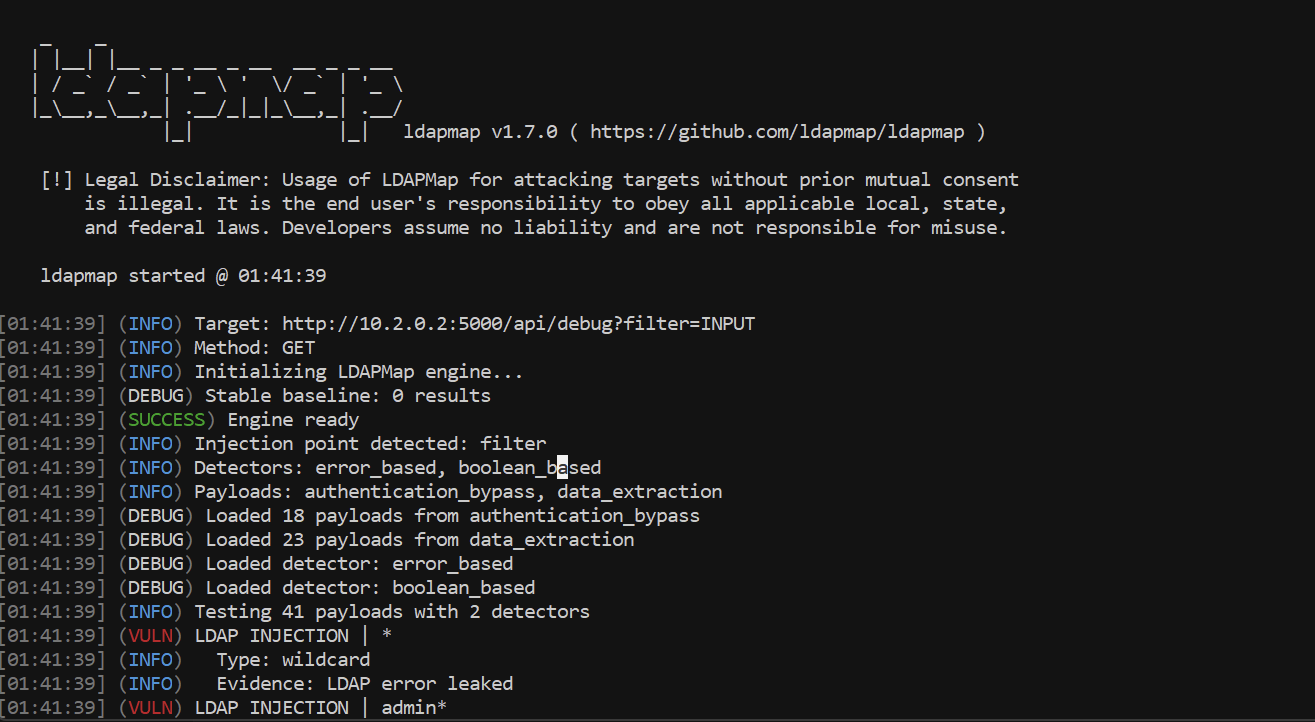
## 截图
 ## 帮助
```
options:
-h, --help show this help message and exit
-u URL, --url URL Target URL with INPUT placeholder (ex: http://target/search?cn=INPUT)
-m {GET,POST,PUT,DELETE}, --method {GET,POST,PUT,DELETE}
HTTP method (default: GET)
--data DATA POST data (ex: username=admin&password=INPUT)
-d {error_based,boolean_based,time_based} [{error_based,boolean_based,time_based} ...], --detector {error_based,boolean_based,time_based} [{error_based,boolean_based,time_based} ...]
Detectors to use (default: error_based boolean_based)
-p {authentication_bypass,data_extraction,blind} [{authentication_bypass,data_extraction,blind} ...], --payload {authentication_bypass,data_extraction,blind} [{authentication_bypass,data_extraction,blind} ...]
Payload types to use (default: authentication_bypass data_extraction)
--threads THREADS, -T THREADS
Number of threads (default: 5)
--timeout TIMEOUT Request timeout in seconds (default: 30)
--delay DELAY Delay between requests in seconds (default: 0)
--retries RETRIES Number of retries (default: 3)
-H HEADER [HEADER ...], --header HEADER [HEADER ...]
HTTP headers (ex: 'Authorization: Bearer token')
--cookie COOKIE Cookies (ex: sessionid=abc123; auth=xyz)
--proxy PROXY Proxy HTTP (ex: http://127.0.0.1:8080)
--no-verify-ssl Disable SSL verification
-v, --verbose Verbose mode
--no-banner Hide banner
--version Show version
Exploitation:
--exploit Enable exploitation mode after detection
--enum-users Enumerate LDAP users
--dump Full LDAP database dump
--csv Export results to CSV
--output OUTPUT Output directory for exports (default: ./output)
```
## 安装
`pip install ldapmap`
或
`git clone https://github.com/ldapmap/ldapmap.git`
## 帮助
```
options:
-h, --help show this help message and exit
-u URL, --url URL Target URL with INPUT placeholder (ex: http://target/search?cn=INPUT)
-m {GET,POST,PUT,DELETE}, --method {GET,POST,PUT,DELETE}
HTTP method (default: GET)
--data DATA POST data (ex: username=admin&password=INPUT)
-d {error_based,boolean_based,time_based} [{error_based,boolean_based,time_based} ...], --detector {error_based,boolean_based,time_based} [{error_based,boolean_based,time_based} ...]
Detectors to use (default: error_based boolean_based)
-p {authentication_bypass,data_extraction,blind} [{authentication_bypass,data_extraction,blind} ...], --payload {authentication_bypass,data_extraction,blind} [{authentication_bypass,data_extraction,blind} ...]
Payload types to use (default: authentication_bypass data_extraction)
--threads THREADS, -T THREADS
Number of threads (default: 5)
--timeout TIMEOUT Request timeout in seconds (default: 30)
--delay DELAY Delay between requests in seconds (default: 0)
--retries RETRIES Number of retries (default: 3)
-H HEADER [HEADER ...], --header HEADER [HEADER ...]
HTTP headers (ex: 'Authorization: Bearer token')
--cookie COOKIE Cookies (ex: sessionid=abc123; auth=xyz)
--proxy PROXY Proxy HTTP (ex: http://127.0.0.1:8080)
--no-verify-ssl Disable SSL verification
-v, --verbose Verbose mode
--no-banner Hide banner
--version Show version
Exploitation:
--exploit Enable exploitation mode after detection
--enum-users Enumerate LDAP users
--dump Full LDAP database dump
--csv Export results to CSV
--output OUTPUT Output directory for exports (default: ./output)
```
## 安装
`pip install ldapmap`
或
`git clone https://github.com/ldapmap/ldapmap.git`
## 帮助
```
options:
-h, --help show this help message and exit
-u URL, --url URL Target URL with INPUT placeholder (ex: http://target/search?cn=INPUT)
-m {GET,POST,PUT,DELETE}, --method {GET,POST,PUT,DELETE}
HTTP method (default: GET)
--data DATA POST data (ex: username=admin&password=INPUT)
-d {error_based,boolean_based,time_based} [{error_based,boolean_based,time_based} ...], --detector {error_based,boolean_based,time_based} [{error_based,boolean_based,time_based} ...]
Detectors to use (default: error_based boolean_based)
-p {authentication_bypass,data_extraction,blind} [{authentication_bypass,data_extraction,blind} ...], --payload {authentication_bypass,data_extraction,blind} [{authentication_bypass,data_extraction,blind} ...]
Payload types to use (default: authentication_bypass data_extraction)
--threads THREADS, -T THREADS
Number of threads (default: 5)
--timeout TIMEOUT Request timeout in seconds (default: 30)
--delay DELAY Delay between requests in seconds (default: 0)
--retries RETRIES Number of retries (default: 3)
-H HEADER [HEADER ...], --header HEADER [HEADER ...]
HTTP headers (ex: 'Authorization: Bearer token')
--cookie COOKIE Cookies (ex: sessionid=abc123; auth=xyz)
--proxy PROXY Proxy HTTP (ex: http://127.0.0.1:8080)
--no-verify-ssl Disable SSL verification
-v, --verbose Verbose mode
--no-banner Hide banner
--version Show version
Exploitation:
--exploit Enable exploitation mode after detection
--enum-users Enumerate LDAP users
--dump Full LDAP database dump
--csv Export results to CSV
--output OUTPUT Output directory for exports (default: ./output)
```
## 安装
`pip install ldapmap`
或
`git clone https://github.com/ldapmap/ldapmap.git`标签:LDAP注入, LDAP目录, Python, SEO: ldapmap, SEO: LDAP注入检测, SEO: 安全测试工具, 代理配置, 多线程扫描, 安全测试, 开源安全工具, 攻击性安全, 数据提取, 无后门, 枚举, 目录服务, 认证绕过, 调试模式, 逆向工具, 逆向工程平台