Jhatchi/Linux-HIDS-Bash-BC-2026
GitHub: Jhatchi/Linux-HIDS-Bash-BC-2026
一个基于Bash脚本的轻量级Linux主机入侵检测系统,能实时监控文件、用户、进程及网络活动并发出告警。
Stars: 0 | Forks: 0
# Linux HIDS
一个基于 Bash 的 Linux 主机入侵检测系统。可检测文件完整性、账户活动、运行进程、开放端口和系统健康状况方面的入侵指标。由 **Mahmoud Hasan**、**Johan-Emmanuel Hatchi** 和 **Muza** 作为 BeCode 团队项目构建(更多信息请参阅 [`团队与贡献`](#team-and-contributions))。
[](https://github.com/Jhatchi/Linux-HIDS-Bash-BC-2026/actions/workflows/shellcheck.yml)
[](#requirements)
[](#requirements)
[](#requirements)
[](LICENSE)
[](https://www.linkedin.com/in/johan-emmanuel-hatchi/)
## 截图
**实时警报信息流**(`logs/alerts.console.log`),模拟攻击期间:
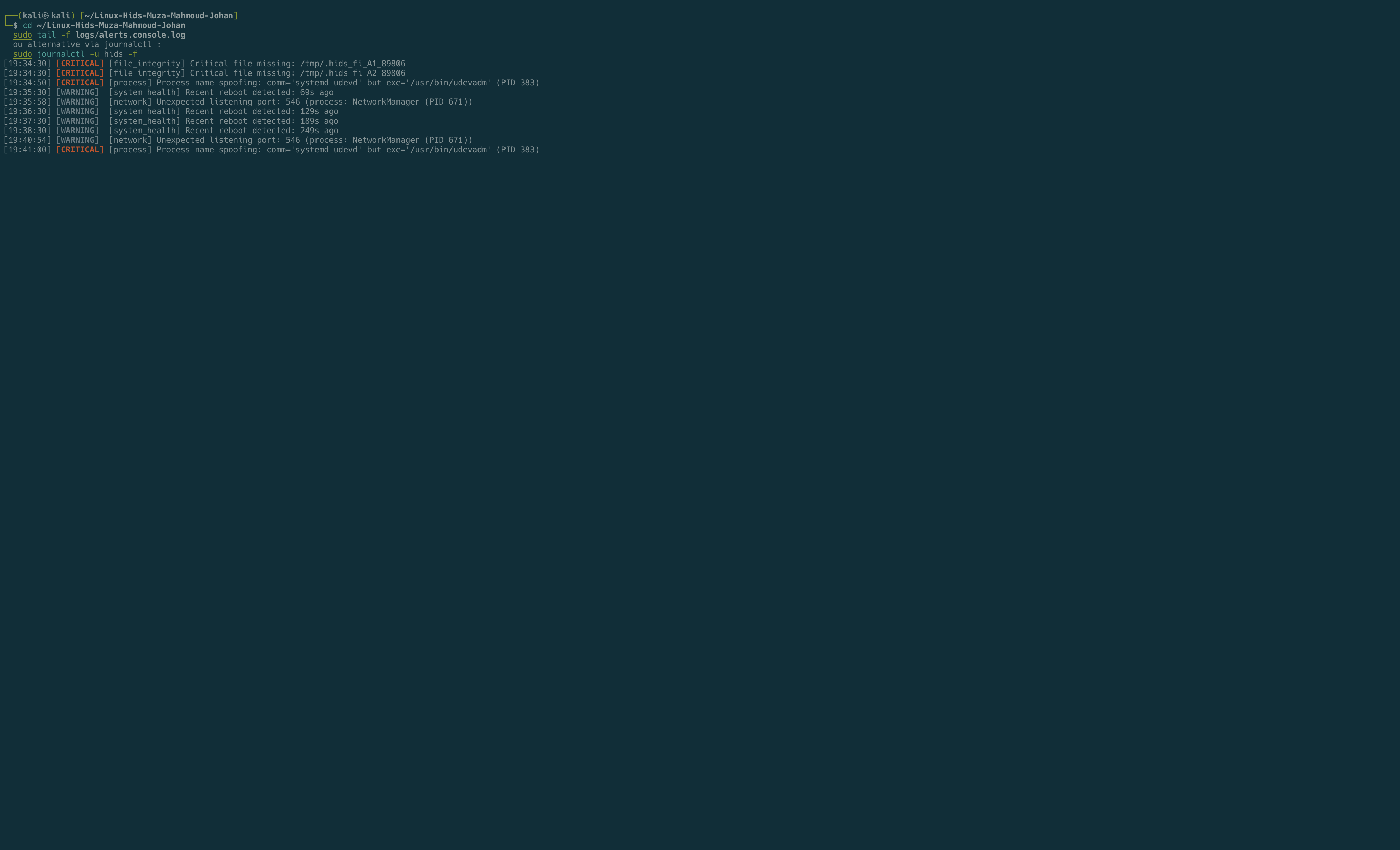
由 `file_integrity`、`process_network` 和 `system_health` 模块捕获的实时 `CRITICAL` 和 `WARNING` 警报。进程名伪造(`comm=systemd-udevd` 但 `exe=/usr/bin/udevadm`)、恶意监听端口和关键文件篡改均在几秒内被检测到。
## ⚠ 操作须知
**设计用于实验室环境,以及部署在您拥有或管理的生产主机上。** 该 HIDS 读取敏感文件(`/etc/shadow`、`/proc//exe`、审计日志)并需要 root 权限。在生产主机上部署前,请务必审查 `install.sh` 中的 auditd 规则和 `config/` 中的文件列表:该规则集基于特定原则,在您的环境中可能会产生误报。
`tests/` 下的测试套件**具有侵入性**:它会修改真实用户、真实的 `/etc/shadow`,并在 `/tmp` 中放置文件。每个破坏性步骤都会被记录,并且可以通过 `tests/rollback.sh` 撤销,但请仅在您可以完全恢复的主机上运行(建议先对虚拟机进行快照)。
## 功能概述
- **4 个检测器模块在 Bash 督导器 (`controller.sh`) 下并行运行**,每个模块专注于一个信号:文件完整性(`/etc/passwd`、`/etc/shadow`、sudoers、SSH 密钥、关键二进制文件)、用户活动(新用户、UID 0 后门、非工作时间登录、authorized_keys 偏移)、进程与网络(恶意端口、从 `/tmp` 执行、隐藏进程、LD_PRELOAD)、系统健康(资源耗尽、错误激增、异常进程数)。
- **2 个事件驱动的伴随模块,实现亚秒级延迟**:对关键文件使用 `inotifywait`,并通过 auditd 密钥(`user_modify`、`priv_escalation`、`persistence`、`ssh_config`)过滤 `tail -F /var/log/audit/audit.log`。
- **集中告警**,输出为适配 SIEM 的 JSON 日志 (`logs/alerts.json`),具有去重、严重性等级以及一个三阶段关联管线(`auditd_parser`、`enrichment`、`correlation_engine`),能够捕获多信号模式(例如:"shell spawned + outbound socket = reverse-shell indicator")。
## 架构
```
┌─────────────────────────────────────────────────────────┐
│ controller.sh │
│ (supervisor / PID 1) │
│ │
│ crash-loop guard · kill_tree() · alert tail │
└──────┬──────────────────────────────────────────────────┘
│ supervises (restart-on-death)
│
┌───┴────┬────────┬─────────┬──────┬──────────┬────────┐
│ │ │ │ │ │ │
▼ ▼ ▼ ▼ ▼ ▼ ▼
file_ user_ process_ system_ ua_ fi_ sh_
integ. activ. network health events events dashboard
│ │ │ │ │ │ │
└────────┴────────┴─────────┴───────┴────────┴────────┘
│
▼
alerting.sh
├── logs/alerts.json (SIEM-ready, deduped)
└── logs/alerts.console.log (live tail feed)
```
**为什么需要督导器?** 如果一个模块崩溃或挂起,其他模块继续运行,督导器会重新启动失败的模块。崩溃循环防护(300 秒内崩溃 3 次,则冷却 300 秒)可防止热循环。
**关联管线**(`auditd_parser`、`enrichation`、`correlation_engine`)在督导器内部的独立计时器上运行。它关联来自不同模块的原始事件,并触发更高置信度的警报(例如:"shell spawned + outbound socket = reverse-shell indicator")。
## 快速开始
在 Linux 主机(Debian/Ubuntu/RHEL 系列)上,以 root 身份执行:
```
git clone https://github.com/Jhatchi/Linux-HIDS-Bash-BC-2026.git && cd Linux-HIDS-Bash-BC-2026
sudo bash install.sh # auto-installs auditd, bc, inotify-tools, jq, deploys auditd rules
sudo bash main.sh --init && sudo bash main.sh # capture baseline, then start the supervisor (foreground)
```
**作为 systemd 服务运行**(执行 `install.sh` 后):
```
sudo systemctl enable --now hids && sudo systemctl status hids
```
督导器终端实时显示警报信息流。JSON 格式的警报记录到 `logs/alerts.json`。完整操作指南见下文。
## 卸载
要从主机完全移除 HIDS(包括服务、auditd 规则、项目文件):
```
# 1. Stop and disable the systemd service
sudo systemctl stop hids
sudo systemctl disable hids
sudo rm /etc/systemd/system/hids.service
sudo systemctl daemon-reload
# 2. Remove the auditd rules deployed by install.sh
sudo rm /etc/audit/rules.d/hids.rules 2>/dev/null
sudo augenrules --load 2>/dev/null
sudo systemctl restart auditd
# 3. Kill any leftover HIDS process
sudo pkill -f "Linux-HIDS-Bash-BC-2026" 2>/dev/null
sudo pkill -f "modules/" 2>/dev/null
sudo pkill -9 -f "inotifywait.*etc" 2>/dev/null
# 4. Remove the project directory (baselines, logs, run)
cd ~
sudo rm -rf Linux-HIDS-Bash-BC-2026
```
**完整性检查:**
```
systemctl status hids 2>&1 | head -1 # "Unit hids.service could not be found."
sudo auditctl -l # "No rules"
ps -ef | grep -E "modules/|inotifywait.*etc" | grep -v grep # empty
```
`install.sh` 安装的依赖项(`auditd`、`bc`、`inotify-tools`、`jq`)**故意不删除**:它们可能被主机上的其他工具使用。如果需要,请使用您的包管理器手动删除它们。
## 模块
**4 个轮询检测器**(基于计时器运行,由督导器管理重启):
| 模块 | 检测内容 |
|---|---|
| `file_integrity` | 篡改 `/etc/passwd`、`/etc/shadow`、sudoers、SSH 主机密钥、关键二进制文件:内容、权限、所有权 |
| `user_activity` | 新用户、UID 0 后门、无密码账户、服务账户 shell 切换、SSH `authorized_keys` 偏移、登录失败激增、非工作时间 root 登录 |
| `process_network` | 恶意监听端口、从 `/tmp` 执行、隐藏进程(rootkit 指标)、`LD_PRELOAD` 注入、进程名伪造、通配符绑定、SUID 增长 |
| `system_health` | 资源耗尽、服务故障、错误日志量激增、异常进程数、近期重启 |
**2 个事件驱动伴随模块**(亚秒级延迟):
| 模块 | 机制 |
|---|---|
| `file_integrity_events` | 监控关键文件父目录的 `inotifywait`。文件变更瞬间触发 |
| `user_activity_events` | 通过 auditd 密钥(`user_modify`、`priv_escalation`、`persistence`、`ssh_config`)过滤 `tail -F /var/log/audit/audit.log` |
**1 个实时仪表盘:**
| 模块 | 频率 |
|---|---|
| `system_health_dashboard` | 每 3 秒将彩色快照重写到 `logs/system_health.status` |
## 测试与攻击模拟
`tests/` 目录包含攻击模拟测试,它们会以受控方式**实际入侵测试主机**,并断言 HIDS 捕获了入侵。每个破坏性步骤在运行*之前*都会被记录,因此即使测试进程被 `kill -9`,`rollback.sh` 也可以撤销所有操作。
**3 个测试文件中的 12 种攻击:**
| 类别 | 攻击 | 预期警报 |
|---|---|---|
| 文件完整性 | 重写受保护文件内容 | `CRITICAL` |
| 文件完整性 | 对权限为 600 的文件执行 `chmod 644` | 权限偏移 |
| 文件完整性 | 在 HIDS 运行时创建/修改关键文件 (inotify) | 实时告警 |
| 文件完整性 (侵入性) | 修改真实的 `/etc/shadow` | `CRITICAL` |
| 用户活动 | 在 `authorized_keys` 中放入 SSH 密钥 | `CRITICAL` |
| 用户活动 (侵入性) | 创建无密码账户 | `CRITICAL` |
| 用户活动 (侵入性) | 创建 UID 0 后门账户 | `CRITICAL` |
| 用户活动 (侵入性) | 服务账户 shell 切换 | 偏移 |
| 进程 / 网络 | 恶意监听端口 | `WARNING` |
| 进程 / 网络 | 从 `/tmp` 放置并执行载荷 | `CRITICAL` |
| 进程 / 网络 | 通配符 `0.0.0.0` 绑定 | `WARNING` |
| 进程 / 网络 | `LD_PRELOAD` 注入 | `CRITICAL` |
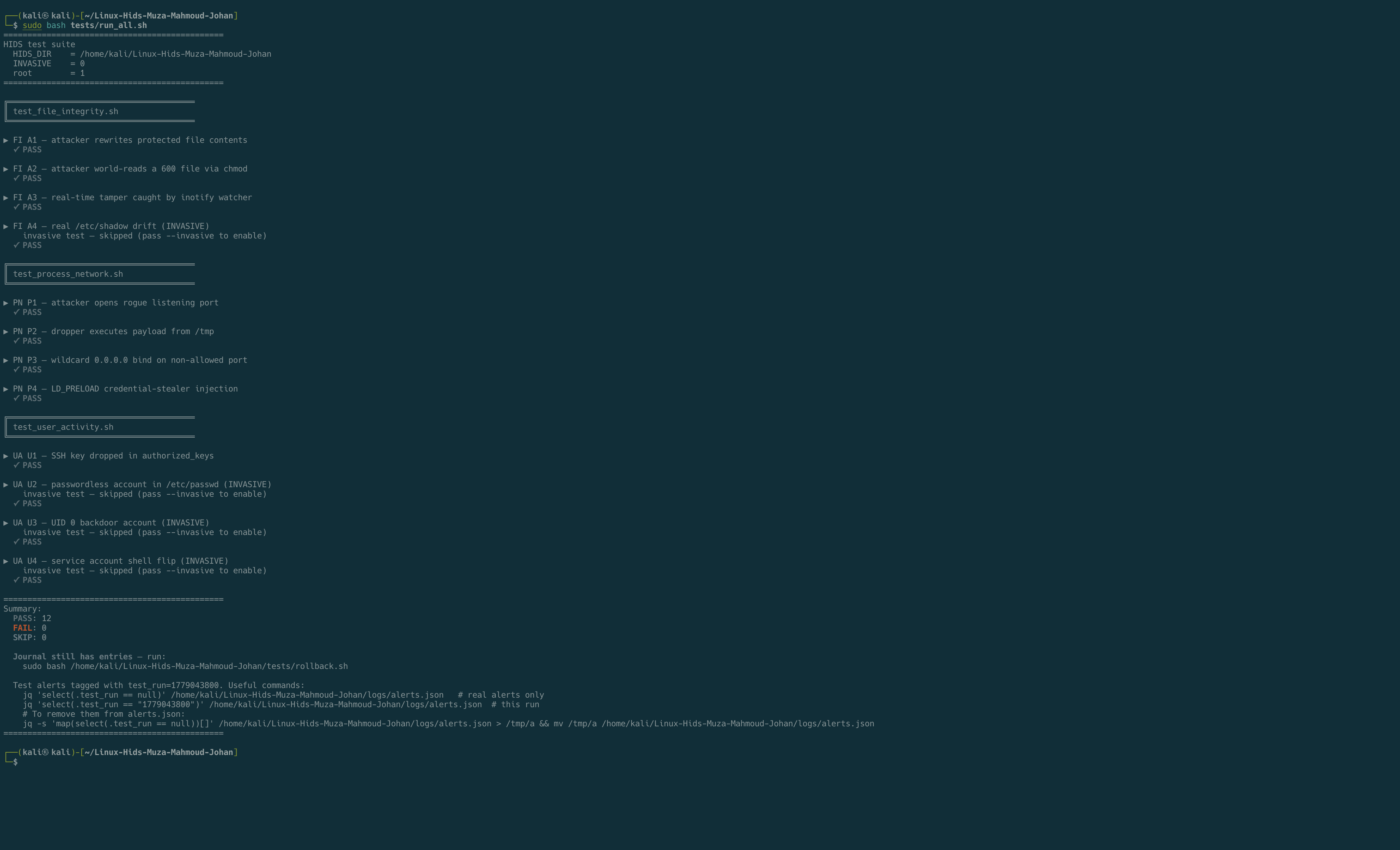
在全新 Kali 系统上完整运行(非侵入模式):**12 项通过,0 项失败**。侵入性测试(真实的 `useradd`,真实的 `/etc/shadow` 编辑)在不指定 `--invasive` 时会被跳过,但仍报告通过。
**运行安全子集**(仅非侵入性):
```
sudo bash tests/run_all.sh
```
**启用侵入性测试**(真实的 `useradd`,真实的 `/etc/shadow` 编辑,通过日志完全回滚):
```
sudo bash tests/run_all.sh --invasive
```
**选择单个模块:**
```
sudo bash tests/run_all.sh --module file_integrity
```
**清理崩溃运行后的状态:**
```
sudo bash tests/rollback.sh # replay the journal
sudo bash tests/rollback.sh --dry-run # preview without acting
```
测试期间触发的每个警报都会在 `alerts.json` 中被标记一个 `test_run` 字段,因此您可以从生产视图中过滤掉测试警报:
```
jq -s 'map(select(.test_run == null))' logs/alerts.json
```
## 配置
所有配置文件位于 `config/`:
| 文件 | 用途 |
|---|---|
| `hids.conf` | 检查间隔、日志路径、去重窗口、崩溃循环限制 |
| `file_integrity.conf` | `CRITICAL_FILES` 列表(需要计算哈希的文件) |
| `user_activity.conf` | 允许的登录时间、受信任 IP、登录失败阈值 |
| `thresholds.conf` | CPU / 内存 / 磁盘 / 交换区 / 进程数的警告和严重阈值带 |
| `auditd.conf` | `ENABLE_AUDITD` 开关和模块名称 |
编辑后,重新加载(`sudo systemctl restart hids`,或按 Ctrl+C 并重新运行 `sudo bash main.sh`)。
## 日志
| 路径 | 内容 |
|---|---|
| `logs/alerts.json` | 每条警报一个 JSON 对象:适配 SIEM(Splunk, Wazuh, ELK) |
| `logs/alerts.console.log` | 平面彩色文本流(督导器输出到终端的信息) |
| `logs/system_health.status` | 实时仪表盘快照(原子重写) |
| `logs/.log` | 督导器输出的每个模块的 stdout 和 stderr |
| `logs/raw_events.log` | 关联引擎使用的管道分隔事件 |
| `logs/pipeline.log` | `auditd_parser`、`enrichment`、`correlation_engine` 的输出 |
**JSON 警报格式:**
```
{
"timestamp": "2026-04-19T14:30:38+02:00",
"host": "kali",
"severity": "CRITICAL",
"module": "user_activity",
"message": "authorized_keys modified: /root/.ssh/authorized_keys"
}
```
当警报来源于测试工具时,会添加一个 `"test_run": ""` 字段。
查询示例:
```
jq -s '.' logs/alerts.json # every alert ever fired
jq -s 'map(select(.severity == "CRITICAL"))' logs/alerts.json # only criticals
jq -s 'map(select(.test_run == null))' logs/alerts.json # exclude test runs
```
## 目录结构
```
Linux-HIDS-Bash-BC-2026/
├── install.sh # one-shot installer (deps + auditd rules + systemd unit)
├── main.sh # operator entry point (supervisor launcher)
├── controller.sh # the supervisor itself
├── config/ # tunable thresholds, file lists, auditd toggle
├── modules/ # one script per detector
│ ├── alerting.sh # centralized alert() function + dedup
│ ├── baseline.sh # reference-state builder (--init)
│ ├── file_integrity.sh
│ ├── file_integrity_events.sh
│ ├── user_activity.sh
│ ├── user_activity_events.sh
│ ├── process_network.sh
│ ├── system_health.sh
│ ├── system_health_dashboard.sh
│ ├── auditd_parser.sh # pipeline stage 1
│ ├── enrichment.sh # pipeline stage 2
│ └── correlation_engine.sh # pipeline stage 3
├── baselines/ # trusted snapshot (built by --init)
├── logs/ # alerts + per-module stdout
├── run/ # dedup state, lockfiles
├── tests/
│ ├── run_all.sh # orchestrator
│ ├── rollback.sh # undo via journal replay
│ ├── lib.sh # shared helpers (journal, assertions)
│ ├── test_file_integrity.sh
│ ├── test_user_activity.sh
│ └── test_process_network.sh
└── .github/workflows/
└── shellcheck.yml # static analysis on push
```
## 系统要求
- Linux 系统,`bash` >= 4.0
- Root 权限(读取 `/etc/shadow`、`/proc//exe`、审计日志)
- `auditd`、`inotify-tools`、`bc`、`jq`:由 `install.sh` 自动安装
在 Kali 上测试通过。应适用于任何 Debian、Ubuntu 或 RHEL 衍生版。
## 已知限制
- **基线是本地的。** 被入侵的主机可以重写自身的基线。生产部署应将 `baselines/` 复制到只读的远程存储。
- **无内核级监控。** 所有操作均在用户空间运行。内核 rootkit 可以对 `/proc` 本身隐藏,从而规避“隐藏进程”检查。
- **auditd 规则覆盖基于特定原则。** 请查看 `install.sh` 了解确切的规则集。如果您的威胁模型需要更多规则,可就地扩展。
- **Inotify 监视范围仅限于系统目录**(`/etc`、`/etc/ssh`)。在 `/tmp` 中投放文件的测试由轮询式的 `file_integrity` 模块在下一次扫描时捕获,而非由实时的 `file_integrity_events` 监视器捕获。
## 许可证
[MIT](LICENSE),2026 Mahmoud Hasan、Johan-Emmanuel Hatchi 和 Muza。
## 关于
为期四天的团队项目,在 [BeCode Brussels](https://becode.org) 蓝队与红队训练营期间(2025年11月至2026年9月)构建。共同构建者:
- **Mahmoud Hasan** ([MahmoudHasan83](https://github.com/MahmoudHasan83)):首席开发人员
- **Johan-Emmanuel Hatchi** ([Jhatchi](https://github.com/Jhatchi)):第一阶段研究、集成、仓库元数据、CI ([LinkedIn](https://www.linkedin.com/in/johan-emmanuel-hatchi/))
- **Muza** ([minarokova-design](https://github.com/minarokova-design)):脚手架搭建和文档
自 2026 年 9 月起,在比利时开放网络安全实习机会。
实时系统健康状况仪表盘(每 3 秒刷新)
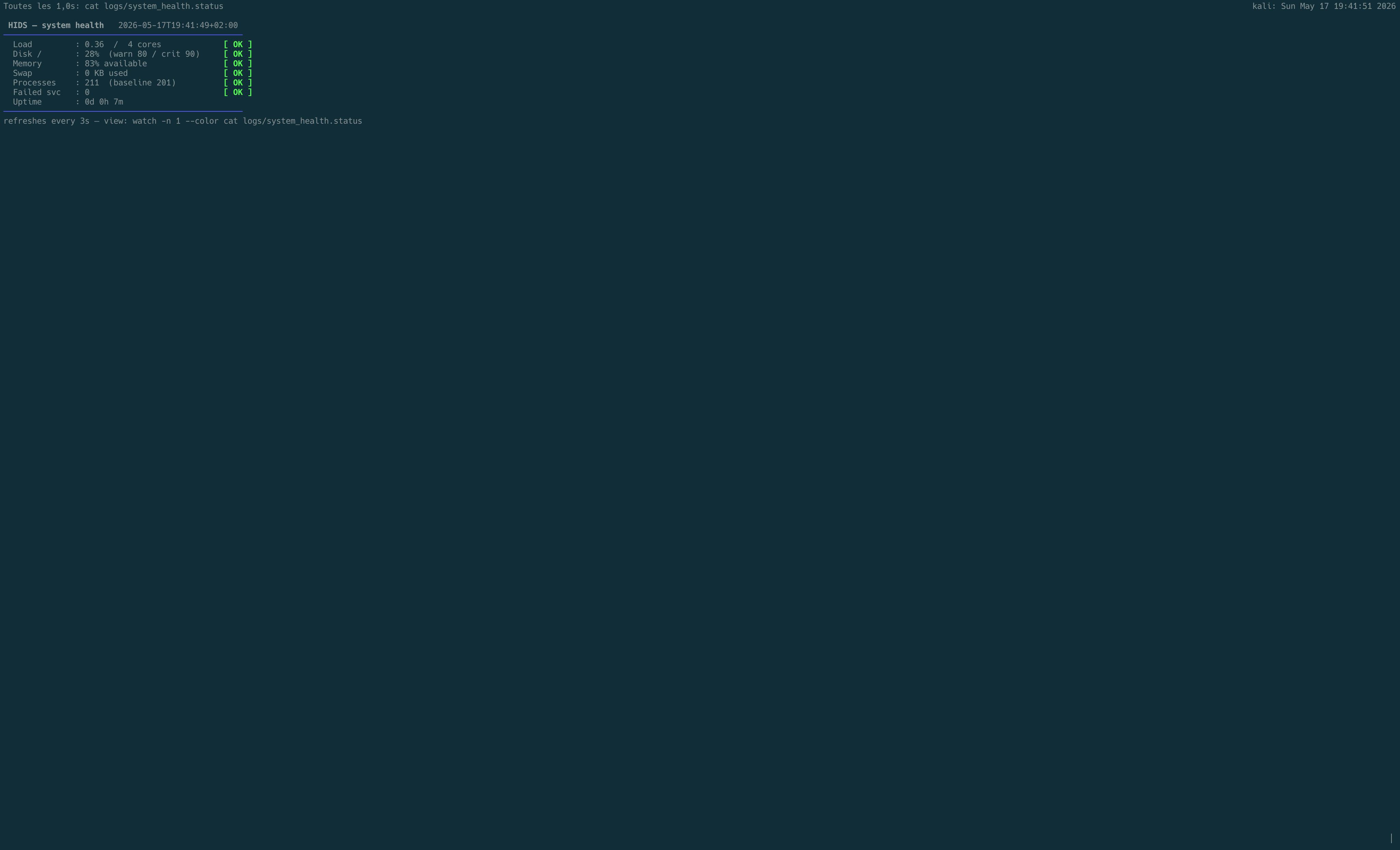 CPU 负载、磁盘、内存、交换区、进程数、故障服务和运行时间的自动刷新彩色快照。绿色 `[OK]` 标签表示主机处于基线阈值内。每 3 秒更新 `logs/system_health.status` 文件。标签:AMSI绕过, Awesome, x64dbg, 入侵检测系统, 威胁检测, 安全事件管理, 安全数据湖, 实时警报, 应用安全, 文件完整性, 时间线生成, 用户活动监控, 系统健康, 系统管理, 自动化监控