Adelya30stm/AI-powered-RAG-framework-for-automated-cross-platform-SIEM-rule-translation
GitHub: Adelya30stm/AI-powered-RAG-framework-for-automated-cross-platform-SIEM-rule-translation
一个基于 AI 与 RAG 的跨平台 SIEM 规则翻译框架,解决手动迁移规则效率低、易出错的问题。
Stars: 0 | Forks: 0
# AI 规则翻译系统 - 一个由 AI 驱动的 RAG 框架,用于自动化跨平台 SIEM 规则翻译。无缝将 SPL/KQL 转换为 YARA-L,具备企业级稳定性,显著减少 SOC 环境中的人工工程开销
## 📋 目录
1. [引言](#introduction)
2. [系统架构](#system-architecture)
3. [安装与设置](#installation--setup)
4. [项目结构](#project-structure)
5. [工作原理](#how-it-works)
6. [系统组件](#system-components)
7. [使用方法](#usage)
8. [故障排除](#troubleshooting)
### 1.3 最近更新(2025 年 12 月)
**主要系统增强功能:**
1. **严格的“仅输出代码”模式:**
- agent 现在配置为**仅输出纯 YARA-L 代码**。
- 所有对话文本、Markdown 解释以及“更改说明”部分均已移除,以简化集成流程。
- 现在仅以生成的代码内的**内联注释**形式提供解释。
2. **“黄金模板”逻辑:**
- 系统现在优先处理通过 `github_rule_finder` 找到的现有 GitHub 规则的结构。
- 如果找到相似的规则,其结构(缩进、变量命名、节段排序)将被视为**唯一事实来源**,并覆盖通用的生成逻辑。
3. **Prompt 工程与控制:**
- **增强的 Prompt 控制:** 在系统 prompt 中实施了“强制合规性检查”,以确保严格遵守各项约束。
- **消耗监控:** 增加了对 prompt 消耗和 token 使用情况的可视化。
- **语法强制执行:** 明确禁止了无效的 YARA-L 构造(例如 `events` 节段中的 `and`,以及 `contains` 运算符),并强制使用正确的语法(隐式 AND,`re.regex`)。
4. **性能调优:**
- 降低了规则查找的相似度阈值,以提高找到相关模板的概率。
- 增加了文档检索的上下文限制。
## 1. 引言
### 1.1 系统目的
Rule Translator 是一个智能的**由 AI 驱动的双模式系统**,它将 RAG(检索增强生成)架构与自主 agent 工作流相结合,用于自动化安全规则转换。
**两种操作模式:**
1. **测试与评估模式** (`run_tes.py`) - 规则翻译测试与验证
- 通过将 agent 输出与真实的 YARA-L 规则进行比较来测试翻译质量
- 处理来自测试目录 (`rag/app/tests/rules_static/`) 的 KQL/SPL 规则
- 将结果输出到 Excel (`simple_output.xlsx`) 以供人工审查
- JSON 输出 (`output_log.json`) 用于程序化分析
- 交互式 CLI 提示用于选择规则语言
2. **Web 应用模式** - 交互式手动翻译
- 友好的 Web 界面,访问地址为 http://127.0.0.1:8000/
- 实时规则转换与即时反馈
- **语言切换器**:通过下拉菜单选择源格式(KQL 或 SPL)
- 复制粘贴界面,用于快速进行一次性翻译
- 调试模式,展示 agent 推理步骤
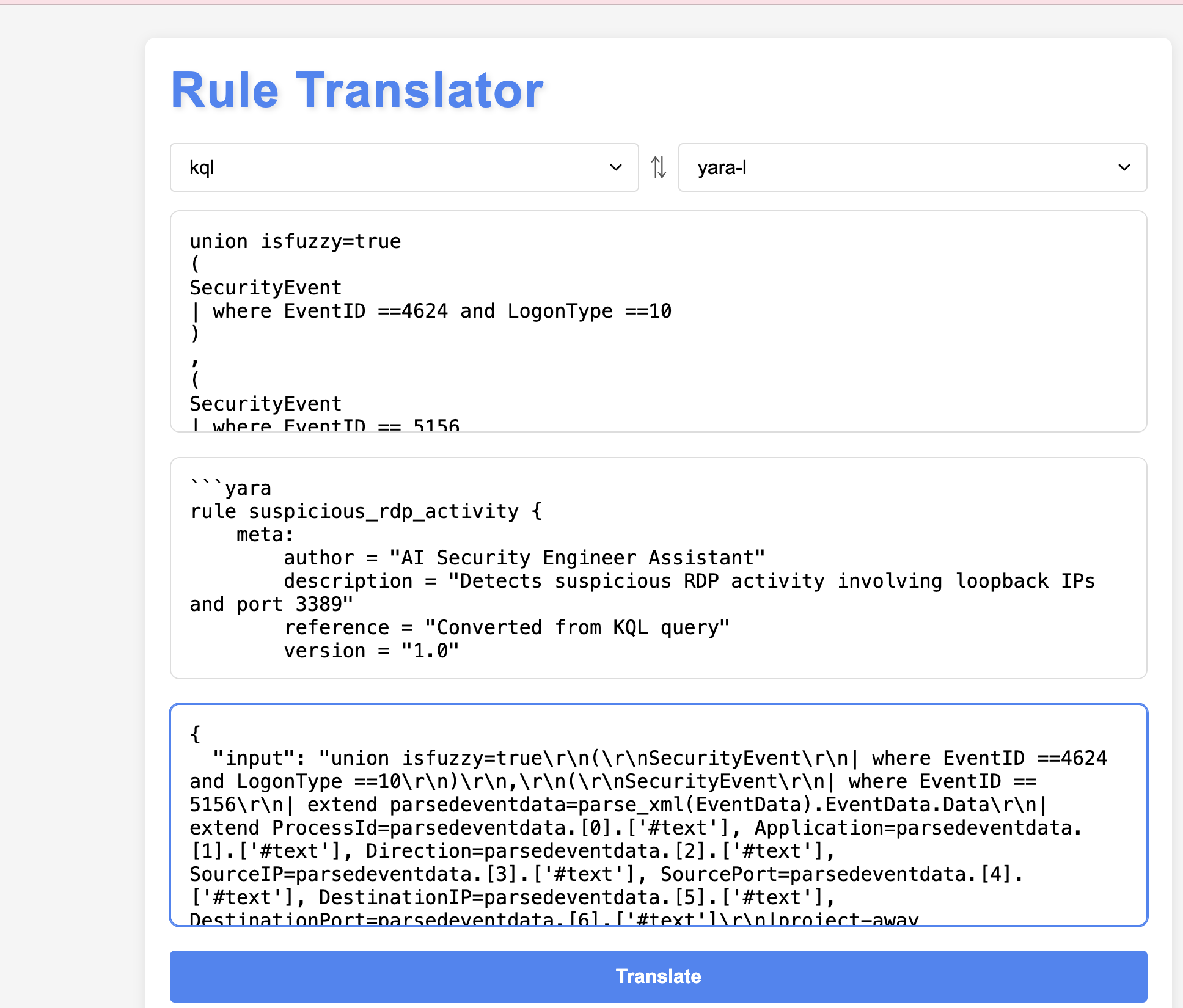
**系统架构:**
- **测试框架组件:** 具备真实结果比较功能的翻译质量测试
- **Agent 组件:** 具备多工具编排功能的 LangChain ReAct agent
- **知识层:** 具备 RAG 检索功能的向量数据库
**灵活性与可扩展性:**
- **主要用例:** 面向 Google Chronicle SecOps 的 SPL/KQL → YARA-L 2.0
- **经过验证的适应性:** 已成功测试用于 SPL → KQL 转换
- **轻松定制:** 可以通过以下方式针对任意查询语言对进行配置:
- 字段映射字典(JSON 配置文件)
- 针对新语言的自定义 prompt 模板
- 通过增加新文档来扩展知识库
**核心竞争优势:**
1. **智能字段映射** - 具有精确字段翻译的预配置字典
- KQL → UDM 映射(例如:`EventID` → `metadata.product_event_type`)
- SPL → UDM 映射(例如:`src` → `principal.ip`)
- 基于规则逻辑的上下文字段选择
2. **基于 RAG 的翻译** - 优于传统的基于规则的翻译器
- 按需检索相关的语法文档
- 从知识库中的类似规则示例中学习
- 适应超越简单字段替换的复杂查询
- 理解检测逻辑,而不仅仅是语法转换
3. **Agent 推理** - 多步智能决策
- 在翻译前分析规则意图
- 选择合适的 YARA-L 模式(匹配条件、时间窗口)
- 通过迭代细化处理边缘情况
- 自动验证输出结构
**为什么 RAG 优于简单的翻译器:** 传统工具在不理解上下文的情况下直接进行字段映射。这个 RAG 系统会检索相关示例,理解检测模式,并生成在语义上正确、保留原始安全逻辑的规则。
### 1.2 快速入门示例
**真实场景:** 您的 SOC 团队需要将 Splunk 暴力破解检测规则迁移到 Google Chronicle。
**输入 (SPL):**
```
index=windows EventCode=4625
| stats count by src_ip, user
| where count > 5
```
**执行过程:**
1. **Agent 分析** SPL 查询结构
2. **检索** 知识库中的 UDM 字段映射 (EventCode 4625 → metadata.product_event_type)
3. **查找** 规则库中类似的 YARA-L 暴力破解示例
4. **转换** SPL 字段为 UDM 格式 (src_ip → principal.ip, user → principal.user.userid)
5. **生成** 语法完整的 YARA-L 规则
**输出 (YARA-L):**
```
rule windows_brute_force_detection {
meta:
author = "EPMC-MDRS"
description = "Detect multiple failed login attempts from same source"
severity = "Medium"
events:
$event.metadata.event_type = "USER_LOGIN"
$event.metadata.product_event_type = "4625"
$event.principal.ip = $ip
$event.principal.user.userid = $user
$event.security_result.action = "BLOCK"
match:
$ip, $user over 15m
condition:
#event > 5
}
```
**耗时:** 45 秒(相比于 2-3 小时的人工工作)
### 1.3 问题描述
**问题:** 在不同 SIEM 系统之间迁移安全规则需要投入大量时间,并深入理解每个系统的语法。
**业务影响:**
- **人工转换:** 每条规则需要 2-4 小时(需要专家级 SOC 分析师)
- **错误率:** 由于语法差异和字段映射复杂性,错误率达到 30-40%
- **知识壁垒:** 需要具备源和目标 SIEM 平台的专业知识
- **测试挑战:** 缺乏真实标准时难以验证翻译准确性
- **成本:** 熟练安全工程师的高昂人工成本
**解决方案:** 使用以下方式进行自动化转换:
- 由 Azure OpenAI (GPT-4) 驱动并采用 ReAct 推理模式的 **AI Agent**
- 包含 YARA-L 语法、UDM 字段和规则示例的 **知识库**
- 用于智能检索相关文档的 **向量数据库**
- 通过 Google Chronicle API 进行规则正确性的 **验证**
- 通过 `run_tes.py` 实现具备真实结果比较功能的翻译质量保证的 **测试框架**
### 1.4 商业价值
**节省时间:**
- 转换时间**减少 95%**:每条规则从 2-4 小时缩短至 5-10 分钟
- **测试验证**:通过 `run_tes.py` 自动与真实规则进行对比
- **即时生产力**:无需培训分析师学习新的 SIEM 语法
**质量提升:**
- **一致的输出**:标准化的 YARA-L 代码结构
- **更低的错误率**:AI 辅助字段映射减少了失误
- **内置验证**:Chronicle API 集成可捕获语法错误
- **知识保留**:RAG 系统从以往的转换中学习
- **质量保证**:测试框架验证翻译准确性
**降低成本:**
- **节省人工**:将 SOC 分析师的工作时间减少 90%
- **更快的验证**:自动化测试取代人工审查
- **可扩展性**:无需增加人手即可处理无限规则
- **自助服务**:安全团队可以在没有供应商协助的情况下转换规则
**战略收益:**
- **平台独立性**:轻松在不同 SIEM 供应商之间迁移
- **多租户**:支持具有不同规则库的多个客户端
- **持续改进**:系统从新的规则示例中学习
- **合规性**:在平台过渡期间保持检测覆盖率
### 1.6 范围与用例
**主要用例:** 面向 Google Chronicle SecOps 迁移的 SPL/KQL → YARA-L 2.0
**额外能力:**
- **跨平台翻译:** 已成功测试用于 SPL → KQL 转换
- **规则标准化:** 跨不同 SIEM 平台标准化检测逻辑
- **知识转移:** 帮助安全团队理解不同的查询语言
**目标受众:**
- 在不同 SIEM 平台之间进行迁移的 SOC 分析师
- 管理多供应商环境的安全工程师
- 支持多个客户端 SIEM 技术的 MSSP 团队
**注意:** 虽然针对 Google Chronicle SecOps 进行了优化,但这种基于 agent 的架构允许通过 prompt 工程和知识库更新来适应其他翻译对。
## 2. 系统架构
### 2.1 Web 应用模式(交互式翻译)
```
┌─────────────────────────────────────────────────────────────┐
│ Web Interface (Django) │
│ index.html + views.py │
│ [KQL/SPL Language Selector Dropdown] │
└────────────────────────────┬────────────────────────────────┘
│
▼
┌─────────────────────────────────────────────────────────────┐
│ RAG System Core │
│ ┌─────────────────────────────────────────────────────┐ │
│ │ LangChain ReAct Agent (rag_agent.py) │ │
│ │ - Max iterations: 10 │ │
│ │ - Timeout: 180 seconds │ │
│ │ - Azure OpenAI GPT-4 │ │
│ └──────────┬───────────────────────────────────────────┘ │
│ │ │
│ ▼ │
│ ┌─────────────────────────────────────────────────────┐ │
│ │ Agent Tools │ │
│ │ ┌──────────────────────────────────────────────┐ │ │
│ │ │ 1. security_document_retriever │ │ │
│ │ │ - ChromaDB vector store │ │ │
│ │ │ - YARA-L docs, UDM fields, Azure docs │ │ │
│ │ └──────────────────────────────────────────────┘ │ │
│ │ ┌──────────────────────────────────────────────┐ │ │
│ │ │ 2. github_rule_finder │ │ │
│ │ │ - Search for similar YARA-L rules │ │ │
│ │ └──────────────────────────────────────────────┘ │ │
│ │ ┌──────────────────────────────────────────────┐ │ │
│ │ │ 3. field_converter_tool │ │ │
│ │ │ - KQL/SPL → UDM mapping │ │ │
│ │ └──────────────────────────────────────────────┘ │ │
│ │ ┌──────────────────────────────────────────────┐ │ │
│ │ │ 4. google_rule_validator (optional) │ │ │
│ │ │ - Validation via Chronicle API │ │ │
│ │ └──────────────────────────────────────────────┘ │ │
│ └─────────────────────────────────────────────────────┘ │
└─────────────────────────────────────────────────────────────┘
│
▼
┌─────────────────────────────────────────────────────────────┐
│ Data Storage & Knowledge Base │
│ ┌──────────────────┐ ┌────────────────┐ ┌─────────────┐ │
│ │ ChromaDB │ │ Config Files │ │ Datasets │ │
│ │ (Vector Store) │ │ (JSON) │ │ (Docs) │ │
│ └──────────────────┘ └────────────────┘ └─────────────┘ │
└─────────────────────────────────────────────────────────────┘
```
### 2.2 测试与评估模式(翻译质量测试)
```
┌─────────────────────────────────────────────────────────────┐
│ Test Script CLI (run_tes.py) │
│ │
│ Input: rag/app/tests/rules_static/kql/*.kql │
│ rag/app/tests/rules_static/spl/*.spl │
│ Ground truth: *.yara files │
│ Output: simple_output.xlsx + output_log.json │
│ │
│ ┌────────────────────────────────────────────────────┐ │
│ │ Test Framework (FromDir class) │ │
│ │ - Scans test directories for rule pairs │ │
│ │ - Finds matching rule + yara file combinations │ │
│ │ - Interactive: Prompts for KQL or SPL language │ │
│ └──────────────────────┬─────────────────────────────┘ │
└────────────────────────┬┼──────────────────────────────────┘
││
▼▼
┌─────────────────────────────────────────────────────────────┐
│ Test Processing Loop │
│ │
│ For each test pair: │
│ ┌──────────────────────────────────────────────────┐ │
│ │ 1. Load rule file content │ │
│ └──────────────┬───────────────────────────────────┘ │
│ ▼ │
│ ┌──────────────────────────────────────────────────┐ │
│ │ 2. Call RAG System │ │
│ │ - LangChain ReAct Agent │ │
│ │ - Vector retrieval from ChromaDB │ │
│ │ - Field mapping via dictionaries │ │
│ │ - Rule generation via GPT-4 │ │
│ └──────────────┬───────────────────────────────────┘ │
│ ▼ │
│ ┌──────────────────────────────────────────────────┐ │
│ │ 3. Extract output from agent response │ │
│ │ - response['output'] contains YARA-L rule │ │
│ └──────────────┬───────────────────────────────────┘ │
│ ▼ │
│ ┌──────────────────────────────────────────────────┐ │
│ │ 4. Load ground truth YARA-L from .yara file │ │
│ └──────────────┬───────────────────────────────────┘ │
│ ▼ │
│ ┌──────────────────────────────────────────────────┐ │
│ │ 5. Store comparison in results │ │
│ │ DataFrame: [rule_content, yara_agent_ │ │
│ │ translation, yara_correct_rule] │ │
│ └──────────────────────────────────────────────────┘ │
│ │
└────────────────────────────┬────────────────────────────────┘
│
▼
┌─────────────────────────────────────────────────────────────┐
│ Output Generation │
│ │
│ ┌──────────────────────┐ ┌───────────────────────────┐ │
│ │ Excel Spreadsheet │ │ JSON File │ │
│ │ (simple_output.xlsx)│ │ (output_log.json) │ │
│ │ │ │ │ │
│ │ Columns: │ │ Same data structure │ │
│ │ - rule_content │ │ for programmatic access │ │
│ │ - yara_agent_ │ │ │ │
│ │ translation │ │ │ │
│ │ - yara_correct_rule │ │ │ │
│ └──────────────────────┘ └───────────────────────────┘ │
│ │
│ Ready for: │
│ - Side-by-side comparison in Excel │
│ - Translation quality assessment │
│ - Test result documentation │
└─────────────────────────────────────────────────────────────┘
```
### 2.3 技术栈:
**后端:**
- Django 5.2 - Web 框架
- LangChain 0.3 - AI agent 编排
- Azure OpenAI GPT-4 - LLM
- ChromaDB - 向量数据库
- Python 3.13
**前端:**
- HTML5/CSS3/JavaScript (Vanilla)
- 用于异步请求的 AJAX
**AI/ML:**
- sentence-transformers - embeddings
- Azure OpenAI Embeddings
- ReAct Agent 模式
## 3. 安装与设置
### 3.1 要求
- Python 3.10+
- Azure OpenAI API 密钥
- 至少 4GB RAM
- 2GB 可用磁盘空间
### 3.2 安装
```
# 克隆仓库
git clone
cd adelya_rag
# 创建虚拟环境
python3 -m venv .venv
source .venv/bin/activate # Linux/Mac
# 或
.venv\Scripts\activate # Windows
# 安装依赖
pip install -r rag/requirements.txt
pip install django
# 配置环境变量
cp .env.example .env
# 编辑 .env 文件
```
### 3.3 .env 文件配置
```
# Azure OpenAI 配置
AZURE_OPENAI_API_KEY=your-api-key-here
AZURE_OPENAI_ENDPOINT=https://ai-proxy.lab.epam.com
AZURE_OPENAI_API_VERSION=2024-02-01
# Deployment Names
AZURE_OPENAI_EMBEDDINGS_DEPLOYMENT_NAME=text-embedding-ada-002
AZURE_OPENAI_CHAT_DEPLOYMENT_NAME=gpt-4o
# Google Chronicle API(可选)
GOOGLE_API_FILE=path/to/google-credentials.json
```
### 3.4 数据库初始化
```
# 执行 Django migrations
python manage.py migrate
# 创建超级用户(可选)
python manage.py createsuperuser
```
### 3.5 运行服务器
```
python manage.py runserver
# 服务器运行于:http://127.0.0.1:8000/
```
## 4. 项目结构
```
adelya_rag/
├── core/ # Django project settings
│ ├── settings.py # Settings
│ ├── urls.py # URL routing
│ └── wsgi.py # WSGI entry point
│
├── rag_app/ # Django application
│ ├── views.py # API endpoints
│ ├── templates/
│ │ └── index.html # Web interface
│ └── utils/
│ └── rag_service.py # Service layer
│
├── rag/ # RAG System Core
│ └── app/
│ └── src/
│ └── mdrs/
│ ├── rag.py # Main RAG logic
│ ├── agent/
│ │ ├── rag_agent.py # ReAct agent
│ │ └── simple_agent.py # Simple agent
│ │
│ ├── configs/ # Configuration files
│ │ ├── dataset_configs.json
│ │ ├── udm_fields_mapping.json
│ │ └── spl_to_udm_fields_mapping.json
│ │
│ ├── datasets/ # Knowledge base
│ │ ├── azure-docs/ # Azure documentation
│ │ ├── kql-rules/ # KQL rule examples
│ │ ├── secops-docs/ # SecOps docs
│ │ ├── splunk-rules/ # Splunk rules
│ │ ├── udm-fields/ # UDM field docs
│ │ └── yaral-rules/ # YARA-L examples
│ │
│ ├── persist/ # ChromaDB storage
│ │ └── chroma.sqlite3
│ │
│ ├── preprompt/ # System prompts
│ │ ├── base_preprompt.py
│ │ ├── kql_preprompt.py
│ │ └── spl_preprompt.py
│ │
│ ├── retrieval/ # RAG components
│ │ ├── loader.py # Document loading
│ │ ├── split.py # Text splitting
│ │ ├── search.py # Vector search
│ │ ├── retriever.py # Main retriever
│ │ └── annotate.py # Document annotation
│ │
│ └── tool/ # Agent tools
│ ├── search_tool.py
│ ├── field_converter_tool.py
│ ├── github_rule_finder.py
│ ├── google_validator.py
│ └── udm_web_search_tool.py
│
├── prompts/ # Prompt templates
│ ├── chronicle.md
│ └── rules_templating.txt
│
├── scripts/ # Utility scripts
│ ├── install_bindplane.sh
│ └── install_bindplane.ps1
│
├── manage.py # Django management
├── requirements.txt # Python dependencies
└── README.md # This file
```
## 5. 工作原理
### 5.1 整体工作流
```
User Input (KQL/SPL Rule)
│
▼
┌───────────────────────┐
│ Django View Handler │
│ (views.py) │
└──────────┬────────────┘
│
▼
┌───────────────────────┐
│ get_agent_response() │
│ (rag.py) │
└──────────┬────────────┘
│
▼
┌───────────────────────────────────────┐
│ ReAct Agent Execution Loop │
│ ┌─────────────────────────────────┐ │
│ │ Iteration 1-10 │ │
│ │ ┌──────────────────────────┐ │ │
│ │ │ Thought: Analyze input │ │ │
│ │ └──────────────────────────┘ │ │
│ │ ┌──────────────────────────┐ │ │
│ │ │ Action: Use tool │ │ │
│ │ └──────────────────────────┘ │ │
│ │ ┌──────────────────────────┐ │ │
│ │ │ Observation: Tool result │ │ │
│ │ └──────────────────────────┘ │ │
│ └─────────────────────────────────┘ │
└───────────────┬───────────────────────┘
│
▼
┌──────────────┐
│ Final Answer │
│ (YARA-L Rule)│
└──────┬───────┘
│
▼
┌──────────────┐
│ Response │
│ to User │
└──────────────┘
```
### 5.2 详细的转换过程
#### 步骤 1:接收输入数据
```
# views.py
def render_index(request):
if request.method == 'POST':
rule_lang = request.POST.get('from') # 'kql' or 'spl'
query_text = request.POST.get('query_text') # Rule content
```
#### 步骤 2:Agent 初始化
```
# rag.py
def get_agent_response(rule_lang: str, user_input: str):
agent = create_agent_with_tools(rule_lang)
# agent contains:
# - LLM (Azure OpenAI GPT-4)
# - Tools (retriever, github finder, etc.)
# - Prompt template (kql_template or spl_template)
```
#### 步骤 3:ReAct Agent 循环
Agent 执行 Thought → Action → Observation 循环:
**第 1 次迭代:**
```
Thought: I need to understand the KQL rule structure
Action: security_document_retriever
Action Input: "KQL EventID field mapping to UDM"
Observation: [Retrieved documentation about UDM fields]
```
**第 2 次迭代:**
```
Thought: I need a template for YARA-L structure
Action: github_rule_finder
Action Input: "authentication failure detection"
Observation: [Found similar YARA-L rule from GitHub]
```
**第 3 次迭代:**
```
Thought: I need to map KQL fields to UDM
Action: KQLtoUDMFieldsConverterTool
Action Input: {"EventID": "4625", "LogonType": "10"}
Observation: [Mapped fields to UDM paths]
```
**最终迭代:**
```
Thought: I have all information to generate the rule
Final Answer: [Complete YARA-L rule code]
```
#### 步骤 4:返回结果
```
# views.py
return JsonResponse({
'status': 'success',
'translated_text': final_rule_code,
'debug_text': debug_information
})
```
## 6. 系统组件
### 6.1 RAG Agent (rag_agent.py)
**目的:** 具备工具访问能力的 AI agent 编排
**关键参数:**
```
agent_executor = AgentExecutor(
agent=agent,
tools=tools,
verbose=True,
max_iterations=10, # Maximum 10 cycles
max_execution_time=180, # 3 minute timeout
handle_parsing_errors=True,
return_intermediate_steps=True,
early_stopping_method="generate"
)
```
**工作原理:**
1. 接收包含指令的 prompt
2. 分析传入的规则
3. 选择合适的工具
4. 迭代收集信息
5. 生成最终的 YARA-L 规则
### 6.2 安全文档检索器
**目的:** 通过向量搜索检索相关文档
**数据源:**
- YARA-L 语法文档
- UDM 字段描述
- Azure SecOps 文档
- 规则示例
**流程:**
```
# 1. 查询 embedding
query_embedding = embeddings.embed_query("UDM field for event type")
# 2. 在 ChromaDB 中搜索
results = vectorstore.similarity_search(
query_embedding,
k=5 # Top 5 results
)
# 3. 返回文档
return [doc.page_content for doc in results]
```
### 6.3 GitHub 规则查找器
**目的:** 查找相似的 YARA-L 规则作为模板
**流程:**
1. 分析传入的规则(检测类型、字段)
2. 在本地 YARA-L 规则库中搜索
3. 按相似度得分排名
4. 返回最相似的规则
### 6.4 字段转换器工具
**目的:** 将 KQL/SPL 格式的字段映射为 UDM 格式
**映射示例:**
**KQL → UDM:**
```
{
"EventID": "metadata.product_event_type",
"Account": "principal.user.userid",
"IpAddress": "principal.ip",
"Computer": "principal.hostname"
}
```
**SPL → UDM:**
```
{
"src": "src.ip",
"dest": "target.ip",
"user": "principal.user.userid",
"signature": "metadata.product_event_type"
}
```
### 6.5 Google 规则验证器(可选)
**目的:** 通过 Chronicle API 验证 YARA-L 规则
**要求:**
- Google 服务账号 JSON
- 访问 Chronicle API 的权限
**流程:**
```
# 1. 发送规则进行验证
response = chronicle_api.validate_rule(rule_content)
# 2. 检查响应
if response.valid:
return "Rule is valid"
else:
return f"Errors: {response.errors}"
```
### 6.6 Prompt 模板
**baserompt.py:**
- 通用 agent 指令
- 工作流准则
- 工具使用规则
**kql_preprompt.py:**
- 针对 KQL 的特定指令
- KQL → YARA-L 转换示例
- 针对KQL的 UDM 字段映射
**spl_preprompt.py:**
- 针对 SPL 的特定指令
- SPL → YARA-L 转换示例
- 针对 Splunk 的 UDM 字段映射
### 6.7 向量存储
**结构:**
```
persist/
├── chroma.sqlite3 # SQLite database
└── [collection-id]/ # Vectors and metadata
├── data_level0.bin # HNSW index
└── length.bin # Document lengths
```
**集合:**
- `azure-docs` - Azure 文档
- `secops-docs` - Chronicle SecOps 文档
- `udm-fields` - UDM 字段描述
- `yaral-rules` - YARA-L 规则示例
## 7. 使用方法
### 7.1 Web 界面
1. 打开 http://127.0.0.1:8000/
2. 选择源语言(KQL 或 SPL)
3. 将规则粘贴到文本框中
4. 点击“Translate”
5. 在输出中获取 YARA-L 规则
### 7.2 转换示例
**输入的 KQL 规则:**
```
SecurityEvent
| where EventID == 4625
| where LogonType == 10
| summarize FailedAttempts = count() by Account, Computer
| where FailedAttempts > 5
```
**输出的 YARA-L 规则:**
```
rule rdp_brute_force_detection {
meta:
author = "E"
description = "Detect RDP brute force attempts"
severity = "High"
events:
$fail.metadata.event_type = "USER_LOGIN"
$fail.metadata.product_event_type = "4625"
$fail.target.user.userid = $user
$fail.principal.hostname = $hostname
$fail.security_result.action = "BLOCK"
match:
$user, $hostname over 15m
condition:
#fail > 5
}
```
### 7.3 测试与评估模式(翻译质量测试)
**目的:** 通过将 agent 输出与真实的 YARA-L 规则进行比较,来测试翻译质量。
**脚本:** `run_tes.py`
**前置条件:**
- 配置好包含 Azure OpenAI 凭证的 `.env` 文件
- Python 包:`pandas`, `openpyxl`
**测试数据结构:**
```
rag/app/tests/rules_static/
├── kql/
│ ├── test_case_1/
│ │ ├── rule.kql # Input KQL rule
│ │ └── rule.yara # Ground truth YARA-L
│ └── test_case_2/
│ ├── rule.kql
│ └── rule.yara
└── spl/
├── test_case_1/
│ ├── rule.spl # Input SPL rule
│ └── rule.yara # Ground truth YARA-L
└── test_case_2/
├── rule.spl
└── rule.yara
```
**使用方法:**
```
# 激活虚拟环境
source .venv/bin/activate
# 作为 Python module 运行(推荐)
.venv/bin/python -m rag.app.src.mdrs.run_tes
# 交互式提示将询问:
# 输入规则语言:KQL 或 SPL:
```
**流程:**
1. 提示用户选择规则语言(KQL 或 SPL)
2. 扫描相应的测试目录以寻找规则/yara 对
3. 对于每个测试用例:
- 加载输入规则内容
- 调用 agent 进行翻译
- 从 `response['output']` 提取翻译后的 YARA-L
- 从 `.yara` 文件加载真实的 YARA-L
- 存储这三者以供比较
4. 将结果保存为 Excel 和 JSON
**输出结构:**
**Excel 文件: `simple_output.xlsx`**
| 列名 | 描述 |
|--------|-------------|
| `rule_content` | 原始的 KQL/SPL 规则文本 |
| `yara_agent_translation` | Agent 生成的 YARA-L 规则 |
| `yara_correct_rule` | 测试文件中真实的 YARA-L |
**JSON 文件: `output_log.json`**
- 结构与 Excel 相同
- 适用于程序化分析
- 为 diff 工具保留格式
**输出示例:**
```
$ .venv/bin/python -m rag.app.src.mdrs.run_tes
Enter rule language: KQL or SPL: KQL
Processing KQL rule: rule.kql
OfficeActivity
| where RecordType =~ "SharePointFileOperation"
| where Operation =~ "FileUploaded"
...
> Entering new AgentExecutor chain...
[Agent thinking and tool usage...]
> Finished chain.
Results saved to:
- simple_output.xlsx
- output_log.json
```
**用例:**
- **质量保证**:将 agent 翻译与专家编写的规则进行比较
- **回归测试**:验证改进不会破坏现有的翻译
- **评估**:衡量翻译准确性并识别边缘情况
- **文档编写**:为利益相关者创建测试报告
**性能:**
- 平均:每个测试用例 30-60 秒
- 取决于 agent 复杂度和工具调用的次数
- 每次运行仅测试一条规则(在第一对测试完成后中断)
### 7.4 API 使用(程序化)
```
from rag.app.src.mdrs.rag import get_agent_response
# 转换 KQL 规则
result = get_agent_response(
rule_lang='kql',
user_input='SecurityEvent | where EventID == 4625'
)
# 结果
yaral_rule = result['output']
print(yaral_rule)
```
## 8. 故障排除
### 8.1 问题:Agent 无限循环
**症状:**
- Agent 执行超过 10 次迭代
- 不返回最终结果
- 180 秒后超时
**解决方案:**
1. 检查 `rag_agent.py` 中的 `max_iterations`:
```
max_iterations=10 # Should be 10 or less
```
2. 简化 prompt(移除“MUST ALWAYS”指令)
3. 检查日志:
```
# Django 控制台将显示 Thought/Action/Observation
```
### 8.2 问题:“[object Object] undefined”
**症状:**
- Web 界面显示“[object Object]”
- 没有可读的规则文本
**解决方案:**
检查 `views.py` - 应该提取 `output`:
```
if isinstance(answer, dict):
translated_text = answer.get('output', str(answer))
```
标签:AI代码翻译, RAG框架, SIEM, YARA-L, 安全运营, 扫描框架