immanuwell/dockerfile-roast
GitHub: immanuwell/dockerfile-roast
一款用 Rust 编写、具备深度语法解析能力和鲜明「吐槽」风格的 Dockerfile 静态检查与代码审查工具。
Stars: 654 | Forks: 15
 ・
・

docs
・
site
・
GH action
・
Wasmer
・
comparison
# droast
[](https://crates.io/crates/dockerfile-roast)
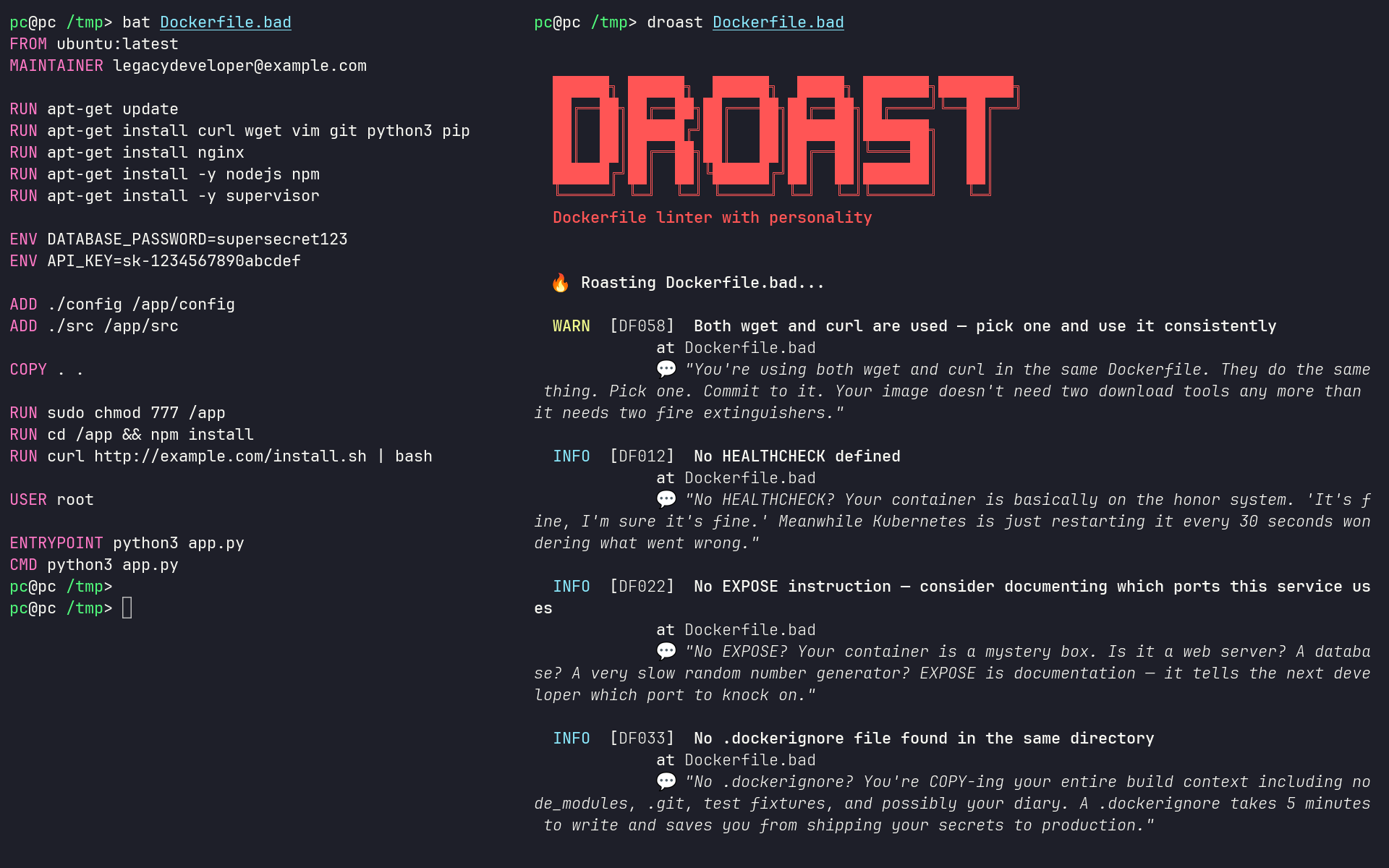
一个真正有主见的 Dockerfile linter。它能发现糟糕的实践,并尽可能用最不留情面的方式告诉你。
把它想象成一位经历过太多生产事故、已经不再客套的资深开发者进行的代码审查。
其具备 span 感知的解析器能够理解 heredoc、parser 和 escape 指令、shell 和 JSON 格式、诸如 `RUN --mount` 的 BuildKit 标志、Windows 路径以及 PowerShell —— 并会将格式错误的 Dockerfile 语法报告为 `DF071`。
## vs code 扩展
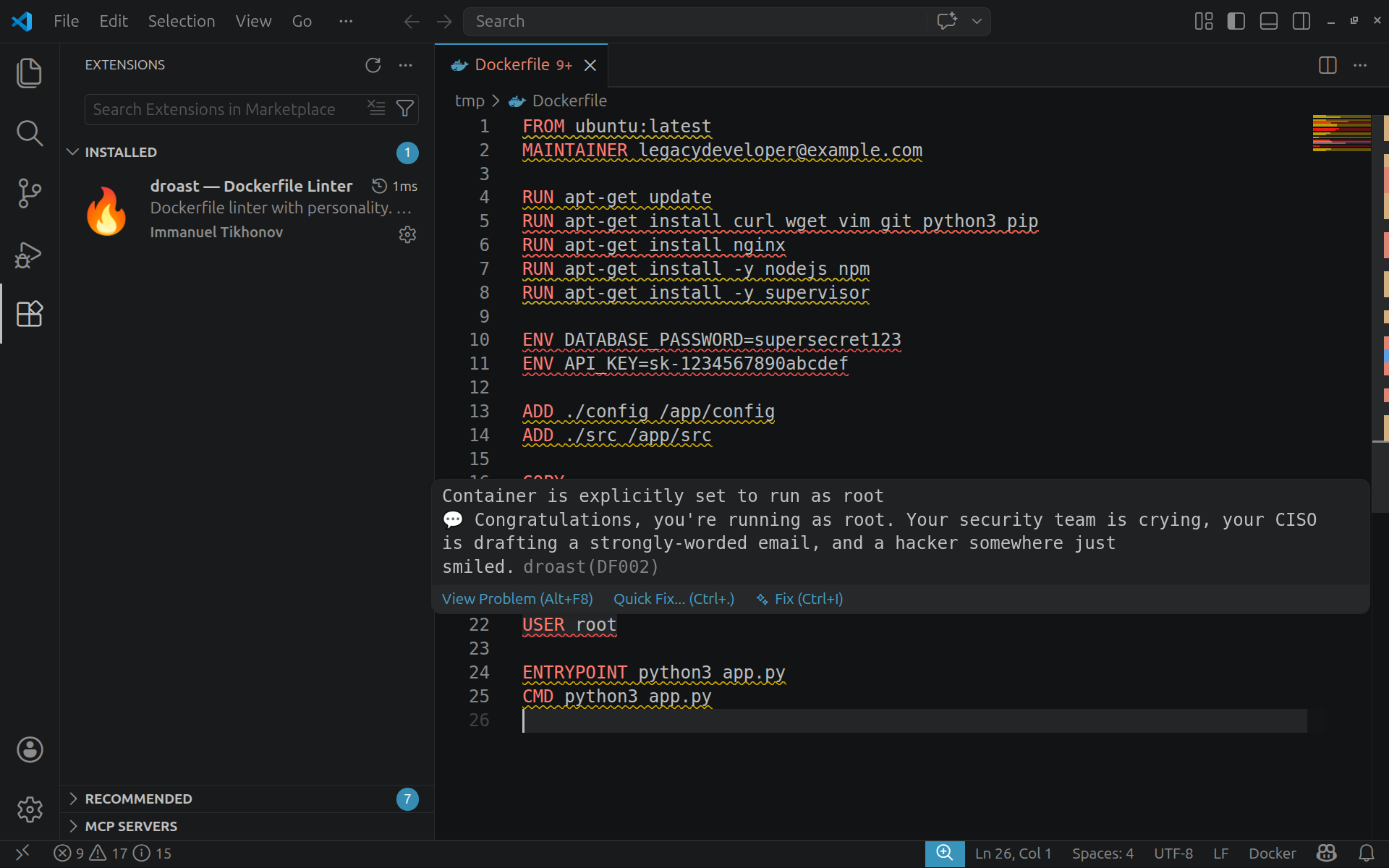
从市场安装并在你输入时获取内联波浪线提示:

**[droast — Dockerfile Linter](https://marketplace.visualstudio.com/items?itemName=ImmanuelTikhonov.droast)**
```
code --install-extension ImmanuelTikhonov.droast
```
二进制文件已内置——无需单独安装。发现的问题将实时显示,并在悬停时展示吐槽信息。
## 安装
**一键安装**(macOS 和 Linux,自动检测 Homebrew):
```
curl -fsL ewry.net/droast/install.sh | sh
```
**Homebrew**(macOS 和 Linux):
```
brew tap immanuwell/droast https://github.com/immanuwell/homebrew-droast.git
brew install immanuwell/droast/droast
```
**Cargo**([crates.io](https://crates.io/crates/dockerfile-roast),从源码构建):
```
cargo install dockerfile-roast
```
**Wasmer**([Wasmer Registry](https://wasmer.io/immanuwell/droast),沙盒化的 WASI 命令):
```
wasmer run immanuwell/droast -- --check-dockerignore=false - < Dockerfile
```
要扫描文件或代码库,请将该目录显式挂载到沙盒中:
```
wasmer run --volume "$PWD:/workspace" immanuwell/droast -- /workspace
```
如果你不想等待 Rust 编译器慢慢折腾,也可以从发布页面获取预编译的二进制文件。
## 使用方法
```
# 基础知识
droast Dockerfile
# 递归发现并 lint 整个 repository
droast .
# 无聊模式(没有 roasts,只有事实)
droast --no-roast Dockerfile
# 只关心真实问题
droast --min-severity warning Dockerfile
# 不同意某条规则?没问题,我们尊重它
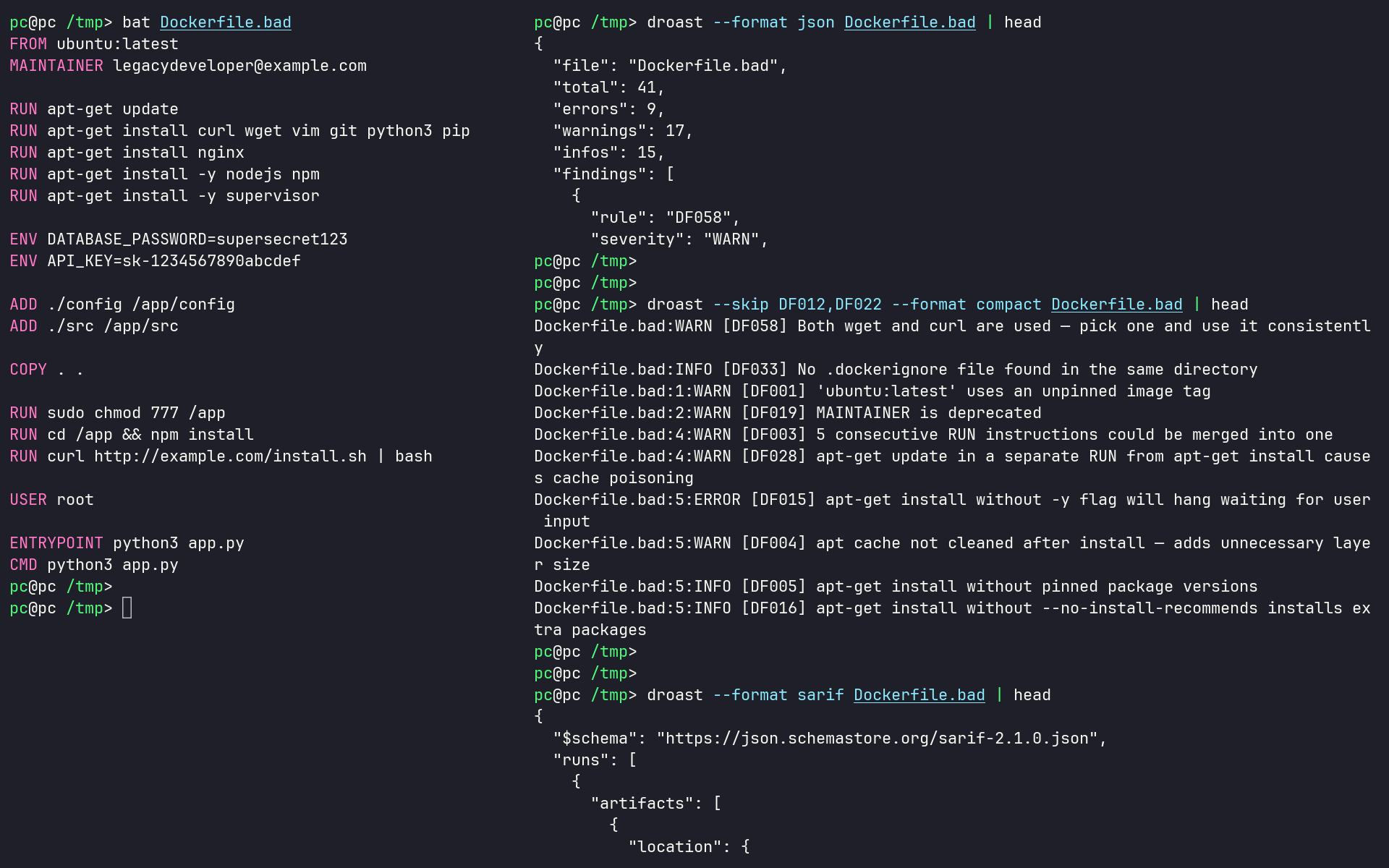
droast --skip DF001,DF012 Dockerfile
# ci 友好输出
droast --format github Dockerfile # github actions annotations
droast --format json Dockerfile # machine-readable
droast --format compact Dockerfile # one line per finding
droast --format sarif Dockerfile # SARIF 2.1.0 for GitHub Advanced Security / IDEs
```
当给定一个目录——或者根本不提供路径时——droast 会递归发现 `Dockerfile`、`Dockerfile.*`、`*.Dockerfile`、`Containerfile` 和 `Containerfile.*`。它还会读取 Compose YAML 和 Docker Bake HCL/JSON 文件,以查找非标准的 Dockerfile 路径及其声明的构建上下文。在 Podman 模式下,它还会额外跟踪 Quadlet 的 `.build`/`.kube` 单元以及本地镜像的 `*.kube.yaml` 布局。系统会遵守仓库的忽略规则,同时 `.devcontainer` 等隐藏的项目目录依然可以被探测到。
对于 `DF033`,Docker 模式使用 Docker 将会使用的有效忽略文件:Dockerfile 旁边的 `
.dockerignore` 优先于构建上下文根目录下的 `.dockerignore`。Podman 模式则优先使用 `.containerignore`,然后再回退到 `.dockerignore`。使用 `--engine podman` 或 `[workflow] engine = "podman"` 进行选择。系统会报告缺失、为空、仅包含注释以及仅包含反向匹配的忽略文件;使用 `--check-ignorefile=false` 可禁用此上下文检查。
## 配置
droast 开箱即用,无需任何配置。对于希望提交项目级默认配置的团队,只需在仓库根目录放一个 `droast.toml`:
```
# droast.toml — 所有字段均为可选
preset = "production" # minimal | security | performance | production | strict
skip = ["DF012", "DF022"]
min-severity = "warning"
no-roast = true
[severity-overrides]
DF020 = "error"
[shellcheck]
mode = "auto" # off (default) | auto | required
exclude = ["SC2086"]
[workflow]
engine = "podman" # docker (default) | podman
```
droast 会从当前目录开始搜索 `droast.toml`,并向上遍历到最近的 `.git` 根目录。CLI 标志始终优先于配置文件——该文件仅用于设置默认值,免得你重复输入。
当安装了 ShellCheck 时,`mode = "auto"` 还会分析 shell 格式的 `RUN` 指令和脚本 heredoc,并带上 Dockerfile 源码位置报告原生的 `SC####` ID。默认状态为 `off`;设为 `required` 会使得缺失或失败的 ShellCheck 可执行文件触发 `SC0000` 错误。你也可以通过 `--shellcheck auto` 为单次执行选择该模式。
为了将 lint 配置保留在其他地方,可以显式传入其路径:
```
droast --config .lint/droast.toml Dockerfile
```
要迁移 Hadolint 策略,可以从其 YAML 配置生成等效的 `droast.toml`:
```
droast init --from-hadolint .hadolint.yaml
```
兼容的设置和 Hadolint 的 `DL` 规则别名会被导入;对于没有等效项的每一个设置或规则,Droast 都会进行报告,从而使迁移过程保持可审查。
大型团队可以添加特定路径的覆盖配置、规则分类、继承的组织策略、registry 和基础镜像白名单、必需的 OCI 标签,以及包含强制原因和过期时间的受管内联抑制规则:
```
# droast ignore=DF001 reason="PLAT-142 migration" expires=2026-09-30
FROM alpine:latest
```
请参阅**[完整配置指南](DOCS.md#configuration)**以及可直接复制粘贴的 [`examples/droast-enterprise.toml`](examples/droast-enterprise.toml)。这些控制项都不是必需的;零配置行为保持不变。
## github action
只需 5 行代码即可将 droast 添加到任何仓库:
```
- uses: immanuwell/dockerfile-roast@1.4.4
```
完整示例(`.github/workflows/lint.yml`):
```
name: Lint Dockerfiles
on: [push, pull_request]
jobs:
droast:
runs-on: ubuntu-latest
steps:
- uses: actions/checkout@v4
- uses: immanuwell/dockerfile-roast@1.4.4
```
发现的问题将作为内联批注显示在 PR diff 上。无需任何配置。
可用输入(均为可选):
| 输入项 | 默认值 | 描述 |
|-------|---------|-------------|
| `files` | `Dockerfile` | 要进行 lint 的文件或 glob 匹配模式 |
| `min-severity` | 配置文件或 `info` | `info`、`warning` 或 `error` |
| `preset` | — | `minimal`、`security`、`performance`、`production` 或 `strict` |
| `category` | — | 要运行的、以逗号分隔的规则类别 |
| `skip-category` | — | 要跳过的、以逗号分隔的规则类别 |
| `skip` | — | 要忽略的、以逗号分隔的规则 ID |
| `no-roast` | `false` | 仅输出技术内容,不包含玩笑 |
| `no-fail` | `false` | 建议模式——绝不阻塞构建 |
| `engine` | 配置文件或 `docker` | 构建上下文约定:`docker` 或 `podman` |
| `image-tag` | `latest` | 锁定到特定的 droast 版本,例如 `1.4.4` |
带选项的示例:
```
- uses: immanuwell/dockerfile-roast@1.4.4
with:
files: '**/Dockerfile'
preset: production
skip: DF012,DF022
no-fail: true # report findings but don't block the PR
```
## pre-commit
通过 [pre-commit](https://pre-commit.com),在 Dockerfile 甚至还没到达 CI 之前就对其进行吐槽(roast):
```
- repo: https://github.com/immanuwell/dockerfile-roast
rev: 1.4.4
hooks:
- id: droast
```
该 hook 会在 `Dockerfile`、`Dockerfile.*`、`*.Dockerfile`、`Containerfile` 和 `Containerfile.*` 上运行,同时排除 Dockerfile 特定的 `.dockerignore` 文件。像往常一样通过 `args` 传递标志:
```
- id: droast
args: [--min-severity, warning, --skip, DF012]
```
## docker
从 ghcr 拉取并立即使用,无需安装:
```
# lint 当前目录中的 Dockerfile
docker run --rm -v "$(pwd)/Dockerfile":/Dockerfile ghcr.io/immanuwell/droast /Dockerfile
# lint 任何位置的任何文件
docker run --rm -v /path/to/your/Dockerfile:/Dockerfile ghcr.io/immanuwell/droast /Dockerfile
# 像往常一样传递 flags
docker run --rm -v "$(pwd)/Dockerfile":/Dockerfile ghcr.io/immanuwell/droast \
--no-roast --min-severity warning /Dockerfile
```
或者从源码在本地构建:
```
docker build -t droast .
docker run --rm -v "$(pwd)/Dockerfile":/Dockerfile droast /Dockerfile
```
该镜像会在每次发布标签时自动发布到 `ghcr.io/immanuwell/droast`。
## podman
同样的 OCI 镜像也适用于 rootless Podman。在 SELinux 主机上使用 `:Z` 挂载仓库,以便 Podman 能够为容器重新标记它的权限:
```
podman run --rm \
-v "$PWD:/workspace:Z" \
-w /workspace \
ghcr.io/immanuwell/droast \
--engine podman .
```
`--engine podman` 会使 `DF033` 遵循 Podman “`.containerignore` 优先于 `.dockerignore`”的规则;它不需要 Podman 守护进程,也不会改变 Dockerfile 的解析方式。使用以下命令为仓库永久保留该工作流:
```
[workflow]
engine = "podman"
```
Podman 会使用 CPP 预处理 `Containerfile.in`。Droast 会将 `DF075` 作为一条信息提醒进行报告,提示你在该构建工作流中对生成的 Containerfile 进行 lint。
## wasmer
droast 也作为 WASI 包发布在 [Wasmer Registry](https://wasmer.io/immanuwell/droast) 中。它使用与原生二进制文件相同的 CLI 和规则引擎。
在不授予文件系统访问权限的情况下,通过 stdin 进行 lint:
```
wasmer run immanuwell/droast -- \
--check-dockerignore=false --format compact - < Dockerfile
```
Lint 一个已挂载的仓库:
```
wasmer run --volume "$PWD:/workspace" immanuwell/droast -- /workspace
```
除非挂载了目录,否则 Wasmer 会拒绝主机文件系统访问。如果仓库使用 `droast.toml`,请在 `--` 分隔符之后传入 `--config /workspace/droast.toml`。
## shell 自动补全
添加一次这个命令,就再也不会把 `--min-severity` 拼错了:
```
# bash — 添加到 .bashrc
source <(droast completion bash)
# zsh — 添加到 .zshrc
droast completion zsh > ~/.zfunc/_droast
# fish — 添加到 config.fish
droast completion fish | source
```
## 它能发现什么
85 条规则,不得不说确实很多。运行 droast --list-rules 查看完整列表。
全部 85 条规则
```
Available Rules
ID SEVERITY CATEGORIES DESCRIPTION
──────────────────────────────────────────────────────────────────────────────────────────────────────────────────────
DF001 WARN correctness,reproducibility Use specific base image tags instead of 'latest'
DF002 ERROR security Do not run as root
DF011 WARN performance Use multi-stage builds to reduce image size
DF013 ERROR security Avoid storing secrets in ENV variables
DF014 ERROR security Avoid hardcoding passwords or tokens in ARG/ENV
DF020 WARN security Set explicit non-root USER
DF003 WARN performance Combine RUN commands to reduce layers
DF004 WARN performance Clean apt/yum/apk cache in the same RUN layer
DF005 INFO correctness,reproducibility Pin package versions for reproducibility
DF006 WARN maintainability,performance Avoid ADD for local files; prefer COPY
DF007 WARN performance Do not copy the entire build context (COPY . .)
DF008 INFO maintainability,performance Use WORKDIR instead of inline cd commands
DF009 WARN correctness,maintainability Use absolute paths in WORKDIR
DF010 WARN security Avoid using sudo inside containers
DF012 INFO maintainability,reliability Set HEALTHCHECK for long-running services
DF017 WARN maintainability,reliability Use ENTRYPOINT with CMD for flexible images
DF018 WARN correctness,reliability Avoid using shell form for ENTRYPOINT
DF019 WARN correctness,maintainability Do not use deprecated MAINTAINER; use LABEL instead
DF022 INFO maintainability,reliability Specify EXPOSE for documented ports
DF023 WARN correctness,maintainability Avoid multiple FROM without aliases (unintended multistage)
DF024 WARN correctness,reproducibility Avoid using :latest in FROM even with aliases
DF025 WARN correctness,reliability Use JSON array syntax for CMD/ENTRYPOINT
DF026 WARN maintainability,performance Avoid recursive COPY from root
DF030 INFO performance Avoid using pip without --no-cache-dir
DF031 INFO performance Avoid npm install without ci/--production for prod images
DF032 INFO maintainability,reliability Set PYTHONDONTWRITEBYTECODE and PYTHONUNBUFFERED for Python images
DF033 INFO performance,security Use an effective .dockerignore for each build context
DF034 ERROR security Avoid chmod 777 — overly permissive
DF035 INFO maintainability,reliability Avoid using curl without --fail flags
DF036 WARN maintainability,reliability Avoid Dockerfile with no CMD or ENTRYPOINT
DF015 ERROR correctness,reliability Avoid using apt-get without -y flag
DF016 INFO performance Use --no-install-recommends with apt-get
DF021 ERROR security,supply-chain Avoid wget|sh pipe patterns (execute remote code)
DF027 ERROR correctness,reliability Do not use yum without -y flag
DF028 WARN performance Cache-bust apt-get update
DF029 WARN performance Avoid apk add without --no-cache
DF037 ERROR correctness,maintainability Dockerfile must begin with FROM, ARG, or a comment
DF038 WARN correctness,maintainability Multiple CMD instructions — only the last one takes effect
DF039 ERROR correctness,reliability Multiple ENTRYPOINT instructions — only the last one takes effect
DF040 ERROR correctness,reliability EXPOSE port must be in valid range 0-65535
DF041 ERROR correctness,reliability Multiple HEALTHCHECK instructions — only the last one applies
DF042 ERROR correctness,reproducibility FROM stage aliases must be unique
DF043 WARN correctness,maintainability zypper install without non-interactive flag
DF044 WARN correctness,maintainability Avoid zypper dist-upgrade in Dockerfiles
DF045 INFO performance Run zypper clean after zypper install
DF046 WARN performance Run dnf clean all after dnf install
DF047 WARN performance Run yum clean all after yum install
DF048 ERROR correctness,reliability COPY with multiple sources requires destination to end with /
DF049 WARN correctness,reliability COPY --from must reference a previously defined stage
DF050 ERROR correctness,reliability COPY --from cannot reference the current stage
DF051 WARN reproducibility,supply-chain Pin versions in pip install
DF052 WARN reproducibility,supply-chain Pin versions in apk add
DF053 WARN reproducibility,supply-chain Pin versions in gem install
DF054 WARN reproducibility,supply-chain Pin versions in go install with @version
DF055 INFO performance Run yarn cache clean after yarn install
DF056 INFO maintainability,performance Use wget --progress=dot:giga to avoid bloated build logs
DF057 WARN reliability,security Set -o pipefail before RUN commands that use pipes
DF058 WARN maintainability,performance Use either wget or curl consistently, not both
DF059 WARN correctness,maintainability Use apt-get or apt-cache instead of apt in scripts
DF060 INFO maintainability,reliability Avoid running pointless interactive commands inside containers
DF061 WARN correctness,maintainability Do not use --platform in FROM unless required
DF062 ERROR correctness,reproducibility ENV variable must not reference itself in the same statement
DF063 WARN correctness,maintainability COPY to relative destination requires WORKDIR to be set first
DF064 WARN performance useradd without -l flag may create excessively large images
DF065 WARN reproducibility,supply-chain FROM uses an unrecognised image registry
DF066 WARN reliability,security Bash-specific syntax used without a SHELL instruction
DF067 INFO maintainability,performance COPY of a local archive — ADD auto-extracts tarballs
DF068 ERROR correctness,reliability FROM, ONBUILD, and MAINTAINER are forbidden as ONBUILD triggers
DF069 WARN correctness,reproducibility Avoid apt-get upgrade / dist-upgrade — makes builds non-reproducible
DF070 WARN performance Avoid broad COPY before package install — invalidates Docker layer cache
DF071 ERROR correctness,reliability Dockerfile syntax must be valid
DF072 ERROR correctness,security Suppression directives must satisfy policy
DF073 ERROR reproducibility,supply-chain Base images must satisfy the approved image policy
DF074 ERROR correctness,security Image labels must satisfy the configured schema
DF075 INFO correctness,reliability Containerfile.in must be linted after Podman CPP preprocessing
DF076 WARN correctness,reliability Use a consistent casing style for Dockerfile instructions
DF077 ERROR correctness,reliability Do not COPY or ADD files excluded from the build context
DF078 WARN correctness,reliability Use lowercase protocol names in EXPOSE
DF079 WARN correctness,reliability Match AS casing to FROM in multi-stage builds
DF082 WARN correctness,reliability Use key=value syntax for ENV and LABEL
DF083 WARN correctness,reproducibility Do not set FROM --platform to the default target platform
DF084 ERROR correctness,reliability Do not use reserved Dockerfile stage names
DF085 WARN correctness,reliability Use lowercase multi-stage build names
DF086 ERROR correctness,reliability Declare ARG variables used by FROM before the first FROM
DF087 ERROR correctness,reliability Declare Dockerfile variables before using them
Use --skip DF001,DF002 to suppress specific rules.
Use --min-severity warning to hide INFO findings.
```
最受欢迎的规则:
| 规则 | 罪状 |
|------|-------|
| DF001 | `FROM ubuntu:latest` —— 选个具体的标签吧 |
| DF002 | 显式以 root 身份运行 |
| DF004 | apt 缓存留在镜像中(你造了个垃圾桶) |
| DF011 | 把整个构建工具链都送到生产环境 |
| DF013 | ENV 变量中包含机密信息(在你的层里。永永远远。恭喜啊) |
| DF021 | `curl \| sh` —— 绝对不行。 |
| DF028 | 将 `apt-get update` + install 拆分到不同的 RUN 层中 |
| DF034 | 在某处使用了 `chmod 777` |
| DF037 | FROM 指令之前出现了指令(无效的 Dockerfile) |
| DF039 | 存在多个 ENTRYPOINT 指令 |
| DF046 | dnf install 后未清理缓存 |
| DF051 | pip install 没有锁定版本 |
| DF057 | RUN 中使用了管道却没有设置 `set -o pipefail` |
| DF059 | 脚本中使用了 `apt` 而不是 `apt-get` |
| DF063 | 在未设置 WORKDIR 的情况下 COPY 到相对路径 |
规则类别:基础镜像 · 安全 · 包管理器 · 层卫生 · 指令质量 · 服务质量 · Python/Node 专项
## 退出码
`0` = 干净(或使用了 `--no-fail`),`1` = 发现错误。
`--no-fail` 适用于建议性的 CI 运行,即你希望看到输出但还不打算阻塞构建。
## 许可证
MIT。随你怎么用。
## 与其他工具的比较
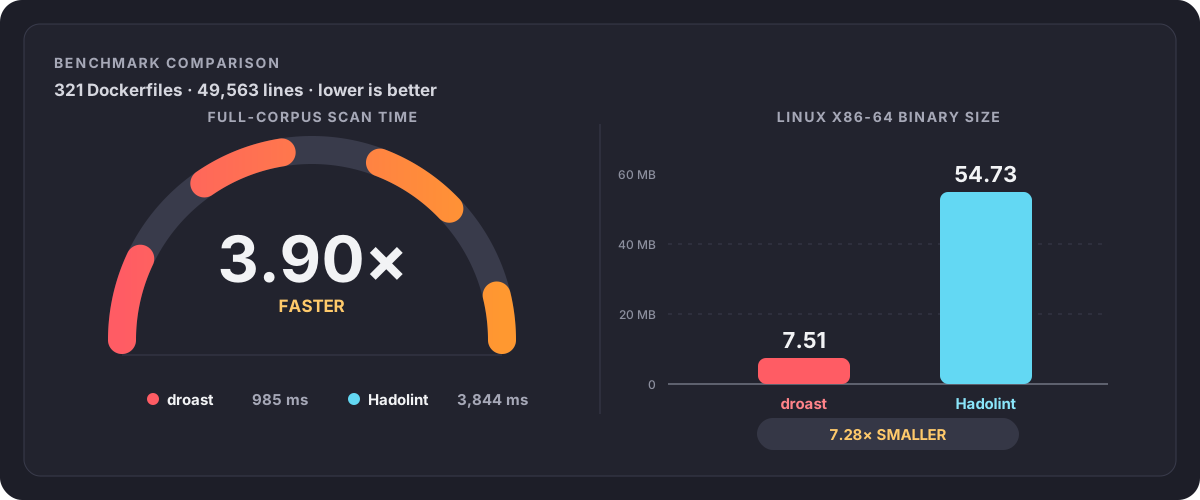
基准测试方法及详细结果
该比较在 Ubuntu 24.04.4 LTS x86-64 上使用了 droast 1.4.4 和 Hadolint 2.14.0。
两个工具扫描了同一组按字母排序的真实 Dockerfile,共包含 49,563 行代码的 321 个文件。每个工具在进行了三次不计时的预热扫描后,执行了 10 次测量扫描。运行交替进行,并且在每次迭代时颠倒执行顺序以减少顺序偏差。一次进程调用扫描整个语料库,中和了配置的影响,并且 SARIF 序列化所耗费的时间也被包含在总耗时中。
| 指标 | droast | Hadolint |
|---|---:|---:|
| 全语料库扫描中位数 | 984.5 ms | 3,844 ms |
| 全语料库扫描 P95 | 1,085 ms | 4,615 ms |
| 每秒处理文件数 | 326.1 | 83.5 |
| 每秒处理行数 | 50,343 | 12,894 |
| Linux x86-64 二进制文件 | 7.51 MB | 54.73 MB |
该基准测试衡量的是执行速度和二进制文件大小,而不是检测质量。发现的问题总数无法直接比较,因为这两个工具具有不同的规则集、严重程度、shell 分析覆盖率以及解析器行为。
标签:Docker, Rust, SOC Prime, VSCode插件, 代码规范, 可视化界面, 安全防御评估, 开发工具, 网络流量审计, 通知系统, 静态检查