jeet-ganguly/birdy-edwards
GitHub: jeet-ganguly/birdy-edwards
一个基于本地大模型的 Facebook SOCMINT 工具,解决数据隐私与离线分析需求。
Stars: 42 | Forks: 5

# BIRDY-EDWARDS
### *渗透与揭露*
[](https://python.org)
[](https://flask.palletsprojects.com)
[](https://ollama.com)
[](https://docker.com)
[]()
[]()
**AI 驱动的 Facebook SOCMINT 平台 —— 100% 本地化,零云端依赖。如需精简版本,[点击此处](https://github.com/jeet-ganguly/birdy-edwards-lite)查看此仓库**
[安装](#installation) · [故障排除](#troubleshooting) · [免责声明](#️-disclaimer) . [贡献指南](#contributing)
## 架构
## 功能
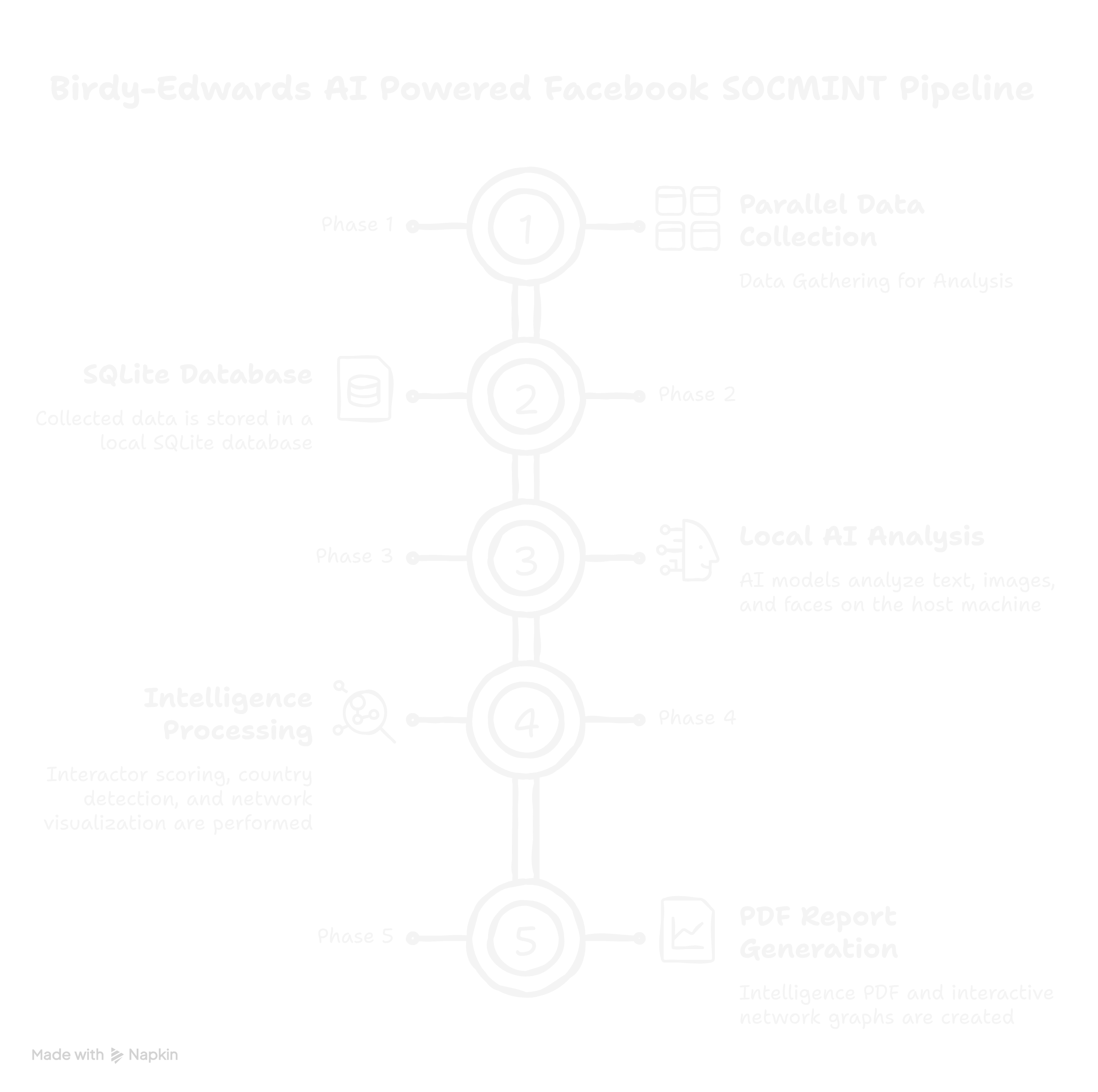
- 🔍 **资料收集** — 自动抓取帖子、照片、Reels、个人资料以及评论、评论者的主页链接和姓名等数据
- 🧠 **交互情报** — AI 针对每次交互进行情感、立场、情绪和语言分析
- 📊 **行为者评分** — 带有 5 级分类系统的加权综合评分
- 🌍 **国家检测** — LLM 根据资料信号识别用户所在国家
- 👤 **人脸情报** — 跨所有图像进行人脸检测、128D 编码和身份聚类。使用 HOG 模型。
- 🕸️ **网络图表** — 交互式 HTML 图表,包括力导向图和共同交互者关系矩阵
- 📄 **PDF 报告** — 包含有限数量图表的专业情报报告
- 🤖 **本地 AI** — 由 Ollama 驱动,支持 gemma3:4b/12b/27b 及其他模型(在 Web 面板中注明),可在 GPU 或 CPU 上运行
- 🐳 **Docker 就绪** — 在 Linux 和 Windows 上一键部署
## 文档
项目网站上提供了针对两种调查模式的完整使用指南:
- [点击此处](https://jeet-ganguly.github.io/profile/edwards.html)
[](https://jeet-ganguly.github.io/profile/edwards.html)
## ⚠️ 免责声明
## 系统要求
| 组件 | 最低配置 | 推荐配置 |
|---|---|---|
| OS | Ubuntu 24.04 LTS / Windows 10+ | Ubuntu 24.04 LTS |
| RAM | 8 GB | 16 GB |
| 存储 | 20 GB 可用空间 | 40 GB 可用空间 |
| Docker | Docker Desktop / Engine | 最新稳定版 |
| Ollama | 最新版 | 最新版 |
## 安装说明
### 前置条件
**步骤 1 — 安装 Docker**
- **Linux:** https://docs.docker.com/engine/install/ubuntu/
- **Windows:** https://docs.docker.com/desktop/install/windows-install/
**步骤 2 — 安装 Ollama**
- **Linux:**
```
curl -fsSL https://ollama.com/install.sh | sh
```
- **Windows:** 从 https://ollama.com/download 下载安装程序
**步骤 3 — 启动 Ollama 并绑定到所有网络接口**
- **Linux:**
```
OLLAMA_HOST=0.0.0.0:11434 ollama serve
```
使其永久生效:
```
sudo systemctl edit ollama
```
添加:
```
[Service]
Environment="OLLAMA_HOST=0.0.0.0:11434"
```
```
sudo systemctl daemon-reload && sudo systemctl restart ollama
```
- **Windows:** Ollama 默认监听所有网络接口 —— 无需额外配置。如果不生效,则:
```
$env:OLLAMA_HOST="0.0.0.0"
ollama serve
```
### 快速开始
**步骤 1 — 克隆仓库**
```
git clone https://github.com/jeet-ganguly/birdy-edwards.git
cd birdy-edwards
```
**步骤 2 — 创建必需的文件和目录**
- **Linux:**
```
mkdir -p app/reports app/face_data app/post_screenshots app/status
touch app/fb_cookies.pkl app/socmint.db app/socmint_manual.db app/.ollama_model
```
- **Windows (PowerShell):**
```
New-Item -ItemType Directory app/reports, app/face_data, app/post_screenshots, app/status
New-Item -ItemType File app/fb_cookies.pkl, app/socmint.db, app/socmint_manual.db, app/.ollama_model
```
**步骤 3 — 构建 Docker 镜像**
```
docker compose build
```
**步骤 4 — 启动容器**
```
docker compose up -d
docker compose logs -f
```
**步骤 5 — 打开 Web UI**
```
http://localhost:5000
```
**步骤 6 - 导入 Session Cookies**
```
http://localhost:5000/tools/import-cookies
```
### 拉取 AI 模型
在您的主机上拉取模型:
```
ollama pull gemma3:4b
```
或者在 Web UI 中使用 **AI 模型面板** —— 选择一个模型并点击 **Apply & Pull**。
| RAM | 推荐模型 |
|---|---|
| 8 GB | gemma3:4b |
| 16 GB | gemma3:12b |
| 32 GB | gemma3:27b |
### 导入 Session Cookies
BIRDY-EDWARDS 需要有效的 Facebook session。请使用 **Cookie-Editor** 浏览器扩展 —— 支持所有平台,无需 Selenium。
1. 安装 Cookie-Editor → [Chrome](https://chrome.google.com/webstore/detail/cookie-editor/hlkenndednhfkekhgcdicdfddnkalmdm) · [Firefox](https://addons.mozilla.org/en-US/firefox/addon/cookie-editor/)
2. 登录您的**专用调查账号** Facebook
3. 在 facebook.com 上点击 Cookie-Editor
4. 点击 **Export → Export as JSON**
5. 访问 `http://localhost:5000/tools/import-cookies` 并粘贴
## 故障排除
**无法从 Docker 访问 Ollama**
```
docker exec -it birdy-edwards curl http://host.docker.internal:11434/api/tags
```
如果失败,请使用 `OLLAMA_HOST=0.0.0.0:11434 ollama serve` 命令重启 Ollama
**DB 错误:no such table 或其他数据库相关错误**
启动新的调查 —— 首次使用时会自动创建 schema。如果您在分析期间停止了进程/程序,请删除该调查并重新启动新的调查。
**Cookies 过期**
访问 `http://localhost:5000/tools/import-cookies` 并重新导入最新的 cookies。
**端口 5000 已被占用**
修改 `docker-compose.yml` 文件:将 `"5001:5000"` 改为其他端口,然后通过 `http://localhost:5001` 访问
**构建期间内存不足**
通过 Settings → Resources → Memory 将 Docker Desktop 的内存增加至 8 GB 以上
- Bug 修复和稳定性提升
- 新增对 Ollama 模型的支持
- UI 改进
- 文档改进
- 为 OCR 和评论分析增加更多语言支持
**我们不接受的内容**
- 绕过平台安全控制的功能
- 引入云端依赖的更改
- 在外部存储或传输调查数据的代码
## 致谢
- 灵感来源于 [Sherlock](https://github.com/sherlock-project/sherlock)
- 灵感来源于 OSINT 和威胁情报研究社区
- [SeleniumBase](https://github.com/seleniumbase/SeleniumBase) — 无痕 Chrome 自动化工具
- [Ollama](https://ollama.com) — 本地 LLM 推理引擎
- [face_recognition](https://github.com/ageitgey/face_recognition) — 人脸检测和编码库
- [pyvis](https://github.com/WestHealth/pyvis) — 交互式网络图可视化
- [reportlab](https://www.reportlab.com) — PDF 生成工具
- [pytesseract](https://github.com/madmaze/pytesseract) — OCR 引擎封装库
**BIRDY-EDWARDS** · 渗透与揭露 ·
标签:ESC4, GitHub, OSINT, 人脸识别, 情报收集, 本地大模型, 漏洞研究, 社交媒体情报, 系统分析, 网络分析