nark-sh/nark
GitHub: nark-sh/nark
nark 是一个 TypeScript 静态扫描器,通过内置的 npm 包 profile 库检测代码中缺失的运行时错误处理,帮助团队在发布前预防生产环境崩溃。
Stars: 26 | Forks: 0

# nark
**针对 npm 包的 Profile 覆盖扫描器 — 在生产之前发现缺失的错误处理。**
nark 会根据一个包含 169+ 个包 profile 的精选库,扫描你的 TypeScript 代码库,找出缺失错误处理的地方。可以把它看作是一个 linter,但专门针对运行时故障模式 — 例如未处理的 promise 拒绝、缺失的 `.on('error')` 监听器、未捕获的 API 异常。
[](https://www.npmjs.com/package/nark)
[](https://socket.dev/npm/package/nark)
[](https://scorecard.dev/viewer/?uri=github.com/nark-sh/nark)
[](https://nark.sh/status)
[](https://www.gnu.org/licenses/agpl-3.0)
## 自行验证
我们试图用“来,验证吧”来代替“相信我”。以下每一项声明都指向你可以在自己的机器上重新检查,或者在我们无法控制的第三方页面上查看的内容:
- **源码公开。** 仓库位于 https://github.com/nark-sh/nark — AGPL-3.0 协议,没有闭源二进制文件。
- **来源证明。** 通过 [npm Trusted Publishing](https://docs.npmjs.com/trusted-publishers/) 使用 `npm publish --provenance` 发布。[npm 页面](https://www.npmjs.com/package/nark) 上的绿色 Provenance 徽章以加密方式将发布的 tarball 与确切的 git commit 和 CI 运行关联起来。使用 `npm audit signatures` 验证任何已安装的副本。
- **第三方供应链评分。** 由 [Socket](https://socket.dev/npm/package/nark) 持续评分。我们不提交任何内容 — Socket 会自动扫描每个已发布的版本。
- **第三方项目健康度评分。** [OpenSSF Scorecard](https://scorecard.dev/viewer/?uri=github.com/nark-sh/nark) 每周针对公开仓库重新运行。任何人都可以从头重新推导该分数。
- **评分历史。** 每日更新的 Socket 评分时间线位于 https://nark.sh/status — 每一条记录都提交到了公开的工作流日志中。
- **tarball 中的内容。** 运行 `npm pack --dry-run nark` — 你只会看到 `bin/`、`dist/`、`schema/`、`demo/`、`FORAIAGENTS.md`。没有其他东西。
- **无安装脚本。** `npm install nark --ignore-scripts` 会产生完全相同的安装。nark 在安装时不会在你的机器上运行任何代码。
- **完整的遥测详情。** Schema、endpoint 和三个 opt-out 路径记录在 https://nark.sh/telemetry。请参阅下方的 [遥测](#telemetry)。
- **负责任的披露。** [SECURITY.md](./SECURITY.md) — 48 小时确认,security@nark.sh。
## 坦诚对待误报
nark 使用静态分析。静态分析是一种近似方法 — 扫描器在不运行代码的情况下对其进行推理,因此如果你的项目在 nark 目前还无法看到的层面上处理了错误(例如:中心的 Express 或 NestJS 错误中间件、React 错误边界、上一层的 retry wrapper、调用函数中的 try-catch,或者内部会进行捕获的库),那么一些被标记的违规可能会是误报。
我们为了保持误报率诚实所做的事情:
- **Profile 基于证据。** 每一个后置条件都会引用包的文档或源代码。我们不会凭空发明规则。
- **扫描器能识别常见的框架模式。** 它理解 TanStack Query 全局处理程序、TanStack Router loader 回调、tRPC callback wrapper、Fastify `setErrorHandler`、Express 和 Koa 错误中间件、NestJS exception filter 以及其他几种架构模式。这个列表每月都在增加。
- **我们在发布前进行衡量。** 每次扫描器升级在发布前都会针对真实的代码库进行验证。
如果你发现了误报:在该行旁边使用 `// nark-ignore:
` 进行抑制,或者访问 [github.com/nark-sh/nark/issues](https://github.com/nark-sh/nark/issues) 提交一个包含文件:行号 的 issue — 我们会根据真实的报告更新 Profile 或扫描器。我们并不声称扫描器是完美的。我们声称的是,它对自己知道什么和不知道什么是诚实的。
## 快速开始
### 60 秒内体验(无需配置)
```
npx nark --demo
```
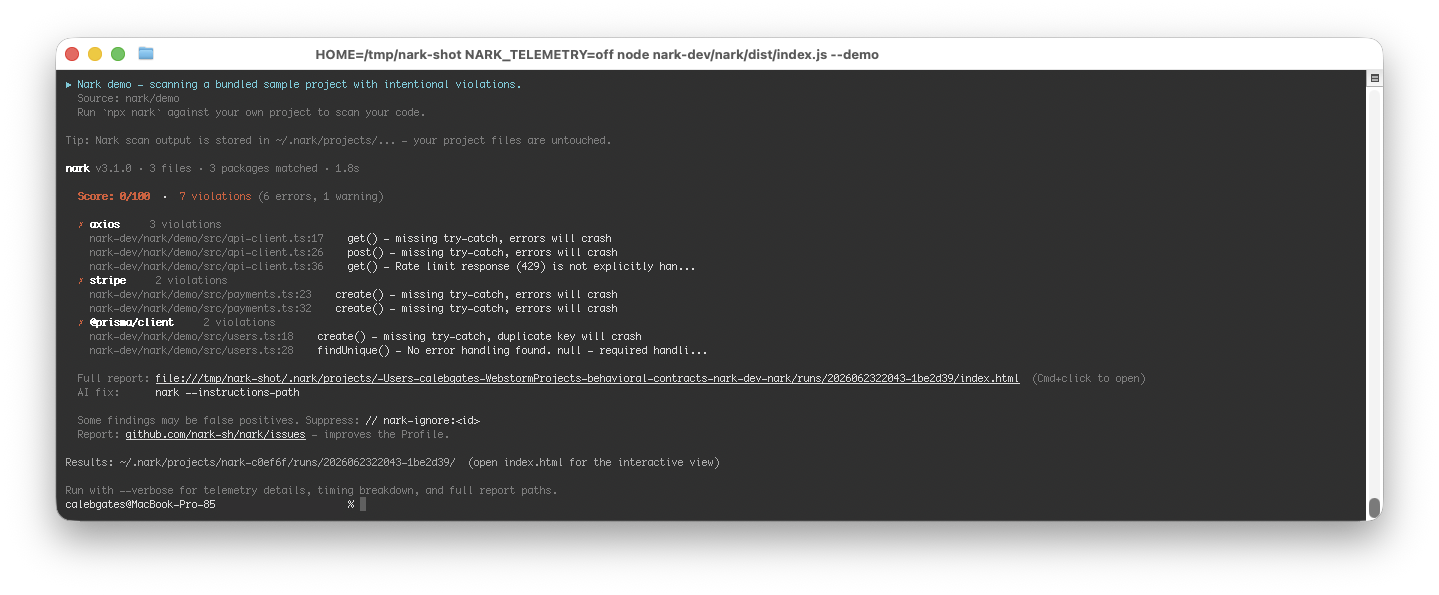
这会针对一个内置的示例项目运行 nark,该项目包含有意的 `axios`、`stripe` 和 `@prisma/client` 违规。输出结果与你扫描自己代码的真实情况完全一致 — 只是它保证报告不会为空。
使用 `--verbose` 运行可以查看每个违规的详细信息(代码片段、来源和修复指导)以及仓库健康度指标:
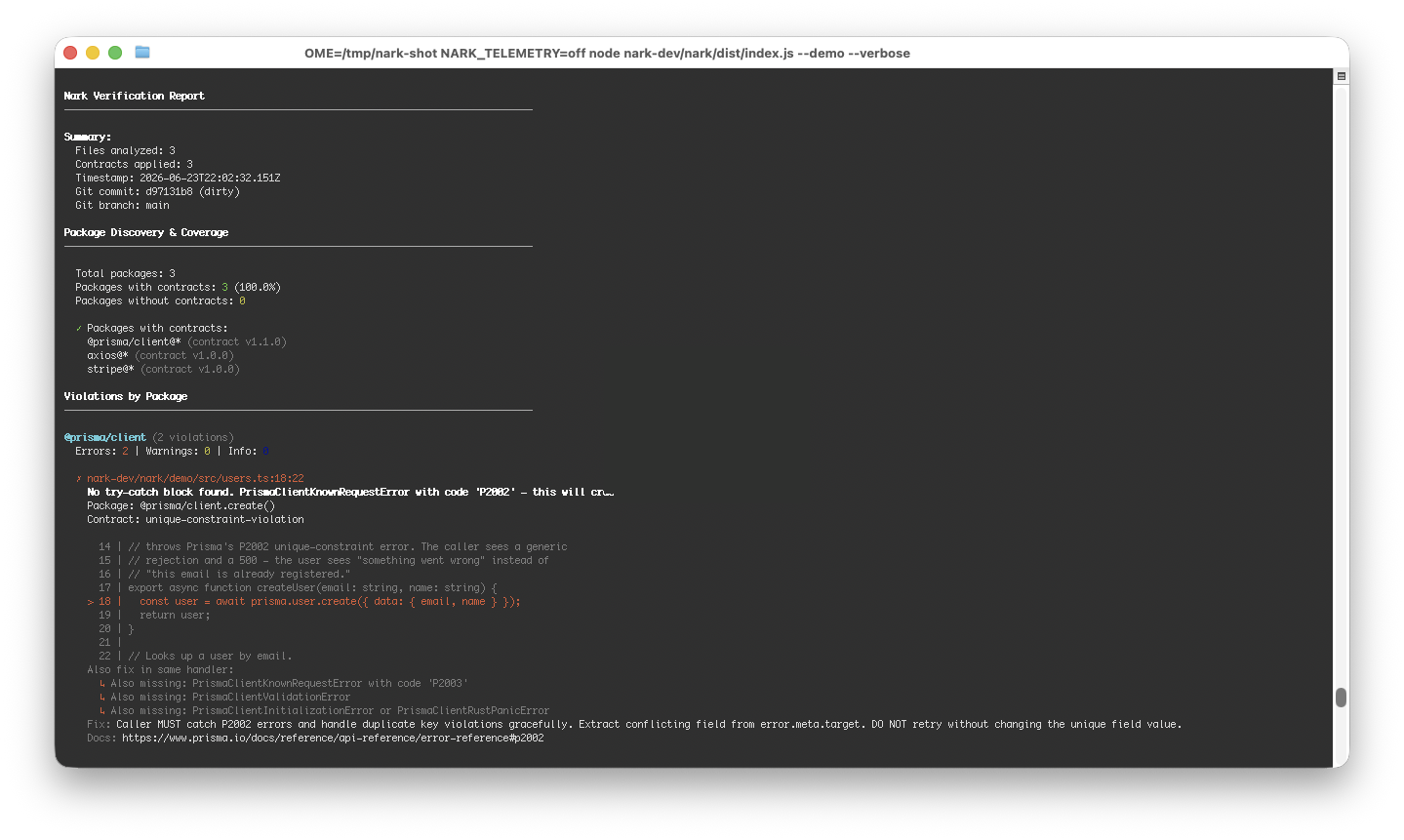
以可搜索文本形式显示详细的验证报告(包含代码片段的每个违规的详细信息)
```
Nark Verification Report
────────────────────────────────────────────────────────────────────────────────
Summary:
Files analyzed: 3
Contracts applied: 3
Timestamp: 2026-06-23T23:18:02.014Z
Git commit: c170802b (dirty)
Git branch: main
Package Discovery & Coverage
────────────────────────────────────────────────────────────────────────────────
Total packages: 3
Packages with contracts: 3 (100.0%)
Packages without contracts: 0
✓ Packages with contracts:
@prisma/client@* (contract v1.1.0)
axios@* (contract v1.0.0)
stripe@* (contract v1.0.0)
Violations by Package
────────────────────────────────────────────────────────────────────────────────
@prisma/client (2 violations)
Errors: 2 | Warnings: 0 | Info: 0
✗ nark-dev/nark/demo/src/users.ts:18:22
No try-catch block found. PrismaClientKnownRequestError with code 'P2002' - this will crash the application.
Package: @prisma/client.create()
Contract: unique-constraint-violation
14 | // throws Prisma's P2002 unique-constraint error. The caller sees a generic
15 | // rejection and a 500 — the user sees "something went wrong" instead of
16 | // "this email is already registered."
17 | export async function createUser(email: string, name: string) {
> 18 | const user = await prisma.user.create({ data: { email, name } });
19 | return user;
20 | }
21 |
22 | // Looks up a user by email.
Also fix in same handler:
↳ Also missing: PrismaClientKnownRequestError with code 'P2003'
↳ Also missing: PrismaClientValidationError
↳ Also missing: PrismaClientInitializationError or PrismaClientRustPanicError
Fix: Caller MUST catch P2002 errors and handle duplicate key violations gracefully. Extract conflicting field from error.meta.target. DO NOT retry without changing the unique field value.
Docs: https://www.prisma.io/docs/reference/api-reference/error-reference#p2002
✗ nark-dev/nark/demo/src/users.ts:28:22
No error handling found. null — required handling missing.
Package: @prisma/client.findUnique()
Contract: record-not-found
24 | // reject on connection-pool exhaustion, statement-timeout, or a transient
25 | // network blip to the database. Without handling, a slow query during
26 | // peak traffic crashes the request instead of returning a graceful 503.
27 | export async function getUserByEmail(email: string) {
> 28 | const user = await prisma.user.findUnique({ where: { email } });
29 | return user;
30 | }
31 |
Also fix in same handler:
↳ Also missing: PrismaClientInitializationError
Fix: Caller MUST check if result is null before accessing properties. Code that assumes findUnique always returns a record will crash.
Docs: https://www.prisma.io/docs/concepts/components/prisma-client/crud#findunique
axios (3 violations)
Errors: 2 | Warnings: 1 | Info: 0
✗ nark-dev/nark/demo/src/api-client.ts:17:26
No try-catch block found. AxiosError with error.response containing the error response - this will crash the application.
Package: axios.get()
Contract: error-4xx-5xx
13 | // VIOLATION (axios.error-4xx-5xx): no try/catch — a 404 or a network blip
14 | // rejects the promise, the caller sees an unhandled rejection, and depending
15 | // on the Node version the process may exit.
16 | export async function fetchUserProfile(userId: string) {
> 17 | const response = await axios.get(`${API_BASE}/users/${userId}`);
18 | return response.data;
19 | }
20 |
21 | // Submits a comment to the upstream service.
Also fix in same handler:
↳ Also missing: AxiosError with error.response.status === 429
↳ Also missing: AxiosError with error.request populated but error.response === undefined
↳ Also missing: AxiosError with both error.request === undefined and error.response === undefined
Fix: Caller MUST catch AxiosError and check error.response.status to distinguish between client errors (4xx) and server errors (5xx).
Docs: https://axios-http.com/docs/handling_errors
✗ nark-dev/nark/demo/src/api-client.ts:26:26
No try-catch block found. AxiosError with error.response - this will crash the application.
Package: axios.post()
Contract: error-4xx-5xx
22 | // VIOLATION (axios.error-4xx-5xx): same shape as above, but on a POST —
23 | // even more dangerous because retrying naively could double-post the
24 | // comment without an idempotency key.
25 | export async function postComment(userId: string, text: string) {
> 26 | const response = await axios.post(`${API_BASE}/comments`, { userId, text });
27 | return response.data;
28 | }
29 |
30 | // Fetches search results.
Also fix in same handler:
↳ Also missing: AxiosError with error.response.status === 429
↳ Also missing: AxiosError with error.response === undefined
Fix: Caller MUST catch AxiosError and inspect error.response.status
Docs: https://axios-http.com/docs/handling_errors
⚠ nark-dev/nark/demo/src/api-client.ts:36:28
Rate limit response (429) is not explicitly handled. Consider implementing retry logic with exponential backoff.
Package: axios.get()
Contract: rate-limited-429
32 | // only logs and re-throws. A 429 from a rate-limited API should trigger a
33 | // backoff/retry; here it just bubbles up as a generic "request failed."
34 | export async function searchPosts(query: string) {
35 | try {
> 36 | const response = await axios.get(`${API_BASE}/search`, {
37 | params: { q: query },
38 | });
39 | return response.data;
40 | } catch (error) {
Fix: Caller MUST either: 1. Implement exponential backoff retry logic with the Retry-After header, OR 2. Explicitly handle 429 as a terminal error and surface to the user, OR 3. Use a request queue that respects rate limits. Silently catching and ignoring 429 without retry logic is a violation.
Docs: https://axios-http.com/docs/handling_errors
stripe (2 violations)
Errors: 2 | Warnings: 0 | Info: 0
✗ nark-dev/nark/demo/src/payments.ts:23:24
No try-catch block found. StripeCardError with error.type === 'card_error' - this will crash the application.
Package: stripe.create()
Contract: card-error
19 | amount: number,
20 | currency: string,
21 | source: string,
22 | ) {
> 23 | const charge = await stripe.charges.create({ amount, currency, source });
24 | return charge.id;
25 | }
26 |
27 | // Creates a new Stripe customer record at signup time.
Also fix in same handler:
↳ Also missing: StripeRateLimitError with error.type === 'rate_limit_error'
↳ Also missing: StripeAuthenticationError with error.type === 'authentication_error'
↳ Also missing: Error with no error.type (connection error)
Fix: Caller MUST catch StripeCardError and handle gracefully. Display user-friendly message based on error.decline_code. DO NOT retry card_error without user intervention.
Docs: https://stripe.com/docs/error-handling
✗ nark-dev/nark/demo/src/payments.ts:32:26
No try-catch block found. StripeCardError with error.type === 'card_error' - this will crash the application.
Package: stripe.create()
Contract: card-error
28 | // VIOLATION (stripe.error-4xx-5xx): no try/catch on the customer.create.
29 | // A duplicate-email collision or a transient 502 from Stripe will throw
30 | // and the signup flow will appear to silently fail.
31 | export async function registerCustomer(email: string) {
> 32 | const customer = await stripe.customers.create({ email });
33 | return customer.id;
34 | }
35 |
Also fix in same handler:
↳ Also missing: StripeRateLimitError with error.type === 'rate_limit_error'
↳ Also missing: StripeAuthenticationError with error.type === 'authentication_error'
↳ Also missing: Error with no error.type (connection error)
Fix: Caller MUST catch StripeCardError and handle gracefully. Display user-friendly message based on error.decline_code. DO NOT retry card_error without user intervention.
Docs: https://stripe.com/docs/error-handling
────────────────────────────────────────────────────────────────────────────────
Overall Summary:
Total violations: 7
Errors: 6
Warnings: 1
Info: 0
✗ FAILED
╔═══════════════════════════════════════════════════════════════════════════════╗
```
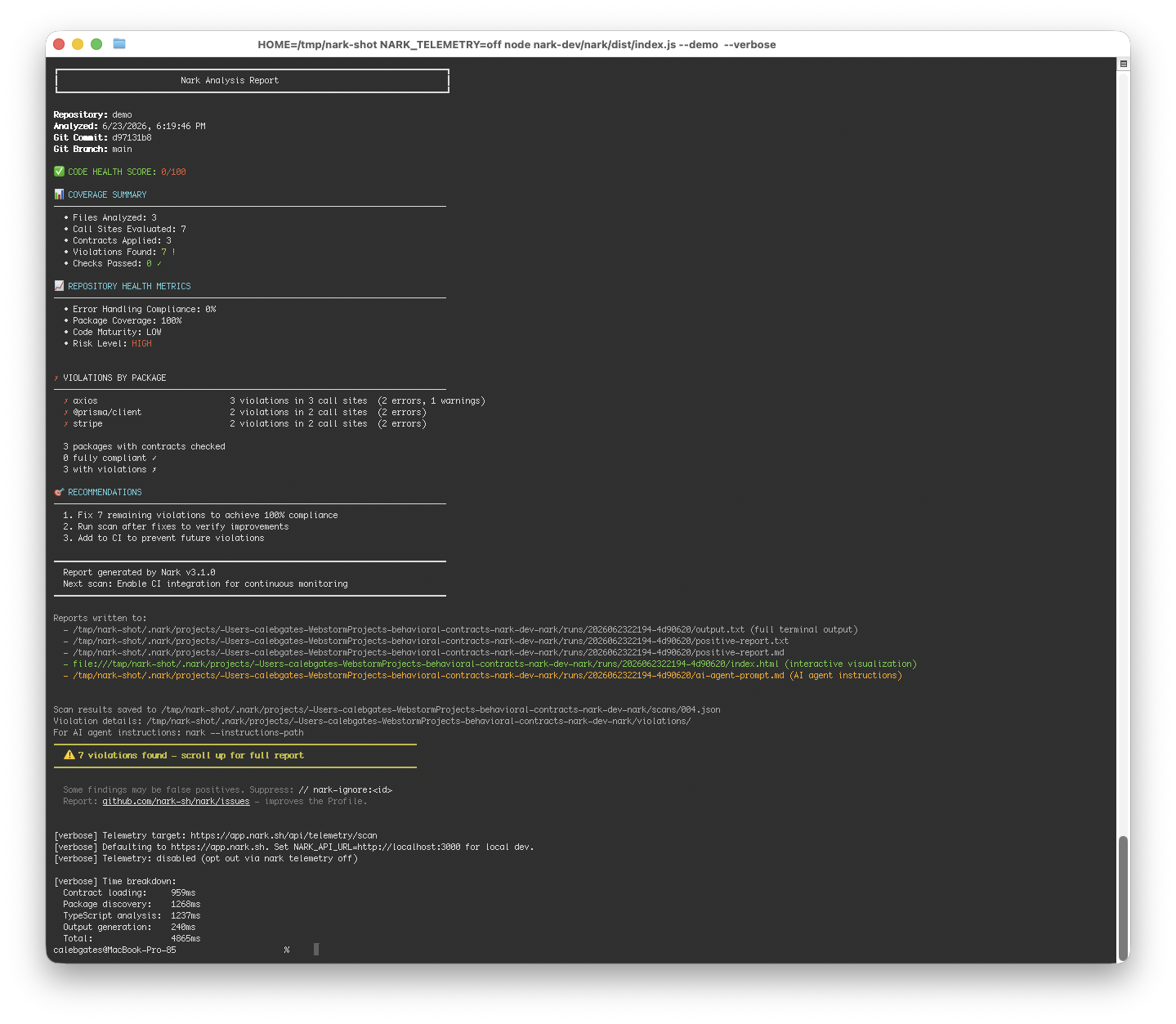
以可搜索文本形式显示详细的分析报告(覆盖率摘要、健康度指标、建议)
```
║ Nark Analysis Report ║
╚═══════════════════════════════════════════════════════════════════════════════╝
Repository: demo
Analyzed: 6/23/2026, 7:18:02 PM
Git Commit: c170802b
Git Branch: main
✅ CODE HEALTH SCORE: 0/100
📊 COVERAGE SUMMARY
────────────────────────────────────────────────────────────────────────────────
• Files Analyzed: 3
• Call Sites Evaluated: 7
• Contracts Applied: 3
• Violations Found: 7 !
• Checks Passed: 0 ✓
📈 REPOSITORY HEALTH METRICS
────────────────────────────────────────────────────────────────────────────────
• Error Handling Compliance: 0%
• Package Coverage: 100%
• Code Maturity: LOW
• Risk Level: HIGH
✗ VIOLATIONS BY PACKAGE
────────────────────────────────────────────────────────────────────────────────
✗ axios 3 violations in 3 call sites (2 errors, 1 warnings)
✗ @prisma/client 2 violations in 2 call sites (2 errors)
✗ stripe 2 violations in 2 call sites (2 errors)
3 packages with contracts checked
0 fully compliant ✓
3 with violations ✗
🎯 RECOMMENDATIONS
────────────────────────────────────────────────────────────────────────────────
1. Fix 7 remaining violations to achieve 100% compliance
2. Run scan after fixes to verify improvements
3. Add to CI to prevent future violations
════════════════════════════════════════════════════════════════════════════════
Report generated by Nark v3.2.0
Next scan: Enable CI integration for continuous monitoring
════════════════════════════════════════════════════════════════════════════════
```
### 或者从源码构建
```
# 并排 Clone nark 和 contract corpus
git clone https://github.com/nark-sh/nark.git
git clone https://github.com/nark-sh/nark-corpus.git
# 构建
cd nark
npm install
npm run build
# 通过扫描 nark 本身来验证其是否有效
node bin/nark.js --tsconfig ./tsconfig.json --corpus ../nark-corpus
# 然后扫描你自己的项目
node bin/nark.js --tsconfig /path/to/your/project/tsconfig.json --corpus ../nark-corpus
```
扫描 nark 自己的仓库是一个很好的冒烟测试 — 你应该会看到一份干净的报告,包含 0 个违规以及检测到少量已签约的包。
如果你的项目没有 `tsconfig.json`,nark 会自动生成一个最小化的配置。
如果 `nark-corpus` 作为 npm 包安装,nark 会自动找到它 — 不需要 `--corpus` 标志。
## 添加到你的项目中
将 nark 安装为 dev dependency,让你的整个团队都能运行它:
```
npm install --save-dev nark
# 或者
pnpm add -D nark
```
在你的 `package.json` 中添加一个脚本:
```
{
"scripts": {
"nark": "nark"
}
}
```
然后使用以下命令扫描:
```
npm run nark
# 或者直接
pnpm nark
```
对于 CI,遇到违规时让构建失败:
```
pnpm nark --fail-threshold warning
```
## 它能发现什么
nark 知道 169+ 个 npm 包在运行时是如何失败的。对于每一个包,它会检查你的代码是否处理了这些故障。违规示例:
```
ERROR axios.get() call without try-catch
→ src/api/client.ts:42
Contract: axios → postcondition "network-error-handling"
Fix: Wrap in try-catch and handle AxiosError
WARN redis.connect() without .on('error') listener
→ src/cache/redis.ts:18
Contract: ioredis → postcondition "connection-error-listener"
Fix: Register error listener before calling connect()
```
## 工作原理
1. **契约** 定义了包是如何失败的(它们抛出什么错误,发出什么事件)
2. **扫描器** 遍历你的 TypeScript AST 并查找已签约包的调用
3. **分析器** 检查每个调用点是否有适当的错误处理
4. **报告器** 输出包含严重程度、位置和修复建议的违规
契约是 [nark-corpus](https://github.com/nark-sh/nark-corpus) 包中的 YAML 文件。扫描器使用 TypeScript 的 compiler API — 没有运行时执行。
## 输出
结果会输出到你项目目录下的 `.nark/` 中:
```
.nark/
├── config.yaml # Scanner configuration
├── latest -> scans/002/ # Symlink to most recent scan
├── scans/
│ ├── 001/
│ │ ├── summary.json # Machine-readable results
│ │ └── summary.md # Human-readable report
│ └── 002/
│ ├── summary.json
│ └── summary.md
└── violations/
├── axios/
│ └── network-error-handling.md
└── ioredis/
└── connection-error-listener.md
```
## 命令
### 扫描(默认)
```
# 扫描当前目录
nark
# 扫描特定项目
nark --tsconfig ./tsconfig.json
# 包含测试文件
nark --include-tests
# 遇到警告时使 CI 失败
nark --fail-on-warnings
# 仅报告模式(总是 exit 0 —— 永不阻断 CI)
nark --report-only
# 如果发现任何警告或错误则 exit 1
nark --fail-threshold warning
# 用于 GitHub Code Scanning 的 SARIF 输出
nark --sarif
nark --sarif-output results.sarif
# 紧凑摘要输出(默认为完整报告)
nark --quiet
```
### 显示
检查 nark 的配置和受支持的包:
```
# 打印 nark 版本、Node 版本、corpus 路径、contract 数量
nark show version
# 列出所有 contracted 包(易于人类阅读)
nark show supported-packages
# 以 JSON 格式列出
nark show supported-packages --json
# 显示当前的 auth/API endpoint 配置
nark show deployment
```
### 遥测
nark 收集匿名的使用数据,以帮助确定开发的优先级。遥测**默认开启**,并且可以随时禁用。首次运行时会显示通知。
可选:app.nark.sh 上的托管仪表板
如果开启了遥测并且你已经运行过 nark login,你的扫描结果就会显示在
app.nark.sh 的托管仪表板中,其中包含趋势
线、每个包的汇总以及 PR 级别的差异视图。该仪表板
完全是可选的 — 无论哪种情况,nark 都会在本地运行相同的扫描,并且
所有结果始终会写入到你项目的 .nark/ 中。该
仪表板只是锦上添花,而不是强制依赖。
**收集的内容:** nark 版本、OS/arch、Node.js 版本、检测到的 npm 包名(仅限公开的包名)、匹配的 contract ID、每个 contract 的违规计数、扫描持续时间、CI 模式标志,以及你的 git 远程 URL 的可选 SHA256 哈希值。
**绝不收集的内容:** 源代码、文件路径、变量名、目录名、仓库名、git 历史记录、用户身份、机器主机名或 IP 地址(在服务器端已被剥离)。
```
# 检查 telemetry 状态
nark telemetry status
# 永久退出
nark telemetry off
# 通过环境变量退出(非常适合 CI)
export NARK_TELEMETRY=off
# 遵循标准的 DO_NOT_TRACK 约定
export DO_NOT_TRACK=1
# 重新加入
nark telemetry on
```
你也可以在 `.nark/config.yaml` 中设置 `telemetry: false`,或者使用 `NARK_API_URL` 将遥测指向不同的 endpoint。
如果遥测发送超时(网络缓慢、开发服务器冷启动),可以针对每次扫描增加超时时间:`nark --telemetry-timeout=10000`(毫秒;默认 5000)。无论遥测是否成功,扫描结果都会保存在本地。
了解更多:[https://nark.sh/telemetry](https://nark.sh/telemetry)
### 崩溃报告
当 nark 遇到意外错误时,会将匿名崩溃报告发送到 Sentry。这有助于捕获影响真实用户的 bug。不包含任何源代码、文件路径或身份识别信息(路径已通过 `beforeSend` 清除)。仅对 25% 的错误进行采样,以最大限度地减少开销。
崩溃报告遵循与遥测相同的 opt-out 标志,此外还有一个专用的 kill switch:
```
# 仅禁用崩溃报告(scan telemetry 仍然会传输)
export NARK_SENTRY=off
# 禁用所有功能(telemetry + 崩溃报告)
export NARK_TELEMETRY=off
# 遵循标准的 DO_NOT_TRACK 约定
export DO_NOT_TRACK=1
```
### 身份验证
nark 支持从同一台机器登录到**多个 workspace**(组织)。凭证存储在 `~/.nark/credentials.json` 中,以组织 slug 为键,文件权限为 `0600`。
```
# 登录(基于浏览器的 device flow;从下拉菜单中选择 org)
nark login
# 在浏览器中预选一个 organization
nark login --org acme
# 显示活跃的 workspace 及其解析方式
nark whoami
# 列出所有已登录的 workspace(标记 default + 最近使用)
nark workspace
# 切换全局 default workspace
nark workspace use acme
# 将此 repo 绑定到 workspace(写入 .nark/config.json —— 请提交此文件!)
nark workspace use --here acme
# 在本地重命名 workspace alias
nark workspace rename old-slug new-slug
# 登出 default workspace(自动提升至下一个最近使用的)
nark logout
# 登出特定的 workspace
nark logout --org acme
# 登出所有 workspace(删除 ~/.nark/credentials.json)
nark logout --all
```
#### 多 workspace 流程
如果你属于多个组织(例如个人组织 + 团队组织),请分别登录:
```
nark login --org personal
nark login --org acme
```
第一次登录会成为你的默认设置。后续登录**不会**更改默认设置 — 请使用 `nark workspace use ` 进行切换。
#### 绑定特定仓库的 workspace(`.nark/config.json`)
要将仓库固定到特定的 workspace,请提交一个 `.nark/config.json`:
```
{ "workspace": "acme" }
```
这与 Vercel 用于 `.vercel/project.json` 的模式相同。该文件**应该被提交** — 它让每个贡献者的 workspace 都变得明确,并避免了“这个扫描结果落入了谁的组织?”的混乱。
作为兜底,也会兼容带有 `workspace` 字段的旧版 `.narkrc.json`。如果两个文件同时存在,`.nark/config.json` 优先,并会给出一次性的警告,建议删除旧文件。
#### 解析优先级
当 nark 需要 token(用于遥测、仪表板上传等)时,它会按顺序遍历此链条 — 第一个匹配的获胜:
1. `NARK_API_KEY` 环境变量
2. `NARK_TOKEN` 环境变量(已弃用;会发出一次性警告)
3. `--org ` / `-w ` 命令行标志
4. `.nark/config.json` 中的 `workspace` 字段(CWD 或其父目录)
5. `.narkrc.json` 中的 `workspace` 字段(CWD 或其父目录,旧版)
6. `~/.nark/credentials.json` 中的 `default` 字段
7. 存储中恰好有一个 workspace(静默设为默认)
8. 错误 — 调用者会要求你设置以上之一
#### 环境变量
| 变量 | 状态 | 备注 |
| --------------- | ------------------ | ---------------------------------------------------------------------------------------- |
| `NARK_API_KEY` | 规范 | 在 CI 中为无人值守的运行设置。 |
| `NARK_TOKEN` | 已弃用 | 仍然可用;每个进程会打印一次警告。将在 nark **v2.0** 中被移除。 |
| `NARK_API_URL` | 可选的覆盖项 | 默认为 `https://app.nark.sh`。适用于 staging/自托管的 endpoint。 |
#### 从早期的 nark 版本迁移 (NARK_TOKEN)
如果你有现存的 `~/.nark/credentials` (v1) 文件,nark 会在你第一次运行 nark **2.1.0** 或更高版本的任何命令时自动迁移它:
- 凭证会被复制到新的 `~/.nark/credentials.json` (v2) 中,
以哨兵 slug `default` 为键。
- 单行 stderr 输出 — `Migrated nark credentials to v2 (multi-workspace).`
— 会打印一次。会写入一个 `migratedAt` 时间戳,该消息
永远不会再次出现。
- 在写入新文件后,旧版 v1 文件会被删除。
迁移后,运行 `nark login --org ` 将你的团队 workspace 添加到已迁移的 workspace 旁边,然后运行 `nark workspace use ` 选择你的默认 workspace。
### CI(文件级差异感知扫描)
仅扫描当前 PR/branch 中更改的文件 — 非常适合 GitHub Actions:
```
# 扫描自 HEAD~1 以来更改的文件
nark ci
# 扫描自特定 commit 以来更改的文件
nark ci --baseline-commit
# 带有 SARIF 输出(用于 GitHub Check Runs / Code Scanning)
nark ci --sarif
nark ci --sarif-output results.sarif
```
### 推荐 GitHub Actions 工作流
可直接复制粘贴的起点。在你进行集成**之前**有三件事需要了解 — 这些都是我们在自己的 SaaS 上运行 nark 时通过惨痛教训学到的。
```
name: Nark
on:
push:
branches: [main]
pull_request:
branches: [main]
jobs:
nark:
name: Nark scan
runs-on: ubuntu-latest
steps:
- uses: actions/checkout@v4
- uses: pnpm/action-setup@v2
with: { version: 9 }
- uses: actions/setup-node@v4
with: { node-version: '20' }
- run: pnpm install
# Generate any client code Nark's TS analyzer needs to resolve types.
# Prisma is the common case; drop this step if your project doesn't use it.
- run: pnpm prisma generate
- name: Run nark
id: nark
continue-on-error: true # SHADOW MODE — see "Rollout pattern" below
run: |
npx -y nark@latest \
--tsconfig path/to/your/tsconfig.json \
--output nark-audit.json
env:
# Default Node old-gen heap on GitHub-hosted runners is ~2 GB.
# Non-trivial TS programs (Next.js + Prisma + a few dozen routes)
# OOM under that with exit 134. Runners have 16 GB physical, so
# 8 GB is well within budget. Skip this only on a tiny project.
NODE_OPTIONS: '--max-old-space-size=8192'
NARK_TELEMETRY: 'false'
# Without this verify step, an OOM or crash leaves nark-audit.json
# missing, upload-artifact emits a warning instead of failing, and
# `continue-on-error: true` reports the whole job as green. We hit
# this 18 times in a row before we noticed. Fail loud when there's
# no audit JSON.
- name: Verify nark produced an audit
if: steps.nark.outcome == 'success' || steps.nark.outcome == 'failure'
run: |
test -f nark-audit.json || {
echo "::error::Nark did not produce nark-audit.json — scan crashed before writing output. See the Run nark step log."
exit 1
}
- name: Upload nark audit
if: always()
uses: actions/upload-artifact@v4
with:
name: nark-audit
path: nark-audit.json
retention-days: 30
```
**需要知道的三件事:**
1. **`NODE_OPTIONS: '--max-old-space-size=8192'`** — 没有这个,中等规模的 TypeScript 项目会内存溢出 (OOM),报错 `FATAL ERROR: Reached heap limit Allocation failed - JavaScript heap out of memory`。GitHub 托管的运行器将 Node 的老生代堆内存默认限制在约 2 GB;请将其调高。
2. **“验证 nark 是否生成了审计”步骤** — `continue-on-error: true` + `actions/upload-artifact@v4` 是一个脆弱的组合。当扫描器崩溃时,审计 JSON 不会被写入,上传步骤只会发出警告而不是失败,因此作业仪表板依然显示绿色。验证步骤使得“静默成功”变得不可能。
3. **上线模式** — 从 `continue-on-error: true` 开始。在没有任何 nark 感知的代码库上的首次运行通常会发现数十个问题。对它们进行分级处理(将误报添加到 `.nark/suppressions.json`,修复真正的违规),然后去掉 `continue-on-error` 以阻止合并。分为三个阶段:
- 阶段 1(第 1 周):扫描器运行,捕获基线,合并不受阻碍。
- 阶段 2(第 1-2 周):审查基线,附带原因进行抑制,修复真正的问题。
- 阶段 3:移除 `continue-on-error: true`。新的违规将阻止 PR。
### `--diff`(行级过滤)
将违规过滤为仅针对 git diff 范围内实际触及的行。未修改文件中未触及行上的既有违规会被排除在外 — 这符合 CodeRabbit / Greptile 风格 PR 审查机器人的姿态。
```
# 仅限你的 branch 相比 main 引入的违规
nark --diff main..HEAD --tsconfig tsconfig.json
# 针对特定的 base SHA(在 PR CI 中很有用)
nark --diff $BASE_SHA..HEAD --tsconfig tsconfig.json
# 针对 GitHub Actions 中的 PR base
nark --diff origin/${{ github.base_ref }}..HEAD --tsconfig tsconfig.json
```
过滤后的计数驱动退出代码 — `nark --diff` 仅在 diff 引入的违规满足 `--fail-threshold` 时以非零状态退出。既有违规不会导致构建失败。
与 `--changed-files`(文件级)共存。当两者同时传递时,`--diff` 优先,因为在相同的变更集上,行级限制始终至少与文件级限制一样严格。
重命名的文件会被妥善处理 — 重命名文件上的违规仅根据新路径进行匹配。
### 分级审查
审查并对违规进行分类:
```
# 列出未分诊的违规
nark triage list
# 标记一个违规
nark triage mark true-positive
nark triage mark false-positive --reason "handled by framework"
nark triage mark wont-fix --reason "acceptable risk"
# 显示 triage 统计信息
nark triage summary
```
误报会在未来的扫描中被自动抑制。
### 抑制
```
# 列出所有 suppressions
nark suppressions list
# 添加一个 suppression
nark suppressions add --fingerprint --reason "handled by middleware"
# 查找并移除过期的 suppressions
nark suppressions clean
```
### 其他
```
# 在项目中初始化 .nark/ 配置
nark init
# 压缩 scan 历史(保留 triage 决策)
nark compact
# 获取 AI agent 指令(适用于 Claude、Cursor 等)
nark --instructions-path
```
## 配置文件
在你的项目根目录下放置一个 `.nark/config.yaml` 以持久化 CLI 选项。CLI 标志始终会覆盖文件值。
```
# .nark/config.yaml
# Fail 阈值:error | warning | info(默认值:error)
failThreshold: error
# 总是 exit 0(仅报告模式)
# reportOnly: false
# 输出路径
output:
json: .nark/latest.json
sarif: .nark/results.sarif
# Exclude 模式
exclude:
- '**/*.test.ts'
- '**/node_modules/**'
# 包含 draft/开发中的 contracts
# includeDrafts: false
```
| 字段 | 描述 | 默认值 |
|-------|-------------|---------|
| `tsconfig` | tsconfig.json 的路径 | `./tsconfig.json` |
| `corpus` | corpus 目录的路径 | 自动检测 |
| `failThreshold` | 触发退出代码 `1` 的严重级别 (`error`\|`warning`\|`info`) | `error` |
| `reportOnly` | 无论是否有违规都始终退出 `0` | `false` |
| `output.json` | JSON 审计记录的自定义路径 | 自动 |
| `output.sarif` | SARIF 输出的自定义路径 | 无 |
| `include` | 用于限制分析文件范围的 Glob 匹配模式 | 所有 `.ts` 文件 |
| `exclude` | 用于排除文件的 Glob 匹配模式 | 无 |
| `includeDrafts` | 包含草案阶段的 contract | `false` |
| `includeTests` | 包含测试文件 | `false` |
| `includeDeprecated` | 包含已弃用的 contract | `false` |
| `telemetry` | 开启遥测 | `true` |
## AI Agent 集成
nark 包含 `FORAIAGENTS.md` — 这是一个机器可读的指令文件,用于教导 AI agent 如何解释和修复违规。将你的 agent 指向它:
```
# 获取指令文件的路径
nark --instructions-path
# 或者在你的 AI 配置中引用
# Claude Code:添加到 CLAUDE.md
# Cursor:添加到 .cursorrules
```
## 退出代码
| 代码 | 含义 |
|------|---------|
| `0` | 干净的扫描 — 在失败阈值及以上没有违规 |
| `1` | 在 `--fail-threshold` 及以上发现违规(默认:`error`) |
| `2` | 内部错误(糟糕的 tsconfig、缺失 corpus 等) |
使用 `--report-only` 可始终获得 `0`,或者使用 `--fail-threshold warning` 也可以在出现 warning 时阻止运行。
## CLI 选项
| 标志 | 描述 | 默认值 |
|------|-------------|---------|
| `--tsconfig ` | tsconfig.json 的路径 | `./tsconfig.json` |
| `--corpus ` | corpus 目录的路径 | 内置 |
| `--output ` | 审计 JSON 的输出路径 | 自动生成 |
| `--project ` | 用于发现 package.json 的项目根目录 | cwd |
| `--no-terminal` | 禁用终端输出(仅输出 JSON) | false |
| `--report-only` | 始终退出 0(永不阻止 CI) | false |
| `--fail-threshold ` | 如果在该严重级别及以上的违规则退出 1 | `error` |
| `--fail-on-warnings` | `--fail-threshold warning` 的简写 | false |
| `--sarif` | 将 SARIF 2.1.0 写入 `.nark/results.sarif` | false |
| `--sarif-output ` | 将 SARIF 写入自定义路径 | — |
| `--diff ` | 行级过滤 — 仅报告 diff 涉及的行上的违规(例如 `main..HEAD`) | — |
| `--changed-files ` | 文件级过滤 — 仅报告指定文件中的违规 | — |
| `--quiet, -q` | 显示简要摘要而不是完整报告 | false |
| `--verbose` | 显示遥测详情、耗时分析和完整的报告路径。 | false |
| `--include-tests` | 包含测试文件 | false |
| `--include-drafts` | 包含草案阶段的 contract | false |
| `--show-suppressions` | 显示已抑制的违规 | false |
| `--check-dead-suppressions` | 报告过时的抑制项 | false |
| `--fail-on-dead-suppressions` | 发现过时的抑制项时以非零状态退出 | false |
## 从源码构建
```
# Clone 两个 repos(corpus 是扫描所必需的,而不是构建所必需的)
git clone https://github.com/nark-sh/nark.git
git clone https://github.com/nark-sh/nark-corpus.git
cd nark
npm install
npm run build
npm test
```
需要 Node.js >= 18。
## Corpus
契约库 ([nark-corpus](https://github.com/nark-sh/nark-corpus)) 包含 169+ 个契约,涵盖以下包:
- **HTTP:** axios, got, node-fetch, undici, superagent
- **数据库:** prisma, knex, sequelize, typeorm, drizzle, pg, mysql2, better-sqlite3
- **云服务:** aws-sdk, @google-cloud/*, @azure/*
- **身份验证:** jsonwebtoken, bcrypt, passport, @clerk/*, @auth0/*
- **消息队列:** bullmq, amqplib, kafkajs
- **AI:** openai, @anthropic-ai/sdk, @langchain/*
- **以及另外 100 多个...**
## 故障排除
### `npx nark` 时的 npm 警告
运行 `npx nark` 可能会打印如下警告:
```
npm warn Unknown env config "developer"
npm warn Unknown project config "public-hoist-pattern". This will stop working in the next major version of npm.
```
这些警告来自于你的 `~/.npmrc` 中包含了 pnpm 专用的配置键,而 npm 无法识别它们。它们不是 nark 的错误 — npm 只是在警告这些键对它不起作用。扫描本身运行良好。
**修复方法(任选其一):**
- 将 pnpm 专用的键移动到 `~/.pnpmrc` 中(只有 pnpm 会读取该文件)。这是最清晰的分离方式。
- 在 `~/.npmrc` 中为未知的键添加前缀 `_`(例如 `_public-hoist-pattern=...`)。npm 会静默忽略以 `_` 开头的键。
**不要**使用 `npm --silent` 或 `npx --silent` 来抑制它们 — 该标志也会隐藏你希望看到的真实 npm 错误。
## 许可证
AGPL-3.0 — 详情请参阅 [LICENSE](./LICENSE)。免费用于本地使用、CI/CD 和自托管。SaaS 提供商必须开源修改内容或获取商业许可证。标签:MITM代理, SOC Prime, TypeScript, 代码审查, 分布式计算, 安全专业人员, 安全插件, 开发工具, 异常处理, 暗色界面, 自动化攻击, 错误基检测, 静态代码分析