han-nguyen-cyber/Robort-Custom-Web-Vulnerability-Scanner-with-AI-Reporting
GitHub: han-nguyen-cyber/Robort-Custom-Web-Vulnerability-Scanner-with-AI-Reporting
一个集成 AI 报告功能的定制化 Web 漏洞扫描器,旨在提升漏洞检测透明度并降低安全评估门槛。
Stars: 1 | Forks: 0
# IT\_359\_期末项目\_第8组
# Robort :3 – 带有 AI 报告的自定义 Web 漏洞扫描器
 **说明:**
- 这是一个自定义 Web 应用漏洞扫描器,带有 AI 报告的 AI 集成功能,作为 IT 359 的课程项目完成。
- 本 readme 包含以下内容:
1. 项目概述
2. 工具功能列表
3. 工具的设置和运行说明
**职责划分:**
- **技术负责人:** Han Nguyen
- **演讲负责人:** Carter Steiling
- **文档负责人:** Michael Mui
## i. 项目概述:
Robort 是一个带有 AI 集成的自定义 Web 应用漏洞扫描器,旨在识别 Web 应用中常见的安全问题,包括 SQL 注入、跨站脚本攻击 (XSS) 和安全配置错误。该工具旨在提供自动化扫描器工作原理的透明度,让用户能够理解检测逻辑,而不是依赖于“黑盒”工具。
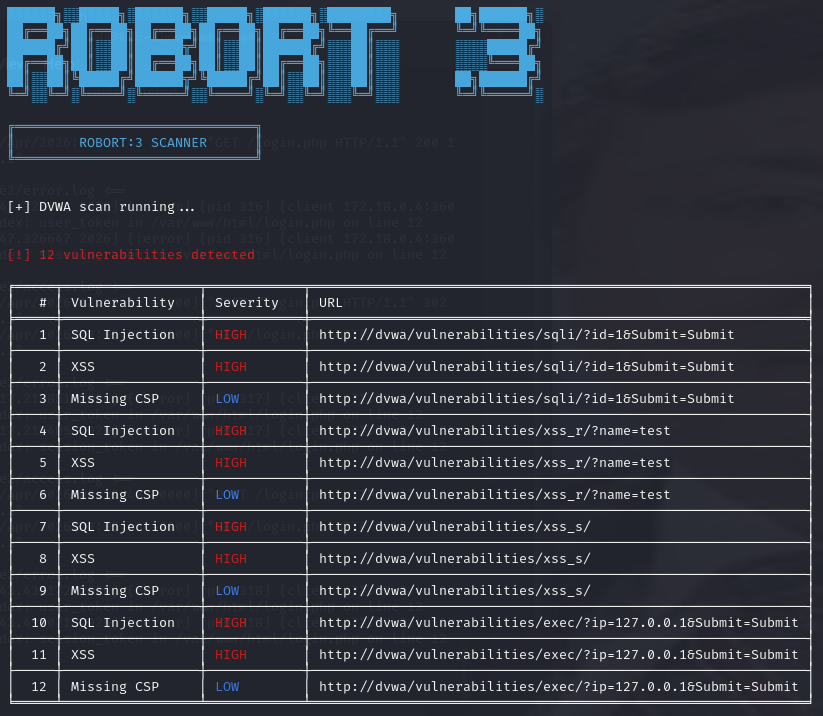
Robort 结合了自动化扫描技术和 AI 报告功能,可生成详细的安全评估报告,其中包括风险分析、修复建议以及与 MITRE ATT&CK 框架的映射。
本项目还包含一个使用 Docker 容器化的测试环境,允许用户扫描故意设置漏洞的目标,例如 Damn Vulnerable Web Application (DVWA),以及一个存在漏洞的 vibe-coded Web 应用程序。
## ii. 功能列表:
1. **自动化漏洞扫描**\
a. 检测 SQL 注入 (SQLi) \
b. 检测跨站脚本攻击 (XSS) \
c. 识别缺失的安全标头 (CSP, HSTS, X-Frame-Options)
2. **表单与参数测试**\
a. 将 payload 注入到 URL 参数和 HTML 表单中
b. 分析服务器响应以寻找漏洞特征
3. **DVWA 模式**\
a. 针对 Damn Vulnerable Web Application (DVWA) 进行专门扫描,以模拟组织根据其信息环境中特定的攻击面进行自定义检测逻辑的需求。
b. 稳定可靠地识别漏洞。
4. **AI 驱动的报告(AI 集成)**\
a. 生成结构化的安全报告,包括:
1. 风险分析
2. 修复策略
3. MITRE ATT&CK 框架映射
5. **专业的输出格式**\
a. 颜色编码的风险等级(高、中、低) \
b. 基于表格的漏洞展示 \
c. 汇总统计
6. **Docker 化的实验室环境**\
a. 扫描器在其独立的容器中运行
b. 可用的扫描目标包括:
1. Damn Vulnerable Web Application (DVWA)
2. Vibe-Coded Vulnerable Web Application
7. **JSON 导出**\
1. 扫描结果可保存以供后续分析或 AI 处理。
## iii. 工具的设置和运行说明:
1. **前置条件:**\
a. **卸载旧版本的 Docker:**
`for pkg in docker.io docker-doc docker-compose podman-docker containerd runc; do sudo apt-get remove $pkg; done`
b. **安装 Docker 和 Docker Compose(适用于基于 Debian 的系统)**
sudo apt-get update
sudo apt-get install docker-ce docker-ce-cli containerd.io docker-buildx-plugin docker-compose-plugin
2. **项目设置:**\
a. **下载本项目的代码。**
b. **导航至项目目录:**
`cd ~/Downloads/robort`
c. **确保文件夹结构如下所示:**
```
robort/
|--- docker-compose.yml
|--- .env
|--- robort/
|--- vulnapp/
```
3. **启动环境:**\
a. 使用以下命令执行干净的构建并启动所有服务:
```
docker-compose down
docker system prune -f
docker-compose build --no-cache
docker-compose up
```
b. 此命令将启动 Robort 扫描器容器、运行在端口 8081 上的 DVWA,以及运行在端口 5000 上的存在漏洞的 vibe-coded 应用。
5. **访问目标:**\
a. **访问 DVWA:**\
- 链接:http://localhost:8081 \
- 用户名:admin \
- 密码:password \
- 安全级别应设置为 LOW。
b. **访问 Vibe-Coded Vulnerable App:** \
- 链接:http://localhost:5000
6. **运行扫描器:**\
a. 打开一个新的终端,并进入扫描器容器:
` docker exec -it robort bash `
b. 扫描 DVWA:
` python main.py --target http://dvwa/ --dvwa --json `
c. 扫描 Vibe-Coded Web App:
` python main.py --target http://vulnapp:5000 --json `
d. 生成 AI 报告:
- 必须配置一个 API key 才能与 sushi.it.ilstu.edu 服务器交互。通过创建一个 .env 文件并定义 "MY_API_KEY=xxxxxxx",同时为 http://sushi.it.ilstu.edu:8080/ 服务器提供您自己的 API key,您就可以使用此工具的 AI 报告功能。
` python main.py --target http://dvwa/ --dvwa `
使用上述命令,该工具将自动生成一份详细的基于 AI 的漏洞报告。
**说明:**
- 这是一个自定义 Web 应用漏洞扫描器,带有 AI 报告的 AI 集成功能,作为 IT 359 的课程项目完成。
- 本 readme 包含以下内容:
1. 项目概述
2. 工具功能列表
3. 工具的设置和运行说明
**职责划分:**
- **技术负责人:** Han Nguyen
- **演讲负责人:** Carter Steiling
- **文档负责人:** Michael Mui
## i. 项目概述:
Robort 是一个带有 AI 集成的自定义 Web 应用漏洞扫描器,旨在识别 Web 应用中常见的安全问题,包括 SQL 注入、跨站脚本攻击 (XSS) 和安全配置错误。该工具旨在提供自动化扫描器工作原理的透明度,让用户能够理解检测逻辑,而不是依赖于“黑盒”工具。
Robort 结合了自动化扫描技术和 AI 报告功能,可生成详细的安全评估报告,其中包括风险分析、修复建议以及与 MITRE ATT&CK 框架的映射。
本项目还包含一个使用 Docker 容器化的测试环境,允许用户扫描故意设置漏洞的目标,例如 Damn Vulnerable Web Application (DVWA),以及一个存在漏洞的 vibe-coded Web 应用程序。
## ii. 功能列表:
1. **自动化漏洞扫描**\
a. 检测 SQL 注入 (SQLi) \
b. 检测跨站脚本攻击 (XSS) \
c. 识别缺失的安全标头 (CSP, HSTS, X-Frame-Options)
2. **表单与参数测试**\
a. 将 payload 注入到 URL 参数和 HTML 表单中
b. 分析服务器响应以寻找漏洞特征
3. **DVWA 模式**\
a. 针对 Damn Vulnerable Web Application (DVWA) 进行专门扫描,以模拟组织根据其信息环境中特定的攻击面进行自定义检测逻辑的需求。
b. 稳定可靠地识别漏洞。
4. **AI 驱动的报告(AI 集成)**\
a. 生成结构化的安全报告,包括:
1. 风险分析
2. 修复策略
3. MITRE ATT&CK 框架映射
5. **专业的输出格式**\
a. 颜色编码的风险等级(高、中、低) \
b. 基于表格的漏洞展示 \
c. 汇总统计
6. **Docker 化的实验室环境**\
a. 扫描器在其独立的容器中运行
b. 可用的扫描目标包括:
1. Damn Vulnerable Web Application (DVWA)
2. Vibe-Coded Vulnerable Web Application
7. **JSON 导出**\
1. 扫描结果可保存以供后续分析或 AI 处理。
## iii. 工具的设置和运行说明:
1. **前置条件:**\
a. **卸载旧版本的 Docker:**
`for pkg in docker.io docker-doc docker-compose podman-docker containerd runc; do sudo apt-get remove $pkg; done`
b. **安装 Docker 和 Docker Compose(适用于基于 Debian 的系统)**
sudo apt-get update
sudo apt-get install docker-ce docker-ce-cli containerd.io docker-buildx-plugin docker-compose-plugin
2. **项目设置:**\
a. **下载本项目的代码。**
b. **导航至项目目录:**
`cd ~/Downloads/robort`
c. **确保文件夹结构如下所示:**
```
robort/
|--- docker-compose.yml
|--- .env
|--- robort/
|--- vulnapp/
```
3. **启动环境:**\
a. 使用以下命令执行干净的构建并启动所有服务:
```
docker-compose down
docker system prune -f
docker-compose build --no-cache
docker-compose up
```
b. 此命令将启动 Robort 扫描器容器、运行在端口 8081 上的 DVWA,以及运行在端口 5000 上的存在漏洞的 vibe-coded 应用。
5. **访问目标:**\
a. **访问 DVWA:**\
- 链接:http://localhost:8081 \
- 用户名:admin \
- 密码:password \
- 安全级别应设置为 LOW。
b. **访问 Vibe-Coded Vulnerable App:** \
- 链接:http://localhost:5000
6. **运行扫描器:**\
a. 打开一个新的终端,并进入扫描器容器:
` docker exec -it robort bash `
b. 扫描 DVWA:
` python main.py --target http://dvwa/ --dvwa --json `
c. 扫描 Vibe-Coded Web App:
` python main.py --target http://vulnapp:5000 --json `
d. 生成 AI 报告:
- 必须配置一个 API key 才能与 sushi.it.ilstu.edu 服务器交互。通过创建一个 .env 文件并定义 "MY_API_KEY=xxxxxxx",同时为 http://sushi.it.ilstu.edu:8080/ 服务器提供您自己的 API key,您就可以使用此工具的 AI 报告功能。
` python main.py --target http://dvwa/ --dvwa `
使用上述命令,该工具将自动生成一份详细的基于 AI 的漏洞报告。
**说明:**
- 这是一个自定义 Web 应用漏洞扫描器,带有 AI 报告的 AI 集成功能,作为 IT 359 的课程项目完成。
- 本 readme 包含以下内容:
1. 项目概述
2. 工具功能列表
3. 工具的设置和运行说明
**职责划分:**
- **技术负责人:** Han Nguyen
- **演讲负责人:** Carter Steiling
- **文档负责人:** Michael Mui
## i. 项目概述:
Robort 是一个带有 AI 集成的自定义 Web 应用漏洞扫描器,旨在识别 Web 应用中常见的安全问题,包括 SQL 注入、跨站脚本攻击 (XSS) 和安全配置错误。该工具旨在提供自动化扫描器工作原理的透明度,让用户能够理解检测逻辑,而不是依赖于“黑盒”工具。
Robort 结合了自动化扫描技术和 AI 报告功能,可生成详细的安全评估报告,其中包括风险分析、修复建议以及与 MITRE ATT&CK 框架的映射。
本项目还包含一个使用 Docker 容器化的测试环境,允许用户扫描故意设置漏洞的目标,例如 Damn Vulnerable Web Application (DVWA),以及一个存在漏洞的 vibe-coded Web 应用程序。
## ii. 功能列表:
1. **自动化漏洞扫描**\
a. 检测 SQL 注入 (SQLi) \
b. 检测跨站脚本攻击 (XSS) \
c. 识别缺失的安全标头 (CSP, HSTS, X-Frame-Options)
2. **表单与参数测试**\
a. 将 payload 注入到 URL 参数和 HTML 表单中
b. 分析服务器响应以寻找漏洞特征
3. **DVWA 模式**\
a. 针对 Damn Vulnerable Web Application (DVWA) 进行专门扫描,以模拟组织根据其信息环境中特定的攻击面进行自定义检测逻辑的需求。
b. 稳定可靠地识别漏洞。
4. **AI 驱动的报告(AI 集成)**\
a. 生成结构化的安全报告,包括:
1. 风险分析
2. 修复策略
3. MITRE ATT&CK 框架映射
5. **专业的输出格式**\
a. 颜色编码的风险等级(高、中、低) \
b. 基于表格的漏洞展示 \
c. 汇总统计
6. **Docker 化的实验室环境**\
a. 扫描器在其独立的容器中运行
b. 可用的扫描目标包括:
1. Damn Vulnerable Web Application (DVWA)
2. Vibe-Coded Vulnerable Web Application
7. **JSON 导出**\
1. 扫描结果可保存以供后续分析或 AI 处理。
## iii. 工具的设置和运行说明:
1. **前置条件:**\
a. **卸载旧版本的 Docker:**
`for pkg in docker.io docker-doc docker-compose podman-docker containerd runc; do sudo apt-get remove $pkg; done`
b. **安装 Docker 和 Docker Compose(适用于基于 Debian 的系统)**
sudo apt-get update
sudo apt-get install docker-ce docker-ce-cli containerd.io docker-buildx-plugin docker-compose-plugin
2. **项目设置:**\
a. **下载本项目的代码。**
b. **导航至项目目录:**
`cd ~/Downloads/robort`
c. **确保文件夹结构如下所示:**
```
robort/
|--- docker-compose.yml
|--- .env
|--- robort/
|--- vulnapp/
```
3. **启动环境:**\
a. 使用以下命令执行干净的构建并启动所有服务:
```
docker-compose down
docker system prune -f
docker-compose build --no-cache
docker-compose up
```
b. 此命令将启动 Robort 扫描器容器、运行在端口 8081 上的 DVWA,以及运行在端口 5000 上的存在漏洞的 vibe-coded 应用。
5. **访问目标:**\
a. **访问 DVWA:**\
- 链接:http://localhost:8081 \
- 用户名:admin \
- 密码:password \
- 安全级别应设置为 LOW。
b. **访问 Vibe-Coded Vulnerable App:** \
- 链接:http://localhost:5000
6. **运行扫描器:**\
a. 打开一个新的终端,并进入扫描器容器:
` docker exec -it robort bash `
b. 扫描 DVWA:
` python main.py --target http://dvwa/ --dvwa --json `
c. 扫描 Vibe-Coded Web App:
` python main.py --target http://vulnapp:5000 --json `
d. 生成 AI 报告:
- 必须配置一个 API key 才能与 sushi.it.ilstu.edu 服务器交互。通过创建一个 .env 文件并定义 "MY_API_KEY=xxxxxxx",同时为 http://sushi.it.ilstu.edu:8080/ 服务器提供您自己的 API key,您就可以使用此工具的 AI 报告功能。
` python main.py --target http://dvwa/ --dvwa `
使用上述命令,该工具将自动生成一份详细的基于 AI 的漏洞报告。标签:AI报告, CISA项目, Docker, Web漏洞扫描器, 安全工具, 安全防御评估, 自动化测试