jesse12-21/suricata-ids-rules
GitHub: jesse12-21/suricata-ids-rules
这是一个基于 Suricata 构建的网络入侵检测实验项目,展示了如何通过编写自定义规则、分析 PCAP 流量及集成威胁情报来构建分层防御与自动化告警体系。
Stars: 0 | Forks: 0
# 🚨 使用 Suricata IDS 进行网络入侵检测
### 编写自定义检测规则并在真实网络流量中搜寻威胁
[](https://suricata.io/)
[](https://ubuntu.com/)
[](https://rules.emergingthreats.net/)
[](LICENSE)
*一个动手实践的网络安全项目,演示网络入侵检测系统 (NIDS) 的操作流程 —— 从 Suricata 的安装和配置,到编写自定义检测规则、分析真实攻击 PCAP、集成威胁情报以及构建自动化告警管道。*
[环境搭建](#part-1---suricata-installation--configuration) · [规则解析](#part-2---suricata-rule-anatomy) · [自定义规则](#part-3---writing-custom-detection-rules) · [PCAP 分析](#part-4---analyzing-real-attack-traffic) · [威胁情报](#part-5---integrating-threat-intelligence) · [自动化](#part-6---alert-processing--automation)
## 📋 项目概述
网络入侵检测系统 (NIDS) 部署在网络边界,检查每一个数据包以寻找恶意活动的迹象。Suricata 是领先的开源 NIDS,全球安全团队使用它来替代或配合 Snort 使用。本项目演示了完整的 NIDS 工作流程:部署 Suricata、理解其规则语法、针对真实攻击模式编写自定义检测规则、使用捕获的攻击流量测试这些规则,以及处理生成的告警以集成到 SOC。
### 本项目涵盖的内容
| 章节 | 演示技能 | 使用的工具 |
|---|---|---|
| **安装与配置** | Suricata 安装、接口绑定、规则管理 | `suricata`, `suricata-update` |
| **规则解析** | 理解 Suricata 规则语法和组件 | 规则头、选项、修饰符 |
| **自定义规则** | 针对 SQL 注入、XSS、暴力破解、恶意软件 C2 编写检测规则 | 本地规则、内容匹配、PCRE |
| **PCAP 分析** | 运行 Suricata 分析捕获的攻击流量 | `suricata -r`, EVE JSON 输出 |
| **威胁情报** | 将 IP 和域名拦截列表集成到检测中 | 数据集、IP 声誉、IOC 匹配 |
| **告警自动化** | 使用 `jq` 和 bash 解析和分流告警 | EVE JSON、脚本化分析 |
## 🏗️ 实验环境
该实验室在 VirtualBox 中的 Ubuntu 24.04 上运行 Suricata,分析来自易受攻击的目标 VM 的实时流量以及来自公共安全数据集的预捕获攻击 PCAP。
### 架构
```
+----------------------------------------------------------------+
| Suricata IDS Lab Environment |
| |
| +----------------------+ +-------------------------+ |
| | Attack Sources | | Suricata IDS | |
| | | | (Ubuntu 24.04 VM) | |
| | - Metasploitable | ----> | | |
| | - Custom Payloads | ----> | Rules: | |
| | - PCAP Replays | ----> | - ET Open ruleset | |
| | - Malicious Domains | ----> | - Custom local rules | |
| | | | - IOC datasets | |
| +----------------------+ +-------------------------+ |
| | |
| v |
| +-------------------------+ |
| | EVE JSON Alerts | |
| | /var/log/suricata/ | |
| +-------------------------+ |
+----------------------------------------------------------------+
```
### 组件
| 组件 | 用途 |
|---|---|
| **Suricata 8.0.4** | 网络入侵检测引擎 |
| **ET Open 规则集** | 由 Proofpoint 维护的社区检测规则 |
| **自定义规则** | 针对特定攻击模式的手写规则 |
| **EVE JSON 输出** | 用于 SIEM 集成的结构化告警格式 |
| **示例 PCAP** | 用于规则测试的真实攻击流量 |
## 第一部分 - Suricata 安装与配置
### 在 Ubuntu 上安装 Suricata
我从官方 PPA 安装 Suricata,以确保获得最新的稳定版本 (8.0+):
```
sudo add-apt-repository ppa:oisf/suricata-stable -y
sudo apt update
sudo apt install -y suricata jq
```
安装完成后,我验证版本:
```
suricata --version
```
*一个动手实践的网络安全项目,演示网络入侵检测系统 (NIDS) 的操作流程 —— 从 Suricata 的安装和配置,到编写自定义检测规则、分析真实攻击 PCAP、集成威胁情报以及构建自动化告警管道。*
[环境搭建](#part-1---suricata-installation--configuration) · [规则解析](#part-2---suricata-rule-anatomy) · [自定义规则](#part-3---writing-custom-detection-rules) · [PCAP 分析](#part-4---analyzing-real-attack-traffic) · [威胁情报](#part-5---integrating-threat-intelligence) · [自动化](#part-6---alert-processing--automation)
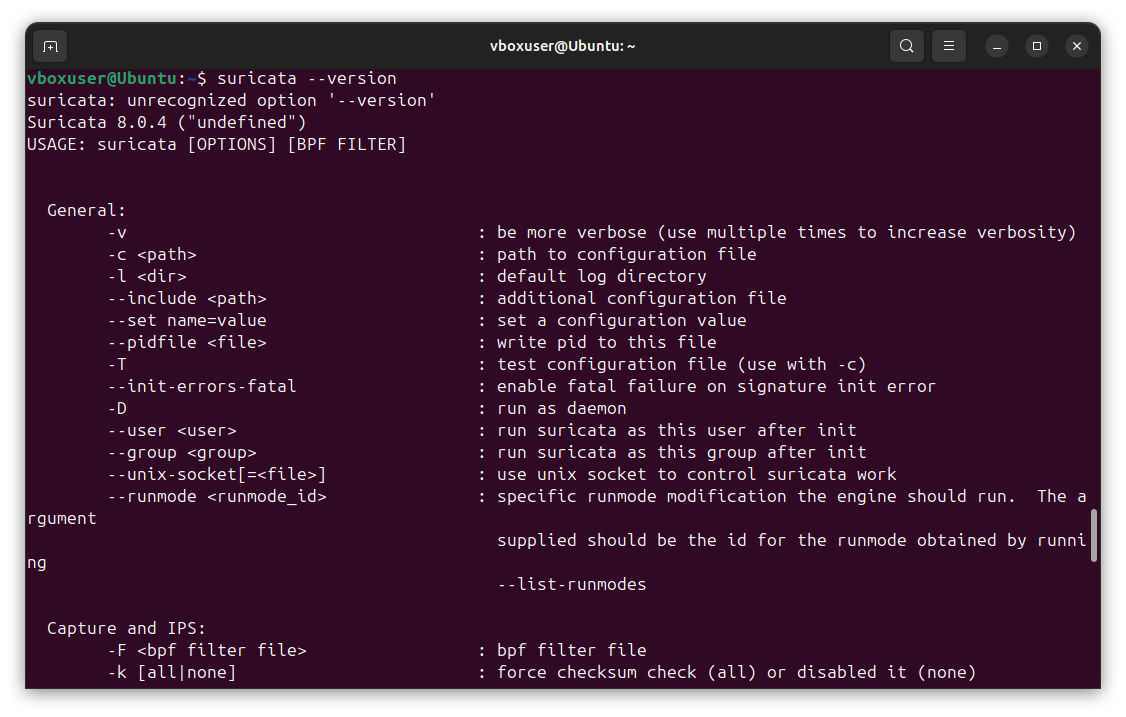
Suricata 8.0.4 successfully installed from the OISF stable PPA — confirming the engine is ready for configuration
### 配置网络接口 Suricata 需要知道监控哪个接口。我识别活动接口并更新 Suricata 配置: ``` ip link show ``` 我编辑 `/etc/suricata/suricata.yaml` 来设置接口: ``` af-packet: - interface: enp0s3 cluster-id: 99 cluster-type: cluster_flow defrag: yes ``` 我还配置 **HOME_NET** 变量以匹配我实验室的内部网络 —— 这告诉 Suricata 哪些 IP 被视为“内部”,以便用于具有方向感知的规则: ``` vars: address-groups: HOME_NET: "[192.168.56.0/24]" EXTERNAL_NET: "!$HOME_NET" ``` ### 更新规则集 Suricata 附带 `suricata-update` 工具,用于管理规则源。我启用 Emerging Threats Open 规则集并拉取最新规则: ``` sudo suricata-update update-sources sudo suricata-update enable-source et/open sudo suricata-update ```
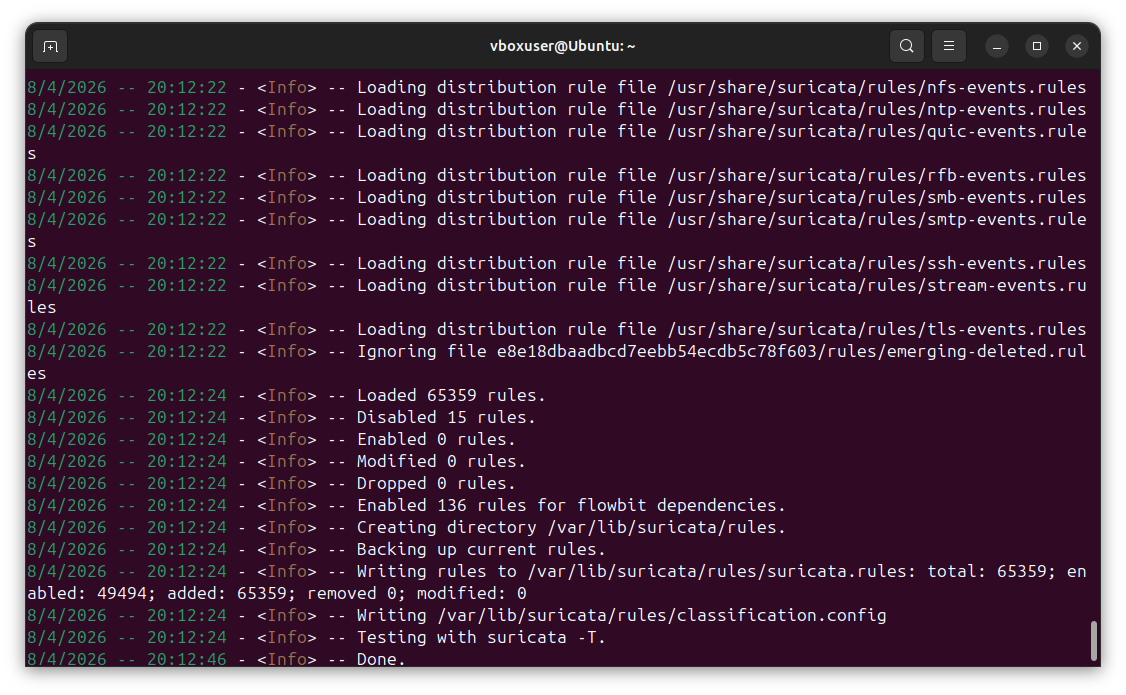
Successfully downloaded the Emerging Threats Open ruleset — 65,359 rules loaded with 49,494 enabled, providing comprehensive coverage across malware, exploits, scanning, and policy violations
### 验证配置 在启动 Suricata 之前,我验证配置和规则语法: ``` sudo suricata -T -c /etc/suricata/suricata.yaml -v ``` `-T` 标志在测试模式下运行,而不会实际启动数据包捕获。测试成功确认所有规则解析正确且配置有效。 ## 第二部分 - Suricata 规则解析 ### 理解规则格式 每条 Suricata 规则都遵循相同的结构: ``` ACTION PROTOCOL SRC_IP SRC_PORT -> DST_IP DST_PORT (OPTIONS) ``` **示例规则:** ``` alert http $EXTERNAL_NET any -> $HOME_NET any (msg:"SQL Injection Attempt"; flow:established,to_server; content:"UNION SELECT"; nocase; classtype:web-application-attack; sid:1000001; rev:1;) ``` ### 规则头组件 | 组件 | 用途 | 示例 | |---|---|---| | **动作** | 规则匹配时的操作 | `alert`, `drop`, `pass`, `reject` | | **协议** | 网络协议 | `tcp`, `udp`, `http`, `dns`, `tls`, `ssh` | | **源 IP** | 流量来源 | `$EXTERNAL_NET`, `any`, `192.168.1.0/24` | | **源端口** | 源端口 | `any`, `80`, `[80,443]` | | **方向** | 流量流向 | `->` (单向), `<>` (双向) | | **目的 IP** | 流量目的地 | `$HOME_NET`, `any`, `10.0.0.5` | | **目的端口** | 目的端口 | `any`, `$HTTP_PORTS`, `!22` | ### 常见规则选项 | 选项 | 用途 | 示例 | |---|---|---| | `msg` | 人类可读的告警消息 | `msg:"SQL Injection Attempt";` | | `content` | 匹配负载中的字符串 | `content:"UNION SELECT";` | | `nocase` | 不区分大小写的内容匹配 | `content:"admin"; nocase;` | | `pcre` | 使用 Perl 兼容正则表达式匹配 | `pcre:"/[0-9]{16}/";` | | `flow` | 匹配流状态/方向 | `flow:established,to_server;` | | `classtype` | 用于告警分流的分类 | `classtype:web-application-attack;` | | `sid` | 签名 ID(唯一标识符) | `sid:1000001;` | | `rev` | 规则修订号 | `rev:1;` | | `threshold` | 速率限制 / 抑制 | `threshold: type both, track by_src, count 5, seconds 60;` | | `reference` | 链接到 CVE 或外部文档 | `reference:cve,2021-44228;` | ### 规则动作层次结构 ``` +-----------+----------------------------------------------+ | ACTION | BEHAVIOR | +-----------+----------------------------------------------+ | alert | Generate alert, log to EVE JSON | | drop | Block packet (IPS mode only) | | reject | Send TCP RST or ICMP unreachable | | pass | Allow packet, skip remaining rules | +-----------+----------------------------------------------+ ``` ## 第三部分 - 编写自定义检测规则 我编写了一系列针对特定攻击模式的自定义检测规则。所有自定义规则都放入 `/etc/suricata/rules/local.rules`,SID 从 `1000000` 开始(本地 SID 范围)。 ### 规则 1:SQL 注入检测 检测 HTTP 请求中常见的 SQL 注入模式: ``` alert http $EXTERNAL_NET any -> $HOME_NET any ( \ msg:"LOCAL SQL Injection - UNION SELECT"; \ flow:established,to_server; \ http.uri; \ content:"UNION"; nocase; \ content:"SELECT"; nocase; distance:0; within:30; \ classtype:web-application-attack; \ sid:1000001; rev:1;) ``` ### 规则 2:路径穿越检测 检测 URI 中的目录穿越尝试: ``` alert http $EXTERNAL_NET any -> $HOME_NET any ( \ msg:"LOCAL Path Traversal Attempt"; \ flow:established,to_server; \ http.uri; \ pcre:"/(\.\.[\/\\]){2,}/"; \ classtype:web-application-attack; \ sid:1000002; rev:1;) ``` ### 规则 3:跨站脚本 (XSS) 检测 HTTP 参数中的脚本注入尝试: ``` alert http $EXTERNAL_NET any -> $HOME_NET any ( \ msg:"LOCAL XSS Attempt - Script Tag"; \ flow:established,to_server; \ http.uri; \ content:"
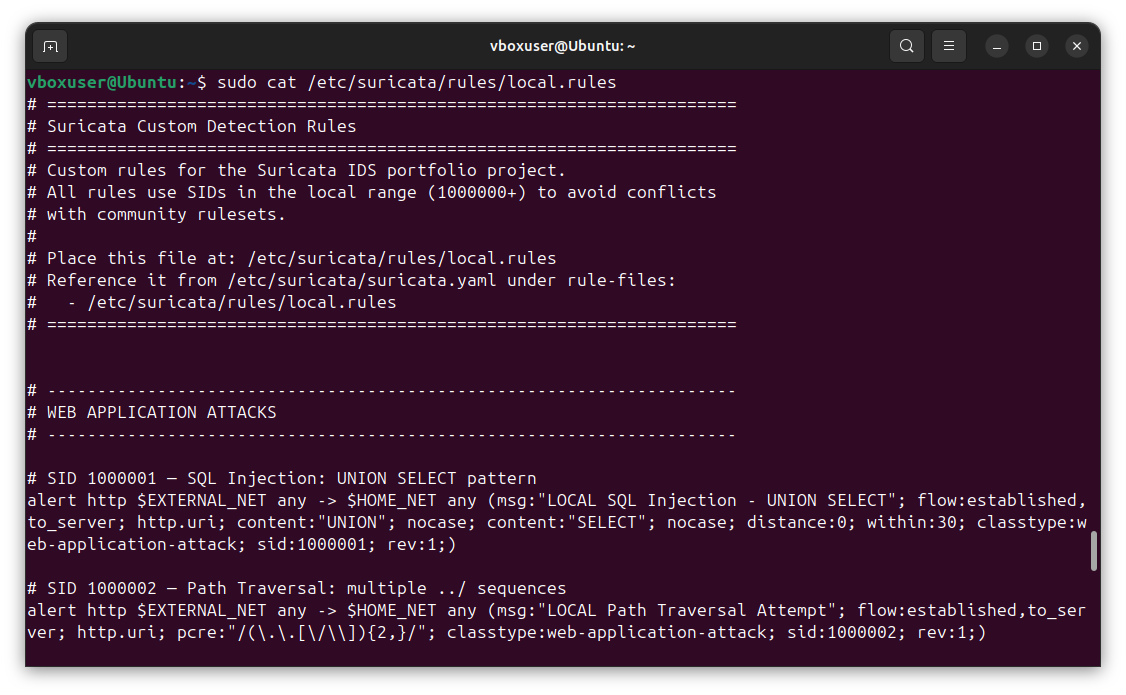
Custom detection rules covering web attacks, brute-force, malware C2, and reverse shells — each tagged with appropriate classtype and unique SID for SIEM correlation
## 第四部分 - 分析真实攻击流量 ### 生成用于分析的攻击流量 为了生成包含丰富、可检测攻击模式的 PCAP,我在针对测试域生成攻击的同时捕获实时流量。在一个终端中,我启动 `tcpdump` 来捕获活动接口上的所有流量: ``` sudo tcpdump -i enp0s3 -w ~/suricata-lab/attack.pcap ``` 在第二个终端中,我生成各种攻击流量 —— Web 利用尝试和对常被恶意软件滥用的可疑 TLD 的 DNS 查询: ``` # 使用恶意 User-Agents 和 payloads 进行 Web 攻击 curl -A "sqlmap/1.6" "http://example.com/?id=1' UNION SELECT 1,2,3--" curl -A "Nikto/2.1.6" "http://example.com/admin/login.php" curl "http://example.com/?file=../../../etc/passwd" curl "http://example.com/search?q=" # 针对可疑 TLDs 的 DNS 查询(常见恶意软件基础设施) nslookup malware-test.tk nslookup phishing.ml nslookup c2-server.ga nslookup exploit-kit.cf ``` 停止 `tcpdump` 后,捕获的 PCAP 包含 139 个数据包,具备现实世界的攻击模式,可供分析。 ### 针对 PCAP 运行 Suricata 我用 Suricata 以离线模式处理捕获的 PCAP 文件: ``` sudo suricata -c /etc/suricata/suricata.yaml -r ~/suricata-lab/attack.pcap -l ~/suricata-lab/output/ ``` 这会通过所有 49,494 条启用的规则处理 PCAP 中的每个数据包,并将告警写入 `./output/eve.json`。
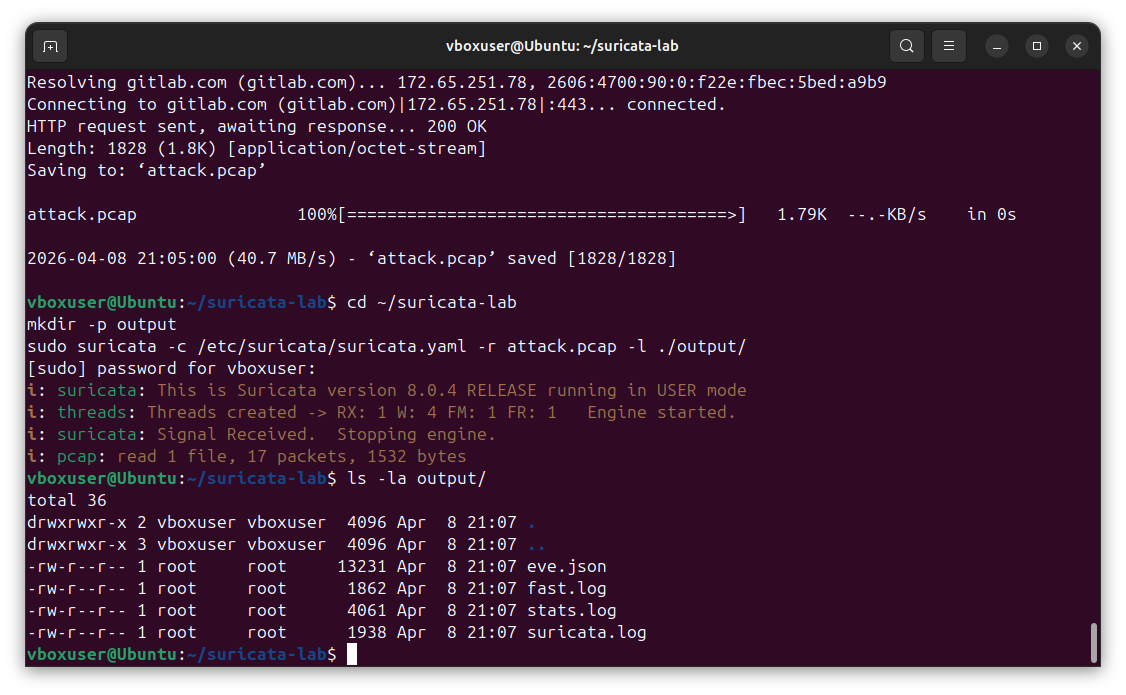
Suricata 8.0.4 processing the captured attack PCAP — 139 packets analyzed in offline mode, producing structured alert output across eve.json, fast.log, stats.log, and suricata.log
### 检查 EVE JSON 输出 Suricata 的主要输出格式是 **EVE JSON** —— 一种行分隔的 JSON 文件,其中每一行都是一个结构化事件。我使用 `jq` 来解析和过滤输出。 **按签名统计告警:** ``` cat ~/suricata-lab/output/eve.json | jq -r 'select(.event_type=="alert") | .alert.signature' | sort | uniq -c | sort -rn ```
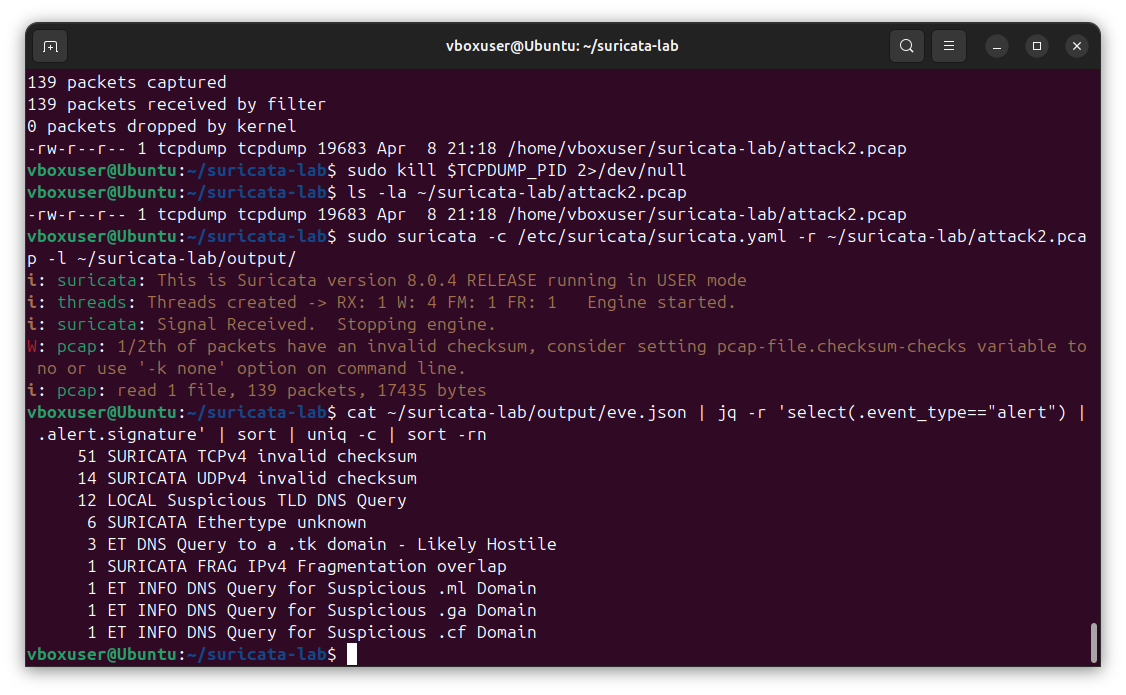
Top alert signatures revealing successful layered detection — the custom rule LOCAL Suspicious TLD DNS Query (12 alerts) fired alongside ET Open community rules detecting the same .tk, .ml, .ga, and .cf domains, confirming the custom rules and community ruleset work together as defense-in-depth
### 分层检测结果 我的自定义规则和 Emerging Threats 社区规则集都检测到了相同的恶意 DNS 活动 —— 这证明了同时运行自定义规则和社区规则的价值: | 规则来源 | 签名 | 告警数量 | |---|---|---| | **LOCAL (自定义)** | LOCAL Suspicious TLD DNS Query (SID 1000006) | 12 | | **ET Open** | ET DNS Query to a .tk domain - Likely Hostile | 3 | | **ET Open** | ET INFO DNS Query for Suspicious .ml Domain | 1 | | **ET Open** | ET INFO DNS Query for Suspicious .ga Domain | 1 | | **ET Open** | ET INFO DNS Query for Suspicious .cf Domain | 1 | ### 按严重程度过滤告警 Suricata 为告警分配严重程度级别 (1=高, 3=低)。我过滤高和中严重程度的告警,以生成结构化的 JSON 格式,供 SOC 分流使用: ``` cat ~/suricata-lab/output/eve.json | jq 'select(.event_type=="alert" and .alert.severity<=2) | {time: .timestamp, signature: .alert.signature, src: .src_ip, dst: .dest_ip}' ```
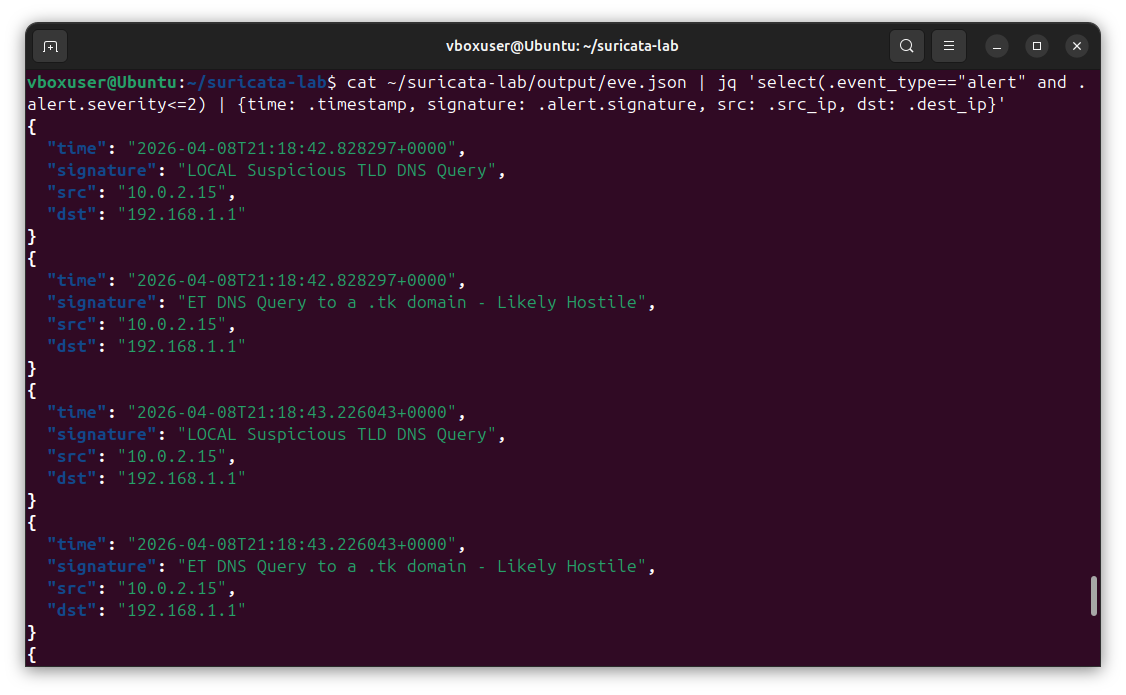
High and medium-severity alerts extracted with structured fields — timestamp, signature, source IP (10.0.2.15), and destination IP (192.168.1.1) — showing both LOCAL custom rule detections and ET Open community alerts side-by-side, ready for SIEM ingestion
### 按源 IP 过滤 一旦我从告警中识别出可疑的源 IP,我就提取该 IP 的所有活动以进行事件调查: ``` cat ~/suricata-lab/output/eve.json | jq --arg ip "10.0.2.15" 'select(.src_ip == $ip) | {time: .timestamp, event: .event_type, signature: .alert.signature}' ``` 这会生成 Suricata 从单个源观察到的所有内容的时间顺序视图 —— 这是事件调查工作流程的基础。 ## 第五部分 - 集成威胁情报 ### 使用数据集进行 IOC 匹配 Suricata 6+ 支持 **数据集** —— 可以从规则引用的快速查找表。这允许规则根据包含数千个恶意 IP、域名或哈希的威胁情报源检查传入流量。 我创建了一个已知恶意 IP 地址的数据集: ``` sudo mkdir -p /var/lib/suricata/datasets sudo nano /var/lib/suricata/datasets/malicious_ips.txt ``` 示例内容: ``` 185.220.101.1 198.51.100.42 45.227.255.206 194.165.16.66 ``` 我编写了一条引用此数据集的规则: ``` alert ip $EXTERNAL_NET any -> $HOME_NET any ( \ msg:"LOCAL Connection from Known Malicious IP"; \ iprep:src,malicious,>,50; \ classtype:bad-unknown; \ sid:1000010; rev:1;) ``` ### 基于域名的检测 同样,我创建了一个已知恶意域名的数据集,用于基于 DNS 的检测: ``` sudo nano /var/lib/suricata/datasets/malicious_domains.txt ``` 示例条目: ``` malware-c2.example phishing-site.test data-exfil.invalid ``` 使用此数据集的规则: ``` alert dns $HOME_NET any -> any any ( \ msg:"LOCAL DNS Query to Known Malicious Domain"; \ dns.query; \ dataset:isset,malicious_domains,type string,load malicious_domains.txt; \ classtype:trojan-activity; \ sid:1000011; rev:1;) ```
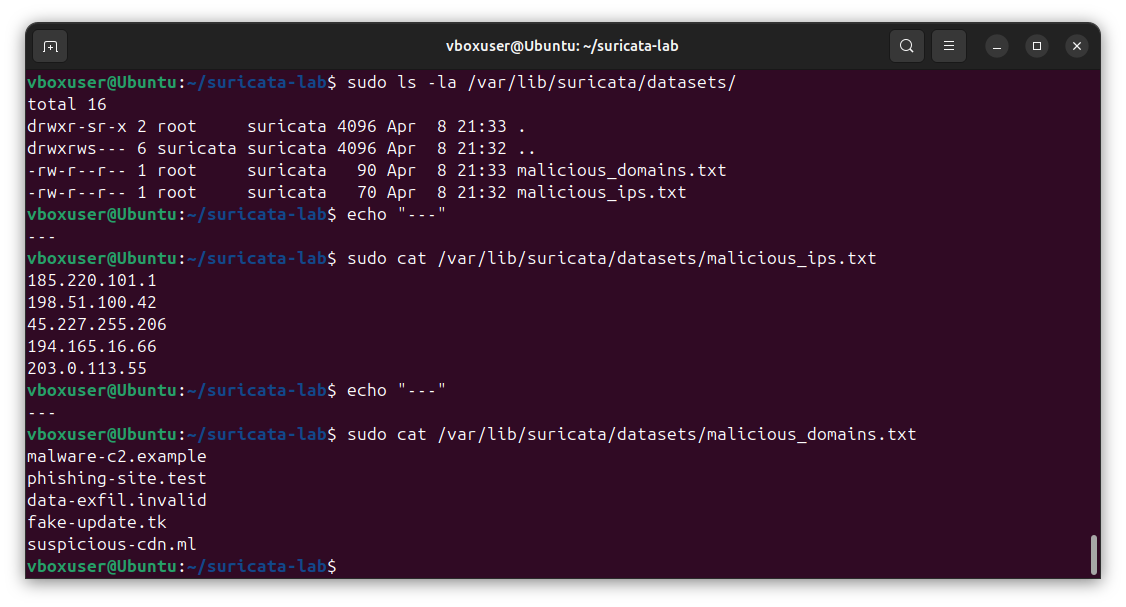
Threat intelligence infrastructure — IOC datasets stored at /var/lib/suricata/datasets/ with proper Suricata ownership, containing both malicious IP and malicious domain blocklists ready for rule-based matching against incoming traffic
### 自动更新威胁情报源 在生产环境中,威胁情报应该自动更新。我创建了一个从公共来源拉取最新源的脚本: ``` #!/bin/bash # update_threat_feeds.sh DATASET_DIR="/var/lib/suricata/datasets" # 从 FireHOL 获取最新的恶意 IPs curl -s https://iplists.firehol.org/files/firehol_level1.netset \ | grep -v '^#' | grep -v '^$' \ > "$DATASET_DIR/malicious_ips.txt" # 重新加载 Suricata 以获取新的数据集 sudo systemctl reload suricata echo "Threat feeds updated: $(wc -l < $DATASET_DIR/malicious_ips.txt) entries" ``` ## 第六部分 - 告警处理与自动化 ### 为什么要自动化告警处理? Suricata 每小时可以生成数千条告警。如果没有自动化,分析人员会被噪音淹没。我编写了脚本来对告警进行分流、汇总和确定优先级,以供 SOC 使用。 ### 告警汇总脚本 ``` #!/bin/bash # alert_summary.sh - 生成 Suricata 告警的执行摘要 EVE_LOG="${1:-/var/log/suricata/eve.json}" if [ ! -f "$EVE_LOG" ]; then echo "Error: EVE log not found at $EVE_LOG" exit 1 fi echo "===========================================" echo " Suricata Alert Summary" echo "===========================================" echo " Source: $EVE_LOG" echo " Time: $(date)" echo "" TOTAL=$(jq -r 'select(.event_type=="alert")' "$EVE_LOG" | wc -l) HIGH=$(jq -r 'select(.event_type=="alert" and .alert.severity==1)' "$EVE_LOG" | wc -l) MED=$(jq -r 'select(.event_type=="alert" and .alert.severity==2)' "$EVE_LOG" | wc -l) LOW=$(jq -r 'select(.event_type=="alert" and .alert.severity==3)' "$EVE_LOG" | wc -l) echo "Total alerts: $TOTAL" echo " High severity: $HIGH" echo " Medium severity: $MED" echo " Low severity: $LOW" echo "" echo "--- Top 10 Alert Signatures ---" jq -r 'select(.event_type=="alert") | .alert.signature' "$EVE_LOG" \ | sort | uniq -c | sort -rn | head -10 echo "" echo "--- Top 10 Source IPs ---" jq -r 'select(.event_type=="alert") | .src_ip' "$EVE_LOG" \ | sort | uniq -c | sort -rn | head -10 echo "" echo "--- Alert Categories ---" jq -r 'select(.event_type=="alert") | .alert.category' "$EVE_LOG" \ | sort | uniq -c | sort -rn ``` ### 实时告警追踪 ``` #!/bin/bash # alert_tail.sh - 实时跟踪高严重性告警 tail -f /var/log/suricata/eve.json | \ jq -r --unbuffered 'select(.event_type=="alert" and .alert.severity<=2) | "\(.timestamp) [\(.alert.severity)] \(.src_ip) -> \(.dest_ip) | \(.alert.signature)"' ``` ### IOC 提取器 提取所有唯一的攻击者 IP 及其触发的签名,以便进行 IOC 共享: ``` #!/bin/bash # extract_iocs.sh - 从 Suricata 告警中提取 IOCs 以便共享 EVE_LOG="${1:-/var/log/suricata/eve.json}" OUTPUT="iocs_$(date +%Y%m%d).csv" echo "src_ip,signature,category,severity,first_seen,last_seen,count" > "$OUTPUT" jq -r 'select(.event_type=="alert") | [.src_ip, .alert.signature, .alert.category, .alert.severity, .timestamp] | @csv' "$EVE_LOG" | \ awk -F',' '{ key=$1"|"$2"|"$3"|"$4 if (!(key in first)) first[key]=$5 last[key]=$5 count[key]++ } END { for (k in count) { split(k, parts, "|") print parts[1]","parts[2]","parts[3]","parts[4]","first[k]","last[k]","count[k] } }' >> "$OUTPUT" echo "IOCs extracted to: $OUTPUT" echo "Unique attacker entries: $(($(wc -l < $OUTPUT) - 1))" ```
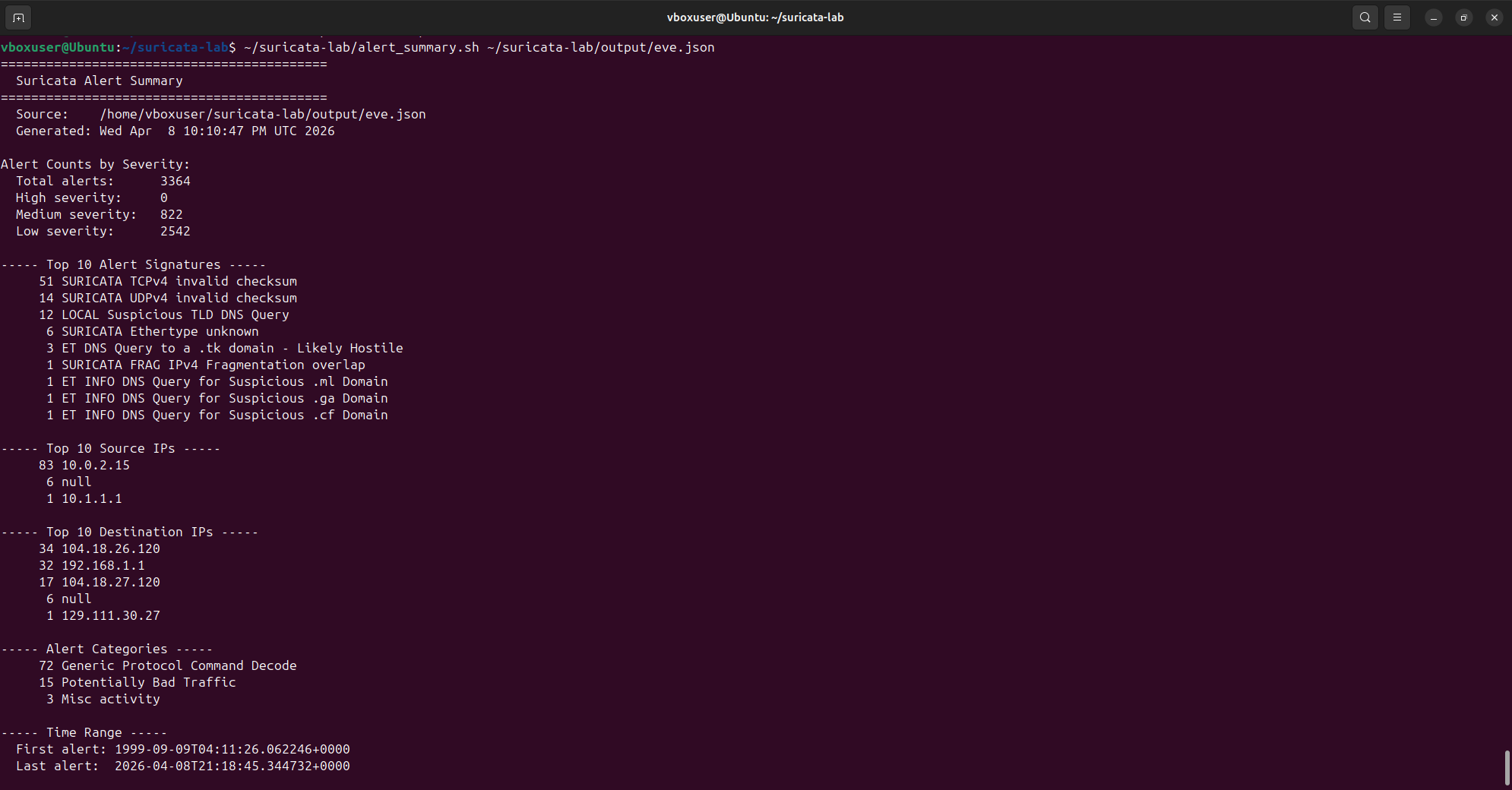
Automated alert summary processing 3,364 total alerts (822 medium severity, 2,542 low) — surfacing the top 10 signatures including custom LOCAL Suspicious TLD DNS Query (12 alerts) alongside ET Open community detections, plus top source/destination IPs and category breakdowns generated from a single command
### 与 SIEM 集成 EVE JSON 格式专为 SIEM 摄取而设计。要将告警转发到 Splunk、ELK 或任何现代 SIEM,通常需要配置日志转发器(Filebeat、Splunk Universal Forwarder、Fluentd)来跟踪 `/var/log/suricata/eve.json`。这种结构化格式意味着不需要解析 —— 每个字段都已经被键值化。 示例 Filebeat 配置片段: ``` filebeat.inputs: - type: log enabled: true paths: - /var/log/suricata/eve.json json.keys_under_root: true json.add_error_key: true fields: source: suricata ``` 同样的 EVE JSON 输出也是 [SplunkEM Analysis 项目](https://github.com/jesse12-21/splunk-siem-analysis) 中 `suricata` 源类型的输入 —— 实现了检测和分析之间的闭环。 ## 🔑 Suricata 关键命令参考 | 命令 | 用途 | |---|---| | `suricata -T -c suricata.yaml` | 测试配置而不启动 | | `suricata -c suricata.yaml -i enp0s3` | 在接口上运行实时捕获 | | `suricata -c suricata.yaml -r file.pcap -l ./out/` | 离线处理 PCAP 文件 | | `suricata-update` | 从配置的源更新规则 | | `suricata-update enable-source et/open` | 启用 Emerging Threats Open 规则集 | | `suricatasc -c "reload-rules"` | 重新加载规则而不重启 | | `systemctl status suricata` | 检查 Suricata 服务状态 | | `tail -f /var/log/suricata/eve.json \| jq` | 实时追踪告警 | ## 🧰 工具与环境 | 组件 | 版本 | 用途 | |---|---|---| | **Ubuntu** | 24.04 LTS | 主机操作系统 (VirtualBox VM) | | **Suricata** | 8.0.4 | 网络入侵检测引擎 | | **ET Open 规则集** | 49,494 条启用的规则 | 社区维护的检测规则 | | **jq** | 1.7+ | 用于 EVE 日志分析的 JSON 解析 | | **tcpdump** | 最新 | 用于 PCAP 生成的数据包捕获 | ## 📚 总结 本项目通过六个循序渐进的练习展示了实用的网络入侵检测技能: 1. **安装与配置** —— 从 OISF 稳定 PPA 在 Ubuntu 24.04 上安装了 Suricata 8.0.4,配置了网络接口和 HOME_NET 变量,并从 Emerging Threats Open 规则集加载了 49,494 条规则 2. **规则解析** —— 记录了 Suricata 的规则语法,包括动作、协议、选项和修饰符 —— 这是编写有效检测的基础 3. **自定义规则** —— 编写了 16 条自定义检测规则,涵盖 SQL 注入、XSS、路径穿越、暴力破解、扫描器检测、可疑 DNS、反向 Shell 和 PowerShell 下载 —— 所有规则均使用本地 1000000+ 范围内的 SID 4. **PCAP 分析** —— 使用 `tcpdump` 和 `curl` 生成攻击流量,通过 Suricata 处理生成的 139 数据包 PCAP,并使用 `jq` 解析 EVE JSON 输出。演示了成功的 **分层检测**,其中自定义规则 `LOCAL Suspicious TLD DNS Query`(12 条告警)和 ET Open 社区规则(6 条告警)检测到了相同的恶意 DNS 活动 5. **威胁情报** —— 在 `/var/lib/suricata/datasets/` 构建了包含 IP 和域名拦截列表的威胁情报基础设施,展示了基于 IOC 的检测和行为规则 6. **告警自动化** —— 构建了三个 bash 脚本,用于告警汇总、实时追踪和 IOC 提取。汇总脚本在几秒钟内处理了 3,364 条告警,提取出顶级签名、源 IP 和类别,以便立即进行 SOC 分流 ### 演示的技能 `Network Intrusion Detection` · `Suricata Rule Writing` · `EVE JSON Analysis` · `PCAP Forensics` · `Threat Intelligence Integration` · `Bash Scripting` · `Linux Administration` · `SOC Operations` · `IOC Extraction` · `SIEM Integration`
### 🔗 相关项目
[](https://github.com/jesse12-21/wireshark-threat-detection)
[](https://github.com/jesse12-21/nmap-network-recon)
[](https://github.com/jesse12-21/splunk-siem-analysis)
*作为网络安全作品集项目构建 —— 欢迎反馈和建议。*
*作为网络安全作品集项目构建 —— 欢迎反馈和建议。*
标签:AMSI绕过, DOE合作, ET Open规则, Metaprompt, NIDS, PCAP分析, SOC集成, Suricata, 告警自动化, 威胁情报, 威胁检测, 安全运营, 容器化, 应用安全, 开发者工具, 开源安全工具, 扫描框架, 现代安全运营, 网络安全, 网络安全防御, 自定义规则, 逆向工程平台, 隐私保护