microsoft/Webwright
GitHub: microsoft/Webwright
微软推出的轻量级浏览器代理框架,通过让 LLM 编写 Playwright 脚本而非逐步预测操作来完成复杂 Web 任务。
Stars: 5829 | Forks: 365
# Webwright
## 🎥 演示
https://github.com/user-attachments/assets/4ed94cd5-11be-4daa-b2d7-1260a803baca
## 📊 性能
在两个真实网站基准测试中处于最先进水平,步数预算为 100 步——有关完整详细信息,请参阅[博客文章](https://www.microsoft.com/en-us/research/articles/webwright-a-terminal-is-all-you-need-for-web-agents/)。
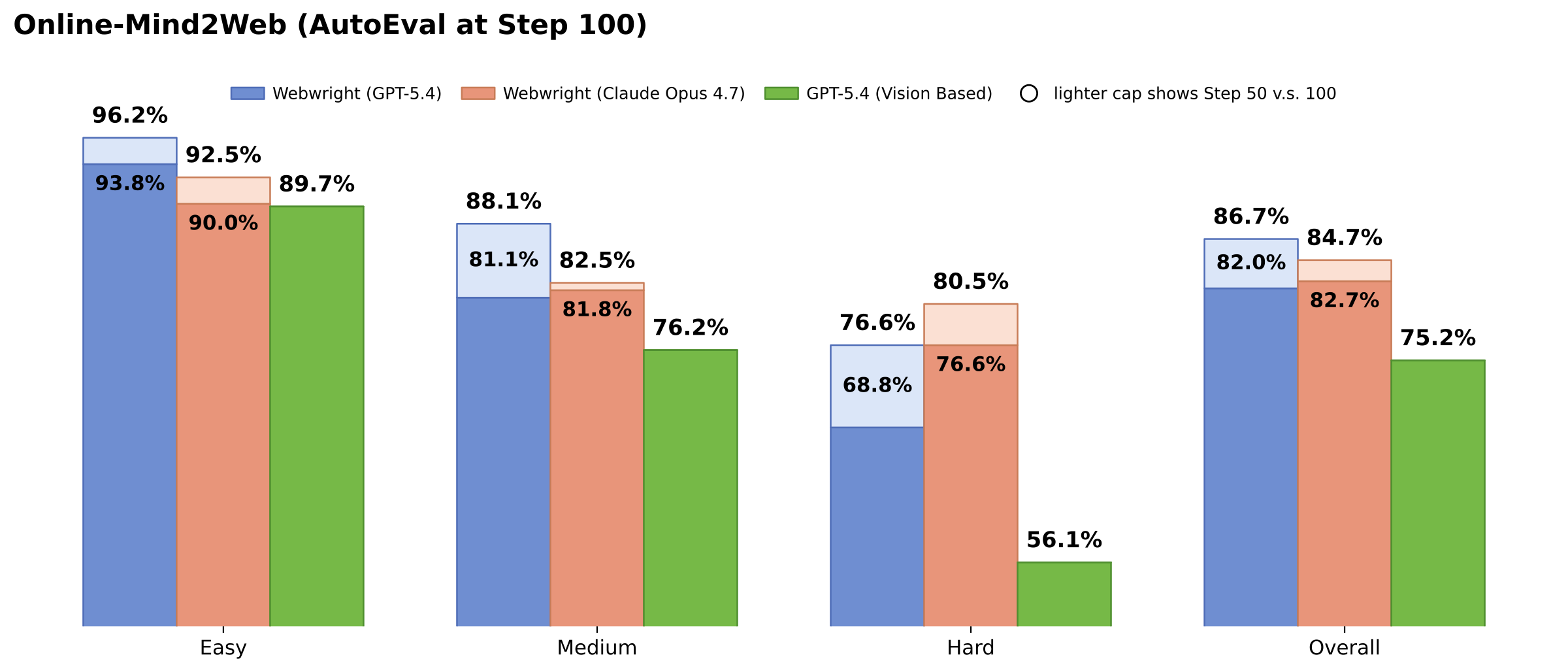
- 🏆 **Online-Mind2Web(300 个任务):** 使用 GPT-5.4 达到 **86.7%** —— 在 AutoEval 类别的开源测试框架中最高。Claude Opus 4.7 达到 **84.7%**,并且在困难划分中更强(**80.5%**,而在 N=100 时 GPT-5.4 为 76.6%)。
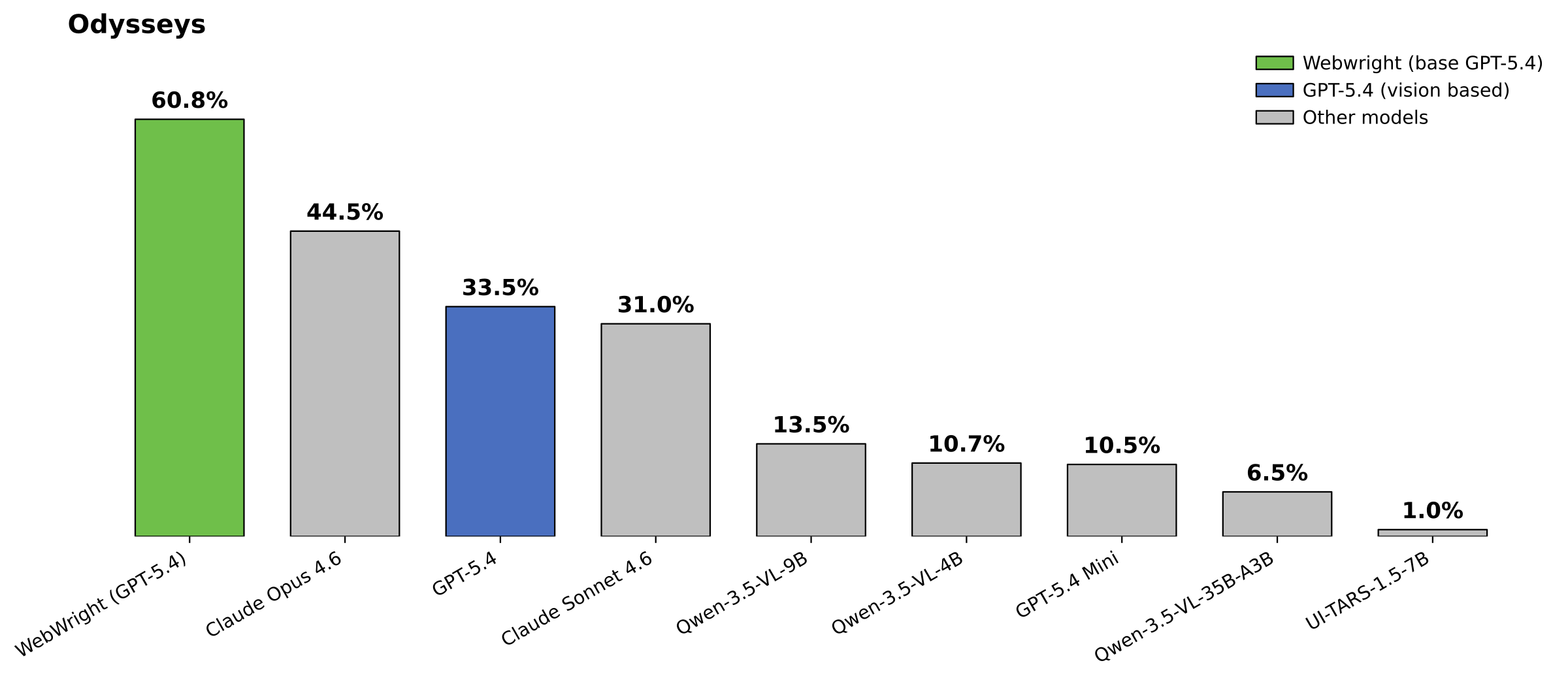
- 🚀 **Odysseys(200 个长期任务):** 使用 GPT-5.4 达到 **60.1%**(平均 76.1 步)—— 比之前的 SOTA(使用基于视觉的方法和持久浏览器的 Opus 4.6,44.5%)**高出 15.6 个百分点**,比基础版 GPT-5.4(使用 xy 坐标预测和持久浏览器,33.5%)**高出 26.6 个百分点**。
- 🧠 **代码即动作胜过坐标预测:** Webwright 在所有难度划分中都大幅超过了复现的 GPT-5.4 截图+xy 坐标基线。
- 🧰 **小模型 + 可重用工具:** 生成的脚本可以打包为参数化的 CLI 工具——即使是 **Qwen-3.5-9B**,在有 5 个以上可用工具的情况下,也能在 Online-Mind2Web 网站上很好地完成任务。
/ # task.json + report.json per task
├── tests/
└── outputs/ # run artifacts (trajectories, screenshots)
```
## 📰 任务展示(作为仪表板的重复运行)
[`assets/task_showcase/`](assets/task_showcase/README.md) 下的一个小型 Flask 应用将
Webwright 针对**可重复** odyssey 任务(优惠、库存、列表、
招聘看板、天气等)的运行结果整合到一个仪表板中。每个任务仅附带两个
文件—— `task.json`(元数据)和 `report.json`(精心整理的结构化输出:
来源 + 表格、列表、摘要等结果部分)——并且模板
以通用方式渲染它们,因此添加新任务只需在
`assets/task_showcase/tasks/` 中放入一个新文件夹。
```
pip install flask
python assets/task_showcase/app.py # http://127.0.0.1:5005
```
为了让 Webwright 在运行时生成一个准备好渲染的任务文件夹,请叠加
Task Showcase 覆盖层:
```
python -m webwright.run.cli \
-c base.yaml -c model_openai.yaml -c task_showcase.yaml \
-t "" \
--task-id my_repeatable_task \
-o outputs/default
```
运行会在输出工作空间内写入 `task_showcase/tasks//task.json` 和 `report.json`。无需将生成的文件复制
回仓库即可渲染它们:
```
python assets/task_showcase/app.py \
--tasks-dir outputs/default//task_showcase/tasks
```
## 🚀 快速开始
### 前置条件
- Python 3.10+
- 通过 Playwright 安装的 Chromium
- 你选择的后端(OpenAI、Anthropic 或 OpenRouter)的 API 密钥
### 安装
```
pip install -e .
playwright install chromium
```
### 运行
为配置的后端导出凭证(例如,与 `model_openai.yaml` 一起使用的 `OPENAI_API_KEY`,或与 `model_claude.yaml` 一起使用的 `ANTHROPIC_API_KEY`)。
`image_qa` 和 `self_reflection` 工具默认使用同一配置的模型,
因此 Anthropic 运行不需要 OpenAI 密钥。然后:
```
python -m webwright.run.cli \
-c base.yaml -c model_openai.yaml \
-t "Search for flights from SEA to JFK on 2026-08-15 to 2026-08-20" \
--start-url https://www.google.com/flights \
--task-id demo_openai \
-o outputs/default
```
### 🚩 标志
| 标志 | 描述 |
|------|-------------|
| `-c` | 来自 `src/webwright/config/` 的配置文件(可叠加)。 |
| `-t` | 任务指令。 |
| `--start-url` | 初始页面。 |
| `--task-id` | 输出子文件夹名称。 |
| `-o` | 输出目录。 |
## 🔌 作为插件使用
Webwright 为 [Claude Code](https://docs.claude.com/en/docs/claude-code/plugins)([`.claude-plugin/plugin.json`](.claude-plugin/plugin.json))和 [OpenAI Codex](https://developers.openai.com/codex/plugins)([`.codex-plugin/plugin.json`](.codex-plugin/plugin.json))都提供了插件清单,共享技能位于 [`skills/webwright/`](skills/webwright/),斜杠命令位于 [`skills/webwright/commands/`](skills/webwright/commands/)。宿主代理原生驱动 Webwright 循环——除了你的宿主订阅外,无需额外的 LLM API 密钥或成本。原生读取 PNG 屏幕截图的宿主会跳过 `image_qa` / `self_reflection` 工具。
常见的运行时依赖(在任一路径后只需安装一次):
```
pip install -e .
playwright install chromium
```
/` 下运行带有埋点的 Playwright 脚本,并根据保存的屏幕截图直观地自我验证每个关键点。
/` 下运行带有埋点的 Play 脚本,并根据保存的屏幕截图直观地自我验证每个关键点。
要在不卸载的情况下关闭插件,请在 `~/.codex/config.toml` 中将其条目设置为 `enabled = false`,然后重启 Codex。
`)来调用它。
卸载:`openclaw plugins uninstall webwright`。
## 📃 轨迹比较与查看器
你可以使用 Webwright 测试框架及其 Codex / GitHub Copilot 技能变体运行相同的任务,并查看不同测试框架之间的 token 使用情况和轨迹比较。轨迹查看器支持 Codex、GitHub Copilot 和 Webwright 测试框架的跟踪。
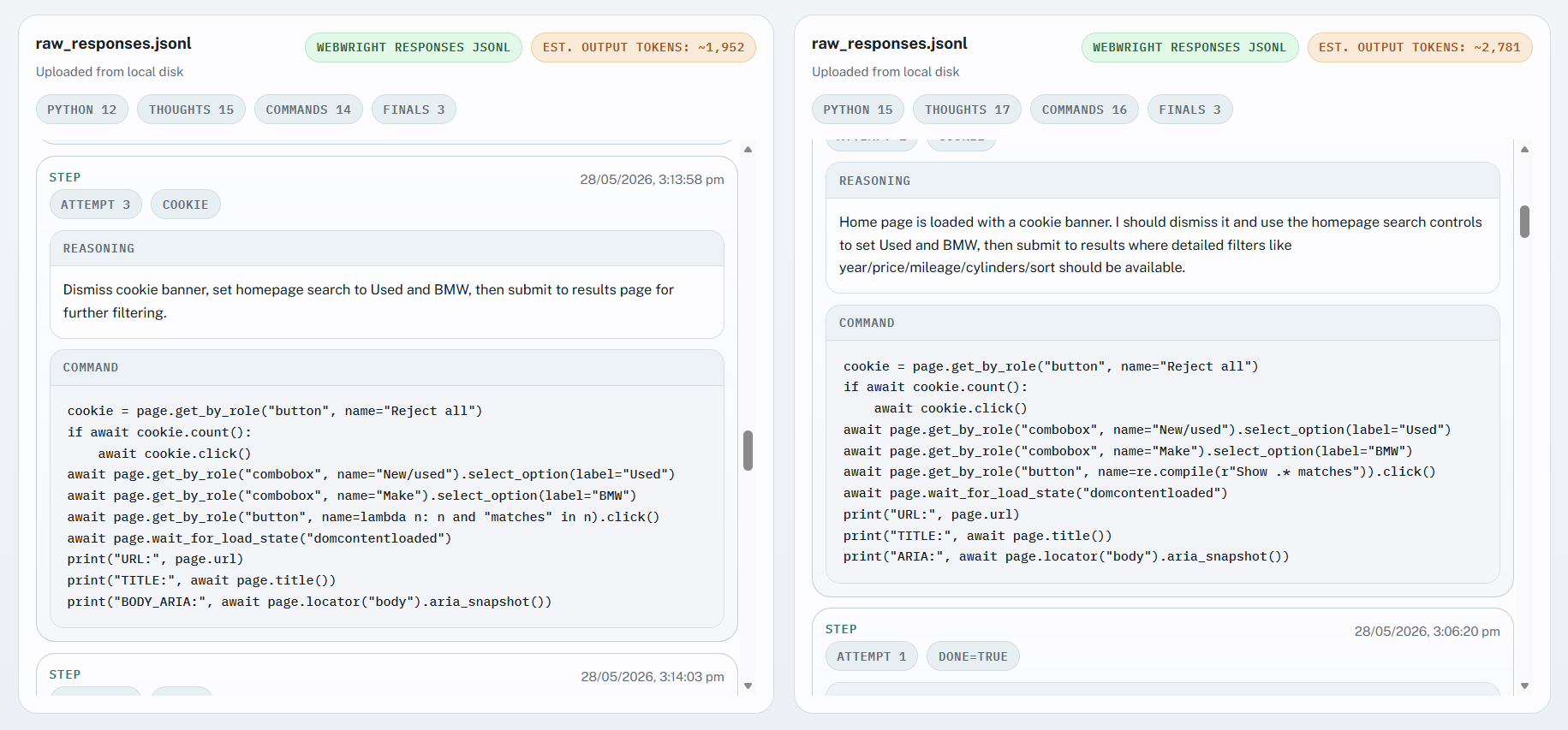
### 如何使用
```
cd assets/compare_trajectory/
python3 -m http.server
```
在浏览器中打开网页,上传 Webwright 的 `raw_responses.jsonl` 并附加 `trajectory.json` 进行查看。然后在另一侧,你可以上传你的 Codex 或 GitHub Copilot 跟踪记录。
### 获取 Codex 跟踪记录:
```
ls ~/.codex/sessions/2026/MONTH/DAY/SESSION_ID.jsonl
```
### 获取 GitHub Copilot 跟踪记录:
```
/export file session
-> session.md is the uploadable trace
```
### 快速比较
#### “寻找 2005-2015 年间生产、价格在 25,000 到 50,000 美元之间、里程数少于 50,000 英里的最便宜的二手 8 缸宝马车。”
| Tokens | Webwright 测试框架(本地浏览器模式) | Codex Webwright 技能 |
| --- | ---: | ---: |
| Input | 420,433 | 3,271,143 |
| Output | 3,593 | 20,040 |
| Reasoning | 0 | 4,410 |
| Cached | 217,216 | 3,081,3440 |
| Total | 424,026 | 3,291,183 |
单次运行和结果可能会有所不同。
## 致谢
- [SWE-agent/mini-swe-agent](https://github.com/SWE-agent/mini-swe-agent/tree/main) — 最小代理循环的设计灵感。
- [Playwright](https://playwright.dev/) — 浏览器自动化。
## 引用
如果你在研究中使用了 Webwright 或在此基础上进行了开发,请引用此仓库:
```
@misc{webwright2026,
title = {Webwright: A terminal is all you need for web agents},
author = {Lu, Yadong and Xu, Lingrui and Huang, Chao and Awadallah, Ahmed},
year = {2026},
howpublished = {\url{https://github.com/microsoft/Webwright}},
note = {GitHub repository}
}
```
将你的编码模型转变为最先进的浏览器代理




💡 动机:超越有状态浏览器中的分步 Web 交互
如今的大多数 Web 代理将浏览器会话本身视为工作空间:在每一步中,模型接收当前页面状态并预测下一个单一操作——一次点击、一次输入、一个 DOM 选择器或一次简短的工具调用。无论采用何种格式,代理都被锁定在预定义的交互循环中,每次只能预测一个 Web 操作。当 LLM 还比较弱时,这种机制是有用的。随着模型在编写和调试代码方面变得越来越强大,同样的机制就成了瓶颈。 Webwright 采取了不同的立场:**将代理与浏览器分离开来**,并将浏览器视为代理在开发程序时可以启动、检查和丢弃的东西。持久的工件不是浏览器会话——而是**本地工作空间中的代码和日志**。 - 🧱 **与 Web 环境的健壮、可重用交互** — 具有终端的编码代理不再执行脆弱的像素级操作,而是查询元素、等待条件并处理动态行为(如延迟加载或重新渲染)。生成的脚本可以重新运行、修改并跨任务共享,而不是从头重新探索。 - ⚡ **复杂工作流的高效组合** — 像选择日期或填写表单这样的多步交互变成了一个紧凑的程序。循环、函数和抽象让代理能够跨相似任务(例如不同的日期)进行泛化,而无需重新预测相同的底层序列。交互轮次更少,执行速度更快,长期任务中的错误累积更少。 - 🧪 **工作空间即状态,而非浏览器即状态** — 代理可以编写探索性脚本,生成新的浏览器会话,并自行决定何时捕获屏幕截图和检查失败,就像人类工程师迭代 RPA 脚本一样。 - 🪄 **极简却出奇地有效** — 这种精简的设置事实证明能够很好地处理复杂,特别是长期的 Web 任务(参见[性能](#-performance))。🌟 为什么选择 Webwright
大多数 Web 代理框架将实际的代理循环埋藏在多层抽象之下。Webwright 采取了相反的立场: - 🪶 **设计轻量** — 核心代理循环在一个约 450 行的文件中,Playwright 环境约 570 行,CLI 约 150 行。 - 🧩 **可插拔的模型后端** — OpenAI、Anthropic 和 OpenRouter,每个约 150–200 行。 - 🔍 **零隐藏框架** — 仅使用 `httpx`、`pydantic`、`playwright` 和 `typer`。 - 🔁 **扁平的提示词 → 观察 → 执行脚本循环** — 端到端可读,易于调试,易于 fork。 - 🧪 **运行工件优先** — 每次运行都会将轨迹和屏幕截图写入磁盘以供检查。 如果你想要一个极简、易于调试的浏览器代理起点,而不是另一个重量级平台,这就是它。🆚 Webwright 与其他浏览器代理仓库的区别
它们在架构层面的区别: | | **Stagehand (Browserbase)** | **agent-browser (Vercel)** | **browser-use** | **Webwright** | | ------------------- | ------------------------------------------------------------ | ------------------------------------------------------------------------- | ----------------------------------------------------- | ------------------------------------------------------------------------- | | **范式** | 混合:代码 + 自然语言原语 (`act` / `extract` / `agent`) | 由*另一个*代理(Claude Code、Codex 等)调用的 CLI 工具 | 基于 DOM/AX 快照的自主 LLM 代理循环 | **具有终端的编码代理**;浏览器只是它生成的一个环境 | | **动作空间** | Playwright 代码,或自然语言 → LLM 翻译的 Playwright | 离散子命令 (`open`, `click @e2`, `snapshot`, `eval`) | 由 LLM 选择的带索引的点击/输入动作 | **自由格式的 Python(自己编写 Playwright 脚本)** | | **什么是“状态”?**| 浏览器会话 | 浏览器会话(通过守护进程跨 CLI 调用保留) | 浏览器会话 | **本地工作空间——代码、屏幕截图、日志。** 浏览器是一次性的。 | | **循环形态** | 命令式;`agent()` 在需要时执行多步 | 每个微步执行一次 CLI 调用 | 观察 → 预测下一步操作 → 执行 → 重复 | 编写代码 → 执行 → 检查屏幕截图 → 修复(代码即动作) |
Claude Code
### 安装 通过 Claude Code 内置的市场安装: ``` # 1. 将此 repo 添加为 Claude Code plugin marketplace /plugin marketplace add microsoft/Webwright # 2. 从该 marketplace 安装 plugin /plugin install webwright@webwright ``` 更倾向于本地检出?将 marketplace 命令指向克隆的仓库: ``` /plugin marketplace add /absolute/path/to/Webwright /plugin install webwright@webwright ``` ### 使用 安装后**启动一个新的 Claude Code 会话**——插件在会话启动时加载,在你重启之前不会出现。 你可以直接用自然语言询问 Claude Code(技能会根据其描述自动激活),或者使用以下其中一个斜杠命令: ``` /webwright:run search Google Flights for flights from SEA to JFK on 2026-08-15 to 2026-08-20 /webwright:craft search a ticket on Google Flights from LAX to SFO depart June 7 return June 14 ``` - `/webwright:run`(或任何直接的提示词)会为字面任务值生成一个**一次性的** `final_script.py`。 - `/webwright:craft` 会生成一个**可重用的 CLI 工具**:`final_script.py` 会变成一个带有 Google 风格 `Args:` 文档字符串的参数化函数,以及一个默认使用具体任务值的 `argparse` 包装器,这样你以后可以使用不同的参数重新运行它——例如 `python final_script.py --origin JFK --destination LAX --depart-date 2026-07-01`。 在这两种模式下,Claude Code 都会构建一个包含 `plan.md` 的工作空间,在 `final_runs/run_OpenAI Codex
### 安装 Codex 读取 Claude 风格的市场,因此同一个仓库可以用作 Codex 插件市场。从 Codex CLI 运行: ``` # 1. 将此 repo 添加为 Codex plugin marketplace codex plugin marketplace add microsoft/Webwright # 2. 打开 plugin 浏览器并安装 Webwright codex /plugins ``` 更倾向于本地检出? ``` codex plugin marketplace add /absolute/path/to/Webwright ``` 然后重启 Codex 以加载新的市场和插件。 ### 使用 在一个新的 Codex 线程中,你可以用自然语言询问(技能会根据其描述自动激活),也可以使用 `@webwright` 显式调用内置技能: ``` @webwright search Google Flights for flights from SEA to JFK on 2026-08-15 to 2026-08-20 ``` Codex 会构建一个包含 `plan.md` 的工作空间,在 `final_runs/run_🦞 OpenClaw
### 安装 直接从本地检出安装(路径、归档、npm 规格、git 仓库或 `clawhub:` 规格均可): ``` openclaw plugins install /absolute/path/to/Webwright openclaw gateway restart # reload so the plugin and skill are picked up ``` 验证: ``` openclaw plugins list | grep webwright openclaw skills list | grep webwright # should show "✓ ready" ``` ### 使用 `webwright` 技能现在可用于任何 OpenClaw 代理界面(CLI、Telegram 等)——通过用自然语言询问代理,或者通过 [`skills/webwright/commands/`](skills/webwright/commands/) 下提供的斜杠命令(例如 `/webwright runHermes Agent
### 安装 [Hermes Agent](https://github.com/NousResearch/hermes-agent) 是一个[兼容技能的客户端](https://agentskills.io),因此同一个 `skills/webwright/` 文件夹可以作为 Hermes 技能加载。将其符号链接到你的 Hermes 用户技能目录中: ``` mkdir -p ~/.hermes/skills ln -sfn /absolute/path/to/Webwright/skills/webwright ~/.hermes/skills/webwright ``` 不需要 Hermes 专用的清单;仅加载 `SKILL.md`。 ### 使用 启动 Hermes(`hermes`)并要求它用自然语言驱动一个 Web 任务——该技能会根据其描述自动激活。你也可以使用 `/webwright` 显式调用它。 注意:[`skills/webwright/commands/`](skills/webwright/commands/) 下提供的命名子命令(`/webwright:run`、`/webwright:craft`)是 Claude Code / Codex 的惯例,在 Hermes 中不起作用;技能本身仍然可以端到端地工作。标签:AI代理, RPA, Web自动化, 人工智能, 浏览器自动化, 特征检测, 用户模式Hook绕过, 运行时操纵, 逆向工具, 镜像安全