sever-ali/threat-hunting-scenario-tor
GitHub: sever-ali/threat-hunting-scenario-tor
一份关于在端点检测中识别未经授权使用 Tor 的威胁狩猎报告与查询方案。
Stars: 0 | Forks: 0
 # 威胁狩猎报告:未经授权的 TOR 使用
- [场景创建](https://github.com/sever-ali/threat-hunting-scenario-tor/blob/main/threat-hunting-scenario-tor-event-creation.md)
## 利用的平台和语言
- Windows 10 虚拟机(Microsoft Azure)
- EDR 平台:Microsoft Defender for Endpoint
- Kusto 查询语言(KQL)
- Tor 浏览器
## 场景描述
管理层怀疑部分员工可能使用 TOR 浏览器绕过网络安全控制,因为近期网络日志显示异常的加密流量模式以及与已知 TOR 入口节点的连接。此外,有匿名报告称员工在工作时间讨论访问受限网站的方法。目标是检测任何 TOR 使用情况并分析相关安全事件以缓解潜在风险。如果发现任何 TOR 使用行为,需通知管理层。
### TOR 相关 IoC 发现的高级计划
- **检查 `DeviceFileEvents`** 是否存在任何 `tor(.exe)` 或 `firefox(.exe)` 文件事件。
- **检查 `DeviceProcessEvents`** 是否存在安装或使用的迹象。
- **检查 `DeviceNetworkEvents`** 是否存在通过已知 TOR 端口发出的外连迹象。
## 采取的步骤
### 1. 查询 `DeviceFileEvents` 表
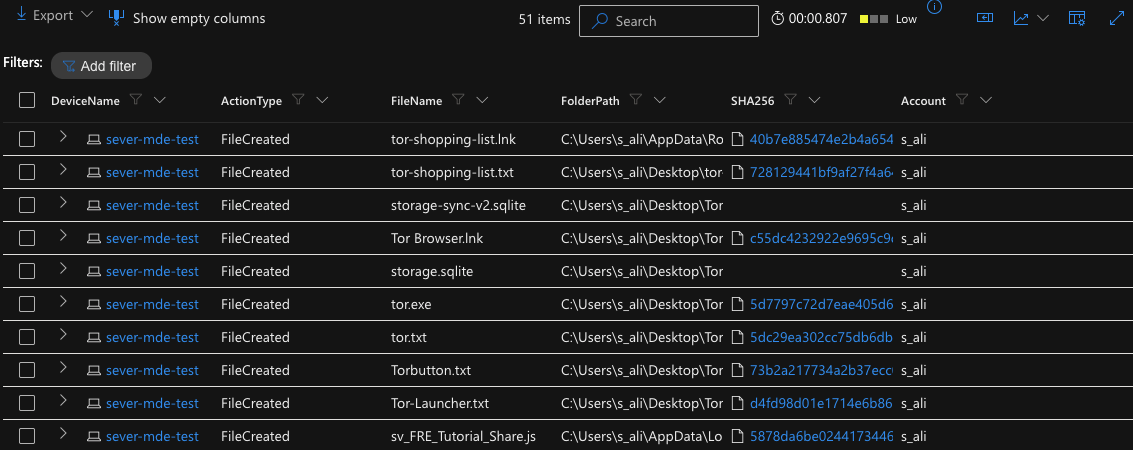
在 DeviceFileEvents 表中搜索包含字符串 “tor” 的任意文件,发现用户 “s_ali” 下载了 TOR 安装程序,随后桌面上出现了许多与 TOR 相关的文件,并在 2026-04-05T17:16:52.9273805Z 创建了名为 “tor-shopping-list.txt” 的文件。这些事件始于 2026-04-05T17:01:15.7698993Z。
**用于定位事件的查询:**
```
DeviceFileEvents
| where DeviceName == "sever-mde-test"
| where InitiatingProcessAccountName == "s_ali"
| where FileName contains "tor"
| where Timestamp >= datetime(2026-04-05T17:01:15.7698993Z)
| order by Timestamp desc
| project DeviceName, ActionType, FileName, FolderPath, SHA256, Account = InitiatingProcessAccountName
```
# 威胁狩猎报告:未经授权的 TOR 使用
- [场景创建](https://github.com/sever-ali/threat-hunting-scenario-tor/blob/main/threat-hunting-scenario-tor-event-creation.md)
## 利用的平台和语言
- Windows 10 虚拟机(Microsoft Azure)
- EDR 平台:Microsoft Defender for Endpoint
- Kusto 查询语言(KQL)
- Tor 浏览器
## 场景描述
管理层怀疑部分员工可能使用 TOR 浏览器绕过网络安全控制,因为近期网络日志显示异常的加密流量模式以及与已知 TOR 入口节点的连接。此外,有匿名报告称员工在工作时间讨论访问受限网站的方法。目标是检测任何 TOR 使用情况并分析相关安全事件以缓解潜在风险。如果发现任何 TOR 使用行为,需通知管理层。
### TOR 相关 IoC 发现的高级计划
- **检查 `DeviceFileEvents`** 是否存在任何 `tor(.exe)` 或 `firefox(.exe)` 文件事件。
- **检查 `DeviceProcessEvents`** 是否存在安装或使用的迹象。
- **检查 `DeviceNetworkEvents`** 是否存在通过已知 TOR 端口发出的外连迹象。
## 采取的步骤
### 1. 查询 `DeviceFileEvents` 表
在 DeviceFileEvents 表中搜索包含字符串 “tor” 的任意文件,发现用户 “s_ali” 下载了 TOR 安装程序,随后桌面上出现了许多与 TOR 相关的文件,并在 2026-04-05T17:16:52.9273805Z 创建了名为 “tor-shopping-list.txt” 的文件。这些事件始于 2026-04-05T17:01:15.7698993Z。
**用于定位事件的查询:**
```
DeviceFileEvents
| where DeviceName == "sever-mde-test"
| where InitiatingProcessAccountName == "s_ali"
| where FileName contains "tor"
| where Timestamp >= datetime(2026-04-05T17:01:15.7698993Z)
| order by Timestamp desc
| project DeviceName, ActionType, FileName, FolderPath, SHA256, Account = InitiatingProcessAccountName
```
 ### 2. 查询 `DeviceProcessEvents` 表
在 DeviceProcessEvents 表中搜索包含字符串 “tor-browser-windows” 的进程命令行。根据 4 月 6 日 18:03 的日志,设备 “sever-mde-test” 上的员工运行了文件 tor-browser-windows-x86_64-portable-15.0.8.exe,该文件位于其 Downloads 文件夹中,并使用了触发静默安装的命令。
**用于定位事件的查询:**
```
DeviceProcessEvents
| where DeviceName == "sever-mde-test"
| where ProcessCommandLine contains "tor-browser-windows"
| project Timestamp, DeviceName, ActionType, FileName, FolderPath, SHA256, ProcessCommandLine
```
### 2. 查询 `DeviceProcessEvents` 表
在 DeviceProcessEvents 表中搜索包含字符串 “tor-browser-windows” 的进程命令行。根据 4 月 6 日 18:03 的日志,设备 “sever-mde-test” 上的员工运行了文件 tor-browser-windows-x86_64-portable-15.0.8.exe,该文件位于其 Downloads 文件夹中,并使用了触发静默安装的命令。
**用于定位事件的查询:**
```
DeviceProcessEvents
| where DeviceName == "sever-mde-test"
| where ProcessCommandLine contains "tor-browser-windows"
| project Timestamp, DeviceName, ActionType, FileName, FolderPath, SHA256, ProcessCommandLine
```
 ### 3. 查询 `DeviceProcessEvents` 表以查找 TOR 浏览器执行
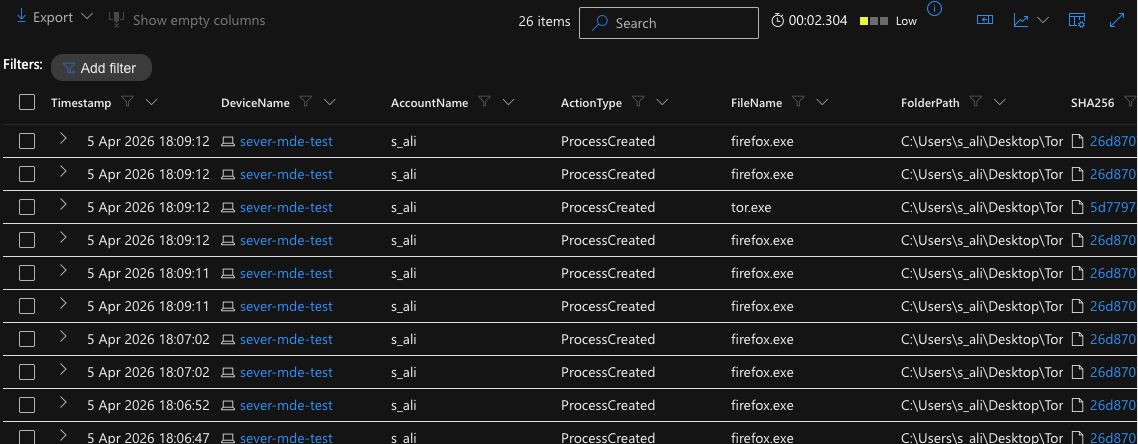
在 DeviceProcessEvents 表中搜索用户 “s_ali” 是否实际打开了 TOR 浏览器的迹象。证据表明其在 2026-04-05T17:03:47.7833944Z 打开了该浏览器。随后还出现了多个 firefox.exe(Tor)以及 tor.exe 实例。
**用于定位事件的查询:**
```
DeviceProcessEvents
| where DeviceName == "sever-mde-test"
| where FileName has_any ("tor.exe", "firefox.exe", "tor-browser.exe")
| project Timestamp, DeviceName, AccountName, ActionType, FileName, FolderPath, SHA256, ProcessCommandLine
| order by Timestamp desc
```
### 3. 查询 `DeviceProcessEvents` 表以查找 TOR 浏览器执行
在 DeviceProcessEvents 表中搜索用户 “s_ali” 是否实际打开了 TOR 浏览器的迹象。证据表明其在 2026-04-05T17:03:47.7833944Z 打开了该浏览器。随后还出现了多个 firefox.exe(Tor)以及 tor.exe 实例。
**用于定位事件的查询:**
```
DeviceProcessEvents
| where DeviceName == "sever-mde-test"
| where FileName has_any ("tor.exe", "firefox.exe", "tor-browser.exe")
| project Timestamp, DeviceName, AccountName, ActionType, FileName, FolderPath, SHA256, ProcessCommandLine
| order by Timestamp desc
```
 ### 4. 查询 `DeviceNetworkEvents` 表以查找 TOR 网络连接
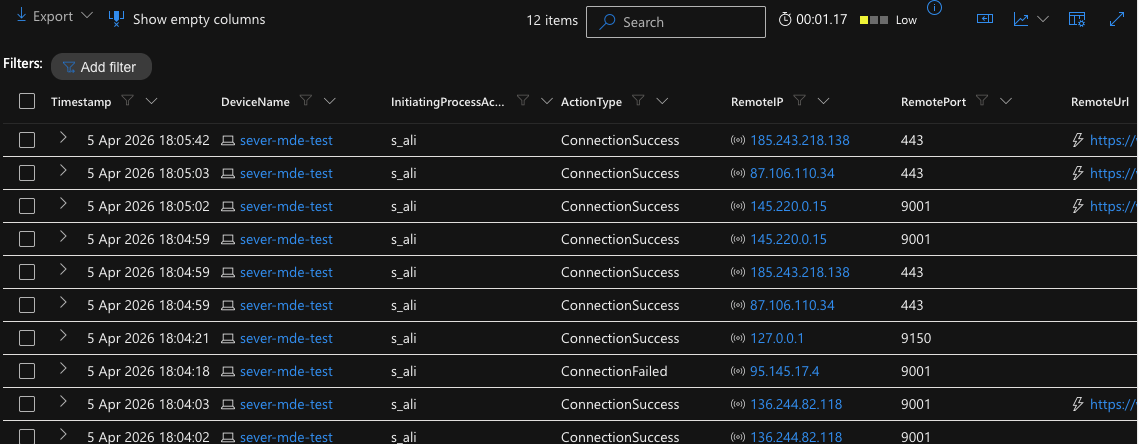
在 2026-04-05T17:04:02.9584499Z,用户 “s_ali” 在设备 “sever-mde-test” 上成功建立了与远程 IP 地址 136.244.82.118、端口 9001 的连接。该连接由位于文件夹 c:\users\s_ali\desktop\tor browser\browser\torbrowser\tor\tor.exe 的 tor.exe 进程发起,同时还建立了多个通过端口 443 的连接。
**用于定位事件的查询:**
```
DeviceNetworkEvents
| where DeviceName == "sever-mde-test"
| where InitiatingProcessAccountName != "system"
| where InitiatingProcessFileName in ("tor.exe", "firefox.exe")
| where RemotePort in ("9001", "9030", "9040", "9050", "9051", "9150", "80", "443")
| project Timestamp, DeviceName, InitiatingProcessAccountName, ActionType, RemoteIP, RemotePort, RemoteUrl, InitiatingProcessFileName, InitiatingProcessFolderPath
| order by Timestamp desc
```
### 4. 查询 `DeviceNetworkEvents` 表以查找 TOR 网络连接
在 2026-04-05T17:04:02.9584499Z,用户 “s_ali” 在设备 “sever-mde-test” 上成功建立了与远程 IP 地址 136.244.82.118、端口 9001 的连接。该连接由位于文件夹 c:\users\s_ali\desktop\tor browser\browser\torbrowser\tor\tor.exe 的 tor.exe 进程发起,同时还建立了多个通过端口 443 的连接。
**用于定位事件的查询:**
```
DeviceNetworkEvents
| where DeviceName == "sever-mde-test"
| where InitiatingProcessAccountName != "system"
| where InitiatingProcessFileName in ("tor.exe", "firefox.exe")
| where RemotePort in ("9001", "9030", "9040", "9050", "9051", "9150", "80", "443")
| project Timestamp, DeviceName, InitiatingProcessAccountName, ActionType, RemoteIP, RemotePort, RemoteUrl, InitiatingProcessFileName, InitiatingProcessFolderPath
| order by Timestamp desc
```
 ## 总结
设备 “threat-hunt-lab” 上的用户 “employee” 启动并完成了 TOR 浏览器的安装。随后,他们启动了浏览器,建立了 TOR 网络连接,并在桌面上创建了多个与 TOR 相关的文件,包括名为 `tor-shopping-list.txt` 的文件。这一系列操作表明用户主动安装、配置并使用了 TOR 浏览器,很可能用于匿名浏览,并以 “shopping list” 文件作为文档记录。
## 响应措施
已通过设备 `threat-hunt-lab` 和用户 `employee` 确认 TOR 使用情况。该设备已被隔离,且已通知用户的直接主管。
## 总结
设备 “threat-hunt-lab” 上的用户 “employee” 启动并完成了 TOR 浏览器的安装。随后,他们启动了浏览器,建立了 TOR 网络连接,并在桌面上创建了多个与 TOR 相关的文件,包括名为 `tor-shopping-list.txt` 的文件。这一系列操作表明用户主动安装、配置并使用了 TOR 浏览器,很可能用于匿名浏览,并以 “shopping list” 文件作为文档记录。
## 响应措施
已通过设备 `threat-hunt-lab` 和用户 `employee` 确认 TOR 使用情况。该设备已被隔离,且已通知用户的直接主管。标签:API接口, BurpSuite集成, DeviceFileEvents, DeviceNetworkEvents, DeviceProcessEvents, IoC 收集, KQL, Kusto 查询语言, Microsoft Defender for Endpoint, TOR 使用检测, URLScan, Windows 事件日志, 加密流量, 匿名浏览, 可疑文件下载, 合规监控, 异常检测, 数据泄露防护, 无线安全, 网络探测, 网络流量分析, 网络端口探测