MinishLab/semble
GitHub: MinishLab/semble
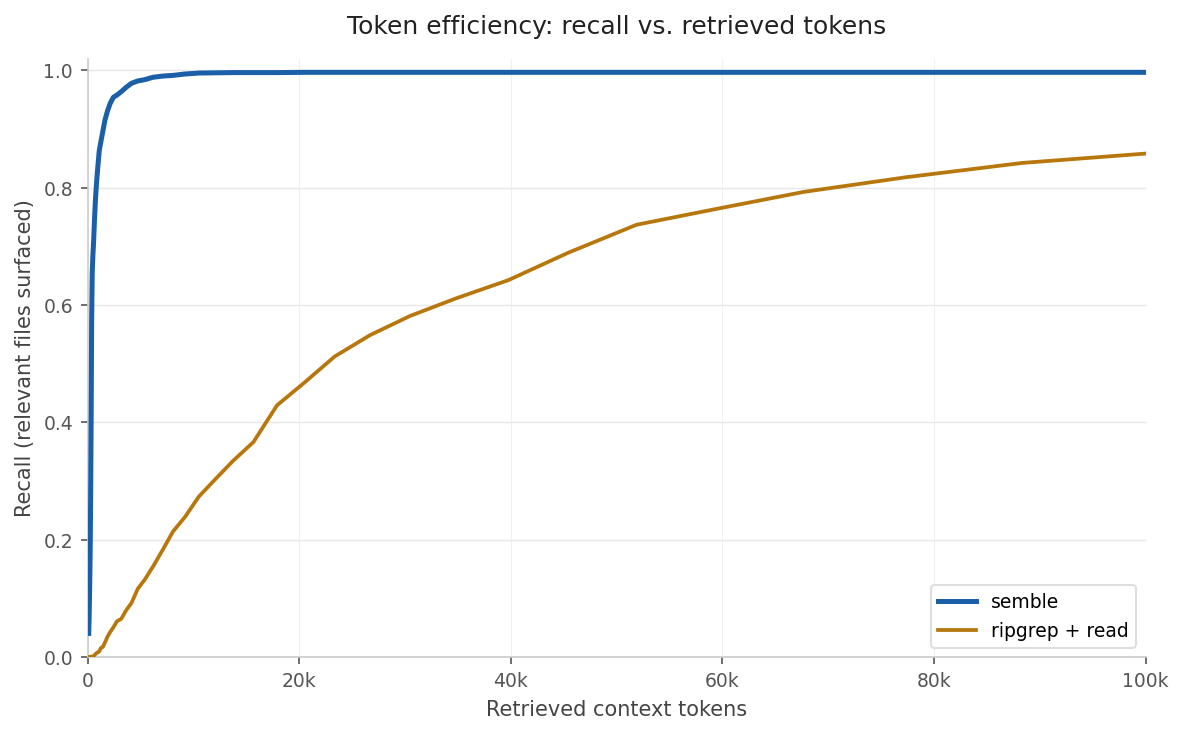
Semble 是一个面向 AI 智能体的本地化代码搜索引擎,通过语义检索和词汇匹配的混合方法,在毫秒级时间内从代码库中返回精准代码片段,将 token 消耗降低约 98%。
Stars: 5649 | Forks: 236

Fast and Accurate Code Search for Agents
Uses ~98% fewer tokens than grep+read



AGENTS.md / CLAUDE.md 代码片段
``` ## 代码搜索 Use `semble search` to find code by describing what it does or naming a symbol/identifier, instead of grep: ```bash semble search "authentication flow" ./my-project semble search "save_pretrained" ./my-project semble search "save model to disk" ./my-project --top-k 10 ``` If you anticipate doing more than one search, use `semble index` to create an index. ```bash semble index ./my-project -o my_index ``` You can then reuse this index later on: ```bash semble search "save_pretrained" --index my_index ``` An index is not automatically updated, so if the code changes significantly, reindex. If you notice stale results while resolving searches to files, reindex. Use `--content docs` to search documentation and prose, `--content config` for config files (yaml, toml, etc.), or `--content all` to search code, docs, and config: ```bash semble search "deployment guide" ./my-project --content docs semble search "database host port" ./my-project --content config semble search "authentication" ./my-project --content all ``` Use `semble find-related` to discover code similar to a known location (pass `file_path` and `line` from a prior search result): ```bash semble find-related src/auth.py 42 ./my-project ``` Like search, `find-related` also accepts an `--index` argument. `path` defaults to the current directory when omitted; git URLs are accepted. If `semble` is not on `$PATH`, use `uvx --from "semble[mcp]" semble` in its place. ### 工作流 1. Index the repo using `semble index -o cached_index`. 2. Start with `semble search` to find relevant chunks. Pass the index to achieve results faster. 3. Use `--content docs` for documentation, `--content config` for config files, or `--content all` for everything. 4. Inspect full files only when the returned chunk does not give enough context. 5. Optionally use `semble find-related` with a promising result's `file_path` and `line` to discover related implementations. 6. Use grep only when you need exhaustive literal matches or quick confirmation of an exact string. ```更新 Semble
``` uv tool upgrade semble # with uv uv cache clean semble # for MCP users (restart your MCP client after) pip install --upgrade semble # with pip ```Claude Code
``` claude mcp add semble -s user -- uvx --from "semble[mcp]" semble ```Cursor
添加到 `~/.cursor/mcp.json`(或项目中的 `.cursor/mcp.json`): ``` { "mcpServers": { "semble": { "command": "uvx", "args": ["--from", "semble[mcp]", "semble"] } } } ```Codex
添加到 `~/.codex/config.toml`: ``` [mcp_servers.semble] command = "uvx" args = ["--from", "semble[mcp]", "semble"] ```OpenCode
添加到 `~/.opencode/config.json`: ``` { "mcp": { "semble": { "type": "local", "command": ["uvx", "--from", "semble[mcp]", "semble"] } } } ```VS Code
添加到项目中的 `.vscode/mcp.json`(或用户配置文件的 `mcp.json`): ``` { "servers": { "semble": { "command": "uvx", "args": ["--from", "semble[mcp]", "semble"] } } } ```GitHub Copilot CLI
添加到 `~/.copilot/mcp-config.json`: ``` { "mcpServers": { "semble": { "command": "uvx", "args": ["--from", "semble[mcp]", "semble"] } } } ```Windsurf
添加到 `~/.codeium/windsurf/mcp_config.json`: ``` { "mcpServers": { "semble": { "command": "uvx", "args": ["--from", "semble[mcp]", "semble"] } } } ```Gemini CLI
添加到 `~/.gemini/settings.json`: ``` { "mcpServers": { "semble": { "command": "uvx", "args": ["--from", "semble[mcp]", "semble"] } } } ```Kiro
添加到 `~/.kiro/settings/mcp.json`(或项目中的 `.kiro/settings/mcp.json`): ``` { "mcpServers": { "semble": { "command": "uvx", "args": ["--from", "semble[mcp]", "semble"] } } } ```Zed
添加到 `~/.config/zed/settings.json`(或项目中的 `.zed/settings.json`): ``` { "context_servers": { "semble": { "command": "uvx", "args": ["--from", "semble[mcp]", "semble"] } } } ```节省统计
`semble savings` 显示 Semble 在所有搜索中节省的 token 数量: ``` semble savings # summary by period semble savings --verbose # also show breakdown by call type ``` ``` Semble Token Savings ════════════════════════════════════════════════════════════════ Period Calls Savings ──────────────────────────────────────────────────────────────── Today 42 [███████████████░] ~58.4k tokens (95%) Last 7 days 287 [██████████████░░] ~312.4k tokens (90%) All time 1.4k [██████████████░░] ~1.2M tokens (89%) ``` 节省计算方式如下:每次调用时,Semble 记录包含返回代码块的唯一文件的总字符数,以及返回代码片段的字符数。估算节省的 token 数为 `(文件字符数 − 代码片段字符数) / 4`(每 token 4 个字符)。这是一个保守估算:基准是将匹配文件完整读取,这是编码智能体探索不熟悉代码时的常见方式。 统计数据存储在 `~/.semble/savings.jsonl` 中。库用法
Semble 也可用作 Python 库进行编程访问,适用于构建自定义工具或将搜索直接集成到你自己的代码中。 ``` from semble import ContentType, SembleIndex # 索引本地目录(仅限代码,默认) index = SembleIndex.from_path("./my-project") # 索引文档和文本(markdown、rst 等) index = SembleIndex.from_path("./my-project", content=ContentType.DOCS) # 索引所有内容(代码、文档和配置) index = SembleIndex.from_path("./my-project", content=[ContentType.CODE, ContentType.DOCS, ContentType.CONFIG]) # 同时索引代码和文档 index = SembleIndex.from_path("./my-project", content=[ContentType.CODE, ContentType.DOCS]) # 索引远程 git 仓库 index = SembleIndex.from_git("https://github.com/MinishLab/model2vec") # 使用自然语言或代码查询搜索索引 results = index.search("save model to disk", top_k=3) # 查找与特定结果相似的代码 related = index.find_related(results[0], top_k=3) # 每个结果都展示匹配的代码块 result = results[0] result.chunk.file_path # "model2vec/model.py" result.chunk.start_line # 127 result.chunk.end_line # 150 result.chunk.content # "def save_pretrained(self, path: PathLike, ..." ```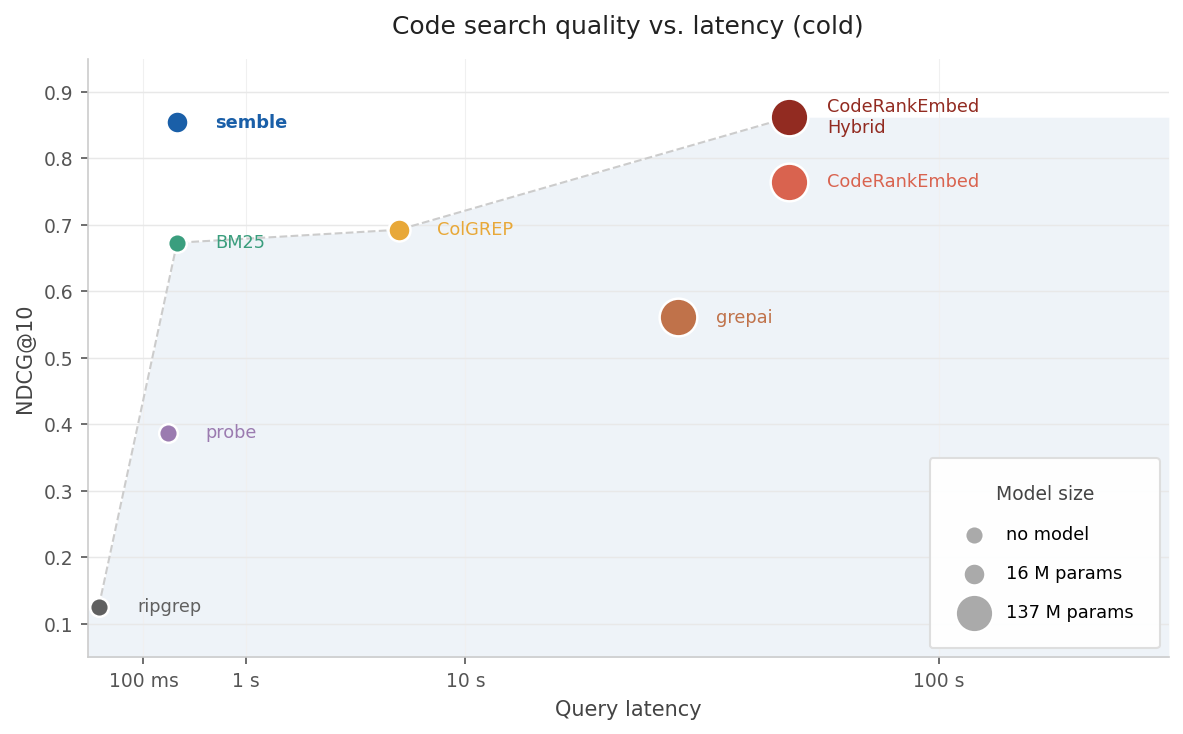 |
 |
排序信号
- **自适应加权**。类符号查询(`Foo::bar`、`_private`、`getUserById`)获得更高的词汇权重,而自然语言查询在语义和词汇检索器之间保持平衡。 - **定义提升**。定义被查询符号的代码块(`class`、`def`、`func` 等)排名高于仅引用它的代码块。 - **标识符词干提取**。查询词进行词干提取并与代码块中的标识符词干匹配,对包含它们的代码块给予额外权重。例如,查询 `parse config` 会提升包含 `parseConfig`、`ConfigParser` 或 `config_parser` 的代码块。 - **文件一致性**:当同一文件的多个代码块匹配查询时,该文件会被提升,使顶部结果反映文件级别的广泛相关性,而非单个脱离上下文的代码块。 - **噪声惩罚**:测试文件、`compat/`/`legacy/` shim、示例代码和 `.d.ts` 声明存根会被降序排列,使规范实现优先显示。标签:AGENTS.md, Claude Code, Codex, CPU推理, Cursor, grep替代, MCP Server, OpenCode, 代码上下文, 代码分析, 代码匹配, 代码向量, 代码导航, 代码嵌入, 代码库索引, 代码建议, 代码推荐, 代码提示, 代码搜索, 代码搜索工具, 代码智能, 代码查询, 代码检索, 代码片段, 代码片段提取, 代码理解, 代码生成, 代码相似性, 代码索引, 代码补全, 代码语义, 低Token消耗, 凭证管理, 开源, 快速索引, 无API Key, 无GPU, 智能搜索, 本地部署, 检索质量, 渗透测试工具, 端到端搜索, 自然语言查询, 语义搜索, 逆向工具