Antonlovesdnb/fishbowl
GitHub: Antonlovesdnb/fishbowl
一个容器化凭证审计系统,为 AI 编码代理提供基于 eBPF 的全链路观测与审计。
Stars: 9 | Forks: 1
# Fishbowl
[](https://github.com/Antonlovesdnb/fishbowl/releases)
[](https://github.com/Antonlovesdnb/fishbowl/actions)
[](https://www.rust-lang.org/)
[]()
[](LICENSE)
[](AGENTS.md)
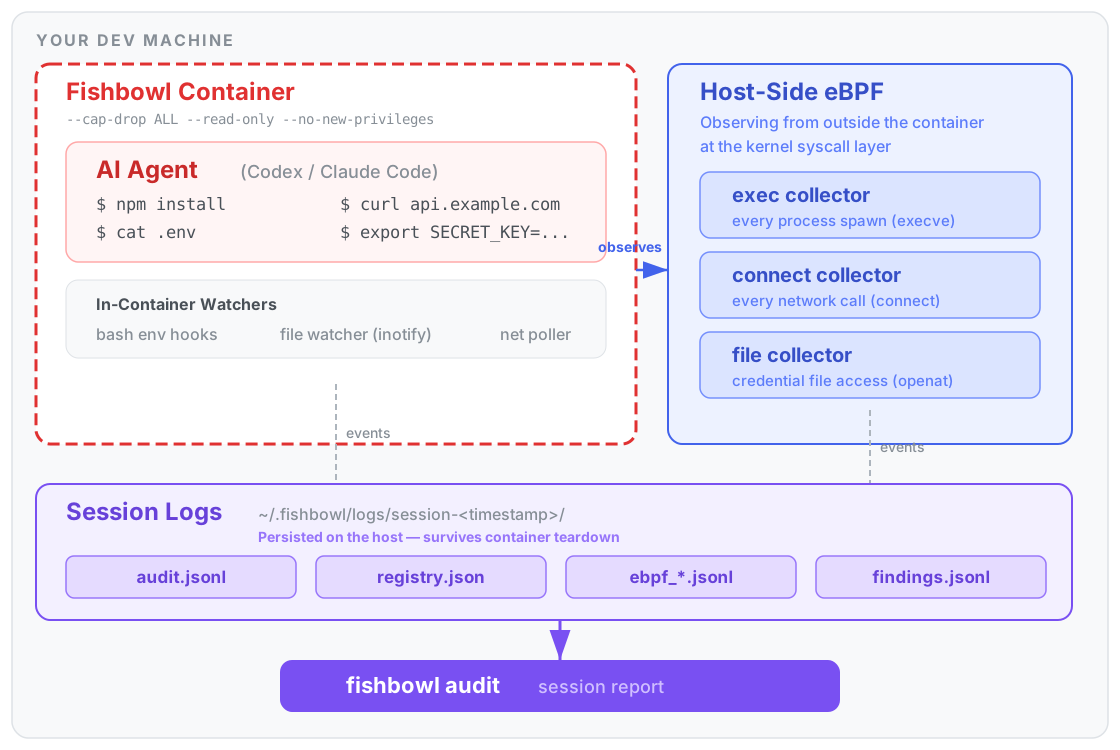
一个为 AI 编程 agent 打造的容器化凭证审计边界。已通过 **Codex** 和 **Claude Code** 在 macOS 和 Linux 上验证。
Fishbowl 将你的 AI agent 封装在 Docker container 中,审计每一次凭证访问、环境变量变更以及出站网络连接,然后为你生成一份会话报告。它是纯观察性的——它不会阻止或终止 agent 的任何操作。
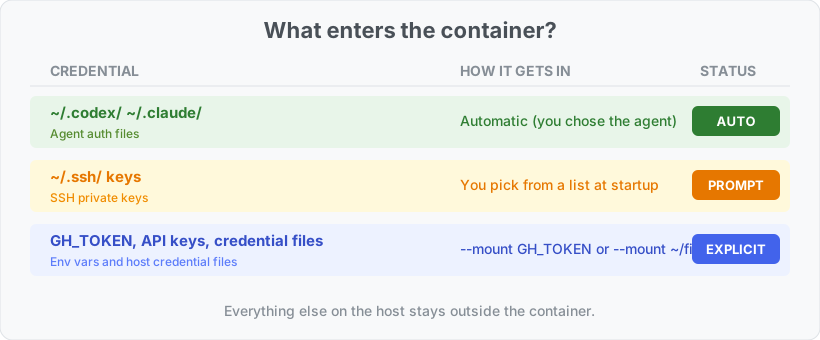
Container 本身就是安全边界。Agent 可以看到你的项目目录、它自己的认证文件(自动挂载的 `~/.codex/` 或 `~/.claude/` 副本)、你通过 `--mount` 显式挂载的任何凭证,以及会话日志——但它无法访问你的主目录或系统的其余部分。Container 的文件系统是只读的,所有的 Linux capabilities 都被丢弃,并且禁用了权限提升。
**注意 - fishbowl 是一个 vibe coded 项目,在生产环境中使用之前,请对其进行评估和测试**
## 工作原理
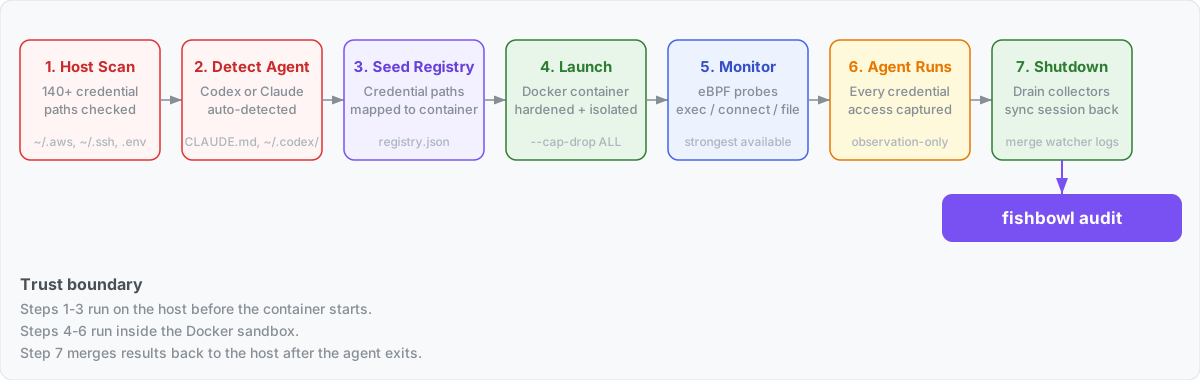
当你运行 `fishbowl run ~/my-project` 时,会发生以下过程:
1. **宿主机凭证扫描。** Fishbowl 会遍历你的主目录和项目,查找已知的凭证文件(`.env`、`~/.aws/credentials`、`~/.codex/auth.json`、SSH keys 等)并打印出找到的内容。扫描报告会保存到一个仅限宿主机访问的位置(`~/.fishbowl/host-scans/`)——它在 container 内部是不可见的。
有关路径和分类规则的完整列表,请参见 [docs/credential-scanning.md](docs/credential-scanning.md)。

1. **Agent 自动检测。** 基于项目标记(`CLAUDE.md`、`AGENTS.md`)、宿主机认证工件(`~/.codex/`、`~/.claude/`)以及环境变量引用,Fishbowl 会选择 agent 类型,并自动将相关的认证文件挂载到 container 内部的 `/fishbowl/home/` 目录下。
有关检测优先级级联和每个 agent 获取的内容,请参见 [docs/agent-detection.md](docs/agent-detection.md)。在 macOS 上,Claude Code 将其 OAuth token 存储在服务 `"Claude Code-credentials"` 下的登录 Keychain 中,而不是在 `~/.claude/.credentials.json` 中;Fishbowl 通过 `security find-generic-password -w` 将其提取到按会话划分的运行时认证目录中(权限 0o600,父目录 0o700,与会话的其余部分一起清理),以便在 Linux container 内运行的 Claude 可以像读取常规文件一样读取它。首次运行可能会触发标准的 macOS “允许安全访问你的钥匙串”对话框。**项目文本中引用的凭证环境变量和 SSH keys 不会自动传递** —— Fishbowl 会将它们作为建议打印出来,但需要显式使用 `--mount` 以避免恶意 repo 静默导入宿主机机密。

1. **注册表播种。** 来自宿主机扫描的凭证路径会被转换为 container 内部的等效路径,并写入运行时凭证注册表(`registry.json`)中。这就是文件收集器如何知道哪些 `openat()` 事件值得关注的方式。
2. **Container 启动。** Docker 在一个经过安全加固的 container 中运行 agent:
- `--cap-drop ALL --security-opt no-new-privileges`
- 项目目录绑定挂载到 `/` 和 `/workspace`
- 选定的凭证挂载到 `/fishbowl/creds/` 和 `/fishbowl/ssh/`(只读)
- Agent 认证挂载到 `/fishbowl/home/`(即 container 的 `$HOME`)
- 会话日志位于 `/var/log/fishbowl/`
3. **监控启动。** Fishbowl 会选择可用的最强监控方式:
- **Linux:** 通过 `sudo` 辅助程序进行宿主机端的 bpftrace 监控,范围限定在 container 的 cgroup 内
- **macOS:** 在 Docker VM 内部的特权 sidecar container 中运行 bpftrace(自动检测 Docker Desktop、Colima、OrbStack、Rancher Desktop)
- **降级方案:** 如果强监控路径失败(无 root 权限、Docker 未运行、缺少收集器镜像),则打印原因并继续使用 container 本地遥测(bash env hooks、inotify 文件监视器、`ss` 网络轮询)
4. **Agent 运行。** 你的 agent 在 container 内部执行其工作。每一个 `execve()`、`connect()` 以及对受监控凭证的 `openat()` 操作都会被捕获。
5. **关闭。** 当 agent 退出时,Fishbowl 会正常耗尽 bpftrace 收集器(SIGINT + 1.5 秒宽限期)并销毁辅助 container。会话状态会同步回宿主机以供 Codex/Claude 使用。
## 安装说明
```
curl -fsSL https://raw.githubusercontent.com/Antonlovesdnb/fishbowl/main/install.sh | sh
```
该脚本会自动检测你的操作系统和架构,从最新的 [GitHub 发布](https://github.com/Antonlovesdnb/fishbowl/releases)中下载正确的二进制文件和收集器镜像,验证 SHA256 校验和,并安装到 `/usr/local/bin`(如果没有写权限,则安装到 `~/.local/bin`)。
**支持的平台:** macOS (Apple Silicon) 和 Linux (x86_64 + arm64)。Linux 二进制文件是完全静态链接的(musl libc),因此它们可以在包括 Alpine 在内的任何发行版上运行。
**要求:** 在执行 `fishbowl run` 之前,必须有一个正在运行的容器运行时——Docker Desktop、Colima、OrbStack 或 Rancher Desktop。
**选项:** 使用 `FISHBOWL_VERSION=v2.1.1` 固定版本,使用 `FISHBOWL_BIN_DIR=...` 覆盖安装目录。
**这就是安装的全部内容。** Container 镜像会在你第一次运行 `fishbowl run` 时自动构建(需要几分钟时间;仅此一次)。如果你想提前完成这一步,请在安装后运行 `fishbowl build-image`。
### 卸载
```
curl -fsSL https://raw.githubusercontent.com/Antonlovesdnb/fishbowl/main/install.sh | sh -s -- --uninstall
```
移除二进制文件、Docker 镜像,并可选择移除 `~/.fishbowl/`(在删除会话数据之前会进行提示)。
## 用法
```
# 运行当前目录
fishbowl run
# 运行特定项目
fishbowl run ~/projects/my-app
# 挂载 credential(自动检测类型:env var、SSH key 或 credential file)
fishbowl run --mount GH_TOKEN --mount ~/.ssh/id_ed25519 --mount ~/secrets/service.json
# 使用 host networking(用于 VPN/lab routes)
fishbowl run --network host
```
挂载的凭证将显示在 container 内部的 `/fishbowl/creds/`(凭证文件)和 `/fishbowl/ssh/`(SSH keys)路径下。环境变量将直接传递。
## 查看会话
运行结束后,查看发生了什么:
```
fishbowl audit # most recent session
fishbowl audit # specific session directory
```
审计报告显示:
- **凭证** — 每个发现的凭证、其分类、访问次数和预期的目标地址
- **警报** — 中/高/严重级别的安全事件(环境变量变更、可疑进程访问凭证)
- **网络** — 出站目标地址及其连接次数和警报标志
注意 - `fishbowl audit` 应在 container 外部运行。
### 会话日志位置
所有会话数据都位于 `~/.fishbowl/logs/` 目录下:
```
~/.fishbowl/
logs/
latest -> session-1775780487 # symlink to most recent
session-1775780487/ # one directory per run
audit.jsonl # all audit events (JSONL)
registry.json # credential registry (live state)
findings.jsonl # credential-egress correlation findings
ebpf_exec.jsonl # host eBPF: process exec events
ebpf_connect.jsonl # host eBPF: network connect events
ebpf_file.jsonl # host eBPF: credential file access events
ebpf_scope.json # eBPF container scope metadata
ebpf_*.stderr.log # bpftrace stderr (empty = probes attached OK)
host-scans/
session-1775780487.json # host credential path enumeration (host-only)
runtime/
session-1775780487-/ # runtime auth copies (cleaned up after 6h)
```
### 日志格式
**audit.jsonl** — 每行一个 JSON object,包含来自 container 内部监视器和宿主机 eBPF 收集器的所有事件:
```
{
"timestamp": "2026-04-10T00:21:29+00:00",
"event": "process_exec",
"severity": "info",
"agent": "host-ebpf",
"command": "/bin/cat",
"path": "/usr/bin/cat",
"process_name": "cat",
"observed_pid": "40643",
"process_chain": "cat(pid=40643) <- bash(pid=40626) <- tini <- containerd-shim <- systemd",
"env_findings": [{"variable": "BASH_ENV", "value_preview": "/age...(redacted,len=23)"}],
"discovery_method": "host_ebpf_exec",
"verdict": "observed"
}
```
事件类型:`process_exec`、`env_mutation`、`env_enumeration`、`credential_discovery`、`credential_access`、`network_egress`、`workspace_credential_access`。
**不会故意记录**完整的凭证值。环境变量的发现结果包含一个简短的预览(前 4 个字符 + 长度)用于分类目的——例如 `sk-p...(redacted,len=48)`。凭证环境变量通过 `--env-file`(而不是 CLI 参数)传递给 Docker,以避免在宿主机进程表中暴露。
**registry.json** — 实时凭证注册表,随着凭证的发现和访问而更新:
```
{
"credentials": [
{
"id": "file::/fishbowl-smoke/.env",
"classification": "Project .env Credential File",
"discovery_method": "project_scan",
"path": "/fishbowl-smoke/.env",
"access_count": 3,
"last_accessed_at": "2026-04-10T00:21:29+00:00"
}
]
}
```
**ebpf_file.jsonl** — 来自内核文件收集器的凭证访问事件:
```
{
"event": "credential_access",
"process_name": "cat",
"raw_path": "/workspace/.env",
"resolved_path": "/fishbowl-demo/.env",
"operation": "openat",
"classification": "Project .env Credential File",
"process_chain": "cat <- bash <- tini <- containerd-shim <- systemd",
"collector": "bpftrace_file"
}
```
**ebpf_exec.jsonl** — container 内部的每一个进程生成:
```
{
"event": "process_exec",
"process_name": "bash",
"filename": "/usr/bin/curl",
"cmdline": "curl -sS https://example.com/",
"process_chain": "curl <- bash <- tini <- containerd-shim <- systemd",
"env_findings": [
{
"variable": "BASH_ENV",
"classification": "Dangerous Execution Environment Variable",
"value_preview": "/age...(redacted,len=23)"
}
],
"collector": "bpftrace_exec"
}
```
**audit.jsonl** — bash hooks 捕获的环境变量变更:
```
{
"event": "dangerous_env_mutation",
"severity": "medium",
"command": "export PAGER=\"evil-pager\"",
"variable": "PAGER",
"new_value": "\"evi...(redacted,len=12)",
"reason": "dangerous variable mutation command observed"
}
```
**findings.jsonl** — 凭证访问后发起网络连接的相关性发现结果(例如,“进程读取了 ~/.codex/auth.json,然后连接到了 185.x.x.x:443”)。
## 平台支持
| 平台 | 监控方式 | 说明 |
|---|---|---|
| **Linux** (源码或二进制文件) | 通过 `sudo` 辅助程序进行宿主机端 eBPF 监控 | 完整的 exec/connect/file 覆盖,cgroup 范围限定。无需收集器镜像 — bpftrace 作为宿主机二进制文件运行。 |
| **macOS** (源码或二进制文件) | Docker VM 中的 eBPF sidecar | 完整覆盖。`install.sh` 从 release 下载预构建的收集器镜像并 `docker load` 它;源码安装通过 `fishbowl build-image` 构建它。自动检测 Docker Desktop/Colima/OrbStack/Rancher。 |
| **任何宿主机,降级方案** | Container 本地监视器 | 如果 eBPF 路径失败(Linux 上无 root 权限、Docker 未运行等),Fishbowl 将降级为 bash env hooks、inotify 文件监视器和 `ss` 网络轮询。 |
**Container 镜像是特定于平台的。** 克隆到不同的架构后,在运行 `fishbowl run` 之前,请先运行 `fishbowl build-image`。
## 已知限制
- **Container 内的审计日志可被 agent 写入。** Container 内部的监视器将 `audit.jsonl` 和 `registry.json` 写入 container 内部的一个可写子目录(`/var/log/fishbowl/watcher/`)。被入侵的 agent 可能会篡改此监视器的输出。但是,**宿主机端的 eBPF 日志(`ebpf_*.jsonl`)是受保护的** —— 父会话日志目录以只读方式挂载到 agent container 中,并且 eBPF 日志由辅助 container 通过其自己的挂载点写入。因此,高保真度的事件数据(exec、connect、来自内核层的文件访问)是防篡改的;只有 container 内部的监视器事件存在风险。
- **降级监控存在覆盖盲区。** 当强监控(默认方式)不可用时——Linux 上没有 root 权限或 macOS 上缺少收集器镜像——Fishbowl 会降级为 container 本地监视器。这些监视器存在已知的盲区:bash env hooks 不会为 `sh`/`python`/`node` 触发,`ss` 网络轮询器会错过低于 50 毫秒的连接,并且不覆盖 UDP/DNS。强监控通过内核级 eBPF probes 覆盖了所有这些情况。
- **已测试的 agents。** 只有 Codex 和 Claude Code 进行了端到端的验证。Cursor、Windsurf 和 Copilot 在代码中拥有脚手架式的枚举变体,但尚未针对它们执行封装会话的流程。
## 安全模型
Fishbowl 提供**对机会性凭证窃取的可见性** —— 恶意的 npm/pip postinstall 脚本、环境变量投毒(CVE-2026-22708)、通过 prompt injection 进行的 MCP 配置篡改(CVE-2025-54135/54136),以及运行 `curl`/`wget` 来窃取凭证的 prompt injection。
**不在范围内:** 专门针对监控栈的顽固攻击者、agent 将凭证编码到其自身的 API 通道中(例如发送至 `api.anthropic.com`),以及复杂的多步骤窃取链条。
Fishbowl **在 runtime 期间是纯观察性的。** 它不会阻止、终止或干扰 agent。有关具有执行力且基于内核防护的预防措施,请参见 [owLSM](https://github.com/Cybereason-Public/owLSM)、[Falco](https://falco.org/) 或 [Tetragon](https://tetragon.io/) —— Fishbowl 是对这些工具的补充,而不是它们的替代品。
## CI/CD 集成
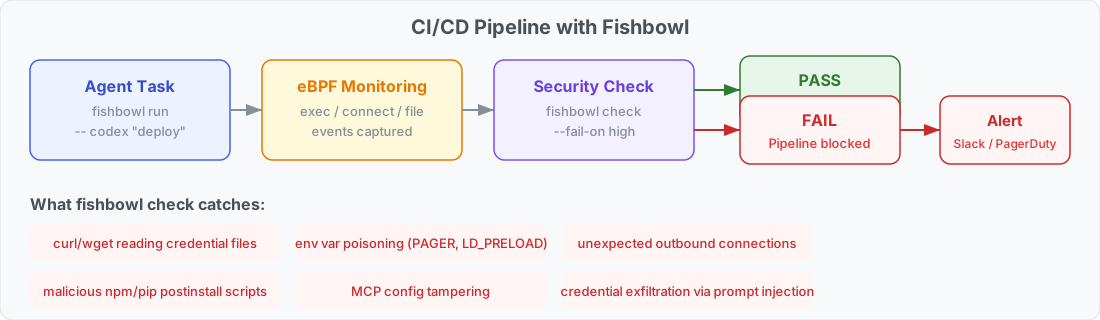
使用 `fishbowl check` 据会话安全性为 CI/CD pipelines 设置门禁。它会读取会话日志,按严重程度对事件进行计数,如果超过阈值则以非零状态退出。
```
# 在 Fishbowl 内运行 agent task
fishbowl run ~/my-app --mount API_KEY -- codex "run the deploy script"
# 门控 pipeline — 如果发生任何 high-severity 事件则失败
fishbowl check --fail-on high
```
严重程度级别:`low`、`medium`、`high`、`critical`。默认阈值为 `high`。
```
Fishbowl Check
Session: /Users/dev/.fishbowl/logs/session-1775954089
Threshold: --fail-on high
Events: 12 total (2 info, 0 low, 9 medium, 1 high, 0 critical)
eBPF: 9 exec, 2 file, 1 connect
Result: FAIL (1 events at or above high severity)
HIGH credential_access_by_network_tool: curl accessed credential file /workspace/.env
```
它能捕获的内容:
- **凭证窃取** — `curl`/`wget`/`python` 读取凭证文件
- **环境变量投毒** — `PAGER`、`LD_PRELOAD`、`GIT_ASKPASS` 变更
- **供应链攻击** — 恶意的 postinstall 脚本访问机密
- **MCP 配置篡改** — 在 agent 会话期间未经授权添加服务器
- **Prompt injection** — agent 被诱骗执行窃取命令
在 GitHub Actions workflow 中:
```
- name: Deploy with Fishbowl
run: |
fishbowl run . --mount DEPLOY_KEY -- codex "deploy to staging"
fishbowl check --fail-on high
```
如果 `fishbowl check` 以非零状态退出,pipeline 将停止,并提供完整的会话审计日志以供调查。
标签:AI编程助手, Docker, eBPF, Rust, 凭证审计, 安全审计, 安全防御评估, 容器化隔离, 网络流量审计, 通知系统