blacknon/childflow

GitHub: blacknon/childflow

一个 Linux 下的按命令树隔离网络沙箱工具,能在不依赖应用程序配合的情况下,对单个进程树强制实施 DNS、代理、出站策略和流量捕获控制。

Stars: 2 | Forks: 0

# childflow

childflow 是一个用于 Linux 的按命令树隔离的网络沙箱。 在一个隔离的网络上下文中运行一个命令及其子进程,控制 DNS / hosts / 代理行为,应用出站策略,仅捕获该进程树的流量,并为该进程树生成结构化的流日志。 ## 关于 `childflow` 在隔离的网络上下文中运行一个命令树,并仅对该树应用 DNS、hosts、代理、沙箱、策略和捕获控制。 这对于不能一致遵守代理环境变量的工具非常有用。`childflow` 在命令树的网络路径上强制使用代理,而不是依赖 `HTTP_PROXY`、`HTTPS_PROXY` 或 `LD_PRELOAD` 风格的拦截。 它有两个 Linux 后端:用于日常默认路径的 `rootless-internal`,以及在您需要诸如 `--iface` 或透明拦截等主机集成行为时通过 `--root` 使用的 `rootful`。 - 仅影响目标命令树,而非整个主机会话 - 可以针对每个命令树强制设置 DNS、`/etc/hosts`、代理、沙箱策略、数据包捕获、结构化流日志和可复用的配置文件 - 可以在不依赖 `HTTP_PROXY`、`HTTPS_PROXY` 或 `LD_PRELOAD` 技巧的情况下强制使用代理 - 可以对出站流量应用允许/拒绝 CIDR 策略和默认拒绝规则 - 默认使用 `rootless-internal` - 仅在需要 `--iface` 和透明拦截等功能时使用 `--root` ## 示例
childflow proxy and capture example
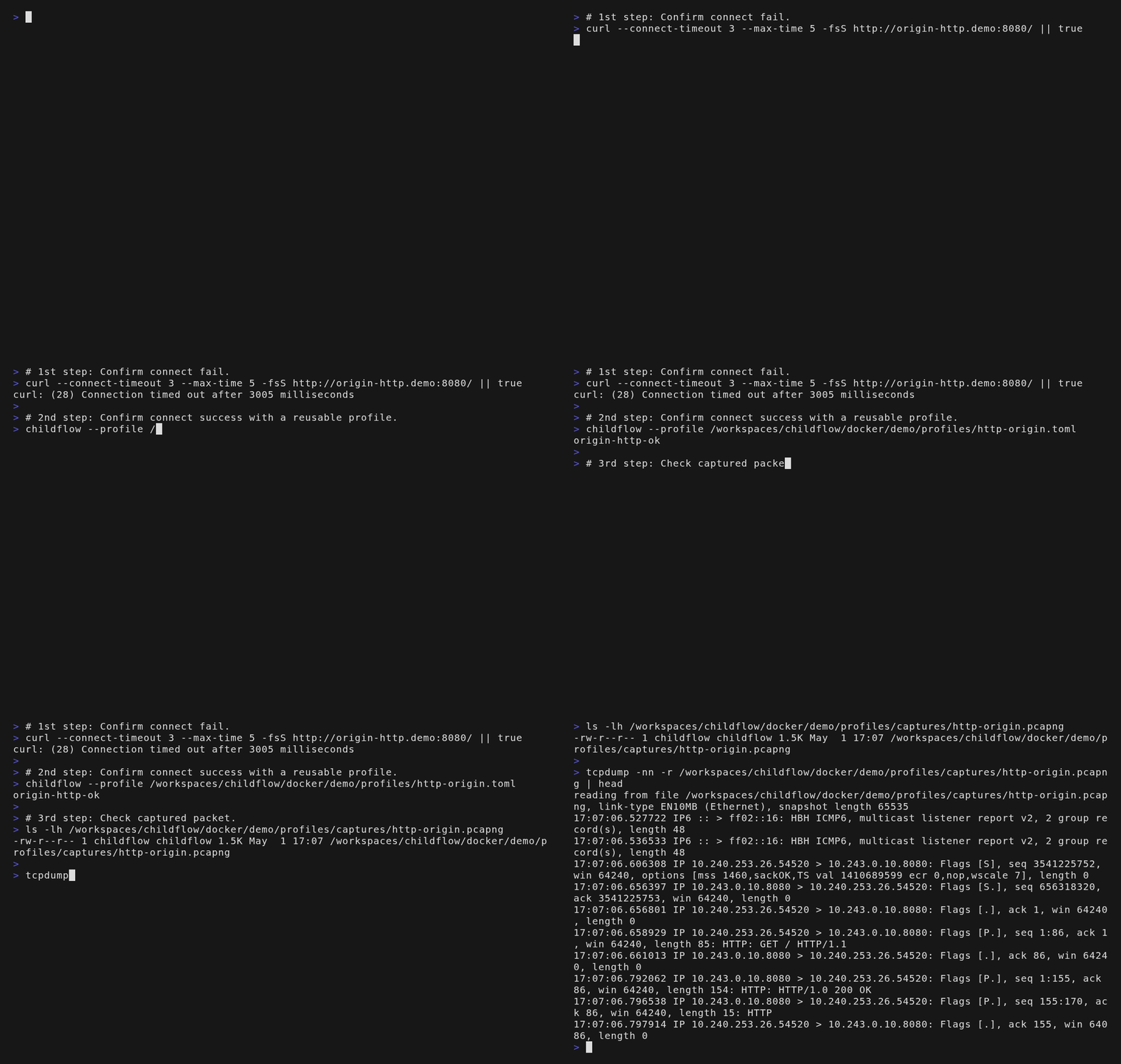
Proxy control and capture

childflow --profile ./docker/demo/profiles/http-origin.toml
Block direct access, force the command tree through a proxy, and inspect only that tree's capture.
childflow profile example
Reusable profiles

childflow --profile ./profiles/default-deny.toml --dump-profile
Keep sandbox settings in TOML, inherit from a base profile, and inspect the merged effective configuration.
childflow flow log example
Structured flow logs

childflow --summary --flow-log ./flow.jsonl -- curl https://example.com
Record structured DNS, connect, and policy events for the command tree without dropping down to packet-level inspection first.
## 安装 ### cargo ``` cargo install childflow ``` ### 依赖要求 主机要求: - 仅限 Linux - `ip` - `iptables` - `ip6tables` `rootless-internal` 的额外要求: - user、network 和 mount 命名空间支持 - `/dev/net/tun` - 主机上已启用 user 命名空间 - 在 Debian / Ubuntu 类系统上建议安装 `uidmap`,以便作为 `newuidmap` / `newgidmap` 的后备方案 `rootful` 的额外要求: - root 权限 - 可写的 `/proc/sys/net/ipv4/ip_forward` - 可写的 `/proc/sys/net/ipv6/conf/all/forwarding` - 使用代理拦截时所需的 TPROXY Linux 特性 如果您正在 macOS 或其他非 Linux 环境中进行评估,请使用 Docker 工作流,而不是尝试直接运行二进制文件。 ## 用法 ``` $ childflow --help Run one command tree inside a controlled network sandbox Usage: childflow [OPTIONS] [COMMAND]... Arguments: [COMMAND]... Command to execute Options: --profile Load effective defaults from a TOML profile file. Explicit CLI flags override the profile --dump-profile Print the effective profile as TOML and exit -c, --capture Write only the target command tree's traffic as pcapng -C, --capture-point Select which capture point or view `--capture` should write. `child` is the current stable view [default: child] [possible values: child, egress, wire-egress, both] --root Use the rootful backend. Without this flag, childflow uses the default rootless backend --doctor Diagnose whether the current host is ready for the selected backend -d, --dns Force DNS traffic for the child tree to this IPv4 or IPv6 resolver --hosts-file Bind-mount an `/etc/hosts`-format file over the child's `/etc/hosts` so those entries are consulted first during name resolution -p, --proxy Configure an upstream proxy URI, for example http://127.0.0.1:8080, https://proxy.example.com:443, or socks5://host.docker.internal:10080. `--root` uses transparent interception, while the default rootless backend relays outbound TCP through the selected proxy from the parent-side engine -U, --proxy-user Username for upstream proxy authentication -P, --proxy-password Password for upstream proxy authentication --proxy-insecure Ignore certificate trust errors for https:// upstream proxies while still validating the hostname --summary Print a post-run summary to stderr --flow-log Write structured flow events as JSON Lines. Currently supported only by the default rootless backend --offline Block all outbound networking for the child tree, including DNS forwarding --block-private Block child-tree traffic to private, loopback, link-local, and ULA-style destinations --block-metadata Block common cloud metadata endpoints such as 169.254.169.254 --default-policy Choose whether unmatched outbound destinations are allowed or denied [default: allow] [possible values: allow, deny] --allow-cidr Allow outbound destinations that fall within this IPv4 or IPv6 CIDR --deny-cidr Deny outbound destinations that fall within this IPv4 or IPv6 CIDR --proxy-only Require outbound traffic to use the configured upstream proxy path --fail-on-leak Exit non-zero if childflow blocks traffic that the child process did not treat as fatal. Currently supported only by the default rootless backend -i, --iface Force the host-side egress interface for the child's direct traffic -h, --help Print help -V, --version Print version ``` ### 命令行示例 #### 基本 使用默认的无 root 后端运行一个命令树: ``` childflow -- curl https://example.com ``` 仅捕获该进程树的流量: ``` childflow -c rootless.pcapng -- curl https://example.com ``` 强制通过特定的解析器进行 DNS 解析: ``` childflow -d 1.1.1.1 -- curl https://example.com ``` 仅为该命令树覆盖 `/etc/hosts`: ``` childflow --hosts-file ./hosts.override -- curl http://demo.internal ``` #### 策略 完全离线运行: ``` childflow --offline -- cargo test ``` 阻止常见的云元数据端点: ``` childflow --block-metadata -- ./my-client ``` 阻止私有、环回和链路本地目标地址: ``` childflow --block-private -- curl https://example.com ``` 切换为默认拒绝并仅允许一个目标地址: ``` childflow \ --default-policy deny \ --allow-cidr 203.0.113.10/32 \ -- curl http://203.0.113.10/ ``` 明确阻止一个目标地址范围: ``` childflow --deny-cidr 10.0.0.0/8 -- ./scanner ``` #### 代理 强制使用简单的 HTTP 代理路径: ``` childflow -p http://127.0.0.1:8080 -- curl https://example.com ``` 运行通常不会处理代理环境变量的工具: ``` childflow \ -p http://127.0.0.1:8080 \ -- gobuster dir -u http://target.local/ -w ./wordlist.txt ``` 使用带有身份验证的 HTTPS 上游代理: ``` childflow \ -p https://proxy.example.com:443 \ -U alice \ -P secret \ -- curl https://example.com ``` 要求所有出站 TCP 使用配置的代理路径: ``` childflow \ --proxy-only \ -p http://127.0.0.1:8080 \ -- curl https://example.com ``` 将被阻止的直接流量视为运行失败: ``` childflow \ --proxy-only \ --fail-on-leak \ -p http://127.0.0.1:8080 \ -- ./client ``` #### 配置文件 按原样运行已存储的配置文件: ``` childflow --profile ./profiles/default-deny.toml ``` 加载配置文件并在命令行中覆盖命令: ``` childflow --profile ./profiles/default-deny.toml -- curl https://example.com ``` 在应用命令行覆盖后检查合并后的有效配置: ``` childflow \ --profile ./profiles/default-deny.toml \ --deny-cidr 198.51.100.0/24 \ --dump-profile ``` #### 可观测性 写入结构化的流日志以供后续检查: ``` childflow \ --flow-log ./flow.jsonl \ --deny-cidr 10.0.0.0/8 \ -- curl https://example.com ``` #### Rootful 当您需要主机集成行为时,使用 rootful 后端: ``` sudo childflow --root -c capture.pcapng -- curl https://example.com ``` #### ICMP 和 Traceroute 在隔离的命令树内运行 `ping`: ``` childflow -- ping -c 1 8.8.8.8 childflow -- ping -6 -c 1 2606:4700:4700::1111 ``` 在隔离的命令树内运行 `traceroute`: ``` childflow -- traceroute -n -q 1 -w 2 8.8.8.8 childflow -- traceroute -I -n -q 1 -w 2 8.8.8.8 ``` ## 描述 ### 后端摘要 | 特性 | `rootless-internal` | `rootful` | | -------------------------- | ----------------------------------------------------------------- | ---------------------------------------------------------------------- | | 隔离执行 | 是 | 是 | | DNS 覆盖 | 是 | 是 | | `/etc/hosts` 覆盖 | 是 | 是 | | 出站 TCP | 是 | 是 | | UDP 中继 | 是 | 是 | | 代理支持 | 是,通过父侧中继引擎 | 是,通过透明拦截路径 | | 策略控制 | 是 | 是 | | 结构化流日志 | 是 | 暂不支持 | | `--fail-on-leak` | 是 | 暂不支持 | | 透明代理 / TPROXY | 否 | 是 | | `--iface` | 否 | 是 | | 数据包捕获 | 可选,包含 `child`、`egress`、`wire-egress` 和 `both` 视图 | 可选,包含 `child`、`egress`、`wire-egress` 和 `both` 视图 | | 状态 | 默认且推荐的路径 | 针对仍需主机端网络功能的高级后备方案 | 默认使用 `rootless-internal`。这是在无需全局 root 权限设置的情况下进行隔离执行、DNS 控制、代理、数据包捕获、`ping` 和 `traceroute` 的主要路径。 当您明确需要 rootless 路径目前尚未暴露的主机集成行为时,请使用 `--root`,包括: - 透明代理 - 使用 `--iface` 强制接口直接出站 - 比当前 rootless 中继引擎实现的更广泛的原始 ICMP 行为 ### 策略控制 `childflow` 可以将命令树视为一个小型的出站策略域。 - `--offline` 拒绝所有出站流量并禁用 DNS 转发 - `--block-private` 拒绝私有、环回、链路本地和 ULA 风格的目标地址 - `--block-metadata` 拒绝常见的云元数据端点 - `--default-policy deny` 拒绝目标地址,除非它们匹配显式的允许规则 - `--allow-cidr` 允许 IPv4 或 IPv6 CIDRs - `--deny-cidr` 拒绝 IPv4 或 IPv6 CIDRs - `--proxy-only` 要求出站流量使用配置的代理路径 - `--fail-on-leak` 当 childflow 阻止了流量但子进程仍以 `0` 退出时,返回非零值 当前注意事项: - `--proxy-only` 主要是一个面向 TCP 的控制;在 rootless 后端中,直接的 DNS / UDP / ICMP 流量也会被阻止而不是被中继 - `--fail-on-leak` 目前仅由 `rootless-internal` 支持 ### 配置文件 `childflow` 可以使用 `--profile` 加载可复用的 TOML 配置文件。 ``` childflow --profile ./profiles/default-deny.toml ``` ``` extends = "./base.toml" capture = "./captures/run.pcapng" flow_log = "./logs/run.jsonl" dns = "1.1.1.1" backend = "rootless-internal" block_private = true block_metadata = true default_policy = "deny" allow_cidrs = ["203.0.113.10/32"] command = ["curl", "https://203.0.113.10/healthz"] ``` 您还可以在应用命令行覆盖后打印合并的有效配置文件: ``` childflow \ --profile ./profiles/default-deny.toml \ --deny-cidr 198.51.100.0/24 \ --dump-profile ``` 当前注意事项: - 配置文件目前使用 TOML - 配置文件可以通过 `extends = "./base.toml"` 继承自共享基础配置 - 合并顺序为:父配置、子配置,然后是显式的命令行参数 - 当命令行参数和配置文件同时存在时,命令行参数会覆盖配置文件的值 - 对于诸如 `allow_cidrs` 和 `deny_cidrs` 等列表类型的设置,显式的命令行参数会替换配置文件中的列表,而不是追加到其中 - `--` 后显式指定的命令会替换配置文件中的 `command` - `--dump-profile` 会打印合并后的有效 TOML 并退出,而不运行命令 - 配置文件内的相对路径是相对于配置文件本身进行解析的 - 配置键使用面向命令的名称,例如 `capture`、`capture_point`、`backend`、`flow_log`、`default_policy`、`allow_cidrs` 和 `deny_cidrs` - `--root` 仍然是仅限命令行的便捷标志;当您需要 rootful 后端时,请在配置文件中使用 `backend = "rootful"` - 更详细的逐键 schema 记录在 [docs/profile-schema.md](docs/profile-schema.md) 中 ### 流日志 `childflow` 可以通过 `--flow-log` 发出结构化的 JSON Lines 流事件。 ``` childflow --flow-log ./flow.jsonl -- curl https://example.com ``` ``` childflow --summary --flow-log ./flow.jsonl -- curl https://example.com ``` 当前事件类型: - `dns_query` - `dns_answer` - `connect_attempt` - `connect_result` - `policy_violation` - `flow_end` 当前 schema 说明: - 每个事件都包含 `schema_version: 1` - `connect_attempt`、`connect_result` 和 `flow_end` 包含稳定的 `remote_ip` / `remote_port` 字段 - `connect_result.status` 当前为 `ok` 或 `error` 之一 - `dns_query` 和 `dns_answer` 包含稳定的 `server_ip` / `server_port` 字段 - `dns_answer.mode` 当前为 `relayed` 或 `synthetic_empty` 之一 - `policy_violation` 在适用时包含诸如 `action`、`reason_code`、`control` 和 `matched_cidr` 等结构化字段 当前注意事项: - `--flow-log` 目前仅由 `rootless-internal` 支持 - 每一行都是独立的 JSON,因此可以使用诸如 `jq` 等工具轻松检查 - 流日志是 `--capture` 的补充;使用 `--capture` 进行数据包级别的检查,使用 `--flow-log` 进行更高层次的执行追踪 - `--summary` 在运行后也会显示聚合的流日志事件计数 - 更详细的逐事件 schema 记录在 [docs/flow-log-schema.md](docs/flow-log-schema.md) 中 ### 捕获模式 `childflow` 旨在仅捕获目标命令树的流量,而不是不相关的主机流量。 默认的 `child` 模式保持隔离的子进程端视图。 - `egress` 两种后端上的合成出站导向视图 - `wire-egress` 两种后端上的真实主机出站捕获 - `both` 写入同级的 `.child.pcapng` 和 `.egress.pcapng` 文件 生成的 `pcapng` 文件还会嵌入描述捕获视图、后端、类型和接口的元数据。 有关当前捕获点和计划的 `child` / `egress` / `wire-egress` / `both` 捕获点方向的更详细比较,请参阅 [docs/technical-details.md](docs/technical-details.md)。 ## 许可证 MIT。请参阅 [LICENSE](LICENSE)。
标签:CIDR策略, DNS劫持, HTTPS代理, HTTP代理, JSONLines, NetworkNamespace, Rootless, 代理控制, 可视化界面, 安全测试, 应用隔离, 开发辅助, 攻击性安全, 沙箱, 流量捕获, 流量监控, 网络安全, 网络审计, 网络拓扑, 网络拦截, 网络沙盒, 网络策略, 网络访问控制, 进程隔离, 透明代理, 通知系统, 防御绕过, 隐私保护, 零信任