adithyan-ak/AgentHound
GitHub: adithyan-ak/AgentHound
AgentHound 是一款专为 AI agent 基础设施设计的攻击路径发现与可视化分析框架,将 BloodHound 理念应用于 MCP、A2A 及各类 AI 服务的安全审计。
Stars: 1 | Forks: 1
 ## **针对 MCP、A2A 和 AI agent 基础设施的攻击路径发现。**
专为 MCP 服务器、A2A agent、AI 服务、本地配置、凭据、工具、prompt 以及 agent 蔓延打造的 BloodHound。
[文档](https://docs.agenthound.io) ·
[快速开始](https://docs.agenthound.io/getting-started/quickstart/) ·
[图模型](https://docs.agenthound.io/reference/graph-model/) ·
[CLI](https://docs.agenthound.io/reference/cli/) ·
[安全](https://docs.agenthound.io/operator/security/) ·
[贡献](CONTRIBUTING.md)
[](https://github.com/adithyan-ak/agenthound/actions/workflows/ci.yml)
[](https://github.com/adithyan-ak/agenthound/releases)
[](https://goreportcard.com/report/github.com/adithyan-ak/agenthound)
[](LICENSE)
## **针对 MCP、A2A 和 AI agent 基础设施的攻击路径发现。**
专为 MCP 服务器、A2A agent、AI 服务、本地配置、凭据、工具、prompt 以及 agent 蔓延打造的 BloodHound。
[文档](https://docs.agenthound.io) ·
[快速开始](https://docs.agenthound.io/getting-started/quickstart/) ·
[图模型](https://docs.agenthound.io/reference/graph-model/) ·
[CLI](https://docs.agenthound.io/reference/cli/) ·
[安全](https://docs.agenthound.io/operator/security/) ·
[贡献](CONTRIBUTING.md)
[](https://github.com/adithyan-ak/agenthound/actions/workflows/ci.yml)
[](https://github.com/adithyan-ak/agenthound/releases)
[](https://goreportcard.com/report/github.com/adithyan-ak/agenthound)
[](LICENSE)
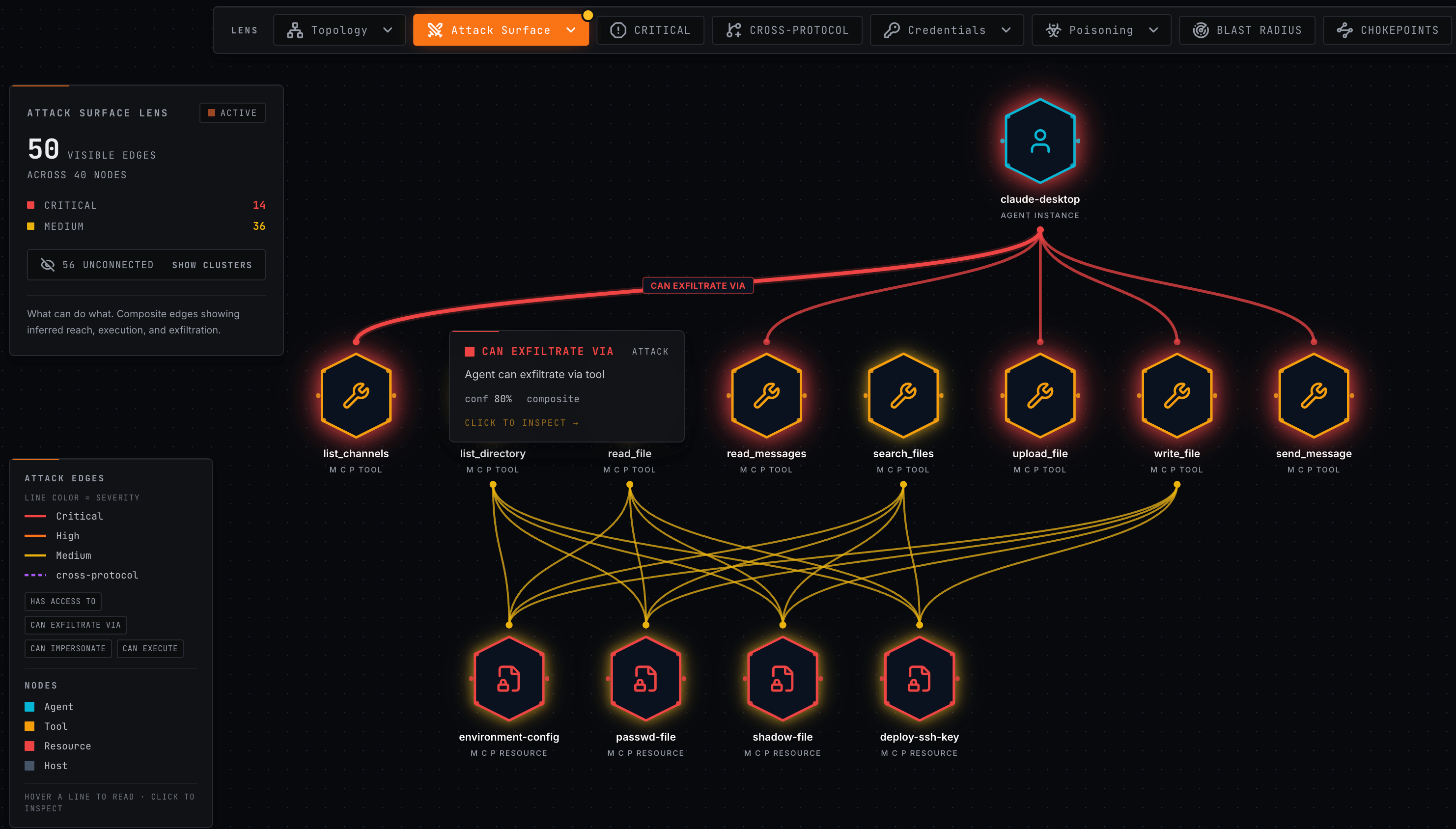
Risk scoring"] API["REST API"] UI["Graph UI"] end Config --> Collector MCP --> Collector A2A --> Collector Services --> Collector Collector --> JSON JSON --> Ingest Ingest --> Neo4j Ingest --> Postgres Neo4j --> Analyze Analyze --> API Analyze --> UI ``` 收集器保持小巧且便携:没有 Neo4j 驱动,没有 PostgreSQL 客户端,没有 UI,也没有服务器依赖。它写入 JSON 然后退出。服务器负责摄取、去重、图写入、后处理、查询 API 以及可视化。 AgentHound 的图模型包含 agent、MCP 服务器、工具、资源、prompt、凭据、主机、配置文件、指令文件、A2A agent、AI 服务节点和模型节点。诸如 `CAN_REACH`、`CAN_EXECUTE`、`CAN_EXFILTRATE_VIA`、`CAN_IMPERSONATE`、`SHADOWS`、`POISONED_DESCRIPTION` 和 `POISONED_INSTRUCTIONS` 等复合边是在数据摄取后计算得出的。 请在[图模型参考](https://docs.agenthound.io/reference/graph-model/)中阅读完整的 schema。
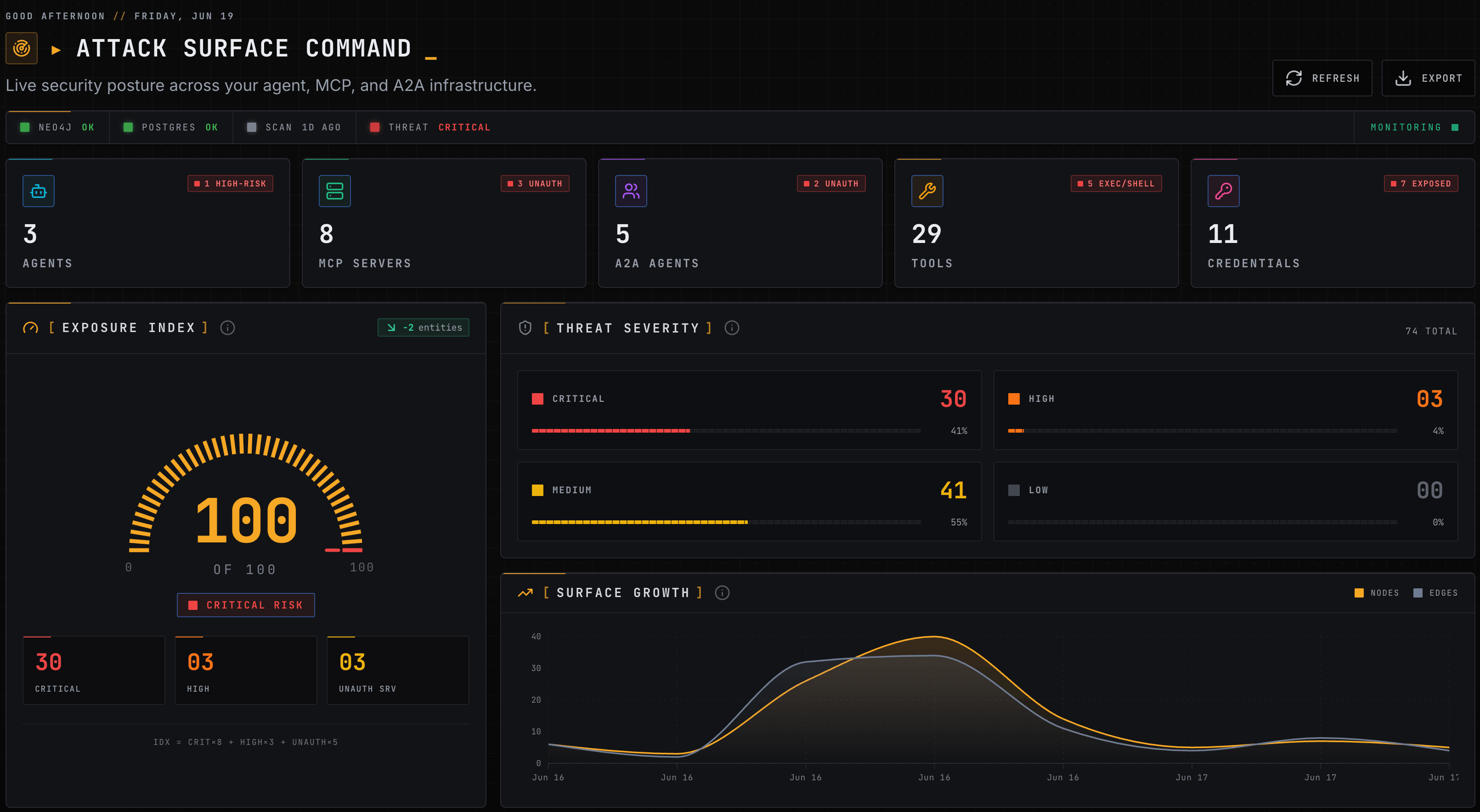
其他安装和摄取选项
``` # 将扫描文件拖拽到 UI 的 Scan Manager 中(零 CLI 摄取) agenthound scan --config open http://127.0.0.1:8080 # then drop scan-*.json into the Scan Manager # 从源码构建(需要 Go 1.25+ 和 Node.js 20+) git clone https://github.com/adithyan-ak/agenthound.git && cd agenthound docker compose -f docker/docker-compose.yml up -d --build # builds server image locally make build # bin/agenthound + bin/agenthound-server # 使用 Go 安装 collector go install github.com/adithyan-ak/agenthound/collector/cmd/agenthound@latest # 使用 Go 安装并启动 server(完全跳过 Docker;由您提供 Neo4j + Postgres) go install github.com/adithyan-ak/agenthound/server/cmd/agenthound-server@latest agenthound-server serve # 将 install.sh 固定到 release tag(校验 checksums;在可用时使用 cosign) curl -sSfL https://raw.githubusercontent.com/adithyan-ak/agenthound/v0.7.0/install.sh | sh ``` 请查看完整的[安装指南](https://docs.agenthound.io/getting-started/install/)以了解 Homebrew、发布二进制文件、签名验证和源码构建。claude-desktop"] Notes["MCPServer
internal-notes"] Cred["Credential
value_hash: a3f9..."] Gateway["LiteLLMGateway
prod"] Providers["LLM providers
OpenAI / Anthropic / Bedrock"] Agent -- TRUSTS_SERVER --> Notes Notes -- HAS_ENV_VAR --> Cred Gateway -- EXPOSES_CREDENTIAL --> Cred Agent -- CAN_REACH --> Gateway Gateway -- PROVIDES_MODEL --> Providers ``` 没有任何单个配置文件声明此路径。一旦收集器输出汇入同一个图,AgentHound 就会将其计算出来。 ## 适用场景 - **初始访问分诊**:识别在未经预期身份验证的情况下暴露的 agent 面。 - **权限提升**:发现 agent、工具、主机和服务之间重复使用的凭据和信任路径。 - **目标路径规划**:查询通往类 shell 工具、数据库、模型网关和敏感资源的路由。 - **证据打包**:报告基于图的路径,而不是模糊的配置观察结果。 - **重测验证**:比较扫描结果以证明关键路径已消失。 ## 负责任的使用与安全姿态 AgentHound 专为授权评估和内部可见性而构建。主动模块仅用于授权测试,并单独记录在案。操作者负责对每个目标进行授权。 - 收集器默认处于离线状态,并将 JSON 写入文件或标准输出。 - 服务器默认绑定到 `127.0.0.1:8080`。 - 服务器为单用户,没有应用层登录。请勿将其暴露在 localhost 之外;读取 endpoint 可能会暴露收集到的图内容。 - 更改 localhost API endpoint 受 Origin 允许列表(`OriginGuard`)限制;跨域浏览器 POST 请求会被拒绝,非浏览器调用者(curl、agenthound CLI)可直接通过。 - 对于支持的网络模块,默认严格进行 TLS 验证。 - 破坏性或变更性的评估工作流需要操作者的明确意图,应仅在书面授权范围内使用。 请阅读[安全姿态指南](https://docs.agenthound.io/operator/security/)和[攻击性操作指南](https://docs.agenthound.io/operator/offensive-actions/)。 ## 文档 完整文档位于 [docs.agenthound.io](https://docs.agenthound.io)。 从以下内容开始: - [快速开始](https://docs.agenthound.io/getting-started/quickstart/) - [安装指南](https://docs.agenthound.io/getting-started/install/) - [CLI 参考](https://docs.agenthound.io/reference/cli/) - [配置指南](https://docs.agenthound.io/reference/configuration/) - [图模型](https://docs.agenthound.io/reference/graph-model/) - [检测规则](https://docs.agenthound.io/reference/detection-rules/) - [部署指南](https://docs.agenthound.io/operator/deployment/) - [安全姿态](https://docs.agenthound.io/operator/security/) ## 贡献 AgentHound 围绕小型的、自注册的模块和稳定的摄取格式构建。收集器、检测器和后处理器设计为可扩展,而无需将服务器依赖项拉入收集器。 请从 [CONTRIBUTING.md](CONTRIBUTING.md) 和[模块编写指南](https://docs.agenthound.io/contributing/modules/)开始。发现 AgentHound 本身的漏洞?请参阅 [SECURITY.md](SECURITY.md)。 ## 许可证 AgentHound 采用 [Apache License 2.0](LICENSE) 授权。
标签:A2A, AI安全, Chat Copilot, EVTX分析, Go语言, MCP, StruQ, 攻击路径分析, 数据泄露, 日志审计, 测试用例, 程序破解, 请求拦截