kunchenguid/no-mistakes
GitHub: kunchenguid/no-mistakes
一个本地 Git 代理工具,在推送代码到真实远程仓库前自动运行测试、Lint 和 AI 验证流水线,确保只有通过所有检查的代码才能生成干净的 PR。
Stars: 7248 | Forks: 623
git push no-mistakes




消灭所有冗杂。提交干净的 PR。
English · 简体中文
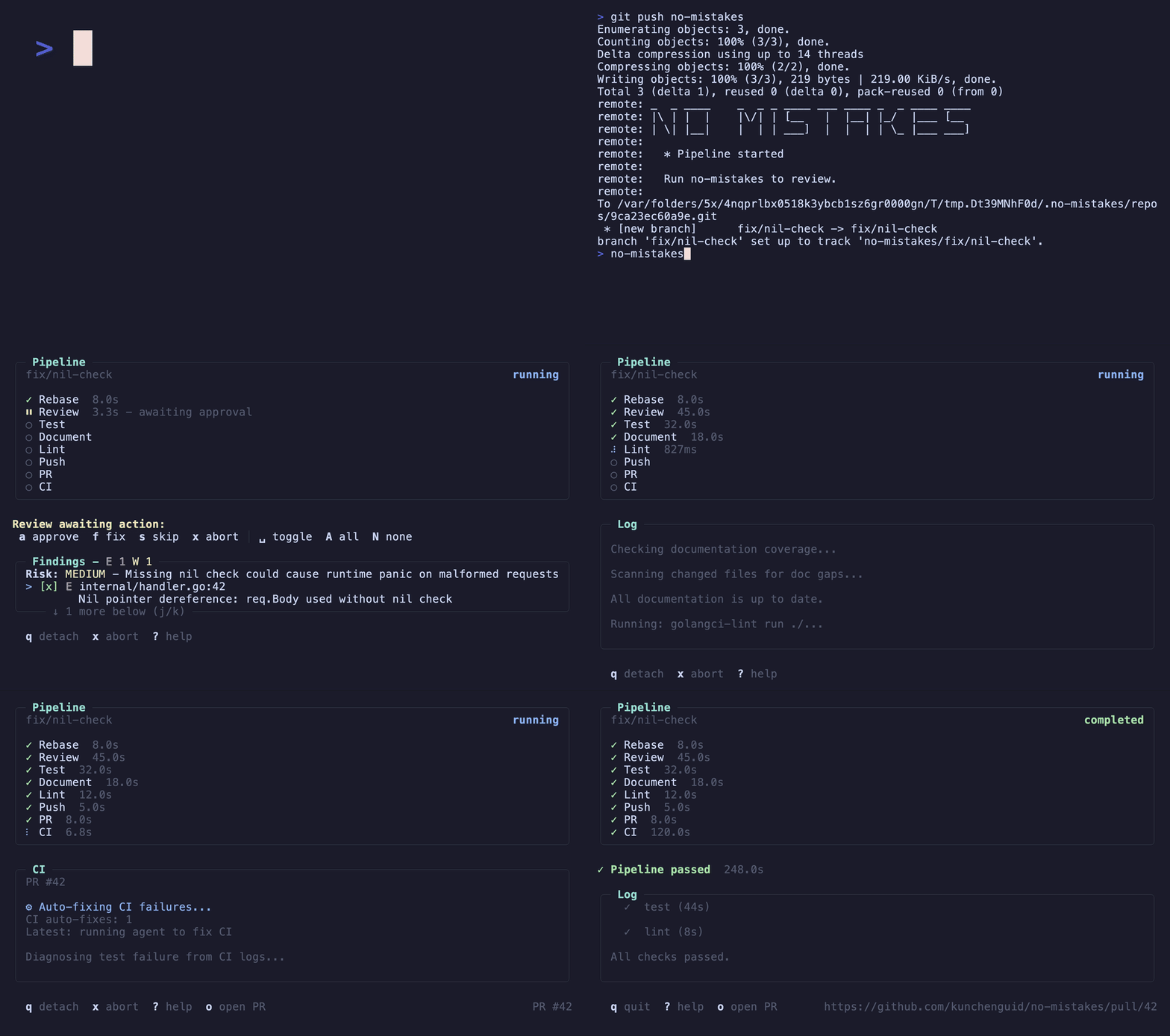
`no-mistakes` 在你的真实远程仓库前设置了一个本地 git 代理。推送到 `no-mistakes` 而不是 `origin`,它会启动一个一次性的 worktree,运行基于 AI 的验证 pipeline,只有在所有检查通过后才向上游转发,并自动开启一个干净的 PR。
- **非阻塞** - pipeline 在隔离的 worktree 中运行,不会干扰你的工作。
- **Agent 无关** - 通过 `acpx` 支持 `claude`、`codex`、`rovodev`、`opencode`、`pi` 或 `acp:
`。
- **Agent 原生** - `/no-mistakes` 让你的编码 agent 执行任务并进行拦截,或者拦截已提交的现有工作:它运行 pipeline,让 pipeline 应用安全的修复,并将剩余部分升级交给你处理。
- **人类始终掌控** - 自动修复或审查发现的问题,由你决定。
- **默认生成干净的 PR** - 一次性完成推送、开启 PR、监控 CI 以及自动修复失败。
完整文档:
## 工作原理
```
your branch
│ git push no-mistakes
▼
┌──────────────────────────────────────────────┐
│ disposable worktree — your work stays put │
│ review → test → docs → lint → push → PR → CI │
└──────────────────────────────────────────────┘
│ every check green
▼
clean PR, opened for you
```
每个步骤要么自行通过,要么停止并生成一个**发现(finding)**供你处理。安全、机械的修复会自动应用;任何涉及你意图的内容都会升级交给你来**批准**、**修复**或**跳过**。在所有检查通过之前,任何内容都不会到达你的真实远程仓库。
## 安装
```
curl -fsSL https://raw.githubusercontent.com/kunchenguid/no-mistakes/main/docs/install.sh | sh
```
Windows、Go 安装和从源码构建的说明请参阅[安装指南](https://kunchenguid.github.io/no-mistakes/start-here/installation/)。
## 快速开始
```
$ no-mistakes init
✓ Gate initialized
repo /Users/you/src/my-repo
gate no-mistakes → /Users/you/.no-mistakes/repos/abc123def456.git
remote git@github.com:you/my-repo.git
skill /no-mistakes installed for agents at user level
Push through the gate with:
git push no-mistakes
$ git checkout my-branch
# 在 branch 中进行一些操作...
$ git push no-mistakes
* Pipeline started
Run no-mistakes to review.
$ no-mistakes
# 为活跃的 run 打开 TUI
```
在 TUI 中,你可以对每个**发现**采取行动:**auto-fix** 项会自动为你应用(或者你批准让其应用),**ask-user** 项则需要你做出判断,决定是批准、修复还是跳过。一旦所有检查通过,拦截器会将你的分支转发到上游并为你开启 PR —— 无需手动执行 `git push origin`,无需手写 PR 内容。想让你的编码 agent 以无头模式驱动相同的流程吗?请使用 `/no-mistakes`(见下文)。
## 触发拦截器的三种方式
每次更改都会经过相同的 pipeline。请根据更改准备就绪时你的工作方式,选择合适的入口点:
- **`git push no-mistakes`** - 显式的 Git 路径。将已提交的分支推送到拦截器远程仓库,而不是 `origin`。
- **`no-mistakes`** - TUI。在进行更改后运行它(无需提交),向导将引导你创建分支、提交、通过拦截器推送,然后附加到运行中。`no-mistakes -y` 会自动完成所有这些操作。
- **`/no-mistakes`** - agent 技能。告诉编码 agent 执行任务并使用 `/no-mistakes ` 进行拦截,或者使用简单的 `/no-mistakes` 拦截已提交的现有工作。它运行 pipeline,让 pipeline 应用安全的修复,并在遇到需要人工决定的情况时停下来询问你。
`no-mistakes init` 会为 Claude Code 和其他 agent 安装 `/no-mistakes` 技能。在底层,该技能驱动 `no-mistakes axi`,这是一个非交互式的 TOON 接口,连接到相同的审批流程。
请参阅[快速开始](https://kunchenguid.github.io/no-mistakes/start-here/quick-start/)获取完整的首次运行演示。
## 开发
```
make build # Build bin/no-mistakes with version info
make test # Run go test -race ./... (excludes the e2e suite)
make e2e # Run the tagged end-to-end agent journey suite
make e2e-record # Re-record e2e fixtures when agent wire formats change
make lint # Check generated skill drift and run go vet ./...
make skill # Regenerate committed no-mistakes skill files
make fmt # Run gofmt -w .
make demo # Regenerate demo.gif and demo.mp4 (needs vhs and ffmpeg)
make docs # Build the Astro docs site in docs/dist
```
完整的 target 列表请参阅 `Makefile`。
`make e2e-record` 会从真实的 `claude`、`codex` 和 `opencode` CLI 覆盖 `internal/e2e/fixtures/`,这会消耗真实的 API 配额,并且在提交前应该进行审查。
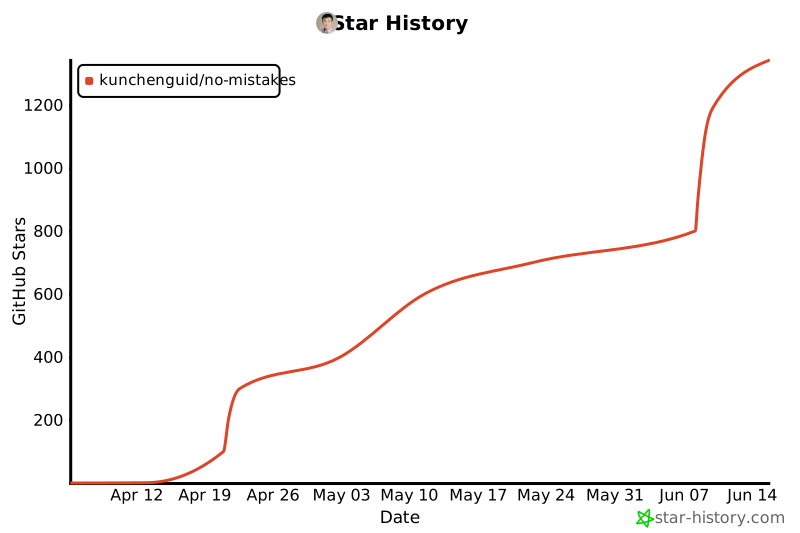
## Star 历史
标签:AI, EVTX分析, Git, SOC Prime, 代码审查, 开发工具, 日志审计, 网络安全研究, 网络调试, 自动化, 自动化代码审查