Paul1404/Sigil
GitHub: Paul1404/Sigil
一个自托管的 DMARC 报告查看器与电子邮件身份验证仪表板,用于解析聚合报告并监控域名的 DNS 安全配置。
Stars: 1 | Forks: 0
# Sigil
一个自托管的 DMARC 报告查看器和电子邮件身份验证仪表板。连接到您的 IMAP 邮箱,解析聚合报告,并为您提供域电子邮件身份验证健康状况的清晰视图。
## 功能
- **IMAP 采集** — 连接到任意 IMAP 邮箱,拉取 DMARC (RUA) 和 TLS-RPT 附件(`.xml`, `.xml.gz`, `.zip`, `.json`, `.json.gz`)
- **报告解析** — RFC 7489 DMARC 聚合报告和 RFC 8460 TLS-RPT 报告,完全解析并存储
- **仪表板** — 通过率、时间线、顶级发件人、域概览
- **DNS 健康检查** — MX、DMARC、SPF、DKIM、TLSA/DANE、MTA-STS 和 TLS Reporting 记录,附带警告和建议
- **检测到的域** — 报告中的域会显示在 DNS 页面上,以便一键进行健康检查
- **后台获取** — 可配置间隔的自动 IMAP 轮询(默认:每 6 小时)
- **静态加密** — 使用 Fernet 加密 IMAP 密码
- **单容器部署** — 一个 Docker 镜像,捆绑前端,启动时自动运行迁移
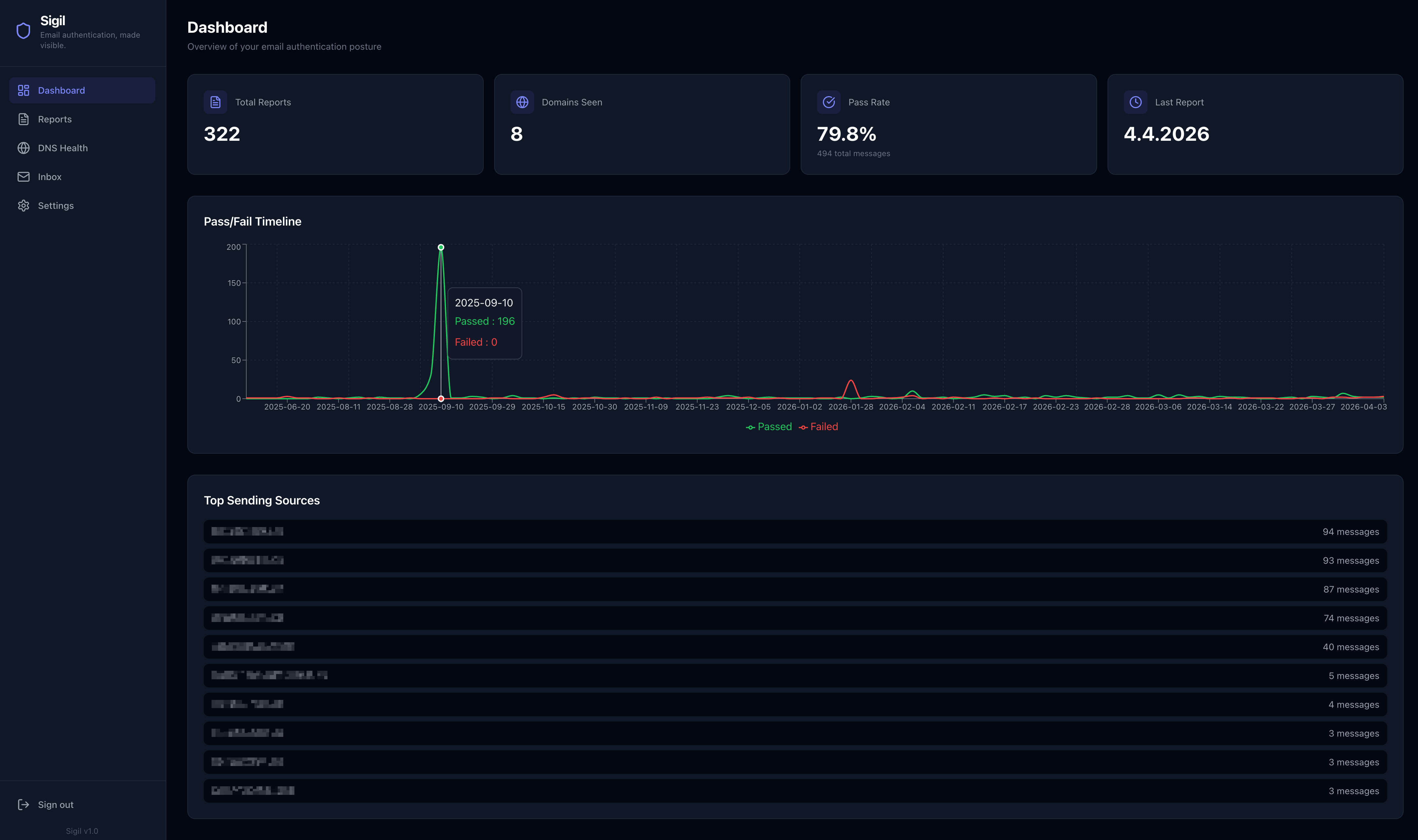 ## 功能说明
## 快速开始 (Docker Compose)
这是运行 Sigil 的推荐方式。无需克隆仓库。
```
# 1. Download the compose file and example env
curl -LO https://raw.githubusercontent.com/Paul1404/Sigil/main/docker-compose.yml
curl -LO https://raw.githubusercontent.com/Paul1404/Sigil/main/.env.example
# 2. Create your .env and fill in the values
cp .env.example .env
# 3. Generate required secrets
python3 -c "from cryptography.fernet import Fernet; print(Fernet.generate_key().decode())"
python3 -c "import secrets; print(secrets.token_urlsafe(32))"
# 4. Start everything
docker compose up -d
```
打开 `http://localhost:8000` 并使用您在 `.env` 中设置的 `ADMIN_PASSWORD` 登录。
### 更新
```
docker compose pull
docker compose up -d
```
迁移在容器启动时自动运行。
## 配置
所有配置均通过环境变量进行。完整列表请参阅 `.env.example`。
| 变量 | 必填 | 描述 |
|---|---|---|
| `POSTGRES_PASSWORD` | 是 | 捆绑的 PostgreSQL 容器的密码 |
| `ENCRYPTION_KEY` | 是 | 用于静态加密 IMAP 密码的 Fernet 密钥 |
| `ADMIN_PASSWORD` | 是 | 登录仪表板的密码 |
| `SECRET_KEY` | 是 | 签署 JWT 令牌 — 使用随机字符串 |
| `FETCH_INTERVAL_HOURS` | 否 | 自动 IMAP 获取之间的小时数(默认:`6`) |
| `SIGIL_PORT` | 否 | 暴露的主机端口(默认:`8000`) |
| `CORS_ORIGINS` | 否 | 逗号分隔的允许来源。留空则表示同源 |
| `DATABASE_URL` | 否 | 覆盖以使用外部 PostgreSQL 而非捆绑的数据库。必须使用 `postgresql+asyncpg://` 协议 |
## 使用外部数据库
如果您已经在运行 PostgreSQL,请在 `.env` 中设置 `DATABASE_URL` 并从 `docker-compose.yml` 中移除 `sigil-db` 服务:
```
DATABASE_URL=postgresql+asyncpg://user:password@your-db-host:5432/sigil
```
## 反向代理
Sigil 默认运行在端口 8000 上。将其置于您现有的反向代理(nginx、Caddy、Traefik 等)之后,并将 `CORS_ORIGINS` 设置为您的公开 URL:
```
CORS_ORIGINS=https://sigil.example.com
```
## 添加邮箱
登录后,前往 **Settings** 并添加您的 IMAP 邮箱。Sigil 将扫描 DMARC 和 TLS-RPT 报告邮件。您可以触发手动获取,或等待下一次计划运行。
大多数 DMARC 报告提供商(Google、Microsoft、Yahoo 等)会将报告作为电子邮件附件发送到您 DMARC 记录中的 `rua` 地址。将该地址指向 Sigil 可以读取的邮箱。
## 从源码构建
如果您更喜欢在本地构建而不是从 `ghcr.io` 拉取:
```
git clone https://github.com/Paul1404/Sigil.git && cd Sigil
docker compose up -d --build
```
或者用于不使用 Docker 的开发:
```
# Backend (Python 3.12+)
cd backend
pip install -r requirements.txt
alembic upgrade head
uvicorn main:app --reload
# Frontend (Node 20+)
cd frontend
npm install
npm run dev
```
前端开发服务器将 `/api` 代理到 `localhost:8000`。
## API
```
GET /api/health Health check
GET /api/dashboard/stats Aggregate stats
GET /api/dashboard/timeline Pass/fail over time
GET /api/reports List DMARC reports (filterable by domain, date)
GET /api/reports/{id} Single report with records
GET /api/tls-reports List TLS-RPT reports
GET /api/tls-reports/summary TLS report summary by domain
POST /api/dns/check Run DNS health checks for a domain
GET /api/dns/domains Domains detected from ingested reports
GET /api/mailboxes List configured mailboxes
POST /api/mailboxes Add a mailbox
PUT /api/mailboxes/{id} Update a mailbox
DELETE /api/mailboxes/{id} Delete a mailbox
POST /api/mailboxes/{id}/fetch Trigger manual fetch
GET /api/inbox Non-report emails
```
## 项目布局
```
backend/
main.py FastAPI app, all routes
models.py SQLAlchemy models
schemas.py Pydantic request/response schemas
dns_checker.py MX, DMARC, SPF, DKIM, TLSA, MTA-STS, TLSRPT checks
imap_fetcher.py IMAP connection + email processing
dmarc_parser.py RFC 7489 XML report parser
tls_parser.py RFC 8460 TLS-RPT JSON parser
scheduler.py Background fetch jobs (APScheduler)
database.py Async DB engine + sessions
config.py Settings from env vars
encryption.py Fernet encrypt/decrypt for IMAP passwords
auth.py JWT auth + password verification
alembic/ Database migrations
frontend/
src/
pages/ Dashboard, Reports, DNS, Settings, Inbox
components/ Shared UI components
api.js API client
```
## 技术栈
- **后端:** FastAPI、SQLAlchemy (async)、Alembic、PostgreSQL、dnspython、APScheduler
- **前端:** React 19、Vite、Tailwind CSS v4、Recharts
- **容器:** 多阶段 Docker 构建 (Node + Python)
## 许可证
MIT
## 功能说明
## 快速开始 (Docker Compose)
这是运行 Sigil 的推荐方式。无需克隆仓库。
```
# 1. Download the compose file and example env
curl -LO https://raw.githubusercontent.com/Paul1404/Sigil/main/docker-compose.yml
curl -LO https://raw.githubusercontent.com/Paul1404/Sigil/main/.env.example
# 2. Create your .env and fill in the values
cp .env.example .env
# 3. Generate required secrets
python3 -c "from cryptography.fernet import Fernet; print(Fernet.generate_key().decode())"
python3 -c "import secrets; print(secrets.token_urlsafe(32))"
# 4. Start everything
docker compose up -d
```
打开 `http://localhost:8000` 并使用您在 `.env` 中设置的 `ADMIN_PASSWORD` 登录。
### 更新
```
docker compose pull
docker compose up -d
```
迁移在容器启动时自动运行。
## 配置
所有配置均通过环境变量进行。完整列表请参阅 `.env.example`。
| 变量 | 必填 | 描述 |
|---|---|---|
| `POSTGRES_PASSWORD` | 是 | 捆绑的 PostgreSQL 容器的密码 |
| `ENCRYPTION_KEY` | 是 | 用于静态加密 IMAP 密码的 Fernet 密钥 |
| `ADMIN_PASSWORD` | 是 | 登录仪表板的密码 |
| `SECRET_KEY` | 是 | 签署 JWT 令牌 — 使用随机字符串 |
| `FETCH_INTERVAL_HOURS` | 否 | 自动 IMAP 获取之间的小时数(默认:`6`) |
| `SIGIL_PORT` | 否 | 暴露的主机端口(默认:`8000`) |
| `CORS_ORIGINS` | 否 | 逗号分隔的允许来源。留空则表示同源 |
| `DATABASE_URL` | 否 | 覆盖以使用外部 PostgreSQL 而非捆绑的数据库。必须使用 `postgresql+asyncpg://` 协议 |
## 使用外部数据库
如果您已经在运行 PostgreSQL,请在 `.env` 中设置 `DATABASE_URL` 并从 `docker-compose.yml` 中移除 `sigil-db` 服务:
```
DATABASE_URL=postgresql+asyncpg://user:password@your-db-host:5432/sigil
```
## 反向代理
Sigil 默认运行在端口 8000 上。将其置于您现有的反向代理(nginx、Caddy、Traefik 等)之后,并将 `CORS_ORIGINS` 设置为您的公开 URL:
```
CORS_ORIGINS=https://sigil.example.com
```
## 添加邮箱
登录后,前往 **Settings** 并添加您的 IMAP 邮箱。Sigil 将扫描 DMARC 和 TLS-RPT 报告邮件。您可以触发手动获取,或等待下一次计划运行。
大多数 DMARC 报告提供商(Google、Microsoft、Yahoo 等)会将报告作为电子邮件附件发送到您 DMARC 记录中的 `rua` 地址。将该地址指向 Sigil 可以读取的邮箱。
## 从源码构建
如果您更喜欢在本地构建而不是从 `ghcr.io` 拉取:
```
git clone https://github.com/Paul1404/Sigil.git && cd Sigil
docker compose up -d --build
```
或者用于不使用 Docker 的开发:
```
# Backend (Python 3.12+)
cd backend
pip install -r requirements.txt
alembic upgrade head
uvicorn main:app --reload
# Frontend (Node 20+)
cd frontend
npm install
npm run dev
```
前端开发服务器将 `/api` 代理到 `localhost:8000`。
## API
```
GET /api/health Health check
GET /api/dashboard/stats Aggregate stats
GET /api/dashboard/timeline Pass/fail over time
GET /api/reports List DMARC reports (filterable by domain, date)
GET /api/reports/{id} Single report with records
GET /api/tls-reports List TLS-RPT reports
GET /api/tls-reports/summary TLS report summary by domain
POST /api/dns/check Run DNS health checks for a domain
GET /api/dns/domains Domains detected from ingested reports
GET /api/mailboxes List configured mailboxes
POST /api/mailboxes Add a mailbox
PUT /api/mailboxes/{id} Update a mailbox
DELETE /api/mailboxes/{id} Delete a mailbox
POST /api/mailboxes/{id}/fetch Trigger manual fetch
GET /api/inbox Non-report emails
```
## 项目布局
```
backend/
main.py FastAPI app, all routes
models.py SQLAlchemy models
schemas.py Pydantic request/response schemas
dns_checker.py MX, DMARC, SPF, DKIM, TLSA, MTA-STS, TLSRPT checks
imap_fetcher.py IMAP connection + email processing
dmarc_parser.py RFC 7489 XML report parser
tls_parser.py RFC 8460 TLS-RPT JSON parser
scheduler.py Background fetch jobs (APScheduler)
database.py Async DB engine + sessions
config.py Settings from env vars
encryption.py Fernet encrypt/decrypt for IMAP passwords
auth.py JWT auth + password verification
alembic/ Database migrations
frontend/
src/
pages/ Dashboard, Reports, DNS, Settings, Inbox
components/ Shared UI components
api.js API client
```
## 技术栈
- **后端:** FastAPI、SQLAlchemy (async)、Alembic、PostgreSQL、dnspython、APScheduler
- **前端:** React 19、Vite、Tailwind CSS v4、Recharts
- **容器:** 多阶段 Docker 构建 (Node + Python)
## 许可证
MIT
## 功能说明
## 快速开始 (Docker Compose)
这是运行 Sigil 的推荐方式。无需克隆仓库。
```
# 1. Download the compose file and example env
curl -LO https://raw.githubusercontent.com/Paul1404/Sigil/main/docker-compose.yml
curl -LO https://raw.githubusercontent.com/Paul1404/Sigil/main/.env.example
# 2. Create your .env and fill in the values
cp .env.example .env
# 3. Generate required secrets
python3 -c "from cryptography.fernet import Fernet; print(Fernet.generate_key().decode())"
python3 -c "import secrets; print(secrets.token_urlsafe(32))"
# 4. Start everything
docker compose up -d
```
打开 `http://localhost:8000` 并使用您在 `.env` 中设置的 `ADMIN_PASSWORD` 登录。
### 更新
```
docker compose pull
docker compose up -d
```
迁移在容器启动时自动运行。
## 配置
所有配置均通过环境变量进行。完整列表请参阅 `.env.example`。
| 变量 | 必填 | 描述 |
|---|---|---|
| `POSTGRES_PASSWORD` | 是 | 捆绑的 PostgreSQL 容器的密码 |
| `ENCRYPTION_KEY` | 是 | 用于静态加密 IMAP 密码的 Fernet 密钥 |
| `ADMIN_PASSWORD` | 是 | 登录仪表板的密码 |
| `SECRET_KEY` | 是 | 签署 JWT 令牌 — 使用随机字符串 |
| `FETCH_INTERVAL_HOURS` | 否 | 自动 IMAP 获取之间的小时数(默认:`6`) |
| `SIGIL_PORT` | 否 | 暴露的主机端口(默认:`8000`) |
| `CORS_ORIGINS` | 否 | 逗号分隔的允许来源。留空则表示同源 |
| `DATABASE_URL` | 否 | 覆盖以使用外部 PostgreSQL 而非捆绑的数据库。必须使用 `postgresql+asyncpg://` 协议 |
## 使用外部数据库
如果您已经在运行 PostgreSQL,请在 `.env` 中设置 `DATABASE_URL` 并从 `docker-compose.yml` 中移除 `sigil-db` 服务:
```
DATABASE_URL=postgresql+asyncpg://user:password@your-db-host:5432/sigil
```
## 反向代理
Sigil 默认运行在端口 8000 上。将其置于您现有的反向代理(nginx、Caddy、Traefik 等)之后,并将 `CORS_ORIGINS` 设置为您的公开 URL:
```
CORS_ORIGINS=https://sigil.example.com
```
## 添加邮箱
登录后,前往 **Settings** 并添加您的 IMAP 邮箱。Sigil 将扫描 DMARC 和 TLS-RPT 报告邮件。您可以触发手动获取,或等待下一次计划运行。
大多数 DMARC 报告提供商(Google、Microsoft、Yahoo 等)会将报告作为电子邮件附件发送到您 DMARC 记录中的 `rua` 地址。将该地址指向 Sigil 可以读取的邮箱。
## 从源码构建
如果您更喜欢在本地构建而不是从 `ghcr.io` 拉取:
```
git clone https://github.com/Paul1404/Sigil.git && cd Sigil
docker compose up -d --build
```
或者用于不使用 Docker 的开发:
```
# Backend (Python 3.12+)
cd backend
pip install -r requirements.txt
alembic upgrade head
uvicorn main:app --reload
# Frontend (Node 20+)
cd frontend
npm install
npm run dev
```
前端开发服务器将 `/api` 代理到 `localhost:8000`。
## API
```
GET /api/health Health check
GET /api/dashboard/stats Aggregate stats
GET /api/dashboard/timeline Pass/fail over time
GET /api/reports List DMARC reports (filterable by domain, date)
GET /api/reports/{id} Single report with records
GET /api/tls-reports List TLS-RPT reports
GET /api/tls-reports/summary TLS report summary by domain
POST /api/dns/check Run DNS health checks for a domain
GET /api/dns/domains Domains detected from ingested reports
GET /api/mailboxes List configured mailboxes
POST /api/mailboxes Add a mailbox
PUT /api/mailboxes/{id} Update a mailbox
DELETE /api/mailboxes/{id} Delete a mailbox
POST /api/mailboxes/{id}/fetch Trigger manual fetch
GET /api/inbox Non-report emails
```
## 项目布局
```
backend/
main.py FastAPI app, all routes
models.py SQLAlchemy models
schemas.py Pydantic request/response schemas
dns_checker.py MX, DMARC, SPF, DKIM, TLSA, MTA-STS, TLSRPT checks
imap_fetcher.py IMAP connection + email processing
dmarc_parser.py RFC 7489 XML report parser
tls_parser.py RFC 8460 TLS-RPT JSON parser
scheduler.py Background fetch jobs (APScheduler)
database.py Async DB engine + sessions
config.py Settings from env vars
encryption.py Fernet encrypt/decrypt for IMAP passwords
auth.py JWT auth + password verification
alembic/ Database migrations
frontend/
src/
pages/ Dashboard, Reports, DNS, Settings, Inbox
components/ Shared UI components
api.js API client
```
## 技术栈
- **后端:** FastAPI、SQLAlchemy (async)、Alembic、PostgreSQL、dnspython、APScheduler
- **前端:** React 19、Vite、Tailwind CSS v4、Recharts
- **容器:** 多阶段 Docker 构建 (Node + Python)
## 许可证
MIT标签:Cryptography, DANE, Dashboard, DKIM, DMARC, DNS健康检查, Docker, IMAP, MTA-STS, Mutation, Python, RFC 7489, RFC 8460, SPF, TLS-RPT, 代码示例, 前端, 单容器部署, 可视化, 后端, 域名安全, 安全防御评估, 数据分析, 数据解析, 无后门, 测试用例, 网络安全, 聚合报告, 自动轮询, 自托管, 请求拦截, 运维工具, 逆向工具, 邮件合规, 邮件安全, 邮件报告, 邮件服务器, 邮件认证, 防欺诈, 防钓鱼, 隐私保护