mr-tanta/securing-production-servers
GitHub: mr-tanta/securing-production-servers
一款零依赖的Linux生产服务器安全加固工具包,通过模块化脚本实现安全审计、配置加固与CI/CD集成的全流程自动化。
Stars: 0 | Forks: 0


securing-production-servers




生产服务器加固工具包 — 审计您的安全态势并在几分钟内应用久经实战检验的加固措施。
## 演示
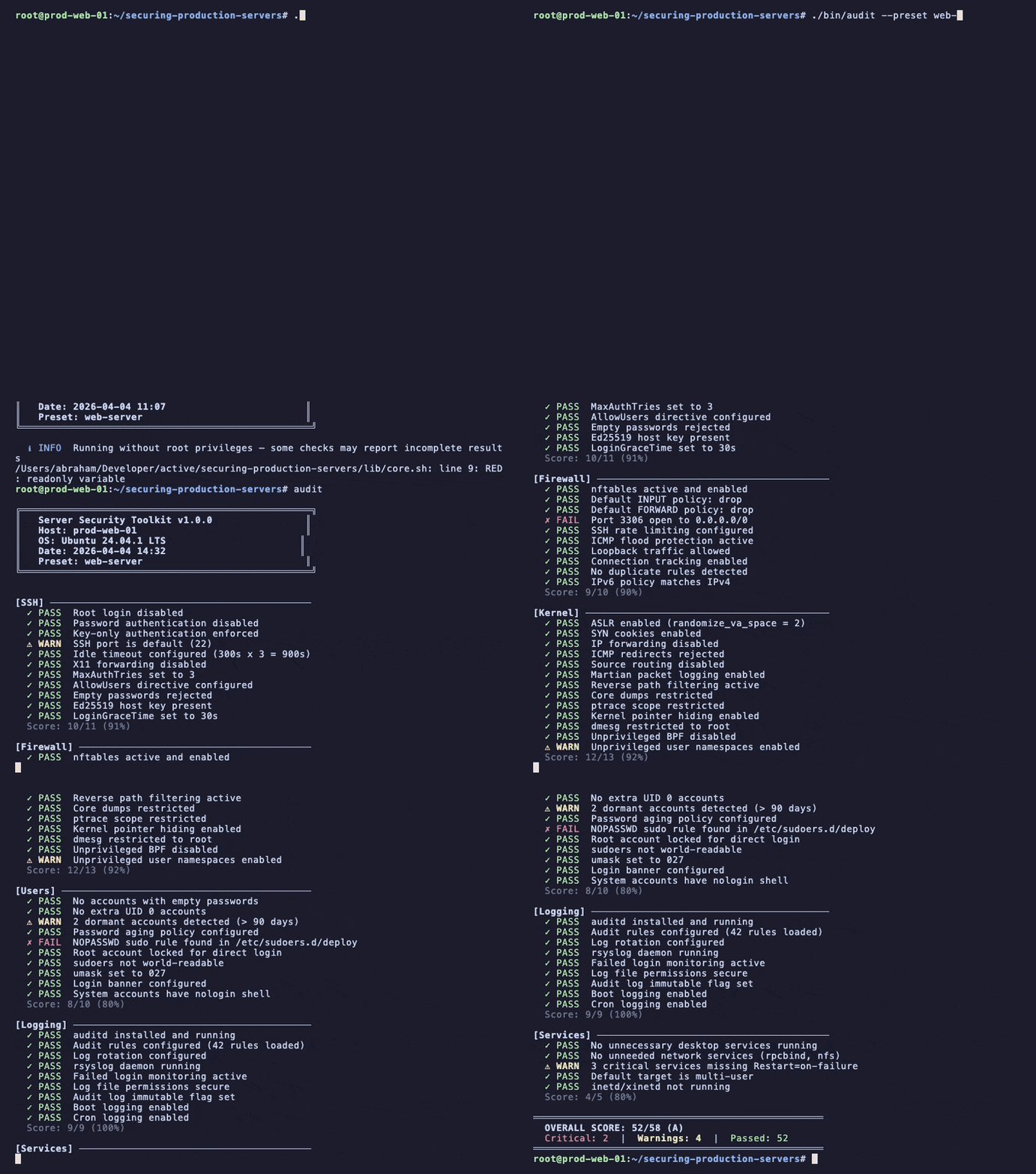
## 快速开始
```
# Clone
git clone https://github.com/mr-tanta/securing-production-servers.git
cd securing-production-servers
# 审计您的服务器
sudo ./bin/audit
# 审查加固将执行哪些更改(默认为 dry-run)
sudo ./bin/harden --preset web-server
# 应用加固
sudo ./bin/harden --preset web-server --apply
```
每个被修改的文件在应用更改之前都会**自动备份**。随时运行 `sudo ./bin/harden --undo` 即可还原。
## 功能特性
- **模块化架构** — 每个安全域都是一个独立的模块,拥有各自的审计、加固和配置文件
- **10 个安全模块** — SSH、防火墙、内核、文件系统、用户、网络、软件包、日志、服务、容器
- **预设配置** — 一键加固,专为 Web 服务器、数据库、CI Runner、Kubernetes 节点和最小基线调优
- **默认试运行** — 在更改触及系统之前预览每一项变更
- **自动备份** — 每个配置文件在修改前都会备份,支持基于清单的还原
- **用于 CI 的 JSON 输出** — 通过管道将 `--json` 传入您的流水线,以编程方式执行安全门禁
- **撤销功能** — 完全回滚到最近的加固前状态
- **修复命令** — 传递 `--fix-commands` 以查看针对每个失败项的确切补救措施
- **加固等级** — 每次运行可选择 `minimal`(最小)、`standard`(标准)或 `strict`(严格)强度
- **零依赖** — 纯 Bash,目标机器上无需安装代理或软件包
## 模块
| 模块 | 描述 |
|---|---
| **ssh** | sshd_config 审计:root 登录、密码认证、协议版本、空闲超时、密钥强度、主机密钥算法 |
| **firewall** | nftables/iptables 策略:默认 DROP、速率限制、conntrack、IPv6 一致性、重复规则检测 |
| **kernel** | sysctl 加固:ASLR、SYN Cookies、IP 转发、ICMP 重定向、源路由、ptrace、kptr_restrict |
| **filesystem** | 文件权限、挂载选项、SUID/SGID 二进制文件清单、所有权检查 |
| **users** | 密码策略、休眠账户、sudo 配置、登录加固 |
| **network** | 监听服务、DNS 配置、TCP Wrappers、ARP 安全、无线接口、时间同步 |
| **packages** | 自动更新、GPG 验证、仓库安全、漏洞软件包检测、内核实时补丁 |
| **logging** | auditd 配置、日志轮转、syslog、日志文件权限、监控设置 |
| **services** | 不必要的服务、网络守护程序、systemd 沙箱、过时的启用项、重启策略 |
| **containers** | Docker/Podman 守护程序配置、运行中的容器安全、Rootless 模式、内容信任、镜像策略 |
## 预设配置
| 预设 | 模块 | 用例 |
|---|---|---|
| `web-server` | ssh, firewall, kernel, filesystem, users, network, packages, logging, services | 暴露在互联网上的 Nginx/Apache/Node.js 服务器 |
| `database-server` | ssh, firewall, kernel, filesystem, users, network, packages, logging, services | PostgreSQL, MySQL, MongoDB, Redis — 网络隔离与审计日志 |
| `ci-runner` | ssh, firewall, kernel, filesystem, users, network, packages, logging, services, containers | GitHub Actions, GitLab Runner, Jenkins — 容器隔离与横向移动防御 |
| `kubernetes-node` | ssh, firewall, kernel, filesystem, users, network, packages, logging, services, containers | Worker 和 control-plane 节点 — CIS Kubernetes Benchmark 对齐 |
| `minimal` | ssh, firewall, kernel, users, services | 任何 Linux 服务器的基线加固 |
## 用法
### 审计
```
# 完整审计(所有模块)
sudo ./bin/audit
# 仅特定模块
sudo ./bin/audit --modules ssh,firewall
# 使用预设 profile
sudo ./bin/audit --preset web-server
# 用于机器读取的 JSON 输出
sudo ./bin/audit --json
# 在失败项旁显示修复命令
sudo ./bin/audit --fix-commands
# 列出可用的 modules 和 presets
./bin/audit --list-modules
./bin/audit --list-presets
```
### 加固
```
# 预览更改(默认为 dry-run)
sudo ./bin/harden --preset web-server
# 应用加固
sudo ./bin/harden --preset web-server --apply
# 对单个 module 进行 Strict 加固
sudo ./bin/harden --modules ssh --level strict --apply
# 从备份恢复
sudo ./bin/harden --undo
```
### 加固等级
| 等级 | 行为 |
|---|---|
| `minimal` | 保守默认值,干扰最小 |
| `standard` | 推荐用于大多数生产服务器(默认) |
| `strict` | 最大程度加固,可能需要应用调优 |
## 直接替换配置
`configs/` 目录包含加固模块部署的生产就绪配置文件:
```
configs/
├── audit.rules.d/ # auditd rules for filesystem and syscall monitoring
├── fail2ban/ # Jail configs for SSH and service brute-force protection
├── sysctl.d/ # Kernel parameter hardening profiles
├── sshd_config.hardened # Hardened OpenSSH server configuration
├── nftables.conf.web # nftables ruleset for web servers
└── nftables.conf.database # nftables ruleset for database servers
```
这些是在 `--apply` 期间应用的确切文件。在对敏感系统运行加固之前,请检查或自定义它们。
## 文档
深入指南和模块参考文档位于 `docs/`:
```
docs/
├── guides/ # Step-by-step hardening walkthroughs
├── compliance/ # CIS Benchmark and regulatory mapping
└── modules/ # Per-module deep dives
```
## CI/CD 集成
使用 `--json` 在部署流水线中执行安全基线。如果发现任何严重失败,退出代码为 `1`,否则为 `0`。
**GitHub Actions:**
```
- name: Security audit
run: |
sudo ./bin/audit --preset web-server --json > audit.json
# Parse results
SCORE=$(jq '.summary.score' audit.json)
TOTAL=$(jq '.summary.total' audit.json)
FAILURES=$(jq '.summary.fail' audit.json)
echo "Security score: ${SCORE}/${TOTAL}"
if [ "$FAILURES" -gt 0 ]; then
echo "::error::${FAILURES} critical security finding(s)"
exit 1
fi
```
**GitLab CI:**
```
security_audit:
stage: test
script:
- sudo ./bin/audit --preset web-server --json | tee audit.json
- jq -e '.summary.fail == 0' audit.json
artifacts:
paths:
- audit.json
when: always
```
## 支持的发行版
| 发行版 | 版本 |
|---|---|
| Ubuntu | 22.04 LTS, 24.04 LTS |
| Debian | 12 (Bookworm) |
| Rocky Linux | 8, 9 |
| AlmaLinux | 8, 9 |
| Amazon Linux | 2023 |
该工具包会自动检测操作系统家族,并相应地调整包管理器命令、服务名称和配置文件路径。
## 贡献
欢迎贡献。请参阅 [CONTRIBUTING.md](CONTRIBUTING.md) 了解有关添加模块、编写测试和提交 Pull Request 的指南。
## 许可证
[MIT](LICENSE)
## 作者
**Abraham Esandayinze Tanta** — 安全研究员与专家
- GitHub: [@mr-tanta](https://github.com/mr-tanta)
- LinkedIn: [mr-tanta](https://linkedin.com/in/mr-tanta)
- 组织: [Tanta Innovative](https://github.com/tantainnovative)
标签:Bash, CISA项目, DevSecOps, Homebrew安装, PE 加载器, Shell脚本, Web服务器安全, 上游代理, 入侵防御, 关系图谱, 基线检查, 安全配置, 应用安全, 开源安全工具, 无线安全, 服务器监控, 服务器维护, 权限管理, 模块化设计, 模型越狱, 漏洞防护, 生产服务器加固, 系统加固, 网络安全, 网络安全审计, 自动化修复, 自动化运维, 请求拦截, 逆向工程平台, 隐私保护