safishamsi/graphify
GitHub: Graphify-Labs/graphify
将代码、文档、论文和图片转化为可查询知识图谱的AI助手技能,帮助理解代码结构和架构决策。
Stars: 91354 | Forks: 8905
# graphify
[English](README.md) | [简体中文](README.zh-CN.md)
[](https://github.com/safishamsi/graphify/actions/workflows/ci.yml)
[](https://pypi.org/project/graphifyy/)
[](https://github.com/sponsors/safishamsi)
**一个 AI 编码助手技能。** 在 Claude Code、Codex、OpenCode、OpenClaw 或 Factory Droid 中输入 `/graphify`——它会读取您的文件,构建知识图谱,并返回您原本不知道存在的结构。更快地理解代码库。找出架构决策背后的"原因"。
完全多模态。支持代码、PDF、Markdown、截图、图表、白板照片,甚至其他语言的图片——graphify 使用 Claude 视觉能力从中提取概念和关系,并将它们连接成一个图谱。
```
/graphify . # works on any folder - your codebase, notes, papers, anything
```
```
graphify-out/
├── graph.html interactive graph - click nodes, search, filter by community
├── GRAPH_REPORT.md god nodes, surprising connections, suggested questions
├── graph.json persistent graph - query weeks later without re-reading
└── cache/ SHA256 cache - re-runs only process changed files
```
添加 `.graphifyignore` 文件来排除您不希望出现在图谱中的文件夹:
```
# .graphifyignore
vendor/
node_modules/
dist/
*.generated.py
```
语法与 `.gitignore` 相同。模式与您运行 graphify 的文件夹下的文件路径匹配。
## 工作原理
graphify 分两轮运行。首先,确定性的 AST 轮从代码文件中提取结构(类、函数、导入、调用图、文档字符串、解释性注释),无需 LLM。其次,Claude 子代理并行处理文档、论文和图片,以提取概念、关系和设计理念。结果合并到 NetworkX 图中,使用 Leiden 社区检测进行聚类,并导出为可交互 HTML、可查询 JSON 和纯语言审计报告。
**聚类基于图拓扑——无需嵌入。** Leiden 通过边密度发现社区。Claude 提取的语义相似边(`semantically_similar_to`,标记为 INFERRED)已经在图中,因此它们直接影响社区检测。图结构就是相似度信号——无需单独的嵌入步骤或向量数据库。
每个关系都标记为 `EXTRACTED`(直接从源码中发现)、`INFERRED`(合理推断,带置信度分数)或 `AMBIGUOUS`(标记待审核)。您始终知道什么是被发现的,什么是被推测的。
## 安装
**要求:** Python 3.10+ 和以下之一:[Claude Code](https://claude.ai/code)、[Codex](https://openai.com/codex)、[OpenCode](https://opencode.ai)、[OpenClaw](https://openclaw.ai) 或 [Factory Droid](https://factory.ai)
```
pip install graphifyy && graphify install
```
### 平台支持
| 平台 | 安装命令 |
|----------|----------------|
| Claude Code(Linux/Mac) | `graphify install` |
| Claude Code(Windows) | `graphify install`(自动检测)或 `graphify install --platform windows` |
| Codex | `graphify install --platform codex` |
| OpenCode | `graphify install --platform opencode` |
| OpenClaw | `graphify install --platform claw` |
| Factory Droid | `graphify install --platform droid` |
Codex 用户还需要在 `~/.codex/config.toml` 的 `[features]` 下设置 `multi_agent = true` 以进行并行提取。Factory Droid 使用 `Task` 工具进行并行子代理调度。OpenClaw 使用顺序提取(该平台的并行代理支持仍在早期阶段)。
然后打开您的 AI 编码助手并输入:
```
/graphify .
```
### 让您的助手始终使用图谱(推荐)
构建图谱后,在您的项目中运行一次:
| 平台 | 命令 |
|----------|---------|
| Claude Code | `graphify claude install` |
| Codex | `graphify codex install` |
| OpenCode | `graphify opencode install` |
| OpenClaw | `graphify claw install` |
| Factory Droid | `graphify droid install` |
**Claude Code** 做两件事:写入一个 `CLAUDE.md` 部分,告诉 Claude 在回答架构问题前先读取 `graphify-out/GRAPH_REPORT.md`,并安装一个 **PreToolUse 钩子**(`settings.json`),它在每次 Glob 和 Grep 调用之前触发。如果存在知识图谱,Claude 会看到:_"graphify:存在知识图谱。在搜索原始文件之前,请先阅读 GRAPH_REPORT.md 了解核心节点和社区结构。"_——因此 Claude 通过图谱导航,而不是grep每个文件。
**Codex、OpenCode、OpenClaw、Factory Droid** 将相同的规则写入项目根目录的 `AGENTS.md`。这些平台不支持 PreToolUse 钩子,所以 AGENTS.md 是始终开启的机制。
使用匹配的卸载命令卸载(例如 `graphify claude uninstall`)。
**始终开启 vs 显式触发——有什么区别?**
始终开启的钩子会显示 `GRAPH_REPORT.md`——这是核心节点、社区和意外连接的摘要。您的助手在搜索文件之前会读取它,因此它按结构而不是关键词匹配来导航。这涵盖了大多数日常问题。
`/graphify query`、`/graphify path` 和 `/graphify explain` 更深入:它们逐跳遍历原始 `graph.json`,追踪节点之间的精确路径,并显示边级细节(关系类型、置信度分数、来源位置)。当您想要从图谱中回答特定问题而不是一般性了解时,使用它们。
这样想:始终开启的钩子给您的助手一张地图。`/graphify` 命令让它精确地导航地图。
## 使用方法
```
/graphify # run on current directory
/graphify ./raw # run on a specific folder
/graphify ./raw --mode deep # more aggressive INFERRED edge extraction
/graphify ./raw --update # re-extract only changed files, merge into existing graph
/graphify ./raw --cluster-only # rerun clustering on existing graph, no re-extraction
/graphify ./raw --no-viz # skip HTML, just produce report + JSON
/graphify ./raw --obsidian # also generate Obsidian vault (opt-in)
/graphify add https://arxiv.org/abs/1706.03762 # fetch a paper, save, update graph
/graphify add https://x.com/karpathy/status/... # fetch a tweet
/graphify add https://... --author "Name" # tag the original author
/graphify add https://... --contributor "Name" # tag who added it to the corpus
/graphify query "what connects attention to the optimizer?"
/graphify query "what connects attention to the optimizer?" --dfs # trace a specific path
/graphify query "what connects attention to the optimizer?" --budget 1500 # cap at N tokens
/graphify path "DigestAuth" "Response"
/graphify explain "SwinTransformer"
/graphify ./raw --watch # auto-sync graph as files change (code: instant, docs: notifies you)
/graphify ./raw --wiki # build agent-crawlable wiki (index.md + article per community)
/graphify ./raw --svg # export graph.svg
/graphify ./raw --graphml # export graph.graphml (Gephi, yEd)
/graphify ./raw --neo4j # generate cypher.txt for Neo4j
/graphify ./raw --neo4j-push bolt://localhost:7687 # push directly to a running Neo4j instance
/graphify ./raw --mcp # start MCP stdio server
# git hooks - 平台无关,在提交和分支切换时重建图
graphify hook install
graphify hook uninstall
graphify hook status
# always-on assistant 说明 - 平台特定
graphify claude install # CLAUDE.md + PreToolUse hook (Claude Code)
graphify claude uninstall
graphify codex install # AGENTS.md (Codex)
graphify opencode install # AGENTS.md (OpenCode)
graphify claw install # AGENTS.md (OpenClaw)
graphify droid install # AGENTS.md (Factory Droid)
```
支持任意混合的文件类型:
| 类型 | 扩展名 | 提取方式 |
|------|-----------|------------|
| 代码 | `.py .ts .js .go .rs .java .c .cpp .rb .cs .kt .scala .php .swift .lua .zig .ps1` | 通过 tree-sitter 进行 AST 提取 + 调用图 + 文档字符串/注释分析 |
| 文档 | `.md .txt .rst` | 通过 Claude 提取概念 + 关系 + 设计理念 |
| Office | `.docx .xlsx` | 转换为 markdown 后通过 Claude 提取(需要 `pip install graphifyy[office]`) |
| 论文 | `.pdf` | 引用挖掘 + 概念提取 |
| 图片 | `.png .jpg .webp .gif` | Claude 视觉——截图、图表、任何语言 |
## 输出内容
**核心节点** - 最高度数概念(所有内容都通过它连接)
**意外连接** - 按综合分数排名。代码-论文边的排名高于代码-代码边。每个结果都包含通俗易懂的解释。
**建议问题** - 图谱特别适合回答的 4-5 个问题
**"原因"** - 文档字符串、内联注释(`# NOTE:`、`# IMPORTANT:`、`# HACK:`、`# WHY:`)以及文档中的设计理念被提取为 `rationale_for` 节点。不只是代码做什么——而是为什么那样写。
**置信度分数** - 每个 INFERRED 边都有一个 `confidence_score`(0.0-1.0)。您不仅知道什么是被推测的,还知道模型的置信度。EXTRACTED 边始终为 1.0。
**语义相似边** - 没有结构连接跨文件概念链接。两个解决同样问题但没有相互调用的函数,代码中的一个类和论文中描述同一算法的一个概念。
**超边** - 连接 3 个以上节点的关系, pairwise 边无法表达。实现同一协议的所有类,认证流程中的所有函数,论文章节中的所有概念形成一个整体。
**Token 基准** - 每次运行后自动打印。在混合语料库上(Karpathy 仓库 + 论文 + 图片):**71.5x** 更少的 token 每查询相比读取原始文件。第一次运行提取并构建图谱(这需要 token)。之后的每次查询都读取紧凑的图谱而不是原始文件——这就是节省累积的地方。SHA256 缓存意味着重新运行只重新处理更改的文件。
**自动同步**(`--watch`)- 在后台终端运行,图谱会在您的代码库更改时自动更新。代码文件保存会触发即时重建(仅 AST,无需 LLM)。文档/图片更改会通知您运行 `--update` 进行 LLM 重新处理。
**Git 钩子**(`graphify hook install`)- 安装 post-commit 和 post-checkout 钩子。每次提交后和每次分支切换后图谱都会自动重建。如果重建失败,钩子会以非零代码退出,这样 git 会显示错误而不是静默继续。无需进程。
**维基**(`--wiki`)- 每个社区和核心节点的 Wikipedia 风格 markdown 文章,带有 `index.md` 入口点。将任何代理指向 `index.md`,它可以通过读取文件而不是解析 JSON 来导航知识库。
## 工作示例
| 语料库 | 文件数 | 缩减 | 输出 |
|--------|-------|-----------|--------|
| Karpathy 仓库 + 5 篇论文 + 4 张图片 | 52 | **71.5x** | [`worked/karpathy-repos/`](worked/karpathy-repos/) |
| graphify 源码 + Transformer 论文 | 4 | **5.4x** | [`worked/mixed-corpus/`](worked/mixed-corpus/) |
| httpx(合成 Python 库) | 6 | ~1x | [`worked/httpx/`](worked/httpx/) |
Token 缩减随语料库大小而扩展。6 个文件本来就能放入上下文窗口,所以图谱的价值在于结构清晰,而不是压缩。在 52 个文件(代码 + 论文 + 图片)时,您获得 71 倍以上。每个 `worked/` 文件夹都有原始输入文件和实际输出(`GRAPH_REPORT.md`、`graph.json`),这样您可以自己运行并验证数字。
## 隐私
graphify 将文件内容发送到您 AI 编码助手底层模型 API 进行文档、论文和图片的语义提取——Anthropic(Claude Code)、OpenAI(Codex),或您平台使用的任何提供商。代码文件通过 tree-sitter AST 在本地处理——代码不发送任何文件内容离开您的机器。没有遥测、使用跟踪或任何形式的分析。网络调用仅在提取期间发送到您平台的模型 API,使用您自己的 API 密钥。
## 技术栈
NetworkX + Leiden(graspologic)+ tree-sitter + vis.js。语义提取通过 Claude(Claude Code)、GPT-4(Codex)或您平台运行的任何模型进行。无需 Neo4j,无需服务器,完全本地运行。
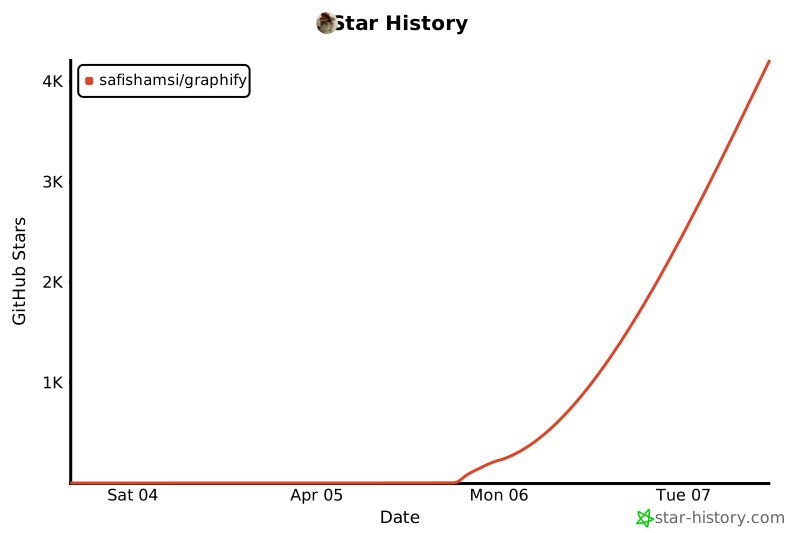
## Star 历史
[](https://star-history.com/#safishamsi/graphify&Date)
手动安装(curl)
``` mkdir -p ~/.claude/skills/graphify curl -fsSL https://raw.githubusercontent.com/safishamsi/graphify/v3/graphify/skill.md \ > ~/.claude/skills/graphify/SKILL.md ``` 添加到 `~/.claude/CLAUDE.md`: ``` - **graphify** (`~/.claude/skills/graphify/SKILL.md`) - any input to knowledge graph. Trigger: `/graphify` When the user types `/graphify`, invoke the Skill tool with `skill: "graphify"` before doing anything else. ```贡献
**工作示例** 是最建立信任的贡献。在真实语料库上运行 `/graphify`,将输出保存到 `worked/{slug}/`,写一个诚实的 `review.md` 评估图谱做对了什么和做错了什么,提交 PR。 **提取 bug** - 打开 issue 并提供输入文件、缓存条目(`graphify-out/cache/`)以及遗漏或捏造的内容。 请参阅 [ARCHITECTURE.md](ARCHITECTURE.md) 了解模块职责以及如何添加语言。标签:AI编程助手, AST解析, Claude, CVE检测, Python, RAG, 交互式图谱, 代码分析, 代码可视化, 代码检索, 代码理解, 代码理解工具, 凭证管理, 多模态理解, 文档分析, 无后门, 架构分析, 特权检测, 知识提取, 语义搜索, 逆向工具, 项目文档化