Grymenaso/KGB-Crypter-WdKiller-DLL-Sideloading-Ev-Cert-Unpacked-Fud
GitHub: Grymenaso/KGB-Crypter-WdKiller-DLL-Sideloading-Ev-Cert-Unpacked-Fud
一款集成 DLL 侧加载、运行时加密和反调试技术的 Windows 恶意软件加壳免杀工具套件。
Stars: 1 | Forks: 0

# 什么是 Crypter?
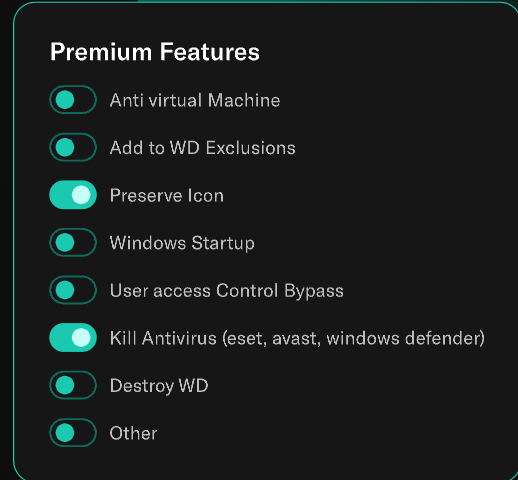
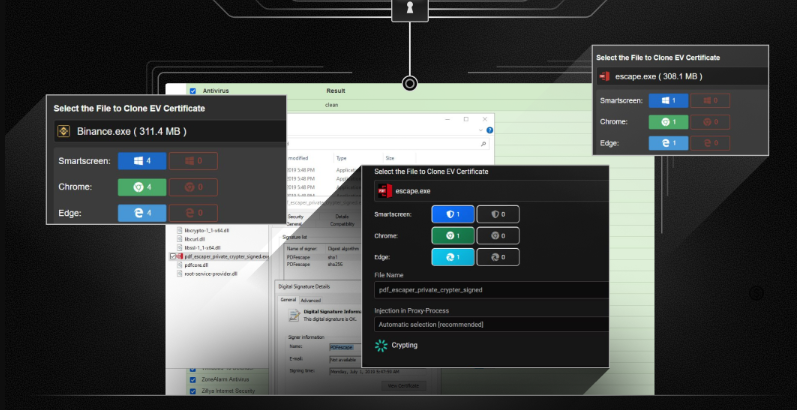
KGB-Crypter 是一款专为高级恶意软件混淆和执行而设计的工具。**Windows Defender Killer** 用于禁用 Windows Defender 以降低被检测的风险。**DLL Sideloading** 将恶意代码注入合法应用程序中。**EV Certificate Support** 支持使用扩展验证 (EV) 证书进行签名,以增加信任度。**Unpacked FUD** 可生成在扫描和运行时均未被检测到的 Payload。**Runtime Encryption** 对 Payload 进行加密,仅在执行期间解密。**Anti-Debugging** 阻止分析工具正常运行。**Heuristic Bypass** 用于规避基于行为的检测系统。**Icon Customization** 修改文件外观以避免引起怀疑,使 Payload 看起来合法且更难被检测。
## 媒体
## 功能特性
* 1 Windows Defender Killer (Windows Defender 终结者)
* 2 DLL Sideloading (DLL 旁加载)
* 3 EV Certificate Support (EV 证书支持)
* 4 Unpacked FUD (无壳 FUD)
* 5 Runtime Encryption (运行时加密)
* 6 Anti-Debugging (反调试)
* 7 Heuristic Bypass (启发式绕过)
* 8 Icon Customization (图标自定义)

# 安装说明
1. 下载 Visual Studio 2022
_使用 Git Clone 或者下载项目或解压 rar 文件。然后在此处下载 Visual Studio 2022:[VisualStudio 下载](https://visualstudio.microsoft.com/downloads/)_

2. 或者

3. _然后打开 sln (项目解决方案) 文件_

4. 查找可执行文件
/ProjectName/Bin/Debug/Executable.exe
# 如何使用
1. **打开应用程序**
- 在计算机上找到可执行文件 (`.exe`) 并双击以启动程序。
2. **选择目标并调整设置**
- 从可用选项中选择所需的目标或任务。
- 自定义任何附加设置(例如:首选项、配置)以满足您的需求。
3. **生成安全密码**
- 使用内置功能创建一个使用 **SHA-256 算法** 哈希处理的强密码。这可确保您的密码安全且经过加密。
4. **启动进程**
- 点击 **“Start” 按钮** 或按 `Ctrl + V` 开始操作。
- 出现提示时,输入您在上一步中生成的密码。
5. **提供 API Key(如果需要)**
- 如果应用程序需要 API Key 才能运行(例如:用于外部服务),请转到设置并在继续操作之前输入有效的 API Key。
6. **启动服务器**
- 配置完所有内容后,启动服务器。等待连接建立。应用程序的正常运行需要稳定的连接。
7. **排除错误(如有)**
- 如果遇到错误,请确保您的系统上已安装以下组件:
- **Node.js**:从 [nodejs.org](https://nodejs.org) 下载并安装。
- **Visual Studio Build Tools**:安装这些工具以解决技术问题。
## 许可证
本项目基于 [MIT 许可证](https://github.com/AvaloniaUI/Avalonia/blob/master/licence.md) 授权。
```
solid cube_corner
facet normal 0.0 -1.0 0.0
outer loop
vertex 0.0 0.0 0.0
vertex 1.0 0.0 0.0
vertex 0.0 0.0 1.0
endloop
endfacet
facet normal 0.0 0.0 -1.0
outer loop
vertex 0.0 0.0 0.0
vertex 0.0 1.0 0.0
vertex 1.0 0.0 0.0
endloop
endfacet
facet normal -1.0 0.0 0.0
outer loop
vertex 0.0 0.0 0.0
vertex 0.0 0.0 1.0
vertex 0.0 1.0 0.0
endloop
endfacet
facet normal 0.577 0.577 0.577
outer loop
vertex 1.0 0.0 0.0
vertex 0.0 1.0 0.0
vertex 0.0 0.0 1.0
endloop
endfacet
endsolid
```
标签:DLL 侧加载, DNS 反向解析, DNS 解析, EV 证书签名, FUD Crypter, .NET 开发, RFI远程文件包含, TGT, Visual Studio, Windows Defender 绕过, Windows 安全, 二进制安全, 免杀技术, 加壳工具, 反向载荷, 反调试技术, 后门生成, 启发式绕过, 图标伪装, 多人体追踪, 安全测试, 恶意软件混淆, 攻击性安全, 攻防演练, 暴力破解检测, 杀毒软件逃逸, 端点可见性, 运行时加密, 隐蔽攻击


