dnlkilonzi-pixel/Smart-Contract-Intelligence-Scanner
GitHub: DANIELKILONZI/Smart-Contract-Intelligence-Scanner
一个面向 Web3 安全领域的智能合约自动化审计与链上威胁情报平台,集静态漏洞分析、AI 风险评分、钱包行为画像和实时内存池监控于一体。
Stars: 0 | Forks: 0
# 🛡️ 智能合约智能扫描器
**生产级 Web3 安全平台,可在数秒内审计 Solidity 合约、分析链上行为并分配动态风险评分。**
[](https://www.python.org/)
[](https://fastapi.tiangolo.com/)
[](https://nextjs.org/)
[](https://www.postgresql.org/)
[](docker/docker-compose.yml)
[](LICENSE)
## 📸 截图
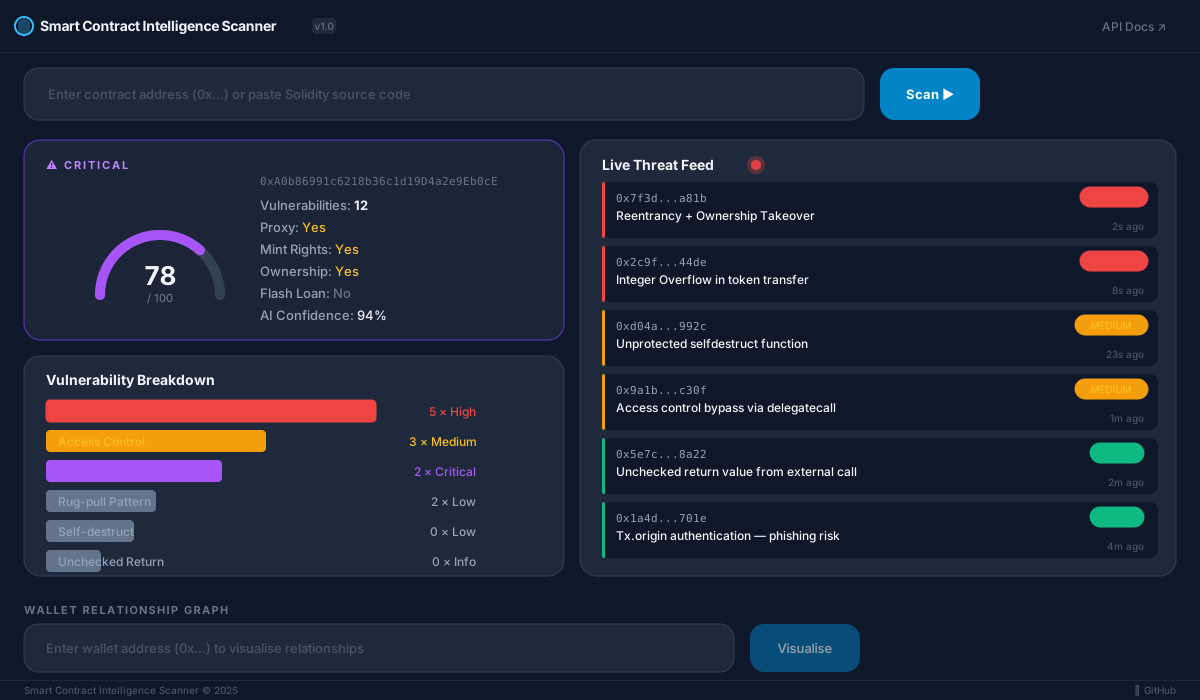
### 仪表盘 — 概览
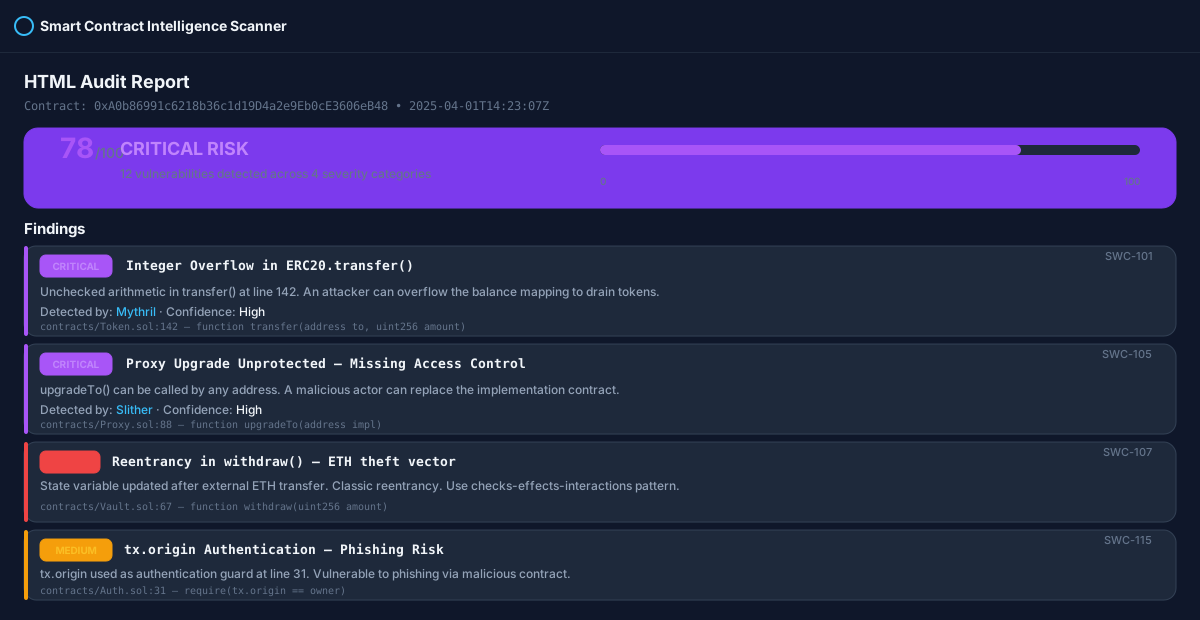
### 扫描报告 — 漏洞详情
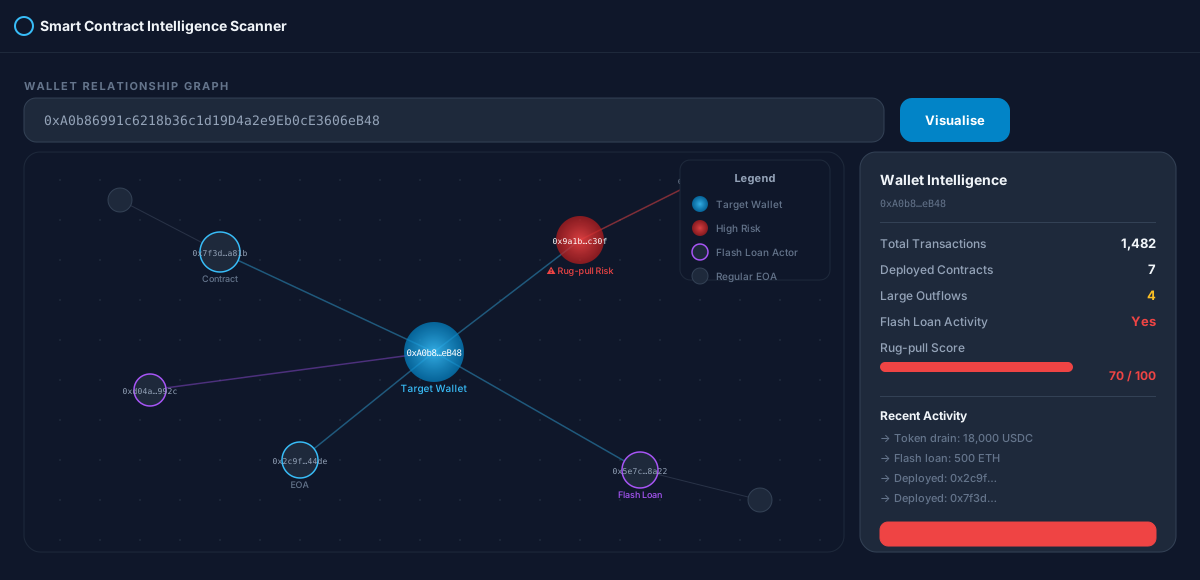
### 钱包关系图谱
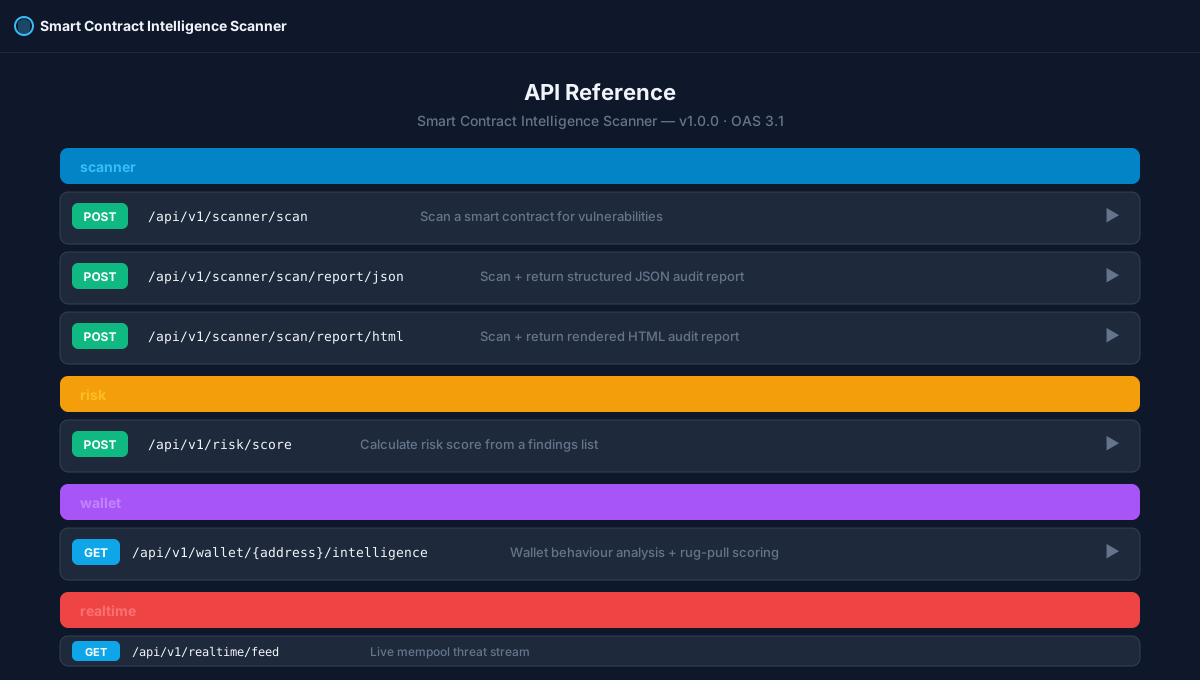
### 交互式 API 文档 (Swagger UI)
## ✨ 核心特性
| 功能 | 详情 |
|---------|---------|
| 🔬 **静态分析** | 50+ [Slither](https://github.com/crytic/slither) 检测器 + [Mythril](https://github.com/ConsenSys/mythril) 符号执行 |
| 🤖 **AI 分类** | 随机森林分类器在首次运行时自动引导,无需预训练权重 |
| 📊 **风险评分** | 归一化的 0-100 评分,包含严重性权重、合约特征标记和 AI 置信度提升 |
| 🏗️ **合约分析** | 代理 / 可升级性 · 铸币权限 · 所有权 · 闪电贷能力 · 自毁 |
| 👛 **钱包情报** | 链上行为分析、大额流出检测、闪电贷活动、抽地毯(Rug-pull)评分 |
| 🌐 **实时威胁信息流** | 实时内存池监听器自动扫描新部署的合约 |
| 📄 **审计报告** | 将完整审计导出为结构化的 JSON 或渲染的 HTML |
| 🖥️ **Next.js 仪表盘** | 暗黑模式 React UI,带 D3 钱包图谱、Chart.js 数据图和实时信息流 |
## 🏗️ 架构
```
Smart-Contract-Intelligence-Scanner/
├── app/ # FastAPI backend
│ ├── api/v1/
│ │ ├── scanner.py # POST /scan, /scan/report/json, /scan/report/html
│ │ ├── risk.py # POST /risk/score
│ │ ├── wallet.py # GET /wallet/{address}/intelligence
│ │ ├── realtime.py # GET /realtime/feed (mempool stream)
│ │ └── graph.py # GET /graph/{address}
│ ├── core/
│ │ ├── scanner/ # Slither + Mythril wrappers
│ │ ├── analyzer/ # Vulnerability parser, risk engine, contract profiler
│ │ ├── intelligence/ # Blockchain client, wallet analyzer, rug-pull detector
│ │ └── ai/ # ML classifier + feature extractor
│ ├── models/ # SQLAlchemy ORM models (async)
│ ├── schemas/ # Pydantic v2 request / response models
│ ├── services/ # Orchestration: scan, wallet, report
│ └── utils/ # structlog, helpers
├── dashboard/ # Next.js 15 frontend
│ └── src/components/
│ ├── ContractSearch.tsx
│ ├── RiskScoreCard.tsx
│ ├── VulnerabilityBreakdown.tsx
│ ├── LiveThreatFeed.tsx
│ └── WalletGraph.tsx # D3-powered interactive graph
├── tests/ # pytest async test suite
└── docker/ # Dockerfile + docker-compose.yml
```
## 🚀 快速开始
### 前置条件
| 需求 | 版本 | 安装 |
|-------------|---------|---------|
| Python | 3.11+ | [python.org](https://python.org) |
| PostgreSQL | 14+ | [postgresql.org](https://postgresql.org) |
| Redis | 7+ | [redis.io](https://redis.io) |
| Node.js | 20+ | [nodejs.org](https://nodejs.org) |
| solc | 0.8.x | `solc-select install 0.8.19` |
### 方案 A — Docker(推荐,只需一条命令)
```
git clone https://github.com/dnlkilonzi-pixel/Smart-Contract-Intelligence-Scanner.git
cd Smart-Contract-Intelligence-Scanner
cp .env.example .env # fill in your API keys
docker-compose -f docker/docker-compose.yml up --build
```
| 服务 | URL |
|---------|-----|
| REST API | http://localhost:8000 |
| Swagger UI | http://localhost:8000/docs |
| Next.js 仪表盘 | http://localhost:3000 |
### 方案 B — 本地设置
```
# 1. 克隆并安装 Python 依赖
git clone https://github.com/dnlkilonzi-pixel/Smart-Contract-Intelligence-Scanner.git
cd Smart-Contract-Intelligence-Scanner
pip install -r requirements.txt
# 2. 安装静态分析工具
pip install slither-analyzer mythril
pip install solc-select && solc-select install 0.8.19 && solc-select use 0.8.19
# 3. 配置环境
cp .env.example .env
# 编辑 .env — 设置 DATABASE_URL, ETHERSCAN_API_KEY, ETH_RPC_URL
# 4. 启动数据库 + 缓存
docker-compose -f docker/docker-compose.yml up db redis -d
# 5. 运行 API 服务器
uvicorn app.main:app --reload --host 0.0.0.0 --port 8000
# 6. (可选)运行 dashboard
cd dashboard
npm install
npm run dev # http://localhost:3000
```
## 📡 API 参考
### 合约扫描
| 方法 | 端点 | 描述 |
|--------|----------|-------------|
| `POST` | `/api/v1/scanner/scan` | 扫描合约(源代码或地址) |
| `POST` | `/api/v1/scanner/scan/report/json` | 扫描 + 结构化 JSON 审计报告 |
| `POST` | `/api/v1/scanner/scan/report/html` | 扫描 + 渲染的 HTML 审计报告 |
**按源代码扫描:**
```
curl -X POST http://localhost:8000/api/v1/scanner/scan \
-H "Content-Type: application/json" \
-d '{
"source_code": "pragma solidity ^0.8.0;\ncontract Vault {\n mapping(address=>uint) bal;\n function withdraw() external {\n (bool ok,) = msg.sender.call{value: bal[msg.sender]}(\"\");\n require(ok);\n bal[msg.sender] = 0;\n }\n}",
"compiler_version": "0.8.19",
"enable_mythril": false
}'
```
**按已部署地址扫描**(需要在 Etherscan 上具有已验证的源代码):
```
curl -X POST http://localhost:8000/api/v1/scanner/scan \
-H "Content-Type: application/json" \
-d '{"address": "0xA0b86991c6218b36c1d19D4a2e9Eb0cE3606eB48"}'
```
**示例响应:**
```
{
"address": "0xA0b86991c6218b36c1d19D4a2e9Eb0cE3606eB48",
"risk_score": 78,
"risk_level": "critical",
"vulnerability_count": 12,
"vulnerabilities": [
{
"name": "reentrancy-eth",
"severity": "High",
"description": "withdraw() sends ETH before updating state",
"source_location": "Vault.sol:67"
}
],
"profile": {
"is_proxy": true,
"has_mint": true,
"has_ownership": true,
"has_flash_loan": false,
"has_self_destruct": false,
"creator_address": "0x1234…"
},
"ai_classification": "Reentrancy",
"ai_confidence": 0.94
}
```
### 风险评分
| 方法 | 端点 | 描述 |
|--------|----------|-------------|
| `POST` | `/api/v1/risk/score` | 根据发现列表计算评分 |
```
curl -X POST http://localhost:8000/api/v1/risk/score \
-H "Content-Type: application/json" \
-d '{"findings": [{"severity": "High"}, {"severity": "Medium"}, {"severity": "Low"}]}'
```
### 钱包情报
| 方法 | 端点 | 描述 |
|--------|----------|-------------|
| `GET` | `/api/v1/wallet/{address}/intelligence` | 行为分析 + 抽地毯(rug-pull)评分 |
```
curl http://localhost:8000/api/v1/wallet/0xA0b86991c6218b36c1d19D4a2e9Eb0cE3606eB48/intelligence
```
## 🔍 漏洞覆盖范围
| 类别 | 检测器 | SWC ID |
|----------|-----------|---------|
| 重入攻击 (ETH + token) | Slither + Mythril | SWC-107 |
| 整数溢出 / 下溢 | Mythril | SWC-101 |
| 访问控制 | Slither | SWC-105, SWC-106 |
| 无保护的自毁 | Slither | SWC-106 |
| 闪电贷模式 | 自定义启发式 | — |
| 抽地毯(任意转账) | 自定义启发式 | — |
| tx.origin 验证 | Slither | SWC-115 |
| 未检查的返回值 | Slither | SWC-104 |
| 时间戳依赖 | Slither | SWC-116 |
| 未初始化的存储 | Slither | SWC-109 |
## 📊 风险评分参考
| 评分 | 等级 | 颜色 |
|-------|-------|--------|
| 0 – 14 | 🟢 低 | `#10b981` |
| 15 – 39 | 🟡 中 | `#f59e0b` |
| 40 – 69 | 🔴 高 | `#ef4444` |
| 70 – 100 | 🟣 严重 | `#a855f7` |
评分计算公式为:
```
score = severity_weighted_sum × diminishing_returns × profile_multiplier × ai_boost
```
## 🧪 运行测试
```
pip install pytest pytest-asyncio pytest-cov
python -m pytest tests/ -v --cov=app
```
## 🔧 配置
将 `.env.example` 复制到 `.env` 并填入您的值:
| 变量 | 必填 | 描述 |
|----------|----------|-------------|
| `DATABASE_URL` | ✅ | PostgreSQL 异步 DSN (`postgresql+asyncpg://…`) |
| `ETH_RPC_URL` | ✅ | Ethereum JSON-RPC (Infura / Alchemy) |
| `ETHERSCAN_API_KEY` | ✅ | 用于获取已验证的源代码和钱包历史记录 |
| `REDIS_URL` | ✅ | Redis 连接 URL |
| `ETH_WS_URL` | ☑️ | 用于内存池监听器的 WebSocket RPC |
| `MEMPOOL_AUTO_SCAN` | ☑️ | 设为 `true` 以启用实时内存池扫描 |
| `SLITHER_TIMEOUT` | ☑️ | Slither 的最大运行秒数(默认为 `120`) |
| `MYTHRIL_TIMEOUT` | ☑️ | Mythril 的最大运行秒数(默认为 `300`) |
| `AI_MODEL_PATH` | ☑️ | sklearn joblib 模型的路径(自动创建) |
| `SECRET_KEY` | ✅ | 在生产环境中务必更改 |
## 🗺️ 路线图
- [ ] 用于长时间运行扫描的 Celery 异步任务队列
- [ ] WebSocket 扫描进度流式传输
- [ ] 多链支持(BSC、Polygon、Arbitrum)
- [ ] 基于图谱的抽地毯(Rug-pull)网络分析
- [ ] 微调的 LLM 漏洞解释层
- [ ] 带有审计门禁的 CI/CD 流水线
## 🤝 贡献
1. Fork 本仓库
2. 创建一个功能分支:`git checkout -b feature/my-feature`
3. 提交您的更改:`git commit -m 'feat: add my feature'`
4. 推送并开启一个 Pull Request
用 ❤️ 为 Web3 安全社区打造
标签:AI机器学习, AV绕过, D3.js, DApp安全, Docker, FastAPI, GraphQL安全矩阵, IP 地址批量处理, Mythril, PostgreSQL, Python, Rug Pull检测, Slither, Solidity, Swagger UI, SWC漏洞规范, Web3安全, 云安全监控, 交互式API文档, 代码安全, 加密货币安全, 动态风险评分, 区块链浏览器, 去中心化应用安全, 威胁情报, 安全扫描器, 安全防御评估, 密码管理, 对称加密, 开发者工具, 搜索引擎查询, 无后门, 智能合约审计, 测试用例, 漏洞枚举, 自动化审计, 请求拦截, 逆向工具, 钱包关系图谱, 链上行为分析, 随机森林, 静态分析