Professor-mogli/BurpScanner
GitHub: Professor-mogli/BurpScanner
一款 Burp Suite REST API 的高性能 CLI 封装工具,集成 Katana、Dirsearch 和 FFuf 实现从侦察到漏洞扫描的全流程自动化。
Stars: 0 | Forks: 0
# 🔍 BurpScan — 专业 Web 漏洞扫描器 CLI
[](https://www.python.org/downloads/)
[](https://opensource.org/licenses/MIT)
[](https://portswigger.net/burp)
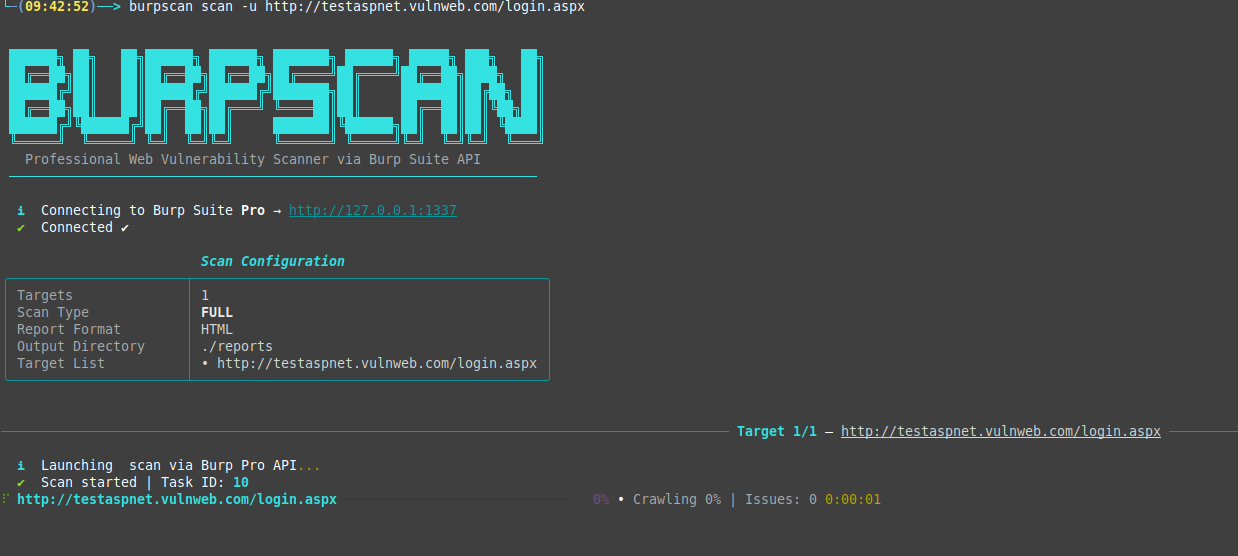
**BurpScan** 是一个用于 Burp Suite REST API 的高性能 CLI 包装器。它允许安全工程师和漏洞赏金猎人直接从终端自动化 Web 漏洞扫描,非常适合 CI/CD 流水线、批量侦察和自动化安全测试。
```
██████╗ ██╗ ██╗██████╗ ██████╗ ███████╗ ██████╗ █████╗ ███╗ ██╗
██╔══██╗██║ ██║██╔══██╗██╔══██╗██╔════╝██╔════╝██╔══██╗████╗ ██║
██████╔╝██║ ██║██████╔╝██████╔╝███████╗██║ ███████║██╔██╗ ██║
██╔══██╗██║ ██║██╔══██╗██╔═══╝ ╚════██║██║ ██╔══██║██║╚██╗██║
██████╔╝╚██████╔╝██║ ██║██║ ███████║╚██████╗██║ ██║██║ ╚████║
╚═════╝ ╚═════╝ ╚═╝ ╚═╝╚═╝ ╚══════╝ ╚═════╝╚═╝ ╚═╝╚═╝ ╚═══╝
```
### 📺 终端预览
## 🌟 核心特性
- 🚀 **双引擎支持** — 无缝兼容 **Burp Suite Professional** 和 **Enterprise Edition**。
- ⚡ **并行扫描** — 通过可配置的线程限制并发扫描多个目标。
- 🎨 **精美终端 UI** — 实时进度条、实时发现表格和漂亮的 ASCII 艺术。
- 📊 **综合报告** — 生成 HTML(现代暗色主题)、JSON(用于自动化)和文本报告。
- 🔧 **轻松设置** — 一键配置以保存您的 API 密钥和环境变量。
- 🕷️ **智能扫描** — 支持 Passive、Active、Full 和 Crawl-only 扫描模式。
- 🔍 **高级发现** — 集成 Katana、Dirsearch 和 FFuf,用于深度侦察。
- 🎯 **严重性过滤** — 仅报告重要内容(Critical、High、Medium 等)。
## 🛠️ 安装
```
# Clone 仓库
git clone https://github.com/yourusername/burpscan.git
cd burpscan
# 以 editable mode 安装 package
pip install -e .
# 验证安装
burpscan --version
```
## 🚀 快速开始
### 1. 配置 Burp Suite
首先,在您的 Burp Suite 实例中启用 REST API。
- **Burp Pro:** Settings → Suite → REST API → 勾选启用 "Service running"。
- **Burp Enterprise:** Settings → REST API → 生成 API Key。
有关分步说明,请参阅[详细设置指南](BURP_PRO_SETUP.md)。
### 2. 运行初始设置
永久保存您的 API 密钥和 URL,这样您就不必每次都输入它们。
```
burpscan setup
```
*此命令将提示您输入 API Key、URL 和版本,并将它们保存到 `~/.burpscan/config.json` 和您的 shell 配置文件中。*
### 3. 开始扫描
```
# Scan 单个 target
burpscan scan -u https://example.com
# 使用 10 个 threads 从文件 Scan 多个 target
burpscan scan -l targets.txt --threads 10
# 带 high-severity filter 和 verbose output 的 Active scan
burpscan scan -u https://example.com -t active --severity high -v
```
## 📖 详细用法
### 扫描命令
| 命令 | 描述 |
|---------|-------------|
| `burpscan scan` | 对目标 URL 或文件启动新的扫描 |
| `burpscan status` | 列出正在运行和已完成的扫描(仅限 Enterprise) |
| `burpscan get-report` | 获取特定扫描/任务 ID 的结果 |
| `burpscan list-configs` | 列出可用的 Burp 扫描配置 |
| `burpscan setup` | 交互式配置向导 |
### 扫描模式 (`-t` / `--scan-type`)
- `full` (**默认**): **Crawl + Active Audit + Passive Audit**。这完全等同于在 Burp Suite GUI 中点击 **"New Scan" 进行专业的 Active Audit。您可以在 Burp 的 **Dashboard** 选项卡中查看进度。
- `active`: 使用 **"Audit coverage - thorough"** 配置文件进行激进的主动扫描,以查找 SQLi、XSS、SSRF、RCE 等。
- `passive`: 仅进行非侵入式监控。
- `crawl-only`: 仅发现端点而不进行审计。
### 报告选项
使用 `-f` 或 `--report-format` 生成多种格式的报告:
- `html`: 精美的交互式仪表板(默认)。
- `json`: 用于工具集成的机器可读格式。
- `txt`: 用于快速审查的纯文本摘要。
- `all`: 生成上述所有格式。
## 🔍 高级侦察与发现
BurpScan 集成了顶级的发现工具,以查找标准爬虫可能会遗漏的隐藏端点。使用这些标志时,BurpScan 会首先运行发现工具,然后将所有发现的 URL 提交给 Burp Suite 进行全面扫描。
| 标志 | 工具 | 最适合 |
|------|------|----------|
| `--with-katana` | [Katana](https://github.com/projectdiscovery/katana) | 深度 JS 爬取和端点提取 |
| `--with-dirsearch` | [Dirsearch](https://github.com/maurosoria/dirsearch) | 查找隐藏的目录和文件 |
| `--with-ffuf` | [FFuf](https://github.com/ffuf/ffuf) | 高速目录和参数 Fuzzing |
### 用法示例
```
# 使用 Katana Deep crawl 然后使用 Burp scan
burpscan scan -u https://target.com --with-katana
# 使用 Dirsearch 发现隐藏路径然后 scan
burpscan scan -u https://target.com --with-dirsearch
# Maximum Coverage (Katana + Dirsearch + Burp)
burpscan scan -u https://target.com --with-katana --with-dirsearch
```
*注意:如果未安装这些工具,BurpScan 将提供安装命令并自动回退到默认的 Burp Crawler。*
## ⚙️ 环境变量
如果您不想使用 `burpscan setup`,可以导出这些变量:
```
export BURP_API_KEY="your-secret-key"
export BURP_API_URL="http://127.0.0.1:1337"
export BURP_EDITION="pro" # or "enterprise"
```
## 📁 项目结构
```
burpscan/
├── core/
│ ├── scanner.py # API abstraction logic
│ └── reporter.py # HTML/JSON/TXT generators
├── utils/
│ ├── display.py # Rich TUI components
│ └── helpers.py # Utilities & ASCII Banner
└── cli.py # Click command definitions
```
## ⚠️ 法律声明
本工具仅用于教育目的和授权的安全测试。未经双方事先同意扫描目标是违法的。作者对本工具的任何滥用或造成的损害概不负责。
由 Rakesh Raushan 用 ❤️ 制作
标签:BeEF, Bug Bounty, Burp Suite, CISA项目, Dirsearch, FFuf, Python, REST API, Web安全, 企业安全, 可自定义解析器, 安全测试, 密码管理, 攻击性安全, 无后门, 爬虫, 网络安全, 网络资产管理, 蓝队分析, 逆向工具, 隐私保护, 高危漏洞