philipp2604/OpcSecAudit
GitHub: philipp2604/OpcSecAudit
针对 OPC UA 服务器的专项安全审计工具,通过被动非破坏性扫描检测端点加密、认证配置、证书缺陷和服务器配置四类安全问题,并支持导出独立 HTML 报告。
Stars: 0 | Forks: 0
# OpcSecAudit
| 分支 | 构建状态 |
| :--- | :--- |
| **master** (稳定版) | [](https://github.com/philipp2604/OpcSecAudit/actions) |
| **dev** (最新版) | [](https://github.com/philipp2604/OpcSecAudit/actions) |
**OpcSecAudit** 是一款命令行工具,用于连接到 OPC UA 服务器,评估其安全配置,并生成检测结果报告。它会跨四个安全类别(Endpoint Security、Authentication、Server Certificates 和 Server Configuration)执行被动且非破坏性的检查,随后在控制台呈现结果,并可选择导出独立的 HTML 报告。
## 功能特性
| 类别 | 检查项 |
| --- | --- |
| **Endpoint Security** | 未加密的 Endpoint,已弃用的 Cipher Suite (Basic128Rsa15, Basic256) |
| **Authentication** | 未加密通道上的匿名访问,明文 Username 凭据,缺少 Certificate 认证 |
| **Server Certificate** | 已过期或即将过期的 Certificate,弱密钥长度,SHA-1 签名,自签名 Certificate,主机名不匹配 |
| **Server Configuration** | 默认 Discovery 端口,软件版本暴露,匿名 Session 建立,Audit Logging 状态 |
## HTML 报告预览
OpcSecAudit 可以导出一份包含执行摘要、详细检测结果以及被扫描 OPC UA 服务器整体安全态势的独立样式 HTML 报告。
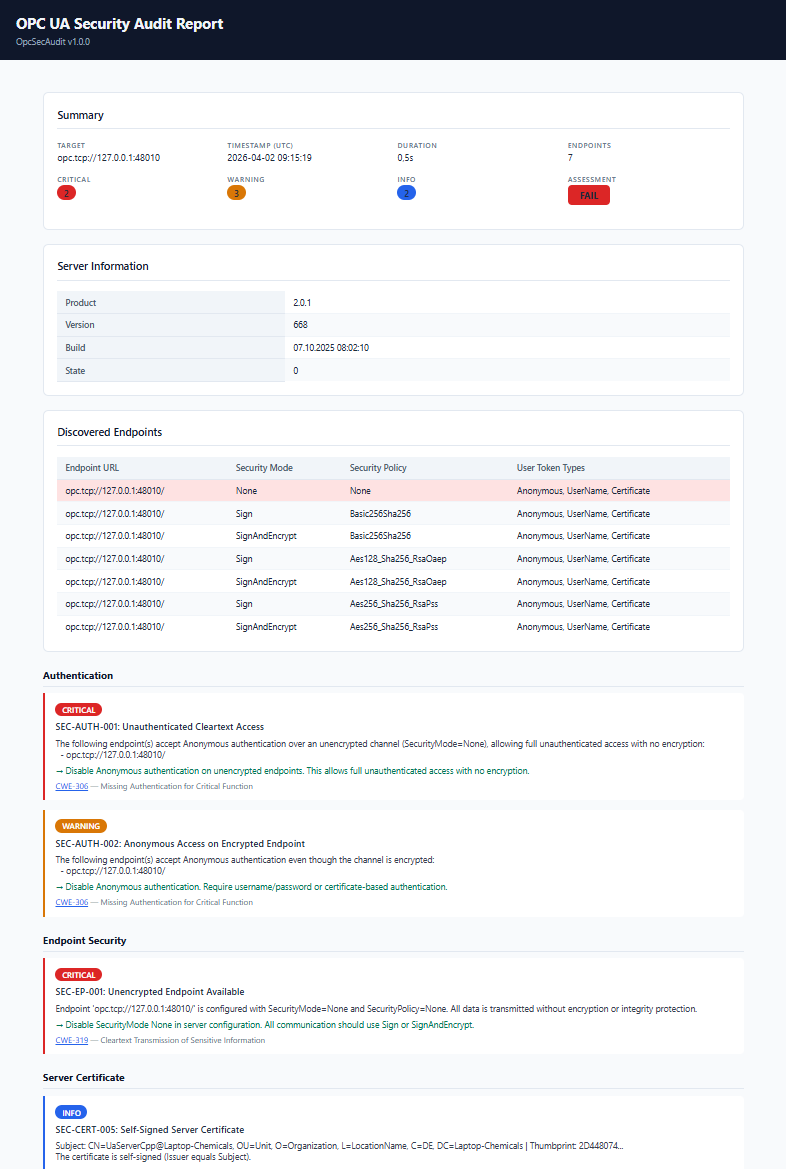 *在扫描命令中添加 `-o report.html` 标志即可生成此报告。*
## 快速开始
### 从源码构建
```
git clone https://github.com/philipp2604/OpcSecAudit.git
cd OpcSecAudit
dotnet build --configuration Release
```
### 对服务器运行扫描
```
dotnet run --project src/OpcSecAudit.Cli -- scan opc.tcp://192.168.1.50:4840
```
或者使用已发布的二进制文件:
```
dotnet publish src/OpcSecAudit.Cli --configuration Release --output ./out
./out/OpcSecAudit scan opc.tcp://192.168.1.50:4840
```
## 用法
```
OpcSecAudit — OPC UA Security Auditor
Usage:
opcsecaudit scan
*在扫描命令中添加 `-o report.html` 标志即可生成此报告。*
## 快速开始
### 从源码构建
```
git clone https://github.com/philipp2604/OpcSecAudit.git
cd OpcSecAudit
dotnet build --configuration Release
```
### 对服务器运行扫描
```
dotnet run --project src/OpcSecAudit.Cli -- scan opc.tcp://192.168.1.50:4840
```
或者使用已发布的二进制文件:
```
dotnet publish src/OpcSecAudit.Cli --configuration Release --output ./out
./out/OpcSecAudit scan opc.tcp://192.168.1.50:4840
```
## 用法
```
OpcSecAudit — OPC UA Security Auditor
Usage:
opcsecaudit scan [options]
Arguments:
OPC UA server URL (e.g., opc.tcp://192.168.1.50:4840)
Options:
-o, --output Export HTML report to the specified file path
-t, --timeout Connection timeout in seconds (default: 5)
--verbose Show detailed endpoint information in console output
--no-color Disable colored console output
--version Show version information
-h, --help Show help
```
### 示例
```
# Basic scan
opcsecaudit scan opc.tcp://192.168.1.50:4840
# Scan 并导出 HTML report
opcsecaudit scan opc.tcp://192.168.1.50:4840 -o report.html
# 带有 10 秒 timeout 的 Verbose output
opcsecaudit scan opc.tcp://192.168.1.50:4840 --verbose --timeout 10
# 为 piping 或 logging 禁用颜色
opcsecaudit scan opc.tcp://192.168.1.50:4840 --no-color > results.txt
```
### 退出代码
| 代码 | 含义 |
| --- | --- |
| `0` | 审计完成 — 无严重发现 |
| `1` | 审计完成 — 存在严重发现 |
| `2` | 审计失败(连接错误,无效 URL 等) |
## 发现参考
| ID | 严重程度 | 类别 | 标题 |
| --- | --- | --- | --- |
| SEC-EP-001 | 严重 | Endpoint Security | 存在可用的未加密 Endpoint |
| SEC-EP-002 | 警告 | Endpoint Security | 已弃用的 Security Policy Basic128Rsa15 |
| SEC-EP-003 | 警告 | Endpoint Security | 已弃用的 Security Policy Basic256 |
| SEC-EP-004 | 信息 | Endpoint Security | 仅配置了安全 Policy |
| SEC-AUTH-001 | 严重 | Authentication | 未经验证的明文访问 |
| SEC-AUTH-002 | 警告 | Authentication | 加密 Endpoint 上的匿名访问 |
| SEC-AUTH-003 | 警告 | Authentication | Username 凭据以明文形式传输 |
| SEC-AUTH-004 | 信息 | Authentication | 基于 Certificate 的认证不可用 |
| SEC-CERT-001 | 严重 | Server Certificate | Server Certificate 已过期 |
| SEC-CERT-002 | 警告 | Server Certificate | 弱 Certificate 密钥长度 |
| SEC-CERT-003 | 警告 | Server Certificate | SHA-1 签名算法 |
| SEC-CERT-004 | 警告 | Server Certificate | Server Certificate 即将过期 |
| SEC-CERT-005 | 信息 | Server Certificate | 自签名 Server Certificate |
| SEC-CERT-006 | 警告 | Server Certificate | Certificate 主机名不匹配 |
| SEC-SRV-001 | 信息 | Server Configuration | Server 运行在默认 Discovery 端口 |
| SEC-SRV-002 | 信息 | Server Configuration | 已识别 Server 软件 |
| SEC-SRV-003 | 警告 | Server Configuration | 成功建立匿名 Session |
| SEC-SRV-004 | 信息 | Server Configuration | 未启用 Audit Logging |
## 构建
```
# Restore、build、test
dotnet restore
dotnet build
dotnet test
# Publish self-contained binary (Linux x64)
dotnet publish src/OpcSecAudit.Cli \
--configuration Release \
--runtime linux-x64 \
--self-contained true \
--output ./publish
```
## 项目结构
```
OpcSecAudit/
├── src/
│ ├── OpcSecAudit.Core/ # Domain models, interfaces, exceptions (no SDK dependency)
│ ├── OpcSecAudit.Scanner/ # OPC UA SDK integration, 4 security checkers, auditor
│ ├── OpcSecAudit.Reporting/ # Self-contained HTML report generator
│ └── OpcSecAudit.Cli/ # CLI entry point (System.CommandLine)
└── tests/
├── OpcSecAudit.Core.Tests/
├── OpcSecAudit.Scanner.Tests/
└── OpcSecAudit.Reporting.Tests/
```
## 许可证
MIT — 详见 [LICENSE.txt](LICENSE.txt)。
## 第三方库
OpcSecAudit 使用了开源软件。详情请参阅 [THIRD-PARTY-NOTICES.txt](THIRD-PARTY-NOTICES.txt)。
 *在扫描命令中添加 `-o report.html` 标志即可生成此报告。*
## 快速开始
### 从源码构建
```
git clone https://github.com/philipp2604/OpcSecAudit.git
cd OpcSecAudit
dotnet build --configuration Release
```
### 对服务器运行扫描
```
dotnet run --project src/OpcSecAudit.Cli -- scan opc.tcp://192.168.1.50:4840
```
或者使用已发布的二进制文件:
```
dotnet publish src/OpcSecAudit.Cli --configuration Release --output ./out
./out/OpcSecAudit scan opc.tcp://192.168.1.50:4840
```
## 用法
```
OpcSecAudit — OPC UA Security Auditor
Usage:
opcsecaudit scan
*在扫描命令中添加 `-o report.html` 标志即可生成此报告。*
## 快速开始
### 从源码构建
```
git clone https://github.com/philipp2604/OpcSecAudit.git
cd OpcSecAudit
dotnet build --configuration Release
```
### 对服务器运行扫描
```
dotnet run --project src/OpcSecAudit.Cli -- scan opc.tcp://192.168.1.50:4840
```
或者使用已发布的二进制文件:
```
dotnet publish src/OpcSecAudit.Cli --configuration Release --output ./out
./out/OpcSecAudit scan opc.tcp://192.168.1.50:4840
```
## 用法
```
OpcSecAudit — OPC UA Security Auditor
Usage:
opcsecaudit scan 标签:HTML报告, ICS, NTLM Relay, OPC UA, PKINIT, SCADA安全, 多人体追踪, 多模态安全, 实时处理, 工业安全, 工控安全, 开源安全工具, 插件系统, 端点安全, 网络安全, 补丁管理, 证书验证, 逆向工程平台, 配置检查, 隐私保护