maxregister/sample-gremlin
GitHub: maxregister/sample-gremlin
基于 Discord 机器人、Ghidra 静态分析和 Claude MCP 的全自动恶意软件分析流水线,无需执行样本即可生成智能化分析报告。
Stars: 2 | Forks: 0
# 恶意软件分析流水线
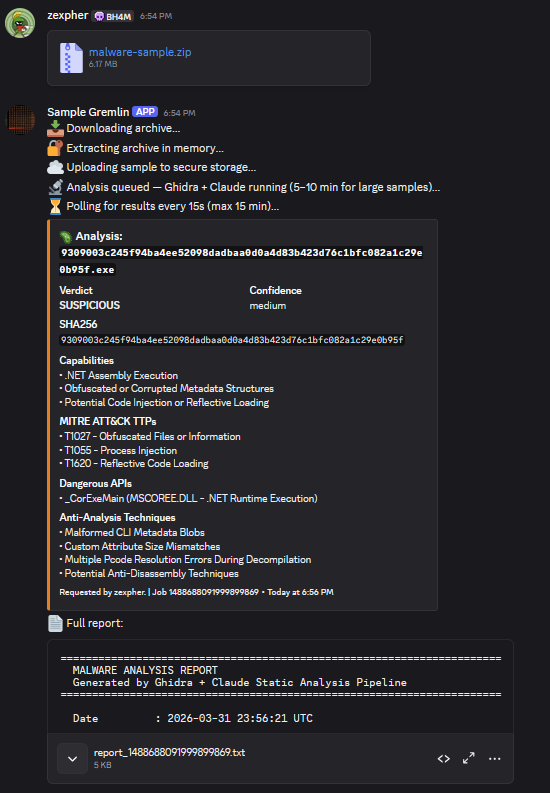
纯静态分析流水线:Discord bot → DigitalOcean → Ghidra (MCP) → Claude。
二进制文件**从不执行**。Ghidra 对其进行静态反汇编和反编译。
 ## 服务(全部运行在一个 Droplet 上)
```
bot/ Discord bot — receives ZIP, extracts in memory, triggers API
api/ FastAPI orchestrator — pulls from Spaces, runs Ghidra, calls Claude via MCP
mcp-server/ Ghidra MCP bridge — exposes Ghidra tools (list_functions, decompile, etc.)
```
这三个服务通过**内部 Docker 网络**进行通信——除了 22 端口(仅限您 IP 的 SSH)之外,没有任何端口暴露在互联网上。请通过 SSH 隧道访问 API。
## 快速开始
### 1. 创建 Droplet
- Ubuntu 22.04,Basic 计划,2 vCPU / 4 GB 内存(约 $24/月)
- 记下其公网 IP
### 2. 创建 DO Space
- 区域:nyc3(或与您的 Droplet 区域保持一致)
- 名称:`malware-samples`
- 访问权限:Restricted(私有)
- 生成 Spaces API 密钥对
### 3. 创建 Discord Bot
- https://discord.com/developers/applications → New Application → Bot
- 启用:Message Content Intent
- 邀请至您的私人服务器,并赋予以下权限:Read Messages、Send Messages、Attach Files
- 创建一个名为 `malware-analysis` 的频道(或在 .env 中设置 ANALYSIS_CHANNEL)
### 4. 部署
```
scp -r . root@
## 服务(全部运行在一个 Droplet 上)
```
bot/ Discord bot — receives ZIP, extracts in memory, triggers API
api/ FastAPI orchestrator — pulls from Spaces, runs Ghidra, calls Claude via MCP
mcp-server/ Ghidra MCP bridge — exposes Ghidra tools (list_functions, decompile, etc.)
```
这三个服务通过**内部 Docker 网络**进行通信——除了 22 端口(仅限您 IP 的 SSH)之外,没有任何端口暴露在互联网上。请通过 SSH 隧道访问 API。
## 快速开始
### 1. 创建 Droplet
- Ubuntu 22.04,Basic 计划,2 vCPU / 4 GB 内存(约 $24/月)
- 记下其公网 IP
### 2. 创建 DO Space
- 区域:nyc3(或与您的 Droplet 区域保持一致)
- 名称:`malware-samples`
- 访问权限:Restricted(私有)
- 生成 Spaces API 密钥对
### 3. 创建 Discord Bot
- https://discord.com/developers/applications → New Application → Bot
- 启用:Message Content Intent
- 邀请至您的私人服务器,并赋予以下权限:Read Messages、Send Messages、Attach Files
- 创建一个名为 `malware-analysis` 的频道(或在 .env 中设置 ANALYSIS_CHANNEL)
### 4. 部署
```
scp -r . root@:/opt/malware-pipeline
ssh root@
chmod +x /opt/malware-pipeline/droplet_setup.sh
/opt/malware-pipeline/droplet_setup.sh
```
### 5. 填写 .env
```
nano /opt/malware-pipeline/.env
docker compose restart
```
## 使用说明
1. 使用密码 `infected` 将样本打包成 Zip 压缩包:
zip --password infected sample.zip malware.exe
2. 将 `sample.zip` 丢进 Discord 的 `#malware-analysis` 频道中
3. Bot 会在内存中解压 → 将原始二进制文件流式传输至 Spaces → 触发 API
4. Ghidra 运行无头静态分析;Claude 通过 MCP 对其进行查询
5. 分析报告以 embed(嵌入式消息)+ 可下载的 `.txt` 文件形式显示在 Discord 中
## 直接访问 API(SSH 隧道)
API 端口从不对外开放。请使用隧道:
```
ssh -L 8080:localhost:8080 root@
```
然后打开:http://localhost:8080/docs
## 容器布局
```
┌─────────────────────────────────────────────┐
│ Droplet │
│ │
│ ┌─────────┐ http ┌─────────────────┐ │
│ │ bot │ ───────► │ api :8080 │ │
│ └─────────┘ └────────┬────────┘ │
│ │ http │
│ ┌────────▼────────┐ │
│ │ mcp :9000 │ │
│ │ (Ghidra inside)│ │
│ └─────────────────┘ │
│ │
│ All containers on internal Docker network │
│ No ports exposed to internet │
└─────────────────────────────────────────────┘
```
## Claude 可调用的 MCP 工具
| 工具 | 描述 |
|--------------------|----------------------------------|
| `list_functions` | 包含地址的所有函数 |
| `decompile_function` | 指定函数的伪代码 |
| `get_strings` | 提取的所有字符串(可设最小长度) |
| `get_imports` | 导入的库和符号 |
| `get_xrefs` | 指向某符号的交叉引用 |
| `search_bytes` | 十六进制字节模式搜索 |
## 安全说明
- 二进制文件仅在进行磁盘分析时存在;无论结果如何,都会在 `finally` 代码块中被删除
- MCP 服务器仅限 localhost 访问(内部 Docker 网络,不绑定主机端口)
- Spaces 存储桶为私有;所有对象均使用服务端加密
- Bot 绝不会将原始二进制文件写入磁盘——解压过程完全在内存中进行
- 频率限制:每用户每小时 5 次分析(可在 bot/bot.py 中配置)
## 服务(全部运行在一个 Droplet 上)
```
bot/ Discord bot — receives ZIP, extracts in memory, triggers API
api/ FastAPI orchestrator — pulls from Spaces, runs Ghidra, calls Claude via MCP
mcp-server/ Ghidra MCP bridge — exposes Ghidra tools (list_functions, decompile, etc.)
```
这三个服务通过**内部 Docker 网络**进行通信——除了 22 端口(仅限您 IP 的 SSH)之外,没有任何端口暴露在互联网上。请通过 SSH 隧道访问 API。
## 快速开始
### 1. 创建 Droplet
- Ubuntu 22.04,Basic 计划,2 vCPU / 4 GB 内存(约 $24/月)
- 记下其公网 IP
### 2. 创建 DO Space
- 区域:nyc3(或与您的 Droplet 区域保持一致)
- 名称:`malware-samples`
- 访问权限:Restricted(私有)
- 生成 Spaces API 密钥对
### 3. 创建 Discord Bot
- https://discord.com/developers/applications → New Application → Bot
- 启用:Message Content Intent
- 邀请至您的私人服务器,并赋予以下权限:Read Messages、Send Messages、Attach Files
- 创建一个名为 `malware-analysis` 的频道(或在 .env 中设置 ANALYSIS_CHANNEL)
### 4. 部署
```
scp -r . root@标签:AI安全, AV绕过, Chat Copilot, Claude, CVE检测, DAST, DigitalOcean, Discord机器人, DLL 劫持, DNS 反向解析, Docker, FastAPI, Ghidra, IP 地址批量处理, MCP协议, SecOps, SSH隧道, URL提取, Wayback Machine, 二进制分析, 云安全架构, 云安全监控, 云安全运维, 云资产清单, 反汇编, 反编译, 大语言模型, 安全运营, 安全防御评估, 恶意软件分析, 扫描框架, 无害化分析, 结构化查询, 网络安全, 自动化安全, 自动化流水线, 请求拦截, 逆向工具, 逆向工程, 隐私保护, 静态分析