O-Labz/Context-Simplo
GitHub: O-Labz/Context-Simplo
一个生产就绪的上下文数据库与 MCP 服务器,通过图与向量混合索引为 AI 助手提供跨语言的代码智能。
Stars: 3 | Forks: 0
# Context-Simplo
[](https://hub.docker.com/r/ohopson/context-simplo)
[](https://opensource.org/licenses/MIT)
[](https://www.typescriptlang.org/)
[](https://nodejs.org/)
## 这是什么?
Context-Simplo 是一个生产就绪的**上下文数据库**和**MCP(模型上下文协议)服务器**,能够自动将你的代码库索引到图+向量数据库中。此上下文工具为 AI 助手(如 Cursor、VS Code 和 Claude Desktop)提供深度代码智能:调用层次结构、影响分析、语义搜索、死代码检测等。
**非常适合:**
- 🤖 增强 AI 助手(Cursor、VS Code、Claude)对代码库的深度理解
- 🔍 跨 248 种编程语言的语义代码搜索
- 📊 重构前的影响分析
- 🗺️ 可视化调用图和代码依赖关系
- 🧹 查找死代码和复杂度热点
- 🔄 无需重启容器即可在多个项目间切换
**核心特性:**
- **上下文数据库** - 用于代码智能的图+向量存储
- **混合搜索** - 结合向量(语义)+ BM25(关键词)搜索
- **248 种语言** - 原生 tree-sitter 解析
- **MCP 服务器** - 与 Cursor、VS Code、Claude Desktop、Claude Code 集成
- **自动索引** - 文件监听器,支持增量更新(每次变更 <500ms)
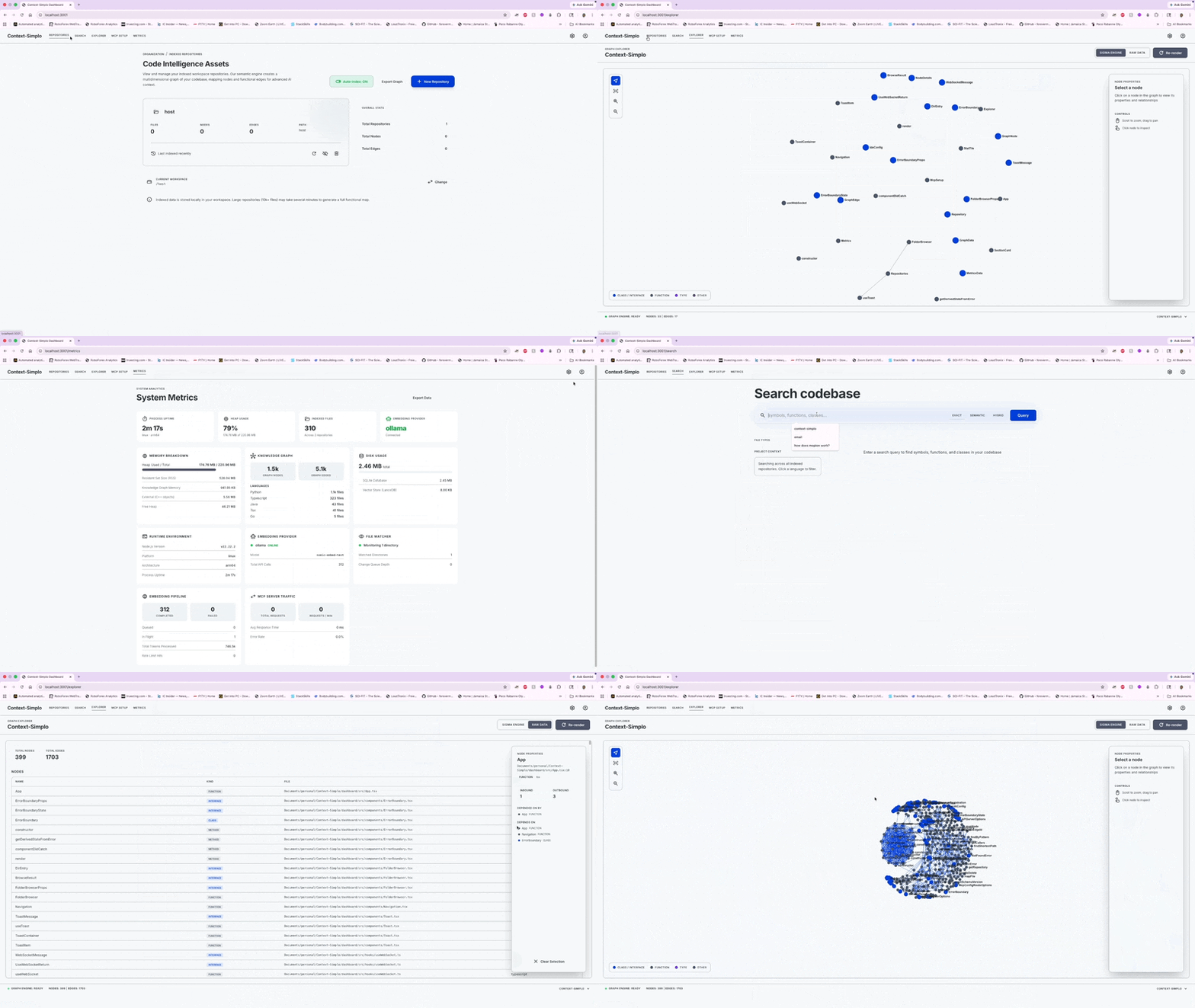
- **Web 仪表板** - 可视化图浏览器、指标和配置
- **Docker 优先** - 单容器,无需复杂设置
- **本地或云端 LLM** - 支持 Ollama、OpenAI、Azure 或无 LLM 模式
### 演示
## 快速开始
Context-Simplo 通过 Docker 运行。请根据下方选择嵌入提供程序。
#### 1. 本地 AI(Ollama)—— 推荐用于隐私保护
```
# 1. 安装 Ollama 并拉取模型
ollama pull nomic-embed-text
# 2. 拉取镜像
docker pull ohopson/context-simplo:latest
```
#### 2. 云端 AI(OpenAI)
```
docker pull ohopson/context-simplo:latest
```
#### 3. 无 AI(仅结构工具)
```
docker run -d \
--name context-simplo \
-p 3001:3001 \
-v "$HOME":/host:ro \
-v context-simplo-data:/data \
-e MOUNT_ROOT=/host \
-e INITIAL_WORKSPACE=/host \
-e LLM_PROVIDER=none \
ohopson/context-simplo:latest
```
在没有嵌入向量的情况下无法使用语义搜索,但所有结构工具(调用层次结构、影响分析、死代码检测等)仍然可用。
#### 启动后
```
open http://localhost:3001 # Dashboard
# 配置您的 IDE 以使用 http://localhost:3001/mcp
```
**旧版模式:** 旧的挂载风格 `-v $(pwd):/workspace:ro` 仍然有效。如果未检测到 `/host`,服务器会自动回退到 `/workspace`。
## 工作区模式
Context-Simplo 支持两种工作区模式:
### 动态模式(推荐)
将主目录挂载到 `/host`。容器可以浏览任意子目录,并且你可以在不重启的情况下从仪表板切换项目。
要在运行时切换工作区,请打开仪表板的“仓库”页面,然后点击工作栏中的 **更改**。浏览到新目录并点击 **切换工作区**。重新索引将在后台自动进行。
### 旧版模式
将单个项目挂载到 `/workspace`。不支持运行时切换 — 切换项目需要重启。
```
docker run -d \
-v $(pwd):/workspace:ro \
...
ohopson/context-simplo:latest
```
### 容器路径
通过仪表板或 MCP 工具添加仓库时,请使用 **容器路径**:
| 主机路径 | 容器路径(动态) | 容器路径(旧版) |
|-----------|--------------------------|------------------------|
| `~/projects/my-app` | `/host/projects/my-app` | `/workspace` |
| `~/projects/my-app/src` | `/host/projects/my-app/src` | `src` |
仪表板的 **浏览** 选项卡会显示容器文件系统 — 点击即可选择。
## 自动 AI 代理使用(Cursor 规则)
当 AI 代理自动使用 Context-Simplo 工具而不是回退到逐文件搜索时,Context-Simplo 工具最为有效。请添加一条 Cursor 规则,指示代理优先使用 Context-Simplo 进行代码智能任务 — 以减少工具调用链并降低令牌成本。
**在项目中创建 `.cursor/rules/context-simplo-usage.mdc`:**
```
---
description: Use Context-Simplo MCP for code intelligence and analysis
alwaysApply: true
---
# Context-Simplo MCP
MCP server: `user-context-simplo`. Use it **instead of** grep/ripgrep/Glob/SemanticSearch when the codebase is indexed.
## 启动:先调用 `list_repositories`。如果为空,则使用路径 `/workspace` 调用 `index_repository`。
## 工具选择
- **Symbol by name** → `find_symbol` (with optional `kind` filter)
- **Who calls X / what does X call** → `find_callers` / `find_callees`
- **Execution path A→B** → `find_path`
- **Conceptual search** ("how do we handle auth?") → `semantic_search`
- **Literal search** (exact name/string) → `exact_search`
- **Unsure** → `hybrid_search`
- **Before any refactor** → `get_impact_radius` (check blast radius first)
- **Code quality** → `find_dead_code`, `find_complex_functions`, `calculate_complexity`
- **Architecture overview** → `explain_architecture`
- **Validate proposed code** → `lint_context`
## 节省成本规则
- Prefer Context-Simplo over multi-file Read/Grep chains — one MCP call replaces many tool calls
- Use `limit` parameter to cap results (default 10, increase only if needed)
- Pass `repositoryId` to scope queries and avoid full-index scans
- Use `incremental: true` when re-indexing after changes
- Skip Context-Simplo for single-file edits where the file is already open/known
## 紧凑模式(节省令牌)
Set `CONTEXT_SIMPLO_RESPONSE_MODE=compact` in the server environment to enable ~60% input token savings.
In compact mode, response keys are abbreviated:
| Full key | Compact | Full key | Compact |
|----------|---------|----------|---------|
| `results` / `callers` / `callees` | `r` | `repositoryId` | `rid` |
| `name` | `n` | `language` | `lang` |
| `qualifiedName` | `qn` | `nodeId` | `nid` |
| `kind` | `k` | `score` | `s` |
| `filePath` | `fp` | `isExported` | `x` |
| `lineStart` | `ls` | `complexity` | `cx` |
| `lineEnd` | `le` | `total` | `t` |
| `symbol` | `sym` | `hasMore` | `m` |
| `affectedNodes` | `nodes` | `searchType` | `st` |
| `affectedFiles` | `files` | `entryPoints` | `entry` |
| `modules` | `mods` | `keyAbstractions` | `abs` |
Compact mode also removes `null` values, `id` hash fields, `visibility`, `limit`, and `offset` from responses, and minifies JSON (no indentation). `repositoryId` and `language` are hoisted to the envelope when all results share the same value.
## 响应风格
Be direct and concise in all responses. Drop articles (a/an/the), filler (just/really/basically/simply), pleasantries (sure/certainly/of course), and hedging. Fragments OK. Use short synonyms: "fix" not "implement a solution for", "use" not "utilize". Technical terms, code blocks, and error messages stay exact.
Pattern: `[thing] [action] [reason]. [next step].`
Example — not: "Sure! I'd be happy to help. The issue you're experiencing is likely caused by..."
Example — yes: "Bug in auth middleware. Token expiry uses `<` not `<=`. Fix:"
Exception: use full sentences for security warnings, irreversible operations, and multi-step sequences where brevity risks misreading.
Never create or edit `.md` files unless explicitly asked.
```
**这样可以降低成本:** 如果没有该规则,AI 代理会通过链式调用多个 Grep → 读取 → Grep → 读取来探索代码库,每次调用都会消耗令牌。一次 Context-Simplo MCP 调用(例如 `find_callers` 或 `get_impact_radius`)可以替代整条探索链,在一次往返中返回结构化结果。
这同样适用于其他 MCP 兼容客户端(VS Code、Claude Desktop、Claude Code) — 请根据你所用 IDE 的约定调整规则格式。
## 平台支持
Context-Simplo 通过 Docker 在所有主流平台上运行:
| 平台 | 架构 | 状态 |
|----------|-------------|--------|
| **macOS** | Intel(x86_64) | ✅ 支持 |
| **macOS** | Apple Silicon(ARM64) | ✅ 支持 |
| **Windows** | Intel/AMD(x86_64) | ✅ 支持 |
| **Windows** | ARM64 | ✅ 支持 |
| **Linux** | Intel/AMD(x86_64) | ✅ 支持 |
| **Linux** | ARM64(Graviton、Ampere 等) | ✅ 支持 |
**要求:**
- Docker Desktop(Windows/macOS)或 Docker Engine(Linux)
- 最低 2GB 内存,推荐 4GB
- 500MB 磁盘空间用于镜像和数据
## 功能特性
- **248 种语言** — 通过 `@kreuzberg/tree-sitter-language-pack` 实现原生 tree-sitter 解析
- **混合搜索** — LanceDB(向量)+ SQLite FTS5(BM25)结合,融合倒数排名
- **自动索引** — 文件监听器,支持增量更新(每次变更 <500ms)
- **动态工作区切换** — 无需重启即可从仪表板切换项目
- **20 种 MCP 工具** — 影响分析、调用层次结构、死代码检测、复杂度分析
- **Web 仪表板** — 安装向导、图浏览器、实时指标、工作区切换器、MCP 配置生成器
- **实时更新** — WebSocket 广播,用于实时索引进度和指标
- **REST API** — 完整功能的 API,用于外部集成和自动化
- **本地或远程 LLM** — 支持 Ollama、OpenAI、Azure 或无 LLM(结构工具仍可用)
- **生产就绪** — 优雅关机、崩溃恢复、敏感信息脱敏、分页
- **可移植** — 单容器 Docker,约 150-200MB 镜像,内置 SQLite + LanceDB 存储
## 架构
Context-Simplo 结合了 Arbor 的 Rust 架构的速度与 CodeGraphContext 的丰富工具集,使用 TypeScript 实现并带有原生 tree-sitter 绑定。
**核心组件:**
- 解析器:tree-sitter-language-pack(原生 C++ NAPI)
- 图:graphology(内存中,持久化到 SQLite)
- 搜索:SQLite FTS5(BM25)+ LanceDB(向量)+ 融合
- MCP:stdio + 可流式 HTTP 双传输
- 仪表板:React + Vite + Tailwind + Sigma.js
## 文档
完整文档可在 [`docs/`](docs/) 目录中找到:
- [安装指南](docs/installation.md)
## 许可证
MIT 许可证 — 详细信息请参见 [LICENSE](LICENSE)。
macOS / Windows
``` docker run -d \ --name context-simplo \ -p 3001:3001 \ -v "$HOME":/host:ro \ -v context-simplo-data:/data \ -e MOUNT_ROOT=/host \ -e INITIAL_WORKSPACE=/host \ -e LLM_PROVIDER=ollama \ -e LLM_BASE_URL=http://host.docker.internal:11434 \ -e LLM_EMBEDDING_MODEL=nomic-embed-text \ ohopson/context-simplo:latest ```Linux
``` docker run -d \ --name context-simplo \ --add-host=host.docker.internal:host-gateway \ -p 3001:3001 \ -v "$HOME":/host:ro \ -v context-simplo-data:/data \ -e MOUNT_ROOT=/host \ -e INITIAL_WORKSPACE=/host \ -e LLM_PROVIDER=ollama \ -e LLM_BASE_URL=http://host.docker.internal:11434 \ -e LLM_EMBEDDING_MODEL=nomic-embed-text \ ohopson/context-simplo:latest ```Windows(命令提示符)
``` docker run -d ^ --name context-simplo ^ -p 3001:3001 ^ -v %USERPROFILE%:/host:ro ^ -v context-simplo-data:/data ^ -e MOUNT_ROOT=/host ^ -e INITIAL_WORKSPACE=/host ^ -e LLM_PROVIDER=ollama ^ -e LLM_BASE_URL=http://host.docker.internal:11434 ^ -e LLM_EMBEDDING_MODEL=nomic-embed-text ^ ohopson/context-simplo:latest ```Windows(PowerShell)
``` docker run -d ` --name context-simplo ` -p 3001:3001 ` -v "$env:USERPROFILE":/host:ro ` -v context-simplo-data:/data ` -e MOUNT_ROOT=/host ` -e INITIAL_WORKSPACE=/host ` -e LLM_PROVIDER=ollama ` -e LLM_BASE_URL=http://host.docker.internal:11434 ` -e LLM_EMBEDDING_MODEL=nomic-embed-text ` ohopson/context-simplo:latest ```macOS / Linux
``` docker run -d \ --name context-simplo \ -p 3001:3001 \ -v "$HOME":/host:ro \ -v context-simplo-data:/data \ -e MOUNT_ROOT=/host \ -e INITIAL_WORKSPACE=/host \ -e LLM_PROVIDER=openai \ -e LLM_API_KEY=sk-your-api-key-here \ -e LLM_BASE_URL=https://api.openai.com/v1 \ -e LLM_EMBEDDING_MODEL=text-embedding-3-small \ ohopson/context-simplo:latest ```Windows(命令提示符)
``` docker run -d ^ --name context-simplo ^ -p 3001:3001 ^ -v %USERPROFILE%:/host:ro ^ -v context-simplo-data:/data ^ -e MOUNT_ROOT=/host ^ -e INITIAL_WORKSPACE=/host ^ -e LLM_PROVIDER=openai ^ -e LLM_API_KEY=sk-your-api-key-here ^ -e LLM_BASE_URL=https://api.openai.com/v1 ^ -e LLM_EMBEDDING_MODEL=text-embedding-3-small ^ ohopson/context-simplo:latest ```Windows(PowerShell)
``` docker run -d ` --name context-simplo ` -p 3001:3001 ` -v "$env:USERPROFILE":/host:ro ` -v context-simplo-data:/data ` -e MOUNT_ROOT=/host ` -e INITIAL_WORKSPACE=/host ` -e LLM_PROVIDER=openai ` -e LLM_API_KEY=sk-your-api-key-here ` -e LLM_BASE_URL=https://api.openai.com/v1 ` -e LLM_EMBEDDING_MODEL=text-embedding-3-small ` ohopson/context-simplo:latest ```标签:248种语言, AI助手, Docker, GNU通用公共许可证, MCP服务器, MITM代理, NIDS, Node.js, SEO关键词, SOC Prime, Tree-sitter, TypeScript, Web仪表板, 上下文数据库, 代码导航, 代码搜索, 代码智能, 代码理解, 可视化依赖, 向量数据库, 增量索引, 复杂度分析, 安全插件, 安全防御评估, 容器化, 开发工具, 开源MIT, 影响分析, 文件监听, 死代码检测, 混合搜索, 生产就绪, 自动化攻击, 语义搜索, 请求拦截, 调用图, 跨项目切换