ostefani/subnetlens
GitHub: ostefani/subnetlens
一个基于 Go 开发的快速并发网络扫描器,提供 TUI 和 CLI 两种交互模式,用于发现子网中的存活主机、开放端口及设备指纹信息。
Stars: 24 | Forks: 6
# ✧ SubnetLens ✧


一款使用 Go 构建的快速、并发网络扫描器,提供 TUI 和纯文本 CLI 两种模式。
支持多种发现方法:
- TCP 连接扫描(无需提升权限)
- ICMP echo(需要 root / 管理员权限)
- ARP 扫描(Linux/macOS;Windows 需要 Npcap)
- mDNS(被动)— 监听本地服务公告
## 功能特性
- **主机发现** (TCP, ICMP, ARP)
- **端口扫描** (TCP connect)
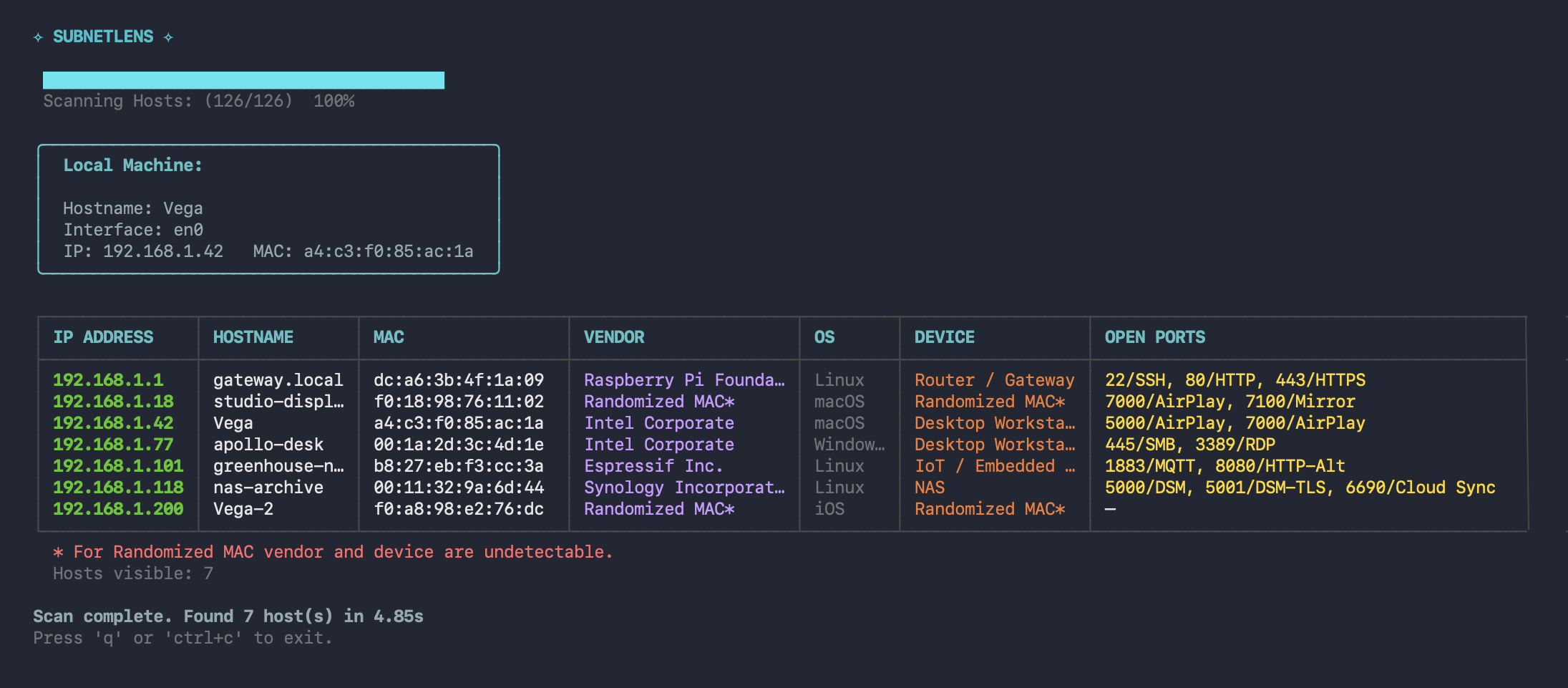
- **操作系统与设备指纹识别:** 启发式检测操作系统和设备类型。
- **厂商与 MAC 解析:** 使用 OUI 数据库识别设备厂商,并检测随机化 MAC 地址。
- **流式 TUI:** 基于 [Charm's Bubbletea](https://github.com/charmbracelet/bubbletea) 构建的可视化界面。
- **纯文本模式:** 脚本友好的输出。
- **单一二进制文件**
## 预览
## OUI 数据库
文件 `scanner/oui.csv` 将 MAC 地址前缀映射到设备厂商。该数据获取自 [IEEE Registration Authority](https://regauth.standards.ieee.org),并包含在此代码库中,以便本地构建和发布版二进制文件都能附带完整的厂商解析功能。
如果需要更新,请从上述链接下载最新的 CSV 并替换 `scanner/oui.csv`。
## 快速开始
如果您想下载代码库并构建二进制文件,请按照下面的说明操作。要运行下载的预编译二进制文件,请继续阅读。
要克隆代码库并从源码构建,请按照下面的说明操作。
要使用预编译的二进制文件,请参阅 [安装预编译版本](#install-precompiled-build)。
**注意:** 在 macOS 和 Linux 上,请使用 `sudo` 运行以启用 ARP 和 ICMP。在 Windows 上,请以管理员身份运行终端。TCP 扫描不需要提升权限。
### 开发
```
git clone https://github.com/ostefani/subnetlens
cd subnetlens
# ---安装依赖---
go mod tidy
# ---构建---
go build .
# 或
go build -o subnetlens
# ---运行---
subnetlens scan
```
### 调试模式
```
# 输出到控制台
sudo SLENS_DEBUG=1 ./subnetlens scan --plain
# 输出到文件
sudo SLENS_DEBUG=1 ./subnetlens scan --plain 2>debug.log
# 从文件打印
cat debug.log
```
### 更新依赖
```
go get -u all
```
### 使用 Go 安装
```
cd subnetlens
go install .
```
### 安装预编译版本
```
sudo mv subnetlens /usr/local/bin/
```
## 使用方法
### 扫描您自己的机器
检查接口及其分配的 IP。仅扫描与您的 WiFi 接口 (`en0`) 匹配的子网,以便保持在家庭网络中。
```
ip addr # Linux
ifconfig | grep "inet " # macOS
```
```
subnetlens scan [subnet] [flags]
```
**Flags:**
`-p`, `--ports` string 逗号分隔的要扫描的端口(默认:常用的 23 个端口)
`-t`, `--timeout` int 单次连接超时时间(毫秒)(默认:500)
`-c`, `--concurrency` int 并行 goroutines 数量(默认:100)
`-b`, `--banners` 抓取服务 Banner
`--plain` 纯文本输出(无 TUI)
`--all-alive` 显示所有发现的主机,包括那些响应 TCP 连接错误的主机。
## 平台支持
| Feature | Linux | macOS | Windows |
| -------- | -------- | -------- | ------------------ |
| TCP scan | ✔ | ✔ | ✔ |
| ICMP | ✔ (root) | ✔ (root) | ✔ (admin) |
| ARP | ✔ | ✔ | ✔ (Npcap required) |
| mDNS | ✔ | ✔ | not tested |
**Windows 前置条件:** 主动 ARP 扫描需要 [Npcap](https://npcap.com) — 一个内核级数据包捕获驱动程序。如果您已安装 Wireshark,则应该已经存在 Npcap。
**示例:**
```
subnetlens scan
subnetlens scan -
subnetlens scan --ports 22,80,443,8080
subnetlens scan --plain --banners
subnetlens scan --concurrency 200 --timeout 300
```
## 项目结构
```
subnetlens /
├── main.go # Entrypoint
├── cmd/
│ └── root.go # Cobra CLI commands
├── scanner/
│ ├── arp.go
| ├── discovery.go
│ ├── engine.go
│ ├── helpers.go
│ ├── icmp.go
│ ├── osdetect.go
│ └── oui.csv # is not included in the repo, download from https://regauth.standards.ieee.org if building locally
├── models/
│ └── models.go
└── ui/
└── tui/
└── tui.go
```
## 路线图
- [x] 基于 ARP 的主机发现(需要原始套接字 / root)
- [x] MAC 地址厂商查询
- [x] mDNS 监听
- [ ] 添加测试
- [ ] 扫描配置文件:`--all-alive | --all`
- [ ] UDP 端口扫描
- [ ] JSON / CSV 导出 (`--output result.json`)
- [ ] 带有交互式网络节点图的 GUI
- [ ] `subnetlens watch` — 定时重新扫描,变更时报警
## 贡献
如需贡献,请查阅 CONTRIBUTING.md 了解 PR 要求。
## 许可证
MIT © 2026 Olha Stefanishyna
**免责声明:** 此工具仅供授权的网络测试和诊断使用。请勿在未经明确许可的情况下扫描网络或系统。请负责任地使用。
标签:ARP, Bubble Tea, C2日志可视化, Cobra, EVTX分析, Facebook API, Golang, Go语言, ICMP, MAC地址解析, mDNS, OUI数据库, TCP Connect, TUI, 云存储安全, 内网探测, 单文件二进制, 厂商识别, 子网扫描, 安全编程, 密码管理, 并发扫描, 开源安全工具, 批量查询, 指纹识别, 插件系统, 数据统计, 日志审计, 服务器安全, 程序破解, 端口扫描, 网络安全, 网络扫描, 资产探测, 资产清点, 轻量级扫描器, 逆向工程平台, 防御绕过, 隐私保护