BMR11/ble-validation-platform
GitHub: BMR11/ble-validation-platform
一个基于配置文件的BLE设备模拟平台,用于加速医疗和IoT设备的开发、测试和验证,减少对物理硬件的依赖。
Stars: 10 | Forks: 0

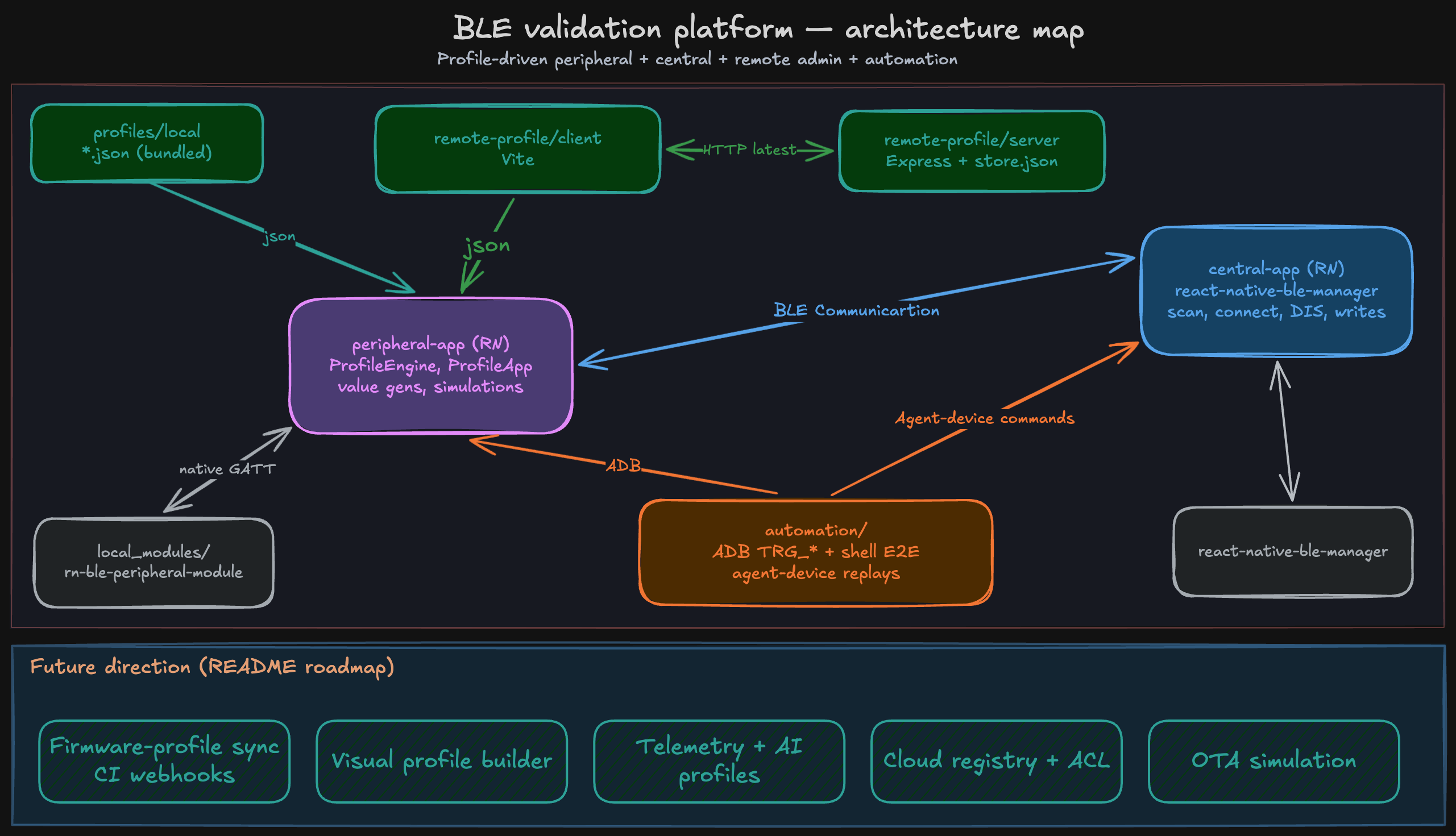 - **外设** (`peripheral-app/`):从 `../profiles/local/*.json` 加载本地捆绑配置文件和/或从 remote-profile 获取;执行 `ProfileEngine`。
- **中心** (`central-app/`):用户选择一个演示目标(心率 vs Nordic LBS),按服务UUID扫描,连接,将DIS读入一个可展开的**信息**面板,发现服务,订阅,为Nordic设备写入LED。
- **远程配置文件** (`remote-profile/`):React 管理界面 + Express API + JSON文件存储 — 参见 [remote-profile/README.md](remote-profile/README.md)。
更多详情:[docs/architecture.md](docs/architecture.md)。
## 文件夹结构
```
ble-validation-platform/
peripheral-app/
central-app/
remote-profile/
client/ # Vite React admin
server/ # Express API + JSON persistence
profiles/
local/ # Bundled JSON (heart-rate, nordic-lbs)
remote/ # Docs / optional exported samples
automation/
docs/
README.md
```
## 安装设置
要求:**Node 18+**,**JDK 17**(用于Android),Xcode + CocoaPods(用于iOS中心应用构建)。
1. **外设应用**
```bash
cd peripheral-app
npm install
cp .env.example .env
```
编辑 **`.env`**:为连接Wi‑Fi的实体手机设置 **`REMOTE_PROFILE_LAN_HOST`**(参见 [docs/remote-profiles.md](docs/remote-profiles.md))。切勿提交 **`.env`** 文件。更改 **`.env`** 后,重启Metro;如果远程URL看起来仍不正确,使用 `yarn start --reset-cache` 或 `npm start -- --reset-cache`。
该应用通过 `file:../local_modules/rn-ble-peripheral-module` 依赖本地库(路径相对于 `peripheral-app/`)。
2. **中心应用**
```bash
cd central-app
npm install
```
3. **远程配置文件**(可选,用于服务器驱动的配置文件)
```bash
cd remote-profile/server && npm install && cp .env.example .env && npm run dev
cd remote-profile/client && npm install && npm run dev
```
可选的 **`server/.env`** 仅覆盖 `PORT` / `HOST`。登录凭据:`demo@example.com` / `demo123`(仅限公共演示 — 参见 [docs/remote-profiles.md](docs/remote-profiles.md))。
4. **iOS(仅中心应用,或如果你添加iOS用途也包括外设应用)**
```bash
cd central-app/ios && bundle install && bundle exec pod install && cd ../..
```
## 运行 peripheral-app
```
cd peripheral-app
npm start
# echnical jargon. Similarly, "native dependency" – keep it as "native dependency". "change" can be translated as "更改" or "变更". So, the phrase could be "每次clone或native dependency更改时".
npm run android
```
流程:
1. 授予蓝牙权限(Android 12+:广播 + 连接)。
2. **配置文件来源**:**本地**(默认)或**远程**(需要 remote-profile 服务器)。
3. 对于**远程**模式:点击**获取远程配置文件**,然后选择一行(加载**最新发布的**)。
4. 点击**启动外设**。
5. 在**日志面板**中观察广播、服务注册、读写操作和状态转换。
**远程API URL** 来自 **`peripheral-app/.env`**(`REMOTE_PROFILE_LAN_HOST` 或 `REMOTE_PROFILE_TUNNEL_BASE`)— 参见 [docs/remote-profiles.md](docs/remote-profiles.md)。
## 运行 central-app
```
cd central-app
npm install
# But to make it grammatically correct in Chinese, I need to adjust the structure. The original has "once per clone / native dependency change", which might mean "once per clone or native dependency change". So in Chinese: "每次clone或native dependency更改时".
npm run pod-install
npm start
npm run android
# - "iOS (simulator example; physical device needs a signing Team in Xcode)": "iOS" keep in English. "simulator example" – "simulator" is a technical term, often kept as "simulator" in Chinese tech contexts, but it can be translated as "模拟器". The instruction says to keep technical jargon in English, so I should keep "simulator" as "simulator"? However, in common usage, "simulator" is often translated. To be safe, I'll check the examples: in the given examples, terms like "Naabu", "Kubernetes", "API" are kept in English. "simulator" might be considered a tool or technical term, but it's more generic. I think it's acceptable to translate it. Let's see the context: it's part of "simulator example", so I can translate "example" as "示例", and "simulator" as "模拟器". But the instruction says "keep all professional terms... in their original English form." Is "simulator" a professional term? It might be, but in this heading, it's likely referring to the iOS simulator, which is a tool. I'll lean towards keeping it in English to be consistent with "Xcode" which is a proper noun. Actually, "simulator" here is part of "simulator example", so perhaps "模拟器示例" is fine, but to be precise, I'll keep "simulator" in English if it's a tool name. However, "iOS Simulator" is a proper tool in Xcode, so it might be kept as "iOS Simulator". But the heading says "simulator example", so it's describing an example with the simulator. I think for clarity, I'll translate "example" but keep "simulator" as is? Let's decide.
npm run ios -- --simulator "iPhone 16"
```
有关CocoaPods区域设置问题、**`BleCentralDemo.xcworkspace`** 以及在真实iPhone上的**签名与功能**设置,请参阅 [central-app/README.md](central-app/README.md)。
流程:
1. 选择**目标配置文件**(与 `profiles/local/` 中的ID匹配)。
2. **扫描(8秒)** — 按该配置文件的主服务UUID过滤。
3. 点击设备行进行**连接**(扫描停止;**目标**和**扫描**按钮保持禁用状态直到断开连接)。
4. 展开设备卡片上的**信息**,查看**DIS**字符串(制造商、型号、序列号、固件等,如果外设暴露了的话)。
5. 观察**实时指标**和**日志**(心率 + 电量,或 Nordic 按钮 + **LED 开启** / **LED 关闭**写入)。
## 配置文件
| 文件 | ID | 广播名称(典型) | 备注 |
|------|-----|------------------|------|
| `profiles/local/heart-rate.json` | `heart-rate-monitor` | `RN_BLE_HR_Demo` | 心率服务 (0x180D),电池服务 (0x180F),DIS,状态机,用于心率和电量模拟的 `valueGenerator`。 |
| `profiles/local/nordic-lbs.json` | `nordic-lbs` | `My_LBS` | Nordic LBS UUID,按钮通知,LED写入,电池服务。 |
模式和 `valueGenerator` 键:[docs/profile-schema.md](docs/profile-schema.md)。
**远程播种历史**(v1 vs v2 的故事)在 [docs/profile-versioning.md](docs/profile-versioning.md) 中有描述。
## 文档索引
- [docs/README.md](docs/README.md) — 文档地图和建议的阅读路径。
- [docs/remote-profiles.md](docs/remote-profiles.md) — 服务器驱动的配置文件概念和外设集成。
- [docs/remote-profile-api.md](docs/remote-profile-api.md) — HTTP API 参考。
- [docs/profile-versioning.md](docs/profile-versioning.md) — 草稿/发布/最新规则。
- [docs/demo-flows.md](docs/demo-flows.md) — 端到端流程。
## 演示流程(端到端)
有关两部手机和可选错误状态测试的分步说明,请参阅 [docs/demo-flows.md](docs/demo-flows.md)。
简要版本:
1. 启动 **peripheral-app** → 选择配置文件 → **启动外设**。
2. 启动 **central-app** → 选择匹配的目标 → **扫描** → **连接**。
3. 在UI和日志中确认**通知**,可选**信息(DIS)**,以及 **LED 开启** 然后 **LED 关闭**(对于Nordic设备)。
https://github.com/user-attachments/assets/f006b81c-21bd-40e6-8a2f-f46200ce6cea
## 使用场景
- **BLE测试** — 无需自定义固件即可实现可重复的外设行为。
- **物联网开发** — 原型验证应用对标准及供应商特定GATT布局的反应。
- **医疗/可穿戴设备验证** — 以受控方式测试心率配置文件风格的服务和状态转换(不用于临床认证;仅用于演示/教育目的)。
## 🌍 适用性
这种方法适用于依赖BLE连接系统的各行各业,包括:
- 医疗保健和医疗设备
- 可穿戴技术
- 物联网平台
- 工业和传感器系统
## ⚠️ 免责声明
本平台旨在用于**开发、模拟和验证工作流**,并不能替代使用真实硬件设备进行的测试。
虽然它能够受控地模拟BLE行为和故障场景,但**最终使用实际设备进行验证仍然至关重要**,特别是在生产环境和受监管环境中。
这种方法旨在通过以下方式补充传统的基于硬件的测试:
- 实现更早的开发和集成
- 通过可重现的场景提高测试覆盖率
- 在开发和QA期间减少对物理设置的依赖
## 🔮 未来方向
- **自动化**:编排中心和外设应用,并使用像 [Agent Device (Callstack)](https://github.com/callstack/agent-device) 这样的工具端到端地验证行为,实现可重复且可扩展的BLE验证工作流。
- **固件-配置文件同步平台**:实现设备固件与BLE配置文件之间的自动同步。固件中服务或特征的更改(例如通过拉取请求)可以触发CI集成的webhook管道,该管道更新或生成远程配置文件系统中的相应配置文件,保持模拟设备与真实固件行为的一致性。
- **拖放式配置文件构建器**:提供基于UI的工作流,无需代码即可创建和修改BLE配置文件,降低QA和跨职能团队的入门门槛。
- **遥测与AI驱动的配置文件生成**:捕获中心与外设设备之间真实的BLE通信轨迹,并用它们生成可重用的配置文件。未来的增强可能利用AI/ML技术推断设备行为模式,模拟真实的边缘案例,并根据观察到的系统行为自动调整配置文件。
- **云配置文件注册表**:引入一个集中式的、版本化的BLE配置文件注册表,支持访问控制,使团队能够在不同环境中共享、重用和管理设备定义。
- **高级OTA模拟**:扩展平台以模拟固件更新工作流和边缘案例,无需实际硬件更新即可验证OTA管道。
- **共享逻辑层(固件 ↔ 移动端)**:探索使用共享的基于C的逻辑层,该层可在设备固件和Android原生外设实现之间复用。这将允许核心设备行为(状态处理、值生成、交互逻辑)在两种环境中保持一致,而仅BLE传输层不同。目标是减少模拟与真实设备行为之间的差异,使验证更能代表生产系统。
- **遥测驱动的配置文件生成(AI辅助)**:捕获中心与外设设备之间的真实BLE通信轨迹,并用它们自动生成可重用的配置文件。这有助于更可靠地重现真实世界的问题,并缩小模拟与生产行为之间的差距。随着时间的推移,AI辅助方法可能有助于识别模式、生成边缘案例,并使配置文件与设备在实践中的行为保持一致。
## 许可证 / 上游
外设BLE引擎和类型位于 [`local_modules/rn-ble-peripheral-module`](local_modules/rn-ble-peripheral-module) 下的 **`rn-ble-peripheral-module`** 供应商包中。
## ⭐ 支持
如果这个项目对你有帮助:
- ⭐ 给仓库点个星
- 🧪 在你的工作流中尝试一下
- 🤝 分享反馈
这有助于使BLE开发更加普及和可扩展。
这有助于使示例扎根于BLE团队实际遇到的问题中。
- **外设** (`peripheral-app/`):从 `../profiles/local/*.json` 加载本地捆绑配置文件和/或从 remote-profile 获取;执行 `ProfileEngine`。
- **中心** (`central-app/`):用户选择一个演示目标(心率 vs Nordic LBS),按服务UUID扫描,连接,将DIS读入一个可展开的**信息**面板,发现服务,订阅,为Nordic设备写入LED。
- **远程配置文件** (`remote-profile/`):React 管理界面 + Express API + JSON文件存储 — 参见 [remote-profile/README.md](remote-profile/README.md)。
更多详情:[docs/architecture.md](docs/architecture.md)。
## 文件夹结构
```
ble-validation-platform/
peripheral-app/
central-app/
remote-profile/
client/ # Vite React admin
server/ # Express API + JSON persistence
profiles/
local/ # Bundled JSON (heart-rate, nordic-lbs)
remote/ # Docs / optional exported samples
automation/
docs/
README.md
```
## 安装设置
要求:**Node 18+**,**JDK 17**(用于Android),Xcode + CocoaPods(用于iOS中心应用构建)。
1. **外设应用**
```bash
cd peripheral-app
npm install
cp .env.example .env
```
编辑 **`.env`**:为连接Wi‑Fi的实体手机设置 **`REMOTE_PROFILE_LAN_HOST`**(参见 [docs/remote-profiles.md](docs/remote-profiles.md))。切勿提交 **`.env`** 文件。更改 **`.env`** 后,重启Metro;如果远程URL看起来仍不正确,使用 `yarn start --reset-cache` 或 `npm start -- --reset-cache`。
该应用通过 `file:../local_modules/rn-ble-peripheral-module` 依赖本地库(路径相对于 `peripheral-app/`)。
2. **中心应用**
```bash
cd central-app
npm install
```
3. **远程配置文件**(可选,用于服务器驱动的配置文件)
```bash
cd remote-profile/server && npm install && cp .env.example .env && npm run dev
cd remote-profile/client && npm install && npm run dev
```
可选的 **`server/.env`** 仅覆盖 `PORT` / `HOST`。登录凭据:`demo@example.com` / `demo123`(仅限公共演示 — 参见 [docs/remote-profiles.md](docs/remote-profiles.md))。
4. **iOS(仅中心应用,或如果你添加iOS用途也包括外设应用)**
```bash
cd central-app/ios && bundle install && bundle exec pod install && cd ../..
```
## 运行 peripheral-app
```
cd peripheral-app
npm start
# echnical jargon. Similarly, "native dependency" – keep it as "native dependency". "change" can be translated as "更改" or "变更". So, the phrase could be "每次clone或native dependency更改时".
npm run android
```
流程:
1. 授予蓝牙权限(Android 12+:广播 + 连接)。
2. **配置文件来源**:**本地**(默认)或**远程**(需要 remote-profile 服务器)。
3. 对于**远程**模式:点击**获取远程配置文件**,然后选择一行(加载**最新发布的**)。
4. 点击**启动外设**。
5. 在**日志面板**中观察广播、服务注册、读写操作和状态转换。
**远程API URL** 来自 **`peripheral-app/.env`**(`REMOTE_PROFILE_LAN_HOST` 或 `REMOTE_PROFILE_TUNNEL_BASE`)— 参见 [docs/remote-profiles.md](docs/remote-profiles.md)。
## 运行 central-app
```
cd central-app
npm install
# But to make it grammatically correct in Chinese, I need to adjust the structure. The original has "once per clone / native dependency change", which might mean "once per clone or native dependency change". So in Chinese: "每次clone或native dependency更改时".
npm run pod-install
npm start
npm run android
# - "iOS (simulator example; physical device needs a signing Team in Xcode)": "iOS" keep in English. "simulator example" – "simulator" is a technical term, often kept as "simulator" in Chinese tech contexts, but it can be translated as "模拟器". The instruction says to keep technical jargon in English, so I should keep "simulator" as "simulator"? However, in common usage, "simulator" is often translated. To be safe, I'll check the examples: in the given examples, terms like "Naabu", "Kubernetes", "API" are kept in English. "simulator" might be considered a tool or technical term, but it's more generic. I think it's acceptable to translate it. Let's see the context: it's part of "simulator example", so I can translate "example" as "示例", and "simulator" as "模拟器". But the instruction says "keep all professional terms... in their original English form." Is "simulator" a professional term? It might be, but in this heading, it's likely referring to the iOS simulator, which is a tool. I'll lean towards keeping it in English to be consistent with "Xcode" which is a proper noun. Actually, "simulator" here is part of "simulator example", so perhaps "模拟器示例" is fine, but to be precise, I'll keep "simulator" in English if it's a tool name. However, "iOS Simulator" is a proper tool in Xcode, so it might be kept as "iOS Simulator". But the heading says "simulator example", so it's describing an example with the simulator. I think for clarity, I'll translate "example" but keep "simulator" as is? Let's decide.
npm run ios -- --simulator "iPhone 16"
```
有关CocoaPods区域设置问题、**`BleCentralDemo.xcworkspace`** 以及在真实iPhone上的**签名与功能**设置,请参阅 [central-app/README.md](central-app/README.md)。
流程:
1. 选择**目标配置文件**(与 `profiles/local/` 中的ID匹配)。
2. **扫描(8秒)** — 按该配置文件的主服务UUID过滤。
3. 点击设备行进行**连接**(扫描停止;**目标**和**扫描**按钮保持禁用状态直到断开连接)。
4. 展开设备卡片上的**信息**,查看**DIS**字符串(制造商、型号、序列号、固件等,如果外设暴露了的话)。
5. 观察**实时指标**和**日志**(心率 + 电量,或 Nordic 按钮 + **LED 开启** / **LED 关闭**写入)。
## 配置文件
| 文件 | ID | 广播名称(典型) | 备注 |
|------|-----|------------------|------|
| `profiles/local/heart-rate.json` | `heart-rate-monitor` | `RN_BLE_HR_Demo` | 心率服务 (0x180D),电池服务 (0x180F),DIS,状态机,用于心率和电量模拟的 `valueGenerator`。 |
| `profiles/local/nordic-lbs.json` | `nordic-lbs` | `My_LBS` | Nordic LBS UUID,按钮通知,LED写入,电池服务。 |
模式和 `valueGenerator` 键:[docs/profile-schema.md](docs/profile-schema.md)。
**远程播种历史**(v1 vs v2 的故事)在 [docs/profile-versioning.md](docs/profile-versioning.md) 中有描述。
## 文档索引
- [docs/README.md](docs/README.md) — 文档地图和建议的阅读路径。
- [docs/remote-profiles.md](docs/remote-profiles.md) — 服务器驱动的配置文件概念和外设集成。
- [docs/remote-profile-api.md](docs/remote-profile-api.md) — HTTP API 参考。
- [docs/profile-versioning.md](docs/profile-versioning.md) — 草稿/发布/最新规则。
- [docs/demo-flows.md](docs/demo-flows.md) — 端到端流程。
## 演示流程(端到端)
有关两部手机和可选错误状态测试的分步说明,请参阅 [docs/demo-flows.md](docs/demo-flows.md)。
简要版本:
1. 启动 **peripheral-app** → 选择配置文件 → **启动外设**。
2. 启动 **central-app** → 选择匹配的目标 → **扫描** → **连接**。
3. 在UI和日志中确认**通知**,可选**信息(DIS)**,以及 **LED 开启** 然后 **LED 关闭**(对于Nordic设备)。
https://github.com/user-attachments/assets/f006b81c-21bd-40e6-8a2f-f46200ce6cea
## 使用场景
- **BLE测试** — 无需自定义固件即可实现可重复的外设行为。
- **物联网开发** — 原型验证应用对标准及供应商特定GATT布局的反应。
- **医疗/可穿戴设备验证** — 以受控方式测试心率配置文件风格的服务和状态转换(不用于临床认证;仅用于演示/教育目的)。
## 🌍 适用性
这种方法适用于依赖BLE连接系统的各行各业,包括:
- 医疗保健和医疗设备
- 可穿戴技术
- 物联网平台
- 工业和传感器系统
## ⚠️ 免责声明
本平台旨在用于**开发、模拟和验证工作流**,并不能替代使用真实硬件设备进行的测试。
虽然它能够受控地模拟BLE行为和故障场景,但**最终使用实际设备进行验证仍然至关重要**,特别是在生产环境和受监管环境中。
这种方法旨在通过以下方式补充传统的基于硬件的测试:
- 实现更早的开发和集成
- 通过可重现的场景提高测试覆盖率
- 在开发和QA期间减少对物理设置的依赖
## 🔮 未来方向
- **自动化**:编排中心和外设应用,并使用像 [Agent Device (Callstack)](https://github.com/callstack/agent-device) 这样的工具端到端地验证行为,实现可重复且可扩展的BLE验证工作流。
- **固件-配置文件同步平台**:实现设备固件与BLE配置文件之间的自动同步。固件中服务或特征的更改(例如通过拉取请求)可以触发CI集成的webhook管道,该管道更新或生成远程配置文件系统中的相应配置文件,保持模拟设备与真实固件行为的一致性。
- **拖放式配置文件构建器**:提供基于UI的工作流,无需代码即可创建和修改BLE配置文件,降低QA和跨职能团队的入门门槛。
- **遥测与AI驱动的配置文件生成**:捕获中心与外设设备之间真实的BLE通信轨迹,并用它们生成可重用的配置文件。未来的增强可能利用AI/ML技术推断设备行为模式,模拟真实的边缘案例,并根据观察到的系统行为自动调整配置文件。
- **云配置文件注册表**:引入一个集中式的、版本化的BLE配置文件注册表,支持访问控制,使团队能够在不同环境中共享、重用和管理设备定义。
- **高级OTA模拟**:扩展平台以模拟固件更新工作流和边缘案例,无需实际硬件更新即可验证OTA管道。
- **共享逻辑层(固件 ↔ 移动端)**:探索使用共享的基于C的逻辑层,该层可在设备固件和Android原生外设实现之间复用。这将允许核心设备行为(状态处理、值生成、交互逻辑)在两种环境中保持一致,而仅BLE传输层不同。目标是减少模拟与真实设备行为之间的差异,使验证更能代表生产系统。
- **遥测驱动的配置文件生成(AI辅助)**:捕获中心与外设设备之间的真实BLE通信轨迹,并用它们自动生成可重用的配置文件。这有助于更可靠地重现真实世界的问题,并缩小模拟与生产行为之间的差距。随着时间的推移,AI辅助方法可能有助于识别模式、生成边缘案例,并使配置文件与设备在实践中的行为保持一致。
## 许可证 / 上游
外设BLE引擎和类型位于 [`local_modules/rn-ble-peripheral-module`](local_modules/rn-ble-peripheral-module) 下的 **`rn-ble-peripheral-module`** 供应商包中。
## ⭐ 支持
如果这个项目对你有帮助:
- ⭐ 给仓库点个星
- 🧪 在你的工作流中尝试一下
- 🤝 分享反馈
这有助于使BLE开发更加普及和可扩展。
这有助于使示例扎根于BLE团队实际遇到的问题中。标签:BLE模拟器, GATT协议, Homebrew安装, JSON配置文件, MITM代理, React Native, SOC Prime, 医疗设备, 开发工具, 故障注入, 测试自动化, 物联网, 硬件无关开发, 移动应用开发, 系统验证, 自动化攻击, 蓝牙低功耗, 设备模拟, 验证平台