jesse12-21/wireshark-threat-detection
GitHub: jesse12-21/wireshark-threat-detection
基于 Wireshark/TShark 的端到端网络威胁检测项目,涵盖 DNS 隧道、TLS 指纹、C2 信标识别,并将检测方法转化为 Sigma 规则与 SOC 调查流程。
Stars: 0 | Forks: 0
# 🛡️ 使用 Wireshark 进行网络威胁检测与流量分析
### 通过数据包级别的取证检测真实世界的攻击模式
[](https://www.wireshark.org/)
[](https://ubuntu.com/)
[](https://www.wireshark.org/docs/man-pages/tshark.html)
[](https://attack.mitre.org/)
[](https://github.com/SigmaHQ/sigma)
*一个实践性的网络安全项目,展示了端到端的网络威胁检测 —— 从在 Wireshark 中进行数据包级别的分析,到使用 TShark 进行 Bash 自动化,再到可移植的 Sigma 规则、SOC 分析师响应手册以及一份完整的调查报告。*
[设置](#part-1---environment-setup--baseline-capture) · [HTTPS/QUIC](#part-2---analyzing-modern-encrypted-traffic-https--quic) · [DNS 检测](#part-3---detecting-dns-based-threats) · [JA4 指纹识别](#part-4---tls-fingerprinting-with-ja4) · [C2 检测](#part-5---identifying-c2-beacon-patterns) · [自动化](#part-6---automating-detection-with-tshark) · [运营化](#part-7---operationalizing-the-detections)
## 📋 项目概述
现代网络威胁日益复杂——攻击者利用加密通道、DNS 隧道和协议滥用来逃避传统检测。本项目展示了在 Ubuntu 24.04 系统上使用 Wireshark 在数据包级别识别这些威胁所需的实用技能,然后将这些检测方法转化为可移植的 Sigma 规则、SOC 手册以及一个完整的调查示例。
### 本项目涵盖的内容
| 章节 | 展示的技能 | 使用的工具 |
|---|---|---|
| **环境配置** | Linux 系统管理、接口配置 | `apt`, `usermod`, `dumpcap` |
| **加密流量分析** | HTTPS 检查、QUIC/HTTP3 协议分析 | Wireshark 显示过滤器 |
| **DNS 威胁检测** | 识别 DNS 隧道和数据渗出 | `dns` 过滤器、熵分析 |
| **TLS 指纹识别** | 使用 JA4 指纹对客户端/服务器进行分类 | JA4 插件、`tls.handshake` 过滤器 |
| **C2 信标检测** | 识别命令与控制通信模式 | 基于时间的过滤器、统计 |
| **自动化分析** | 编写数据包分析脚本以实现可扩展的威胁检测 | `tshark`, `bash` |
| **检测工程** | 可移植的检测规则和分析师响应程序 | Sigma, MITRE ATT&CK |
### 🎯 检测覆盖范围 — MITRE ATT&CK 映射
本项目展示了对以下对手技术的检测能力,这些技术映射到 [MITRE ATT&CK 框架](https://attack.mitre.org/):
| 对手技术 | ATT&CK ID | 战术 | 本项目中的检测方式 |
|---|---|---|---|
| **应用层协议:Web 协议** | [T1071.001](https://attack.mitre.org/techniques/T1071/001/) | 命令与控制 | HTTPS/QUIC 流量基线建立(第 2 部分);信标时序分析(第 5 部分) |
| **应用层协议:DNS** | [T1071.004](https://attack.mitre.org/techniques/T1071/004/) | 命令与控制 | 长域名和 TXT 记录查询分析(第 3 部分,`dns_tunnel_detect.sh`) |
| **协议隧道** | [T1572](https://attack.mitre.org/techniques/T1572/) | 命令与控制 | 高熵子域名检测;QUIC 滥用识别(第 2 和第 3 部分) |
| **通过非加密非 C2 协议渗出** | [T1048.003](https://attack.mitre.org/techniques/T1048/003/) | 渗出 | 提取基础域名的 DNS 隧道比率分析(`dns_tunnel_detect.sh`) |
| **加密通道:非对称加密** | [T1573.002](https://attack.mitre.org/techniques/T1573/002/) | 命令与控制 | JA4 指纹识别(第 4 部分);无 SNI 握手检测(`tls_extract.sh`) |
| **计划传输** | [T1029](https://attack.mitre.org/techniques/T1029/) | 渗出 | 基于 Jitter 的信标检测(`beacon_detect.sh`) |
| **非标准端口** | [T1571](https://attack.mitre.org/techniques/T1571/) | 命令与控制 | 目标端口分布分析(`beacon_detect.sh`) |
### 📂 仓库结构
*一个实践性的网络安全项目,展示了端到端的网络威胁检测 —— 从在 Wireshark 中进行数据包级别的分析,到使用 TShark 进行 Bash 自动化,再到可移植的 Sigma 规则、SOC 分析师响应手册以及一份完整的调查报告。*
[设置](#part-1---environment-setup--baseline-capture) · [HTTPS/QUIC](#part-2---analyzing-modern-encrypted-traffic-https--quic) · [DNS 检测](#part-3---detecting-dns-based-threats) · [JA4 指纹识别](#part-4---tls-fingerprinting-with-ja4) · [C2 检测](#part-5---identifying-c2-beacon-patterns) · [自动化](#part-6---automating-detection-with-tshark) · [运营化](#part-7---operationalizing-the-detections)
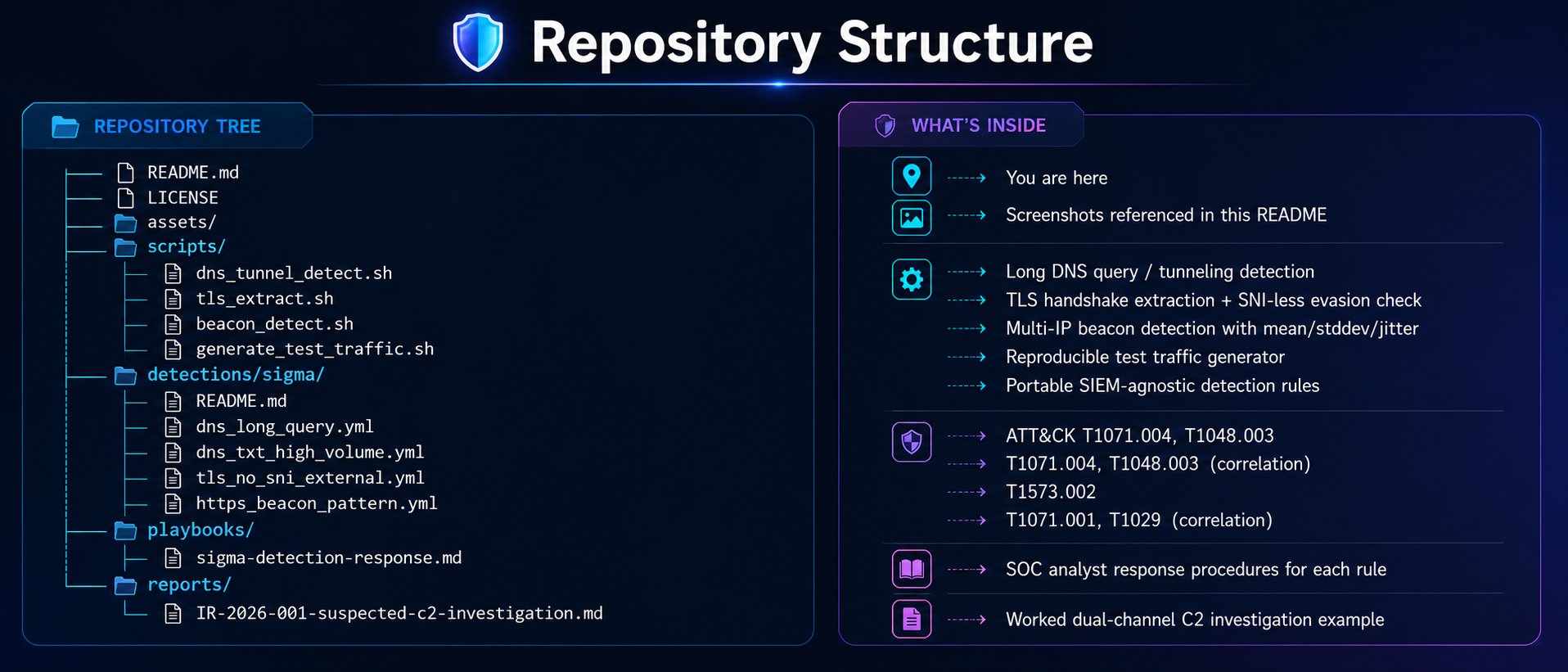
文本版本(点击展开)
``` . ├── README.md ← You are here ├── LICENSE ├── assets/ ← Screenshots referenced in this README ├── scripts/ │ ├── dns_tunnel_detect.sh ← Long DNS query / tunneling detection │ ├── tls_extract.sh ← TLS handshake extraction + SNI-less evasion check │ ├── beacon_detect.sh ← Multi-IP beacon detection with mean/stddev/jitter │ └── generate_test_traffic.sh ← Reproducible test traffic generator ├── detections/sigma/ ← Portable SIEM-agnostic detection rules │ ├── README.md │ ├── dns_long_query.yml ← ATT&CK T1071.004, T1048.003 │ ├── dns_txt_high_volume.yml ← T1071.004, T1048.003 (correlation) │ ├── tls_no_sni_external.yml ← T1573.002 │ └── https_beacon_pattern.yml ← T1071.001, T1029 (correlation) ├── playbooks/ │ └── sigma-detection-response.md ← SOC analyst response procedures for each rule └── reports/ └── IR-2026-001-suspected-c2-investigation.md ← Worked dual-channel C2 investigation example ```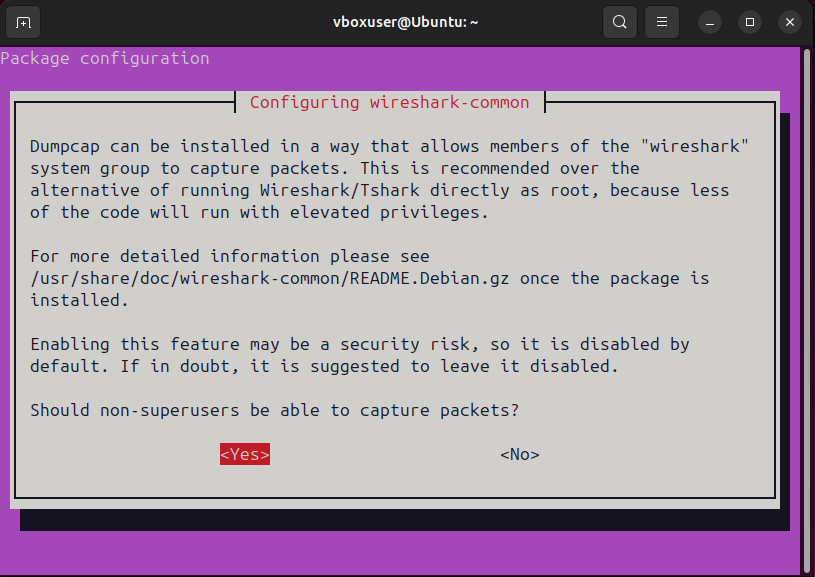
Configuring dumpcap to allow packet capture for wireshark group members
### 将当前用户添加到 Wireshark 组 接下来,我将我的用户账户添加到 `wireshark` 组,这样我就可以在没有提升权限的情况下捕获数据包: ``` sudo usermod -aG wireshark $USER ``` 注销并重新登录后,我验证了组成员身份: ``` groups $USER ``` ``` vboxuser : vboxuser adm cdrom sudo dip plugdev lpadmin lxd sambashare wireshark vboxsf ``` ### 识别捕获接口 我列出可用的网络接口,以确定用于捕获的正确接口: ``` ip link show ``` 系统有几个接口。在本项目中,我将在 `enp0s3` 上进行捕获——这是显示活动流量的主要以太网接口(VirtualBox 模拟的 Intel PRO/1000 适配器):
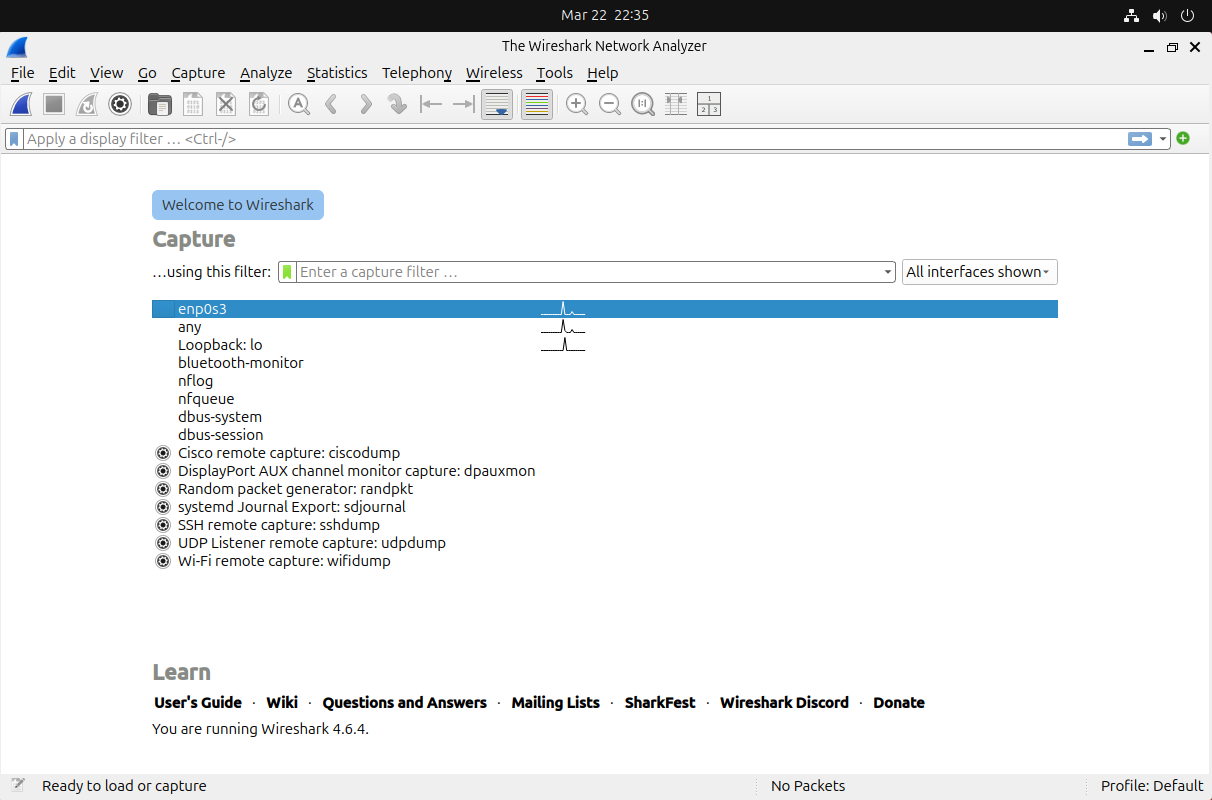
Wireshark showing available capture interfaces — enp0s3 selected with active traffic visible
### 执行基线捕获 在寻找威胁之前,我捕获了正常流量的基线,以了解该系统上的典型网络活动是什么样子的。我在 `enp0s3` 上启动了 60 秒的捕获并将其保存:
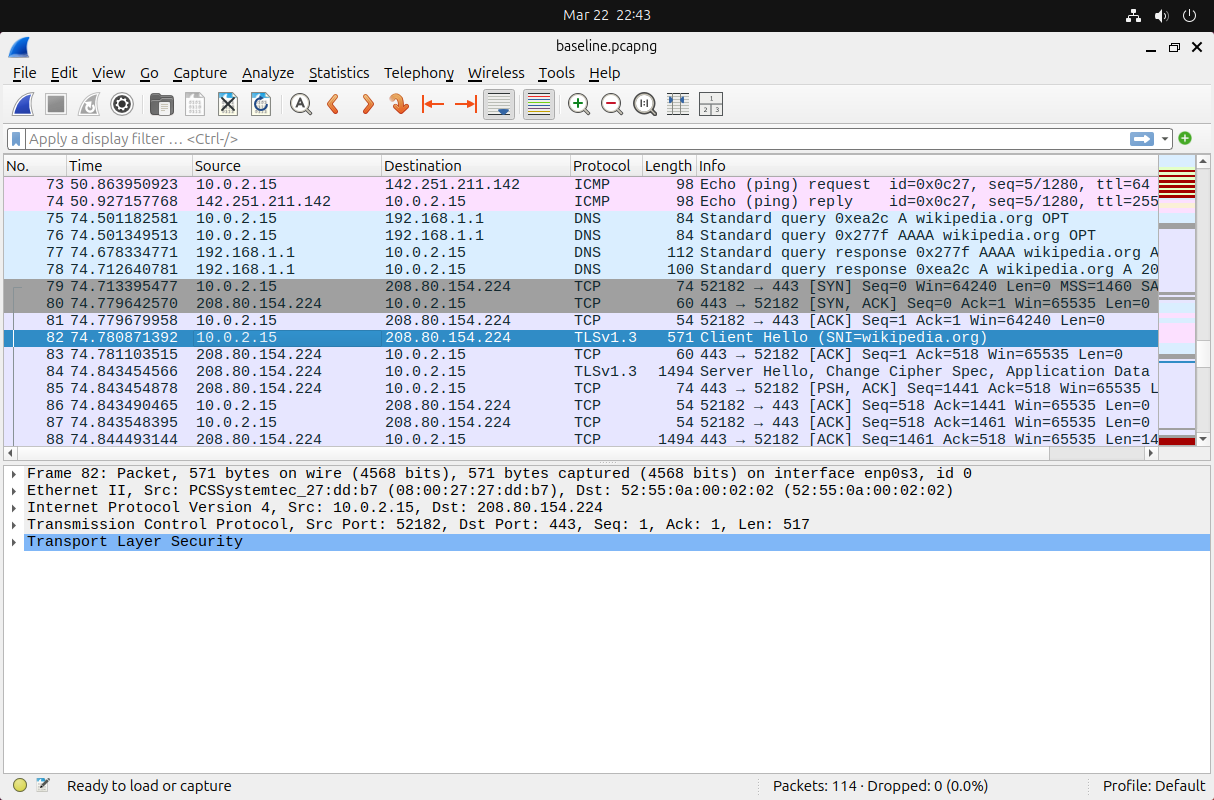
Initial packet capture showing normal TCP traffic between the local system (10.0.2.15) and external hosts
基线揭示了标准的流量模式:TCP 握手、DNS 查找以及到已知服务的 HTTPS 连接。这一背景至关重要——**如果你不知道正常情况是什么样,你就无法检测异常。** ## 第 2 部分 - 分析现代加密流量 (HTTPS & QUIC) ### 捕获 HTTPS 流量 通过在 Firefox 中导航到 `https://duckduckgo.com` 生成 HTTPS 流量,然后应用显示过滤器来隔离加密的 Web 流量: ``` tcp.port == 443 ```
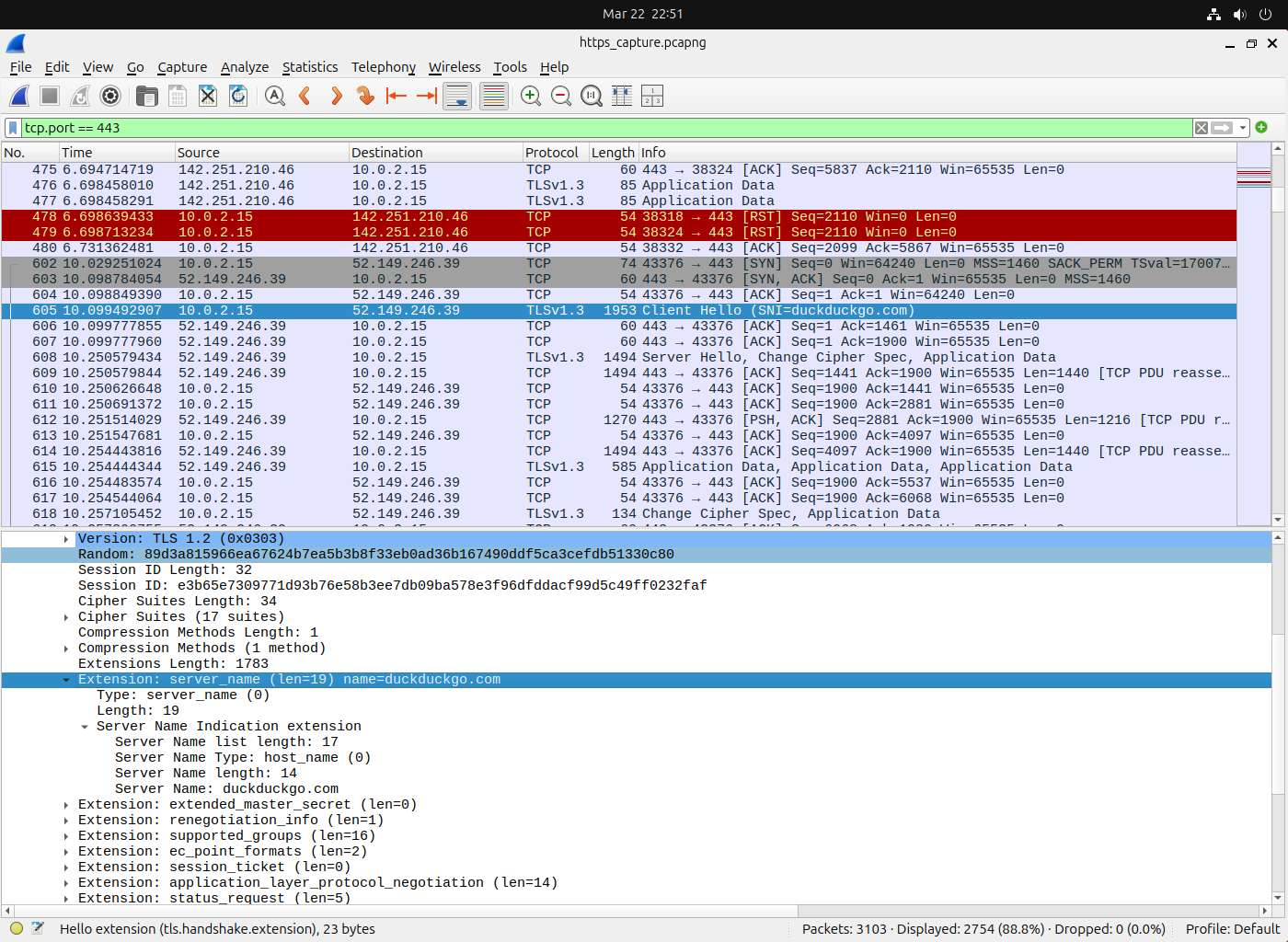
Filtered view showing TLS 1.3 traffic to DuckDuckGo — note the TLS handshake sequence starting with Client Hello
我找到了初始的 **TLS Client Hello** 数据包,并验证目标 IP 是否与 DuckDuckGo 的基础设施匹配。握手使用的是 **TLS 1.3**,这是目前的标准——在 2026 年出现的 TLS 1.2 连接可能需要进一步调查,作为旧版或配置错误的客户端的潜在指标。 ### 分析 QUIC/HTTP3 流量 许多现代服务现在使用 **QUIC** (HTTP/3),它运行在 UDP 而不是 TCP 上。这对安全分析师很重要,因为 QUIC 流量不会出现在传统的 `tcp.port == 443` 过滤器中。 我通过访问 `https://google.com`(Google 大量使用 QUIC)生成 QUIC 流量并对其进行过滤: ``` quic ```
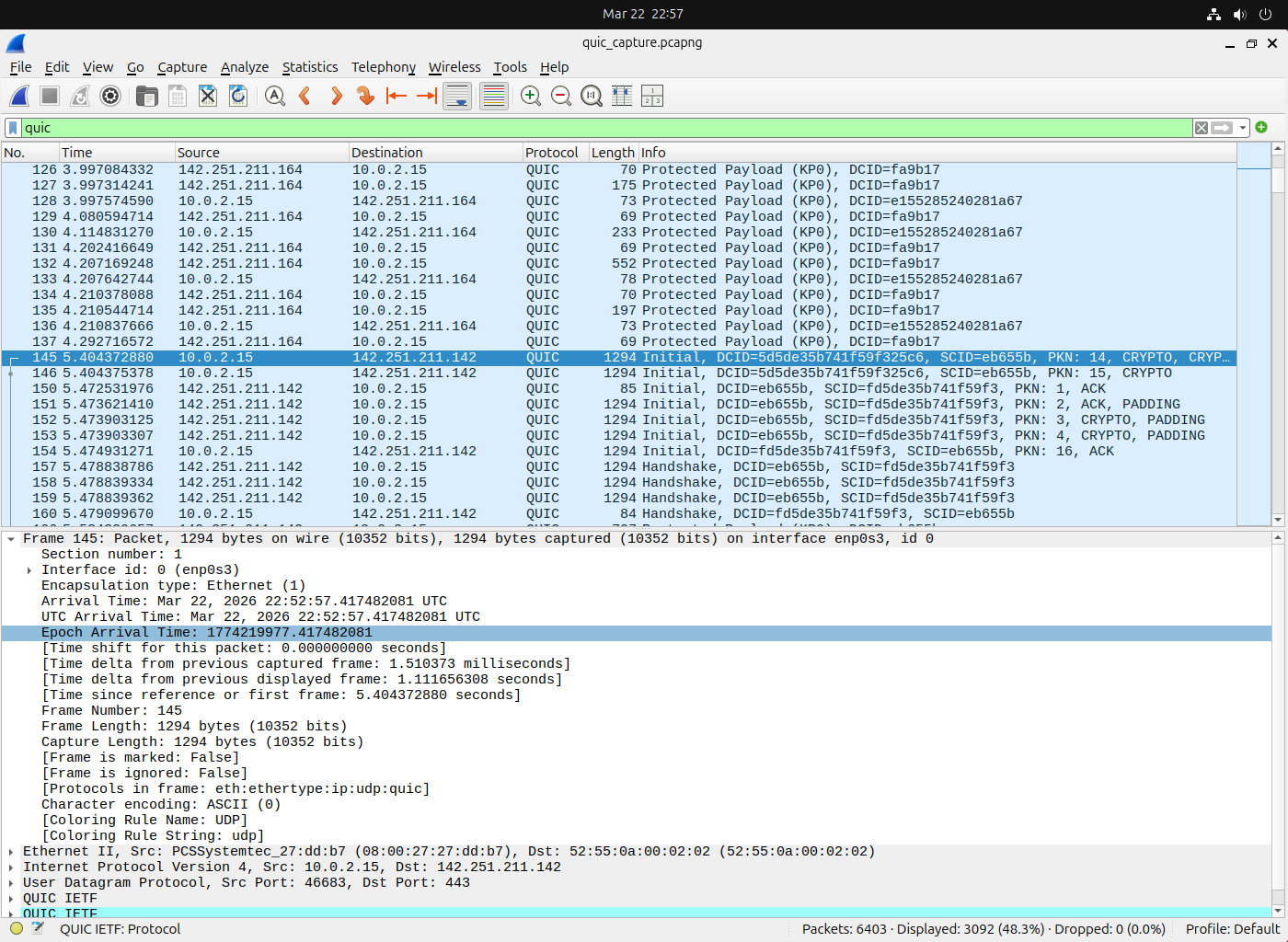
QUIC traffic to Google — note the UDP transport and the QUIC Initial handshake packets replacing the traditional TCP+TLS handshake
要查看**所有**现代加密 Web 流量(传统的 HTTPS 和 QUIC),我使用了一个组合过滤器: ``` tcp.port == 443 || quic ``` ### 在数据包级别比较 HTTP 与 HTTPS 为了展示安全差异,我还通过导航到 `http://neverssl.com`(一个为了测试而故意只提供 HTTP 服务的网站)捕获了明文 HTTP 流量,并进行过滤: ``` tcp.port == 80 && http ```
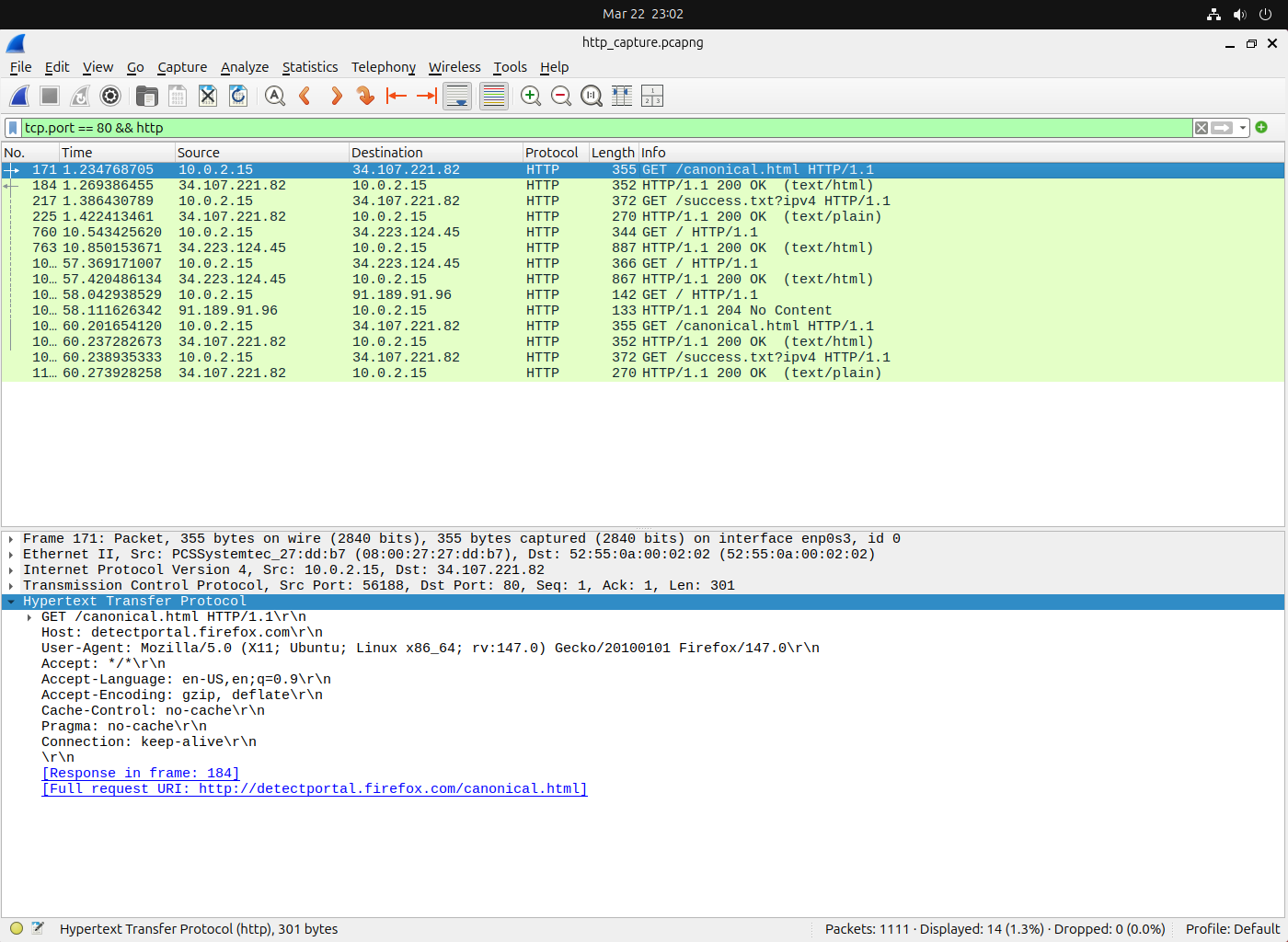
Plaintext HTTP request — the full URL, headers, and user agent are completely visible to anyone capturing this traffic
展开 GET 请求的 HTTP 层会以明文形式显示完整的请求头——主机、user agent、接受的内容类型等。**这正是 HTTPS 重要的原因**:通过 TLS 加密,这些数据将受到保护,免受被动窃听。 ## 第 3 部分 - 检测基于 DNS 的威胁 ### 了解 DNS 作为攻击向量 DNS 通常被称为“互联网的电话簿”,但它也是现实世界攻击中最常被滥用的协议之一。由于防火墙通常允许 DNS 流量通过,攻击者利用它进行数据渗出(DNS 隧道)和命令与控制通信。 ### 识别正常与可疑的 DNS 流量 我开始了一个新的捕获并生成正常的 DNS 流量,然后对其进行过滤: ``` dns ```
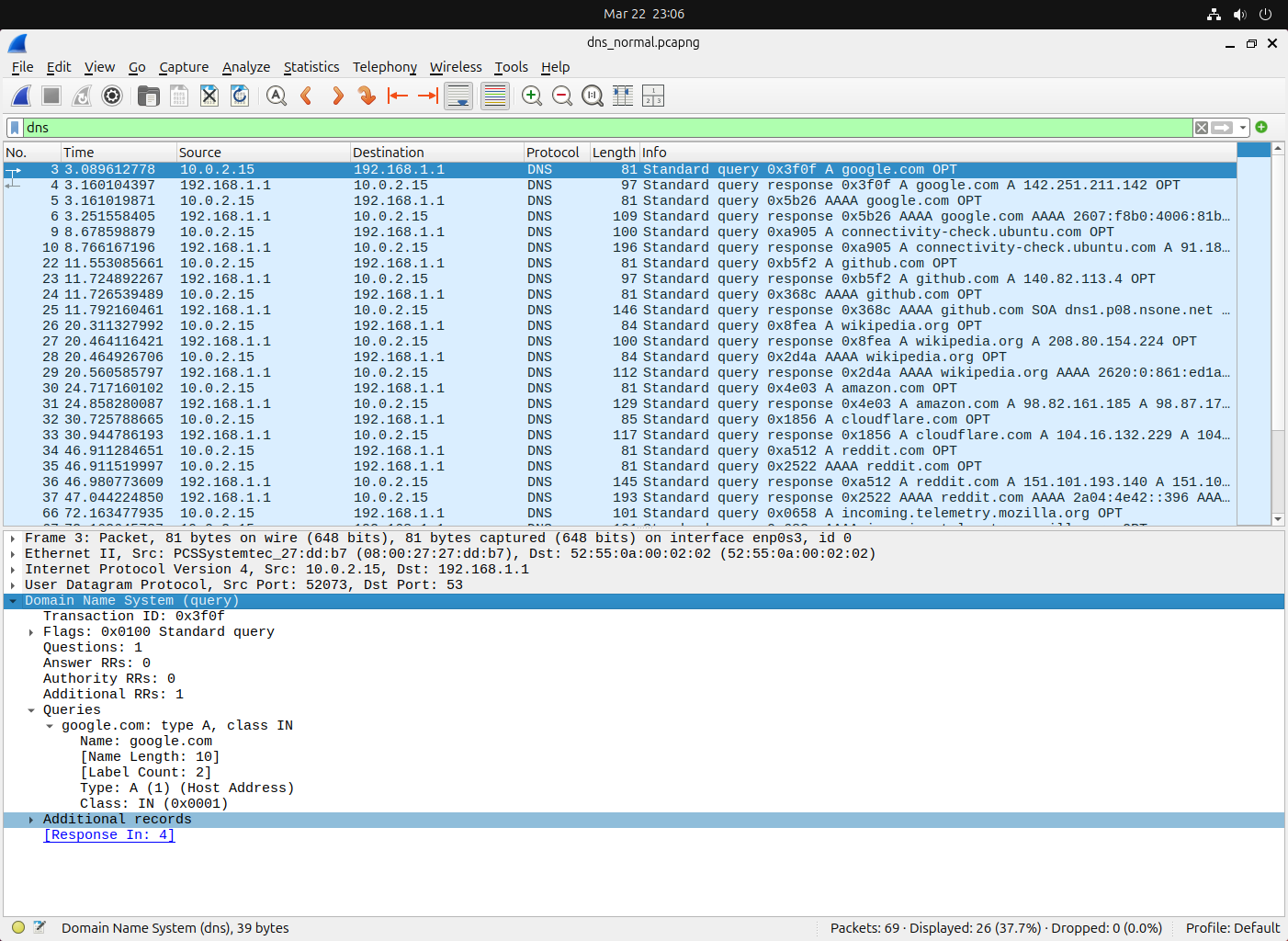
Normal DNS traffic — short, standard A record queries with quick responses from the configured resolver
正常的 DNS 查询具有可识别的特征:简短的域名、标准的记录类型(A, AAAA, CNAME)以及快速的响应时间。DNS 隧道流量的样子则大不相同。 ### 检测 DNS 隧道指标 DNS 隧道在 DNS 查询中对数据进行编码,从而产生独特的模式。我过滤出具有异常长域名的查询——这是 DNS 隧道的一个关键指标: ``` dns.qry.name.len > 50 ``` 为了寻找高熵的子域名标签(可能包含编码数据的看起来随机的字符串): ``` dns.qry.name contains "." && dns.qry.name.len > 40 ```
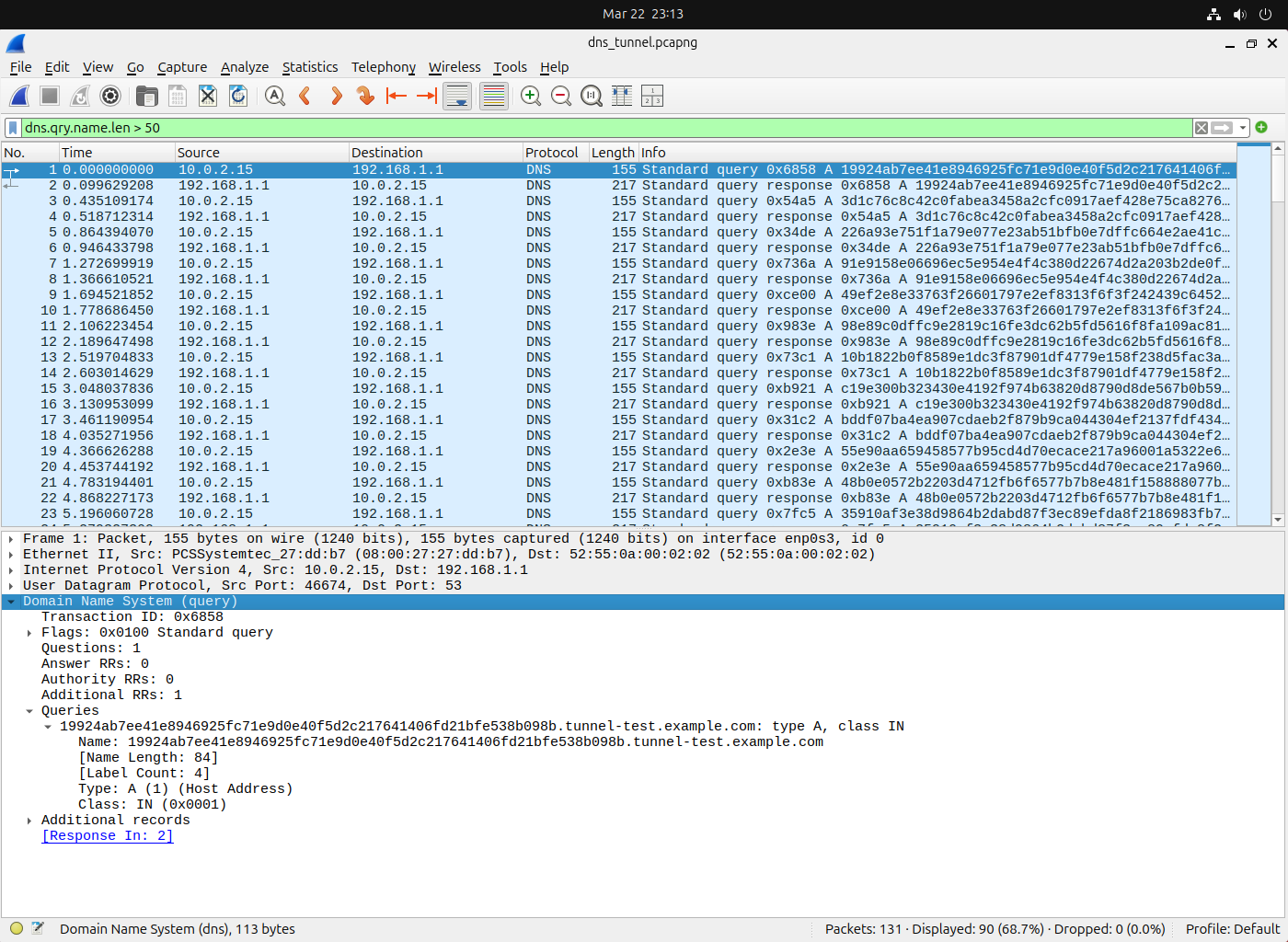
Suspicious DNS queries with abnormally long, high-entropy subdomain labels — a classic indicator of DNS tunneling or data exfiltration
我还检查了异常大量的 DNS TXT 记录查询,这是另一个隧道指标,因为 TXT 记录可以携带更大的 payload: ``` dns.qry.type == 16 ``` ## 第 4 部分 - 使用 JA4 进行 TLS 指纹识别 ### 什么是 TLS 指纹识别? 每个 TLS 客户端(浏览器、恶意软件、API 客户端)在 TLS 握手期间都会创建一个略有不同的 **Client Hello** 消息。这些差异——支持的 cipher suite、扩展、椭圆曲线——创建了一个可以识别客户端软件的指纹。**JA4** 是目前标准的指纹识别方法(JA3 的继任者),Wireshark 4.2+ 原生支持它。 ### 生成和比较 TLS 指纹 我捕获来自多个来源的流量——Firefox、`curl` 和一个 Python 脚本——以演示不同的客户端如何产生不同的指纹。 首先,我过滤出 TLS Client Hello 消息: ``` tls.handshake.type == 1 ```
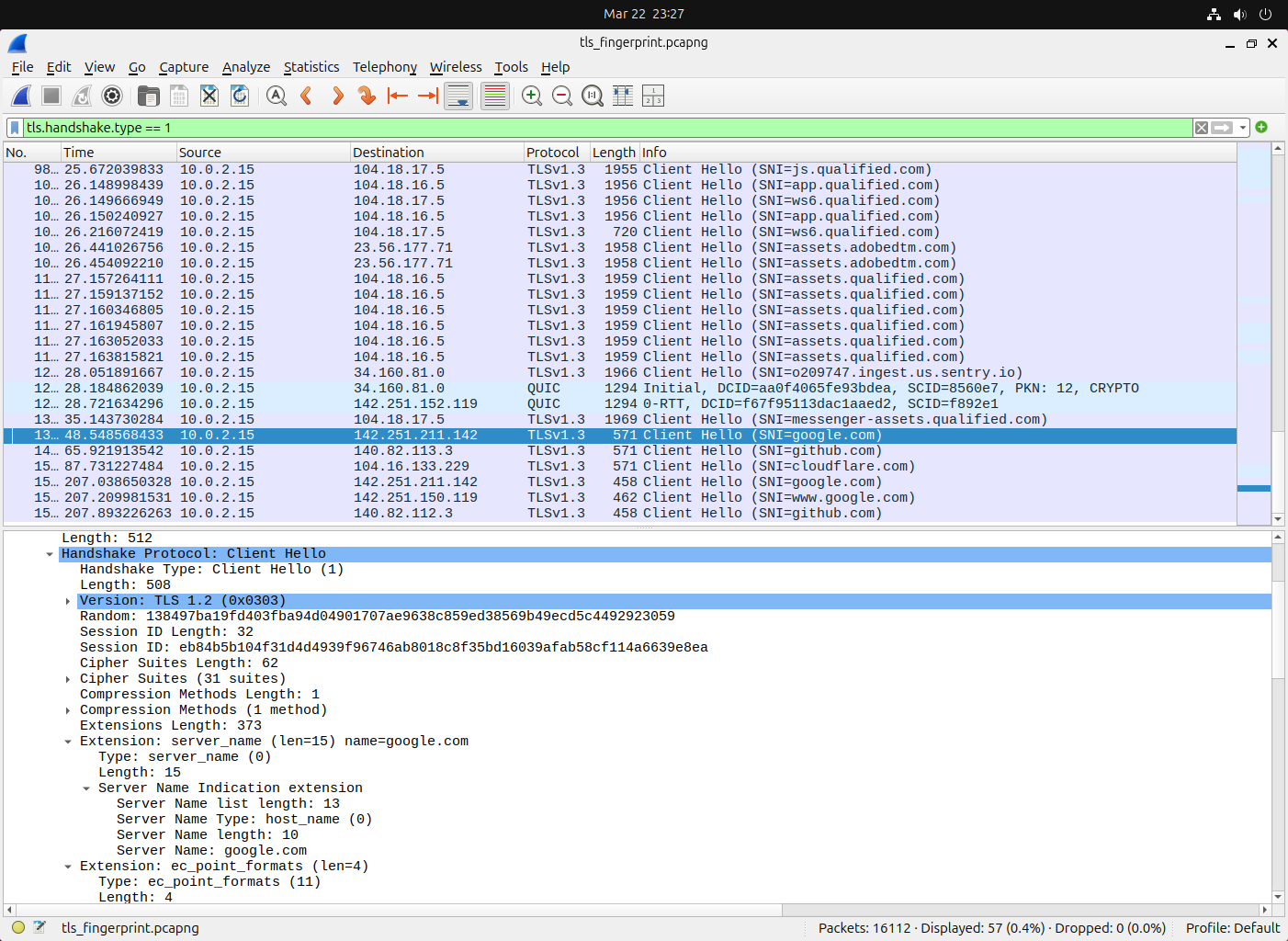
TLS Client Hello messages from different clients — each produces a unique JA4 fingerprint based on its TLS implementation
展开 TLS 握手详细信息会显示 JA4 指纹字段。下表说明了不同客户端实现中 JA4 指纹的典型结构——注意前缀(`t13d` = TLS 1.3,DNS 解析的域名)和 cipher/extension hash 是如何区分每个客户端类别的: | JA4 指纹(示例) | 客户端类型 | 分类 | |---|---|---| | `t13d1517h2_8daaf6152771_02713d6af862` | Firefox | 合法浏览器 | | `t13d1516h2_8daaf6152771_e5627efa2ab1` | curl | CLI 工具 | | `t13d1110h2_2b729b4bf6f3_d5c81e3c4e79` | Python requests | 脚本库 | | `t13d1011h2_5b57614c22b0_93f98aab42fd` | **未知** | 潜在恶意软件——需调查 | ## 第 5 部分 - 识别 C2 信标模式 ### C2 信标的工作原理 命令与控制 (C2) 恶意软件会定期与攻击者的基础设施进行通信——这被称为**信标**。虽然流量本身可能是加密的,但连接的*时间模式*通常是可检测的。 ### 分析连接时序 为了在不搭建真实攻击者基础设施的情况下安全地演示此分析,我使用针对 **httpbin.org** 的 `curl` 循环模拟了一个信标场景——这是一个良性的公共 HTTP 测试服务,在此用作目标 IP 的替代品。该方法论与调查真实的 C2 完全相同;只是目标是良性的。 目标域名通过 DNS round-robin 解析为多个 IP(`34.235.67.238`, `52.71.170.232` 和 `54.83.233.101`),因此 Wireshark 过滤器必须考虑到所有这些 IP——这反映了现实世界中的 C2 基础设施,它们将信标分布在多个目标上,以逃避单 IP 黑名单: ``` (ip.dst == 34.235.67.238 || ip.dst == 52.71.170.232 || ip.dst == 54.83.233.101) && tcp.flags.syn == 1 && tcp.flags.ack == 0 ```
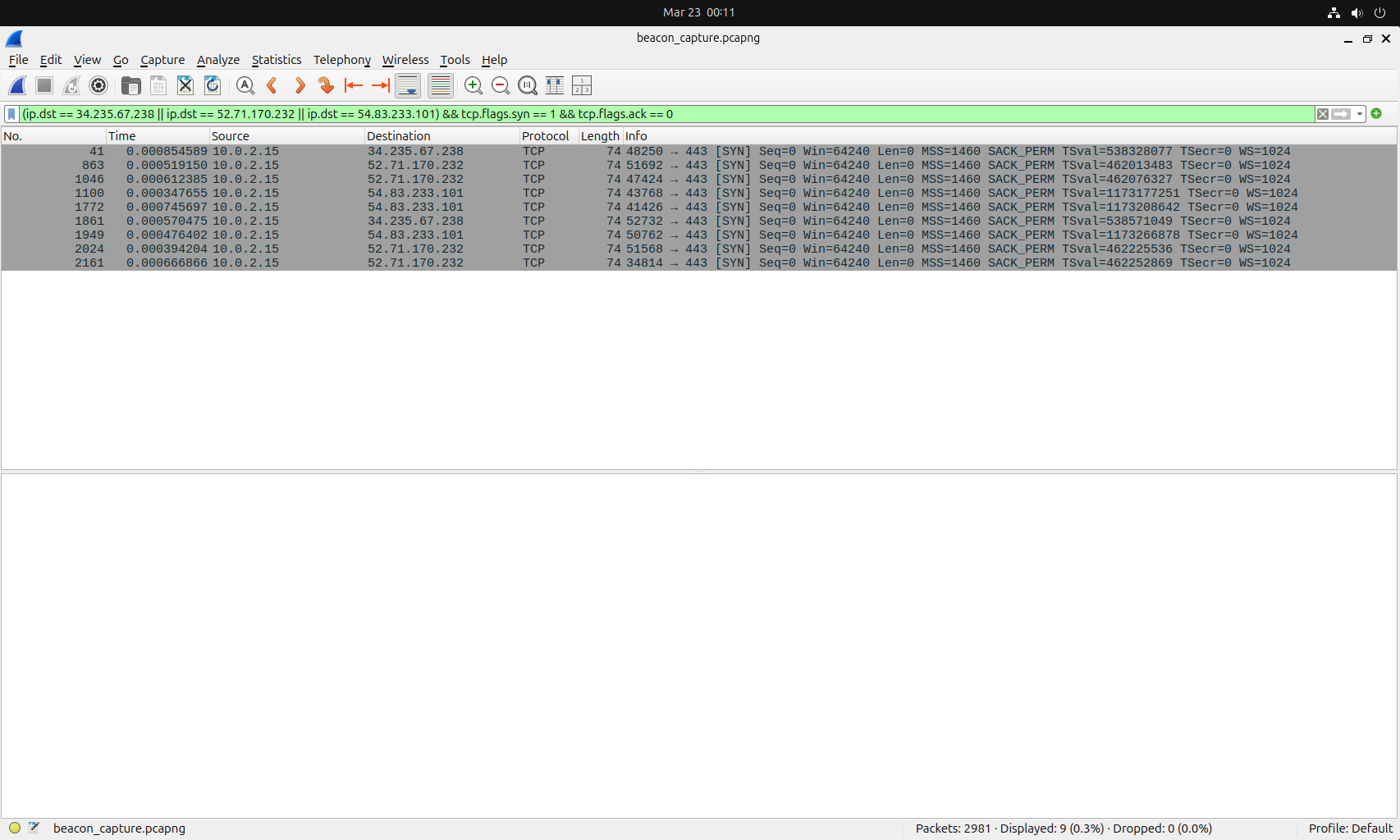
Connections to the simulated target occurring at regular ~30-second intervals — the timing pattern characteristic of real C2 beaconing
使用 Wireshark 的 **Statistics(统计) → Conversations(对话)** 视图,我识别出具有异常大量连接或数据传输模式的主机:
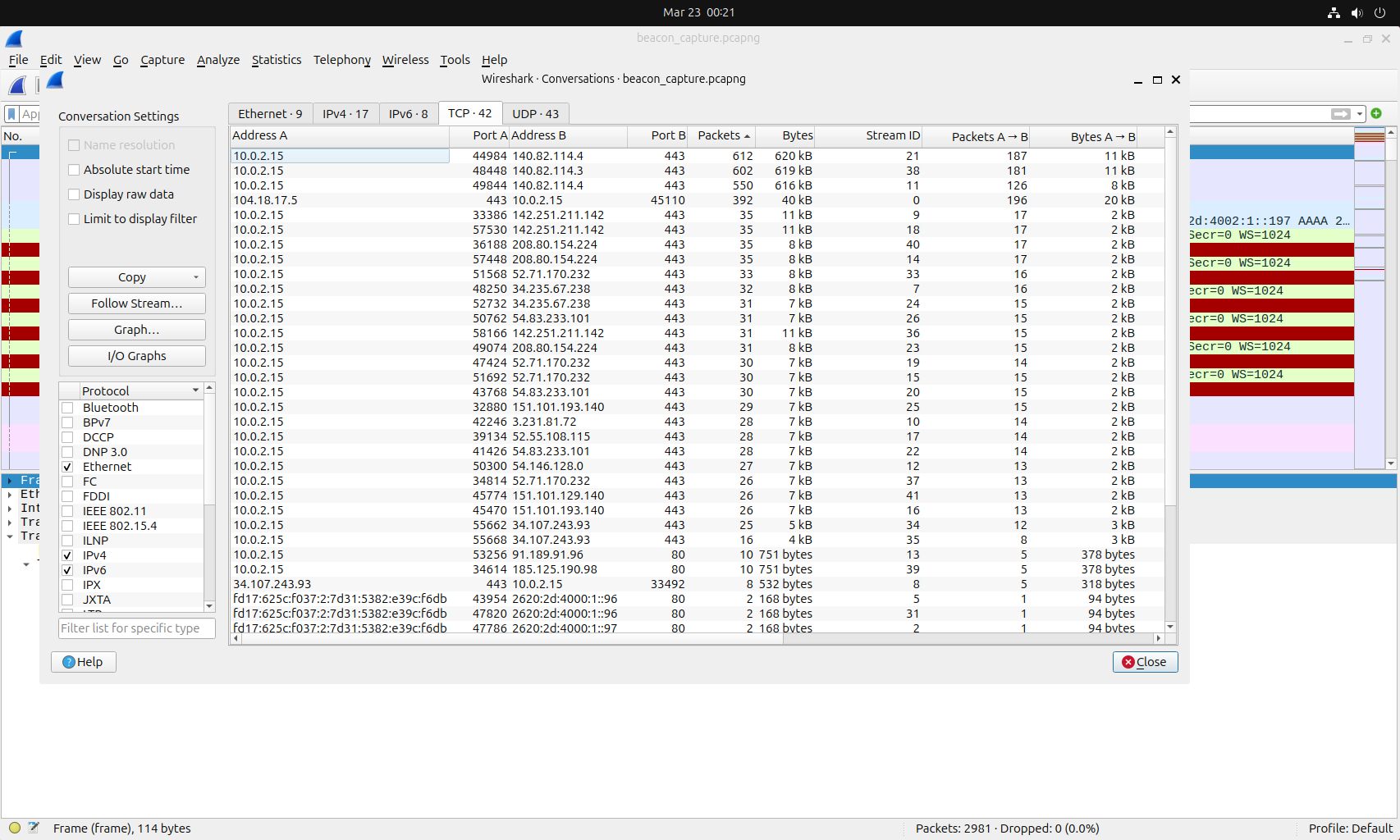
Conversations view highlighting external IPs with repeated, small, regular connections characteristic of beaconing
### 信标检测指标 | 指标 | 正常流量 | C2 信标 | |---|---|---| | **连接间隔** | 不规则,用户驱动 | 规律(例如,每 30–90 秒) | **Payload 大小** | 变化很大 | 一致的小 payload | | **连接持续时间** | 可变 | 短暂、统一的会话 | | **活动时间** | 工作时间 | 24/7,包括非工作时间 | | **Jitter** | 不适用 | 小的随机变化(约 10–20%) | ## 第 6 部分 - 使用 TShark 自动化检测 ### 为什么要自动化? 手动数据包分析无法扩展。**TShark**——Wireshark 的命令行对应工具——支持脚本化、可重复的分析,可集成到安全工作流和 SIEM pipeline 中。[`/scripts/`](scripts/) 中的三个脚本涵盖了本项目前面部分的检测类别,每个脚本都具有输入验证、严重性分级和为分析师准备好的输出。 | 脚本 | 目的 | 关键技术 | |---|---|---| | [`dns_tunnel_detect.sh`](scripts/dns_tunnel_detect.sh) | 标记指示隧道或渗出的 DNS 查询 | 长度阈值 + 可疑比率 + 基础域名分组 | | [`tls_extract.sh`](scripts/tls_extract.sh) | 盘点 TLS Client Hello 并突出显示规避指标 | SNI 缺失检测 | | [`beacon_detect.sh`](scripts/beacon_detect.sh) | 识别暗示 C2 的规律间隔连接(支持多 IP) | 平均值 / 标准差 / Jitter 分析 | 这三个脚本都使用 `set -euo pipefail`,验证输入和工具可用性,并生成可供下游工具使用的人类可读报告和定量摘要。 一个配套脚本 [`generate_test_traffic.sh`](scripts/generate_test_traffic.sh) 可以安全地生成检测脚本可检测到的模式,这样任何克隆此仓库的人都可以端到端地验证整个 pipeline,而无需附带 pcaps。有关端到端工作流,请参见[第 7 部分](#part-7---operationalizing-the-detections)。 ### DNS 隧道检测 — `dns_tunnel_detect.sh` 此脚本标记具有异常长名称的 DNS 查询——这是在子域名标签中编码数据以进行渗出的主要指标。在 `dns.flags.response == 0` 上进行过滤可确保只计算查询(而不是查询/响应对),这保持了可疑与总数比率的准确性。 **用法:** ``` ./scripts/dns_tunnel_detect.sh capture.pcapng 50 ``` 第二个参数是长度阈值(默认:50 个字符)。除了每个查询的警报外,该脚本还会报告总查询数、可疑与总数比率、TXT 记录数量,并按其**基础域名**(最后两个标签)对可疑查询进行分组,这样单个隧道通道就不会显示为数百个唯一的警报: ``` awk -F'.' '{print $(NF-1)"."$NF}' | sort | uniq -c | sort -rn ``` 根据检测到的可疑查询数量,会自动分配一个严重性级别(HIGH / MEDIUM / LOW)。 **示例输出:** ``` ======================================== DNS Tunneling Detection Report ======================================== Capture: capture_2026-05-15.pcapng Threshold: domain names longer than 50 characters [ALERT] Time: 12.45s into capture Source: 10.0.2.15 Query: aXjksRnsKfgPqLmNoTyUvWcXdEf.data-relay.exfil-test.lab Query Type: 16 Name Length: 78 chars [... additional alerts omitted ...] ======================================== Summary ======================================== Total DNS queries: 342 Suspicious (long names): 47 TXT record queries: 47 Suspicious ratio: 13.7% ⚠️ HIGH — Significant DNS tunneling indicators detected. Investigate immediately. Unique suspicious base domains: 47 exfil-test.lab ``` ### TLS 握手提取 — `tls_extract.sh` TLS Client Hello 消息携带 Server Name Indication (SNI) 扩展,该扩展揭示了预期的目标主机名。大多数合法客户端总是发送 SNI——浏览器、系统更新程序和行为良好的 API 都依赖它来进行虚拟主机化基础设施。**恶意软件和规避工具有时会省略 SNI**,使检测工具更难识别目标,特别是在直接连接到硬编码的 C2 IP 而不是通过域名连接时。 此脚本将 TLS 握手元数据提取为 CSV 以供下游分析,并明确标记没有 SNI 值的握手。 **用法:** ``` ./scripts/tls_extract.sh capture.pcapng tls_handshakes.csv ``` **示例输出:** ``` ======================================== TLS Handshake Extraction ======================================== Capture: capture_2026-05-15.pcapng Output: tls_handshakes.csv Extracted 89 TLS Client Hello records. --- Top Destination Domains (by SNI) --- 34 www.google.com 22 duckduckgo.com 12 github.com 6 ubuntu.com 4 mozilla.org --- Unique Destination IPs --- 142.250.80.46 198.51.100.42 140.82.121.4 [...] ⚠️ Found 11 TLS handshakes without SNI — possible evasion technique. These connections may be attempting to hide the destination domain. Connections without SNI: 10.0.2.15,198.51.100.42,443 10.0.2.15,198.51.100.42,443 [...] Full results saved to: tls_handshakes.csv ``` 生成的 CSV 也是下游 JA4 指纹关联(第 4 部分)或 SIEM 摄取的干净输入。 ### C2 信标检测 — `beacon_detect.sh` 此脚本分析发往目标的 SYN 数据包——目标可以是单个 IP、逗号分隔的 IP 列表(用于 DNS round-robin 目标)或在运行时解析的域名——并计算所有目标连接间隔的统计规律性。真实的 C2 信标并不是完全定时的——像 **Cobalt Strike** 和 **Sliver** 这样的现代框架会添加 Jitter(随机时序变化)来击败简单的“精确每 60 秒一次”的检测。该脚本通过报告**平均值、标准差和 Jitter 百分比**而不是仅标记固定间隔来捕捉这一细微差别。 **用法:** ``` # 单个 IP ./scripts/beacon_detect.sh capture.pcapng 198.51.100.42 # 多 IP (DNS 轮询目标) ./scripts/beacon_detect.sh capture.pcapng 198.51.100.42,198.51.100.43,198.51.100.44 # Domain (已解析存活) ./scripts/beacon_detect.sh capture.pcapng suspicious.example.com ``` 置信度评估遵循以下阈值: | Jitter | 连接数 | 置信度 | |---|---|---| | `< 5%` | `> 10` | **HIGH** — 间隔非常规律 | | `< 20%` | `> 5` | **MEDIUM** — 可能有 Jitter 的信标 | | 其他 | — | **LOW** — 可能是正常流量 | **示例输出:** ``` ======================================== Multi-IP C2 Beacon Analysis Report ======================================== Capture: capture_2026-05-15.pcapng Target spec: 198.51.100.42 Resolved: 1 IP(s) - 198.51.100.42 Total SYN packets across all targets: 11 Capture duration for these hosts: 312s --- Combined Connection Interval Distribution --- (Count | Interval in seconds) 4 30 3 31 2 29 1 32 --- Combined Statistical Summary --- Mean interval: 30.20 seconds Std deviation: 0.98 seconds Jitter: 3.2% Connection count: 11 ⚠️ HIGH CONFIDENCE — Very regular intervals with low jitter. Recommended next steps: 1. Confirm JA4 fingerprints match across all destination IPs 2. Investigate IP reputation for each destination (VirusTotal, AbuseIPDB) 3. Check passive DNS history — do these IPs share a common domain? 4. Review payload sizes for consistency across destinations 5. Check whether activity continues outside business hours ``` ### 将它们结合起来 — 三脚本调查链 这些脚本旨在**组合**使用:来自一个工具的警报自然会切入到下一个工具。典型的调查链如下所示: 1. **`dns_tunnel_detect.sh`** 标记一个内部主机正在向一个以前未见过的基础域名发出长且高熵的 DNS 查询 → 识别源 IP 2. 对同一个捕获文件(过滤到该源主机)运行 **`tls_extract.sh`**,识别所有 TLS 目标 → 寻找无 SNI 或其他异常连接 3. 针对任何可疑目标 IP 运行 **`beacon_detect.sh`**,确认或排除定期信标行为 使用所有三个脚本的真实输出调查模拟双通道 C2 攻陷的完整工作示例,可在 [`reports/IR-2026-001-suspected-c2-investigation.md`](reports/IR-2026-001-suspected-c2-investigation.md) 中找到。 ## 第 7 部分 - 将检测运营化 生产网络防御不仅仅止于发现恶意流量——它需要可移植的检测规则、可重复的分析师程序以及完整的调查生命周期的实际示例。本仓库中的配套目录包含了弥补“我能在 Wireshark 中发现它”和“我能在 SOC 中运行它”之间差距的运营工件。 ### 检测规则 — `/detections/sigma/` 第 3-5 部分中演示的四种检测模式被编纂为可移植的 [Sigma](https://github.com/SigmaHQ/sigma) 规则。Sigma 规则通过 `sigma-cli` 转换为特定后端的查询语言(Splunk SPL, Elasticsearch, Microsoft Sentinel KQL),使得相同的检测逻辑可以跨 SIEM 栈部署。 | 规则文件 | 检测 | MITRE ATT&CK | |---|---|---| | [`dns_long_query.yml`](detections/sigma/dns_long_query.yml) | 具有异常长名称的 DNS 查询 | T1071.004, T1048.003 | | [`dns_txt_high_volume.yml`](detections/sigma/dns_txt_high_volume.yml) | 来自单一来源的持续 TXT 查询量(关联规则) | T1071.004, T1048.003 | | [`tls_no_sni_external.yml`](detections/sigma/tls_no_sni_external.yml) | 到外部 IP 且没有 SNI 的 TLS 握手 | T1573.002 | | [`https_beacon_pattern.yml`](detections/sigma/https_beacon_pattern.yml) | 重复到单一目标的 HTTPS 连接(关联规则) | T1071.001, T1029 | 所有规则都针对 Zeek 日志 schema。有关 SIEM 转换示例和调优指南,请参见[文件夹 README](detections/sigma/README.md)。 ### 响应手册 — `/playbooks/` 仅靠检测是不够的——分析师需要标准化的响应程序。[`sigma-detection-response.md`](playbooks/sigma-detection-response.md) 手册为每个 Sigma 规则提供了分阶段的响应程序,涵盖: - 带有显式误报备忘单的初始分类 - 带有特定命令的调查步骤(Splunk SPL、VirusTotal / AbuseIPDB API 调用、切入到项目的 PCAP 脚本) - 将判定映射到下一步操作的决策树 - 遏制和响应程序,带有显式的 Tier 2 / IR 升级标志 - 多个规则同时触发时的交叉指导(例如,DNS 隧道与 HTTPS 信标同时发生) ### 实战调查 — `/reports/` [`IR-2026-001`](reports/IR-2026-001-suspected-c2-investigation.md) 报告介绍了一次完整的调查,该调查依次使用所有三个检测脚本来确认一次模拟的双通道 C2 攻陷。它演示了: - 从一种检测 (DNS) 切入到另一种检测 (TLS) 再到第三种检测(时序) - 基于 Jitter 计算的定量置信度评估 - 针对观察到的活动的 ATT&CK 技术映射 - 建议的遏制和响应行动 - 对检测遗漏内容(DoH、多 IP fast-flux)的诚实差距分析 ### 可复现的测试流量 — `scripts/generate_test_traffic.sh` 为了让任何克隆此仓库的人都能在不附带 pcaps 的情况下端到端地验证检测脚本,[`generate_test_traffic.sh`](scripts/generate_test_traffic.sh) 可以安全地生成检测脚本可检测到的模式: - **DNS 隧道模式** — 针对 RFC 2606 `.invalid` 的长 TXT 查询(始终为 NXDOMAIN,无真实渗出) - **无 SNI 的 TLS 握手** — 通过不带 `-servername` 的 `openssl s_client` 针对 `example.com` 进行 - **HTTPS 信标模式** — 带有小 Jitter 的定期请求 - **基线流量** — 正常的浏览模式以形成对比 与 `tcpdump` 或 Wireshark 一起运行以生成可复现的 PCAP,然后将该 PCAP 提供给检测脚本。完整用法见脚本头。 ``` # 在一个终端中: sudo tcpdump -i any -w test_traffic.pcapng # 在另一个终端中: ./scripts/generate_test_traffic.sh all # 停止捕获后: ./scripts/dns_tunnel_detect.sh test_traffic.pcapng 50 ./scripts/tls_extract.sh test_traffic.pcapng tls.csv ./scripts/beacon_detect.sh test_traffic.pcapng example.com ``` ## 🔑 关键显示过滤器参考 本项目中使用的所有显示过滤器的快速参考: | 过滤器 | 用途 | |---|---| | `tcp.port == 443` | 所有传统的 HTTPS 流量 | | `quic` | 所有 QUIC/HTTP3 流量 | | `tcp.port == 443 \|\| quic` | 所有现代加密 Web 流量 | | `tcp.port == 80 && http` | 明文 HTTP 流量 | | `dns` | 所有 DNS 流量 | | `dns.qry.name.len > 50` | 潜在的隧道 DNS 查询 | | `dns.qry.type == 16` | DNS TXT 记录查询 | | `dns.flags.response == 0` | 仅 DNS 查询(不包括响应) | | `tls.handshake.type == 1` | TLS Client Hello 消息(用于指纹识别) | | `tls.handshake.type == 1 && !tls.handshake.extensions_server_name` | 缺少 SNI 的 TLS Client Hello(规避指标) | | `ip.addr ==
### 🔗 相关项目
[](https://github.com/jesse12-21/nmap-network-recon)
[](https://github.com/jesse12-21/splunk-siem-analysis)
[](https://github.com/jesse12-21/suricata-ids-rules)
[](https://github.com/jesse12-21/threat-intel-enricher)
[](https://github.com/jesse12-21/aws-cloud-security-lab)
*构建为网络安全作品集项目——欢迎反馈和建议。*
*构建为网络安全作品集项目——欢迎反馈和建议。*
标签:AMSI绕过, DNS隐蔽隧道, Radare2, TLS指纹, Wireshark, 句柄查看, 威胁检测, 应用安全, 网络安全, 网络流量分析, 自动化分析, 跨站脚本, 隐私保护