Mosec2525/securecycle
GitHub: Mosec2525/securecycle
一款本地优先的 VS Code 安全扩展,利用 Semgrep 进行静态分析和污点跟踪,并生成 AI 辅助修复提示,帮助开发者在编码阶段发现和修复代码安全问题。
Stars: 0 | Forks: 0
# SecureCycle
[](https://github.com/Mosec2525/securecycle/actions/workflows/ci.yml)
[](LICENSE)
核心理念:覆盖软件开发生命周期每个阶段的安全性。
SecureCycle 是一个本地优先的 VS Code 扩展,它使用 Semgrep 扫描源代码中的安全问题,支持基于策略的审查,跟踪污点分析结果,并将结果转化为 AI 可就绪的修复提示。
代码仓库:
## 使用 Docker 运行
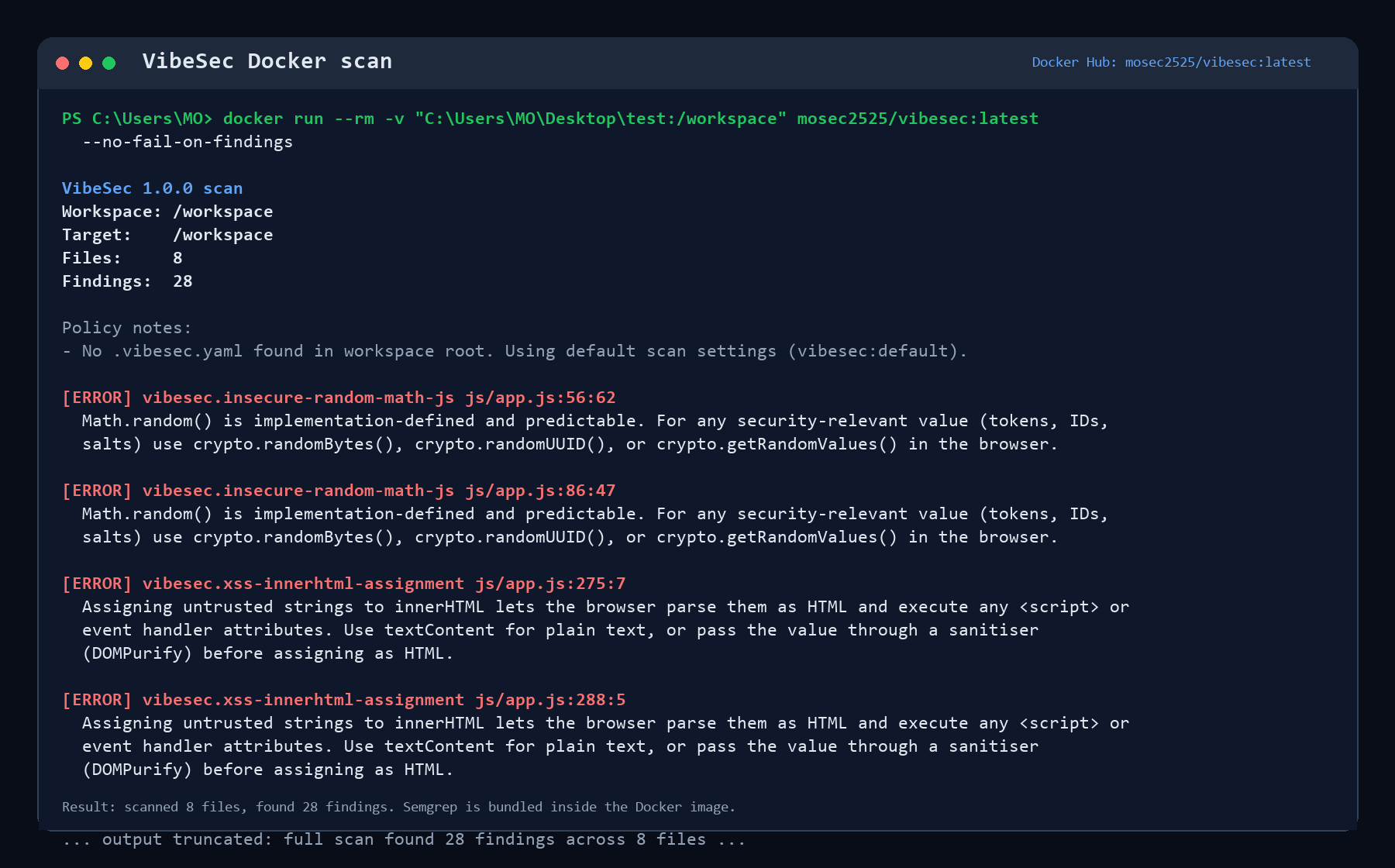
任何人都可以从容器中运行 SecureCycle,而无需手动安装 Semgrep。该镜像运行 SecureCycle,并且已经包含了 Semgrep 工具和捆绑的规则。
```
docker run --rm -v "$PWD:/workspace" ghcr.io/mosec2525/securecycle:latest
```
PowerShell:
```
docker run --rm -v "${PWD}:/workspace" ghcr.io/mosec2525/securecycle:latest
```
旧版 Docker Hub 镜像:
## 它的功能
1. 运行 `SecureCycle: Scan Current File`、`SecureCycle: Scan Whole Project`,或者右键点击文件/文件夹并运行 `SecureCycle: Scan Selected`。
2. SecureCycle 在本地运行 Semgrep,针对捆绑的或工作区选定的策略进行扫描。
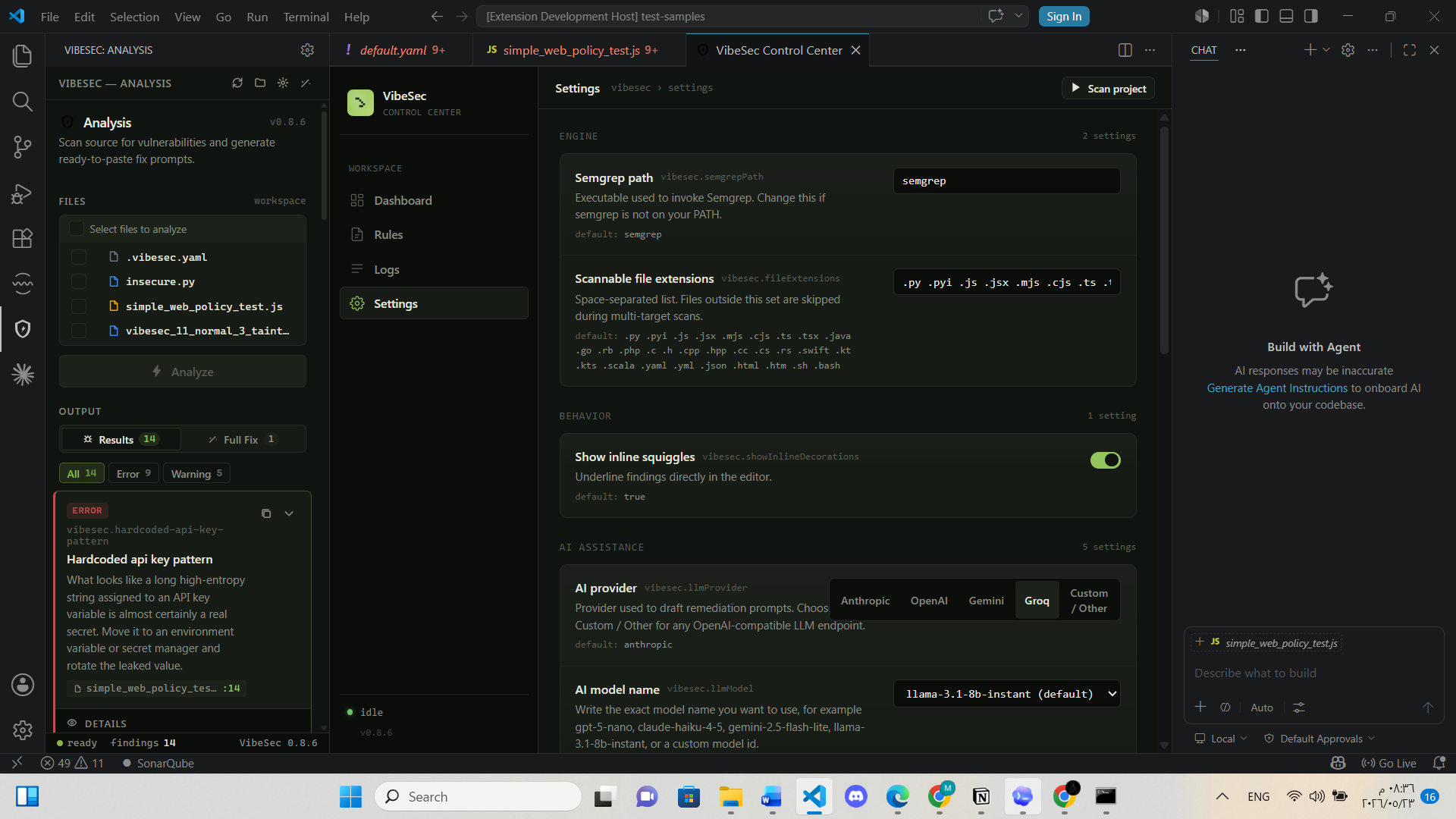
3. 扫描结果显示在 SecureCycle Analysis 侧边栏中,并在编辑器中提供内联诊断。
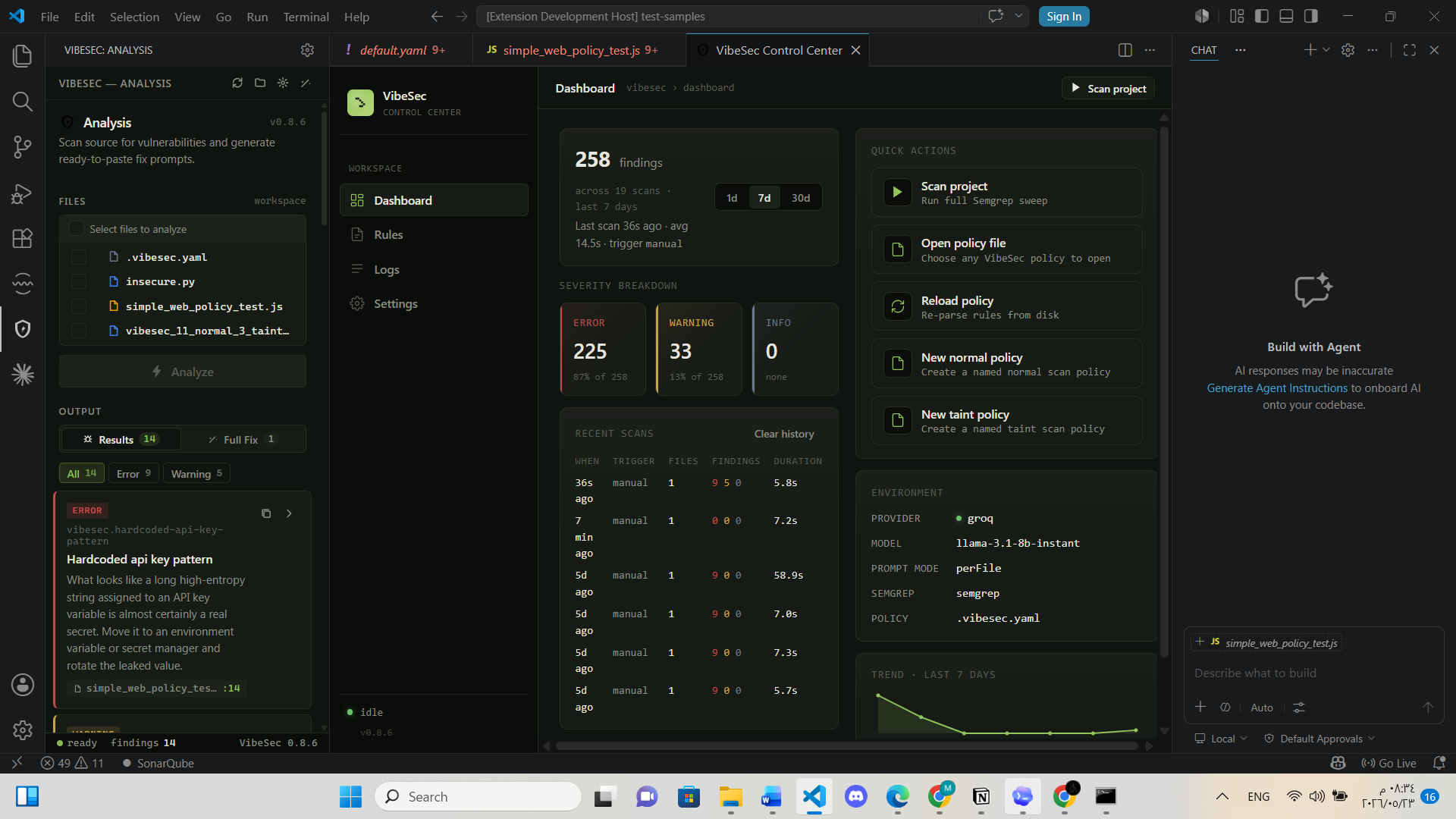
4. 控制中心可以从一个位置打开仪表板、设置、日志和规则清单。
5. 可选的 AI 提示生成功能可以为每个发现、文件或项目创建可复制粘贴的修复提示。
无需扫描器账号,无需遥测,也无需云后端。用于可选提示生成的 API 密钥将通过 VS Code SecretStorage 存储。
## 截图
### 控制中心仪表板
### 分析面板与修复提示
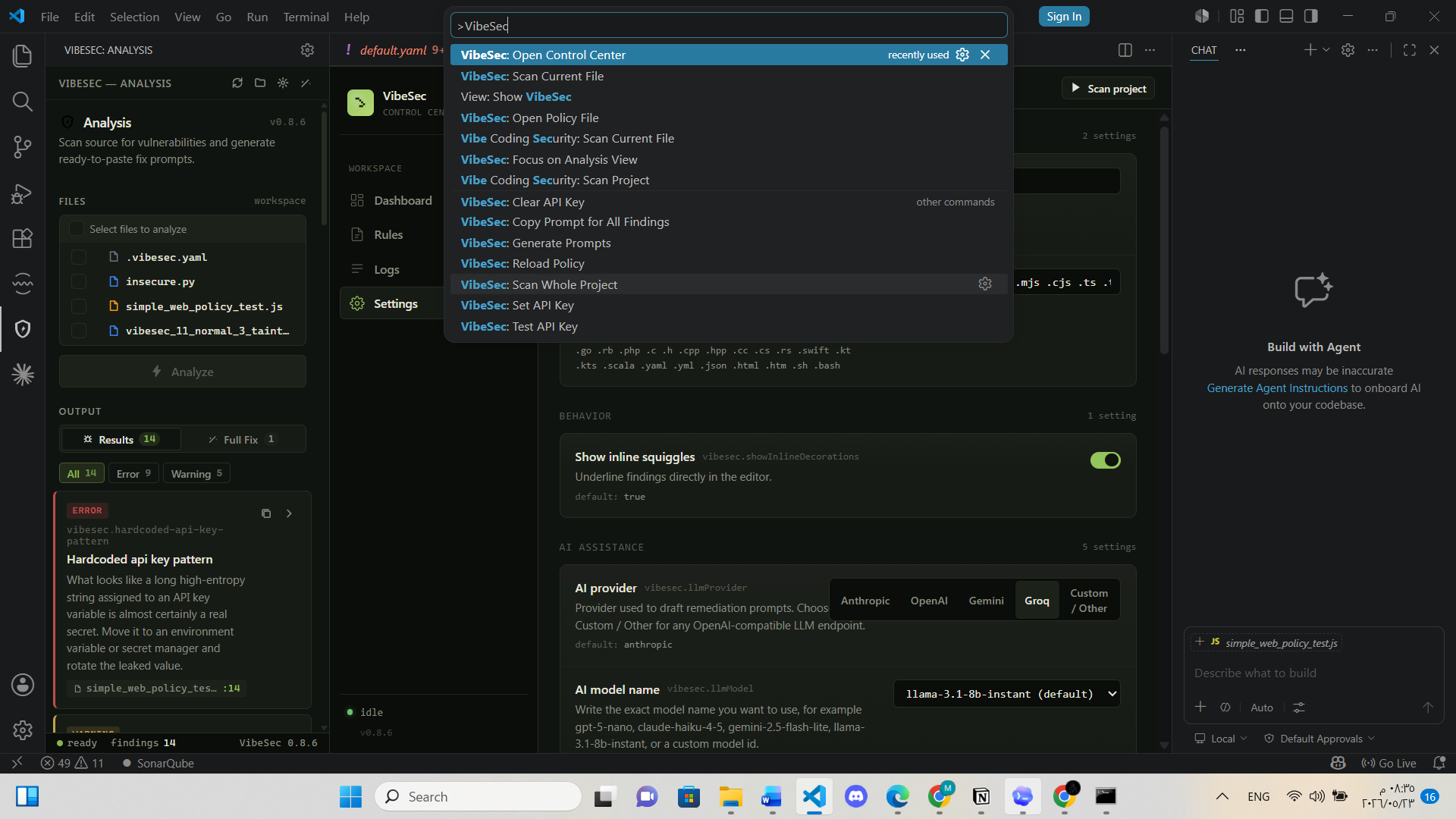
### 命令面板
## 功能
| 领域 | 功能 |
| --- | --- |
| 本地扫描 | 基于 Semgrep 的扫描,支持当前文件、选定的文件/文件夹或整个工作区 |
| 策略控制 | 支持 `.vibesec.yaml` 选择器、捆绑的 `vibesec:default` 和 `vibesec:taint` 规则文件、自定义 Semgrep 格式规则 |
| 发现用户体验 | 分析侧边栏、内联诊断、严重性过滤器、点击跳转的发现、可复制的描述 |
| 控制中心 | 仪表板、设置、日志、扫描历史、规则清单、YAML 打开操作 |
| 污点分析 | 针对命令注入、SQL 注入、路径遍历、反序列化、XSS 和 SSRF 的源点到汇聚点数据流跟踪 |
| AI 辅助 | 支持 OpenAI、Anthropic、Gemini、Groq 以及自定义 OpenAI 兼容提供商以生成修复提示 |
| 发布规范 | CI 编译/测试/审计检查、VSIX 文件审计脚本、基于标签的 VSIX 发布工作流 |
## 环境要求
- 仅需 Docker 即可使用零依赖 Docker 扫描器
- 扩展 UI 需要 VS Code 1.85 或更高版本
- 在不使用 Docker 的情况下通过 VS Code 扩展运行扫描时,仅要求 `PATH` 中存在 Semgrep CLI
- 开发和发布打包需要 Node.js 20 或更高版本
安装 Semgrep:
```
pip install semgrep
semgrep --version
```
## Docker 扫描器
当您希望对 Semgrep 进行零主机设置时,请使用 Docker 扫描器。这是最适合大多数用户的安装途径:
```
docker run --rm -v "$PWD:/workspace" ghcr.io/mosec2525/securecycle:latest
```
旧版 Docker Hub 镜像:
PowerShell:
```
docker run --rm -v "${PWD}:/workspace" ghcr.io/mosec2525/securecycle:latest
```
该镜像默认扫描 `/workspace`,如果存在 `.vibesec.yaml` 则使用它,并且在检测到发现时以退出码 `1` 退出。如需本地镜像开发:
```
npm run docker:build
docker run --rm -v "$PWD:/workspace" securecycle:local
```
有关 JSON 输出、退出码和发布说明,请参阅 [docs/docker.md](docs/docker.md)。
## 开发安装指南
```
git clone https://github.com/Mosec2525/securecycle.git
cd securecycle
npm ci
npm run compile
```
在 VS Code 中打开代码仓库并按 `F5` 启动扩展开发宿主。在新窗口中,打开源文件并运行 `SecureCycle: Scan Current File`。
## 命令
| 命令 | 描述 |
| --- | --- |
| `SecureCycle: Scan Current File` | 扫描当前编辑器文件 |
| `SecureCycle: Scan Selected` | 扫描从资源管理器中选择的文件或文件夹 |
| `SecureCycle: Scan Whole Project` | 扫描工作区中的每个受支持文件 |
| `SecureCycle: Open Control Center` | 打开仪表板、设置、日志和规则 |
| `SecureCycle: Open Policy File` | 在工作区根目录创建或打开 `.vibesec.yaml` |
| `SecureCycle: Reload Policy` | 从磁盘重新加载策略配置 |
| `SecureCycle: Set API Key` | 安全地存储 AI 提供商密钥 |
| `SecureCycle: Clear API Key` | 移除已存储的密钥 |
| `SecureCycle: Test API Key` | 验证已配置的提供商、endpoint、模型和密钥 |
| `SecureCycle: Generate Prompts` | 为当前发现生成 AI 修复提示 |
## 策略文件
在工作区根目录创建 `.vibesec.yaml`。SecureCycle 支持两种策略样式:
### 选择器策略
当您希望控制中心管理一个或多个具体策略文件时,请使用 `activePolicyFiles`。
```
activePolicyFiles:
- rules/default.yaml
- rules/taint.yaml
```
空选择器是有效的,并且是有意为之用于禁用所有活动策略文件:
```
activePolicyFiles: []
```
### 直接策略
当您希望使用一个工作区文件来定义预设、过滤器和自定义规则时,请使用直接策略字段。
```
presets:
- vibesec:default
- vibesec:taint
severity:
minSeverity: warning
files:
exclude:
- "**/node_modules/**"
- "**/*.test.ts"
rules:
- id: local.no-eval
message: "Do not execute user-controlled code."
severity: ERROR
languages: [javascript, typescript]
pattern: eval(...)
```
使用 `SecureCycle: Open Policy File` 创建一个入门策略,并在编辑后运行 `SecureCycle: Reload Policy`。
## AI 修复提示
SecureCycle 可以为 Cursor、Claude Code、ChatGPT 或其他编程助手构建修复提示。生成的提示包含确切的文件路径、行号、规则 ID、严重性标签、代码片段、可用时的污点流以及验证预期。
受支持的提供商:
- OpenAI
- Anthropic
- Google Gemini
- Groq
- 自定义 OpenAI 兼容 endpoint
一次性设置:
1. 运行 `SecureCycle: Set API Key`。
2. 选择提供商并将密钥存储在 VS Code SecretStorage 中。
3. 从控制中心或 VS Code 设置中配置 `vibesec.llmProvider`、`vibesec.llmModel` 以及可选的自定义 endpoint 设置。
4. 运行 `SecureCycle: Generate Prompts`,然后从分析面板复制针对单个发现、单个文件或项目级别的提示。
## 开发脚本
| 脚本 | 用途 |
| --- | --- |
| `npm run compile` | 对扩展代码进行类型检查并重新构建捆绑的 webview 资产 |
| `npm test` | 编译并运行 Node 测试套件 |
| `npm run audit` | 运行 `npm audit --audit-level=moderate` |
| `npm run package:ls` | 编译并列出将包含在 VSIX 中的文件 |
| `npm run package:vsix` | 编译并创建一个本地的 `.vsix` 包 |
| `npm run docker:build` | 将本地的零依赖扫描器镜像构建为 `securecycle:local` |
| `npm run release:dry-run` | 运行测试、审计和 VSIX 文件审计 |
| `npm run release:vsix` | 运行测试、审计并创建 VSIX |
## CI 与发布
每次推送和 pull request 都会运行:
- `npm ci`
- `npm test`
- `npm run audit`
- `npm run package:ls`
匹配 `v*.*.*` 的标签推送将运行发布工作流,构建 VSIX,将其作为工作流 artifact 上传,并将其附加到相应的 GitHub release 中。
有关发布清单,请参阅 [docs/release-checklist.md](docs/release-checklist.md)。
## 项目结构
```
securecycle/
|-- src/ Extension activation, scanner, policy, logs, panel, Control Center
|-- design/ React source for Analysis panel and Control Center
|-- media/ Activity-bar icon, walkthrough Markdown, built design bundles
|-- rules/ Bundled Semgrep policy files
|-- test/ Node test suites for release-critical behavior
|-- test-samples/ Intentionally vulnerable sample project files
|-- docs/ Screenshots, release documentation, rule references
|-- .github/workflows/ CI and release automation
|-- Dockerfile Zero-dependency scanner image with Semgrep bundled
|-- package.json VS Code extension manifest and scripts
|-- package-lock.json Locked npm dependency graph
|-- README.md User and contributor documentation
```
标签:DevSecOps, MITM代理, Semgrep, WordPress安全扫描, 上游代理, 代码安全审计, 自动化攻击, 请求拦截, 软件开发生命周期, 错误基检测, 静态代码分析