MSaet10/azure-project-1-infrastructure
GitHub: MSaet10/azure-project-1-infrastructure
Stars: 0 | Forks: 0
# Azure Infrastructure Deployment Project
## Project Overview
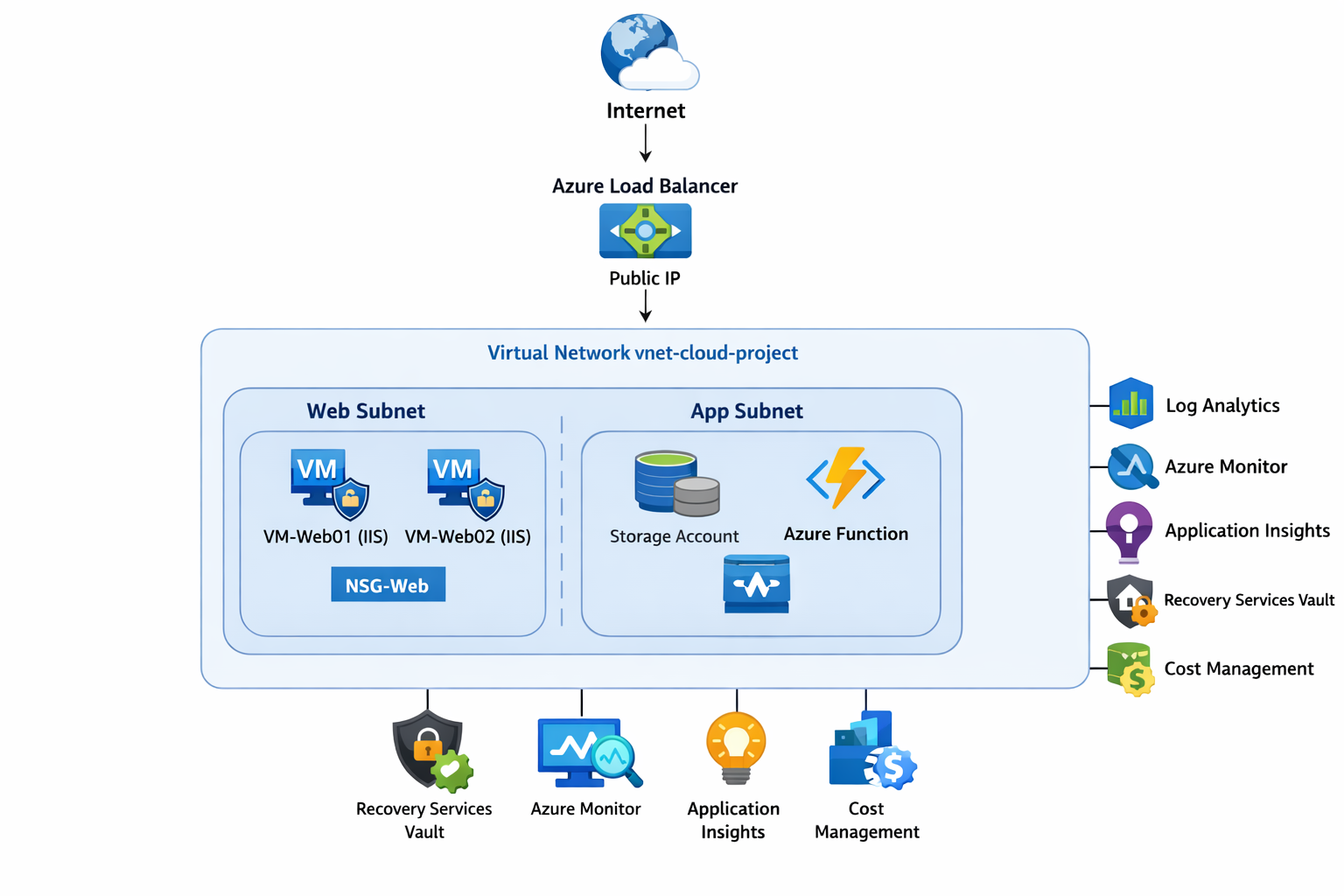
This project demonstrates the deployment of a secure, scalable, and monitored Azure infrastructure environment. The environment includes virtual networking, virtual machines, load balancing, identity and access management, monitoring and alerting, serverless workflows, backup and disaster recovery, cost management, and incident simulation.
The goal of this project was to simulate a real-world Azure cloud environment and demonstrate cloud engineering, infrastructure deployment, monitoring, security, and operational troubleshooting skills.
## Architecture

## Technologies Used
- Microsoft Azure
- Azure Virtual Network (VNet)
- Azure Virtual Machines (Windows Server)
- Azure Load Balancer
- Network Security Groups (NSGs)
- Microsoft Entra ID
- Azure RBAC
- Azure Monitor
- Log Analytics Workspace
- Application Insights
- Azure Functions
- Azure Storage Account / Blob Storage
- Recovery Services Vault
- Azure Backup
- Azure Cost Management
- PowerShell
- Azure CLI
- Visual Studio Code
## Project Implementation
### Day 1 — Environment Setup
Set up the Azure environment by creating and validating the Azure subscription context, installing Azure CLI and local tools, creating the `rg-cloud-project` resource group, and applying tags for cost tracking and organization.
### Day 2 — Networking Layer
Built the networking foundation by creating the `vnet-cloud-project` virtual network with segmented subnets (`web-subnet` and `app-subnet`), creating Network Security Groups, adding inbound rules for HTTP, HTTPS, and restricted management access, and associating NSGs with subnets.
### Day 3 — Core Compute
Deployed Windows Server virtual machines in the web subnet, assigned public IPs for testing, connected through RDP, installed IIS, hosted a simple HTML web page, and validated web access over HTTP. Also configured a Windows container runtime and documented container troubleshooting.
### Day 4 — Load Balancer & High Availability
Created an Azure Standard Load Balancer, configured a frontend public IP, backend pool, HTTP health probe, and load balancing rule for port 80. Added both web VMs to the backend pool and tested failover by stopping one VM while confirming the application remained available through the load balancer.
### Day 5 — Identity & RBAC
Implemented identity and access control using Microsoft Entra ID by creating test users, assigning Reader and Contributor roles at the resource group scope, enabling MFA, and validating access restrictions through user testing.
### Day 6 — Monitoring & Observability
Configured Azure Monitor, Log Analytics Workspace, Azure Monitor Agent, Data Collection Rules, and alerting for high CPU, VM heartbeat loss, network traffic, and low disk space. Built a workbook dashboard for uptime, CPU, disk, and network monitoring.
### Day 7 — Serverless & Event-Driven Workflow
Created an Azure Storage Account, Blob container, and Azure Function App with a blob trigger. Developed and deployed the function from Visual Studio Code, then verified execution through uploaded files and Application Insights logs.
### Day 8 — Backup, Disaster Recovery & Cost Optimization
Created a Recovery Services Vault, enabled Azure Backup for virtual machines, generated recovery points, tested a VM restore, reviewed Azure Cost Management, and created monthly budget alerts for cost governance.
### Day 9 — Incident Simulation
Simulated real-world incidents including VM outage, NSG HTTP blocking, CPU spikes, low disk space, web service failure, and RBAC access denial. Verified that alerts fired correctly in Azure Monitor and Application Insights, then documented troubleshooting steps, resolutions, and lessons learned.
## Incident Simulations
The environment was tested by simulating real-world incidents to validate monitoring, alerting, and troubleshooting procedures.
### Incident 1 — Virtual Machine Outage
- VM was manually stopped.
- Azure Monitor alert detected VM availability issue.
- Load Balancer redirected traffic to the remaining VM.
- Resolution: Restarted VM.
- Lesson: Monitoring and high availability work together to maintain uptime.
### Incident 2 — Network Security Group Blocking HTTP
- An NSG inbound deny rule blocked port 80.
- Website became inaccessible.
- Investigation showed NSG rule blocking HTTP.
- Resolution: Removed deny rule.
- Lesson: NSG rules and priorities can directly impact application availability.
### Incident 3 — High CPU Usage
- CPU usage was artificially increased on VM.
- Azure Monitor CPU alert triggered.
- Investigation showed CPU spike.
- Resolution: Stopped CPU-intensive process.
- Lesson: Performance alerts help detect resource exhaustion.
### Incident 4 — Disk Space Low
- Large files were created to reduce disk space.
- Low disk space alert triggered.
- Resolution: Deleted large files.
- Lesson: Disk monitoring prevents system failures.
### Incident 5 — Web Server Down
- IIS service was stopped.
- Application Insights availability alert triggered.
- Resolution: Restarted web service.
- Lesson: Application-level monitoring is important, not just VM monitoring.
### Incident 6 — RBAC Access Denied
- Reader user attempted to stop a VM.
- Access was denied.
- Verified RBAC restrictions were working correctly.
- Lesson: RBAC prevents unauthorized changes and protects resources.
## Cost Optimization
Azure Cost Management was used to monitor and control spending for the environment.
Cost optimization steps implemented:
- Stopped virtual machines when not in use
- Used Standard HDD managed disks instead of Premium SSD
- Used Consumption plan for Azure Functions (serverless)
- Configured budget alerts at 50%, 70%, and 80% thresholds
- Used resource tags for cost tracking (Project: CloudPortfolio)
- Reviewed Cost Analysis by resource to identify highest cost resources
Primary cost-generating resources:
- Virtual Machines
- Managed Disks
- Public IP Addresses
- Load Balancer
- Log Analytics Workspace
- Storage Account
- Recovery Services Vault (Backup)
## Lessons Learned
This project provided hands-on experience with designing, deploying, securing, monitoring, and maintaining a cloud infrastructure environment in Microsoft Azure.
Key lessons learned:
- Resource Groups organize and manage Azure resources
- Virtual Networks and subnets provide network segmentation and security boundaries
- Network Security Groups function as firewalls controlling traffic
- Virtual Machines host applications and services in the cloud
- Azure Load Balancer provides high availability and failover capability
- Microsoft Entra ID and RBAC control access to cloud resources
- Azure Monitor and Log Analytics provide centralized monitoring and alerting
- Application Insights enables application-level monitoring and availability testing
- Azure Functions enable serverless and event-driven workflows
- Azure Backup and Recovery Services Vault provide disaster recovery capability
- Azure Cost Management helps monitor and control cloud spending
- Incident simulations help validate monitoring, alerting, and troubleshooting procedures
- Documentation and GitHub repositories are important for portfolio and knowledge sharing
## Conclusion
This project demonstrated the deployment of a full Azure infrastructure environment including networking, compute, load balancing, identity and access management, monitoring, serverless computing, backup and disaster recovery, cost optimization, and incident simulation.
The environment was monitored, secured, tested for failures, and documented to simulate real-world cloud engineering and cloud operations scenarios. This project demonstrates practical Azure administration, infrastructure deployment, monitoring, troubleshooting, and documentation skills.