kareem2099/DotGhostBoard
GitHub: kareem2099/DotGhostBoard
一款轻量级、注重隐私的 Linux 剪贴板管理器,提供本地加密、同步与自动化集成。
Stars: 2 | Forks: 0
# 👻 DotGhostBoard






## 什么是 DotGhostBoard?
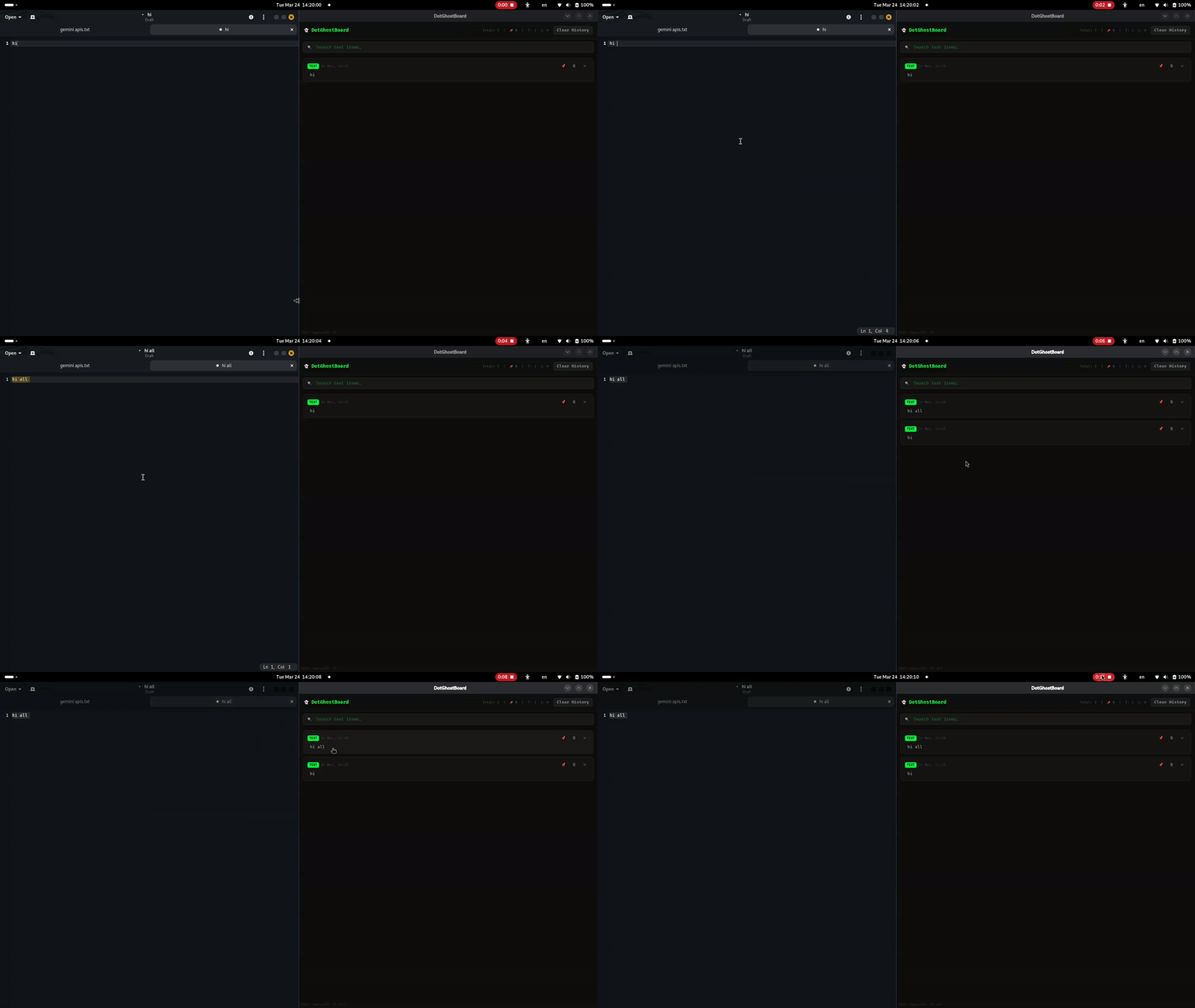
DotGhostBoard 是一个轻量级、注重隐私的剪贴板管理器,原生运行于 Linux。它在后台静默运行,捕获你复制的一切内容——文本、图片和视频路径,并本地存储在 SQLite 数据库中。没有云服务。没有遥传。没有 Electron。
可以将其视为 **Ditto**(Windows)或 **CopyQ**(Linux)的 Linux 版本,但采用专为 DotSuite 生态打造的 Kali 原生深色美学风格。
 ## 功能特性
- **文本捕获** — 你复制的所有文本都会即时保存
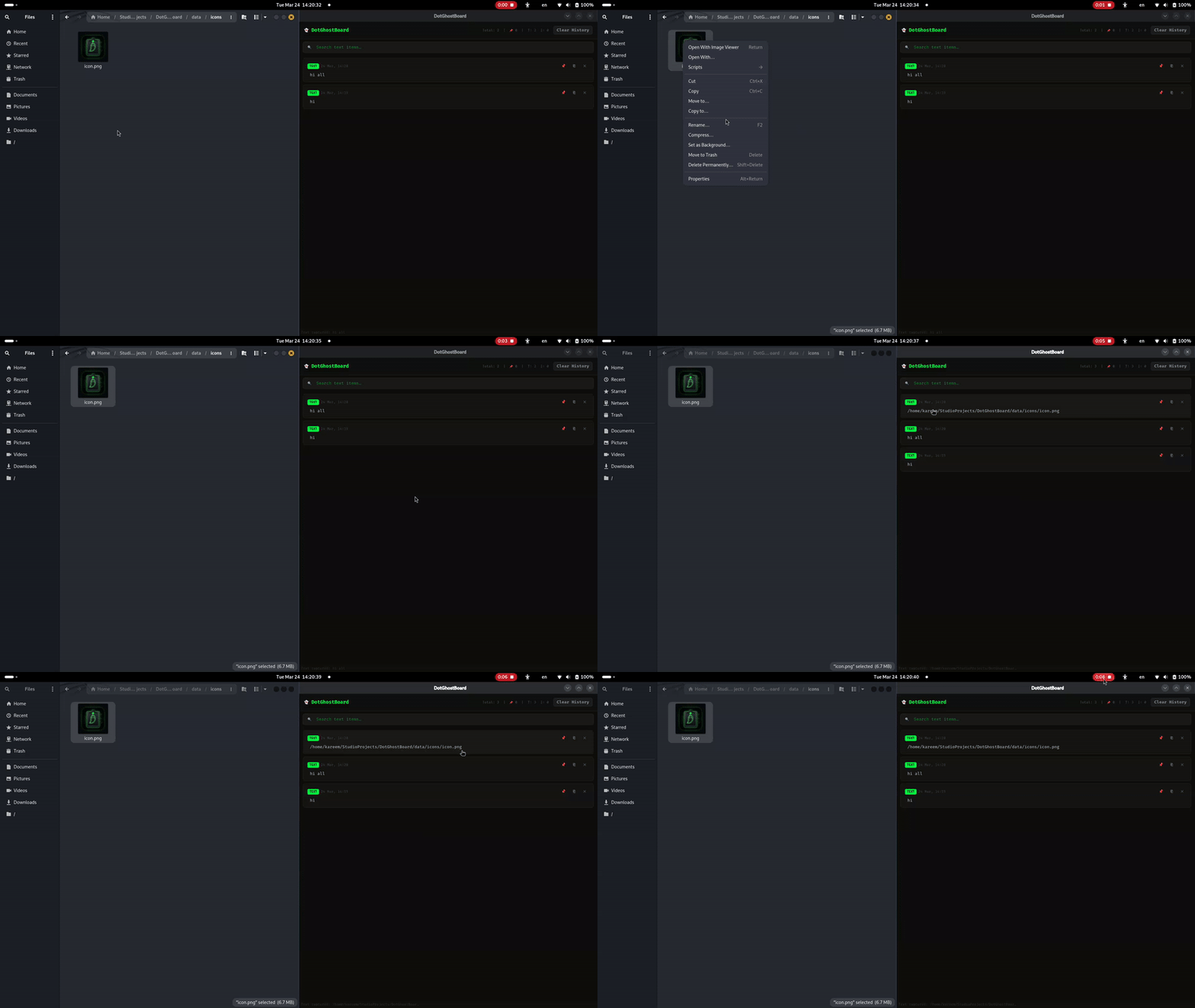
- **图片捕获** — 截图和复制的图片以 `.png` 格式保存
- **视频路径检测** — 检测复制的 `.mp4`、`.mkv`、`.avi` 等视频文件路径
- **固定系统** — 固定重要条目,它们将永久受到保护,不会被删除
- **持久化存储** — SQLite 数据库在重启后仍然保留
- **实时搜索** — 即时筛选剪贴板历史记录
- **清除历史** — 一键清除未固定的条目(固定条目始终保留)
- **系统托盘** — 安静驻留在系统托盘中,随时可用
- **IPC 快捷方式** — 通过本地套接字,`Ctrl+Alt+V` 可在任何位置显示窗口
- **应用图标** — 通过 `scripts/generate_icon.py` 自动生成霓虹鬼怪图标
- **暗黑霓虹 UI** — 为深色桌面定制的自定义 QSS 主题
- **设置面板** — ⚙ 可设置最大历史记录限制、隐私退出清理、主题切换
- **键盘导航** — `↑`/`↓` 移动卡片,`Enter` 复制,`Esc` 清除焦点
- **双击粘贴** — 双击任意卡片即可立即复制
- **独立自动启动** — `scripts/setup_autostart.py` 可设置开机启动项,无需 Bash
- **图像缩略图预览** — 懒加载缩略图,最大限制为 300×180px;通过 `QTimer.singleShot` 延迟渲染
- **视频缩略图(ffmpeg)** — 从视频文件中提取第一帧;后台线程处理;若 ffmpeg 不可用则优雅降级
- **自动清理** — 可配置的 `max_captures` 限制(默认 100);启动时删除最旧的未固定捕获
- **图像查看器弹出框** — 全尺寸图像预览,支持平滑缩放;`Ctrl+C` 复制图像,`Escape` 关闭
- **复制图像到剪贴板** — 图像条目现在可将实际图像数据(而非文件路径)复制回剪贴板
- **拖拽重排序** — 固定卡片显示拖动手柄;重排序通过数据库中的 `sort_order` 持久化
- **标签系统** — 可为任意条目分配自定义 `#tags`;彩色标签芯片显示,支持 6 色循环;支持行内自动补全
## 功能特性
- **文本捕获** — 你复制的所有文本都会即时保存
- **图片捕获** — 截图和复制的图片以 `.png` 格式保存
- **视频路径检测** — 检测复制的 `.mp4`、`.mkv`、`.avi` 等视频文件路径
- **固定系统** — 固定重要条目,它们将永久受到保护,不会被删除
- **持久化存储** — SQLite 数据库在重启后仍然保留
- **实时搜索** — 即时筛选剪贴板历史记录
- **清除历史** — 一键清除未固定的条目(固定条目始终保留)
- **系统托盘** — 安静驻留在系统托盘中,随时可用
- **IPC 快捷方式** — 通过本地套接字,`Ctrl+Alt+V` 可在任何位置显示窗口
- **应用图标** — 通过 `scripts/generate_icon.py` 自动生成霓虹鬼怪图标
- **暗黑霓虹 UI** — 为深色桌面定制的自定义 QSS 主题
- **设置面板** — ⚙ 可设置最大历史记录限制、隐私退出清理、主题切换
- **键盘导航** — `↑`/`↓` 移动卡片,`Enter` 复制,`Esc` 清除焦点
- **双击粘贴** — 双击任意卡片即可立即复制
- **独立自动启动** — `scripts/setup_autostart.py` 可设置开机启动项,无需 Bash
- **图像缩略图预览** — 懒加载缩略图,最大限制为 300×180px;通过 `QTimer.singleShot` 延迟渲染
- **视频缩略图(ffmpeg)** — 从视频文件中提取第一帧;后台线程处理;若 ffmpeg 不可用则优雅降级
- **自动清理** — 可配置的 `max_captures` 限制(默认 100);启动时删除最旧的未固定捕获
- **图像查看器弹出框** — 全尺寸图像预览,支持平滑缩放;`Ctrl+C` 复制图像,`Escape` 关闭
- **复制图像到剪贴板** — 图像条目现在可将实际图像数据(而非文件路径)复制回剪贴板
- **拖拽重排序** — 固定卡片显示拖动手柄;重排序通过数据库中的 `sort_order` 持久化
- **标签系统** — 可为任意条目分配自定义 `#tags`;彩色标签芯片显示,支持 6 色循环;支持行内自动补全
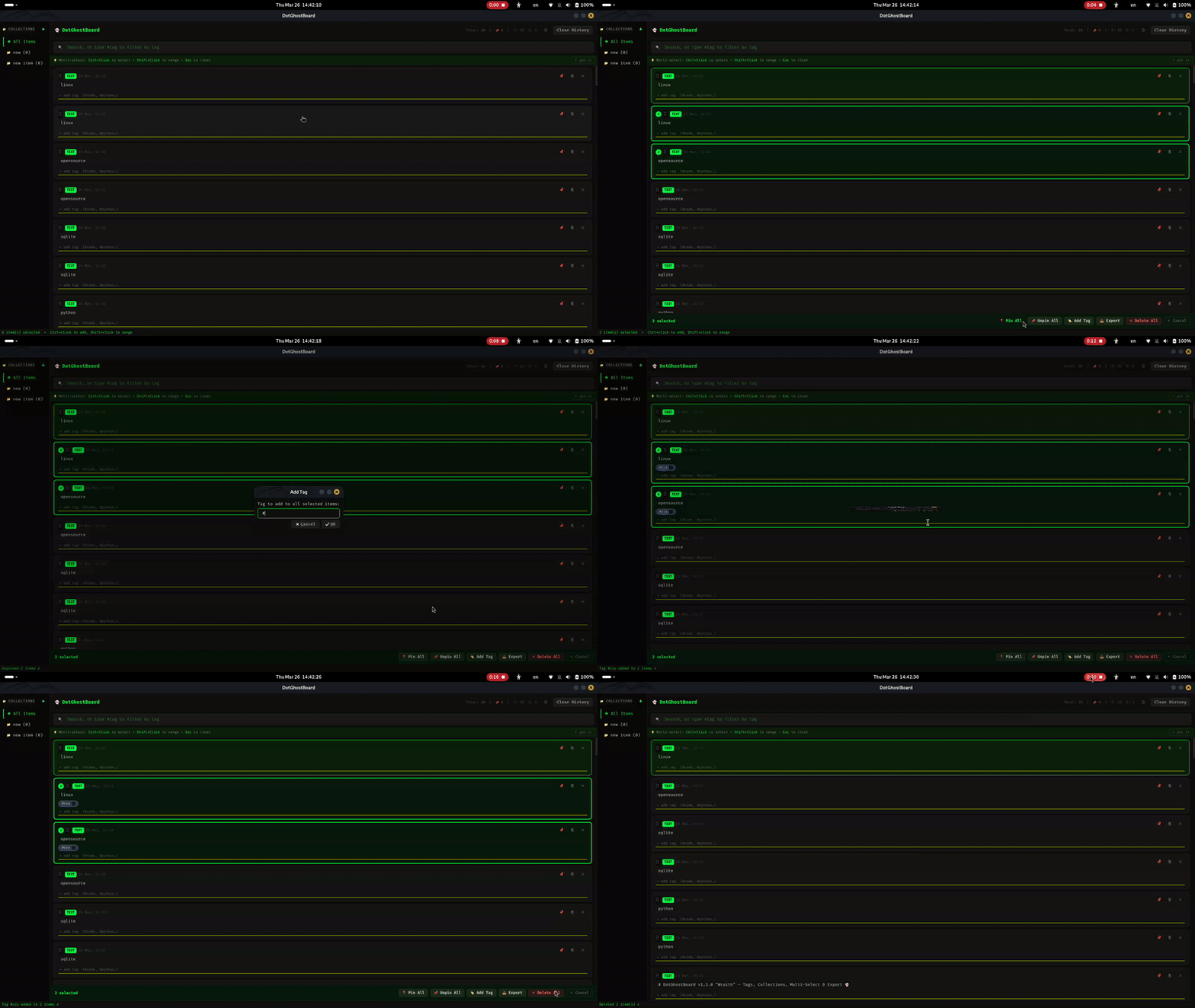 - **组合搜索** — 可同时按文本和标签搜索(例如 `"python #code"`);仅标签过滤适用于所有条目类型
- **集合与拖放** — 可将条目分组到命名的文件夹中;侧边栏支持点击筛选、右键重命名/删除。提供直观的拖放界面用于组织条目
- **组合搜索** — 可同时按文本和标签搜索(例如 `"python #code"`);仅标签过滤适用于所有条目类型
- **集合与拖放** — 可将条目分组到命名的文件夹中;侧边栏支持点击筛选、右键重命名/删除。提供直观的拖放界面用于组织条目
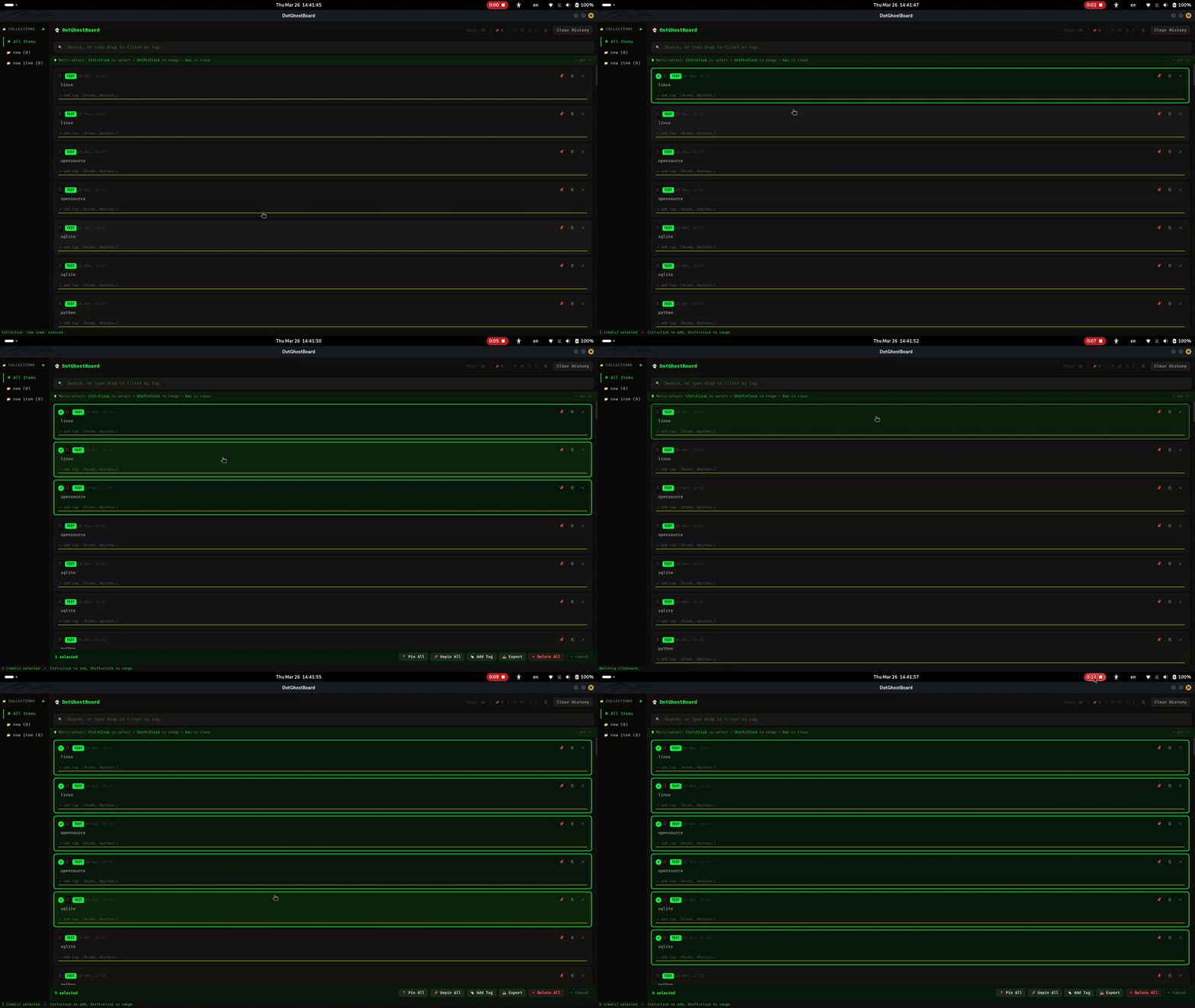
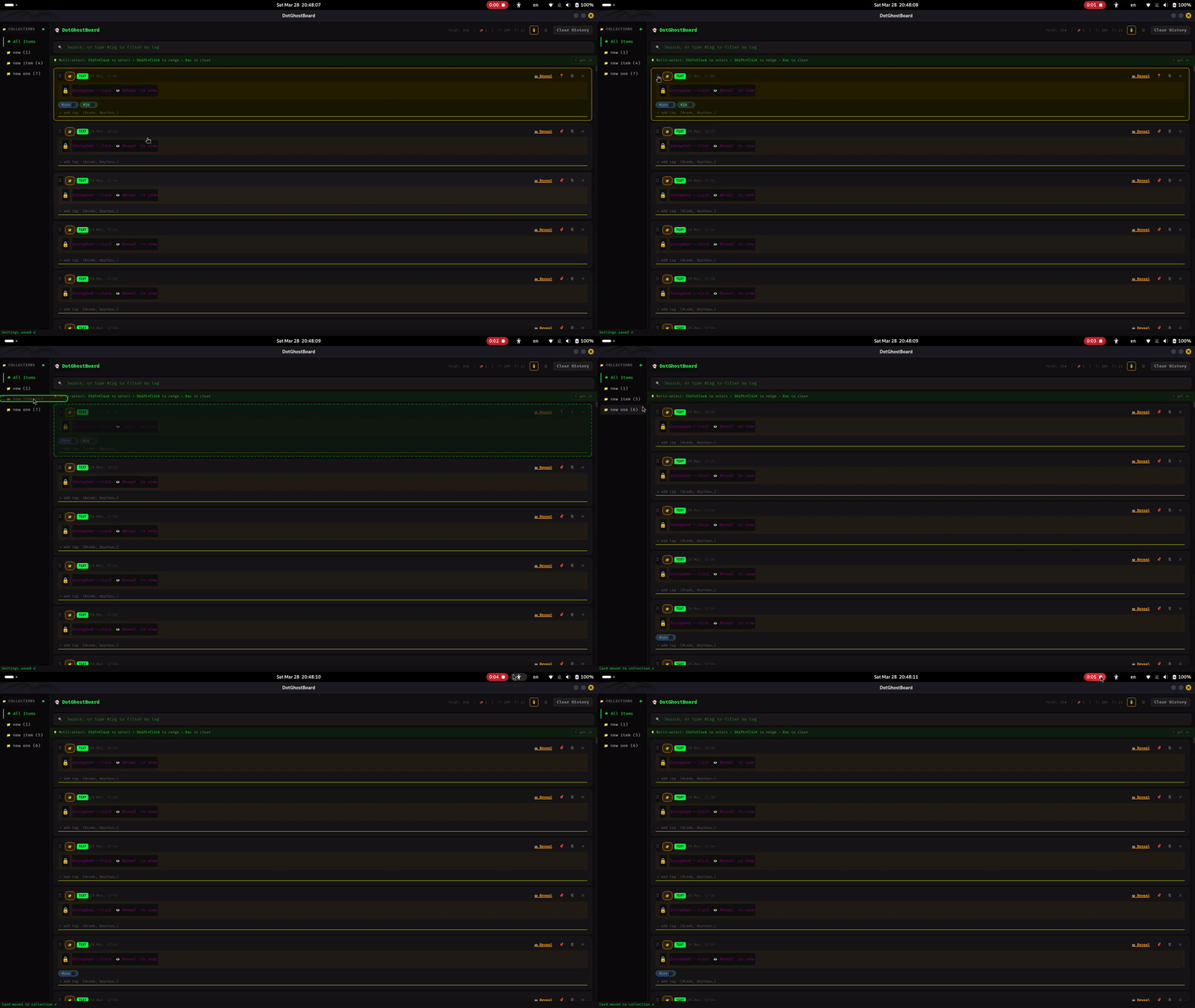 - **多选** — `Ctrl+Click` 切换选择,`Shift+Click` 范围选择;所选卡片上显示霓虹绿 `✓` 覆盖层
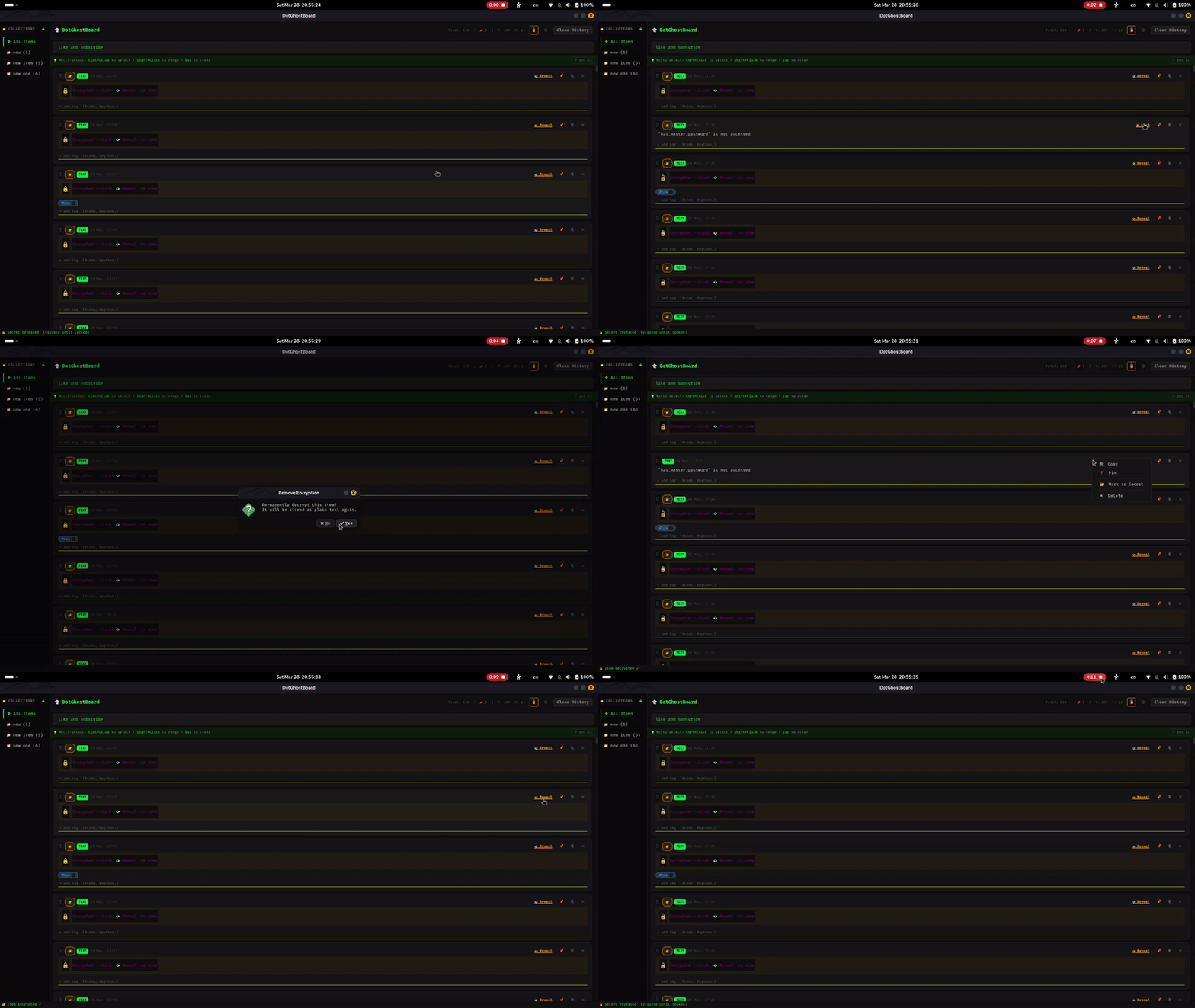
 - **本地加密(Eclipse 模式)** — 使用 AES-256 加密保护敏感剪贴板条目。条目被隐藏并锁定在秘密覆盖层下,直到显式显示
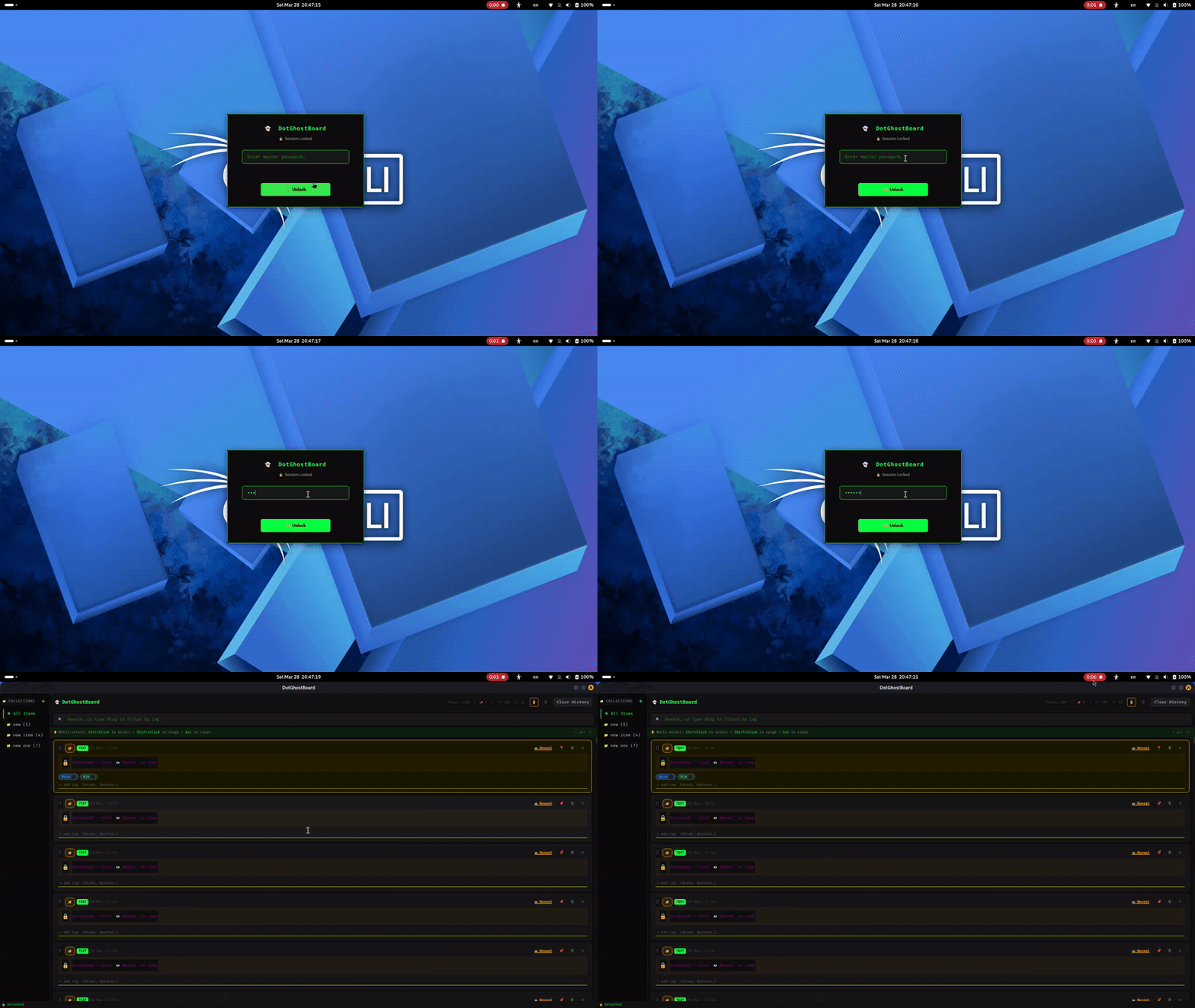
 - **会话锁定与主密码** — 使用主密码保护整个仪表板。具备自动超时锁定和风格化的模糊锁屏
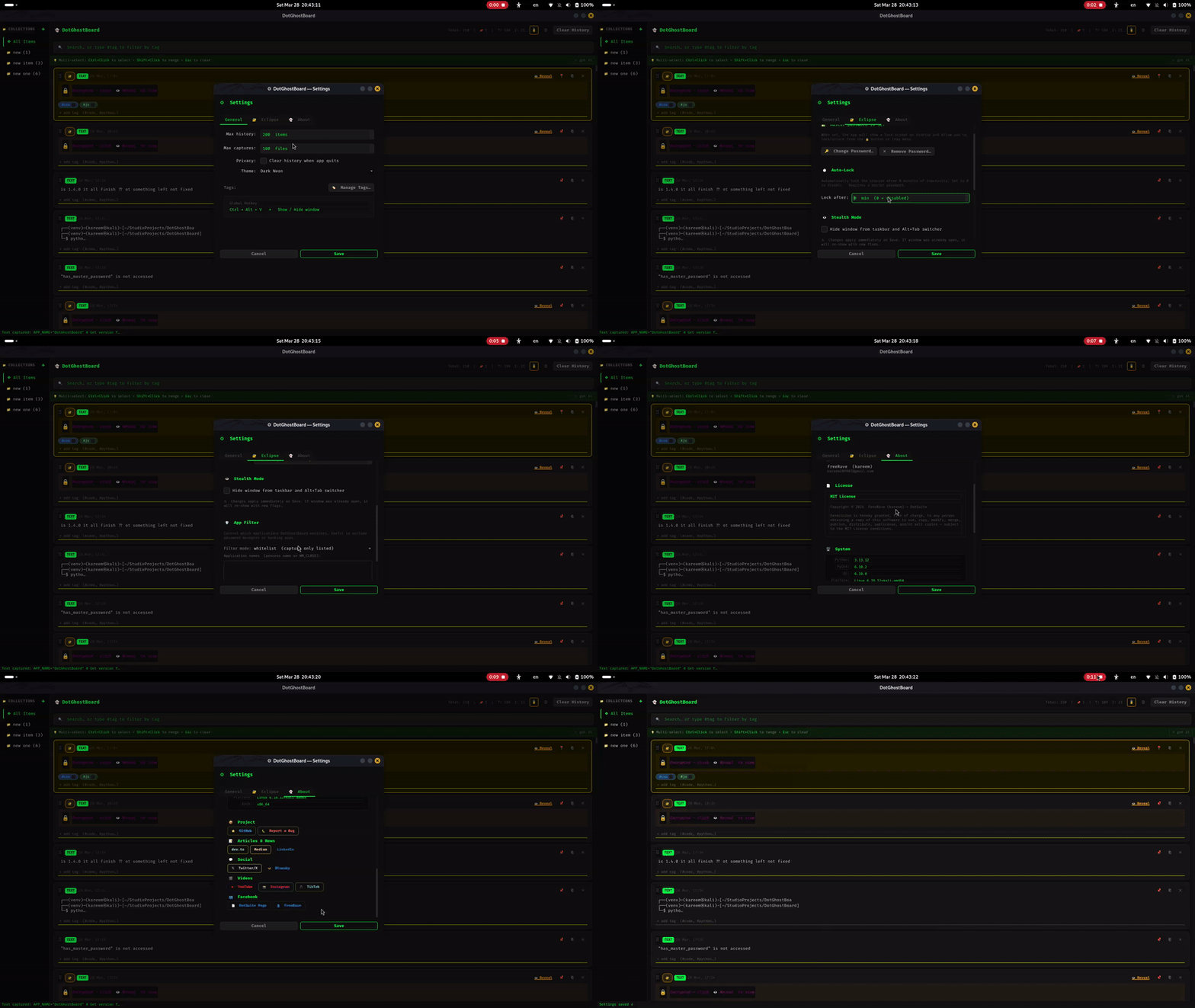
 - **高级设置与专业 UI** — 全面控制隐身模式、应用过滤器、自动锁定超时,以及美观的 DotSuite 许可/关于页面
 - **批量操作工具栏** — 当选择 2 个或更多条目时显示:全部固定、全部取消固定、添加标签、导出、全部删除、取消
- **导出** — 将所选条目导出为 `.txt`(带时间戳的分块)或 `.json`(包含标签的结构化数据)
- **全局标签管理器** — ⚙ 设置 → “管理标签…”;一键重命名或删除所有条目中的标签
- **拖放视觉反馈** — 拖动时显示霓虹边框的幽灵像素图;源卡片变暗 35%;目标位置以绿色虚线边框高亮
- **E2EE 本地网络同步(Nexus)** — 使用 AES-256-GCM 和 X25519(ECDH)握手,实现端到端加密的本地网络剪贴板同步
- **mDNS 自动发现** — 同一 WiFi 下零配置发现对等节点
- **REST API** — 通过本地 localhost 服务器提供程序化访问历史记录和推送功能
- **CLI 伴侣工具** — 使用终端命令 `dotghost push` 和 `dotghost pop` 实现无缝 Shell 工作流
- **安全设备配对** — PIN 保护的握手确保未经授权的设备无法拦截同步数据
**原生桌面集成:**
DotGhostBoard 与桌面环境的停靠栏和应用程序启动器无缝集成。
- **批量操作工具栏** — 当选择 2 个或更多条目时显示:全部固定、全部取消固定、添加标签、导出、全部删除、取消
- **导出** — 将所选条目导出为 `.txt`(带时间戳的分块)或 `.json`(包含标签的结构化数据)
- **全局标签管理器** — ⚙ 设置 → “管理标签…”;一键重命名或删除所有条目中的标签
- **拖放视觉反馈** — 拖动时显示霓虹边框的幽灵像素图;源卡片变暗 35%;目标位置以绿色虚线边框高亮
- **E2EE 本地网络同步(Nexus)** — 使用 AES-256-GCM 和 X25519(ECDH)握手,实现端到端加密的本地网络剪贴板同步
- **mDNS 自动发现** — 同一 WiFi 下零配置发现对等节点
- **REST API** — 通过本地 localhost 服务器提供程序化访问历史记录和推送功能
- **CLI 伴侣工具** — 使用终端命令 `dotghost push` 和 `dotghost pop` 实现无缝 Shell 工作流
- **安全设备配对** — PIN 保护的握手确保未经授权的设备无法拦截同步数据
**原生桌面集成:**
DotGhostBoard 与桌面环境的停靠栏和应用程序启动器无缝集成。
 ## 项目结构
```
DotGhostBoard/
├── main.py # Entry point + IPC local server
├── ghost.db # SQLite database (auto-created)
├── core/
│ ├── watcher.py # Clipboard monitor (QTimer-based)
│ ├── storage.py # Database CRUD layer
│ ├── crypto.py # AES-256 encryption engine (Eclipse)
│ ├── sync_engine.py # E2EE background push worker (Nexus)
│ ├── network_discovery.py # Zeroconf mDNS peer discovery (Nexus)
│ ├── api_server.py # Local REST API & Handshake handler (Nexus)
│ ├── pairing.py # PIN-based ECDH handshake logic (Nexus)
│ ├── updater.py # GitHub auto-updater engine (v1.4.1)
│ ├── app_filter.py # App whitelist/blacklist (Eclipse)
│ └── media.py # Image/video handler
├── ui/
│ ├── dashboard.py # Main window + keyboard nav + settings wiring
│ ├── widgets.py # Item card widget (double-click, focus)
│ ├── settings.py # Settings dialog with About tab
│ ├── pairing_dialog.py # Device pairing UI (Nexus)
│ ├── lock_screen.py # Master password lock screen (Eclipse)
│ ├── updater_dialog.py # GUI for GitHub updates
│ └── ghost.qss # Dark neon stylesheet
├── cli/
│ └── dotghost.py # Command-line companion (Nexus)
├── data/
│ ├── icons/ # Generated app icons + ghost.svg source
│ ├── captures/ # Saved images (.png)
│ ├── assets/ # GIFs, screenshots, demo media
│ └── settings.json # User settings
├── scripts/
│ ├── generate_icon.py # Draws ghost icon at 16/32/48/64/128/256px
│ ├── install.sh # Autostart + shortcut + CLI symlinker
│ ├── build_appimage.sh # AppImage builder
│ └── setup_autostart.py # Standalone Python autostart installer
├── tests/
│ ├── test_api.py # REST API & Sync tests (178 total passed)
│ ├── test_eclipse.py # Encryption & Security tests
│ ├── test_storage.py # Database CRUD tests
│ └── test_media.py # Media detection tests
├── roadmap(v1.x).md
├── CHANGELOG.md
├── requirements.txt
├── pytest.ini
└── .gitignore
```
## 需求
| 依赖 | 版本 |
|------|------|
| Python | 3.11+ |
| PyQt6 | 6.6.0+ |
| Pillow | 10.0.0+ |
| cryptography | 41.0.0+ |
| pytest | 7.0.0+ |
## 📥 下载
**下载对应平台的版本:**
- 🐧 [AppImage (Linux)](https://github.com/kareem2099/DotGhostBoard/releases/latest)
- 📦 [DEB (Ubuntu/Debian)](https://github.com/kareem2099/DotGhostBoard/releases/latest)
- 🪟 [EXE (Windows)](https://github.com/kareem2099/DotGhostBoard/releases/latest)
- 🍎 [DMG (macOS)](https://github.com/kareem2099/DotGhostBoard/releases/latest)
## 安装
### 选项 A — 系统 Python(Kali Linux)
PyQt6 和 Pillow 在 Kali 中通常已预装:
```
git clone https://github.com/kareem2099/DotGhostBoard.git
cd DotGhostBoard
python3 main.py
```
### 选项 B — 虚拟环境(推荐)
```
git clone https://github.com/kareem2099/DotGhostBoard.git
cd DotGhostBoard
# 创建隔离环境
python3 -m venv venv --system-site-packages
source venv/bin/activate
# 安装依赖
pip install -r requirements.txt
# 生成应用图标(仅运行一次)
python3 scripts/generate_icon.py
# 运行
python3 main.py
```
### 选项 C — pip 安装(PyPI)
```
pip install dotghostboard
dotghostboard
```
### 选项 D — AppImage(便携版)
从 [Releases](https://github.com/kareem2099/DotGhostBoard/releases) 下载 `.AppImage` 文件,然后:
```
chmod +x DotGhostBoard-*.AppImage
./DotGhostBoard-*.AppImage
```
无需安装 — 可在任意 Linux 发行版上运行。
### 选项 E — 完整安装(自动启动 + 快捷键 + 图标)
```
chmod +x scripts/install.sh
./scripts/install.sh
```
这将设置登录时自动启动,并通过 `xfconf-query` 注册 `Ctrl+Alt+V` 快捷键
### 选项 F — 从源码构建 AppImage
```
pip install pyinstaller
chmod +x scripts/build_appimage.sh
./scripts/build_appimage.sh
```
### 选项 G — DEB 包(Debian/Ubuntu/Kali)
**快速从 Releases 安装:**
```
# 从 GitHub Releases 下载最新的 .deb 文件
wget https://github.com/kareem2099/DotGhostBoard/releases/latest/download/dotghostboard_1.5.1_amd64.deb
# 使用 dpkg 安装
sudo dpkg -i dotghostboard_*.deb
# 修复任何缺失的依赖(如需要)
sudo apt-get install -f
# 运行
dotghostboard
```
**或本地构建:**
```
# 克隆并构建
git clone https://github.com/kareem2099/DotGhostBoard.git
cd DotGhostBoard
# 构建 .deb 包
chmod +x scripts/build_deb.sh
./scripts/build_deb.sh
# 安装
sudo dpkg -i dotghostboard_*.deb
# 运行
dotghostboard
```
**卸载:**
```
sudo apt remove dotghostboard
```
**安装位置:**
- 二进制文件:`/opt/dotghostboard/`
- 启动器:`/usr/bin/dotghostboard`
- 桌面入口:`/usr/share/applications/dotghostboard.desktop`
- 图标:`/usr/share/icons/hicolor/256x256/apps/dotghostboard.png`
## 使用方法
| 操作 | 方法 |
|------|------|
| 复制任何内容 | 只需使用 `Ctrl+C` — DotGhostBoard 会自动捕获 |
| 显示窗口 | 在任意位置按下 `Ctrl+Alt+V` |
| 固定条目 | 点击卡片上的 📌 |
| 取消固定 | 点击已固定的卡片上的 📍 |
| 复制回内容 | 点击 ⎘ 或 **双击** 卡片 |
| 删除条目 | 点击 ✕ — 固定条目受到保护 |
| 搜索 | 在顶部搜索栏中输入内容 |
| 键盘导航 | 按 `↑`/`↓` 移动焦点;`Enter` 或 `Space` 复制;`Esc` 清除焦点 |
| 清除历史 | 点击“清除历史” — 固定条目永远不会被删除 |
| 设置 | 点击顶部 ⚙ — 调整历史记录限制、隐私选项等 |
| 最小化 | 点击 X — 应用保持在系统托盘中 |
| 退出 | 右键点击托盘图标 → 退出 |
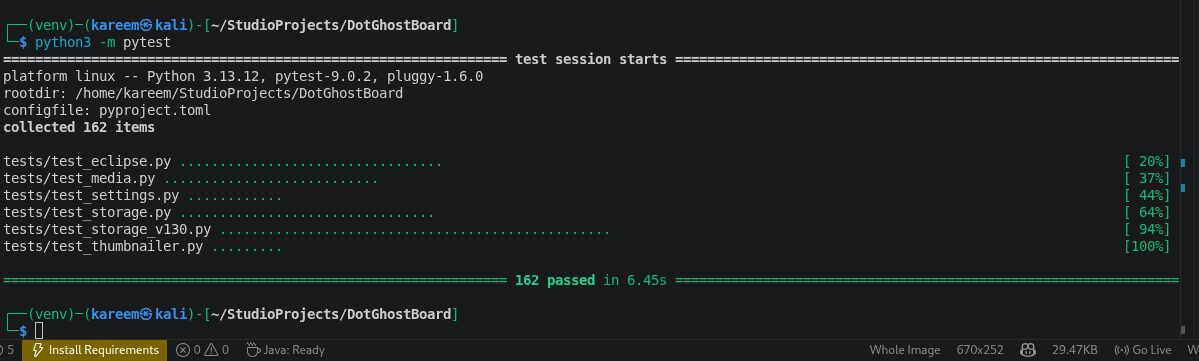
## 运行测试
```
python3 -m pytest
```
预期输出:
```
tests/test_api.py ..... [ 3%]
tests/test_eclipse.py ................................. [ 21%]
tests/test_media.py ........................... [ 37%]
tests/test_settings.py ............ [ 44%]
tests/test_storage.py ................................ [ 62%]
tests/test_storage_v130.py ................................................. [ 90%]
tests/test_thumbnailer.py ......... [ 95%]
tests/test_updater_core.py ........... [100%]
178 passed in 9.07s
```
## 项目结构
```
DotGhostBoard/
├── main.py # Entry point + IPC local server
├── ghost.db # SQLite database (auto-created)
├── core/
│ ├── watcher.py # Clipboard monitor (QTimer-based)
│ ├── storage.py # Database CRUD layer
│ ├── crypto.py # AES-256 encryption engine (Eclipse)
│ ├── sync_engine.py # E2EE background push worker (Nexus)
│ ├── network_discovery.py # Zeroconf mDNS peer discovery (Nexus)
│ ├── api_server.py # Local REST API & Handshake handler (Nexus)
│ ├── pairing.py # PIN-based ECDH handshake logic (Nexus)
│ ├── updater.py # GitHub auto-updater engine (v1.4.1)
│ ├── app_filter.py # App whitelist/blacklist (Eclipse)
│ └── media.py # Image/video handler
├── ui/
│ ├── dashboard.py # Main window + keyboard nav + settings wiring
│ ├── widgets.py # Item card widget (double-click, focus)
│ ├── settings.py # Settings dialog with About tab
│ ├── pairing_dialog.py # Device pairing UI (Nexus)
│ ├── lock_screen.py # Master password lock screen (Eclipse)
│ ├── updater_dialog.py # GUI for GitHub updates
│ └── ghost.qss # Dark neon stylesheet
├── cli/
│ └── dotghost.py # Command-line companion (Nexus)
├── data/
│ ├── icons/ # Generated app icons + ghost.svg source
│ ├── captures/ # Saved images (.png)
│ ├── assets/ # GIFs, screenshots, demo media
│ └── settings.json # User settings
├── scripts/
│ ├── generate_icon.py # Draws ghost icon at 16/32/48/64/128/256px
│ ├── install.sh # Autostart + shortcut + CLI symlinker
│ ├── build_appimage.sh # AppImage builder
│ └── setup_autostart.py # Standalone Python autostart installer
├── tests/
│ ├── test_api.py # REST API & Sync tests (178 total passed)
│ ├── test_eclipse.py # Encryption & Security tests
│ ├── test_storage.py # Database CRUD tests
│ └── test_media.py # Media detection tests
├── roadmap(v1.x).md
├── CHANGELOG.md
├── requirements.txt
├── pytest.ini
└── .gitignore
```
## 需求
| 依赖 | 版本 |
|------|------|
| Python | 3.11+ |
| PyQt6 | 6.6.0+ |
| Pillow | 10.0.0+ |
| cryptography | 41.0.0+ |
| pytest | 7.0.0+ |
## 📥 下载
**下载对应平台的版本:**
- 🐧 [AppImage (Linux)](https://github.com/kareem2099/DotGhostBoard/releases/latest)
- 📦 [DEB (Ubuntu/Debian)](https://github.com/kareem2099/DotGhostBoard/releases/latest)
- 🪟 [EXE (Windows)](https://github.com/kareem2099/DotGhostBoard/releases/latest)
- 🍎 [DMG (macOS)](https://github.com/kareem2099/DotGhostBoard/releases/latest)
## 安装
### 选项 A — 系统 Python(Kali Linux)
PyQt6 和 Pillow 在 Kali 中通常已预装:
```
git clone https://github.com/kareem2099/DotGhostBoard.git
cd DotGhostBoard
python3 main.py
```
### 选项 B — 虚拟环境(推荐)
```
git clone https://github.com/kareem2099/DotGhostBoard.git
cd DotGhostBoard
# 创建隔离环境
python3 -m venv venv --system-site-packages
source venv/bin/activate
# 安装依赖
pip install -r requirements.txt
# 生成应用图标(仅运行一次)
python3 scripts/generate_icon.py
# 运行
python3 main.py
```
### 选项 C — pip 安装(PyPI)
```
pip install dotghostboard
dotghostboard
```
### 选项 D — AppImage(便携版)
从 [Releases](https://github.com/kareem2099/DotGhostBoard/releases) 下载 `.AppImage` 文件,然后:
```
chmod +x DotGhostBoard-*.AppImage
./DotGhostBoard-*.AppImage
```
无需安装 — 可在任意 Linux 发行版上运行。
### 选项 E — 完整安装(自动启动 + 快捷键 + 图标)
```
chmod +x scripts/install.sh
./scripts/install.sh
```
这将设置登录时自动启动,并通过 `xfconf-query` 注册 `Ctrl+Alt+V` 快捷键
### 选项 F — 从源码构建 AppImage
```
pip install pyinstaller
chmod +x scripts/build_appimage.sh
./scripts/build_appimage.sh
```
### 选项 G — DEB 包(Debian/Ubuntu/Kali)
**快速从 Releases 安装:**
```
# 从 GitHub Releases 下载最新的 .deb 文件
wget https://github.com/kareem2099/DotGhostBoard/releases/latest/download/dotghostboard_1.5.1_amd64.deb
# 使用 dpkg 安装
sudo dpkg -i dotghostboard_*.deb
# 修复任何缺失的依赖(如需要)
sudo apt-get install -f
# 运行
dotghostboard
```
**或本地构建:**
```
# 克隆并构建
git clone https://github.com/kareem2099/DotGhostBoard.git
cd DotGhostBoard
# 构建 .deb 包
chmod +x scripts/build_deb.sh
./scripts/build_deb.sh
# 安装
sudo dpkg -i dotghostboard_*.deb
# 运行
dotghostboard
```
**卸载:**
```
sudo apt remove dotghostboard
```
**安装位置:**
- 二进制文件:`/opt/dotghostboard/`
- 启动器:`/usr/bin/dotghostboard`
- 桌面入口:`/usr/share/applications/dotghostboard.desktop`
- 图标:`/usr/share/icons/hicolor/256x256/apps/dotghostboard.png`
## 使用方法
| 操作 | 方法 |
|------|------|
| 复制任何内容 | 只需使用 `Ctrl+C` — DotGhostBoard 会自动捕获 |
| 显示窗口 | 在任意位置按下 `Ctrl+Alt+V` |
| 固定条目 | 点击卡片上的 📌 |
| 取消固定 | 点击已固定的卡片上的 📍 |
| 复制回内容 | 点击 ⎘ 或 **双击** 卡片 |
| 删除条目 | 点击 ✕ — 固定条目受到保护 |
| 搜索 | 在顶部搜索栏中输入内容 |
| 键盘导航 | 按 `↑`/`↓` 移动焦点;`Enter` 或 `Space` 复制;`Esc` 清除焦点 |
| 清除历史 | 点击“清除历史” — 固定条目永远不会被删除 |
| 设置 | 点击顶部 ⚙ — 调整历史记录限制、隐私选项等 |
| 最小化 | 点击 X — 应用保持在系统托盘中 |
| 退出 | 右键点击托盘图标 → 退出 |
## 运行测试
```
python3 -m pytest
```
预期输出:
```
tests/test_api.py ..... [ 3%]
tests/test_eclipse.py ................................. [ 21%]
tests/test_media.py ........................... [ 37%]
tests/test_settings.py ............ [ 44%]
tests/test_storage.py ................................ [ 62%]
tests/test_storage_v130.py ................................................. [ 90%]
tests/test_thumbnailer.py ......... [ 95%]
tests/test_updater_core.py ........... [100%]
178 passed in 9.07s
```
 ## 路线图
| 版本 | 代号 | 状态 | 目标 |
|------|------|------|------|
| v1.0.0 | Ghost | ✅ 已发布 | 稳定基础 — 剪贴板、固定系统、暗黑 UI、SQLite |
| v1.1.0 | Phantom | ✅ 已发布 | 设置面板、键盘导航、双击粘贴、SVG 图标 |
| v1.2.0 | Specter | ✅ 已发布 | 图片缩略图、通过 ffmpeg 的视频预览、自动清理、图片查看器 |
| v1.3.0 | Wraith | ✅ 已发布 | 标签、集合、多选、批量操作、导出 |
| v1.4.0 | Eclipse | ✅ 已发布 | AES-256 加密、主密码锁、隐身模式、专业 UI |
| v1.4.1 | Mem & Perf | ✅ 已发布 | 内存优化、GitHub 自动更新器、IPC/Wayland 错误修复 |
| v1.5.0 | Nexus | ✅ 已发布 | E2EE 网络同步、mDNS 发现、REST API、CLI 伴侣工具 |
| v2.0.0 | Cerberus | 🔭 规划中 | 密码保险库、智能敏感内容检测、偏执模式 |
完整细节请参考 [`roadmap(v2.x).md`](roadmap(v2.x).md)
## 许可证
Apache 2.0 — 详细信息请参考 [`LICENSE`](LICENSE)。
## 属于 DotSuite
DotGhostBoard 是 **DotSuite** 集合中的一员 — 一套为 Linux 高级用户打造的轻量级、注重隐私的生产力工具集合。
*使用 💀 在 Kali Linux 上构建*
## 路线图
| 版本 | 代号 | 状态 | 目标 |
|------|------|------|------|
| v1.0.0 | Ghost | ✅ 已发布 | 稳定基础 — 剪贴板、固定系统、暗黑 UI、SQLite |
| v1.1.0 | Phantom | ✅ 已发布 | 设置面板、键盘导航、双击粘贴、SVG 图标 |
| v1.2.0 | Specter | ✅ 已发布 | 图片缩略图、通过 ffmpeg 的视频预览、自动清理、图片查看器 |
| v1.3.0 | Wraith | ✅ 已发布 | 标签、集合、多选、批量操作、导出 |
| v1.4.0 | Eclipse | ✅ 已发布 | AES-256 加密、主密码锁、隐身模式、专业 UI |
| v1.4.1 | Mem & Perf | ✅ 已发布 | 内存优化、GitHub 自动更新器、IPC/Wayland 错误修复 |
| v1.5.0 | Nexus | ✅ 已发布 | E2EE 网络同步、mDNS 发现、REST API、CLI 伴侣工具 |
| v2.0.0 | Cerberus | 🔭 规划中 | 密码保险库、智能敏感内容检测、偏执模式 |
完整细节请参考 [`roadmap(v2.x).md`](roadmap(v2.x).md)
## 许可证
Apache 2.0 — 详细信息请参考 [`LICENSE`](LICENSE)。
## 属于 DotSuite
DotGhostBoard 是 **DotSuite** 集合中的一员 — 一套为 Linux 高级用户打造的轻量级、注重隐私的生产力工具集合。
*使用 💀 在 Kali Linux 上构建*
## 功能特性
- **文本捕获** — 你复制的所有文本都会即时保存
- **图片捕获** — 截图和复制的图片以 `.png` 格式保存
- **视频路径检测** — 检测复制的 `.mp4`、`.mkv`、`.avi` 等视频文件路径
- **固定系统** — 固定重要条目,它们将永久受到保护,不会被删除
- **持久化存储** — SQLite 数据库在重启后仍然保留
- **实时搜索** — 即时筛选剪贴板历史记录
- **清除历史** — 一键清除未固定的条目(固定条目始终保留)
- **系统托盘** — 安静驻留在系统托盘中,随时可用
- **IPC 快捷方式** — 通过本地套接字,`Ctrl+Alt+V` 可在任何位置显示窗口
- **应用图标** — 通过 `scripts/generate_icon.py` 自动生成霓虹鬼怪图标
- **暗黑霓虹 UI** — 为深色桌面定制的自定义 QSS 主题
- **设置面板** — ⚙ 可设置最大历史记录限制、隐私退出清理、主题切换
- **键盘导航** — `↑`/`↓` 移动卡片,`Enter` 复制,`Esc` 清除焦点
- **双击粘贴** — 双击任意卡片即可立即复制
- **独立自动启动** — `scripts/setup_autostart.py` 可设置开机启动项,无需 Bash
- **图像缩略图预览** — 懒加载缩略图,最大限制为 300×180px;通过 `QTimer.singleShot` 延迟渲染
- **视频缩略图(ffmpeg)** — 从视频文件中提取第一帧;后台线程处理;若 ffmpeg 不可用则优雅降级
- **自动清理** — 可配置的 `max_captures` 限制(默认 100);启动时删除最旧的未固定捕获
- **图像查看器弹出框** — 全尺寸图像预览,支持平滑缩放;`Ctrl+C` 复制图像,`Escape` 关闭
- **复制图像到剪贴板** — 图像条目现在可将实际图像数据(而非文件路径)复制回剪贴板
- **拖拽重排序** — 固定卡片显示拖动手柄;重排序通过数据库中的 `sort_order` 持久化
- **标签系统** — 可为任意条目分配自定义 `#tags`;彩色标签芯片显示,支持 6 色循环;支持行内自动补全
- **组合搜索** — 可同时按文本和标签搜索(例如 `"python #code"`);仅标签过滤适用于所有条目类型
- **集合与拖放** — 可将条目分组到命名的文件夹中;侧边栏支持点击筛选、右键重命名/删除。提供直观的拖放界面用于组织条目
- **多选** — `Ctrl+Click` 切换选择,`Shift+Click` 范围选择;所选卡片上显示霓虹绿 `✓` 覆盖层
- **本地加密(Eclipse 模式)** — 使用 AES-256 加密保护敏感剪贴板条目。条目被隐藏并锁定在秘密覆盖层下,直到显式显示
- **会话锁定与主密码** — 使用主密码保护整个仪表板。具备自动超时锁定和风格化的模糊锁屏
- **高级设置与专业 UI** — 全面控制隐身模式、应用过滤器、自动锁定超时,以及美观的 DotSuite 许可/关于页面
- **批量操作工具栏** — 当选择 2 个或更多条目时显示:全部固定、全部取消固定、添加标签、导出、全部删除、取消
- **导出** — 将所选条目导出为 `.txt`(带时间戳的分块)或 `.json`(包含标签的结构化数据)
- **全局标签管理器** — ⚙ 设置 → “管理标签…”;一键重命名或删除所有条目中的标签
- **拖放视觉反馈** — 拖动时显示霓虹边框的幽灵像素图;源卡片变暗 35%;目标位置以绿色虚线边框高亮
- **E2EE 本地网络同步(Nexus)** — 使用 AES-256-GCM 和 X25519(ECDH)握手,实现端到端加密的本地网络剪贴板同步
- **mDNS 自动发现** — 同一 WiFi 下零配置发现对等节点
- **REST API** — 通过本地 localhost 服务器提供程序化访问历史记录和推送功能
- **CLI 伴侣工具** — 使用终端命令 `dotghost push` 和 `dotghost pop` 实现无缝 Shell 工作流
- **安全设备配对** — PIN 保护的握手确保未经授权的设备无法拦截同步数据
**原生桌面集成:**
DotGhostBoard 与桌面环境的停靠栏和应用程序启动器无缝集成。
## 项目结构
```
DotGhostBoard/
├── main.py # Entry point + IPC local server
├── ghost.db # SQLite database (auto-created)
├── core/
│ ├── watcher.py # Clipboard monitor (QTimer-based)
│ ├── storage.py # Database CRUD layer
│ ├── crypto.py # AES-256 encryption engine (Eclipse)
│ ├── sync_engine.py # E2EE background push worker (Nexus)
│ ├── network_discovery.py # Zeroconf mDNS peer discovery (Nexus)
│ ├── api_server.py # Local REST API & Handshake handler (Nexus)
│ ├── pairing.py # PIN-based ECDH handshake logic (Nexus)
│ ├── updater.py # GitHub auto-updater engine (v1.4.1)
│ ├── app_filter.py # App whitelist/blacklist (Eclipse)
│ └── media.py # Image/video handler
├── ui/
│ ├── dashboard.py # Main window + keyboard nav + settings wiring
│ ├── widgets.py # Item card widget (double-click, focus)
│ ├── settings.py # Settings dialog with About tab
│ ├── pairing_dialog.py # Device pairing UI (Nexus)
│ ├── lock_screen.py # Master password lock screen (Eclipse)
│ ├── updater_dialog.py # GUI for GitHub updates
│ └── ghost.qss # Dark neon stylesheet
├── cli/
│ └── dotghost.py # Command-line companion (Nexus)
├── data/
│ ├── icons/ # Generated app icons + ghost.svg source
│ ├── captures/ # Saved images (.png)
│ ├── assets/ # GIFs, screenshots, demo media
│ └── settings.json # User settings
├── scripts/
│ ├── generate_icon.py # Draws ghost icon at 16/32/48/64/128/256px
│ ├── install.sh # Autostart + shortcut + CLI symlinker
│ ├── build_appimage.sh # AppImage builder
│ └── setup_autostart.py # Standalone Python autostart installer
├── tests/
│ ├── test_api.py # REST API & Sync tests (178 total passed)
│ ├── test_eclipse.py # Encryption & Security tests
│ ├── test_storage.py # Database CRUD tests
│ └── test_media.py # Media detection tests
├── roadmap(v1.x).md
├── CHANGELOG.md
├── requirements.txt
├── pytest.ini
└── .gitignore
```
## 需求
| 依赖 | 版本 |
|------|------|
| Python | 3.11+ |
| PyQt6 | 6.6.0+ |
| Pillow | 10.0.0+ |
| cryptography | 41.0.0+ |
| pytest | 7.0.0+ |
## 📥 下载
**下载对应平台的版本:**
- 🐧 [AppImage (Linux)](https://github.com/kareem2099/DotGhostBoard/releases/latest)
- 📦 [DEB (Ubuntu/Debian)](https://github.com/kareem2099/DotGhostBoard/releases/latest)
- 🪟 [EXE (Windows)](https://github.com/kareem2099/DotGhostBoard/releases/latest)
- 🍎 [DMG (macOS)](https://github.com/kareem2099/DotGhostBoard/releases/latest)
## 安装
### 选项 A — 系统 Python(Kali Linux)
PyQt6 和 Pillow 在 Kali 中通常已预装:
```
git clone https://github.com/kareem2099/DotGhostBoard.git
cd DotGhostBoard
python3 main.py
```
### 选项 B — 虚拟环境(推荐)
```
git clone https://github.com/kareem2099/DotGhostBoard.git
cd DotGhostBoard
# 创建隔离环境
python3 -m venv venv --system-site-packages
source venv/bin/activate
# 安装依赖
pip install -r requirements.txt
# 生成应用图标(仅运行一次)
python3 scripts/generate_icon.py
# 运行
python3 main.py
```
### 选项 C — pip 安装(PyPI)
```
pip install dotghostboard
dotghostboard
```
### 选项 D — AppImage(便携版)
从 [Releases](https://github.com/kareem2099/DotGhostBoard/releases) 下载 `.AppImage` 文件,然后:
```
chmod +x DotGhostBoard-*.AppImage
./DotGhostBoard-*.AppImage
```
无需安装 — 可在任意 Linux 发行版上运行。
### 选项 E — 完整安装(自动启动 + 快捷键 + 图标)
```
chmod +x scripts/install.sh
./scripts/install.sh
```
这将设置登录时自动启动,并通过 `xfconf-query` 注册 `Ctrl+Alt+V` 快捷键
### 选项 F — 从源码构建 AppImage
```
pip install pyinstaller
chmod +x scripts/build_appimage.sh
./scripts/build_appimage.sh
```
### 选项 G — DEB 包(Debian/Ubuntu/Kali)
**快速从 Releases 安装:**
```
# 从 GitHub Releases 下载最新的 .deb 文件
wget https://github.com/kareem2099/DotGhostBoard/releases/latest/download/dotghostboard_1.5.1_amd64.deb
# 使用 dpkg 安装
sudo dpkg -i dotghostboard_*.deb
# 修复任何缺失的依赖(如需要)
sudo apt-get install -f
# 运行
dotghostboard
```
**或本地构建:**
```
# 克隆并构建
git clone https://github.com/kareem2099/DotGhostBoard.git
cd DotGhostBoard
# 构建 .deb 包
chmod +x scripts/build_deb.sh
./scripts/build_deb.sh
# 安装
sudo dpkg -i dotghostboard_*.deb
# 运行
dotghostboard
```
**卸载:**
```
sudo apt remove dotghostboard
```
**安装位置:**
- 二进制文件:`/opt/dotghostboard/`
- 启动器:`/usr/bin/dotghostboard`
- 桌面入口:`/usr/share/applications/dotghostboard.desktop`
- 图标:`/usr/share/icons/hicolor/256x256/apps/dotghostboard.png`
## 使用方法
| 操作 | 方法 |
|------|------|
| 复制任何内容 | 只需使用 `Ctrl+C` — DotGhostBoard 会自动捕获 |
| 显示窗口 | 在任意位置按下 `Ctrl+Alt+V` |
| 固定条目 | 点击卡片上的 📌 |
| 取消固定 | 点击已固定的卡片上的 📍 |
| 复制回内容 | 点击 ⎘ 或 **双击** 卡片 |
| 删除条目 | 点击 ✕ — 固定条目受到保护 |
| 搜索 | 在顶部搜索栏中输入内容 |
| 键盘导航 | 按 `↑`/`↓` 移动焦点;`Enter` 或 `Space` 复制;`Esc` 清除焦点 |
| 清除历史 | 点击“清除历史” — 固定条目永远不会被删除 |
| 设置 | 点击顶部 ⚙ — 调整历史记录限制、隐私选项等 |
| 最小化 | 点击 X — 应用保持在系统托盘中 |
| 退出 | 右键点击托盘图标 → 退出 |
## 运行测试
```
python3 -m pytest
```
预期输出:
```
tests/test_api.py ..... [ 3%]
tests/test_eclipse.py ................................. [ 21%]
tests/test_media.py ........................... [ 37%]
tests/test_settings.py ............ [ 44%]
tests/test_storage.py ................................ [ 62%]
tests/test_storage_v130.py ................................................. [ 90%]
tests/test_thumbnailer.py ......... [ 95%]
tests/test_updater_core.py ........... [100%]
178 passed in 9.07s
```
## 路线图
| 版本 | 代号 | 状态 | 目标 |
|------|------|------|------|
| v1.0.0 | Ghost | ✅ 已发布 | 稳定基础 — 剪贴板、固定系统、暗黑 UI、SQLite |
| v1.1.0 | Phantom | ✅ 已发布 | 设置面板、键盘导航、双击粘贴、SVG 图标 |
| v1.2.0 | Specter | ✅ 已发布 | 图片缩略图、通过 ffmpeg 的视频预览、自动清理、图片查看器 |
| v1.3.0 | Wraith | ✅ 已发布 | 标签、集合、多选、批量操作、导出 |
| v1.4.0 | Eclipse | ✅ 已发布 | AES-256 加密、主密码锁、隐身模式、专业 UI |
| v1.4.1 | Mem & Perf | ✅ 已发布 | 内存优化、GitHub 自动更新器、IPC/Wayland 错误修复 |
| v1.5.0 | Nexus | ✅ 已发布 | E2EE 网络同步、mDNS 发现、REST API、CLI 伴侣工具 |
| v2.0.0 | Cerberus | 🔭 规划中 | 密码保险库、智能敏感内容检测、偏执模式 |
完整细节请参考 [`roadmap(v2.x).md`](roadmap(v2.x).md)
## 许可证
Apache 2.0 — 详细信息请参考 [`LICENSE`](LICENSE)。
## 属于 DotSuite
DotGhostBoard 是 **DotSuite** 集合中的一员 — 一套为 Linux 高级用户打造的轻量级、注重隐私的生产力工具集合。
*使用 💀 在 Kali Linux 上构建*标签:CopyQ替代, Ditto替代, DotSuite生态, Kali风格, Pin保护, PyQt6, Python 3.11+, SQLite, 二进制发布, 剪贴板管理, 历史清除, 后台运行, 图像捕获, 复制捕获, 安全存储, 实时搜索, 开源工具, 快捷键, 操作系统检测, 文本捕获, 文档结构分析, 无Electron, 无云, 无遥测, 暗色主题, 本地存储, 系统托盘, 视频路径检测, 轻量级工具, 逆向工具, 隐私优先