yvgude/lean-ctx
GitHub: yvgude/lean-ctx
LeanCTX 是面向 AI 代理的本地上下文智能层,通过压缩、路由、记忆和验证四大维度将 token 消耗降低 60–90%。
Stars: 3341 | Forks: 309
查看实际运行效果:
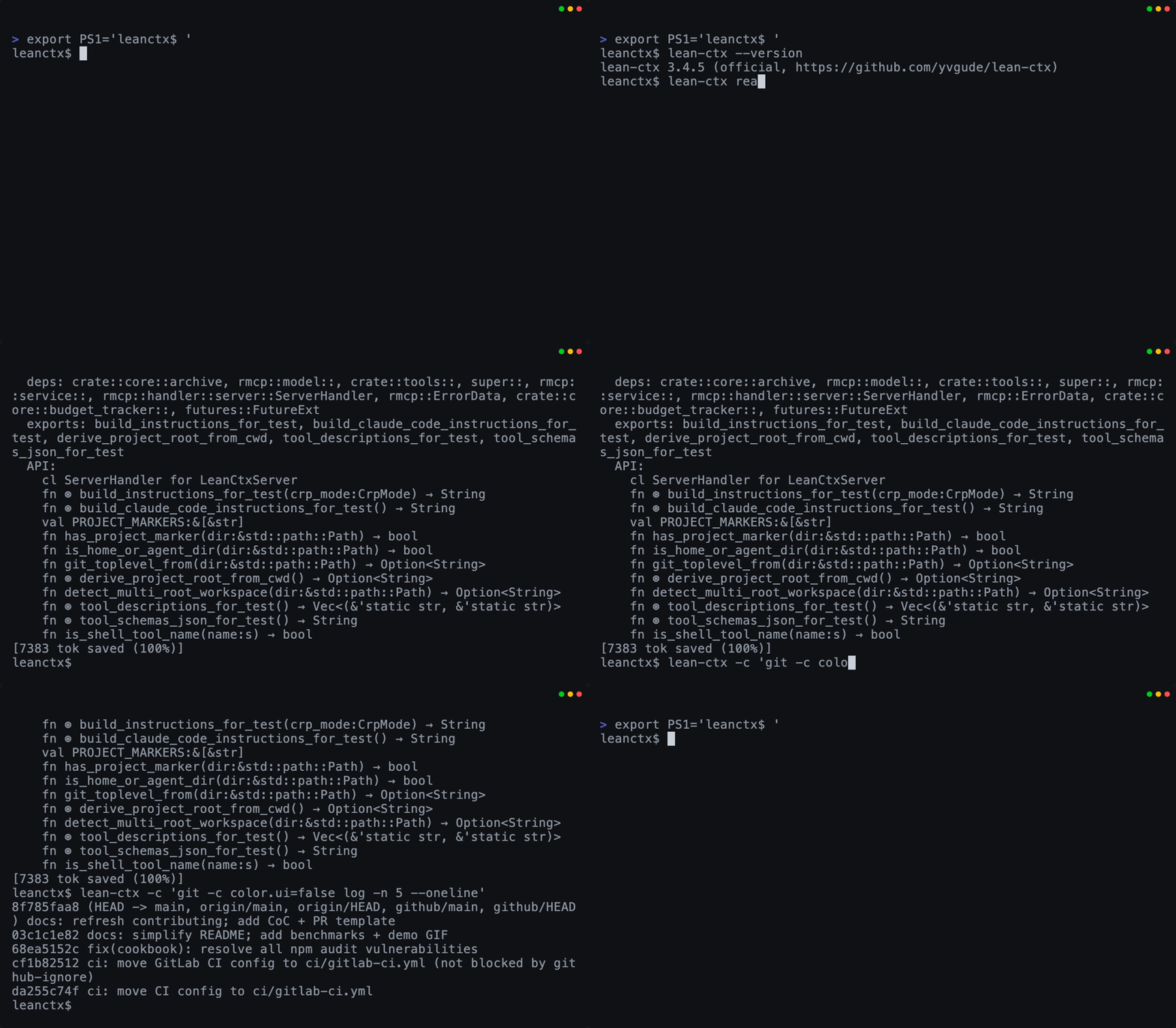
Read + Shell
Map-mode reads + compressed CLI output
|
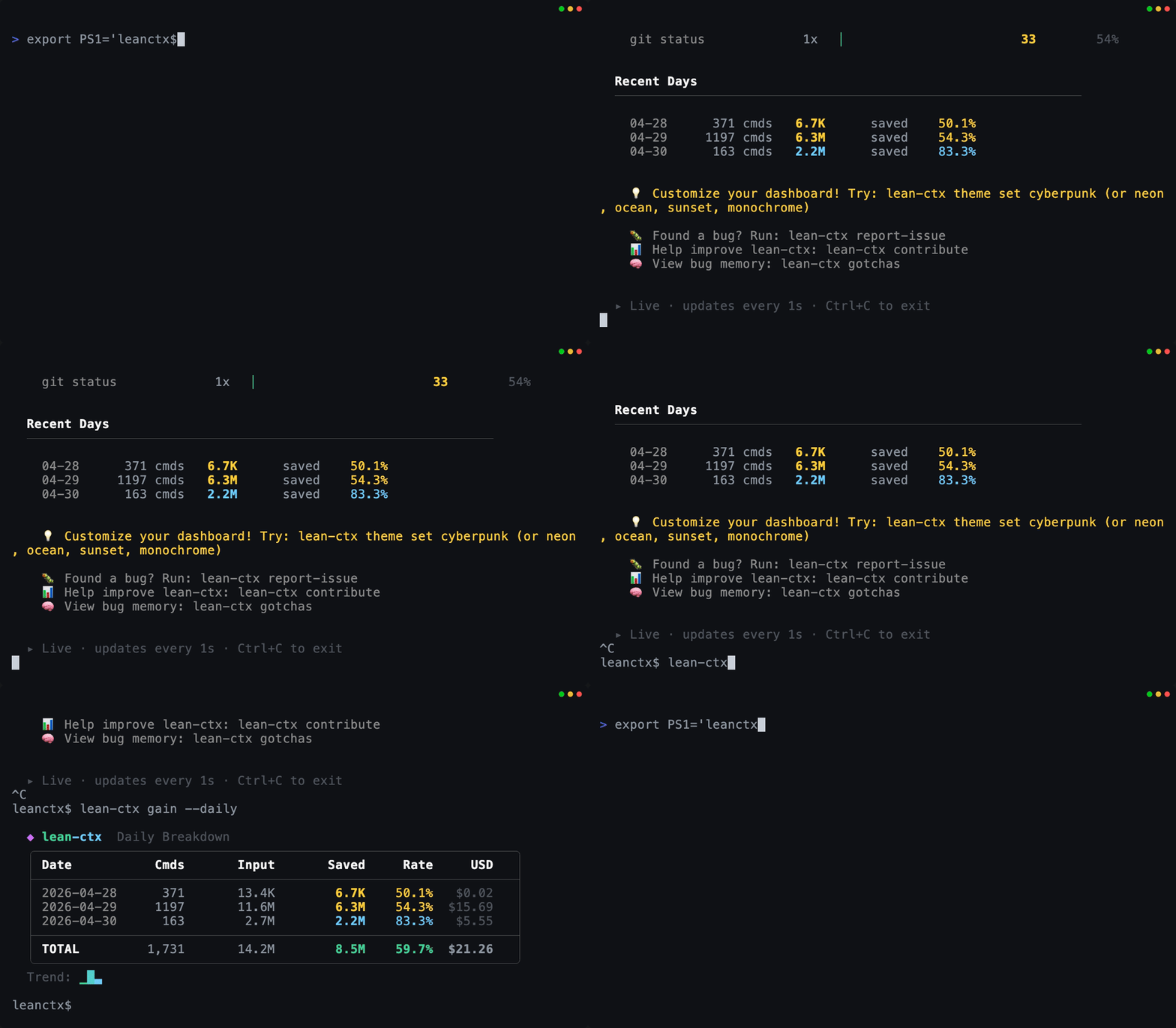
Gain (live)
Tokens + USD savings in real time
|
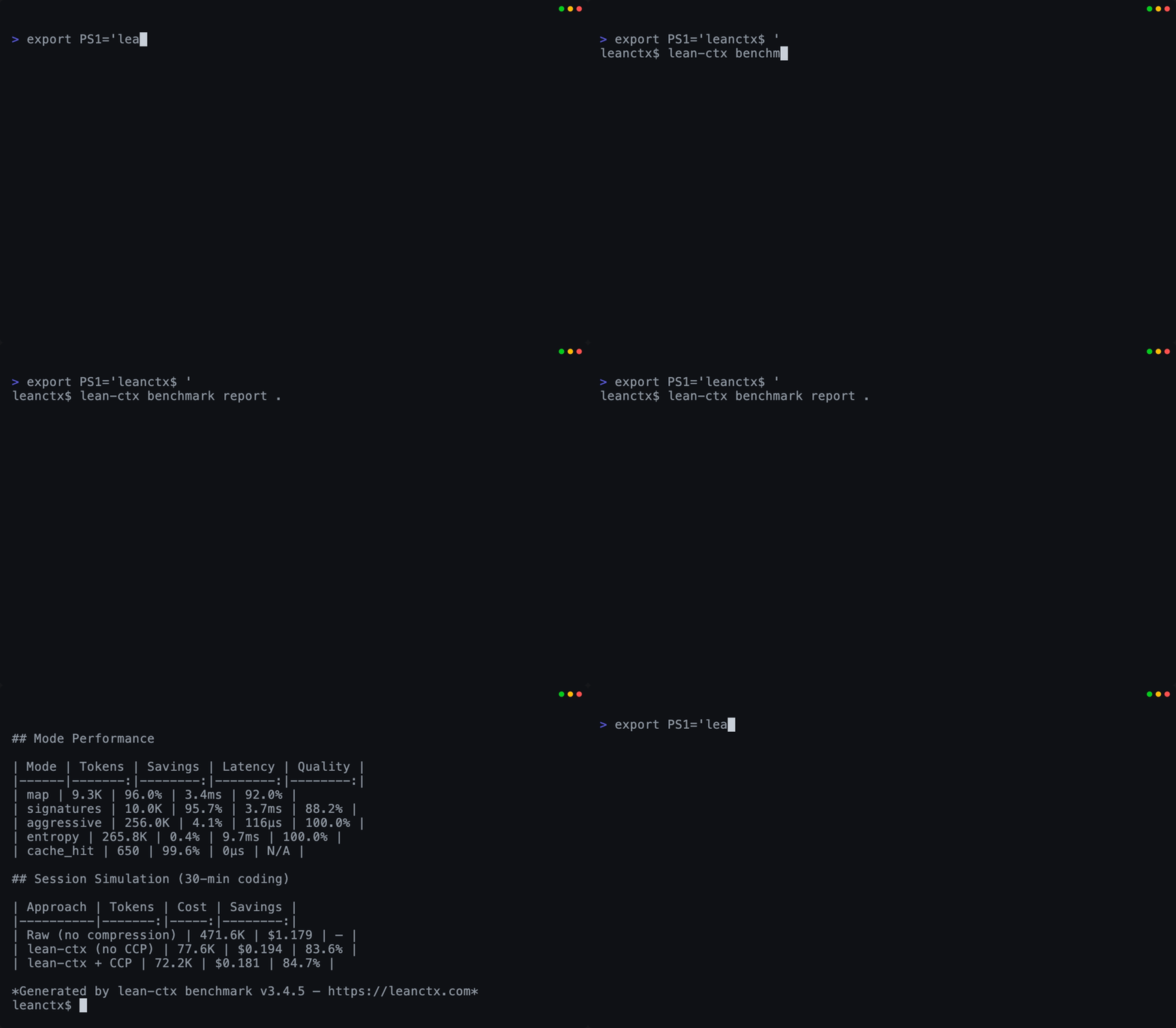
Benchmark proof
Measure compression by language + mode
|
所有 GIF 均由 demo/ 中可复现的 VHS tapes 生成。
## 为什么开发者使用 LeanCTX
- **更长的有效编码会话** — 更少的上下文浪费 = 更多空间用于实际的代码推理
- **更低的 API 成本** — 读取和 shell 输出减少 60–90% 的 token,缓存重新读取仅需约 13 token
- **告别“我已经给你看过这个文件了”** — session 记忆可跨聊天持久化
- **兼容你现有的设置** — 一条 `lean-ctx setup` 命令,无需更改配置
- **完全透明** — 准确查看你的上下文窗口预算消耗在何处
- **模型无关且完全属于你** — 自由切换 OpenAI/Anthropic/Gemini;你的上下文和记忆保持在本地且可移植,绝不锁定在供应商的黑盒中
为你节省了 token? 给个 Star — 帮助更多人发现 LeanCTX。
## 为什么是现在 — 拥有你的上下文
模型正逐渐趋同于常规商品。持久的优势不在于你调用 *哪个* 模型 — 而在于你的**上下文**:你的代理读取什么、记住什么,以及你能证明什么。而优化并*拥有*该上下文的层不可能来自按 token 计费或将你的记忆保存在黑盒中的供应商 — 它必须位于你这一侧。
这就是存在于你的聊天中并记住你公司信息的“代理实体”(如 Slack 中的 Claude、ClickUp Brain)背后的转变:这是**上下文登录,而非模型登录** — 你最终是在把自己的公司知识租回来。LeanCTX 则是完全相反的层。它让护城河属于你:本地优先、可移植 (`.ctxpkg`) 且模型无关 — 切换 OpenAI、Anthropic 或 Gemini 也不会丢失上下文或缓存。**拥有你的上下文;不要把它租回来。**
## 它的功能 — 上下文的四个维度
LeanCTX 将上下文视为一种受管理的资源,而不是事后才考虑的附属品。一个二进制文件涵盖了决定 AI 代理实际表现的四个维度:
### 1. 压缩 — 输入效率
你的 AI 代理会读取文件并运行命令。LeanCTX 会自动对两者进行压缩。
- **文件读取**:10 种读取模式(`full`、`map`、`signatures`、`diff`、`lines:N-M`、`density:X` 等) — 缓存重新读取仅需约 13 token
- **目标密度** (`density:0.4`):SDE 风格的预算压缩 — 保留最高信息熵的行,直到剩余约 40% 的原始 token,具有确定性
- **JIT 揭示**:`signatures` 携带行跨度并指向 `lines:N-M` 以进行针对性展开 — 先看大纲,按需查看主体
- **Shell 输出**:95+ 种 shell 输出模式可压缩 git、npm、cargo、docker、kubectl、terraform 等(包含 270 条透传规则)
- **Tree-sitter AST**:对 26 种语言的结构化理解 — 不仅仅是文本压缩
- **设计上可逆 (CCR)**:压缩从不会*丢弃*内容 — 被修剪或截断的 payload 会移动到带有确定性句柄的基于内容寻址的存储中,因此模型可以通过 `ctx_expand`、`ctx_retrieve`、带内标记或 `GET /v1/references/{id}` 按需拉取原始字节。[五种恢复路径 →](docs/comparisons/vs-headroom.md#reversibility)
### 2. 路由 — 每次读取的正确保真度
并非每个文件都需要相同的深度。LeanCTX 传递的是信号,而不是噪音。
- **10 种读取模式**:从完整内容到 AST 签名和基于信息熵过滤的视图
- **自适应 `ModePredictor`**:从过去的 session 中学习每种文件类型的最佳读取模式
- **`IntentEngine`**:对查询复杂度进行分类,使简单的查找保持低成本
### 3. 记忆 — 持久化的上下文
上下文不再在聊天之间消失。
- **Session 记忆 (CCP)**:跨聊天持久化任务/事实/决策 — 结构化恢复查询能够在压缩中存活
- **知识图谱**:带有有效窗口的时间事实,情景记忆 + 程序记忆
- **属性图**:多边代码图(imports、calls、exports、type_ref)支持影响分析和搜索排名
- **属于你,而非供应商的**:记忆保持在本地且可移植 — 将其导出为 `.ctxpkg` 包并在不同机器或模型之间移动,而不是将其锁定在供应商的黑盒中
### 4. 验证 — 控制到达模型的内容
性能是指准确性,而不仅仅是速度。你始终掌控着窗口。
- **Context Manager**:带有实时 token 跟踪、压缩统计、利用率仪表的浏览器仪表盘
- **预算与 SLO**:配置文件、角色、每个代理的预算和限流策略
- **Context Proof** (`ctx_proof`、`ctx_verify`):具有 CI 漂移阈值的 4 层验证引擎
完整功能列表 (81 个 MCP 工具)
- **网络与研究** (`ctx_url_read`):将公共网页、PDF 或 YouTube 字幕作为压缩的、带引用的文本提取到上下文中 — `facts`/`quotes` 返回带有置信度分数 + 来源 URL 的声明,按相关性排序的研究压缩将其提炼至一个 token 预算内,受 SSRF 防护(仅限 http/https)
- **图谱驱动的智能**:混合搜索(通过 RRF 结合 BM25 + embeddings + 图谱邻近度),增量 git-diff 更新
- **LSP 重构** (`ctx_refactor`):通过 rust-analyzer、typescript-language-server、pylsp、gopls 实现由语言服务器支持的重命名、查找引用和跳转定义
- **多代理** (`ctx_agent`、`ctx_handoff`):带有上下文传输包、日志系统和同步共享状态的代理切换
- **归档全文搜索** (`ctx_expand search_all`):基于 FTS5 对所有先前归档的工具输出进行跨归档搜索
- **PR 上下文包**:`lean-ctx pack --pr` 构建准备就绪的 PR 上下文包(更改的文件、相关测试、影响、制品)
- **上下文包**:`lean-ctx pack create` 将知识 + 图谱 + Session 打包成具有 SHA-256 完整性的可移植 `.ctxpkg` 文件
- **Context Time Machine**:`lean-ctx snapshot create|list|show|verify|restore|publish|import` — 在仅追加的时间线上对层状态(血缘、账本 Φ、ROI、session)进行 git 锚定、ed25519 签名的快照;在仪表盘中重放它们,`restore` 以恢复 session(以及 `--git` 以检出提交),或者 `publish`/`import` 签名的快照以进行分享([概念 →](docs/concepts/context-time-machine.md))
- **可观测性**:`lean-ctx gain --live` 用于实时节省统计,`lean-ctx wrapped` 用于每周/每月摘要(`gain --svg`/`--share` 用于可分享的卡片或可自托管的页面),`lean-ctx watch` 用于 TUI 监控
- **经过验证的节省**:`lean-ctx savings` 是一个可审计的、按事件记录的账本(tokenizer 透明度、兜底计算、防篡改 SHA-256 链) — 仅限本地,默认开启
- **HTTP 模式**:`lean-ctx serve` 用于可流式传输的 HTTP MCP + `/v1/tools/call`(由 Cookbook + SDK 使用)
## Addon — 通过一个网关运行整个生态系统
你无需在 LeanCTX 和你已经喜欢的其他上下文工具之间做出选择。**Addon** 将任何 MCP 服务器封装在一个微小的 `lean-ctx-addon.toml` 清单中;LeanCTX 通过一条命令在其网关后运行它,然后将它返回的内容视为你自己的读取结果,而不仅仅是将其代理转发。
```
lean-ctx addon search memory # browse the registry by category
lean-ctx addon add headroom # installs the upstream package + wires the MCP server, on add
lean-ctx addon list # what's wired into your gateway
```
- **一条命令添加** — `addon add
` 通过其原生管理器(uv、pip、cargo、npm、brew、dotnet)安装上游包,并将 MCP 服务器接入你的网关。无需复刻或重新编译。
- **融入而非仅仅代理** — 选择性的后处理通过与你代码相同的流水线处理 addon 输出:按预算压缩,将过大的 blob 溢出到 `ctx_expand` 句柄,索引到 BM25 / 图谱 / 知识中。类型化适配器将特定工具直接路由到 `ctx_expand`、`ctx_callgraph` 和 `ctx_knowledge`。
- **默认不受信任** — 每个 addon 的输出在到达模型之前都会被清除敏感信息并标记为不受信任。始终开启,无需额外标志。
- **你始终掌控全局** — 通过一条单个仓库无法覆盖的 `[addons]` 策略,将机器或集群固定为仅验证模式、白名单或完全关闭。
该注册表涵盖了压缩(Headroom、Sophon)、代码智能(Repomink、Serena)、记忆(Mem0、Cognee、Letta)和推理(Sequential Thinking)。请参阅 **[addon 指南](docs/guides/addons.md)** 或 [浏览它们全部](https://leanctx.com/addons/)。
## 发展方向LeanCTX 正从一个单一的上下文*层*发展为面向整个团队的完整**认知上下文层**:版本控制的上下文策略、统一的图谱,以及跨多个代理的治理层。
- **Context Time Machine → 托管历史记录** — 快照引擎、仪表盘重放、恢复以及基于文件的签名共享/导入已交付(见上文);下一步是为托管、版本化的上下文历史建立 `ctxpkg.com` 注册表,以及并排的模型视图 | git-diff 重放。贯穿 LeanCTX 所做一切的时间轴 — 它*决定、记忆、保护、证明并重放*。([概念 →](docs/concepts/context-time-machine.md))
- **Context as Code** — TOML 中的声明式 pipeline、配置文件和策略,像基础设施一样进行版本控制
- **统一上下文图** — 代码、测试、提交、CI 运行和知识条目位于单个语义图中
- **代理框架** — 用于多代理治理的角色、预算和工具权限
- **上下文可观测性** — 上下文消耗的 SLO、异常检测、OpenTelemetry / Prometheus 导出
完整的路线图位于 **[VISION.md](VISION.md)** 中。
## 工作原理 (30 秒了解)
LeanCTX 在**两个层面**上运作 — 你的代理 *读取* 什么以及它们 *发送给模型* 什么:
```
read path: AI tool → (MCP tools + shell) → lean-ctx → your repo + CLI
wire path: AI tool → lean-ctx proxy → model provider (every request, compressed)
```
- **MCP 服务器** *(读取路径)*:暴露 `ctx_*` 工具(读取模式、缓存、增量、搜索、记忆、多代理)
- **Shell hook** *(读取路径)*:透明地压缩常用命令,使 LLM 看到的噪音更少
- **请求代理** *(传输路径,可选)*:`lean-ctx proxy enable` 在你的代理和模型之间放置一个本地代理,用于压缩**每个请求** — system prompt、完整历史记录和 tool 结果 — 对 prompt 缓存安全,并具有可衡量的 USD 花费。它还可以在不破坏该缓存的情况下,在 OpenAI、Anthropic 和 Gemini 之间固定 **同一个 reasoning-effort 级别** (`proxy.effort`),通过缓存安全的冗长控制加上测量的保留来削减 **输出** token,并将**易失字段**(日期、UUID、提交 SHA)移出可缓存的前缀,从而使稳定的 system prompt 最终得以缓存。每次重写都是可逆的(内容寻址恢复),并且在契约上是字节稳定的。与独立的请求压缩代理(例如 Headroom)处于同一层 — 你不需要在其之上再叠加一个。
- **属性图**:多边代码图支持影响分析、相关文件发现和搜索排名
- **Session 记忆**:通过结构化恢复持久化状态,使得长时间运行的工作永远不会“冷启动”
- **Context Manager**:用于实时查看上下文窗口内容的浏览器仪表盘
## 开始使用 (60 秒)
```
# 1) 安装(任选其一)
curl -fsSL https://leanctx.com/install.sh | sh # universal (no Rust needed)
brew tap yvgude/lean-ctx && brew install lean-ctx # macOS / Linux
npm install -g lean-ctx-bin # Node.js
cargo install lean-ctx # Rust
pi install npm:pi-lean-ctx # Pi Coding Agent
# 2) 连接你的 AI 工具(零提示,合理默认值)
lean-ctx onboard # or: lean-ctx setup (guided, full control)
# 3) 验证
lean-ctx doctor
# 4) 重启你的 shell + AI 工具,正常使用,然后查看效果
lean-ctx gain # savings appear after your AI's first lean-ctx call
```
在引导(onboarding)之后,重启你的 shell 和编辑器/AI 工具一次,以便激活 MCP + hook。在你的 AI 工具进行第一次 lean-ctx 调用之前,`lean-ctx gain` 都会是空的 — 这是正常的,并不是配置错误。
**在 Windows 上从源码构建?** 复刻仓库并在 PowerShell 中运行 `./install.ps1` — 它会构建 release 二进制文件并将其安装到 Cargo 的 bin 目录中(传递 `-BuildOnly` 可仅构建而不安装)。
故障排除 / 安全
- 立即禁用(当前 shell):`lean-ctx-off`
- 未压缩地运行单个命令:`lean-ctx -c --raw "git status"`
- 仅在 AI 代理 session 中激活:在 `~/.config/lean-ctx/config.toml` 中设置 `shell_activation = "agents-only"`
- 针对项目的配置覆盖:在你的项目根目录中创建 `.lean-ctx.toml`(与全局配置自动合并)
- 共享 `/workspace` 的 Docker 项目:创建一个包含唯一名称的 `.lean-ctx-id` 以防止上下文冲突
- 更新:`lean-ctx update`
- 诊断(可分享):`lean-ctx doctor --json`
## 从你自己的代码中使用 (SDK)
除了 CLI,lean-ctx 还发布了相关库,以便你可以直接从你的应用中调用它。
**直接替换的 prompt 压缩 — [`lean-ctx-sdk`](https://pypi.org/project/lean-ctx-sdk/) ([npm](https://www.npmjs.com/package/lean-ctx-sdk))。** 在聊天式 `messages` 数组到达任何模型之前对其进行压缩 — 确定性且对 prompt 缓存友好;图像、tool-call 和 ID 原样通过。
```
# pip install lean-ctx-sdk
from lean_ctx import compress
messages = compress(messages, model="claude-sonnet-4")
```
```
// npm install lean-ctx-sdk
import { compress } from "lean-ctx-sdk";
messages = await compress(messages, { model: "gpt-4o" });
```
包含框架适配器(LiteLLM、LangChain、Vercel AI SDK)。→ **[compress() cookbook](docs/guides/compress-sdk.md)**
**轻量级 `/v1` 契约客户端 — [`lean-ctx-client`](https://pypi.org/project/lean-ctx-client/) ([npm](https://www.npmjs.com/package/lean-ctx-client) · [crates.io](https://crates.io/crates/lean-ctx-client))。** 封装了跨进程边界的完整 `/v1` 工具、事件和 session API — 绝不链接到引擎,因此随着 lean-ctx 的演进,它能保持稳定。
```
pip install lean-ctx-client # Python (imports as `leanctx`)
npm install lean-ctx-client # TypeScript / Node
cargo add lean-ctx-client # Rust
```
使用 `lean-ctx serve` 启动服务器,然后将客户端指向它。→ **[API 参考](https://leanctx.com/docs/api-reference/)**
## 真实场景
LeanCTX 与你一同成长。以下是大多数人实际经历的旅程 — 每一项都链接到 **[参考](docs/reference/README.md)** 中逐个函数的完整演练(每个 CLI 命令和所有 79 个 MCP 工具均有相关文档记录)。
|
### 🟢 你的前 60 秒
*“我刚安装好 — 接下来做什么?”*
```
lean-ctx onboard # connect every detected AI tool
lean-ctx doctor # confirm you're wired up
```
一条命令即可自动检测 Cursor/Claude/Codex/… 并配置 MCP + hook。
→ **[旅程 1 — 设置与引导](docs/reference/01-setup-and-onboarding.md)**
|
### 📖 每日编码
*“停止重复读取相同的文件。”*
```
lean-ctx read src/server.rs -m map # API surface, ~13 tok on re-read
lean-ctx -c "git status" # compressed shell output
```
你的代理读取更少的内容并进行更智能的搜索 — 全自动。
→ **[旅程 2 — 日常使用](docs/reference/02-daily-use.md)**
|
|
### 🧠 从中断的地方继续
*“我的新聊天忘记了所有事情。”*
```
lean-ctx overview # task-aware project recap
lean-ctx knowledge recall "auth" # facts that survive resets
lean-ctx knowledge consolidate # import session + compact lifecycle
lean-ctx knowledge consolidate --all # compact every project store
```
Session 记忆 + 项目知识图谱可跨聊天持久化。
→ **[旅程 3 — 记忆与知识](docs/reference/03-memory-and-knowledge.md)**
|
### 🗺️ 理解新代码库
*“这个函数会波及到哪里?”*
```
lean-ctx graph impact src/auth.rs # blast radius
lean-ctx smells scan # code-smell hotspots
```
多边属性图支持影响分析 + 排名搜索。
→ **[旅程 4 — 代码智能](docs/reference/04-code-intelligence.md)**
|
|
### 🔌 提供商与多仓库
*“拉取 GitHub issue 和我们的 Postgres schema。”*
```
lean-ctx provider list
lean-ctx serve --root ./api --root ./web # multi-repo
```
外部数据流经相同的合并 pipeline。
→ **[旅程 5 — 高级与集成](docs/reference/05-advanced.md)**
|
### 🛠️ 保持健康
*“更新、修复或彻底移除。”*
```
lean-ctx doctor --fix
lean-ctx update
```
自我修复诊断;精准卸载,仅移除其自身相关的代码块。
→ **[旅程 6 — 生命周期与故障排除](docs/reference/06-lifecycle.md)**
|
|
### 🎛️ 掌控窗口
*“像专业人士一样规划我的上下文预算。”*
```
lean-ctx plan "refactor billing" --budget 8000
lean-ctx compile --mode balanced
```
Phi 评分规划 + 背包编译 + 上下文账本。
→ **[旅程 7 — 上下文工程](docs/reference/07-context-engineering.md)**
|
### 🤝 运行代理团队
*“在同一个仓库上运行规划者 + 编码者 + 审查者。”*
```
ctx_agent action=register role=dev
ctx_handoff action=create # baton-pass with full context
```
共享消息总线、日志、知识和确定性切换。
→ **[旅程 8 — 多代理协作](docs/reference/08-multi-agent.md)**
|
|
### 🏢 跨团队 / CI 共享
*“一个共享的索引,在 pipeline 中实现无头运行。”*
```
lean-ctx team serve --config team.toml
lean-ctx bootstrap # zero-prompt CI setup
```
作用域 token,可选的云同步,可验证的上下文阈值。
→ **[旅程 9 — 团队、云与 CI](docs/reference/09-team-cloud-ci.md)**
|
### 🎚️ 调优与治理
*“让它完全按照我们的意愿行事。”*
```
lean-ctx compression standard
lean-ctx harden # enforce token discipline
```
压缩级别、工具配置文件、主题和规则治理。
→ **[旅程 10 — 定制与治理](docs/reference/10-customization-and-governance.md)**
|
|
### 📊 证明收益
*“给我看数据。”*
```
lean-ctx gain --deep # savings, cost, per-agent, heatmap
lean-ctx wrapped # shareable recap (also: gain --svg / gain --share)
lean-ctx savings # verified per-event ledger (auditable; savings verify)
```
所有分析数据都存在于 CLI/仪表盘中 — 绝不白白消耗代理 token。
→ **[旅程 11 — 分析与洞察](docs/reference/11-analytics-and-insights.md)**
|
### 📚 完整参考
*“我想阅读所有内容。”*
以用户旅程形式组织的每条命令和所有 81 个 MCP 工具,外加
[CLI 导图](docs/reference/appendix-cli-map.md)、
[MCP 工具](docs/reference/appendix-mcp-tools.md) 和
[路径与配置](docs/reference/appendix-paths-and-config.md) 的附录。
→ **[参考索引](docs/reference/README.md)**
|
## 支持的 IDE 与 AI 工具
LeanCTX 是一个标准的 **MCP 服务器**,因此它适用于任何兼容 MCP 的客户端。针对每个代理会自动选择两种集成模式:
| 模式 | 工作原理 | 最适合 |
|---|---|---|
| **Hybrid** | MCP 用于缓存读取(约 13 token) + shell hook 用于命令压缩 | 具有 shell 访问权限的代理(Cursor、Claude Code、Codex 等) |
| **MCP** | 通过 MCP 协议使用全部 80 种工具,无 shell hook | 仅限协议的代理(JetBrains、VS Code、Zed 等) |
### 代理兼容性矩阵
| 代理 | Hybrid | MCP | 设置 |
|---|:---:|:---:|---|
| Cursor | ● | | `lean-ctx init --agent cursor` |
| Claude Code | ● | | `lean-ctx init --agent claude` |
| CodeBuddy | ● | | `lean-ctx init --agent codebuddy` |
| Augment CLI / VS Code | ● | | `lean-ctx init --agent augment` |
| Codex CLI | ● | | `lean-ctx init --agent codex` |
| Gemini CLI | ● | | `lean-ctx init --agent gemini` |
| Windsurf | ● | | `lean-ctx init --agent windsurf` |
| GitHub Copilot | ● | | `lean-ctx init --agent copilot` |
| CRUSH | ● | | `lean-ctx init --agent crush` |
| Hermes | ● | | `lean-ctx init --agent hermes` |
| OpenCode | ● | | `lean-ctx init --agent opencode` |
| Pi | ● | | `lean-ctx init --agent pi` |
| Qoder | ● | | `lean-ctx init --agent qoder` |
| Amp | ● | | `lean-ctx init --agent amp` |
| Cline | ● | | `lean-ctx init --agent cline` |
| Roo Code | ● | | `lean-ctx init --agent roo` |
| Kiro | ● | | `lean-ctx init --agent kiro` |
| Antigravity | ● | | `lean-ctx init --agent antigravity` |
| Amazon Q | ● | | `lean-ctx init --agent amazonq` |
| Qwen | ● | | `lean-ctx init --agent qwen` |
| Trae | ● | | `lean-ctx init --agent trae` |
| Verdent | ● | | `lean-ctx init --agent verdent` |
| Aider | | ● | `lean-ctx init --agent aider` |
| Continue | | ● | `lean-ctx init --agent continue` |
| JetBrains IDEs | | ● | `lean-ctx init --agent jetbrains` |
| QoderWork | | ● | `lean-ctx init --agent qoderwork` |
| VS Code | | ● | `lean-ctx init --agent vscode` |
| Zed | | ● | `lean-ctx init --agent zed` |
| Neovim | | ● | `lean-ctx init --agent neovim` |
| Emacs | | ● | `lean-ctx init --agent emacs` |
| Sublime Text | | ● | `lean-ctx init --agent sublime` |
### 何时使用(以及何时不使用)
**非常适合你,...**
- 每天使用 AI 编码工具,并且你的 session 频繁使用 shell(git/测试/构建)
- 在中型/大型仓库(50+ 个文件 / monorepo)中工作
- 想要一个默认 **无遥测** 的本地优先层
**跳过它,如果你...**
- 主要在微型仓库中工作,并且很少从你的 AI 工具中调用 shell
- 始终需要原始/未过滤的日志(你仍然可以使用 `--raw`,但 ROI 较低)
诚实的附带说明:收益取决于三个杠杆 — **触及面**(通过代理/引擎拥有窗口,而不仅仅是 `ctx_*` 工具层)、**上下文生命周期**(一个长期的存活 session 与每个阶段全新的进程)和**提供商定价**(基于 prompt 缓存定价与每次对话重新计费)。当它们对齐时会叠加成明显的优势,而不对齐时则净值为**盈亏平衡**。请参阅 [优势与盈亏平衡矩阵](docs/reference/14-performance-tuning.md#win-vs-break-even-at-a-glance) 获取完整的详细分析以及如何针对每种情况进行调优。
## 演示
在任何仓库中尝试这些命令:
```
lean-ctx read rust/src/server/mod.rs -m map
lean-ctx -c "git log -n 5 --oneline"
lean-ctx gain --live
lean-ctx dashboard # Context Manager (browser)
lean-ctx watch # TUI monitor
lean-ctx benchmark report .
```
- 该仓库附带了用于在 `demo/` 中渲染 GIF 的确切 tapes
- 在本地重新生成:
```
vhs demo/leanctx.tape
vhs demo/gain.tape
vhs demo/benchmark.tape
```
## 基准测试
真实重现的数字 — 绝非估算。使用 GPT-4o tokenizer (`o200k_base`) 在此仓库中进行测量;未安装的工具会照此报告,绝不瞎猜。
| 读取模式 | 压缩率 | Token (50 个文件) | 质量 |
|---|---:|---:|---:|
| 原始读取 | 0% | 457.6K | 100% |
| `map` | **97.7%** | 8.9K | 83% |
| `signatures` | **97.0%** | 11.8K | 92% |
| 缓存重新读取 | ~99.99% | ~13 tok | 100% |
准确性并不是凭感觉:有损阶段是受 **CI 阈值控制** 的。一个无模型的 A/B 阈值证明了 JSON 压缩器在削减 token 的同时保留了 *每一个* 黄金答案,并且代理重写在契约上是字节稳定的,因此 Anthropic (90%) / OpenAI (50%) 的 prompt 缓存折扣能够在压缩后依然生效。确定性的 **开关对比测试台** (`lean-ctx eval testbench`) 将证明扩展到了 *答案*:它通过原始转储基线和在相同 token 预算下的 lean-ctx 运行固定的真实仓库,使用 LLM 裁判对自由格式的 QA 进行评分,并使用每个仓库自己的测试对代码进行评分,然后生成 `FINDINGS.md`(token / 轮次 / 挂钟时间 / 质量)以及一个回归文件 — 并带有已提交的记录子集,一旦发生任何回归就会阻止 CI。
- **最新快照**:[BENCHMARKS.md](BENCHMARKS.md)
- **重现**:`lean-ctx benchmark report .`
## 数据一览
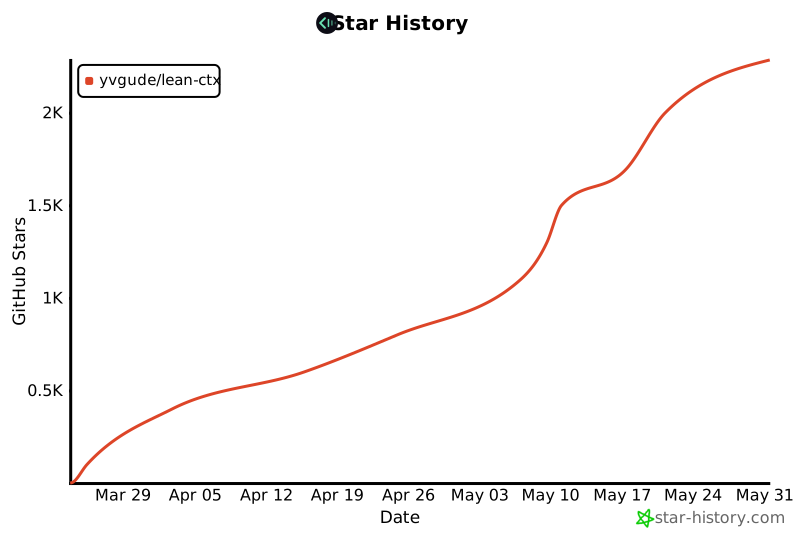
- **2,900+ GitHub Star** — 并且还在增加
- **280+ Fork** — 活跃的社区贡献
- **200+ 个发布版本** — 自推出以来几乎每天发布
- **30+ 支持的 AI 编码代理** — 最广泛的 MCP 兼容性
- **81 个 MCP 工具** — 从简单的文件读取到多代理编排
- 被日常运行 Claude Code、Cursor 和 Codex 的团队用于生产环境
- **实时采用指标**:[leanctx.com/metrics](https://leanctx.com/metrics/) — 安装量、Star 数和节省量,持续更新
## 文档
- **参考(按用户旅程划分的每个功能)**:[docs/reference/](docs/reference/README.md) — 11 个旅程 + CLI/MCP/配置附录
- **适用于 AI 代理 / LLM**:[llms.txt](llms.txt) — 一份精选的、机器可读的 lean-ctx 导图(基于 [llms.txt](https://llmstxt.org) 规范)
- 入门指南:https://leanctx.com/docs/getting-started
- 工具参考:https://leanctx.com/docs/tools/
- CLI 参考:https://leanctx.com/docs/cli-reference/
- 什么是 LeanCTX:https://leanctx.com/what-is-leanctx/
- 对比(与 RTK、Context+、MemGPT):https://leanctx.com/compare/
- 定价与云(本地使用永久免费):https://leanctx.com/pricing/
- 常见问题:[discord-faq.md](discord-faq.md)
- 功能目录(SSOT 快照):[LEANCTX_FEATURE_CATALOG.md](LEANCTX_FEATURE_CATALOG.md)
- Monorepo 指南:[docs/guides/monorepo.md](docs/guides/monorepo.md)
- 架构:[ARCHITECTURE.md](ARCHITECTURE.md)
- 愿景:[VISION.md](VISION.md)
## 隐私与安全
- **默认无遥测**
- **可选的匿名统计数据共享**(在设置期间选择加入)
- **可禁用的更新检查**(配置 `update_check_disabled = true` 或 `LEAN_CTX_NO_UPDATE_CHECK=1`)
- **v3.5.16 中有 40 多项安全加固修复**(路径遍历、注入、CSPRNG、CSP、资源限制 — [详情](CHANGELOG.md))
- 在本地运行;除非你明确启用云同步,否则你的代码永远不会离开你的机器
请参阅 [SECURITY.md](SECURITY.md)。
## 卸载
一条命令即可移除 **所有内容** — 它会停止所有进程,然后删除 hook、编辑器配置、规则、自启动(LaunchAgent/systemd)、数据目录,**以及二进制文件本身**:
```
lean-ctx uninstall # full clean removal
lean-ctx uninstall --dry-run # preview every change, write nothing
lean-ctx uninstall --keep-config # keep MCP configs + rules (for reinstall)
lean-ctx-off # or just disable for the current shell session
```
PATH 中没有二进制文件(或者你使用了 curl 安装程序)?从安装程序运行相同的移除命令:
```
curl -fsSL https://leanctx.com/install.sh | sh -s -- --uninstall
```
如果你是通过包管理器安装的,`uninstall` 会删除它写入的所有内容,并告诉你完成移除二进制文件所需的那一条命令:
```
brew uninstall lean-ctx # Homebrew
cargo uninstall lean-ctx # cargo install
npm uninstall -g lean-ctx-bin # npm
pi uninstall npm:pi-lean-ctx # Pi Coding Agent
```
## Star 历史
 ## 贡献
从 [CONTRIBUTING.md](CONTRIBUTING.md) 开始。简单的首个 PR:通过 [issue 模板](.github/ISSUE_TEMPLATE/compression_pattern.md) 提出新的 CLI 压缩模式。
## 许可证
Apache License 2.0 — 请参阅 [LICENSE](LICENSE)。
## 贡献
从 [CONTRIBUTING.md](CONTRIBUTING.md) 开始。简单的首个 PR:通过 [issue 模板](.github/ISSUE_TEMPLATE/compression_pattern.md) 提出新的 CLI 压缩模式。
## 许可证
Apache License 2.0 — 请参阅 [LICENSE](LICENSE)。 标签:AI智能体, MCP, Rust, Token压缩, 上下文工程, 可视化界面, 大模型, 暗色界面, 本地部署, 网络流量审计, 通知系统








