bukx/secure-cicd-pipeline
GitHub: bukx/secure-cicd-pipeline
基于 GitLab CI 的 DevSecOps 流水线模板,整合静态分析、容器扫描、动态测试、密钥管理和 CIS 合规加固,实现安全左移的自动化交付。
Stars: 0 | Forks: 0
# 安全的 CI/CD Pipeline
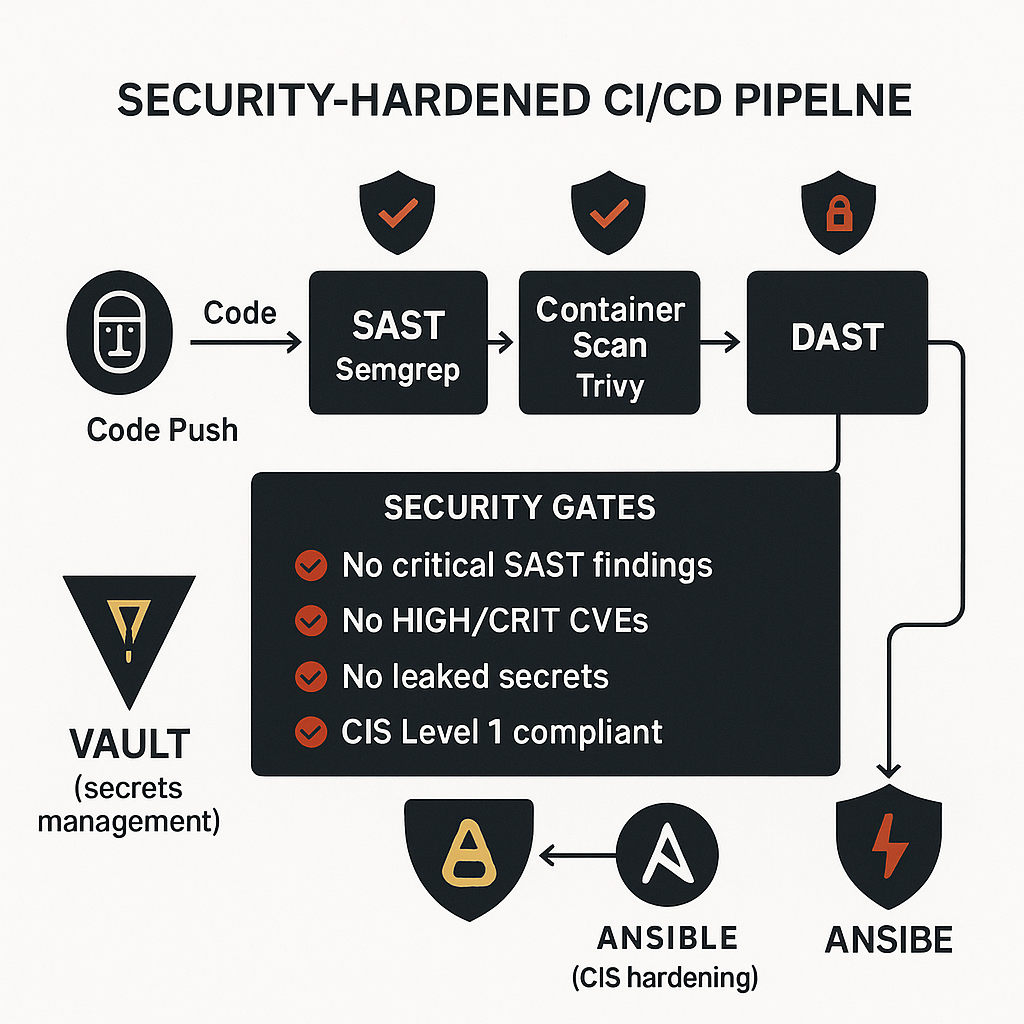
DevSecOps pipeline 侧重于左移安全、运行时密钥管理、容器扫描、DAST 和合规性自动化。该仓库展示了交付工作流如何强制执行安全门控,而不是将安全视为事后补充。
## 为什么这个仓库很重要
这个项目脱颖而出,因为它将安全交付与实际的控制措施结合起来:密钥检测、SAST、容器扫描、DAST、基于 Vault 的密钥以及主机加固。它读起来像一个平台安全工作流,而不仅仅是一个工具列表。
## 安全阶段
| 阶段 | 工具 |
|---|---|
| 密钥检测 | gitleaks |
| SAST | Semgrep |
| 容器扫描 | Trivy |
| DAST | OWASP ZAP |
| 密钥交付 | HashiCorp Vault |
| 合规性加固 | Ansible |
| 报告 | Python 生成的输出 |
## 包含内容
- `.gitlab-ci/` 下的 GitLab CI pipeline 定义
- `ansible/` 下的 CIS Level 1 加固自动化
- `security-tools/` 下的扫描策略和配置
- `vault/` 下的 Vault 策略
- `docs/` 下的文档和报告资产
- `.github/` 下的 GitHub workflow 自动化
## 快速开始
```
# 使用 GitLab Runner 在本地运行 pipeline
gitlab-runner exec docker security-scan
# 或者运行单个工具
semgrep scan --config=p/owasp-top-ten app/
gitleaks detect --source=. --config=security-tools/gitleaks/.gitleaks.toml
trivy image myapp:latest --severity HIGH,CRITICAL
```
## 仓库结构
```
.
|-- .gitlab-ci/ # GitLab CI pipeline definitions
|-- ansible/ # CIS hardening automation
|-- docs/ # compliance reports and supporting docs
|-- security-tools/ # gitleaks, Semgrep, Trivy, and ZAP config
|-- vault/ # Vault policies
`-- .github/ # validation workflows
```
## 这展示了什么
- 具有强制门控的安全软件交付
- 没有硬编码凭证的密钥处理
- 跨越静态、容器和动态分析的分层测试
- 将基础设施加固作为发布路径的一部分,而不是单独的手动步骤
标签:AI应用开发, CI/CD流水线, DevSecOps, 上游代理, 动态应用安全测试, 合规自动化, 安全专业人员, 系统提示词, 逆向工具, 静态代码扫描