tk-alajmi/ace-threat-intel-dashboard
GitHub: tk-alajmi/ace-threat-intel-dashboard
一款基于GitHub Pages的无服务器威胁情报仪表盘,利用Google Gemini AI自动聚合和分析多源安全新闻,生成带风险评分、IoC和MITRE ATT&CK映射的结构化威胁报告。
Stars: 0 | Forks: 0
# 🛡️ ACE 威胁情报仪表盘
[](https://github.com/tk-alajmi/ace-threat-intel-dashboard/actions/workflows/fetch-news.yml)
[](https://tk-alajmi.github.io/ace-threat-intel-dashboard/)
[](https://opensource.org/licenses/MIT)
[](https://tk-alajmi.github.io/ace-threat-intel-dashboard/)
[](https://ai.google.dev/)
## 📋 目录
- [概述](#overview)
- [在线演示](#-live-demo)
- [截图](#-screenshots)
- [功能特性](#-features)
- [架构](#-architecture)
- [技术栈](#-technology-stack)
- [项目结构](#-project-structure)
- [部署指南](#-deployment-guide)
- [配置](#-configuration)
- [API 参考](#-api-reference)
- [数据模式](#-data-schema)
- [安全注意事项](#-security-considerations)
- [故障排除](#-troubleshooting)
- [本地开发](#-local-development)
- [贡献](#-contributing)
- [许可证](#-license)
- [免责声明](#-disclaimer)
- [联系方式](#-contact)
## 概述
**ACE 威胁情报仪表盘**是一个**生产级、完全无服务器、AI 驱动的网络威胁情报平台**,它从多个可信来源聚合网络安全新闻,使用 **Google Gemini AI** 分析和总结威胁,并在专业的 SOC 风格界面中展示可操作的洞察。
### 主要亮点
- 🚀 **完全无服务器** - 完全运行在 GitHub Pages + GitHub Actions 上,无需传统后端
- 🤖 **AI 驱动的分析** - 利用 Google Gemini AI 进行智能威胁总结和分类
- 🔄 **自动更新** - 威胁情报每 6 小时自动获取并更新一次
- 📱 **响应式设计** - 在桌面、平板和移动设备上无缝运行
- 🌙 **暗黑模式** - 针对 SOC 环境优化的专业暗色主题
- 🆓 **100% 免费托管** - 无服务器成本,完全运行在 GitHub 的免费层级上
- 🔒 **设计安全** - API 密钥安全存储在 GitHub Secrets 中,不暴露给客户端
## 🌐 在线演示
**[👉 查看在线仪表盘](https://tk-alajmi.github.io/ace-threat-intel-dashboard/)**
仪表盘每 6 小时自动更新一次,包含来自多个网络安全新闻来源的最新威胁情报。
## 📸 截图
### 仪表盘概览
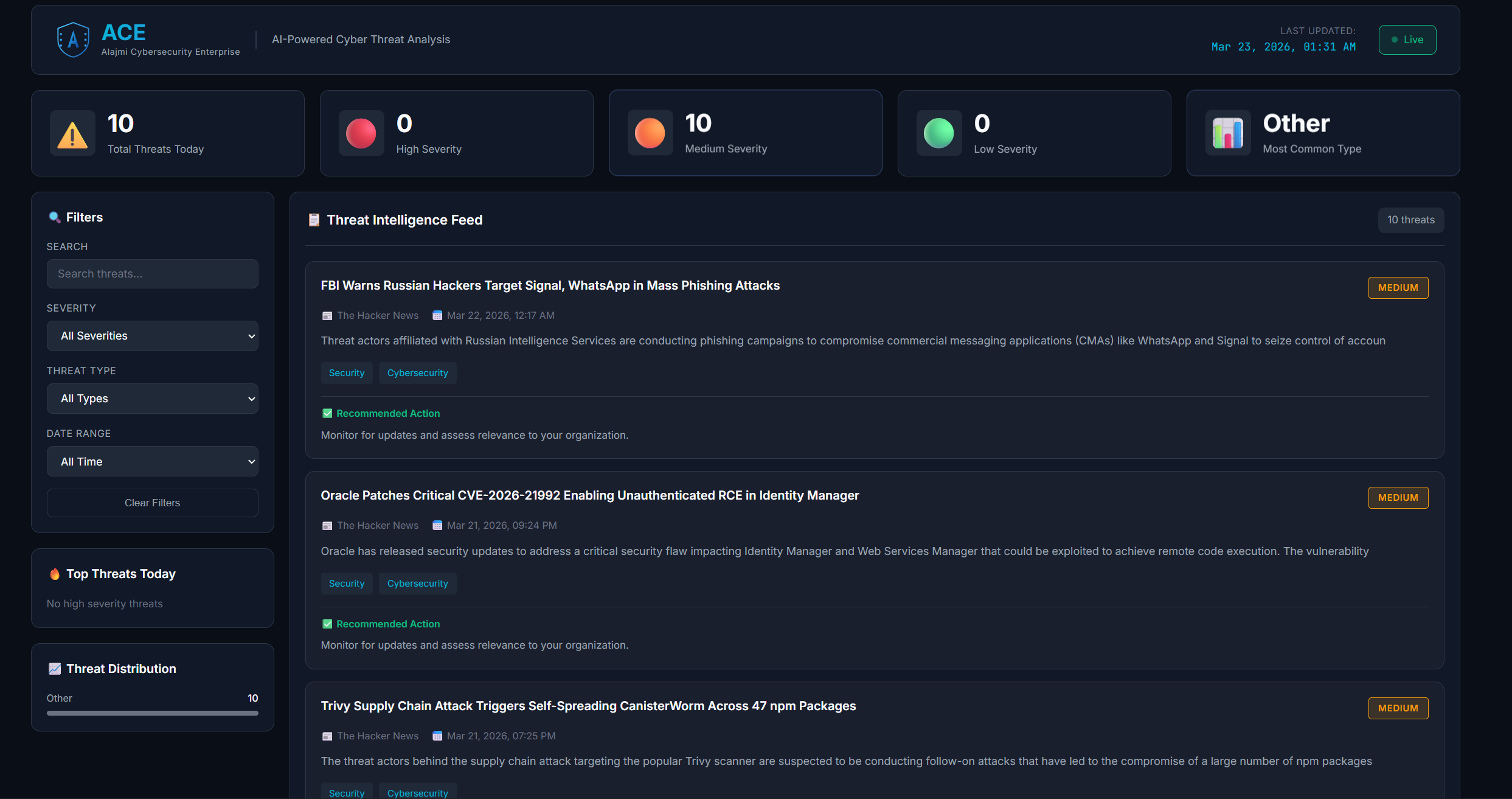 *显示 KPI、威胁源和过滤选项的主仪表盘*
### 威胁详情弹窗
*显示 KPI、威胁源和过滤选项的主仪表盘*
### 威胁详情弹窗
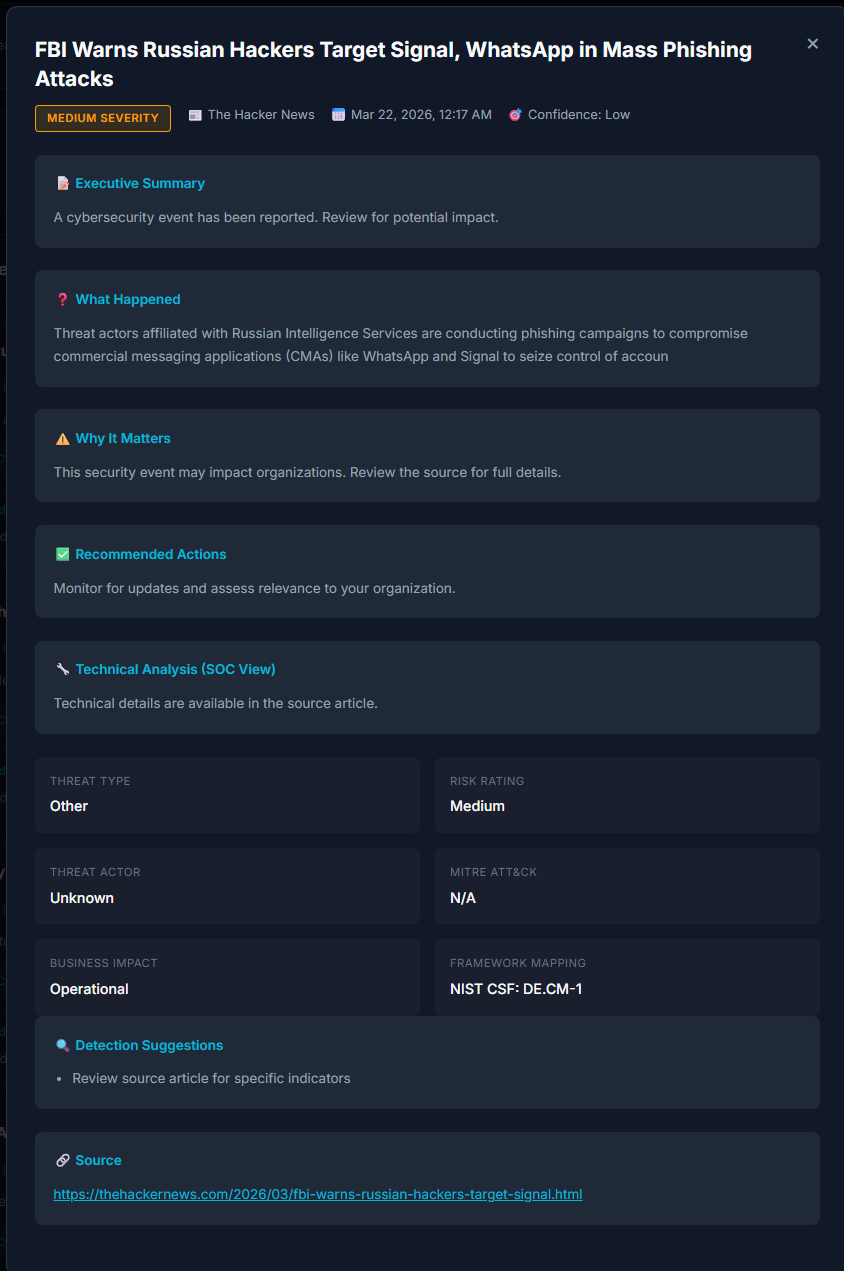 *包含 IoC、MITRE ATT&CK 映射和建议的详细威胁分析*
### 移动端响应式
*包含 IoC、MITRE ATT&CK 映射和建议的详细威胁分析*
### 移动端响应式
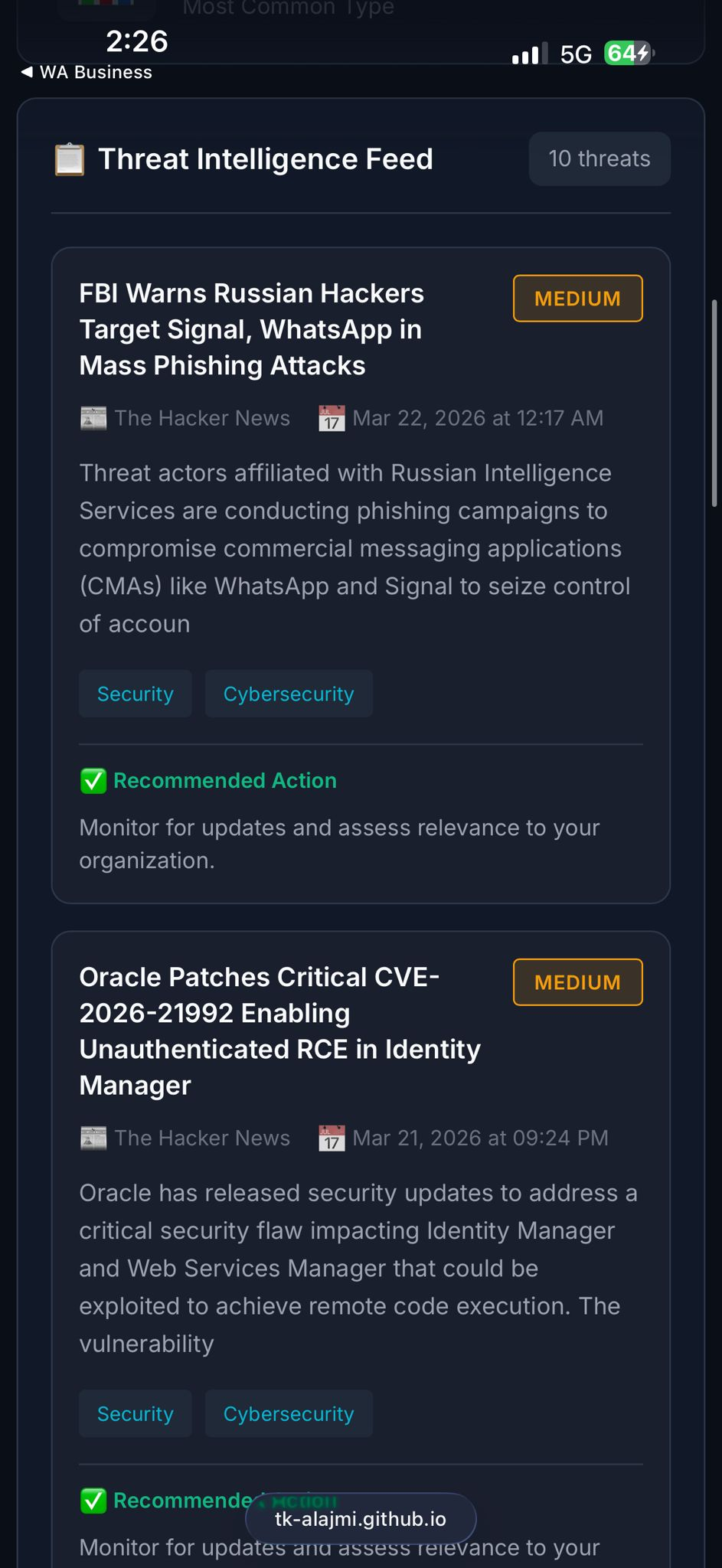 *针对移动设备的完全响应式设计*
## ✨ 功能特性
### 🎯 动态风险评分系统
仪表盘实施了一个符合 SOC 和 GRC 最佳实践的**生产级风险评分系统**:
**风险评分公式:**
```
Risk Score = (CVSS × 0.4) + (EPSS × 10 × 0.3) + (Exploit Availability × 0.2) + (Asset Criticality × 0.1)
```
**严重性分类:**
- **Critical** (9.0-10.0): 需要立即采取行动
- **High** (7.0-8.9): 需要紧急关注
- **Medium** (4.0-6.9): 应当处理
- **Low** (0-3.9): 监控并跟踪
**风险因素:**
- **CVSS Score (0-10)**: 通用漏洞评分系统分数
- **EPSS Score (0-1)**: 漏洞利用预测评分系统(被利用的概率)
- **Exploit Availability**: 是否存在公开的漏洞利用程序
- **Asset Criticality (1-10)**: 受影响资产的业务关键性
### 🎯 威胁情报
| 特性 | 描述 |
|---------|-------------|
| **AI 生成的摘要** | 每个威胁都包含全面的 AI 生成分析,涵盖发生了什么、为何重要、建议措施、执行摘要(非技术性)和技术分析(SOC 视图) |
| **严重性分类** | 根据威胁特征和潜在影响自动评定严重性等级(Critical、High、Medium、Low) |
| **威胁分类** | 自动分类,包括恶意软件、勒索软件、网络钓鱼、APT、漏洞、数据泄露、零日漏洞、供应链、DDoS 和内部威胁 |
| **置信度级别** | AI 对每次威胁分析评估的置信度(High、Medium、Low) |
### 🔍 SOC 级别功能
| 特性 | 描述 |
|---------|-------------|
| **入侵指标** | 提取的 IP、域名、哈希值及其他用于威胁搜寻的指标 |
| **MITRE ATT&CK 映射** | 自动映射到 MITRE ATT&CK 框架技术(例如 T1190 - 利用面向公众的应用程序) |
| **威胁行为者识别** | 在可用时归因于已知的威胁行为者(例如 APT29、Lazarus Group) |
| **检测建议** | 可操作的检测规则和监控建议 |
| **杀伤链分析** | 映射到网络杀伤链阶段,以便更好地了解攻击进展 |
### 📊 GRC/风险功能
| 特性 | 描述 |
|---------|-------------|
| **业务影响评估** | 分析潜在的业务影响(运营、财务、声誉、法律) |
| **风险评级** | 综合可能性和影响的总体风险评级 |
| **框架映射** | 映射到合规框架(NIST CSF、ISO 27001、PCI-DSS、HIPAA) |
| **执行摘要** | 适合高管简报的非技术性摘要 |
| **趋势分析** | 识别新兴的威胁趋势和模式 |
### 🖥️ 仪表盘功能
| 特性 | 描述 |
|---------|-------------|
| **实时 KPI 卡片** | 一目了然的指标,显示威胁总数、严重性细分和最常见的威胁类型 |
| **交互式威胁源** | 可滚动的源,带有可展开的威胁卡片,显示详细分析 |
| **高级过滤** | 按严重性、威胁类型、日期范围和关键字搜索进行过滤 |
| **首要威胁面板** | 突出显示需要立即关注的最关键威胁的侧边栏 |
| **威胁分布图表** | 按类别对威胁进行直观细分 |
| **暗黑模式界面** | 减少 SOC 环境中眼部疲劳的专业暗色主题 |
| **响应式设计** | 针对桌面、平板和移动浏览进行了优化 |
| **离线功能** | 仪表盘在离线时可使用缓存数据工作 |
## 🏗️ 架构
```
┌─────────────────────────────────────────────────────────────────────────────┐
│ GITHUB ACTIONS │
│ ┌─────────────────────────────────────────────────────────────────────┐ │
│ │ Scheduled Workflow (Every 6 Hours) │ │
│ │ ┌──────────────┐ ┌──────────────┐ ┌──────────────────────┐ │ │
│ │ │ RSS Feeds │───▶│ Python │───▶│ Google Gemini AI │ │ │
│ │ │ (Multiple │ │ Script │ │ (Analysis & │ │ │
│ │ │ Sources) │ │ │ │ Summarization) │ │ │
│ │ └──────────────┘ └──────────────┘ └──────────────────────┘ │ │
│ │ │ │ │
│ │ ▼ │ │
│ │ ┌──────────────────┐ │ │
│ │ │ threats.json │ │ │
│ │ │ (Data Store) │ │ │
│ │ └──────────────────┘ │ │
│ └─────────────────────────────────────────────────────────────────────┘ │
└─────────────────────────────────────────────────────────────────────────────┘
│
▼
┌─────────────────────────────────────────────────────────────────────────────┐
│ GITHUB PAGES │
│ ┌─────────────────────────────────────────────────────────────────────┐ │
│ │ Static Website │ │
│ │ ┌──────────────┐ ┌──────────────┐ ┌──────────────────────┐ │ │
│ │ │ index.html │ │ script.js │ │ style.css │ │ │
│ │ │ (Structure) │ │ (Logic) │ │ (Styling) │ │ │
│ │ └──────────────┘ └──────────────┘ └──────────────────────┘ │ │
│ │ │ │ │
│ │ ▼ │ │
│ │ ┌──────────────────┐ │ │
│ │ │ Dashboard UI │ │ │
│ │ │ (Browser) │ │ │
│ │ └──────────────────┘ │ │
│ └─────────────────────────────────────────────────────────────────────┘ │
└─────────────────────────────────────────────────────────────────────────────┘
```
### 工作原理
1. **数据收集**:GitHub Actions 每 6 小时运行一次计划工作流
2. **RSS 聚合**:Python 脚本从多个网络安全 RSS 源获取最新文章
3. **AI 分析**:每篇文章被发送到 Google Gemini AI 进行全面的威胁分析
4. **数据存储**:分析后的威胁保存到 `data/threats.json`
5. **自动提交**:更改自动提交到仓库
6. **GitHub Pages**:静态站点自动重建并部署
7. **用户访问**:用户通过 GitHub Pages URL 访问仪表盘
## 🛠️ 技术栈
| 组件 | 技术 | 用途 |
|-----------|------------|---------|
| **前端** | HTML5, CSS3, JavaScript (Vanilla) | 仪表盘 UI |
| **后端** | Python 3.x | 数据获取和处理 |
| **AI 引擎** | Google Gemini AI (gemini-1.5-flash) | 威胁分析和总结 |
| **托管** | GitHub Pages | 静态站点托管(免费) |
| **自动化** | GitHub Actions | 计划数据更新 |
| **数据格式** | JSON | 威胁数据存储 |
| **RSS 解析** | feedparser (Python) | RSS 源聚合 |
## 📁 项目结构
```
ace-threat-intel-dashboard/
├── .github/
│ └── workflows/
│ └── fetch-news.yml # GitHub Actions workflow
├── assets/
│ └── ace-logo.png # Dashboard logo
├── data/
│ └── threats.json # Generated threat intelligence data
├── screenshots/ # Screenshot images
├── scripts/
│ └── fetch_news.py # Python script for fetching threats
├── index.html # Main dashboard HTML
├── script.js # Dashboard JavaScript logic
├── style.css # Dashboard styling
├── requirements.txt # Python dependencies
├── LICENSE # MIT License
└── README.md # This file
```
## 🚀 部署指南
### 前置条件
1. **GitHub 账户** - 免费账户即可
2. **Google AI Studio API Key** - 在 [Google AI Studio](https://aistudio.google.com/app/apikey) 免费获取
3. **Git** - 用于克隆和管理仓库
### 分步部署
#### 步骤 1:Fork 或克隆仓库
**选项 A:Fork(推荐)**
1. 点击本仓库右上角的“Fork”按钮
2. 选择你的 GitHub 账户作为目标
**选项 B:克隆**
```
git clone https://github.com/tk-alajmi/ace-threat-intel-dashboard.git
cd ace-threat-intel-dashboard
```
#### 步骤 2:配置 GitHub Secrets
1. 进入你的仓库 → **Settings** → **Secrets and variables** → **Actions**
2. 点击 **New repository secret**
3. 添加:
| 名称 | 值 |
|------|-------|
| `GEMINI_API_KEY` | 你的 Google Gemini API 密钥 |
#### 步骤 3:启用 GitHub Pages
1. 进入 **Settings** → **Pages**
2. 在“Source”下,选择 **Deploy from a branch**
3. 选择 **main** 分支和 **/ (root)** 文件夹
4. 点击 **Save**
#### 步骤 4:启用 GitHub Actions
1. 进入 **Actions** 标签页
2. 点击 **"I understand my workflows, go ahead and enable them"**
3. 手动触发:点击 **"Fetch Threat Intelligence"** → **"Run workflow"**
#### 步骤 5:验证部署
访问:`https://YOUR_USERNAME.github.io/ace-threat-intel-dashboard/`
## ⚙️ 配置
### RSS 源
编辑 `scripts/fetch_news.py` 以修改来源:
```
RSS_FEEDS = [
"https://feeds.feedburner.com/TheHackersNews",
"https://www.bleepingcomputer.com/feed/",
"https://krebsonsecurity.com/feed/",
# Add more feeds here
]
```
### AI 模型配置
```
model = genai.GenerativeModel('gemini-1.5-flash')
generation_config = {
"temperature": 0.3,
"top_p": 0.8,
"max_output_tokens": 2048,
}
```
### 计划
编辑 `.github/workflows/fetch-news.yml`:
```
on:
schedule:
- cron: '0 */6 * * *' # Every 6 hours
workflow_dispatch:
```
## 📡 API 参考
### 威胁数据端点
```
GET https://tk-alajmi.github.io/ace-threat-intel-dashboard/data/threats.json
```
## 📊 数据模式
| 字段 | 类型 | 描述 |
|-------|------|-------------|
| `id` | string | 唯一标识符 |
| `title` | string | 威胁标题 |
| `severity` | enum | Critical, High, Medium, Low |
| `threat_type` | enum | Malware, Ransomware, Phishing 等 |
| `summary` | object | AI 生成的分析 |
| `iocs` | object | 入侵指标 |
| `mitre_attack` | array | MITRE ATT&CK 技术 ID |
| `threat_actor` | string | 归因的威胁行为者 |
| `business_impact` | array | 影响类别 |
| `confidence` | enum | High, Medium, Low |
## 🔒 安全注意事项
- ✅ API 密钥存储在 GitHub Secrets(加密)中
- ✅ 密钥绝不会暴露在客户端代码中
- ✅ GitHub Pages 强制使用 HTTPS
- ✅ 不收集敏感数据
## 🔧 故障排除
### 工作流失败
验证 `GEMINI_API_KEY` 是否已在仓库 secrets 中正确设置。
### 未显示威胁
1. 检查 Actions 标签页的工作流状态
2. 验证 `data/threats.json` 是否存在
3. 手动触发工作流
### 页面未更新
清除浏览器缓存并等待 5-10 分钟以进行 CDN 传播。
## 💻 本地开发
```
# 运行 frontend
python -m http.server 8000
# 测试 Python script
pip install -r requirements.txt
set GEMINI_API_KEY=your-api-key
python scripts/fetch_news.py
```
## 🤝 贡献
1. Fork 本仓库
2. 创建功能分支:`git checkout -b feature/AmazingFeature`
3. 提交更改:`git commit -m 'Add AmazingFeature'`
4. 推送:`git push origin feature/AmazingFeature`
5. 提交 Pull Request
## 📄 许可证
MIT 许可证 - 详见 [LICENSE](LICENSE) 文件。
## ⚠️ 免责声明
本仪表盘**仅供教育和信息目的**。AI 生成的分析应在采取行动前由安全专业人员进行验证。
## 💬 联系方式
- **GitHub Issues**: [提出问题](https://github.com/tk-alajmi/ace-threat-intel-dashboard/issues)
*针对移动设备的完全响应式设计*
## ✨ 功能特性
### 🎯 动态风险评分系统
仪表盘实施了一个符合 SOC 和 GRC 最佳实践的**生产级风险评分系统**:
**风险评分公式:**
```
Risk Score = (CVSS × 0.4) + (EPSS × 10 × 0.3) + (Exploit Availability × 0.2) + (Asset Criticality × 0.1)
```
**严重性分类:**
- **Critical** (9.0-10.0): 需要立即采取行动
- **High** (7.0-8.9): 需要紧急关注
- **Medium** (4.0-6.9): 应当处理
- **Low** (0-3.9): 监控并跟踪
**风险因素:**
- **CVSS Score (0-10)**: 通用漏洞评分系统分数
- **EPSS Score (0-1)**: 漏洞利用预测评分系统(被利用的概率)
- **Exploit Availability**: 是否存在公开的漏洞利用程序
- **Asset Criticality (1-10)**: 受影响资产的业务关键性
### 🎯 威胁情报
| 特性 | 描述 |
|---------|-------------|
| **AI 生成的摘要** | 每个威胁都包含全面的 AI 生成分析,涵盖发生了什么、为何重要、建议措施、执行摘要(非技术性)和技术分析(SOC 视图) |
| **严重性分类** | 根据威胁特征和潜在影响自动评定严重性等级(Critical、High、Medium、Low) |
| **威胁分类** | 自动分类,包括恶意软件、勒索软件、网络钓鱼、APT、漏洞、数据泄露、零日漏洞、供应链、DDoS 和内部威胁 |
| **置信度级别** | AI 对每次威胁分析评估的置信度(High、Medium、Low) |
### 🔍 SOC 级别功能
| 特性 | 描述 |
|---------|-------------|
| **入侵指标** | 提取的 IP、域名、哈希值及其他用于威胁搜寻的指标 |
| **MITRE ATT&CK 映射** | 自动映射到 MITRE ATT&CK 框架技术(例如 T1190 - 利用面向公众的应用程序) |
| **威胁行为者识别** | 在可用时归因于已知的威胁行为者(例如 APT29、Lazarus Group) |
| **检测建议** | 可操作的检测规则和监控建议 |
| **杀伤链分析** | 映射到网络杀伤链阶段,以便更好地了解攻击进展 |
### 📊 GRC/风险功能
| 特性 | 描述 |
|---------|-------------|
| **业务影响评估** | 分析潜在的业务影响(运营、财务、声誉、法律) |
| **风险评级** | 综合可能性和影响的总体风险评级 |
| **框架映射** | 映射到合规框架(NIST CSF、ISO 27001、PCI-DSS、HIPAA) |
| **执行摘要** | 适合高管简报的非技术性摘要 |
| **趋势分析** | 识别新兴的威胁趋势和模式 |
### 🖥️ 仪表盘功能
| 特性 | 描述 |
|---------|-------------|
| **实时 KPI 卡片** | 一目了然的指标,显示威胁总数、严重性细分和最常见的威胁类型 |
| **交互式威胁源** | 可滚动的源,带有可展开的威胁卡片,显示详细分析 |
| **高级过滤** | 按严重性、威胁类型、日期范围和关键字搜索进行过滤 |
| **首要威胁面板** | 突出显示需要立即关注的最关键威胁的侧边栏 |
| **威胁分布图表** | 按类别对威胁进行直观细分 |
| **暗黑模式界面** | 减少 SOC 环境中眼部疲劳的专业暗色主题 |
| **响应式设计** | 针对桌面、平板和移动浏览进行了优化 |
| **离线功能** | 仪表盘在离线时可使用缓存数据工作 |
## 🏗️ 架构
```
┌─────────────────────────────────────────────────────────────────────────────┐
│ GITHUB ACTIONS │
│ ┌─────────────────────────────────────────────────────────────────────┐ │
│ │ Scheduled Workflow (Every 6 Hours) │ │
│ │ ┌──────────────┐ ┌──────────────┐ ┌──────────────────────┐ │ │
│ │ │ RSS Feeds │───▶│ Python │───▶│ Google Gemini AI │ │ │
│ │ │ (Multiple │ │ Script │ │ (Analysis & │ │ │
│ │ │ Sources) │ │ │ │ Summarization) │ │ │
│ │ └──────────────┘ └──────────────┘ └──────────────────────┘ │ │
│ │ │ │ │
│ │ ▼ │ │
│ │ ┌──────────────────┐ │ │
│ │ │ threats.json │ │ │
│ │ │ (Data Store) │ │ │
│ │ └──────────────────┘ │ │
│ └─────────────────────────────────────────────────────────────────────┘ │
└─────────────────────────────────────────────────────────────────────────────┘
│
▼
┌─────────────────────────────────────────────────────────────────────────────┐
│ GITHUB PAGES │
│ ┌─────────────────────────────────────────────────────────────────────┐ │
│ │ Static Website │ │
│ │ ┌──────────────┐ ┌──────────────┐ ┌──────────────────────┐ │ │
│ │ │ index.html │ │ script.js │ │ style.css │ │ │
│ │ │ (Structure) │ │ (Logic) │ │ (Styling) │ │ │
│ │ └──────────────┘ └──────────────┘ └──────────────────────┘ │ │
│ │ │ │ │
│ │ ▼ │ │
│ │ ┌──────────────────┐ │ │
│ │ │ Dashboard UI │ │ │
│ │ │ (Browser) │ │ │
│ │ └──────────────────┘ │ │
│ └─────────────────────────────────────────────────────────────────────┘ │
└─────────────────────────────────────────────────────────────────────────────┘
```
### 工作原理
1. **数据收集**:GitHub Actions 每 6 小时运行一次计划工作流
2. **RSS 聚合**:Python 脚本从多个网络安全 RSS 源获取最新文章
3. **AI 分析**:每篇文章被发送到 Google Gemini AI 进行全面的威胁分析
4. **数据存储**:分析后的威胁保存到 `data/threats.json`
5. **自动提交**:更改自动提交到仓库
6. **GitHub Pages**:静态站点自动重建并部署
7. **用户访问**:用户通过 GitHub Pages URL 访问仪表盘
## 🛠️ 技术栈
| 组件 | 技术 | 用途 |
|-----------|------------|---------|
| **前端** | HTML5, CSS3, JavaScript (Vanilla) | 仪表盘 UI |
| **后端** | Python 3.x | 数据获取和处理 |
| **AI 引擎** | Google Gemini AI (gemini-1.5-flash) | 威胁分析和总结 |
| **托管** | GitHub Pages | 静态站点托管(免费) |
| **自动化** | GitHub Actions | 计划数据更新 |
| **数据格式** | JSON | 威胁数据存储 |
| **RSS 解析** | feedparser (Python) | RSS 源聚合 |
## 📁 项目结构
```
ace-threat-intel-dashboard/
├── .github/
│ └── workflows/
│ └── fetch-news.yml # GitHub Actions workflow
├── assets/
│ └── ace-logo.png # Dashboard logo
├── data/
│ └── threats.json # Generated threat intelligence data
├── screenshots/ # Screenshot images
├── scripts/
│ └── fetch_news.py # Python script for fetching threats
├── index.html # Main dashboard HTML
├── script.js # Dashboard JavaScript logic
├── style.css # Dashboard styling
├── requirements.txt # Python dependencies
├── LICENSE # MIT License
└── README.md # This file
```
## 🚀 部署指南
### 前置条件
1. **GitHub 账户** - 免费账户即可
2. **Google AI Studio API Key** - 在 [Google AI Studio](https://aistudio.google.com/app/apikey) 免费获取
3. **Git** - 用于克隆和管理仓库
### 分步部署
#### 步骤 1:Fork 或克隆仓库
**选项 A:Fork(推荐)**
1. 点击本仓库右上角的“Fork”按钮
2. 选择你的 GitHub 账户作为目标
**选项 B:克隆**
```
git clone https://github.com/tk-alajmi/ace-threat-intel-dashboard.git
cd ace-threat-intel-dashboard
```
#### 步骤 2:配置 GitHub Secrets
1. 进入你的仓库 → **Settings** → **Secrets and variables** → **Actions**
2. 点击 **New repository secret**
3. 添加:
| 名称 | 值 |
|------|-------|
| `GEMINI_API_KEY` | 你的 Google Gemini API 密钥 |
#### 步骤 3:启用 GitHub Pages
1. 进入 **Settings** → **Pages**
2. 在“Source”下,选择 **Deploy from a branch**
3. 选择 **main** 分支和 **/ (root)** 文件夹
4. 点击 **Save**
#### 步骤 4:启用 GitHub Actions
1. 进入 **Actions** 标签页
2. 点击 **"I understand my workflows, go ahead and enable them"**
3. 手动触发:点击 **"Fetch Threat Intelligence"** → **"Run workflow"**
#### 步骤 5:验证部署
访问:`https://YOUR_USERNAME.github.io/ace-threat-intel-dashboard/`
## ⚙️ 配置
### RSS 源
编辑 `scripts/fetch_news.py` 以修改来源:
```
RSS_FEEDS = [
"https://feeds.feedburner.com/TheHackersNews",
"https://www.bleepingcomputer.com/feed/",
"https://krebsonsecurity.com/feed/",
# Add more feeds here
]
```
### AI 模型配置
```
model = genai.GenerativeModel('gemini-1.5-flash')
generation_config = {
"temperature": 0.3,
"top_p": 0.8,
"max_output_tokens": 2048,
}
```
### 计划
编辑 `.github/workflows/fetch-news.yml`:
```
on:
schedule:
- cron: '0 */6 * * *' # Every 6 hours
workflow_dispatch:
```
## 📡 API 参考
### 威胁数据端点
```
GET https://tk-alajmi.github.io/ace-threat-intel-dashboard/data/threats.json
```
## 📊 数据模式
| 字段 | 类型 | 描述 |
|-------|------|-------------|
| `id` | string | 唯一标识符 |
| `title` | string | 威胁标题 |
| `severity` | enum | Critical, High, Medium, Low |
| `threat_type` | enum | Malware, Ransomware, Phishing 等 |
| `summary` | object | AI 生成的分析 |
| `iocs` | object | 入侵指标 |
| `mitre_attack` | array | MITRE ATT&CK 技术 ID |
| `threat_actor` | string | 归因的威胁行为者 |
| `business_impact` | array | 影响类别 |
| `confidence` | enum | High, Medium, Low |
## 🔒 安全注意事项
- ✅ API 密钥存储在 GitHub Secrets(加密)中
- ✅ 密钥绝不会暴露在客户端代码中
- ✅ GitHub Pages 强制使用 HTTPS
- ✅ 不收集敏感数据
## 🔧 故障排除
### 工作流失败
验证 `GEMINI_API_KEY` 是否已在仓库 secrets 中正确设置。
### 未显示威胁
1. 检查 Actions 标签页的工作流状态
2. 验证 `data/threats.json` 是否存在
3. 手动触发工作流
### 页面未更新
清除浏览器缓存并等待 5-10 分钟以进行 CDN 传播。
## 💻 本地开发
```
# 运行 frontend
python -m http.server 8000
# 测试 Python script
pip install -r requirements.txt
set GEMINI_API_KEY=your-api-key
python scripts/fetch_news.py
```
## 🤝 贡献
1. Fork 本仓库
2. 创建功能分支:`git checkout -b feature/AmazingFeature`
3. 提交更改:`git commit -m 'Add AmazingFeature'`
4. 推送:`git push origin feature/AmazingFeature`
5. 提交 Pull Request
## 📄 许可证
MIT 许可证 - 详见 [LICENSE](LICENSE) 文件。
## ⚠️ 免责声明
本仪表盘**仅供教育和信息目的**。AI 生成的分析应在采取行动前由安全专业人员进行验证。
## 💬 联系方式
- **GitHub Issues**: [提出问题](https://github.com/tk-alajmi/ace-threat-intel-dashboard/issues)
*显示 KPI、威胁源和过滤选项的主仪表盘*
### 威胁详情弹窗
*包含 IoC、MITRE ATT&CK 映射和建议的详细威胁分析*
### 移动端响应式
*针对移动设备的完全响应式设计*
## ✨ 功能特性
### 🎯 动态风险评分系统
仪表盘实施了一个符合 SOC 和 GRC 最佳实践的**生产级风险评分系统**:
**风险评分公式:**
```
Risk Score = (CVSS × 0.4) + (EPSS × 10 × 0.3) + (Exploit Availability × 0.2) + (Asset Criticality × 0.1)
```
**严重性分类:**
- **Critical** (9.0-10.0): 需要立即采取行动
- **High** (7.0-8.9): 需要紧急关注
- **Medium** (4.0-6.9): 应当处理
- **Low** (0-3.9): 监控并跟踪
**风险因素:**
- **CVSS Score (0-10)**: 通用漏洞评分系统分数
- **EPSS Score (0-1)**: 漏洞利用预测评分系统(被利用的概率)
- **Exploit Availability**: 是否存在公开的漏洞利用程序
- **Asset Criticality (1-10)**: 受影响资产的业务关键性
### 🎯 威胁情报
| 特性 | 描述 |
|---------|-------------|
| **AI 生成的摘要** | 每个威胁都包含全面的 AI 生成分析,涵盖发生了什么、为何重要、建议措施、执行摘要(非技术性)和技术分析(SOC 视图) |
| **严重性分类** | 根据威胁特征和潜在影响自动评定严重性等级(Critical、High、Medium、Low) |
| **威胁分类** | 自动分类,包括恶意软件、勒索软件、网络钓鱼、APT、漏洞、数据泄露、零日漏洞、供应链、DDoS 和内部威胁 |
| **置信度级别** | AI 对每次威胁分析评估的置信度(High、Medium、Low) |
### 🔍 SOC 级别功能
| 特性 | 描述 |
|---------|-------------|
| **入侵指标** | 提取的 IP、域名、哈希值及其他用于威胁搜寻的指标 |
| **MITRE ATT&CK 映射** | 自动映射到 MITRE ATT&CK 框架技术(例如 T1190 - 利用面向公众的应用程序) |
| **威胁行为者识别** | 在可用时归因于已知的威胁行为者(例如 APT29、Lazarus Group) |
| **检测建议** | 可操作的检测规则和监控建议 |
| **杀伤链分析** | 映射到网络杀伤链阶段,以便更好地了解攻击进展 |
### 📊 GRC/风险功能
| 特性 | 描述 |
|---------|-------------|
| **业务影响评估** | 分析潜在的业务影响(运营、财务、声誉、法律) |
| **风险评级** | 综合可能性和影响的总体风险评级 |
| **框架映射** | 映射到合规框架(NIST CSF、ISO 27001、PCI-DSS、HIPAA) |
| **执行摘要** | 适合高管简报的非技术性摘要 |
| **趋势分析** | 识别新兴的威胁趋势和模式 |
### 🖥️ 仪表盘功能
| 特性 | 描述 |
|---------|-------------|
| **实时 KPI 卡片** | 一目了然的指标,显示威胁总数、严重性细分和最常见的威胁类型 |
| **交互式威胁源** | 可滚动的源,带有可展开的威胁卡片,显示详细分析 |
| **高级过滤** | 按严重性、威胁类型、日期范围和关键字搜索进行过滤 |
| **首要威胁面板** | 突出显示需要立即关注的最关键威胁的侧边栏 |
| **威胁分布图表** | 按类别对威胁进行直观细分 |
| **暗黑模式界面** | 减少 SOC 环境中眼部疲劳的专业暗色主题 |
| **响应式设计** | 针对桌面、平板和移动浏览进行了优化 |
| **离线功能** | 仪表盘在离线时可使用缓存数据工作 |
## 🏗️ 架构
```
┌─────────────────────────────────────────────────────────────────────────────┐
│ GITHUB ACTIONS │
│ ┌─────────────────────────────────────────────────────────────────────┐ │
│ │ Scheduled Workflow (Every 6 Hours) │ │
│ │ ┌──────────────┐ ┌──────────────┐ ┌──────────────────────┐ │ │
│ │ │ RSS Feeds │───▶│ Python │───▶│ Google Gemini AI │ │ │
│ │ │ (Multiple │ │ Script │ │ (Analysis & │ │ │
│ │ │ Sources) │ │ │ │ Summarization) │ │ │
│ │ └──────────────┘ └──────────────┘ └──────────────────────┘ │ │
│ │ │ │ │
│ │ ▼ │ │
│ │ ┌──────────────────┐ │ │
│ │ │ threats.json │ │ │
│ │ │ (Data Store) │ │ │
│ │ └──────────────────┘ │ │
│ └─────────────────────────────────────────────────────────────────────┘ │
└─────────────────────────────────────────────────────────────────────────────┘
│
▼
┌─────────────────────────────────────────────────────────────────────────────┐
│ GITHUB PAGES │
│ ┌─────────────────────────────────────────────────────────────────────┐ │
│ │ Static Website │ │
│ │ ┌──────────────┐ ┌──────────────┐ ┌──────────────────────┐ │ │
│ │ │ index.html │ │ script.js │ │ style.css │ │ │
│ │ │ (Structure) │ │ (Logic) │ │ (Styling) │ │ │
│ │ └──────────────┘ └──────────────┘ └──────────────────────┘ │ │
│ │ │ │ │
│ │ ▼ │ │
│ │ ┌──────────────────┐ │ │
│ │ │ Dashboard UI │ │ │
│ │ │ (Browser) │ │ │
│ │ └──────────────────┘ │ │
│ └─────────────────────────────────────────────────────────────────────┘ │
└─────────────────────────────────────────────────────────────────────────────┘
```
### 工作原理
1. **数据收集**:GitHub Actions 每 6 小时运行一次计划工作流
2. **RSS 聚合**:Python 脚本从多个网络安全 RSS 源获取最新文章
3. **AI 分析**:每篇文章被发送到 Google Gemini AI 进行全面的威胁分析
4. **数据存储**:分析后的威胁保存到 `data/threats.json`
5. **自动提交**:更改自动提交到仓库
6. **GitHub Pages**:静态站点自动重建并部署
7. **用户访问**:用户通过 GitHub Pages URL 访问仪表盘
## 🛠️ 技术栈
| 组件 | 技术 | 用途 |
|-----------|------------|---------|
| **前端** | HTML5, CSS3, JavaScript (Vanilla) | 仪表盘 UI |
| **后端** | Python 3.x | 数据获取和处理 |
| **AI 引擎** | Google Gemini AI (gemini-1.5-flash) | 威胁分析和总结 |
| **托管** | GitHub Pages | 静态站点托管(免费) |
| **自动化** | GitHub Actions | 计划数据更新 |
| **数据格式** | JSON | 威胁数据存储 |
| **RSS 解析** | feedparser (Python) | RSS 源聚合 |
## 📁 项目结构
```
ace-threat-intel-dashboard/
├── .github/
│ └── workflows/
│ └── fetch-news.yml # GitHub Actions workflow
├── assets/
│ └── ace-logo.png # Dashboard logo
├── data/
│ └── threats.json # Generated threat intelligence data
├── screenshots/ # Screenshot images
├── scripts/
│ └── fetch_news.py # Python script for fetching threats
├── index.html # Main dashboard HTML
├── script.js # Dashboard JavaScript logic
├── style.css # Dashboard styling
├── requirements.txt # Python dependencies
├── LICENSE # MIT License
└── README.md # This file
```
## 🚀 部署指南
### 前置条件
1. **GitHub 账户** - 免费账户即可
2. **Google AI Studio API Key** - 在 [Google AI Studio](https://aistudio.google.com/app/apikey) 免费获取
3. **Git** - 用于克隆和管理仓库
### 分步部署
#### 步骤 1:Fork 或克隆仓库
**选项 A:Fork(推荐)**
1. 点击本仓库右上角的“Fork”按钮
2. 选择你的 GitHub 账户作为目标
**选项 B:克隆**
```
git clone https://github.com/tk-alajmi/ace-threat-intel-dashboard.git
cd ace-threat-intel-dashboard
```
#### 步骤 2:配置 GitHub Secrets
1. 进入你的仓库 → **Settings** → **Secrets and variables** → **Actions**
2. 点击 **New repository secret**
3. 添加:
| 名称 | 值 |
|------|-------|
| `GEMINI_API_KEY` | 你的 Google Gemini API 密钥 |
#### 步骤 3:启用 GitHub Pages
1. 进入 **Settings** → **Pages**
2. 在“Source”下,选择 **Deploy from a branch**
3. 选择 **main** 分支和 **/ (root)** 文件夹
4. 点击 **Save**
#### 步骤 4:启用 GitHub Actions
1. 进入 **Actions** 标签页
2. 点击 **"I understand my workflows, go ahead and enable them"**
3. 手动触发:点击 **"Fetch Threat Intelligence"** → **"Run workflow"**
#### 步骤 5:验证部署
访问:`https://YOUR_USERNAME.github.io/ace-threat-intel-dashboard/`
## ⚙️ 配置
### RSS 源
编辑 `scripts/fetch_news.py` 以修改来源:
```
RSS_FEEDS = [
"https://feeds.feedburner.com/TheHackersNews",
"https://www.bleepingcomputer.com/feed/",
"https://krebsonsecurity.com/feed/",
# Add more feeds here
]
```
### AI 模型配置
```
model = genai.GenerativeModel('gemini-1.5-flash')
generation_config = {
"temperature": 0.3,
"top_p": 0.8,
"max_output_tokens": 2048,
}
```
### 计划
编辑 `.github/workflows/fetch-news.yml`:
```
on:
schedule:
- cron: '0 */6 * * *' # Every 6 hours
workflow_dispatch:
```
## 📡 API 参考
### 威胁数据端点
```
GET https://tk-alajmi.github.io/ace-threat-intel-dashboard/data/threats.json
```
## 📊 数据模式
| 字段 | 类型 | 描述 |
|-------|------|-------------|
| `id` | string | 唯一标识符 |
| `title` | string | 威胁标题 |
| `severity` | enum | Critical, High, Medium, Low |
| `threat_type` | enum | Malware, Ransomware, Phishing 等 |
| `summary` | object | AI 生成的分析 |
| `iocs` | object | 入侵指标 |
| `mitre_attack` | array | MITRE ATT&CK 技术 ID |
| `threat_actor` | string | 归因的威胁行为者 |
| `business_impact` | array | 影响类别 |
| `confidence` | enum | High, Medium, Low |
## 🔒 安全注意事项
- ✅ API 密钥存储在 GitHub Secrets(加密)中
- ✅ 密钥绝不会暴露在客户端代码中
- ✅ GitHub Pages 强制使用 HTTPS
- ✅ 不收集敏感数据
## 🔧 故障排除
### 工作流失败
验证 `GEMINI_API_KEY` 是否已在仓库 secrets 中正确设置。
### 未显示威胁
1. 检查 Actions 标签页的工作流状态
2. 验证 `data/threats.json` 是否存在
3. 手动触发工作流
### 页面未更新
清除浏览器缓存并等待 5-10 分钟以进行 CDN 传播。
## 💻 本地开发
```
# 运行 frontend
python -m http.server 8000
# 测试 Python script
pip install -r requirements.txt
set GEMINI_API_KEY=your-api-key
python scripts/fetch_news.py
```
## 🤝 贡献
1. Fork 本仓库
2. 创建功能分支:`git checkout -b feature/AmazingFeature`
3. 提交更改:`git commit -m 'Add AmazingFeature'`
4. 推送:`git push origin feature/AmazingFeature`
5. 提交 Pull Request
## 📄 许可证
MIT 许可证 - 详见 [LICENSE](LICENSE) 文件。
## ⚠️ 免责声明
本仪表盘**仅供教育和信息目的**。AI 生成的分析应在采取行动前由安全专业人员进行验证。
## 💬 联系方式
- **GitHub Issues**: [提出问题](https://github.com/tk-alajmi/ace-threat-intel-dashboard/issues)
**为网络安全社区用 ❤️ 构建**
[](https://github.com/tk-alajmi/ace-threat-intel-dashboard)
标签:AI安全, Chat Copilot, CMS安全, CSS, DLL 劫持, DNS解析, ESC4, GitHub Actions, GitHub Pages, Homebrew安装, HTML, HTTP/HTTPS抓包, JavaScript, OSINT, Serverless, 人工智能, 仪表盘, 大语言模型, 威胁情报, 安全运营中心, 实时处理, 密码管理, 开发者工具, 开源项目, 态势感知, 情报分析, 数据可视化, 新闻聚合, 漏洞监测, 用户模式Hook绕过, 知识管理, 网络安全, 网络映射, 网络诊断, 网络调试, 自动化, 自动笔记, 自定义脚本, 逆向工具, 隐私保护, 静态站点