Sarpedon-Quality-Lab/sql-security-community-scripts
GitHub: Sarpedon-Quality-Lab/sql-security-community-scripts
Get-SqlSafe 社区版是一个基于 PowerShell 的 SQL Server 安全评估收集器,通过采集身份验证、权限、配置等高级安全指标并生成 HTML 报告,帮助团队快速审查 SQL Server 实例的安全基线状况。
Stars: 13 | Forks: 4
# Get-SqlSafe.ps1:Sarpedon SQL Server 安全社区评估
**逻辑与引擎由 Andreas Wolter (MCSM) 提供**
版本 2026.4
Get-SqlSafe 社区版是一个独立的、基于 PowerShell 的 SQL Server 安全评估收集器。它从 SQL Server 实例中收集选定的高级安全指标,并生成本地 HTML 报告,供审查和补救讨论使用。
社区版旨在提供对 SQL Server 安全状况的实用初步了解。它侧重于基线指标,如身份验证暴露、审计缺口、过多权限、高风险配置设置、孤立或依赖帐户以及数据库所有权偏移。
阅读 [Get-SqlSafe 社区版的原始公开介绍](https://andreas-wolter.com/en/2605_get-sqlsafe_communityedition_sqlserver_security_asssessment_tool/)。
## 此工具的功能
`Get-SqlSafe.ps1` 是一个简单、可审查的 PowerShell 脚本,可帮助识别高级 SQL Server 安全状况指标。它专注于常见的安全相关领域,如身份验证、特权访问、服务器级权限、高风险配置、审计可见性、所有权风险和孤立帐户。
此社区版旨在:
- 在目标 SQL Server 版本支持的情况下,以最低权限原则运行。
- 输出干净、直观的本地 HTML 报告。
- 作为具有透明度且易于审查的纯文本 PowerShell(包含嵌入式 T-SQL)。
- 避免自动安装依赖项。
- 无需 Microsoft `SqlServer` PowerShell 模块或 `Invoke-Sqlcmd` 即可运行。
- 支持基于 GUI 和基于控制台的执行。
- 通过明确的兼容模式,支持针对 Amazon RDS 上的 SQL Server 执行选定检查。
 ## 2026.4 版本的更新内容
2026.4 版本建立在自包含的 2026.3 收集器基础之上,并添加了:
- 通过 `-AwsRdsCompat` 和 GUI 复选框实现的 AWS RDS 兼容模式。
- 针对可能由 AWS 控制 SQL Server 行为的选定发现,添加了 `AWS managed` 标签。
- 检查 `006`,用于检测没有强制执行密码策略的 SQL 登录名。
- 改进了检查 `802` 中包含的可用性组报告,包括侦听器 DNS/端口详细信息,以及关于独立的包含可用性组安全上下文的指导。
- 改进了可用性组的处理方式。
- HTML 报告中新增了类别汇总表。
- 新增了结果标签的报告图例说明。
## 2026.4 版本的更新内容
2026.4 版本建立在自包含的 2026.3 收集器基础之上,并添加了:
- 通过 `-AwsRdsCompat` 和 GUI 复选框实现的 AWS RDS 兼容模式。
- 针对可能由 AWS 控制 SQL Server 行为的选定发现,添加了 `AWS managed` 标签。
- 检查 `006`,用于检测没有强制执行密码策略的 SQL 登录名。
- 改进了检查 `802` 中包含的可用性组报告,包括侦听器 DNS/端口详细信息,以及关于独立的包含可用性组安全上下文的指导。
- 改进了可用性组的处理方式。
- HTML 报告中新增了类别汇总表。
- 新增了结果标签的报告图例说明。
 请参阅 [`CHANGELOG.md`](CHANGELOG.md) 获取完整的公开更新日志摘要。
## 目录
公开的社区版软件包包含:
- `Get-SqlSafe.ps1` — 独立的 PowerShell 收集器、嵌入式 SQL 评估逻辑和报告生成器
- `README.md` — 使用文档
- `CHANGELOG.md` — 公开发布历史
- `LICENSE.md` — Sarpedon 社区许可证
生成的报告和日志将写入:
```
.\Results
```
公开软件包不需要单独的 SQL 文件。
## 系统要求
- Windows PowerShell 5.1
- 支持 .NET Framework 的 Windows 操作系统
- 可网络访问目标 SQL Server 实例
- 建议使用 SQL Server 2016 或更高版本
- 具备足以读取受评估安全元数据的权限
对于某些特定场景,SQL Server 2012 和 SQL Server 2014 可能可以运行,但旧版本在某些检查中可能需要更高的权限。
执行 SQL 无需安装 PowerShell 模块。收集器使用 .NET `System.Data.SqlClient`。
## 支持的目标和已知限制
Get-SqlSafe 社区版目前支持本地 SQL Server、运行在虚拟机中的 SQL Server,以及 Amazon RDS 上 SQL Server 的特定评估场景。请根据目标平台的支持情况,使用 Windows 或 SQL 身份验证。
对于 Amazon RDS 上的 SQL Server,请显式启用 `-AwsRdsCompat` 或在 GUI 中选择相应选项。当 AWS 控制底层 SQL Server 行为或限制对所需元数据的访问时,此模式会调整或跳过选定的检查。
目前不支持 Microsoft Entra 身份验证场景。在当前的 SQL Server 版本中,经 Entra 身份验证的会话可能会将会话身份验证方案暴露为 `NTLM`,这并不能准确描述身份验证协议。由于 Get-SqlSafe 使用 SQL Server 身份验证方案元数据进行 NTLM/Kerberos 解析,因此对于经 Entra 身份验证的会话,与身份验证相关的发现可能会产生误导。
仅当目标 SQL Server 版本公开了所需的目录视图时,包含可用性组元数据才可用。对于依赖于安全上下文的检查,可能需要通过包含可用性组连接上下文来运行才能获得完整的结果。
## 快速入门 - GUI 模式
1. 下载存储库或发布包。
2. 打开 Windows PowerShell。
3. 如果是从互联网下载的脚本,请先解除阻止:
Unblock-File .\Get-SqlSafe.ps1
4. 运行评估:
.\Get-SqlSafe.ps1
5. 输入 SQL Server 名称或实例。
6. 选择 Windows 或 SQL 身份验证。
7. 选择目标所需的加密选项。
8. 在评估 Amazon RDS 上的 SQL Server 时,启用 AWS RDS 兼容模式。
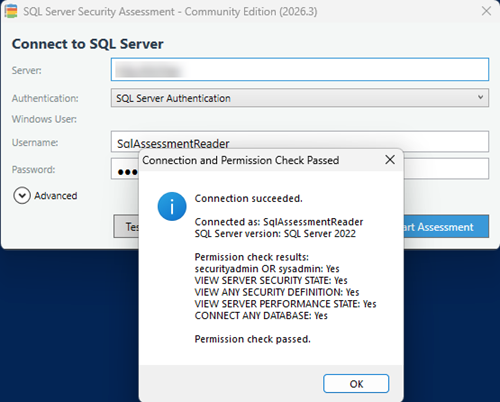
9. (可选)测试连接和权限。
10. 开始评估。
生成的 HTML 报告将写入 `Results` 子文件夹,除非禁用了报告启动功能,否则报告会自动打开。
请参阅 [`CHANGELOG.md`](CHANGELOG.md) 获取完整的公开更新日志摘要。
## 目录
公开的社区版软件包包含:
- `Get-SqlSafe.ps1` — 独立的 PowerShell 收集器、嵌入式 SQL 评估逻辑和报告生成器
- `README.md` — 使用文档
- `CHANGELOG.md` — 公开发布历史
- `LICENSE.md` — Sarpedon 社区许可证
生成的报告和日志将写入:
```
.\Results
```
公开软件包不需要单独的 SQL 文件。
## 系统要求
- Windows PowerShell 5.1
- 支持 .NET Framework 的 Windows 操作系统
- 可网络访问目标 SQL Server 实例
- 建议使用 SQL Server 2016 或更高版本
- 具备足以读取受评估安全元数据的权限
对于某些特定场景,SQL Server 2012 和 SQL Server 2014 可能可以运行,但旧版本在某些检查中可能需要更高的权限。
执行 SQL 无需安装 PowerShell 模块。收集器使用 .NET `System.Data.SqlClient`。
## 支持的目标和已知限制
Get-SqlSafe 社区版目前支持本地 SQL Server、运行在虚拟机中的 SQL Server,以及 Amazon RDS 上 SQL Server 的特定评估场景。请根据目标平台的支持情况,使用 Windows 或 SQL 身份验证。
对于 Amazon RDS 上的 SQL Server,请显式启用 `-AwsRdsCompat` 或在 GUI 中选择相应选项。当 AWS 控制底层 SQL Server 行为或限制对所需元数据的访问时,此模式会调整或跳过选定的检查。
目前不支持 Microsoft Entra 身份验证场景。在当前的 SQL Server 版本中,经 Entra 身份验证的会话可能会将会话身份验证方案暴露为 `NTLM`,这并不能准确描述身份验证协议。由于 Get-SqlSafe 使用 SQL Server 身份验证方案元数据进行 NTLM/Kerberos 解析,因此对于经 Entra 身份验证的会话,与身份验证相关的发现可能会产生误导。
仅当目标 SQL Server 版本公开了所需的目录视图时,包含可用性组元数据才可用。对于依赖于安全上下文的检查,可能需要通过包含可用性组连接上下文来运行才能获得完整的结果。
## 快速入门 - GUI 模式
1. 下载存储库或发布包。
2. 打开 Windows PowerShell。
3. 如果是从互联网下载的脚本,请先解除阻止:
Unblock-File .\Get-SqlSafe.ps1
4. 运行评估:
.\Get-SqlSafe.ps1
5. 输入 SQL Server 名称或实例。
6. 选择 Windows 或 SQL 身份验证。
7. 选择目标所需的加密选项。
8. 在评估 Amazon RDS 上的 SQL Server 时,启用 AWS RDS 兼容模式。
9. (可选)测试连接和权限。
10. 开始评估。
生成的 HTML 报告将写入 `Results` 子文件夹,除非禁用了报告启动功能,否则报告会自动打开。
 如果您的系统阻止了脚本执行,您可以为当前 PowerShell 进程指定显式的执行策略来运行脚本:
```
powershell.exe -ExecutionPolicy Bypass -File .\Get-SqlSafe.ps1
```
这允许该 PowerShell 进程运行脚本。它不会永久解除对文件的阻止,也不会安装依赖项。
## 快速入门 - 控制台模式
提供 `-SqlInstance` 参数会自动以控制台模式运行脚本。
Windows 身份验证:
```
.\Get-SqlSafe.ps1 -SqlInstance "SQLPROD01"
```
运行且不自动打开报告:
```
.\Get-SqlSafe.ps1 -SqlInstance "SQLPROD01" -NoAutoOpenReport
```
SQL 身份验证:
```
$pwd = Read-Host "SQL password" -AsSecureString
.\Get-SqlSafe.ps1 -SqlInstance "SQLPROD01" -Auth SQL -SqlUser "assessment_user" -SqlPass $pwd -NoAutoOpenReport
```
强制加密并信任服务器证书:
```
.\Get-SqlSafe.ps1 -SqlInstance "SQLPROD01" -Encrypt Mandatory -TrustServerCert -NoAutoOpenReport
```
AWS RDS 兼容模式:
```
.\Get-SqlSafe.ps1 -SqlInstance "my-rds-instance.example.rds.amazonaws.com" -AwsRdsCompat -Encrypt Mandatory -TrustServerCert
```
写入运行日志:
```
.\Get-SqlSafe.ps1 -SqlInstance "SQLPROD01" -WriteLog -Verbose -NoAutoOpenReport
```
控制台模式和 `-NoAutoOpenReport` 适用于受控端点、自动化执行环境,以及可能限制 UI 提示或自动启动浏览器的 EDR/XDR 受控环境。
## 参数
| 参数 | 用途 |
| --- | --- |
| `-SqlInstance` | 目标 SQL Server 名称或实例。提供此参数将启用控制台模式。 |
| `-ConsoleOnly` | 在不使用 WPF 对话框的情况下运行。别名:`-NoUI`、`-NonInteractive`。 |
| `-Auth` | 身份验证方法:`Windows` 或 `SQL`。默认为 `Windows`。 |
| `-SqlUser` | SQL 登录名。使用 `-Auth SQL` 时必需。 |
| `-SqlPass` | 作为 `SecureString` 的 SQL 登录密码。如果在进行 SQL 身份验证时省略,脚本会以交互方式提示输入。 |
| `-Encrypt` | 连接加密模式:`Optional` 或 `Mandatory`。默认为 `Optional`。 |
| `-TrustServerCert` | 信任 SQL Server 证书而不进行证书链验证。 |
| `-AwsRdsCompat` | 启用 AWS RDS 兼容行为和 `AWS managed` 标签。 |
| `-WindowsCredential` | 在另一个 Windows 帐户下重新启动评估。与 Windows 身份验证一起使用时有效,并且需要 `-SqlInstance`。 |
| `-WriteLog` | 将运行输出写入 `Results` 文件夹中的日志文件。别名:`-LogFile`。 |
| `-Verbose` | 在控制台中显示详细进度输出,独立于 `-WriteLog`。 |
| `-NoAutoOpenReport` | 阻止生成的 HTML 报告自动打开。 |
## 身份验证模式
### Windows 身份验证
如果当前的 Windows 帐户具有所需的 SQL Server 权限,请使用 Windows 身份验证:
```
.\Get-SqlSafe.ps1 -SqlInstance "SQLPROD01"
```
### 备用 Windows 帐户
使用 `-WindowsCredential` 以另一个 Windows 身份重新启动评估:
```
$cred = Get-Credential
.\Get-SqlSafe.ps1 -ConsoleOnly -SqlInstance "SQLPROD01" -Auth Windows -WindowsCredential $cred -NoAutoOpenReport
```
### SQL 身份验证
使用带有安全密码提示的 SQL 身份验证:
```
$pwd = Read-Host "SQL password" -AsSecureString
.\Get-SqlSafe.ps1 -SqlInstance "SQLPROD01" -Auth SQL -SqlUser "assessment_user" -SqlPass $pwd
```
## AWS RDS 兼容模式
在评估 Amazon RDS 上的 SQL Server 时,请使用 `-AwsRdsCompat`。
启用后,收集器将:
- 针对受限的 AWS 托管环境调整选定的权限检查。
- 跳过检查 `046`,因为在 Amazon RDS 上的 SQL Server 上通常无法获得所需的服务器级访问权限。
- 在适用的情况下,排除由 AWS 托管的对象,例如 `rdsadmin`。
- 在选定的所有者检查中排除 `model` 数据库。
- 当检测到目标为 RDS 时,使用 `AWS managed` 标签标记选定的发现。
AWS RDS 兼容模式并不意味着 AWS 托管的每个控件都是安全或配置正确的。它只是将由平台管理的选定状况与由客户直接控制的发现区分开来。
## 包含可用性组
当 SQL Server 2022 或更高版本公开了所需的元数据时,检查 `802` 将报告包含可用性组的名称以及侦听器 DNS/端口详细信息。
## 所需的 SQL Server 权限
评估旨在目标 SQL Server 版本支持的情况下,使用专用登录名以最低权限运行。
建议做法:
- 使用专用的评估登录名。
- 除非目标环境要求并得到您的流程批准,否则不要使用个人或共享管理员帐户。
- 仅授予目标 SQL Server 版本所需的权限。
- 如果评估登录名不属于已批准的定期流程,请在使用后将其删除或禁用。
- 将生成的报告作为敏感安全输出进行审查。
以下示例使用 `SqlAssessmentReader` 作为评估主体。它们适用于自行管理的 SQL Server。Amazon RDS 上的 SQL Server 具有不同的权限模型;请使用具有可用元数据权限的帐户并启用 `-AwsRdsCompat`。
### SQL Server 2022+
```
GRANT VIEW SERVER SECURITY STATE TO SqlAssessmentReader;
GRANT VIEW ANY SECURITY DEFINITION TO SqlAssessmentReader;
GRANT VIEW SERVER PERFORMANCE STATE TO SqlAssessmentReader;
GRANT CONNECT ANY DATABASE TO SqlAssessmentReader;
ALTER SERVER ROLE securityadmin ADD MEMBER SqlAssessmentReader;
DENY CREATE LOGIN TO SqlAssessmentReader;
DENY ALTER ANY LOGIN TO SqlAssessmentReader;
```
### SQL Server 2014-2019
```
GRANT VIEW SERVER STATE TO SqlAssessmentReader;
GRANT VIEW ANY DEFINITION TO SqlAssessmentReader;
GRANT CONNECT ANY DATABASE TO SqlAssessmentReader;
ALTER SERVER ROLE securityadmin ADD MEMBER SqlAssessmentReader;
DENY ALTER ANY LOGIN TO SqlAssessmentReader;
```
### SQL Server 2012
```
ALTER SERVER ROLE sysadmin ADD MEMBER SqlAssessmentReader;
```
SQL Server 2012 具有较少的粒度化元数据可见性选项。在针对 SQL Server 2012 系统运行社区版之前,请仔细审查此要求。
GUI 中的脚本包含连接和权限测试。在控制台模式下,通常会在执行 SQL 期间发现缺失的权限。
## 检查和报告内容
评估涵盖以下领域的高级指标:
- 身份验证配置
- SQL 身份验证、密码策略强制执行和 NTLM 使用情况
- Sysadmin 和强大的服务器角色成员身份
- 服务器级权限
- `TRUSTWORTHY` 和跨数据库所有权链接
- 强大功能,例如 `xp_cmdshell`、即席分布式查询和 OLE Automation
- 孤立的 Windows 登录名和数据库用户
- SQL Server 安全审计配置
- 数据库所有权风险
- SQL Server 错误日志保留
- 可用性组和包含可用性组
- 系统概述和信息上下文
HTML 报告包含:
- 执行元数据和目标摘要
- 结果分布图
- 包含状态计数和总指标的类别汇总表
- 结果定义图例
- 按类别分组的详细发现
- 针对可操作发现的建议和参考
- 针对版本和系统概述检查的信息上下文
## 结果含义
报告使用五种结果状态:
| 结果 | 含义 |
| --- | --- |
| `INFO` | 提供有用的上下文。它不表示发现了安全问题。 |
| `PASS` | 受评估的条件符合预期的规则。 |
| `OBSERVE` | 标记本身不一定有风险,但应进行审查或监控的状况。影响取决于环境、意图和补偿控制措施。 |
| `WARNING` | 表示应进行审查且通常需要补救的与安全相关的发现,但其本身并不表示存在直接的高风险。 |
| `FAIL` | 表示存在需要立即关注的明显安全风险。 |
对于 `OBSERVE`、`WARNING` 和 `FAIL` 发现,报告包含建议文本和可用的参考链接。
## 输出、安全和数据处理
该工具在 `Results` 文件夹中生成本地 HTML 报告。报告文件名包含目标服务器和时间戳。使用 `-WriteLog` 时,还会将 `.log` 文件写入同一文件夹。
生成的报告和日志可能包含敏感的特定于环境的信息,包括:
- 服务器和数据库名称
- 登录名和角色成员身份详细信息
- 权限详细信息
- 配置值
- 数据库所有权详细信息
- 安全发现和建议
请根据贵组织的数据处理和机密性要求处理生成的报告。
收集器不会故意更改 SQL Server 的配置或数据。它读取元数据并报告高级指标。
## SQL 完整性验证
在执行之前,会使用 SHA-256 对嵌入的 SQL 评估文本进行验证。
所需的哈希值存储在脚本中,并在执行之前与嵌入的 SQL 文本进行比较。如果嵌入的 SQL 文本与所需的哈希值不匹配,则停止执行。
这有助于检测意外的编辑、复制/粘贴损坏或不匹配的构建产物。如需企业级的防篡改保护,请使用您常规的哈希验证和代码签名流程。
## 退出代码
```
0 = completed successfully
2 = startup, parameter, credential, or assessment source validation failure
3 = SQL connection or SQL execution failure
```
## 企业使用和信任
此工具以纯文本 PowerShell 脚本的形式分发,以便组织可以根据内部安全和变更控制流程对其进行审查。
### 行为摘要
Get-SqlSafe 社区版:
- 在解压后的文件夹中本地运行。
- 使用 Windows 或 SQL 身份验证连接到 SQL Server。
- 执行嵌入的 SQL 评估逻辑。
- 在执行之前使用 SHA-256 验证嵌入的 SQL 文本。
- 将本地 HTML 报告写入 `Results` 文件夹。
- 可以选择将运行日志写入 `Results` 文件夹。
- 不会自动安装 PowerShell 模块。
- 不会作为评估的一部分故意修改 SQL Server 配置或数据。
### 推荐的企业流程
#### 1. 审查
在生产或客户环境中运行之前,请先审查 PowerShell 脚本。
#### 2. 验证文件完整性
```
Get-FileHash .\Get-SqlSafe.ps1 -Algorithm SHA256
```
#### 3. 解除下载文件的阻止
```
Unblock-File .\Get-SqlSafe.ps1
```
#### 4. 先进行测试
在生产环境中使用之前,请先针对非生产 SQL Server 实例运行评估。
#### 5. 如有必要,在内部重新签名
如果您的组织强制执行 `AllSigned`,请在审查后使用您的内部代码签名证书对批准的 PowerShell 文件进行签名。
仅供参考:
```
$cert = Get-ChildItem Cert:\CurrentUser\My -CodeSigningCert | Select-Object -First 1
Set-AuthenticodeSignature -FilePath .\Get-SqlSafe.ps1 -Certificate $cert
```
请遵循您的内部流程进行代码审查、签名、打包和部署。
## 范围和限制
社区版是有意限制的。它不是:
- 渗透测试。
- 合规性评估。
- 完整的 SQL Server 安全审查。
- 对目标 SQL Server 安全性的保证。
一份没有问题的报告意味着所涵盖的基线指标未发现任何问题。SQL Server 的真正攻击面更广,并取决于权限、所有权、模拟、SQL Agent、链接服务器、数据库配置、服务帐户、备份、操作系统安全状况以及特定于平台的控制措施的组合。
某些检查可能需要旧版 SQL Server 版本或非提升访问权限的托管平台所不具备的权限。请将该报告作为深入审查和补救规划的起点。
## 从 2026.3 的升级说明
- 在替换旧脚本之前,请查阅 [`CHANGELOG.md`](CHANGELOG.md)。
- 用新的 `Get-SqlSafe.ps1` 文件替换以前的收集器。
- 如果旧的 `SqlSafe.sql` 文件仍保留在工作文件夹中,请将其删除;该文件不再使用。
- 在广泛使用之前,请先针对非生产 SQL Server 测试收集器。
- 在评估 Amazon RDS 上的 SQL Server 时,请使用 `-AwsRdsCompat`。
## 超越基线:需要完整的全貌?
`Get-SqlSafe.ps1` 涵盖了一组重点的核心基线指标。企业环境通常需要更深层的架构审查。
完整的 **Sarpedon SQL Server 安全评估** 可包含高级架构检查,例如:
- 深度数据库级配置审计
- 操作系统级和备份安全审查
- 高级帐户归因和横向移动映射
- 高可用性、运营和以治理为中心的审查领域
[探索 Sarpedon Quality Lab 的全范围 SQL Server 安全评估](https://sarpedonqualitylab.us/sql-server-security-assessment/)。
## 许可证和归属
逻辑与引擎由 Andreas Wolter (MCSM)、Sarpedon Quality Lab 提供。
本项目在 Sarpedon 社区许可证下分发。允许出于内部业务或个人目的进行使用。只要所有品牌、归属、社区版指定和版本信息保持不变,就可以共享未修改的生成报告。修改后的脚本或报告的重新分发受许可条款的约束。
请参阅 [`LICENSE.md`](LICENSE.md) 获取完整的许可证文本。请仅在您获得授权可以运行安全评估工具的系统上使用此工具。
## 免责声明
此工具按“原样”提供,不附带任何形式的保证。
它仅识别风险指标,不能替代完整的安全审计、渗透测试、合规性评估或专业的安全审查。
使用风险由您自行承担。
如果您的系统阻止了脚本执行,您可以为当前 PowerShell 进程指定显式的执行策略来运行脚本:
```
powershell.exe -ExecutionPolicy Bypass -File .\Get-SqlSafe.ps1
```
这允许该 PowerShell 进程运行脚本。它不会永久解除对文件的阻止,也不会安装依赖项。
## 快速入门 - 控制台模式
提供 `-SqlInstance` 参数会自动以控制台模式运行脚本。
Windows 身份验证:
```
.\Get-SqlSafe.ps1 -SqlInstance "SQLPROD01"
```
运行且不自动打开报告:
```
.\Get-SqlSafe.ps1 -SqlInstance "SQLPROD01" -NoAutoOpenReport
```
SQL 身份验证:
```
$pwd = Read-Host "SQL password" -AsSecureString
.\Get-SqlSafe.ps1 -SqlInstance "SQLPROD01" -Auth SQL -SqlUser "assessment_user" -SqlPass $pwd -NoAutoOpenReport
```
强制加密并信任服务器证书:
```
.\Get-SqlSafe.ps1 -SqlInstance "SQLPROD01" -Encrypt Mandatory -TrustServerCert -NoAutoOpenReport
```
AWS RDS 兼容模式:
```
.\Get-SqlSafe.ps1 -SqlInstance "my-rds-instance.example.rds.amazonaws.com" -AwsRdsCompat -Encrypt Mandatory -TrustServerCert
```
写入运行日志:
```
.\Get-SqlSafe.ps1 -SqlInstance "SQLPROD01" -WriteLog -Verbose -NoAutoOpenReport
```
控制台模式和 `-NoAutoOpenReport` 适用于受控端点、自动化执行环境,以及可能限制 UI 提示或自动启动浏览器的 EDR/XDR 受控环境。
## 参数
| 参数 | 用途 |
| --- | --- |
| `-SqlInstance` | 目标 SQL Server 名称或实例。提供此参数将启用控制台模式。 |
| `-ConsoleOnly` | 在不使用 WPF 对话框的情况下运行。别名:`-NoUI`、`-NonInteractive`。 |
| `-Auth` | 身份验证方法:`Windows` 或 `SQL`。默认为 `Windows`。 |
| `-SqlUser` | SQL 登录名。使用 `-Auth SQL` 时必需。 |
| `-SqlPass` | 作为 `SecureString` 的 SQL 登录密码。如果在进行 SQL 身份验证时省略,脚本会以交互方式提示输入。 |
| `-Encrypt` | 连接加密模式:`Optional` 或 `Mandatory`。默认为 `Optional`。 |
| `-TrustServerCert` | 信任 SQL Server 证书而不进行证书链验证。 |
| `-AwsRdsCompat` | 启用 AWS RDS 兼容行为和 `AWS managed` 标签。 |
| `-WindowsCredential` | 在另一个 Windows 帐户下重新启动评估。与 Windows 身份验证一起使用时有效,并且需要 `-SqlInstance`。 |
| `-WriteLog` | 将运行输出写入 `Results` 文件夹中的日志文件。别名:`-LogFile`。 |
| `-Verbose` | 在控制台中显示详细进度输出,独立于 `-WriteLog`。 |
| `-NoAutoOpenReport` | 阻止生成的 HTML 报告自动打开。 |
## 身份验证模式
### Windows 身份验证
如果当前的 Windows 帐户具有所需的 SQL Server 权限,请使用 Windows 身份验证:
```
.\Get-SqlSafe.ps1 -SqlInstance "SQLPROD01"
```
### 备用 Windows 帐户
使用 `-WindowsCredential` 以另一个 Windows 身份重新启动评估:
```
$cred = Get-Credential
.\Get-SqlSafe.ps1 -ConsoleOnly -SqlInstance "SQLPROD01" -Auth Windows -WindowsCredential $cred -NoAutoOpenReport
```
### SQL 身份验证
使用带有安全密码提示的 SQL 身份验证:
```
$pwd = Read-Host "SQL password" -AsSecureString
.\Get-SqlSafe.ps1 -SqlInstance "SQLPROD01" -Auth SQL -SqlUser "assessment_user" -SqlPass $pwd
```
## AWS RDS 兼容模式
在评估 Amazon RDS 上的 SQL Server 时,请使用 `-AwsRdsCompat`。
启用后,收集器将:
- 针对受限的 AWS 托管环境调整选定的权限检查。
- 跳过检查 `046`,因为在 Amazon RDS 上的 SQL Server 上通常无法获得所需的服务器级访问权限。
- 在适用的情况下,排除由 AWS 托管的对象,例如 `rdsadmin`。
- 在选定的所有者检查中排除 `model` 数据库。
- 当检测到目标为 RDS 时,使用 `AWS managed` 标签标记选定的发现。
AWS RDS 兼容模式并不意味着 AWS 托管的每个控件都是安全或配置正确的。它只是将由平台管理的选定状况与由客户直接控制的发现区分开来。
## 包含可用性组
当 SQL Server 2022 或更高版本公开了所需的元数据时,检查 `802` 将报告包含可用性组的名称以及侦听器 DNS/端口详细信息。
## 所需的 SQL Server 权限
评估旨在目标 SQL Server 版本支持的情况下,使用专用登录名以最低权限运行。
建议做法:
- 使用专用的评估登录名。
- 除非目标环境要求并得到您的流程批准,否则不要使用个人或共享管理员帐户。
- 仅授予目标 SQL Server 版本所需的权限。
- 如果评估登录名不属于已批准的定期流程,请在使用后将其删除或禁用。
- 将生成的报告作为敏感安全输出进行审查。
以下示例使用 `SqlAssessmentReader` 作为评估主体。它们适用于自行管理的 SQL Server。Amazon RDS 上的 SQL Server 具有不同的权限模型;请使用具有可用元数据权限的帐户并启用 `-AwsRdsCompat`。
### SQL Server 2022+
```
GRANT VIEW SERVER SECURITY STATE TO SqlAssessmentReader;
GRANT VIEW ANY SECURITY DEFINITION TO SqlAssessmentReader;
GRANT VIEW SERVER PERFORMANCE STATE TO SqlAssessmentReader;
GRANT CONNECT ANY DATABASE TO SqlAssessmentReader;
ALTER SERVER ROLE securityadmin ADD MEMBER SqlAssessmentReader;
DENY CREATE LOGIN TO SqlAssessmentReader;
DENY ALTER ANY LOGIN TO SqlAssessmentReader;
```
### SQL Server 2014-2019
```
GRANT VIEW SERVER STATE TO SqlAssessmentReader;
GRANT VIEW ANY DEFINITION TO SqlAssessmentReader;
GRANT CONNECT ANY DATABASE TO SqlAssessmentReader;
ALTER SERVER ROLE securityadmin ADD MEMBER SqlAssessmentReader;
DENY ALTER ANY LOGIN TO SqlAssessmentReader;
```
### SQL Server 2012
```
ALTER SERVER ROLE sysadmin ADD MEMBER SqlAssessmentReader;
```
SQL Server 2012 具有较少的粒度化元数据可见性选项。在针对 SQL Server 2012 系统运行社区版之前,请仔细审查此要求。
GUI 中的脚本包含连接和权限测试。在控制台模式下,通常会在执行 SQL 期间发现缺失的权限。
## 检查和报告内容
评估涵盖以下领域的高级指标:
- 身份验证配置
- SQL 身份验证、密码策略强制执行和 NTLM 使用情况
- Sysadmin 和强大的服务器角色成员身份
- 服务器级权限
- `TRUSTWORTHY` 和跨数据库所有权链接
- 强大功能,例如 `xp_cmdshell`、即席分布式查询和 OLE Automation
- 孤立的 Windows 登录名和数据库用户
- SQL Server 安全审计配置
- 数据库所有权风险
- SQL Server 错误日志保留
- 可用性组和包含可用性组
- 系统概述和信息上下文
HTML 报告包含:
- 执行元数据和目标摘要
- 结果分布图
- 包含状态计数和总指标的类别汇总表
- 结果定义图例
- 按类别分组的详细发现
- 针对可操作发现的建议和参考
- 针对版本和系统概述检查的信息上下文
## 结果含义
报告使用五种结果状态:
| 结果 | 含义 |
| --- | --- |
| `INFO` | 提供有用的上下文。它不表示发现了安全问题。 |
| `PASS` | 受评估的条件符合预期的规则。 |
| `OBSERVE` | 标记本身不一定有风险,但应进行审查或监控的状况。影响取决于环境、意图和补偿控制措施。 |
| `WARNING` | 表示应进行审查且通常需要补救的与安全相关的发现,但其本身并不表示存在直接的高风险。 |
| `FAIL` | 表示存在需要立即关注的明显安全风险。 |
对于 `OBSERVE`、`WARNING` 和 `FAIL` 发现,报告包含建议文本和可用的参考链接。
## 输出、安全和数据处理
该工具在 `Results` 文件夹中生成本地 HTML 报告。报告文件名包含目标服务器和时间戳。使用 `-WriteLog` 时,还会将 `.log` 文件写入同一文件夹。
生成的报告和日志可能包含敏感的特定于环境的信息,包括:
- 服务器和数据库名称
- 登录名和角色成员身份详细信息
- 权限详细信息
- 配置值
- 数据库所有权详细信息
- 安全发现和建议
请根据贵组织的数据处理和机密性要求处理生成的报告。
收集器不会故意更改 SQL Server 的配置或数据。它读取元数据并报告高级指标。
## SQL 完整性验证
在执行之前,会使用 SHA-256 对嵌入的 SQL 评估文本进行验证。
所需的哈希值存储在脚本中,并在执行之前与嵌入的 SQL 文本进行比较。如果嵌入的 SQL 文本与所需的哈希值不匹配,则停止执行。
这有助于检测意外的编辑、复制/粘贴损坏或不匹配的构建产物。如需企业级的防篡改保护,请使用您常规的哈希验证和代码签名流程。
## 退出代码
```
0 = completed successfully
2 = startup, parameter, credential, or assessment source validation failure
3 = SQL connection or SQL execution failure
```
## 企业使用和信任
此工具以纯文本 PowerShell 脚本的形式分发,以便组织可以根据内部安全和变更控制流程对其进行审查。
### 行为摘要
Get-SqlSafe 社区版:
- 在解压后的文件夹中本地运行。
- 使用 Windows 或 SQL 身份验证连接到 SQL Server。
- 执行嵌入的 SQL 评估逻辑。
- 在执行之前使用 SHA-256 验证嵌入的 SQL 文本。
- 将本地 HTML 报告写入 `Results` 文件夹。
- 可以选择将运行日志写入 `Results` 文件夹。
- 不会自动安装 PowerShell 模块。
- 不会作为评估的一部分故意修改 SQL Server 配置或数据。
### 推荐的企业流程
#### 1. 审查
在生产或客户环境中运行之前,请先审查 PowerShell 脚本。
#### 2. 验证文件完整性
```
Get-FileHash .\Get-SqlSafe.ps1 -Algorithm SHA256
```
#### 3. 解除下载文件的阻止
```
Unblock-File .\Get-SqlSafe.ps1
```
#### 4. 先进行测试
在生产环境中使用之前,请先针对非生产 SQL Server 实例运行评估。
#### 5. 如有必要,在内部重新签名
如果您的组织强制执行 `AllSigned`,请在审查后使用您的内部代码签名证书对批准的 PowerShell 文件进行签名。
仅供参考:
```
$cert = Get-ChildItem Cert:\CurrentUser\My -CodeSigningCert | Select-Object -First 1
Set-AuthenticodeSignature -FilePath .\Get-SqlSafe.ps1 -Certificate $cert
```
请遵循您的内部流程进行代码审查、签名、打包和部署。
## 范围和限制
社区版是有意限制的。它不是:
- 渗透测试。
- 合规性评估。
- 完整的 SQL Server 安全审查。
- 对目标 SQL Server 安全性的保证。
一份没有问题的报告意味着所涵盖的基线指标未发现任何问题。SQL Server 的真正攻击面更广,并取决于权限、所有权、模拟、SQL Agent、链接服务器、数据库配置、服务帐户、备份、操作系统安全状况以及特定于平台的控制措施的组合。
某些检查可能需要旧版 SQL Server 版本或非提升访问权限的托管平台所不具备的权限。请将该报告作为深入审查和补救规划的起点。
## 从 2026.3 的升级说明
- 在替换旧脚本之前,请查阅 [`CHANGELOG.md`](CHANGELOG.md)。
- 用新的 `Get-SqlSafe.ps1` 文件替换以前的收集器。
- 如果旧的 `SqlSafe.sql` 文件仍保留在工作文件夹中,请将其删除;该文件不再使用。
- 在广泛使用之前,请先针对非生产 SQL Server 测试收集器。
- 在评估 Amazon RDS 上的 SQL Server 时,请使用 `-AwsRdsCompat`。
## 超越基线:需要完整的全貌?
`Get-SqlSafe.ps1` 涵盖了一组重点的核心基线指标。企业环境通常需要更深层的架构审查。
完整的 **Sarpedon SQL Server 安全评估** 可包含高级架构检查,例如:
- 深度数据库级配置审计
- 操作系统级和备份安全审查
- 高级帐户归因和横向移动映射
- 高可用性、运营和以治理为中心的审查领域
[探索 Sarpedon Quality Lab 的全范围 SQL Server 安全评估](https://sarpedonqualitylab.us/sql-server-security-assessment/)。
## 许可证和归属
逻辑与引擎由 Andreas Wolter (MCSM)、Sarpedon Quality Lab 提供。
本项目在 Sarpedon 社区许可证下分发。允许出于内部业务或个人目的进行使用。只要所有品牌、归属、社区版指定和版本信息保持不变,就可以共享未修改的生成报告。修改后的脚本或报告的重新分发受许可条款的约束。
请参阅 [`LICENSE.md`](LICENSE.md) 获取完整的许可证文本。请仅在您获得授权可以运行安全评估工具的系统上使用此工具。
## 免责声明
此工具按“原样”提供,不附带任何形式的保证。
它仅识别风险指标,不能替代完整的安全审计、渗透测试、合规性评估或专业的安全审查。
使用风险由您自行承担。
如果您的系统阻止了脚本执行,您可以为当前 PowerShell 进程指定显式的执行策略来运行脚本:
```
powershell.exe -ExecutionPolicy Bypass -File .\Get-SqlSafe.ps1
```
这允许该 PowerShell 进程运行脚本。它不会永久解除对文件的阻止,也不会安装依赖项。
## 快速入门 - 控制台模式
提供 `-SqlInstance` 参数会自动以控制台模式运行脚本。
Windows 身份验证:
```
.\Get-SqlSafe.ps1 -SqlInstance "SQLPROD01"
```
运行且不自动打开报告:
```
.\Get-SqlSafe.ps1 -SqlInstance "SQLPROD01" -NoAutoOpenReport
```
SQL 身份验证:
```
$pwd = Read-Host "SQL password" -AsSecureString
.\Get-SqlSafe.ps1 -SqlInstance "SQLPROD01" -Auth SQL -SqlUser "assessment_user" -SqlPass $pwd -NoAutoOpenReport
```
强制加密并信任服务器证书:
```
.\Get-SqlSafe.ps1 -SqlInstance "SQLPROD01" -Encrypt Mandatory -TrustServerCert -NoAutoOpenReport
```
AWS RDS 兼容模式:
```
.\Get-SqlSafe.ps1 -SqlInstance "my-rds-instance.example.rds.amazonaws.com" -AwsRdsCompat -Encrypt Mandatory -TrustServerCert
```
写入运行日志:
```
.\Get-SqlSafe.ps1 -SqlInstance "SQLPROD01" -WriteLog -Verbose -NoAutoOpenReport
```
控制台模式和 `-NoAutoOpenReport` 适用于受控端点、自动化执行环境,以及可能限制 UI 提示或自动启动浏览器的 EDR/XDR 受控环境。
## 参数
| 参数 | 用途 |
| --- | --- |
| `-SqlInstance` | 目标 SQL Server 名称或实例。提供此参数将启用控制台模式。 |
| `-ConsoleOnly` | 在不使用 WPF 对话框的情况下运行。别名:`-NoUI`、`-NonInteractive`。 |
| `-Auth` | 身份验证方法:`Windows` 或 `SQL`。默认为 `Windows`。 |
| `-SqlUser` | SQL 登录名。使用 `-Auth SQL` 时必需。 |
| `-SqlPass` | 作为 `SecureString` 的 SQL 登录密码。如果在进行 SQL 身份验证时省略,脚本会以交互方式提示输入。 |
| `-Encrypt` | 连接加密模式:`Optional` 或 `Mandatory`。默认为 `Optional`。 |
| `-TrustServerCert` | 信任 SQL Server 证书而不进行证书链验证。 |
| `-AwsRdsCompat` | 启用 AWS RDS 兼容行为和 `AWS managed` 标签。 |
| `-WindowsCredential` | 在另一个 Windows 帐户下重新启动评估。与 Windows 身份验证一起使用时有效,并且需要 `-SqlInstance`。 |
| `-WriteLog` | 将运行输出写入 `Results` 文件夹中的日志文件。别名:`-LogFile`。 |
| `-Verbose` | 在控制台中显示详细进度输出,独立于 `-WriteLog`。 |
| `-NoAutoOpenReport` | 阻止生成的 HTML 报告自动打开。 |
## 身份验证模式
### Windows 身份验证
如果当前的 Windows 帐户具有所需的 SQL Server 权限,请使用 Windows 身份验证:
```
.\Get-SqlSafe.ps1 -SqlInstance "SQLPROD01"
```
### 备用 Windows 帐户
使用 `-WindowsCredential` 以另一个 Windows 身份重新启动评估:
```
$cred = Get-Credential
.\Get-SqlSafe.ps1 -ConsoleOnly -SqlInstance "SQLPROD01" -Auth Windows -WindowsCredential $cred -NoAutoOpenReport
```
### SQL 身份验证
使用带有安全密码提示的 SQL 身份验证:
```
$pwd = Read-Host "SQL password" -AsSecureString
.\Get-SqlSafe.ps1 -SqlInstance "SQLPROD01" -Auth SQL -SqlUser "assessment_user" -SqlPass $pwd
```
## AWS RDS 兼容模式
在评估 Amazon RDS 上的 SQL Server 时,请使用 `-AwsRdsCompat`。
启用后,收集器将:
- 针对受限的 AWS 托管环境调整选定的权限检查。
- 跳过检查 `046`,因为在 Amazon RDS 上的 SQL Server 上通常无法获得所需的服务器级访问权限。
- 在适用的情况下,排除由 AWS 托管的对象,例如 `rdsadmin`。
- 在选定的所有者检查中排除 `model` 数据库。
- 当检测到目标为 RDS 时,使用 `AWS managed` 标签标记选定的发现。
AWS RDS 兼容模式并不意味着 AWS 托管的每个控件都是安全或配置正确的。它只是将由平台管理的选定状况与由客户直接控制的发现区分开来。
## 包含可用性组
当 SQL Server 2022 或更高版本公开了所需的元数据时,检查 `802` 将报告包含可用性组的名称以及侦听器 DNS/端口详细信息。
## 所需的 SQL Server 权限
评估旨在目标 SQL Server 版本支持的情况下,使用专用登录名以最低权限运行。
建议做法:
- 使用专用的评估登录名。
- 除非目标环境要求并得到您的流程批准,否则不要使用个人或共享管理员帐户。
- 仅授予目标 SQL Server 版本所需的权限。
- 如果评估登录名不属于已批准的定期流程,请在使用后将其删除或禁用。
- 将生成的报告作为敏感安全输出进行审查。
以下示例使用 `SqlAssessmentReader` 作为评估主体。它们适用于自行管理的 SQL Server。Amazon RDS 上的 SQL Server 具有不同的权限模型;请使用具有可用元数据权限的帐户并启用 `-AwsRdsCompat`。
### SQL Server 2022+
```
GRANT VIEW SERVER SECURITY STATE TO SqlAssessmentReader;
GRANT VIEW ANY SECURITY DEFINITION TO SqlAssessmentReader;
GRANT VIEW SERVER PERFORMANCE STATE TO SqlAssessmentReader;
GRANT CONNECT ANY DATABASE TO SqlAssessmentReader;
ALTER SERVER ROLE securityadmin ADD MEMBER SqlAssessmentReader;
DENY CREATE LOGIN TO SqlAssessmentReader;
DENY ALTER ANY LOGIN TO SqlAssessmentReader;
```
### SQL Server 2014-2019
```
GRANT VIEW SERVER STATE TO SqlAssessmentReader;
GRANT VIEW ANY DEFINITION TO SqlAssessmentReader;
GRANT CONNECT ANY DATABASE TO SqlAssessmentReader;
ALTER SERVER ROLE securityadmin ADD MEMBER SqlAssessmentReader;
DENY ALTER ANY LOGIN TO SqlAssessmentReader;
```
### SQL Server 2012
```
ALTER SERVER ROLE sysadmin ADD MEMBER SqlAssessmentReader;
```
SQL Server 2012 具有较少的粒度化元数据可见性选项。在针对 SQL Server 2012 系统运行社区版之前,请仔细审查此要求。
GUI 中的脚本包含连接和权限测试。在控制台模式下,通常会在执行 SQL 期间发现缺失的权限。
## 检查和报告内容
评估涵盖以下领域的高级指标:
- 身份验证配置
- SQL 身份验证、密码策略强制执行和 NTLM 使用情况
- Sysadmin 和强大的服务器角色成员身份
- 服务器级权限
- `TRUSTWORTHY` 和跨数据库所有权链接
- 强大功能,例如 `xp_cmdshell`、即席分布式查询和 OLE Automation
- 孤立的 Windows 登录名和数据库用户
- SQL Server 安全审计配置
- 数据库所有权风险
- SQL Server 错误日志保留
- 可用性组和包含可用性组
- 系统概述和信息上下文
HTML 报告包含:
- 执行元数据和目标摘要
- 结果分布图
- 包含状态计数和总指标的类别汇总表
- 结果定义图例
- 按类别分组的详细发现
- 针对可操作发现的建议和参考
- 针对版本和系统概述检查的信息上下文
## 结果含义
报告使用五种结果状态:
| 结果 | 含义 |
| --- | --- |
| `INFO` | 提供有用的上下文。它不表示发现了安全问题。 |
| `PASS` | 受评估的条件符合预期的规则。 |
| `OBSERVE` | 标记本身不一定有风险,但应进行审查或监控的状况。影响取决于环境、意图和补偿控制措施。 |
| `WARNING` | 表示应进行审查且通常需要补救的与安全相关的发现,但其本身并不表示存在直接的高风险。 |
| `FAIL` | 表示存在需要立即关注的明显安全风险。 |
对于 `OBSERVE`、`WARNING` 和 `FAIL` 发现,报告包含建议文本和可用的参考链接。
## 输出、安全和数据处理
该工具在 `Results` 文件夹中生成本地 HTML 报告。报告文件名包含目标服务器和时间戳。使用 `-WriteLog` 时,还会将 `.log` 文件写入同一文件夹。
生成的报告和日志可能包含敏感的特定于环境的信息,包括:
- 服务器和数据库名称
- 登录名和角色成员身份详细信息
- 权限详细信息
- 配置值
- 数据库所有权详细信息
- 安全发现和建议
请根据贵组织的数据处理和机密性要求处理生成的报告。
收集器不会故意更改 SQL Server 的配置或数据。它读取元数据并报告高级指标。
## SQL 完整性验证
在执行之前,会使用 SHA-256 对嵌入的 SQL 评估文本进行验证。
所需的哈希值存储在脚本中,并在执行之前与嵌入的 SQL 文本进行比较。如果嵌入的 SQL 文本与所需的哈希值不匹配,则停止执行。
这有助于检测意外的编辑、复制/粘贴损坏或不匹配的构建产物。如需企业级的防篡改保护,请使用您常规的哈希验证和代码签名流程。
## 退出代码
```
0 = completed successfully
2 = startup, parameter, credential, or assessment source validation failure
3 = SQL connection or SQL execution failure
```
## 企业使用和信任
此工具以纯文本 PowerShell 脚本的形式分发,以便组织可以根据内部安全和变更控制流程对其进行审查。
### 行为摘要
Get-SqlSafe 社区版:
- 在解压后的文件夹中本地运行。
- 使用 Windows 或 SQL 身份验证连接到 SQL Server。
- 执行嵌入的 SQL 评估逻辑。
- 在执行之前使用 SHA-256 验证嵌入的 SQL 文本。
- 将本地 HTML 报告写入 `Results` 文件夹。
- 可以选择将运行日志写入 `Results` 文件夹。
- 不会自动安装 PowerShell 模块。
- 不会作为评估的一部分故意修改 SQL Server 配置或数据。
### 推荐的企业流程
#### 1. 审查
在生产或客户环境中运行之前,请先审查 PowerShell 脚本。
#### 2. 验证文件完整性
```
Get-FileHash .\Get-SqlSafe.ps1 -Algorithm SHA256
```
#### 3. 解除下载文件的阻止
```
Unblock-File .\Get-SqlSafe.ps1
```
#### 4. 先进行测试
在生产环境中使用之前,请先针对非生产 SQL Server 实例运行评估。
#### 5. 如有必要,在内部重新签名
如果您的组织强制执行 `AllSigned`,请在审查后使用您的内部代码签名证书对批准的 PowerShell 文件进行签名。
仅供参考:
```
$cert = Get-ChildItem Cert:\CurrentUser\My -CodeSigningCert | Select-Object -First 1
Set-AuthenticodeSignature -FilePath .\Get-SqlSafe.ps1 -Certificate $cert
```
请遵循您的内部流程进行代码审查、签名、打包和部署。
## 范围和限制
社区版是有意限制的。它不是:
- 渗透测试。
- 合规性评估。
- 完整的 SQL Server 安全审查。
- 对目标 SQL Server 安全性的保证。
一份没有问题的报告意味着所涵盖的基线指标未发现任何问题。SQL Server 的真正攻击面更广,并取决于权限、所有权、模拟、SQL Agent、链接服务器、数据库配置、服务帐户、备份、操作系统安全状况以及特定于平台的控制措施的组合。
某些检查可能需要旧版 SQL Server 版本或非提升访问权限的托管平台所不具备的权限。请将该报告作为深入审查和补救规划的起点。
## 从 2026.3 的升级说明
- 在替换旧脚本之前,请查阅 [`CHANGELOG.md`](CHANGELOG.md)。
- 用新的 `Get-SqlSafe.ps1` 文件替换以前的收集器。
- 如果旧的 `SqlSafe.sql` 文件仍保留在工作文件夹中,请将其删除;该文件不再使用。
- 在广泛使用之前,请先针对非生产 SQL Server 测试收集器。
- 在评估 Amazon RDS 上的 SQL Server 时,请使用 `-AwsRdsCompat`。
## 超越基线:需要完整的全貌?
`Get-SqlSafe.ps1` 涵盖了一组重点的核心基线指标。企业环境通常需要更深层的架构审查。
完整的 **Sarpedon SQL Server 安全评估** 可包含高级架构检查,例如:
- 深度数据库级配置审计
- 操作系统级和备份安全审查
- 高级帐户归因和横向移动映射
- 高可用性、运营和以治理为中心的审查领域
[探索 Sarpedon Quality Lab 的全范围 SQL Server 安全评估](https://sarpedonqualitylab.us/sql-server-security-assessment/)。
## 许可证和归属
逻辑与引擎由 Andreas Wolter (MCSM)、Sarpedon Quality Lab 提供。
本项目在 Sarpedon 社区许可证下分发。允许出于内部业务或个人目的进行使用。只要所有品牌、归属、社区版指定和版本信息保持不变,就可以共享未修改的生成报告。修改后的脚本或报告的重新分发受许可条款的约束。
请参阅 [`LICENSE.md`](LICENSE.md) 获取完整的许可证文本。请仅在您获得授权可以运行安全评估工具的系统上使用此工具。
## 免责声明
此工具按“原样”提供,不附带任何形式的保证。
它仅识别风险指标,不能替代完整的安全审计、渗透测试、合规性评估或专业的安全审查。
使用风险由您自行承担。标签:AI合规, IPv6, Libemu, PowerShell, SQL Server, 反取证, 多模态安全, 安全评估