AlexChariot/bgrules
GitHub: AlexChariot/bgrules
一个基于本地 RAG 的桌游规则书助手,能自动搜索、缓存和索引规则 PDF,并通过 Ollama 实现离线自然语言问答。
Stars: 1 | Forks: 0
# BGRules
[](https://www.python.org/)
[](https://typer.tiangolo.com/)
[](https://python.langchain.com/)
[](https://github.com/facebookresearch/faiss)
[](https://ollama.com/)
本地 CLI,可通过针对每个游戏的 RAG pipeline 来查找、添加、缓存、索引和查询桌游规则书。
## 概述
BGRules 可帮助您为桌游构建本地规则书助手:
- 搜索并下载规则 PDF
- 通过直接的 PDF URL 添加您自己的规则书
- 获取游戏的 BoardGameGeek 元数据
- 在本地缓存文档
- 为每个游戏构建独立的 FAISS 索引
- 通过 Ollama 与规则进行聊天
针对每个游戏的索引模型非常重要:查询单个游戏时,检索范围仅限于该游戏的 PDF,因此答案不会与其他无关的游戏混淆。
## 工作原理(概览)
```
flowchart LR
U[User] -->|find or add| I[Get rulebook PDF]
I --> C[Local cache]
C --> X[Per-game index]
X --> Q[Ask questions]
Q --> A[Answer from rules]
```
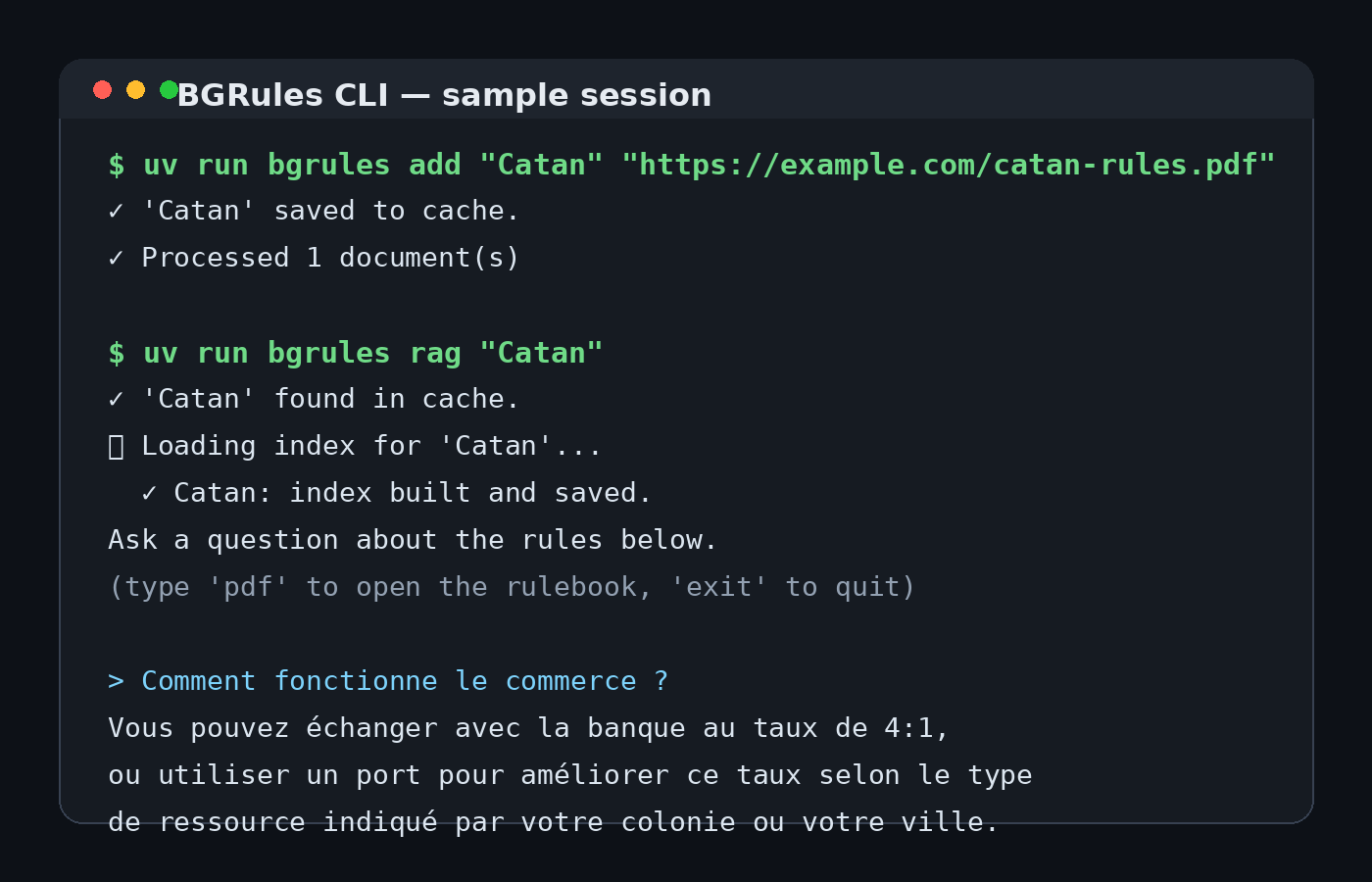
## 截图
## 功能
- 基于 DuckDuckGo 的桌游规则 PDF 发现
- 针对发行商和可信规则来源的域名过滤
- 优先下载法语版本,并以英语作为备选
- 在使用 `find` 时进行交互式验证
- 使用 `add` 进行直接的 PDF 导入
- 使用 `info` 进行 BoardGameGeek 元数据查找
- 下载的规则书本地缓存
- 每个游戏独立的 FAISS 索引
- 未指定游戏时的全游戏 RAG 模式
- 在单个游戏的 RAG session 中使用 `pdf` 快捷方式打开缓存的规则书
- Ollama 模型状态和会话级别的 LLM 覆盖
## 添加游戏的两种方式
```
flowchart LR
U[User]
U -->|find| S[Search online PDFs]
S --> V[Preview & validate]
U -->|add| D[Direct PDF URL]
V --> C[Cache]
D --> C
C --> I[Index]
```
## 项目结构
```
BGRules/
├── bgrules/
│ ├── __init__.py
│ ├── agents.py # Search / filter / download / parse pipeline
│ ├── bgg.py # BoardGameGeek metadata lookup + storage
│ ├── config.py # Global configuration
│ ├── db.py # SQLAlchemy helpers
│ ├── main.py # CLI entry point (Typer)
│ ├── ollama.py # Ollama helpers and model status
│ ├── rag.py # FAISS + retrieval + interactive QA
│ ├── scraper.py # Cache, download, and scraping helpers
│ ├── cache/ # Local PDF cache (auto-created, git-ignored)
│ └── faiss_index/ # Local FAISS indexes (auto-created, git-ignored)
├── docs/
│ └── screenshot.png
├── langflow/
│ └── flow.json
├── ui/
│ └── steamlit_app.py
├── pyproject.toml
└── README.md
```
## 架构图
```
flowchart LR
A[User game name] --> B[SearchAgent]
A2[User PDF URL] --> D[DownloadAgent]
B -->|cache hit| D
B -->|urls| C[FilterAgent: trusted domains]
C -->|filtered urls| D
D -->|all valid candidates\nFR first, then EN| V[Interactive validation]
V -->|confirmed| Cache[(bgrules/cache/)]
Cache -->|pdf bytes| E[ParserAgent]
E -->|text| I[FAISS index\nper game]
I --> J[faiss_index per game]
J -->|reloaded on next run| I
I -->|retriever| R[RAG Q&A chain]
R --> LLM[Ollama LLM]
LLM --> U[User answer]
```
## Pipeline 序列
```
sequenceDiagram
participant U as User
participant S as SearchAgent
participant F as FilterAgent
participant D as DownloadAgent
participant C as Cache
participant V as Validation prompt
participant R as RAG / FAISS
alt add via URL
U->>D: add "Catan"
D->>C: save_to_cache
else find workflow
U->>S: find "Gloomhaven"
S->>C: cache_exists?
alt already cached
C-->>S: yes → skip search
S-->>D: (empty url list)
D-->>U: ✓ Loaded from cache
else not cached
S-->>F: url list
F-->>D: filtered .pdf urls
D->>D: download all candidates\n(FR preferred)
loop for each candidate
D-->>V: preview first page
V-->>U: Is this correct?
alt confirmed
V->>C: save_to_cache
else rejected
V->>D: try next candidate
end
end
end
end
U->>R: rag "Gloomhaven"
R->>R: load/build isolated FAISS index
R-->>U: interactive Q&A session
```
## 安装说明
### 1. 安装 Ollama 并拉取模型
```
ollama pull llama3
ollama serve
```
### 2. 安装 `uv`
```
curl -Ls https://astral.sh/uv/install.sh | sh
```
### 3. 安装依赖
```
uv sync
```
### 4. 配置 BoardGameGeek API 访问以用于 `info`
BoardGameGeek 的 XML API 现在要求使用已批准的应用程序和 bearer token 才能进行大多数访问。
在 BoardGameGeek 上创建您的 token,然后在使用 `info` 之前将其导出:
```
export BGG_API_TOKEN="your-token-here"
uv run bgrules info "Hanabi"
```
## 快速开始
```
# 搜索、预览、验证和缓存规则书
uv run bgrules find "Pandemic"
# 直接从 PDF URL 添加规则书
uv run bgrules add "Catan" "https://example.com/catan-rules.pdf"
# 获取 BoardGameGeek 元数据并将其存储在本地
uv run bgrules info "Catan"
# 针对一个已缓存的游戏提问
uv run bgrules rag "Pandemic"
# 查询所有已缓存的游戏
uv run bgrules rag
```
## RAG 工作原理
```
flowchart LR
Q[Your question]
--> R[Search in game index]
--> C[Relevant chunks]
--> LLM[Ollama]
--> A[Grounded answer]
```
## CLI 参考
```
bgrules
├── find Search, download, preview, validate, and cache a rules PDF
│ --debug Enable runtime debug output for search/download steps
├── add Download a rules PDF from a direct URL and add it to the cache
│ --debug Enable runtime debug output for download/cache steps
├── info Fetch and store BoardGameGeek metadata for a game
├── list List all cached games (alphabetically)
├── rag [game] Interactive RAG chat
│ Omit the game name to query all cached games
│ Type 'pdf' during a single-game session to open the rulebook
│
├── cache
│ ├── clear Delete all cached PDFs and the cache index
│ ├── remove Delete one cached game and its FAISS index
│ └── rebuild Rebuild the cache index from PDFs already on disk
│
└── llm
├── status Show current LLM / embeddings models and Ollama availability
├── set Override the LLM model for this session
└── faiss-clear Delete FAISS index(es)
--game / -g Delete only that game's index (deletes all if omitted)
```
### `find`
在线搜索规则书,下载候选 PDF,将其打开进行验证,并缓存确认的文件。
```
uv run bgrules find
```
示例:
```
uv run bgrules find "Gloomhaven"
uv run bgrules find "Catan" --debug
```
### `add`
通过直接的 PDF URL 添加游戏。
```
uv run bgrules add
```
参数:
- ``:缓存中使用的本地游戏名称
- ``:指向 PDF 文件的直接链接
功能:
- 下载 PDF
- 验证响应看起来像真实的 PDF
- 将其保存到本地缓存
- 清除该游戏现有的 FAISS 索引(如果有)
- 预处理文档,使其为 RAG 做好准备
示例:
```
uv run bgrules add "Catan" "https://example.com/catan-rules.pdf"
```
### `rag`
基于缓存的规则书启动交互式问答 session。
```
uv run bgrules rag [NomDuJeu]
```
示例:
```
uv run bgrules rag "Pandemic"
uv run bgrules rag
```
### `list`
列出所有缓存的游戏。
```
uv run bgrules list
```
### `cache clear`
删除缓存的 PDF 和缓存索引。
```
uv run bgrules cache clear
```
### `cache remove`
删除一个缓存的游戏,移除其缓存条目,并清除其 FAISS 索引。
```
uv run bgrules cache remove "Catan"
```
### `cache rebuild`
从已存储在磁盘上的 PDF 重建缓存索引。
```
uv run bgrules cache rebuild
```
### `llm status`
显示当前的 LLM 和 embeddings 配置,并检查 Ollama 可用性。
```
uv run bgrules llm status
```
## 使用示例
### 搜索并缓存游戏
```
uv run bgrules find "Gloomhaven"
```
### 通过直接 URL 添加游戏
```
uv run bgrules add "Catan" "https://example.com/catan-rules.pdf"
```
### 打开单个游戏的 RAG session
```
uv run bgrules rag "Catan"
```
### 查询所有缓存的游戏
```
uv run bgrules rag
```
### 典型工作流程
```
uv run bgrules add "Catan" "https://example.com/catan-rules.pdf"
uv run bgrules rag "Catan"
```
然后提出类似这样的问题:
```
Comment fonctionne le commerce ?
```
## 按游戏隔离
```
flowchart LR
A[Catan index]
B[Gloomhaven index]
C[Pandemic index]
Q1[Question on Catan] --> A
Q2[Question on Gloomhaven] --> B
```
## 索引工作原理
- 每个缓存的游戏都映射到一个稳定的本地文件名
- 每个游戏都有自己独立的 FAISS 索引
- 提取的 PDF 文本在 embedding 之前被分割成重叠的 chunks,以提高检索精度
- 如果索引不存在,它会在第一次调用 `rag` 时构建
- 使用 `add` 时,该游戏先前的索引将失效,以避免过时的检索
- 查询特定游戏仅使用该游戏的索引
- 在未指定游戏的情况下进行查询,会在内存中合并所有缓存的索引
## 测试
运行自动化测试:
```
./.venv/bin/python -m unittest discover -s tests -v
```
## 技术栈
- **Typer** 用于 CLI
- **LangChain** 用于检索和提示
- **FAISS** 用于 vector 存储
- **Ollama** 用于本地 LLM 和 embeddings
- **PyMuPDF** 用于 PDF 解析
- **DuckDuckGo Search** 用于 PDF 发现
- **UV** 用于依赖和环境管理
## 备注
### 缓存文件
规则书本地存储在 package 缓存目录下。FAISS 数据也存储在本地。
### 模型更改
更改 LLM 不需要重建索引。更改 embeddings 模型则需要。
### Git 忽略的路径
```
bgrules/cache/
bgrules/faiss_index/
```
## 路线图设想
- 本地文件导入:`add "Catan" ./rules.pdf`
- 通过发现实际的 PDF 链接来支持非直接 URL
- 为每个缓存的规则书提供更丰富的元数据
- 完善 Streamlit 应用的 Web UI
标签:AI助手, AI风险缓解, BoardGameGeek, CLI, DLL 劫持, FAISS, LangChain, LLM, LLM评估, NLP, Ollama, PDF下载, PDF解析, Python, RAG, Ruby, Typer, Unmanaged PE, WiFi技术, 向量化, 向量数据库, 大语言模型, 开源, 数据清洗, 文档检索, 无后门, 本地大模型, 本地缓存, 桌游, 桌游规则, 检索增强生成, 知识库, 语言检测, 轻量级, 逆向工具