zavetsec/ZavetSec-Harden
GitHub: zavetsec/ZavetSec-Harden
一个零依赖的 PowerShell 脚本,用于审计和加固 Windows 系统安全基线,支持一键回滚并生成合规报告。
Stars: 1 | Forks: 1
# ZavetSec-Harden
[](https://docs.microsoft.com/powershell)
[](https://microsoft.com/windows)
[](https://cisecurity.org)
[](LICENSE)
[](#)
**Windows 附带不安全的默认设置。此脚本可修复这些问题。**
**一个脚本。60 项检查。四种模式。零臃肿。**
### ⚡ 为什么使用这个
✔ 无需安装
✔ 无需联网
✔ 适用于任何 Windows 10/11/Server
✔ 安全回滚
✔ 用于真实环境:独立主机、实验室集群以及事件响应
## `>_ 问题所在`
大多数 Windows 环境的默认配置都存在积极危险:
LLMNR 向任何询问者广播凭据,WDigest 在内存中存储明文密码,
SMBv1 等待 EternalBlue 攻击,审核日志大小仅设为 20 MB
并在几小时内填满。这些不是错误配置 — **它们在每次全新安装时就是这样提供的。**
`ZavetSec-Harden` 解决了这个问题。它会审计您当前的状态,应用
符合 **CIS Benchmark**、**DISA STIG** 和 **Microsoft Security Baseline** 的
加固基线,并生成一份 HTML 报告,您可以将其直接提交给
客户或附加到工单中。如果出现故障,可以通过在每次更改前创建的 JSON
备份进行回滚。
## `>_ 目标受众`
- 运行快速主机评估的 **SOC 分析师**
- 在事件发生后加固据点的 **DFIR / IR 团队**
- 没有 AD / GPO 控制权的 **系统管理员**(工作组、云加入、独立主机)
- 在参与前验证基线弱点的 **红队成员**
- 需要证明机器符合合规基线的 **任何人**
## `>_ 10 秒钟快速入门`
```
.\ZavetSec-Harden.ps1
```
```
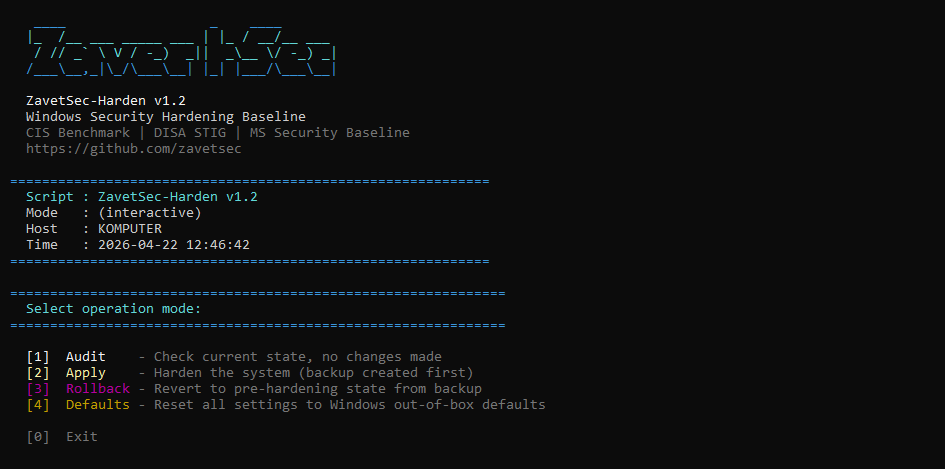
[1] Audit - Check current state, no changes made
[2] Apply - Harden the system (backup created first)
[3] Rollback - Revert to pre-hardening state from backup
[4] Defaults - Reset all settings to Windows out-of-box defaults
```
选择 `[1] Audit` → 打开 HTML 报告 → 查看暴露了什么 → 返回并点击 `[2] Apply`。
 ## `>_ 工作原理`
```
Audit → detect insecure defaults (no changes)
Apply → backup → harden → verify
Rollback → restore exact previous state
```
```
┌─────────────────────────────────────────────────────────┐
│ │
│ Audit mode Read current state │
│ │ │ │
│ ▼ ▼ │
│ State detection HTML report generated │
│ │ │
│ Apply mode JSON backup → apply changes │
│ │ │ │
│ ▼ ▼ │
│ Change engine Verify each setting post-apply │
│ │ │
│ Rollback mode Read backup → restore prior state │
│ │ │
│ Defaults mode Reset to Windows out-of-box state │
│ │
└─────────────────────────────────────────────────────────┘
```
**幂等性** — 运行两次 Apply,结果完全一致。
**非破坏性** — 每次更改前都会创建 JSON 备份,支持完全回滚。
**独立于区域设置** — 审核策略使用 GUID,适用于任何 Windows 语言版本。
**兼容 PsExec** — `-NonInteractive` 标志用于远程/自动化部署。
## `>_ 可阻止的攻击`
| 威胁 | 影响 | MITRE | 控制措施 |
|---|---|---|---|
| 🔴 Responder / MITM | 通过局域网捕获凭据 | T1557.001 | 禁用 LLMNR、NBT-NS、mDNS、WPAD · 强制 SMB 签名 |
| 🔴 Mimikatz / LSASS 转储 | 从内存中获取明文密码 | T1003.001 | 关闭 WDigest · 启用 LSA PPL · 启用 Credential Guard |
| 🔴 Pass-the-Hash | 无需密码的横向移动 | T1550.002 | 仅限 NTLMv2 · 关闭 LM 哈希存储 · 128 位会话 |
| 🔴 EternalBlue / WannaCry | 远程代码执行,勒索软件 | T1210 | 禁用 SMBv1 — 服务器和客户端驱动程序 |
| 🟠 横向移动 | 在网络中传播 | T1021 | 关闭远程注册表 · 限制匿名枚举 |
| 🟠 预认证 RDP 漏洞利用 | 登录提示前的远程代码执行 | T1021.001 | 强制要求 NLA · 高加密级别 |
| 🟠 USB 载荷投递 | 从物理媒体自动运行 | T1091 | 在所有驱动器类型上禁用 AutoRun / AutoPlay |
| 🟠 PowerShell 滥用 | LOLBin / 无文件执行 | T1059.001 | 脚本块 + 模块日志记录 · 禁用 PSv2 |
| 🟡 日志盲区 | 未被检测的攻击者活动 | — | 安全日志 1 GB · 29 项审核子类别检查 |
## `>_ 覆盖范围`
### 🌐 网络攻击面缩减
- LLMNR — **已禁用** (Responder 诱饵)
- mDNS — **已禁用**
- WPAD — **已禁用** (代理劫持向量)
- NBT-NS — 在所有适配器上**已禁用**
- LMHOSTS 查找 — **已禁用**
- SMBv1 服务器 — **已禁用**
- SMBv1 客户端驱动程序 (mrxsmb10) — **已禁用** (需要重启)
- SMB 签名服务器 — **已要求**
- SMB 签名客户端 — **已要求**
- 匿名 SAM/共享枚举 — **已阻止**
- 远程注册表服务 — **已禁用**
`NET-001 — NET-010`
### 🔑 凭据保护
- WDigest 明文缓存 — **已禁用**
- LSA Protected Process Light — **已启用**
- Credential Guard (VBS) — **已启用**
- LAN Manager 身份验证级别 — **仅限 NTLMv2** (拒绝 LM/NTLMv1)
- LM 哈希存储 — **已禁用**
- NTLM 128 位会话安全性 — **已强制**
`CRED-001 — CRED-006`
### 🐚 PowerShell 加固
- 脚本块日志记录 (4104) — **已启用**
- 模块日志记录 (4103) — **已启用**
- 转录输出至 `C:\ProgramData\PSTranscripts` — **已启用**
- PowerShell v2 引擎 — **已禁用** (AMSI 绕过向量)
- 执行策略 (RemoteSigned) — **在机器范围设置**
`PS-001 — PS-005`
### 📋 审核策略
通过带有 GUID 引用的 `auditpol` 配置 27 个子类别 — 独立于区域设置,可在
任何 Windows 语言版本上运行。加上 4688 中的命令行捕获,以及
`SCENoApplyLegacyAuditPolicy` 以防止 GPO 静默覆盖子类别设置。
涵盖登录/注销、Kerberos (TGT + TGS)、进程创建、账户管理、对象访问、
特权使用、策略更改、DPAPI、计划任务、可移动存储、防火墙事件。
`AUD-001 — AUD-029`
### 🖥️ 系统加固
- UAC — **完全强制**并带有安全桌面提示
- AutoRun / AutoPlay — 在所有驱动器类型上**已禁用**
- Windows 防火墙 — 在所有配置文件(域、专用、公共)上**已启用**
- RDP NLA — **强制要求**
- DEP — **AlwaysOn** (需要重启)
- 安全日志 — **1 GB / 覆盖**
- 系统 + 应用程序日志 — **256 MB / 覆盖**
- DNS-over-HTTPS 策略 — **已启用**
- RDP 加密 — **高** (MinEncryptionLevel=3)
- Print Spooler 禁用 — **选择加入** (PrintNightmare 缓解措施)
`SYS-001 — SYS-010`
## `>_ 输出 — HTML 报告`
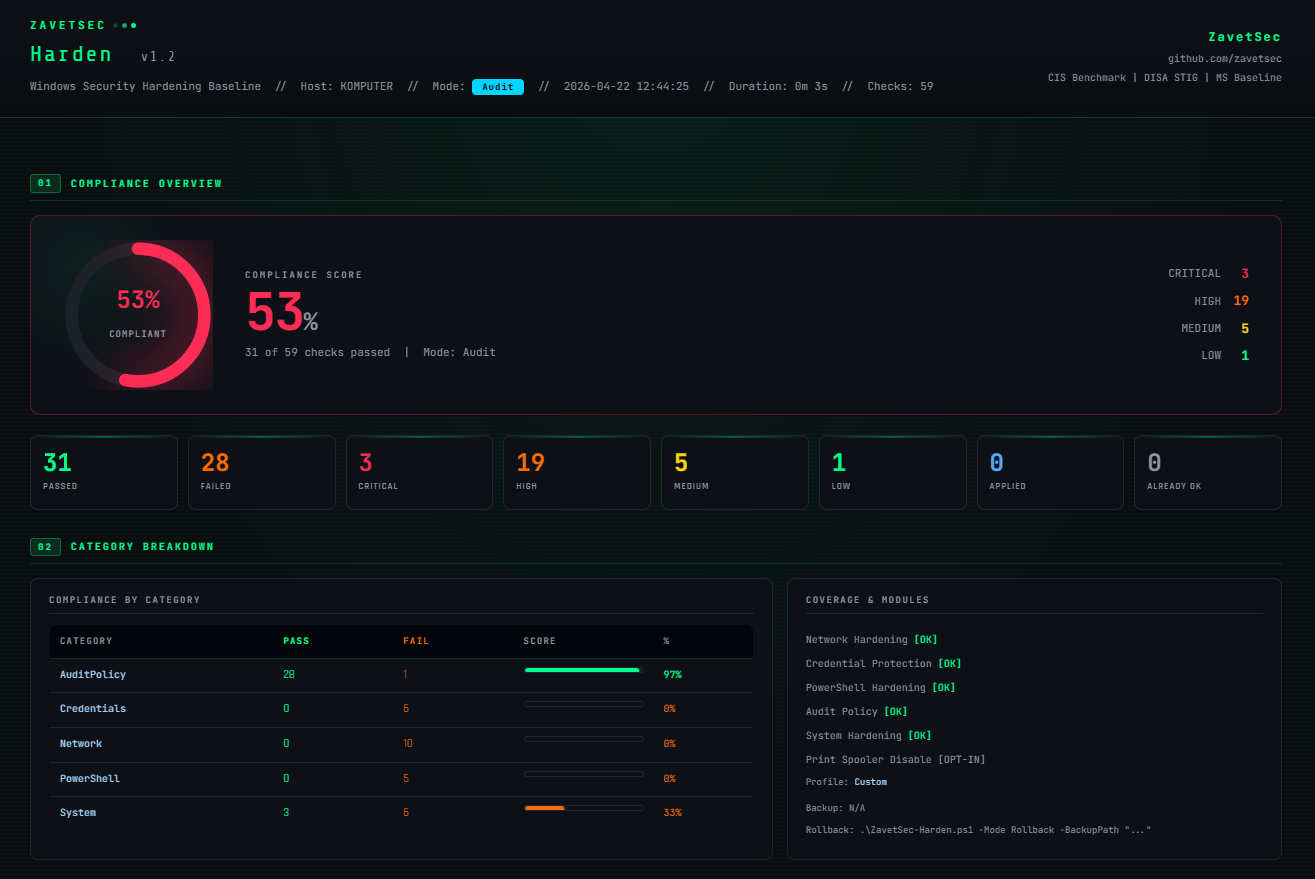
每次运行都会生成一份自包含的深色主题 HTML 报告 — 没有外部依赖,
可在任何浏览器中打开:
- **合规评分仪表** (0–100%) — 绿色 ≥80%,橙色 60–79%,红色 <60%
- 按类别细分并附带通过/失败条形图的**逐类别细分**
- **已应用的设备配置文件**部分 — 运行了哪些部分,跳过了哪些以及原因
- **完整检查列表** — ID · 严重性 · MITRE 技术 · 结果 · 应用状态 · 修复命令
- **实时过滤** — 仅 FAIL · CRITICAL · HIGH · 按类别 · 自由文本搜索
- 底部预先填好的带有备份路径的**回滚命令**
将其交给客户。将其附加到变更管理记录中。运行前后对比以显示差异。
## `>_ 工作原理`
```
Audit → detect insecure defaults (no changes)
Apply → backup → harden → verify
Rollback → restore exact previous state
```
```
┌─────────────────────────────────────────────────────────┐
│ │
│ Audit mode Read current state │
│ │ │ │
│ ▼ ▼ │
│ State detection HTML report generated │
│ │ │
│ Apply mode JSON backup → apply changes │
│ │ │ │
│ ▼ ▼ │
│ Change engine Verify each setting post-apply │
│ │ │
│ Rollback mode Read backup → restore prior state │
│ │ │
│ Defaults mode Reset to Windows out-of-box state │
│ │
└─────────────────────────────────────────────────────────┘
```
**幂等性** — 运行两次 Apply,结果完全一致。
**非破坏性** — 每次更改前都会创建 JSON 备份,支持完全回滚。
**独立于区域设置** — 审核策略使用 GUID,适用于任何 Windows 语言版本。
**兼容 PsExec** — `-NonInteractive` 标志用于远程/自动化部署。
## `>_ 可阻止的攻击`
| 威胁 | 影响 | MITRE | 控制措施 |
|---|---|---|---|
| 🔴 Responder / MITM | 通过局域网捕获凭据 | T1557.001 | 禁用 LLMNR、NBT-NS、mDNS、WPAD · 强制 SMB 签名 |
| 🔴 Mimikatz / LSASS 转储 | 从内存中获取明文密码 | T1003.001 | 关闭 WDigest · 启用 LSA PPL · 启用 Credential Guard |
| 🔴 Pass-the-Hash | 无需密码的横向移动 | T1550.002 | 仅限 NTLMv2 · 关闭 LM 哈希存储 · 128 位会话 |
| 🔴 EternalBlue / WannaCry | 远程代码执行,勒索软件 | T1210 | 禁用 SMBv1 — 服务器和客户端驱动程序 |
| 🟠 横向移动 | 在网络中传播 | T1021 | 关闭远程注册表 · 限制匿名枚举 |
| 🟠 预认证 RDP 漏洞利用 | 登录提示前的远程代码执行 | T1021.001 | 强制要求 NLA · 高加密级别 |
| 🟠 USB 载荷投递 | 从物理媒体自动运行 | T1091 | 在所有驱动器类型上禁用 AutoRun / AutoPlay |
| 🟠 PowerShell 滥用 | LOLBin / 无文件执行 | T1059.001 | 脚本块 + 模块日志记录 · 禁用 PSv2 |
| 🟡 日志盲区 | 未被检测的攻击者活动 | — | 安全日志 1 GB · 29 项审核子类别检查 |
## `>_ 覆盖范围`
### 🌐 网络攻击面缩减
- LLMNR — **已禁用** (Responder 诱饵)
- mDNS — **已禁用**
- WPAD — **已禁用** (代理劫持向量)
- NBT-NS — 在所有适配器上**已禁用**
- LMHOSTS 查找 — **已禁用**
- SMBv1 服务器 — **已禁用**
- SMBv1 客户端驱动程序 (mrxsmb10) — **已禁用** (需要重启)
- SMB 签名服务器 — **已要求**
- SMB 签名客户端 — **已要求**
- 匿名 SAM/共享枚举 — **已阻止**
- 远程注册表服务 — **已禁用**
`NET-001 — NET-010`
### 🔑 凭据保护
- WDigest 明文缓存 — **已禁用**
- LSA Protected Process Light — **已启用**
- Credential Guard (VBS) — **已启用**
- LAN Manager 身份验证级别 — **仅限 NTLMv2** (拒绝 LM/NTLMv1)
- LM 哈希存储 — **已禁用**
- NTLM 128 位会话安全性 — **已强制**
`CRED-001 — CRED-006`
### 🐚 PowerShell 加固
- 脚本块日志记录 (4104) — **已启用**
- 模块日志记录 (4103) — **已启用**
- 转录输出至 `C:\ProgramData\PSTranscripts` — **已启用**
- PowerShell v2 引擎 — **已禁用** (AMSI 绕过向量)
- 执行策略 (RemoteSigned) — **在机器范围设置**
`PS-001 — PS-005`
### 📋 审核策略
通过带有 GUID 引用的 `auditpol` 配置 27 个子类别 — 独立于区域设置,可在
任何 Windows 语言版本上运行。加上 4688 中的命令行捕获,以及
`SCENoApplyLegacyAuditPolicy` 以防止 GPO 静默覆盖子类别设置。
涵盖登录/注销、Kerberos (TGT + TGS)、进程创建、账户管理、对象访问、
特权使用、策略更改、DPAPI、计划任务、可移动存储、防火墙事件。
`AUD-001 — AUD-029`
### 🖥️ 系统加固
- UAC — **完全强制**并带有安全桌面提示
- AutoRun / AutoPlay — 在所有驱动器类型上**已禁用**
- Windows 防火墙 — 在所有配置文件(域、专用、公共)上**已启用**
- RDP NLA — **强制要求**
- DEP — **AlwaysOn** (需要重启)
- 安全日志 — **1 GB / 覆盖**
- 系统 + 应用程序日志 — **256 MB / 覆盖**
- DNS-over-HTTPS 策略 — **已启用**
- RDP 加密 — **高** (MinEncryptionLevel=3)
- Print Spooler 禁用 — **选择加入** (PrintNightmare 缓解措施)
`SYS-001 — SYS-010`
## `>_ 输出 — HTML 报告`
每次运行都会生成一份自包含的深色主题 HTML 报告 — 没有外部依赖,
可在任何浏览器中打开:
- **合规评分仪表** (0–100%) — 绿色 ≥80%,橙色 60–79%,红色 <60%
- 按类别细分并附带通过/失败条形图的**逐类别细分**
- **已应用的设备配置文件**部分 — 运行了哪些部分,跳过了哪些以及原因
- **完整检查列表** — ID · 严重性 · MITRE 技术 · 结果 · 应用状态 · 修复命令
- **实时过滤** — 仅 FAIL · CRITICAL · HIGH · 按类别 · 自由文本搜索
- 底部预先填好的带有备份路径的**回滚命令**
将其交给客户。将其附加到变更管理记录中。运行前后对比以显示差异。
 ## `>_ 为什么选它,而不是其他`
| | ZavetSec-Harden | CIS CAT Pro | LGPO.exe | MS Security Baseline (GPO) |
|---|---|---|---|---|
| **回滚** | ✅ JSON 备份 | ❌ | 手动 GPO 还原 | 部分 |
| **HTML 报告** | ✅ 按检查项,含 MITRE | ✅ | ❌ | ❌ |
| **无依赖** | ✅ 仅需 PS 5.1 | ❌ 需要 Java | ✅ | ❌ 需要 AD/DC |
| **离线** | ✅ | ❌ | ✅ | ✅ |
| **仅审计模式** | ✅ | ✅ | ❌ | ❌ |
| **设备配置文件** | ✅ 按角色的安全预设 | ❌ | ❌ | ❌ |
| **选择性应用** | ✅ 配置文件 + 跳过标志 | ❌ | ❌ | ❌ |
| **PsExec / 自动化** | ✅ `-NonInteractive` | ❌ | 部分 | 部分 |
主要区别在于:大多数替代方案要么在没有简单撤销的情况下更改系统、
需要基础设施,要么不生成可操作的报告。
此工具旨在实现**可逆、可报告且随处可运行**。
专为独立和离线环境设计 — 无需基础设施。
## `>_ 快速入门`
### 选项 A — 交互式 (推荐)
```
.\ZavetSec-Harden.ps1
```
脚本会引导您完成模式选择,然后是 Apply 的设备配置文件选择,
接着是 Rollback 的备份文件选择。每个菜单都有 **[0] Back**。无效输入
会循环 — 绝不会意外退出。
**选择 [2] 后的 Apply 流程:**
```
==============================================================
Select device profile:
==============================================================
[1] Workstation - endpoint, full hardening applied
[2] File Server - SMBv1/signing critical, skip Credential Guard
[3] Domain Controller - skip Credential Guard + audit policy (use GPO)
[4] RDS - terminal server, full hardening + transcription note
[5] SQL / DB Server - skip Credential Guard, check Remote Registry
[6] Exchange / Mail - skip network + credential sections (NTLM/SMB deps)
[7] Print Server - Print Spooler preserved, skip Credential Guard
[8] ALL - apply all 60 checks, operator takes full responsibility
[0] Back - return to mode selection
```
**选择 [3] 后的 Rollback 流程:**
```
[ 1] HardeningBackup_20260422_143012.json [2026-04-22 14:30:12] 8.4 KB
[ 2] HardeningBackup_20260418_091544.json [2026-04-18 09:15:44] 7.1 KB
[0] Back
```
### 选项 B — 直接标志
```
# 审计 -- 零更改
.\ZavetSec-Harden.ps1 -Mode Audit
# 通过设备 profile 应用(无交互式菜单)
.\ZavetSec-Harden.ps1 -Mode Apply -DeviceProfile Workstation
.\ZavetSec-Harden.ps1 -Mode Apply -DeviceProfile DomainController
.\ZavetSec-Harden.ps1 -Mode Apply -DeviceProfile All
# 应用 -- 完全自动化,无提示
.\ZavetSec-Harden.ps1 -Mode Apply -DeviceProfile Workstation -NonInteractive
# 回滚 -- 交互式备份选择
.\ZavetSec-Harden.ps1 -Mode Rollback
# 回滚 -- 明确的备份路径(自动化)
.\ZavetSec-Harden.ps1 -Mode Rollback -BackupPath .\HardeningBackup_20260422_143012.json
# 重置为 Windows 默认设置(当备份不可用时)
.\ZavetSec-Harden.ps1 -Mode Defaults
# 手动跳过个别部分(自定义 profile)
.\ZavetSec-Harden.ps1 -Mode Apply -SkipAuditPolicy
.\ZavetSec-Harden.ps1 -Mode Apply -SkipNetworkHardening
.\ZavetSec-Harden.ps1 -Mode Apply -SkipCredentialProtection
.\ZavetSec-Harden.ps1 -Mode Apply -SkipPowerShell
# PrintNightmare 缓解措施(选择加入)
.\ZavetSec-Harden.ps1 -Mode Apply -EnablePrintSpoolerDisable
```
### 选项 C — 通过 PsExec 批量部署
```
psexec \\TARGET -s -c .\ZavetSec-Harden.ps1 -Mode Apply -DeviceProfile Workstation -NonInteractive
```
## `>_ 设备配置文件`
配置文件会为特定角色自动配置 `Skip*` 标志。HTML 报告包含
一个**已应用的设备配置文件**部分 (02.5),其中包含完整的已应用/跳过
列表以及每次跳过的原因。
| 配置文件 | 跳过网络 | 跳过凭据 | 跳过审核策略 | Print Spooler |
|---|---|---|---|---|
| `Workstation` | — | — | — | 选择加入 |
| `FileServer` | — | ✓ | — | 选择加入 |
| `DomainController` | — | ✓ | ✓ (通过 GPO 管理) | 选择加入 |
| `RDS` | — | — | — | 选择加入 |
| `SQL` | — | ✓ | — | 选择加入 |
| `Exchange` | ✓ | ✓ | — | 选择加入 |
| `PrintServer` | — | ✓ | — | **从不** |
| `All` | — | — | — | **始终开启** |
| `Custom` | 手动 `-Skip*` 标志 | | | |
**为什么大多数服务器配置文件会跳过凭据:** Credential Guard 需要
UEFI + Secure Boot + VBS,并且根据 Microsoft 文档,它在域控制器上明确不受
支持。在 SQL Server 和某些存储配置上,它可能导致不稳定。`CRED-001` (WDigest) 和
`CRED-002` (LSA PPL) 仍会被应用 — 只有
`CRED-003` (Credential Guard) 是存在问题的项,但为了防止部分应用,
整个部分都会被跳过。
## `>_ 安全运行 — 请先阅读`
**可能会出现的问题:**
- **禁用 SMBv1** — 仅支持 SMBv1 的传统设备(旧打印机、NAS、XP/2003)将失去网络访问权限。请先运行 `Get-SmbConnection` 来识别它们。
- **强制要求 SMB 签名** — 不支持签名的客户端将被拒绝。在现代环境中可忽略不计,请在传统/混合环境中进行检查。
- **Credential Guard** — 需要 UEFI + Secure Boot + VBS 硬件。在不兼容的机器上会被优雅地跳过。
- **仅限 NTLMv2** — 仅支持 LM/NTLMv1 的系统将无法通过身份验证。在 IT 环境中罕见,在 OT/工业环境中较常见。
- **Print Spooler** (`-EnablePrintSpoolerDisable`) — 打印功能将完全停止。仅应用于非打印机器。
- **禁用 PSv2** — 需要重启。调用 `powershell -version 2` 的自动化将会中断。
**需要重启以生效的项:** Credential Guard · DE AlwaysOn · 禁用 PSv2 · SMBv1 客户端驱动程序。
**运行时间:** Audit 约 10-30 秒。Apply 约 20-60 秒 — 大部分时间花在 27 个 `auditpol` 子类别调用上。已在实验室集群上通过 PsExec 批量执行进行了测试,未出现问题。
## `>_ 部署时间线`
```
Day 0 Audit on a representative sample.
Review the HTML report. Identify legacy dependencies
(SMBv1 devices, NTLMv1 systems, old automation scripts).
Day 1-7 Fix dependencies. Test Apply in a lab VM.
Confirm rollback works from the generated backup.
Day 7 Apply to a pilot group (5-10 machines).
Monitor for 48 hours. Check application behaviour and helpdesk.
Day 14+ Roll out in batches. Reboot machines that require it.
Day 30 Re-run Audit across all machines.
Compare compliance % before and after.
Attach the HTML report to the change management record.
```
## `>_ 紧急重置`
提供两种恢复途径 — 通过交互式菜单 `[4] Defaults` 或直接执行:
```
# 路径 1 -- 从备份精确恢复(首选)
.\ZavetSec-Harden.ps1 -Mode Rollback
# 自动显示可用备份的交互式列表
# 路径 2 -- 完全重置为 Windows 开箱即用默认设置(当备份不可用时)
.\ZavetSec-Harden.ps1 -Mode Defaults
# 或直接:
.\WindowsDefaults.ps1 -NonInteractive
```
**决策树:**
```
Something broke after Apply
|
+-- JSON backup exists?
| YES -> .\ZavetSec-Harden.ps1 -Mode Rollback
| (precise restore of your exact prior values)
|
+-- No backup / hardened by another tool?
YES -> .\ZavetSec-Harden.ps1 -Mode Defaults
(full reset to clean Windows out-of-box state)
```
## `>_ 测试过的环境`
| 操作系统 | 已加入域 | 工作组 |
|---|---|---|
| Windows 10 21H2+ | ✅ | ✅ |
| Windows 11 22H2+ | ✅ | ✅ |
| Windows Server 2016 | ✅ | ✅ |
| Windows Server 2019 | ✅ | ✅ |
| Windows Server 2022 | ✅ | ✅ |
| Server Core | ✅ | ✅ |
## `>_ 参数`
| 参数 | 默认值 | 描述 |
|---|---|---|
| `-Mode Audit\|Apply\|Rollback\|Defaults` | 交互式菜单 | 操作模式。省略此参数可获取交互式模式选择菜单。 |
| `-DeviceProfile` | `Custom` | 针对设备角色的安全预设。请参阅设备配置文件表。如果在 Apply 模式下省略,将显示交互式菜单。 |
| `-BackupPath` | `
## `>_ 为什么选它,而不是其他`
| | ZavetSec-Harden | CIS CAT Pro | LGPO.exe | MS Security Baseline (GPO) |
|---|---|---|---|---|
| **回滚** | ✅ JSON 备份 | ❌ | 手动 GPO 还原 | 部分 |
| **HTML 报告** | ✅ 按检查项,含 MITRE | ✅ | ❌ | ❌ |
| **无依赖** | ✅ 仅需 PS 5.1 | ❌ 需要 Java | ✅ | ❌ 需要 AD/DC |
| **离线** | ✅ | ❌ | ✅ | ✅ |
| **仅审计模式** | ✅ | ✅ | ❌ | ❌ |
| **设备配置文件** | ✅ 按角色的安全预设 | ❌ | ❌ | ❌ |
| **选择性应用** | ✅ 配置文件 + 跳过标志 | ❌ | ❌ | ❌ |
| **PsExec / 自动化** | ✅ `-NonInteractive` | ❌ | 部分 | 部分 |
主要区别在于:大多数替代方案要么在没有简单撤销的情况下更改系统、
需要基础设施,要么不生成可操作的报告。
此工具旨在实现**可逆、可报告且随处可运行**。
专为独立和离线环境设计 — 无需基础设施。
## `>_ 快速入门`
### 选项 A — 交互式 (推荐)
```
.\ZavetSec-Harden.ps1
```
脚本会引导您完成模式选择,然后是 Apply 的设备配置文件选择,
接着是 Rollback 的备份文件选择。每个菜单都有 **[0] Back**。无效输入
会循环 — 绝不会意外退出。
**选择 [2] 后的 Apply 流程:**
```
==============================================================
Select device profile:
==============================================================
[1] Workstation - endpoint, full hardening applied
[2] File Server - SMBv1/signing critical, skip Credential Guard
[3] Domain Controller - skip Credential Guard + audit policy (use GPO)
[4] RDS - terminal server, full hardening + transcription note
[5] SQL / DB Server - skip Credential Guard, check Remote Registry
[6] Exchange / Mail - skip network + credential sections (NTLM/SMB deps)
[7] Print Server - Print Spooler preserved, skip Credential Guard
[8] ALL - apply all 60 checks, operator takes full responsibility
[0] Back - return to mode selection
```
**选择 [3] 后的 Rollback 流程:**
```
[ 1] HardeningBackup_20260422_143012.json [2026-04-22 14:30:12] 8.4 KB
[ 2] HardeningBackup_20260418_091544.json [2026-04-18 09:15:44] 7.1 KB
[0] Back
```
### 选项 B — 直接标志
```
# 审计 -- 零更改
.\ZavetSec-Harden.ps1 -Mode Audit
# 通过设备 profile 应用(无交互式菜单)
.\ZavetSec-Harden.ps1 -Mode Apply -DeviceProfile Workstation
.\ZavetSec-Harden.ps1 -Mode Apply -DeviceProfile DomainController
.\ZavetSec-Harden.ps1 -Mode Apply -DeviceProfile All
# 应用 -- 完全自动化,无提示
.\ZavetSec-Harden.ps1 -Mode Apply -DeviceProfile Workstation -NonInteractive
# 回滚 -- 交互式备份选择
.\ZavetSec-Harden.ps1 -Mode Rollback
# 回滚 -- 明确的备份路径(自动化)
.\ZavetSec-Harden.ps1 -Mode Rollback -BackupPath .\HardeningBackup_20260422_143012.json
# 重置为 Windows 默认设置(当备份不可用时)
.\ZavetSec-Harden.ps1 -Mode Defaults
# 手动跳过个别部分(自定义 profile)
.\ZavetSec-Harden.ps1 -Mode Apply -SkipAuditPolicy
.\ZavetSec-Harden.ps1 -Mode Apply -SkipNetworkHardening
.\ZavetSec-Harden.ps1 -Mode Apply -SkipCredentialProtection
.\ZavetSec-Harden.ps1 -Mode Apply -SkipPowerShell
# PrintNightmare 缓解措施(选择加入)
.\ZavetSec-Harden.ps1 -Mode Apply -EnablePrintSpoolerDisable
```
### 选项 C — 通过 PsExec 批量部署
```
psexec \\TARGET -s -c .\ZavetSec-Harden.ps1 -Mode Apply -DeviceProfile Workstation -NonInteractive
```
## `>_ 设备配置文件`
配置文件会为特定角色自动配置 `Skip*` 标志。HTML 报告包含
一个**已应用的设备配置文件**部分 (02.5),其中包含完整的已应用/跳过
列表以及每次跳过的原因。
| 配置文件 | 跳过网络 | 跳过凭据 | 跳过审核策略 | Print Spooler |
|---|---|---|---|---|
| `Workstation` | — | — | — | 选择加入 |
| `FileServer` | — | ✓ | — | 选择加入 |
| `DomainController` | — | ✓ | ✓ (通过 GPO 管理) | 选择加入 |
| `RDS` | — | — | — | 选择加入 |
| `SQL` | — | ✓ | — | 选择加入 |
| `Exchange` | ✓ | ✓ | — | 选择加入 |
| `PrintServer` | — | ✓ | — | **从不** |
| `All` | — | — | — | **始终开启** |
| `Custom` | 手动 `-Skip*` 标志 | | | |
**为什么大多数服务器配置文件会跳过凭据:** Credential Guard 需要
UEFI + Secure Boot + VBS,并且根据 Microsoft 文档,它在域控制器上明确不受
支持。在 SQL Server 和某些存储配置上,它可能导致不稳定。`CRED-001` (WDigest) 和
`CRED-002` (LSA PPL) 仍会被应用 — 只有
`CRED-003` (Credential Guard) 是存在问题的项,但为了防止部分应用,
整个部分都会被跳过。
## `>_ 安全运行 — 请先阅读`
**可能会出现的问题:**
- **禁用 SMBv1** — 仅支持 SMBv1 的传统设备(旧打印机、NAS、XP/2003)将失去网络访问权限。请先运行 `Get-SmbConnection` 来识别它们。
- **强制要求 SMB 签名** — 不支持签名的客户端将被拒绝。在现代环境中可忽略不计,请在传统/混合环境中进行检查。
- **Credential Guard** — 需要 UEFI + Secure Boot + VBS 硬件。在不兼容的机器上会被优雅地跳过。
- **仅限 NTLMv2** — 仅支持 LM/NTLMv1 的系统将无法通过身份验证。在 IT 环境中罕见,在 OT/工业环境中较常见。
- **Print Spooler** (`-EnablePrintSpoolerDisable`) — 打印功能将完全停止。仅应用于非打印机器。
- **禁用 PSv2** — 需要重启。调用 `powershell -version 2` 的自动化将会中断。
**需要重启以生效的项:** Credential Guard · DE AlwaysOn · 禁用 PSv2 · SMBv1 客户端驱动程序。
**运行时间:** Audit 约 10-30 秒。Apply 约 20-60 秒 — 大部分时间花在 27 个 `auditpol` 子类别调用上。已在实验室集群上通过 PsExec 批量执行进行了测试,未出现问题。
## `>_ 部署时间线`
```
Day 0 Audit on a representative sample.
Review the HTML report. Identify legacy dependencies
(SMBv1 devices, NTLMv1 systems, old automation scripts).
Day 1-7 Fix dependencies. Test Apply in a lab VM.
Confirm rollback works from the generated backup.
Day 7 Apply to a pilot group (5-10 machines).
Monitor for 48 hours. Check application behaviour and helpdesk.
Day 14+ Roll out in batches. Reboot machines that require it.
Day 30 Re-run Audit across all machines.
Compare compliance % before and after.
Attach the HTML report to the change management record.
```
## `>_ 紧急重置`
提供两种恢复途径 — 通过交互式菜单 `[4] Defaults` 或直接执行:
```
# 路径 1 -- 从备份精确恢复(首选)
.\ZavetSec-Harden.ps1 -Mode Rollback
# 自动显示可用备份的交互式列表
# 路径 2 -- 完全重置为 Windows 开箱即用默认设置(当备份不可用时)
.\ZavetSec-Harden.ps1 -Mode Defaults
# 或直接:
.\WindowsDefaults.ps1 -NonInteractive
```
**决策树:**
```
Something broke after Apply
|
+-- JSON backup exists?
| YES -> .\ZavetSec-Harden.ps1 -Mode Rollback
| (precise restore of your exact prior values)
|
+-- No backup / hardened by another tool?
YES -> .\ZavetSec-Harden.ps1 -Mode Defaults
(full reset to clean Windows out-of-box state)
```
## `>_ 测试过的环境`
| 操作系统 | 已加入域 | 工作组 |
|---|---|---|
| Windows 10 21H2+ | ✅ | ✅ |
| Windows 11 22H2+ | ✅ | ✅ |
| Windows Server 2016 | ✅ | ✅ |
| Windows Server 2019 | ✅ | ✅ |
| Windows Server 2022 | ✅ | ✅ |
| Server Core | ✅ | ✅ |
## `>_ 参数`
| 参数 | 默认值 | 描述 |
|---|---|---|
| `-Mode Audit\|Apply\|Rollback\|Defaults` | 交互式菜单 | 操作模式。省略此参数可获取交互式模式选择菜单。 |
| `-DeviceProfile` | `Custom` | 针对设备角色的安全预设。请参阅设备配置文件表。如果在 Apply 模式下省略,将显示交互式菜单。 |
| `-BackupPath` | `` | JSON 备份路径。在 Rollback 模式下,如果省略此参数,将显示一个交互式列表。 |
| `-OutputPath` | `` | HTML 报告输出路径。 |
| `-SkipAuditPolicy` | — | 跳过审核策略部分。可被配置文件选择覆盖。 |
| `-SkipNetworkHardening` | — | 跳过网络部分。可被配置文件选择覆盖。 |
| `-SkipPowerShell` | — | 跳过 PowerShell 部分。可被配置文件选择覆盖。 |
| `-SkipCredentialProtection` | — | 跳过凭据部分。可被配置文件选择覆盖。 |
| `-EnablePrintSpoolerDisable` | — | 禁用 Print Spooler (选择加入)。在 `PrintServer` 配置文件中被忽略。 |
| `-NonInteractive` | — | 抑制所有提示。与 Apply 一起使用时需要显式的 `-Mode` 和 `-DeviceProfile`。 |
## `>_ 防病毒排除项`
某些 EDR/AV 解决方案可能会根据脚本的行为将其标记 — 更改注册表、
控制服务、调用 `auditpol.exe` 以及执行 `.ps1`。
这是预期行为,并不表示存在恶意意图。
如果您的防病毒软件触发了警报,请检查源代码(完全开源)
并考虑为以下内容添加排除项:
```
ZavetSec-Harden.ps1
```
## `>_ ZavetSec DFIR 工具包的一部分`
`ZavetSec-Harden` 是 **ZavetSec** 开源 SOC/DFIR 工具包中的一个模块 —
这是一组专为在真实环境中工作的从业者构建的独立 PowerShell 工具集:混合操作系统集群、
无互联网连接、预算有限以及不等待人的突发事件。
该工具包中的每一个工具都遵循相同的设计契约:
- **仅限 PS 5.1** — 可在从 Server 2016 到 Windows 11 的任何系统上运行,无先决条件
- **零依赖** — 单个脚本文件,无需安装模块,无需互联网
- **自包含的 HTML 报告** — 深色主题,可过滤,随时可附加到工单中
- **映射 MITRE ATT&CK** — 调查发现与具体技术相关联,而不仅仅是抽象的建议
- **兼容 PsExec / 自动化** — 所有工具均提供 `-NonInteractive` 标志
- **可逆** — 只要进行了更改,就总会提供回滚途径
该工具包涵盖了完整的事件响应生命周期:实时取证和工件收集、威胁情报丰富、
网络发现和漏洞面映射、横向移动检测、凭据暴露分析,以及带有合规性报告的
加固。这些工具旨在根据任务需求,作为管道链接在一起或
独立使用。
**→ [github.com/zavetsec](https://github.com/zavetsec)**
## `>_ 如果这帮到了您`
如果此工具在审计或事件响应期间为您节省了时间 — 请考虑给仓库加星。
这有助于其他防御者发现该工具。
## `>_ 免责声明`
## `>_ 工作原理`
```
Audit → detect insecure defaults (no changes)
Apply → backup → harden → verify
Rollback → restore exact previous state
```
```
┌─────────────────────────────────────────────────────────┐
│ │
│ Audit mode Read current state │
│ │ │ │
│ ▼ ▼ │
│ State detection HTML report generated │
│ │ │
│ Apply mode JSON backup → apply changes │
│ │ │ │
│ ▼ ▼ │
│ Change engine Verify each setting post-apply │
│ │ │
│ Rollback mode Read backup → restore prior state │
│ │ │
│ Defaults mode Reset to Windows out-of-box state │
│ │
└─────────────────────────────────────────────────────────┘
```
**幂等性** — 运行两次 Apply,结果完全一致。
**非破坏性** — 每次更改前都会创建 JSON 备份,支持完全回滚。
**独立于区域设置** — 审核策略使用 GUID,适用于任何 Windows 语言版本。
**兼容 PsExec** — `-NonInteractive` 标志用于远程/自动化部署。
## `>_ 可阻止的攻击`
| 威胁 | 影响 | MITRE | 控制措施 |
|---|---|---|---|
| 🔴 Responder / MITM | 通过局域网捕获凭据 | T1557.001 | 禁用 LLMNR、NBT-NS、mDNS、WPAD · 强制 SMB 签名 |
| 🔴 Mimikatz / LSASS 转储 | 从内存中获取明文密码 | T1003.001 | 关闭 WDigest · 启用 LSA PPL · 启用 Credential Guard |
| 🔴 Pass-the-Hash | 无需密码的横向移动 | T1550.002 | 仅限 NTLMv2 · 关闭 LM 哈希存储 · 128 位会话 |
| 🔴 EternalBlue / WannaCry | 远程代码执行,勒索软件 | T1210 | 禁用 SMBv1 — 服务器和客户端驱动程序 |
| 🟠 横向移动 | 在网络中传播 | T1021 | 关闭远程注册表 · 限制匿名枚举 |
| 🟠 预认证 RDP 漏洞利用 | 登录提示前的远程代码执行 | T1021.001 | 强制要求 NLA · 高加密级别 |
| 🟠 USB 载荷投递 | 从物理媒体自动运行 | T1091 | 在所有驱动器类型上禁用 AutoRun / AutoPlay |
| 🟠 PowerShell 滥用 | LOLBin / 无文件执行 | T1059.001 | 脚本块 + 模块日志记录 · 禁用 PSv2 |
| 🟡 日志盲区 | 未被检测的攻击者活动 | — | 安全日志 1 GB · 29 项审核子类别检查 |
## `>_ 覆盖范围`
### 🌐 网络攻击面缩减
- LLMNR — **已禁用** (Responder 诱饵)
- mDNS — **已禁用**
- WPAD — **已禁用** (代理劫持向量)
- NBT-NS — 在所有适配器上**已禁用**
- LMHOSTS 查找 — **已禁用**
- SMBv1 服务器 — **已禁用**
- SMBv1 客户端驱动程序 (mrxsmb10) — **已禁用** (需要重启)
- SMB 签名服务器 — **已要求**
- SMB 签名客户端 — **已要求**
- 匿名 SAM/共享枚举 — **已阻止**
- 远程注册表服务 — **已禁用**
`NET-001 — NET-010`
### 🔑 凭据保护
- WDigest 明文缓存 — **已禁用**
- LSA Protected Process Light — **已启用**
- Credential Guard (VBS) — **已启用**
- LAN Manager 身份验证级别 — **仅限 NTLMv2** (拒绝 LM/NTLMv1)
- LM 哈希存储 — **已禁用**
- NTLM 128 位会话安全性 — **已强制**
`CRED-001 — CRED-006`
### 🐚 PowerShell 加固
- 脚本块日志记录 (4104) — **已启用**
- 模块日志记录 (4103) — **已启用**
- 转录输出至 `C:\ProgramData\PSTranscripts` — **已启用**
- PowerShell v2 引擎 — **已禁用** (AMSI 绕过向量)
- 执行策略 (RemoteSigned) — **在机器范围设置**
`PS-001 — PS-005`
### 📋 审核策略
通过带有 GUID 引用的 `auditpol` 配置 27 个子类别 — 独立于区域设置,可在
任何 Windows 语言版本上运行。加上 4688 中的命令行捕获,以及
`SCENoApplyLegacyAuditPolicy` 以防止 GPO 静默覆盖子类别设置。
涵盖登录/注销、Kerberos (TGT + TGS)、进程创建、账户管理、对象访问、
特权使用、策略更改、DPAPI、计划任务、可移动存储、防火墙事件。
`AUD-001 — AUD-029`
### 🖥️ 系统加固
- UAC — **完全强制**并带有安全桌面提示
- AutoRun / AutoPlay — 在所有驱动器类型上**已禁用**
- Windows 防火墙 — 在所有配置文件(域、专用、公共)上**已启用**
- RDP NLA — **强制要求**
- DEP — **AlwaysOn** (需要重启)
- 安全日志 — **1 GB / 覆盖**
- 系统 + 应用程序日志 — **256 MB / 覆盖**
- DNS-over-HTTPS 策略 — **已启用**
- RDP 加密 — **高** (MinEncryptionLevel=3)
- Print Spooler 禁用 — **选择加入** (PrintNightmare 缓解措施)
`SYS-001 — SYS-010`
## `>_ 输出 — HTML 报告`
每次运行都会生成一份自包含的深色主题 HTML 报告 — 没有外部依赖,
可在任何浏览器中打开:
- **合规评分仪表** (0–100%) — 绿色 ≥80%,橙色 60–79%,红色 <60%
- 按类别细分并附带通过/失败条形图的**逐类别细分**
- **已应用的设备配置文件**部分 — 运行了哪些部分,跳过了哪些以及原因
- **完整检查列表** — ID · 严重性 · MITRE 技术 · 结果 · 应用状态 · 修复命令
- **实时过滤** — 仅 FAIL · CRITICAL · HIGH · 按类别 · 自由文本搜索
- 底部预先填好的带有备份路径的**回滚命令**
将其交给客户。将其附加到变更管理记录中。运行前后对比以显示差异。
## `>_ 为什么选它,而不是其他`
| | ZavetSec-Harden | CIS CAT Pro | LGPO.exe | MS Security Baseline (GPO) |
|---|---|---|---|---|
| **回滚** | ✅ JSON 备份 | ❌ | 手动 GPO 还原 | 部分 |
| **HTML 报告** | ✅ 按检查项,含 MITRE | ✅ | ❌ | ❌ |
| **无依赖** | ✅ 仅需 PS 5.1 | ❌ 需要 Java | ✅ | ❌ 需要 AD/DC |
| **离线** | ✅ | ❌ | ✅ | ✅ |
| **仅审计模式** | ✅ | ✅ | ❌ | ❌ |
| **设备配置文件** | ✅ 按角色的安全预设 | ❌ | ❌ | ❌ |
| **选择性应用** | ✅ 配置文件 + 跳过标志 | ❌ | ❌ | ❌ |
| **PsExec / 自动化** | ✅ `-NonInteractive` | ❌ | 部分 | 部分 |
主要区别在于:大多数替代方案要么在没有简单撤销的情况下更改系统、
需要基础设施,要么不生成可操作的报告。
此工具旨在实现**可逆、可报告且随处可运行**。
专为独立和离线环境设计 — 无需基础设施。
## `>_ 快速入门`
### 选项 A — 交互式 (推荐)
```
.\ZavetSec-Harden.ps1
```
脚本会引导您完成模式选择,然后是 Apply 的设备配置文件选择,
接着是 Rollback 的备份文件选择。每个菜单都有 **[0] Back**。无效输入
会循环 — 绝不会意外退出。
**选择 [2] 后的 Apply 流程:**
```
==============================================================
Select device profile:
==============================================================
[1] Workstation - endpoint, full hardening applied
[2] File Server - SMBv1/signing critical, skip Credential Guard
[3] Domain Controller - skip Credential Guard + audit policy (use GPO)
[4] RDS - terminal server, full hardening + transcription note
[5] SQL / DB Server - skip Credential Guard, check Remote Registry
[6] Exchange / Mail - skip network + credential sections (NTLM/SMB deps)
[7] Print Server - Print Spooler preserved, skip Credential Guard
[8] ALL - apply all 60 checks, operator takes full responsibility
[0] Back - return to mode selection
```
**选择 [3] 后的 Rollback 流程:**
```
[ 1] HardeningBackup_20260422_143012.json [2026-04-22 14:30:12] 8.4 KB
[ 2] HardeningBackup_20260418_091544.json [2026-04-18 09:15:44] 7.1 KB
[0] Back
```
### 选项 B — 直接标志
```
# 审计 -- 零更改
.\ZavetSec-Harden.ps1 -Mode Audit
# 通过设备 profile 应用(无交互式菜单)
.\ZavetSec-Harden.ps1 -Mode Apply -DeviceProfile Workstation
.\ZavetSec-Harden.ps1 -Mode Apply -DeviceProfile DomainController
.\ZavetSec-Harden.ps1 -Mode Apply -DeviceProfile All
# 应用 -- 完全自动化,无提示
.\ZavetSec-Harden.ps1 -Mode Apply -DeviceProfile Workstation -NonInteractive
# 回滚 -- 交互式备份选择
.\ZavetSec-Harden.ps1 -Mode Rollback
# 回滚 -- 明确的备份路径(自动化)
.\ZavetSec-Harden.ps1 -Mode Rollback -BackupPath .\HardeningBackup_20260422_143012.json
# 重置为 Windows 默认设置(当备份不可用时)
.\ZavetSec-Harden.ps1 -Mode Defaults
# 手动跳过个别部分(自定义 profile)
.\ZavetSec-Harden.ps1 -Mode Apply -SkipAuditPolicy
.\ZavetSec-Harden.ps1 -Mode Apply -SkipNetworkHardening
.\ZavetSec-Harden.ps1 -Mode Apply -SkipCredentialProtection
.\ZavetSec-Harden.ps1 -Mode Apply -SkipPowerShell
# PrintNightmare 缓解措施(选择加入)
.\ZavetSec-Harden.ps1 -Mode Apply -EnablePrintSpoolerDisable
```
### 选项 C — 通过 PsExec 批量部署
```
psexec \\TARGET -s -c .\ZavetSec-Harden.ps1 -Mode Apply -DeviceProfile Workstation -NonInteractive
```
## `>_ 设备配置文件`
配置文件会为特定角色自动配置 `Skip*` 标志。HTML 报告包含
一个**已应用的设备配置文件**部分 (02.5),其中包含完整的已应用/跳过
列表以及每次跳过的原因。
| 配置文件 | 跳过网络 | 跳过凭据 | 跳过审核策略 | Print Spooler |
|---|---|---|---|---|
| `Workstation` | — | — | — | 选择加入 |
| `FileServer` | — | ✓ | — | 选择加入 |
| `DomainController` | — | ✓ | ✓ (通过 GPO 管理) | 选择加入 |
| `RDS` | — | — | — | 选择加入 |
| `SQL` | — | ✓ | — | 选择加入 |
| `Exchange` | ✓ | ✓ | — | 选择加入 |
| `PrintServer` | — | ✓ | — | **从不** |
| `All` | — | — | — | **始终开启** |
| `Custom` | 手动 `-Skip*` 标志 | | | |
**为什么大多数服务器配置文件会跳过凭据:** Credential Guard 需要
UEFI + Secure Boot + VBS,并且根据 Microsoft 文档,它在域控制器上明确不受
支持。在 SQL Server 和某些存储配置上,它可能导致不稳定。`CRED-001` (WDigest) 和
`CRED-002` (LSA PPL) 仍会被应用 — 只有
`CRED-003` (Credential Guard) 是存在问题的项,但为了防止部分应用,
整个部分都会被跳过。
## `>_ 安全运行 — 请先阅读`
**可能会出现的问题:**
- **禁用 SMBv1** — 仅支持 SMBv1 的传统设备(旧打印机、NAS、XP/2003)将失去网络访问权限。请先运行 `Get-SmbConnection` 来识别它们。
- **强制要求 SMB 签名** — 不支持签名的客户端将被拒绝。在现代环境中可忽略不计,请在传统/混合环境中进行检查。
- **Credential Guard** — 需要 UEFI + Secure Boot + VBS 硬件。在不兼容的机器上会被优雅地跳过。
- **仅限 NTLMv2** — 仅支持 LM/NTLMv1 的系统将无法通过身份验证。在 IT 环境中罕见,在 OT/工业环境中较常见。
- **Print Spooler** (`-EnablePrintSpoolerDisable`) — 打印功能将完全停止。仅应用于非打印机器。
- **禁用 PSv2** — 需要重启。调用 `powershell -version 2` 的自动化将会中断。
**需要重启以生效的项:** Credential Guard · DE AlwaysOn · 禁用 PSv2 · SMBv1 客户端驱动程序。
**运行时间:** Audit 约 10-30 秒。Apply 约 20-60 秒 — 大部分时间花在 27 个 `auditpol` 子类别调用上。已在实验室集群上通过 PsExec 批量执行进行了测试,未出现问题。
## `>_ 部署时间线`
```
Day 0 Audit on a representative sample.
Review the HTML report. Identify legacy dependencies
(SMBv1 devices, NTLMv1 systems, old automation scripts).
Day 1-7 Fix dependencies. Test Apply in a lab VM.
Confirm rollback works from the generated backup.
Day 7 Apply to a pilot group (5-10 machines).
Monitor for 48 hours. Check application behaviour and helpdesk.
Day 14+ Roll out in batches. Reboot machines that require it.
Day 30 Re-run Audit across all machines.
Compare compliance % before and after.
Attach the HTML report to the change management record.
```
## `>_ 紧急重置`
提供两种恢复途径 — 通过交互式菜单 `[4] Defaults` 或直接执行:
```
# 路径 1 -- 从备份精确恢复(首选)
.\ZavetSec-Harden.ps1 -Mode Rollback
# 自动显示可用备份的交互式列表
# 路径 2 -- 完全重置为 Windows 开箱即用默认设置(当备份不可用时)
.\ZavetSec-Harden.ps1 -Mode Defaults
# 或直接:
.\WindowsDefaults.ps1 -NonInteractive
```
**决策树:**
```
Something broke after Apply
|
+-- JSON backup exists?
| YES -> .\ZavetSec-Harden.ps1 -Mode Rollback
| (precise restore of your exact prior values)
|
+-- No backup / hardened by another tool?
YES -> .\ZavetSec-Harden.ps1 -Mode Defaults
(full reset to clean Windows out-of-box state)
```
## `>_ 测试过的环境`
| 操作系统 | 已加入域 | 工作组 |
|---|---|---|
| Windows 10 21H2+ | ✅ | ✅ |
| Windows 11 22H2+ | ✅ | ✅ |
| Windows Server 2016 | ✅ | ✅ |
| Windows Server 2019 | ✅ | ✅ |
| Windows Server 2022 | ✅ | ✅ |
| Server Core | ✅ | ✅ |
## `>_ 参数`
| 参数 | 默认值 | 描述 |
|---|---|---|
| `-Mode Audit\|Apply\|Rollback\|Defaults` | 交互式菜单 | 操作模式。省略此参数可获取交互式模式选择菜单。 |
| `-DeviceProfile` | `Custom` | 针对设备角色的安全预设。请参阅设备配置文件表。如果在 Apply 模式下省略,将显示交互式菜单。 |
| `-BackupPath` | `
**[ZavetSec](https://github.com/zavetsec)** — 为那些在凌晨 2 点阅读日志的人提供的安全工具
*⭐ 为仓库加星以帮助其他防御者发现它。*
标签:ATTACK-Python-Client, Awesome, CIS Benchmark, Conpot, DISA STIG, HTML报告, IT运维, Libemu, MS Security Baseline, OpenCanary, PE 加载器, PowerShell脚本, Socks5代理, Windows 10, Windows 11, Windows Server, Windows安全, 关系图谱, 基线检查, 子域名变形, 安全合规, 安全基线, 教学环境, 漏洞防御, 系统加固, 系统管理, 网络代理, 配置回滚, 防御绕过