Youhai020616/stealth-cli
GitHub: Youhai020616/stealth-cli
基于 Camoufox(C++ 层面修改的 Firefox 分支)打造的反检测浏览器命令行工具,能够在 C++ 原生层面伪装指纹从而绕过主流反自动化检测系统。
Stars: 37 | Forks: 6
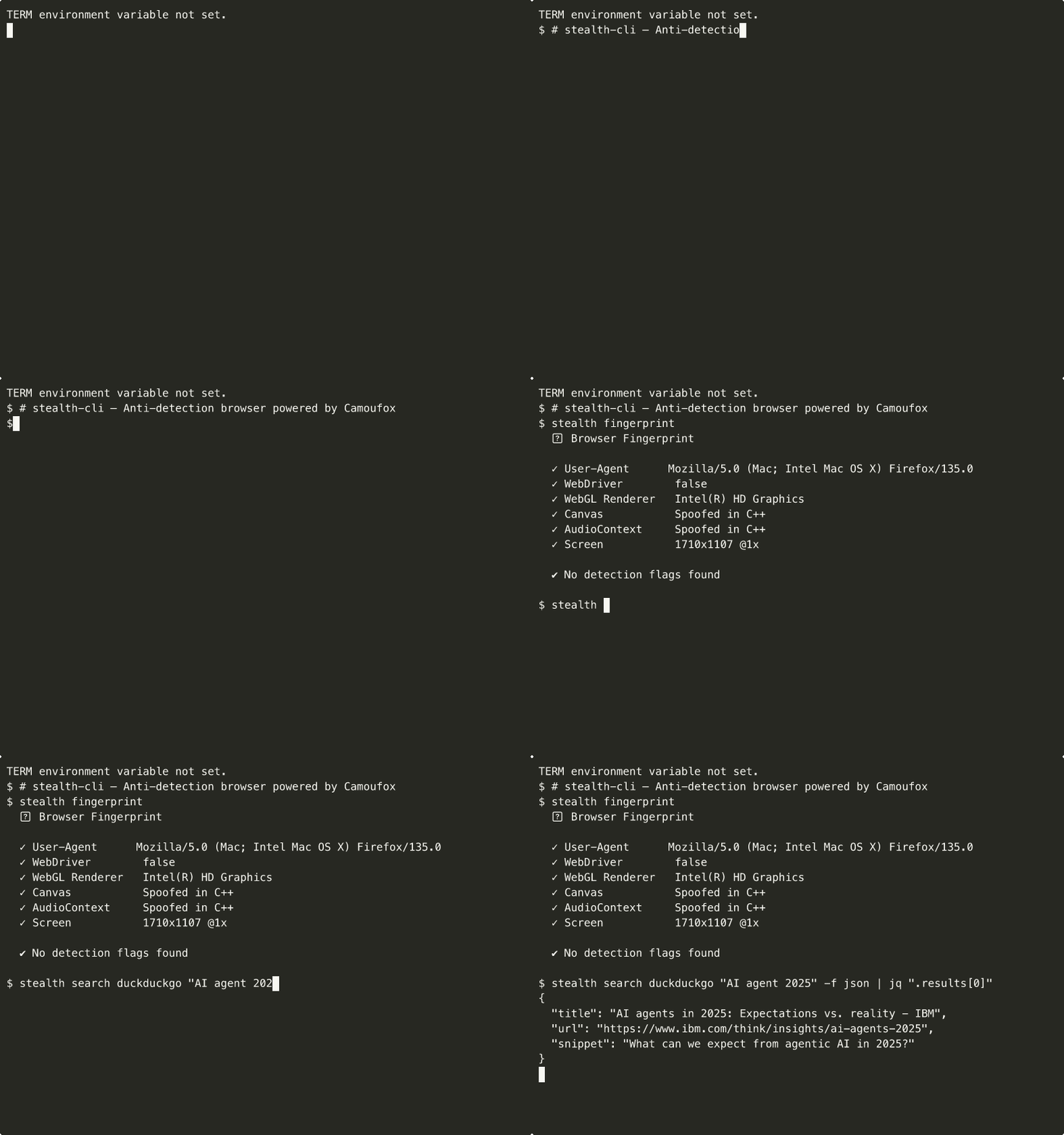
## 为什么
无头版 Chrome 会被指纹识别。Playwright 会被拦截。隐身插件反而成了暴露的指纹。
**stealth-cli** 使用了 [Camoufox](https://camoufox.com) —— 一个在 **C++ 实现层面**修补指纹生成的 Firefox 分支。没有 JavaScript 垫片,没有包装器,毫无破绽。浏览器在底层直接上报伪装的值。
将其封装在一个开发者友好的 CLI 中,包含 16 个命令,你就得到了一个人类和 AI 代理都能使用的工具。
### 对比
| 方案 | 检测风险 | 原因 |
|----------|:---:|------|
| Puppeteer + 隐身插件 | 🔴 高 | JS 级别的补丁会被检测到;Chromium 的 TLS 指纹极易暴露 |
| Playwright + 自定义参数 | 🟡 中 | 稍好一些,但 `navigator.webdriver` 的绕过方法很脆弱 |
| undetected-chromedriver | 🟡 中 | 修补了 Chrome 二进制文件,但仍然是基于 Chromium 的指纹 |
| **stealth-cli (Camoufox)** | 🟢 低 | 在 C++ 层面进行原生伪装的 Firefox 分支;没有可检测的 JS 垫片 |
## 安装
```
npm install -g stealth-cli
```
从源码安装
```
git clone https://github.com/Youhai020616/stealth-cli.git
cd stealth-cli
npm install # Installs deps + downloads Camoufox browser
npm link # Makes 'stealth' command globally available
```
## 快速开始
```
stealth browse https://example.com # Visit a page
stealth screenshot https://example.com -o page.png # Screenshot
stealth search google "best coffee beans" -f json # Search Google
stealth extract https://example.com --links # Extract links
stealth crawl https://example.com -d 2 -l 50 -o out.jsonl # Crawl
stealth interactive --url https://example.com # REPL mode
```
## 反检测的工作原理
```
stealth-cli (Node.js CLI)
└── camoufox-js (npm binding)
└── Camoufox (C++ Firefox fork)
└── Fingerprint spoofing at the native level
```
| 指纹特征 | 方法 |
|---|---|
| `navigator.hardwareConcurrency` | 在 C++ 中伪装 |
| `navigator.webdriver` | 始终为 `false` |
| WebGL 渲染器 / 供应商 | 在 C++ 中伪装 |
| AudioContext 指纹 | 在 C++ 中伪装 |
| Canvas 指纹 | 在 C++ 中伪装 |
| 屏幕分辨率 | 在 C++ 中伪装 |
| WebRTC 泄露 | 内置保护 |
| TLS 指纹 | Firefox 原生(非 Chromium) |
没有 JavaScript 垫片。没有可检测的包装器。浏览器直接上报原生伪装的值。
## 命令
### 核心 (11)
| 命令 | 描述 |
|---------|-------------|
| `browse
` | 访问 URL,打印内容(text/json/snapshot/markdown) |
| `screenshot ` | 截图(PNG/JPEG,全页,自定义视口) |
| `search ` | 在 14 个搜索引擎中进行反检测搜索 |
| `extract ` | 提取链接、图像、元数据、标题、CSS 选择器 |
| `crawl ` | 递归爬取,支持深度/过滤/延迟控制 |
| `interactive` | 支持 20 多个命令的 REPL(goto、click、type、eval 等) |
| `pdf ` | 将页面保存为 PDF |
| `batch ` | 批量处理文件中的 URL |
| `monitor ` | 监控变动(价格下降、库存提醒) |
| `fingerprint` | 检查指纹及反检测状态 |
| `serve` | 带有 Bearer token 认证的 HTTP API 服务器 |
### 管理 (5)
| 命令 | 描述 |
|---------|-------------|
| `daemon start/stop/status` | 后台浏览器(约 1 秒启动,而普通启动需约 6 秒) |
| `profile create/list/delete` | 持久化身份(8 个预设 + 随机) |
| `proxy add/list/test` | 支持轮换和健康检查的代理池 |
| `config set/get/list/reset` | 全局默认配置(~/.stealth/config.json) |
| `mcp` | 用于 Claude Desktop / Cursor 的 MCP 服务器 |
## 使用示例
### 浏览
```
stealth browse https://example.com # Text output
stealth browse https://example.com -f json # JSON with metadata
stealth browse https://example.com -f snapshot # Accessibility tree
stealth browse https://example.com --humanize # Human behavior simulation
stealth browse https://example.com --profile us-desktop # Saved identity
stealth browse https://example.com --proxy http://proxy:8080
```
### 搜索
Google 使用了特殊的反检测流程:访问首页 → 模拟人类输入节奏输入查询 → 按下 Enter。
```
stealth search google "web scraping tools" -f json # Auto-humanized
stealth search google "query" -f json --warmup # Visit random site first
stealth search duckduckgo "privacy browser" -f json
stealth search youtube "tutorial" -f json # Video metadata
stealth search github "camoufox" -f json # Repo results
```
**14 个引擎:** google · bing · duckduckgo · youtube · github · amazon · reddit · wikipedia · twitter · linkedin · tiktok · stackoverflow · npmjs · yelp
### 提取
```
stealth extract https://example.com --links # All links
stealth extract https://example.com --images # All images
stealth extract https://example.com --meta # Title, description, OG
stealth extract https://example.com --headers # h1-h6 headings
stealth extract https://example.com -s ".price" --all # CSS selector
stealth extract https://example.com -s "a" -a "href" --all # Attributes
```
### 爬取
```
stealth crawl https://example.com -d 2 -l 50 # Depth 2, max 50 pages
stealth crawl https://example.com -o results.jsonl # Save to file
stealth crawl https://example.com --include "blog" # URL regex filter
stealth crawl https://example.com --delay 2000 --humanize
stealth crawl https://example.com --proxy-rotate # Rotate per page
```
### 监控
```
stealth monitor https://shop.com/item -s ".price" -i 60 # Check every 60s
stealth monitor https://shop.com/item --contains "In Stock"
stealth monitor https://example.com --not-contains "Sold Out"
```
### 交互式 REPL
```
stealth interactive --url https://example.com
stealth> goto https://google.com
stealth> click "button.submit"
stealth> hclick "a.link" # Human-like click (bezier curve)
stealth> type "input[name=q]" hello
stealth> htype "input[name=q]" hello # Human-like typing (variable speed)
stealth> scroll down 3
stealth> text / snapshot / links # Inspect page
stealth> screenshot page.png
stealth> eval document.title
stealth> exit
```
## 核心特性
### 守护进程模式
在后台保持浏览器存活,以便即时执行命令。
```
stealth daemon start # Start background browser
stealth browse https://example.com # ~1.2s (vs ~6s cold start)
stealth daemon stop # Shut down (auto-stops after 5min idle)
```
### 浏览器配置文件
具有独特指纹的持久化身份。Cookie 在会话间自动保存。
```
stealth profile create work --preset us-desktop
stealth profile create rand1 --random
stealth browse https://example.com --profile work
# → 指纹: Windows, en-US, America/New_York
```
**8 个预设:** `us-desktop` · `us-laptop` · `uk-desktop` · `de-desktop` · `jp-desktop` · `cn-desktop` · `mobile-ios` · `mobile-android`
### 会话持久化
```
stealth browse https://example.com --session my-task --profile work
# → 保存 Cookies + URL + 历史记录
stealth browse https://other.com --session my-task
# → 自动恢复 cookies 和最后访问的 URL
```
### 代理池
```
stealth proxy add http://proxy1:8080 --label us --region US
stealth proxy add http://proxy2:8080 --label eu --region EU
stealth proxy test # Health check
stealth browse https://example.com --proxy-rotate # Auto-rotate
```
GeoIP:Camoufox 会自动将语言环境、时区和地理位置匹配为代理的出口 IP。
### 拟人化模式
模拟人类行为模式以规避行为检测:
```
stealth browse https://example.com --humanize
stealth search google "query" --humanize --warmup
```
- 动作间呈高斯分布的延迟
- 贝塞尔曲线鼠标移动轨迹
- 可变的输入速度
- 随机的滚动模式
### 全局配置
设置默认值,省去重复输入标志的麻烦:
```
stealth config set locale zh-CN
stealth config set humanize true
stealth config set retries 3
stealth config set format json
stealth config list
```
所有核心命令均遵循全局配置。CLI 标志具有最高覆盖优先级。
### 支持管道
stdout = 数据,stderr = 状态。结合 Unix 工具使用:
```
stealth browse https://api.example.com -f json | jq '.title'
stealth search google "query" -f json | jq '.results[].url'
stealth extract https://example.com --links -f json | jq '.data[].url'
```
## 集成
### HTTP API 服务器
将 stealth-cli 作为服务运行以供程序化调用:
```
stealth serve --port 9377
# → 启动时打印自动生成的 API token
curl localhost:9377/health # No auth
curl -X POST localhost:9377/tabs \
-H 'Authorization: Bearer ' \
-H 'Content-Type: application/json' \
-d '{"url":"https://example.com"}' # Create tab
curl localhost:9377/tabs/tab-1/text -H 'Authorization: Bearer ' # Get text
```
**选项:** `--token ` · `--no-auth` (仅限 localhost) · `--host 0.0.0.0`
**端点:** `/health` · `/tabs` (POST/GET) · `/tabs/:id/navigate` · `/tabs/:id/text` · `/tabs/:id/snapshot` · `/tabs/:id/screenshot` · `/tabs/:id/click` · `/tabs/:id/type` · `/tabs/:id/evaluate` · `/tabs/:id` (DELETE) · `/shutdown`
### MCP 服务器 (Claude Desktop / Cursor)
为你的 AI 编程助手添加隐身浏览功能:
```
{
"mcpServers": {
"stealth": {
"command": "stealth",
"args": ["mcp"]
}
}
}
```
**7 个工具:** `stealth_browse` · `stealth_screenshot` · `stealth_search` · `stealth_extract` · `stealth_click` · `stealth_type` · `stealth_evaluate`
### SDK(库模式)
在你的 Node.js 应用程序中以编程方式使用 stealth-cli:
```
import { launchBrowser, closeBrowser, navigate, getTextContent } from 'stealth-cli';
const handle = await launchBrowser({ profile: 'us-desktop', humanize: true });
await navigate(handle, 'https://example.com');
const text = await getTextContent(handle);
await closeBrowser(handle);
```
## 错误处理
stealth-cli 提供带有上下文提示的结构化错误信息:
```
✖ Failed to navigate to https://example.com
Hint: Page load timed out. Try --wait or --retries
✖ Google detected automation and blocked the request
Hint: Try: --proxy , --warmup, --humanize, or use a different engine
✖ Profile "work" not found
Hint: Create with: stealth profile create work
```
退出代码:`0` 成功 · `3` 浏览器启动 · `4` 导航/被拦截 · `5` 数据提取 · `7` 代理 · `8` 配置文件
## 常用选项
适用于所有核心命令:
| 选项 | 描述 |
|--------|-------------|
| `--proxy ` | 使用代理服务器 |
| `--proxy-rotate` | 在代理池中轮换 |
| `--profile ` | 使用已保存的浏览器身份 |
| `--session ` | 持久化/恢复浏览会话 |
| `--cookies ` | 导入 Netscape 格式的 Cookie 文件 |
| `--humanize` | 模拟人类行为 |
| `--retries ` | 失败时的最大重试次数 |
| `--no-headless` | 显示浏览器窗口 |
| `-f, --format` | 输出格式:text, json, jsonl, snapshot, markdown |
## 项目统计
```
Version: 0.6.1
Commands: 16
Tests: 151 passing (18 test files)
Source: 5,900 lines (39 source files)
Extractors: 6 (Google, Bing, DuckDuckGo, YouTube, GitHub, generic)
Presets: 8 browser profiles
Engine: Camoufox (C++ Firefox fork)
License: MIT
```
## 🔗 生态系统
| 项目 | 描述 |
|---------|-------------|
| [AgentMind](https://github.com/Youhai020616/Agentmind) | AI 代理的自学习记忆系统 |
| [stealth-x](https://github.com/Youhai020616/stealth-x) | 反检测 X/Twitter 自动化工具(基于 stealth-cli 构建) |
| [dy-cli](https://github.com/Youhai020616/douyin) | 抖音/TikTok CLI |
| [xiaohongshu](https://github.com/Youhai020616/xiaohongshu) | 小红书自动化工具 |
| [freepost](https://github.com/Youhai020616/freepost-saas) | AI 社交媒体管理工具 |
## 致谢
- [Camoufox](https://camoufox.com) —— 让这一切成为可能的 Firefox 分支
- [Playwright](https://playwright.dev) —— 浏览器自动化框架
## 许可证
[MIT](./LICENSE) 标签:BeEF, Bot检测规避, Camoufox, CLI, C++底层修改, Firefox, GNU通用公共许可证, MITM代理, Node.js, npm包, Playwright替代方案, Puppeteer替代方案, RPA, Web Scraping, Web自动化, WiFi技术, 匿名浏览, 反指纹浏览器, 反检测浏览器, 密码管理, 指纹伪装, 数据提取, 浏览器指纹伪装, 演示模式, 爬虫, 特征检测, 绕过Cloudflare, 绕过反爬虫, 网络安全, 网络隐身, 网页截图, 自定义脚本, 隐私保护, 隐身浏览




