aws-samples/sample-cfn-guard-security-analyzer
GitHub: aws-samples/sample-cfn-guard-security-analyzer
基于 Amazon Bedrock AgentCore 的 AI Agent,自动分析 CloudFormation 资源文档并生成可直接用于 CI/CD 的 cfn-guard 安全策略规则,解决企业手动编写防护规则效率低且覆盖不全的痛点。
Stars: 18 | Forks: 12
# CloudFormation Guard 安全分析器
**问题:** 处于受监管行业的组织在企业环境中允许使用新的 AWS 服务之前,通常必须满足严格的合规性和安全性要求。负责服务引入的云和安全团队通常需要花费数小时手动分析服务文档、CloudFormation 资源规范和威胁模型,以确定合适的防护机制(例如,阻止 S3 公开访问、强制加密)。这种手动分析会导致引入延迟和覆盖范围不一致。
**解决方案:** 这个 AI Agent 自动完成了这项工作。只需将其指向任何 CloudFormation 资源文档 URL,它就会:
- 识别安全关键配置属性
- 使用 AWS MCP Server 进行文档审查和 IaC 审查,评估风险级别并提供加固建议。
- 生成可直接插入到您的 CI/CD 流水线中的即用型 [CloudFormation Guard](https://github.com/aws-cloudformation/cloudformation-guard) 规则
由 [Amazon Bedrock AgentCore](https://docs.aws.amazon.com/bedrock/latest/userguide/agentcore.html) 提供支持。
## 无需部署即可尝试 — 在您的 AI IDE 中运行分析器
您不需要 AWS 账户、Bedrock 或部署即可使用这四个分析器。
[`integrations/`](integrations/) 文件夹打包了完全相同的 Agent prompt,可以直接在您的 AI 编码工具中运行,它使用其自带的模型以及两个公开的 AWS MCP Server 来进行可靠的文档读取和 `cfn-guard` 验证。唯一的前置条件是您的 `PATH` 中有 [`uv`/`uvx`](https://docs.astral.sh/uv/)(MCP Server 通过 `uvx` 运行)。
- **Claude Code** → [`integrations/claude/`](integrations/claude) — 使用 `claude --plugin-dir ./integrations/claude` 安装,然后运行 `/cfn-guard-security-analyzer:cfn-analyze ` 编排器(或者细粒度的 `cfn-security-scan` / `cfn-property-analysis` / `cfn-guard-rule` / `cfn-crawl` 命令)。
- **Kiro** → [`integrations/kiro/`](integrations/kiro) — 将 `.kiro/` 文件夹复制到您的工作区,使用 `#cfn-security-analyzer` 引用引导文档,然后用自然语言提问(例如:*"为 AWS::S3::Bucket BucketEncryption 生成一个 cfn-guard 规则"*)。
两者都会产生相同的输出 —— 一份按严重程度排序的报告,以及带有通过/失败模板且经过自验证的 cfn-guard 规则,这些内容保存在 `./cfn-analysis/` 下。有关完整的设置和四个分析器的详细信息,请参阅 [`integrations/README.md`](integrations/README.md)。要运行完整的可部署服务(Web 前端、Step Functions 编排、批量扫描),请继续阅读下文。
## 它的功能
[CloudFormation Guard](https://github.com/aws-cloudformation/cloudformation-guard) 在部署之前对 CloudFormation 模板执行安全策略。AWS 提供了一个[开源的 Guard 规则注册表](https://github.com/aws-cloudformation/aws-guard-rules-registry),其中包含数百个映射到 AWS Config 规则的托管规则集。然而,并非所有资源属性都被覆盖 —— 新服务频繁推出,安全最佳实践在不断演进,而且组织通常需要针对其特定合规要求定制的规则。
该工具通过使用 AI Agent 自动生成尚不存在的自定义 Guard 规则,从而补充了现有的 Guard 生态系统:
1. **扫描** 任何 CloudFormation 资源文档并识别每个与安全相关的属性
2. **评估** 每个属性的风险级别(CRITICAL / HIGH / MEDIUM / LOW),并提供具体的威胁描述
3. **推荐** 安全最佳实践及可操作的加固步骤
4. **生成自定义 Guard 规则** —— 针对任何识别出的属性生成有效的 cfn-guard 3.x 规则以及通过/失败测试模板,随时可以插入到您的 CI/CD 流水线中
## 架构
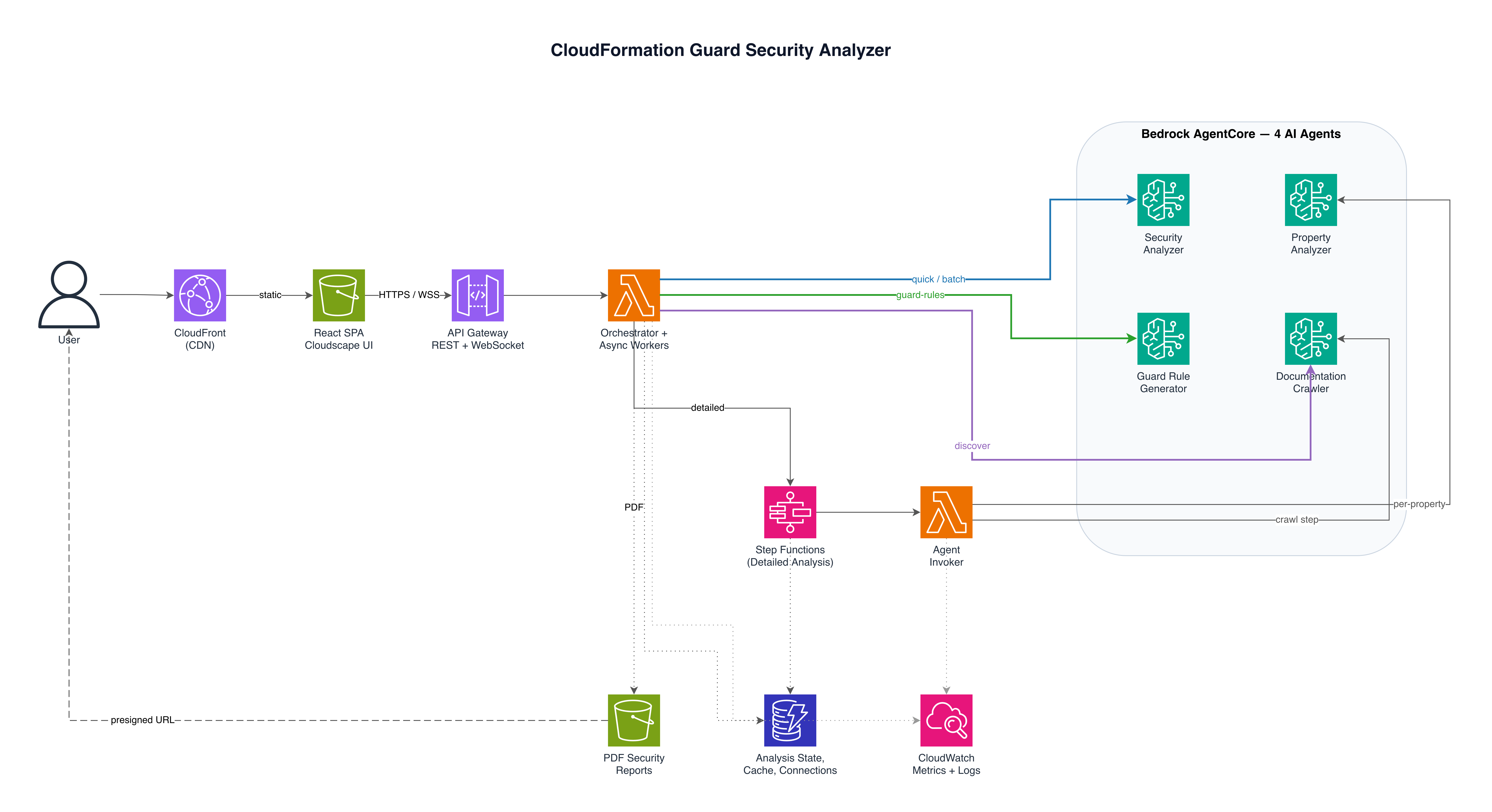
*图 1:CloudFormation Guard 安全分析器 — Serverless 架构*
| 服务 | 用途 |
|---------|---------|
| **Amazon Bedrock AgentCore** | 托管 4 个 AI Agent(Strands Agents SDK) |
| **Amazon API Gateway** | 为前端提供 HTTP 和 WebSocket API |
| **AWS Lambda** | 用于分析、报告、WebSocket 和 Step Functions 任务的无状态 handler |
| **AWS Step Functions** | 编排详细的多 Agent 分析工作流 |
| **Amazon DynamoDB** | 存储分析状态和 WebSocket 连接 |
| **Amazon S3** | 托管 React 前端 SPA 并存储 PDF 报告 |
| **Amazon CloudFront** | 前端的 CDN(同时也为 API 的 `/reports` 提供前端代理) |
| **Amazon CloudWatch** | 仪表板、告警和监控 |
### 工作原理
**步骤 1:安全扫描(10-15 秒)** — 通过快速扫描识别安全相关属性:
```
User → Frontend → API Gateway (SSE) → Lambda → Bedrock AgentCore → Security Analyzer Agent
↓
← Property-by-property streaming ←
```
**步骤 2:生成 Guard 规则(按属性)** — 在任何识别出的属性上点击“Generate Guard Rule”:
```
PropertyCard → API Gateway (POST /guard-rules) → Lambda → Guard Rule Generator Agent
↓
← Guard rule + pass/fail test templates ←
```
Guard 规则生成器使用 [Strands SDK 结构化输出](https://strandsagents.com/docs/user-guide/concepts/agents/structured-output/),旨在通过 `tool_use` schema 强制生成有效的 cfn-guard 3.x 规则。每个规则都包含通过/失败的 CloudFormation 模板,以便使用 `cfn-guard validate` 进行本地验证。
**可选:详细分析(2-5 分钟)** — 如需更深入的分析,可通过 Step Functions 执行多 Agent 工作流:
1. **Crawler Agent** 从 CloudFormation 文档中提取所有与安全相关的属性
2. **Property Analyzer Agent** 并行深入分析每个属性(最多 8 个并发)
3. 通过 WebSocket 将进度实时流式传输到前端
4. 聚合结果并生成 PDF 报告
## 演示
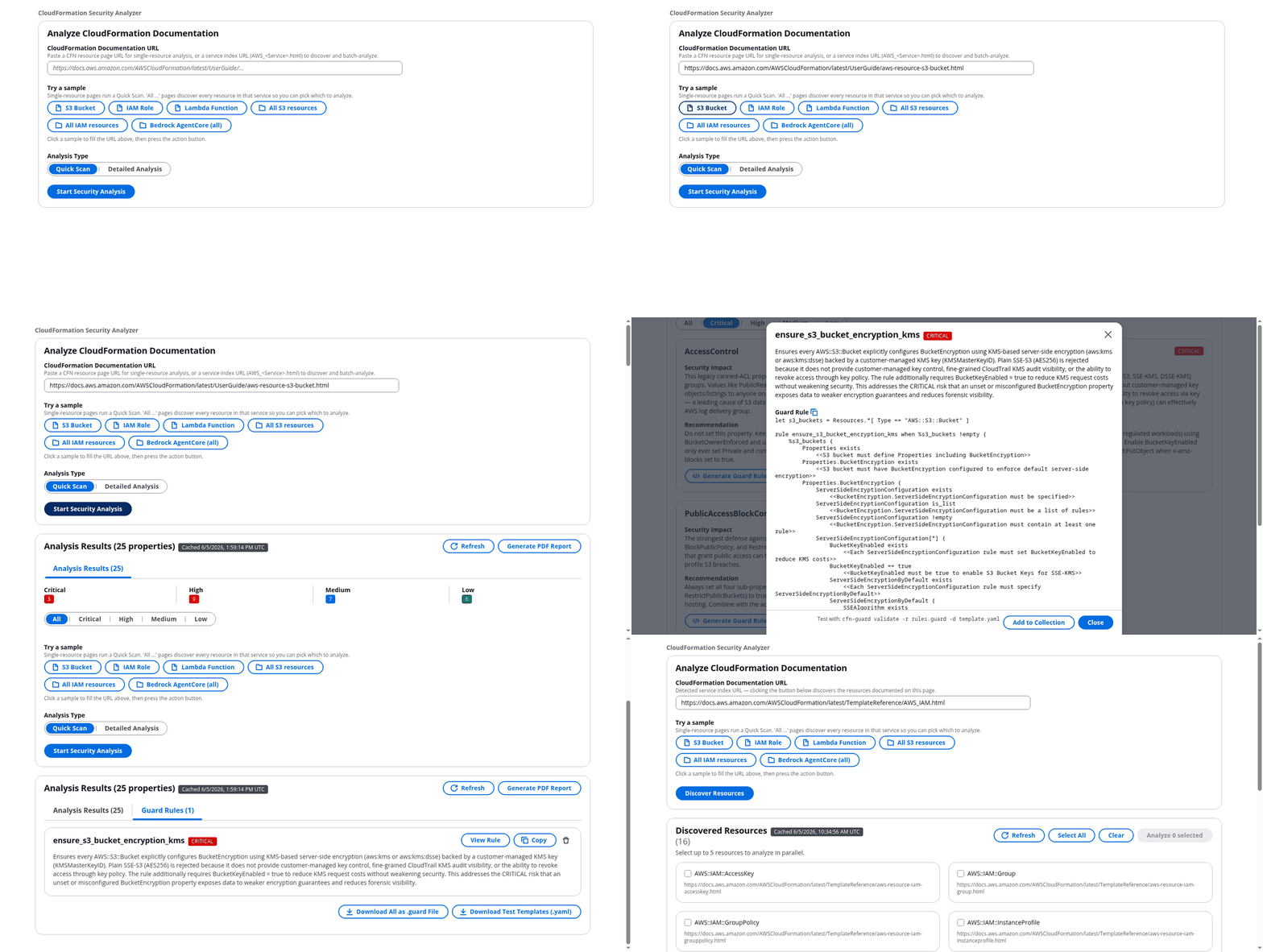
上面的演示过程展示了:
1. **输入 CloudFormation 资源 URL** — 粘贴任何文档链接,或点击示例标签(S3 Bucket、IAM Role、Lambda Function 或整个服务)
2. **快速扫描** — 分析每个属性(`AWS::S3::Bucket` 有 25 个),包含风险级别、安全影响和建议;缓存的结果会瞬间返回,并可通过刷新按钮绕过缓存
3. **严重性过滤器** — 将结果范围缩小到 Critical / High / Medium / Low
4. **生成 Guard 规则** — 点击任何属性上的按钮,生成带有通过/失败模板的 cfn-guard 3.x 规则
5. **Guard 规则集合** — 将规则添加到集合标签页,将所有规则下载为 `.guard` 规则集文件,随时可用于 CI/CD
6. **发现整个服务** — 粘贴服务索引 URL(例如 `AWS_IAM.html`)以列出每个资源,并并行批量分析最多 5 个资源;每个结果都具有相同的严重性过滤器和按属性生成 Guard 规则的功能,并且发现结果会被缓存(可通过刷新绕过)
## 示例输出
### 生成的 Guard 规则
主要输出 —— 点击任何属性上的“Generate Guard Rule”即可获得即用型规则:
```
let s3_buckets = Resources.*[ Type == "AWS::S3::Bucket" ]
rule ensure_s3_bucket_encryption when %s3_buckets !empty {
%s3_buckets {
Properties.BucketEncryption exists
<>
Properties.BucketEncryption {
ServerSideEncryptionConfiguration exists
<>
ServerSideEncryptionConfiguration[*] {
ServerSideEncryptionByDefault exists
<>
ServerSideEncryptionByDefault.SSEAlgorithm IN ["AES256", "aws:kms"]
<>
}
}
}
}
```
每个生成的规则都包含通过/失败的 CloudFormation 模板。在本地验证:
```
cfn-guard validate -r rules.guard -d template.yaml
# FAIL → 阻止了不合规的模板
# PASS → 允许了合规的模板
```
### 安全分析(规则生成的输入)
扫描会识别哪些属性与 Guard 规则相关:
```
Resource: AWS::S3::Bucket
CRITICAL BucketEncryption
Threat: Data at rest not protected by encryption
Fix: Enable SSE-S3 or SSE-KMS encryption
CRITICAL PublicAccessBlockConfiguration
Threat: No explicit public access block configured
Fix: Set BlockPublicAcls, BlockPublicPolicy, IgnorePublicAcls,
RestrictPublicBuckets to true
HIGH VersioningConfiguration
Threat: No versioning protection against accidental deletion or overwrites
Fix: Enable versioning with MFA delete
```
## 前置条件
在部署之前,请确保满足以下条件:
- **Python 3.11+** 和 **pip**
- **Node.js 18+** 和 **npm**(用于前端,在后续阶段添加)
- **AWS CDK v2** — `npm install -g aws-cdk`
- **AWS CLI** — 已配置目标账户的凭证
- **AgentCore CLI** — `pip install bedrock-agentcore-starter-toolkit`
- **Amazon Bedrock 模型访问权限** — 在部署区域中为您首选的 foundation model [启用模型访问权限](https://console.aws.amazon.com/bedrock/home#/modelaccess)。默认是 Claude Opus 4.7,但任何 Bedrock 支持的模型都可以。如果未启用模型访问权限,Agent 调用将失败并返回 `AccessDeniedException`。
## 部署
端到端部署只需一条命令:
```
./deploy.sh
```
`deploy.sh` 运行预检查(`aws`、`cdk`、`node`、`python3`、`agentcore` CLI 和 AWS 凭证),如有需要则引导 CDK,部署四个 AgentCore Agent,运行 `cdk deploy --all`,通过 `scripts/post-deploy.sh` 将 Agent ARN 接入 Lambda,构建 React 前端,并将其同步到由 CloudFront 提供前端代理的 S3 存储桶。它会在最后打印出 CloudFront URL 和一个冒烟测试 `curl` 命令。
有用的标志:
```
./deploy.sh --skip-agents # reuse existing agent ARNs (from .env or env vars)
./deploy.sh --skip-frontend # skip the frontend build + S3 sync
./deploy.sh --region us-west-2 # override the default region
./deploy.sh --help # show all options
```
如果您更喜欢手动控制,底层步骤也可以单独运行:
```
bash scripts/deploy-agents.sh # deploys 4 AgentCore agents, prints export commands
cdk deploy --all # deploys 7 CDK stacks
bash scripts/post-deploy.sh # wires agent ARNs + WebSocket endpoint into Lambdas
```
### 本地运行(开发)
Lambda handler 最好通过部署到开发栈并查看日志来进行测试:
```
aws logs tail /aws/lambda/cfn-security-orchestrator-dev --follow
```
## 配置
### 模型选择
AI Agent 默认使用 Claude Opus 4.7(`us.anthropic.claude-opus-4-7`)。要使用不同的 Bedrock 支持的模型,请设置:
```
export BEDROCK_MODEL_ID=us.anthropic.claude-sonnet-4-6
```
这在以下情况非常有用:
- 您的账户只能访问特定模型
- 您想使用不同的模型进行测试以降低成本或提高性能
- 默认模型在您的区域不可用
### 多环境
`config.py` 中有三种环境:`dev`、`staging`、`prod`。
```
CDK_ENVIRONMENT=staging cdk deploy --all
```
### 结果缓存
分析结果缓存在 DynamoDB(`cfn-security-analysis-cache-{env}`)中,具有 30 天的 TTL。缓存键为 `"{analysisType}:{resourceUrl}:{modelId}"`,因此 Bedrock 模型替换(更改 `BEDROCK_MODEL_ID`)会自动写入新的缓存条目,而不是提供过时的旧模型输出。缓存命中在 <100ms 内返回,而不是 AgentCore 往返所需的 30-90 秒。
前端的结果面板会在缓存的响应上显示“Cached”徽章。点击 **Refresh** 图标按钮可以绕过该扫描的缓存:
```
# 等效的直接 API 调用:
curl -X POST "$API_BASE_URL/analysis?refresh=true" \
-H "Content-Type: application/json" \
-d '{"resourceUrl":"https://docs.aws.amazon.com/...","analysisType":"detailed"}'
```
缓存写入是尽力而为的:DynamoDB 故障会记录错误,但不会导致分析响应失败。要完全禁用缓存(例如在没有缓存表的情况下进行本地测试),请取消设置 orchestrator Lambda 上的 `CACHE_TABLE_NAME`。
### Agent 中的 MCP Server
每个 AgentCore Agent 使用两个 AWS Labs MCP Server:
| MCP Server | 工具 | 使用者 |
|---|---|---|
| `awslabs.aws-documentation-mcp-server` | `read_documentation`、`read_sections`、`search_documentation`、`recommend` | 所有 4 个 Agent(可靠读取官方 CFN 参考文档) |
| `awslabs.aws-iac-mcp-server` | `check_cloudformation_template_compliance`、`validate_cloudformation_template` | Property analyzer(经验性基础);Guard rule generator(针对通过/失败模板进行自我验证,如果不匹配则重试 1 次) |
当 Agent 导入它们时,`agentcore` CLI 会在部署时将 MCP Server 打包到运行时容器中。不需要手动编写 Dockerfile。
### 环境变量
有关完整列表,请参见 [`.env.example`](.env.example)。关键变量:
| 变量 | 描述 | 默认值 |
|----------|-------------|---------|
| `CDK_DEFAULT_ACCOUNT` | 用于部署的 AWS 账户 ID | `111111111111` |
| `CDK_DEFAULT_REGION` | AWS 区域 | `us-east-1` |
| `CDK_ENVIRONMENT` | 环境名称 | `dev` |
| `BEDROCK_MODEL_ID` | Agent 的 Foundation model ID | Claude Opus 4.7 |
| `SECURITY_ANALYZER_AGENT_ARN` | AgentCore runtime ARN(安全扫描) | (在 Agent 部署后设置) |
| `GUARD_RULE_AGENT_ARN` | AgentCore runtime ARN(Guard 规则生成) | (在 Agent 部署后设置) |
| `CORS_ORIGINS` | 允许的 CORS 来源(逗号分隔) | `localhost` |
## 项目结构
```
.
├── deploy.sh # Single-command end-to-end deploy (preflight, CDK, agents, frontend)
├── app.py # CDK entry point (wires AwsSolutionsChecks)
├── cdk_nag_suppressions.py # cdk-nag NagSuppressions with explicit rationale
├── config.py # Per-environment config (dev/staging/prod)
├── stacks/ # CDK stack definitions
│ ├── agents_stack.py # AgentCore agent code S3 staging + ARN refs
│ ├── lambda_stack.py # Lambda functions + IAM
│ ├── api_stack.py # API Gateway REST + WebSocket APIs
│ ├── database_stack.py # DynamoDB tables (analysis, connections, cache)
│ ├── storage_stack.py # S3 buckets (HTTPS-only) + CloudFront
│ ├── stepfunctions_stack.py # Step Functions workflow + cache write
│ └── monitoring_stack.py # CloudWatch dashboards + alarms
├── lambda/ # Lambda handlers
│ ├── analysis_orchestrator.py # POST /analysis/{quick,detailed} dispatch + cache check
│ ├── websocket_handler.py # $connect, $disconnect, subscribe, broadcast
│ ├── crawler_invoker.py # Step Functions task — invokes crawler agent
│ ├── report_generator.py # PDF generation + S3 upload
│ ├── guard_rules_handler.py # POST /guard-rules — Guard rule generation
│ ├── discover_handler.py # POST /analysis/discover — service-index URL discovery
│ └── batch_handler.py # POST /analysis/batch — multi-resource quick scan fan-out
├── agents/ # Bedrock AgentCore agents (Strands SDK + AWS Labs MCP)
│ ├── security_analyzer_agent.py # Quick security scan agent
│ ├── crawler_agent.py # Documentation crawler agent (resource + index modes)
│ ├── property_analyzer_agent.py # Detailed property analysis agent
│ └── guard_rule_generator_agent.py # Guard rule generator (Pydantic structured output)
├── frontend/ # React + TypeScript + Cloudscape SPA (Vitest tests)
├── tests/unit/ # pytest tests for Lambda handlers (moto + freezegun)
│ ├── test_analysis_orchestrator.py
│ ├── test_guard_rules_handler.py
│ ├── test_websocket_handler.py
│ ├── test_report_generator.py
│ ├── test_discover_handler.py
│ └── test_batch_handler.py
└── scripts/ # Deployment helpers
├── deploy-agents.sh # Deploy all 4 AgentCore agents via agentcore CLI
├── post-deploy.sh # Wire agent ARNs + WS endpoint into Lambda; add API Gateway as CloudFront origin
└── add-cloudfront-apigw-origin.py
```
## API 参考
| 方法 | 端点 | 描述 |
|--------|----------|-------------|
| `POST` | `/analysis/quick` | 启动快速安全分析(同步) |
| `POST` | `/analysis/detailed` | 启动详细分析(Step Functions,异步) |
| `POST` | `/analysis/discover` | 发现服务索引 URL(例如 `AWS_S3.html`)上的所有 CFN 资源 |
| `POST` | `/analysis/batch` | 并行运行最多 5 个资源 URL 的快速扫描 |
| `GET` | `/analysis/{analysisId}` | 获取分析状态和结果 |
| `POST` | `//{analysisId}` | 生成 PDF 安全报告 |
| `POST` | `/guard-rules` | 为属性生成 CloudFormation Guard 规则 |
| `WS` | `$default` | 用于实时进度更新的 WebSocket 路由(详细分析) |
## 测试
后端(62 个单元测试,约 10 秒,无需 AWS 凭证 —— 使用 `moto`):
```
pip install -r requirements-dev.txt
pytest tests/unit/ -v
```
前端(47 个 Vitest 测试):
```
cd frontend
npm install
npm test -- --run
```
针对已部署开发栈的端到端冒烟测试:
```
curl -X POST "$API_BASE_URL/analysis/quick" \
-H "Content-Type: application/json" \
-d '{"resourceUrl":"https://docs.aws.amazon.com/AWSCloudFormation/latest/UserGuide/aws-resource-s3-bucket.html"}'
```
`cdk synth` 会在每个栈上运行来自 `cdk-nag` 的 `AwsSolutionsChecks`。发现的问题要么在相关栈中修复,要么在 `cdk_nag_suppressions.py` 中使用明确的理由字符串进行抑制。
## 故障排除
| 问题 | 原因 | 修复方法 |
|---------|-------|-----|
| `cdk deploy` 失败,提示 "CDKToolkit not found" | 账户未进行 bootstrap | 运行 `cdk bootstrap aws://ACCOUNT/REGION` |
| Agent 返回 `AccessDeniedException` | 未启用模型访问权限 | 在您的区域为您选择的模型[启用模型访问权限](https://console.aws.amazon.com/bedrock/home#/modelaccess) |
| Agent 返回 `ResourceNotFoundException` | 模型 ID 已弃用/无效 | 将 `BEDROCK_MODEL_ID` 设置为处于活跃状态的模型 |
| 详细分析时 Lambda 超时 | 默认的 3 秒超时对 AgentCore 调用来说太短 | CDK 将超时设置为 900 秒;请在 `lambda_stack.py` 中验证 |
| API Gateway WebSocket 返回 502 | Lambda 集成未部署 | 重新运行 `cdk deploy CfnSecurityAnalyzer-Api-dev` |
| WebSocket 连接断开 | DynamoDB 中缺少连接记录 | 确认 `$connect` Lambda 已写入连接表 |
## 清理
```
# 销毁 CDK 堆栈
CDK_ENVIRONMENT=dev cdk destroy --all
# 销毁 AgentCore agents
agentcore destroy --agent cfn_security_analyzer --force
agentcore destroy --agent cfn_crawler --force
agentcore destroy --agent cfn_property_analyzer --force
```
## 安全考虑
这是示例教学代码,**不能按原样直接用于生产环境**。在任何生产环境使用之前,请审查并加固以下内容:
- **身份验证** — API 设计为没有身份验证,以便于试用该示例。对于生产环境,请使用 Amazon Cognito(或等效的授权方)为 API 提供前端代理,并要求经过身份验证的请求。
- **CORS** — REST API 使用通配符 `Access-Control-Allow-Origin: *`。这里这是可接受的,因为 API 未经身份验证且不使用任何 cookie 或凭证,因此不会暴露经过身份验证的会话。对于生产环境,请将允许的来源限制为您的前端域。
- **SSRF 防护** — Crawler 仅从列入白名单的主机(`docs.aws.amazon.com`)获取数据。纵深防御过滤器还会从 Agent 输出中剥离任何非白名单的 URL。请根据您的用例将白名单保持在尽可能严格的范围内。
- **报告 URL** — PDF 报告通过短期有效的 S3 presigned URL(1 小时有效期)交付,并且存储桶强制执行 TLS(`aws:SecureTransport` 拒绝)。请将 presigned URL 视为敏感信息,避免记录或共享它们。
- **IAM** — Lambda 和 Step Functions 角色将 `bedrock-agentcore:InvokeAgentRuntime` 限定在此项目的 agent-name 前缀范围内,而不是通配符 ARN。在扩展示例时,请保持 IAM 最小权限原则。
- **Prompt 注入残留风险** — Agent 读取的是公开的 AWS 文档,原则上这些文档可能包含 prompt 注入内容。输出仅供参考,并且在结构上受到约束(Pydantic schema)。对于教学示例而言,这种残留风险是可以接受的;在任何自动化流水线中执行 Agent 输出之前,请先对其进行验证。
- **加密** — 所有 DynamoDB 表均已进行静态加密。
报告:有关报告安全问题的说明,请参见 [CONTRIBUTING](CONTRIBUTING.md#security-issue-notifications)。
## 许可证
本库采用 MIT-0 许可证授权。请参见 [LICENSE](LICENSE) 文件。
标签:AI智能体, AWS, CloudFormation, DevSecOps, DPI, 上游代理, 人工智能, 代码生成, 渗透测试工具, 用户模式Hook绕过, 逆向工具