afshinm/zerobox
GitHub: afshinm/zerobox
轻量级跨平台进程沙箱,支持细粒度的文件、网络和凭据控制,专为安全运行 AI 生成代码和不可信命令而设计。
Stars: 682 | Forks: 40
🫙 Zerobox
Sandbox any command with file, network, and credential controls.



轻量级、跨平台的进程沙箱,由 [OpenAI Codex](https://github.com/openai/codex) 的沙箱运行时提供支持。
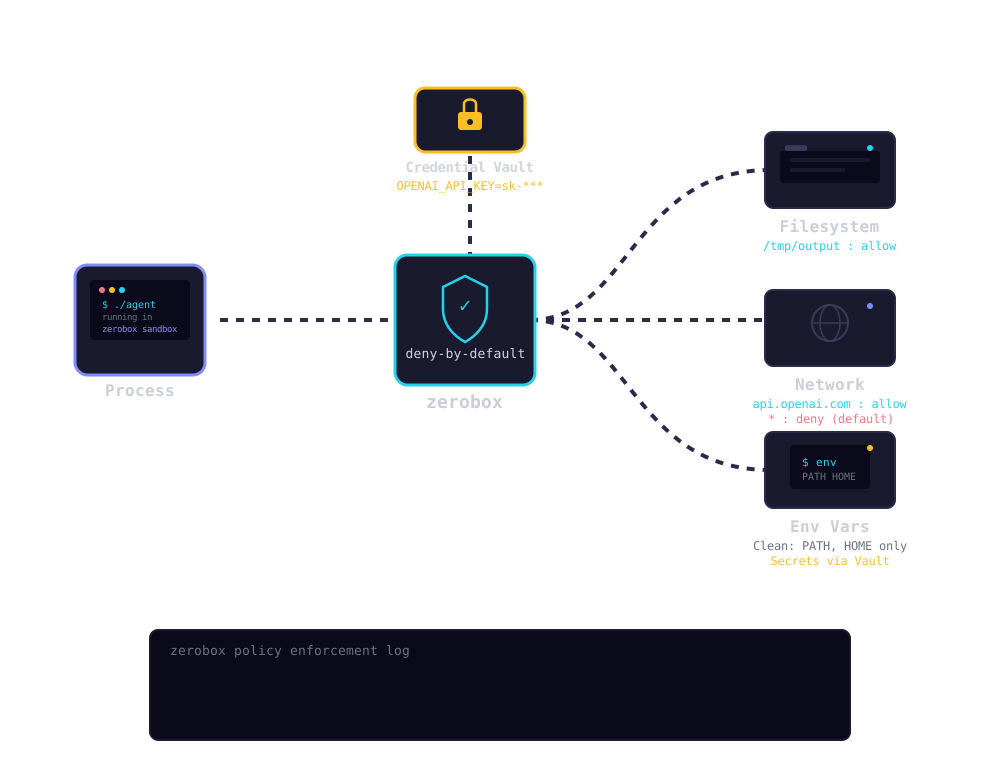
- **默认拒绝:** 写入、网络和环境变量默认被阻止,除非您明确允许
- **凭据注入:** 传递进程无法看到的 API 密钥。Zerobox 仅为批准的主机注入真实值
- **文件访问控制:** 允许或拒绝对特定路径的读取和写入
- **网络过滤:** 按域允许或拒绝出站流量
- **纯净环境:** 默认仅继承必要的环境变量(PATH、HOME 等)
- **TypeScript SDK:** `import { Sandbox } from "zerobox"`,采用 Deno 风格的 API
- **跨平台:** 支持 macOS 和 Linux。Windows 支持计划中
- **单一二进制文件:** 无需 Docker,无需 VM,开销约 10ms
## 安装
### Shell (macOS / Linux)
```
curl -fsSL https://raw.githubusercontent.com/afshinm/zerobox/main/install.sh | sh
```
### npm
```
npm install -g zerobox
```
### 从源码构建
```
git clone https://github.com/afshinm/zerobox && cd zerobox
./scripts/sync.sh && cargo build --release -p zerobox
```
## 快速开始
运行一个禁止写入且无网络访问权限的命令:
```
zerobox -- node -e "console.log('hello')"
```
允许写入特定目录:
```
zerobox --allow-write=. -- node script.js
```
允许访问特定域名的网络:
```
zerobox --allow-net=api.openai.com -- node agent.js
```
将密钥传递给特定主机,内部进程永远看不到真实值:
```
zerobox --secret OPENAI_API_KEY=sk-proj-123 --secret-host OPENAI_API_KEY=api.openai.com -- node agent.js
```
使用 TypeScript SDK 执行相同操作:
```
import { Sandbox } from "zerobox";
const sandbox = Sandbox.create({
secrets: {
OPENAI_API_KEY: {
value: process.env.OPENAI_API_KEY,
hosts: ["api.openai.com"],
},
},
});
const output = await sandbox.sh`node agent.js`.text();
```
记录文件系统更改并在执行后撤销它们:
```
zerobox --restore --allow-write=. -- npm install
```
或者仅记录而不恢复,稍后检查并撤销:
```
zerobox --snapshot --allow-write=. -- npm install
zerobox snapshot list
zerobox snapshot diff
zerobox snapshot restore
```
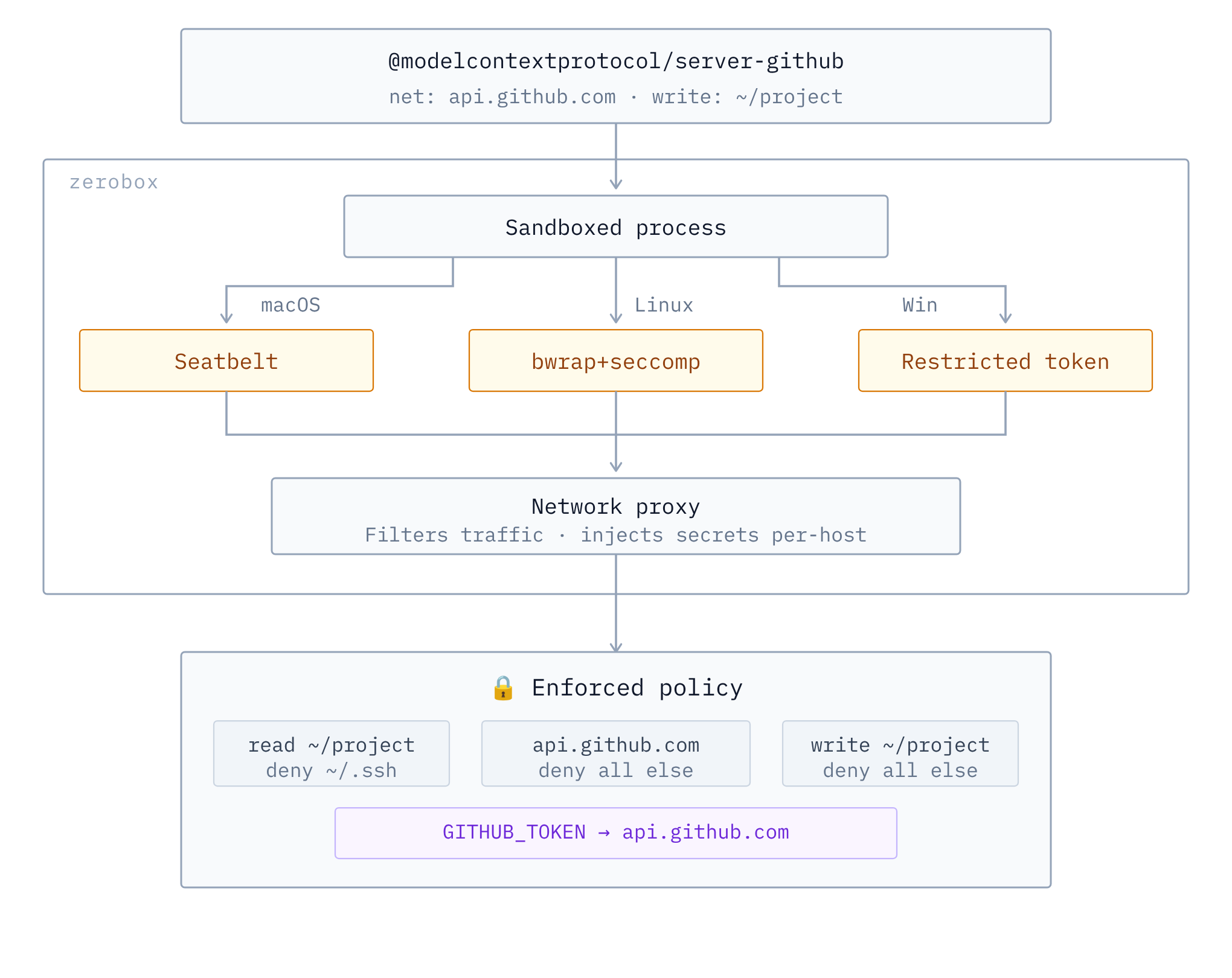
## 架构
## 密钥
密钥是指绝不应在沙箱内可见的 API 密钥、令牌或凭据。被沙箱化的进程在环境变量中看到的是占位符,而真实值仅在请求特定主机时由网络代理层替换:
```
sandbox process: echo $OPENAI_API_KEY
-> ZEROBOX_SECRET_a1b2c3d4e5... (placeholder)
sandbox process: curl -H "Authorization: Bearer $OPENAI_API_KEY" https://api.openai.com/...
-> proxy intercepts, replaces placeholder with real key
-> server receives: Authorization: Bearer sk-proj-123
```
### 使用 CLI
使用 `--secret` 传递密钥,并使用 `--secret-host` 将其限制为特定域:
```
zerobox --secret OPENAI_API_KEY=sk-proj-123 --secret-host OPENAI_API_KEY=api.openai.com -- node app.js
```
如果不使用 `--secret-host`,密钥将传递给所有域:
```
zerobox --secret TOKEN=abc123 -- node app.js
```
您也可以传递具有不同域的多个密钥:
```
zerobox \
--secret OPENAI_API_KEY=sk-proj-123 --secret-host OPENAI_API_KEY=api.openai.com \
--secret GITHUB_TOKEN=ghp-456 --secret-host GITHUB_TOKEN=api.github.com \
-- node app.js
```
### TypeScript SDK
```
import { Sandbox } from "zerobox";
const sandbox = Sandbox.create({
secrets: {
OPENAI_API_KEY: {
value: process.env.OPENAI_API_KEY,
hosts: ["api.openai.com"],
},
GITHUB_TOKEN: {
value: process.env.GITHUB_TOKEN,
hosts: ["api.github.com"],
},
},
});
await sandbox.sh`node agent.js`.text();
```
## 环境变量
默认情况下,只有必要的变量会传递给沙箱,例如 `PATH`、`HOME`、`USER`、`SHELL`、`TERM`、`LANG`。
### 继承所有父级环境变量
`--allow-env` 标志允许沙箱化的进程继承所有父级环境变量:
```
zerobox --allow-env -- node app.js
```
### 仅继承特定环境变量
```
zerobox --allow-env=PATH,HOME,DATABASE_URL -- node app.js
```
### 阻止特定环境变量
```
zerobox --allow-env --deny-env=AWS_SECRET_ACCESS_KEY -- node app.js
```
或设置特定变量:
```
zerobox --env NODE_ENV=production --env DEBUG=false -- node app.js
```
### TypeScript SDK
```
const sandbox = Sandbox.create({
env: { NODE_ENV: "production" },
allowEnv: ["PATH", "HOME"],
denyEnv: ["AWS_SECRET_ACCESS_KEY"],
});
```
## 示例
### 安全运行 AI 生成的代码
运行 AI 生成的代码,无需担心文件损坏或数据泄露:
```
zerobox -- python3 /tmp/task.py
```
或仅允许写入输出目录:
```
zerobox --allow-write=/tmp/output -- python3 /tmp/task.py
```
或通过 TypeScript SDK:
```
import { Sandbox } from "zerobox";
const sandbox = Sandbox.create({
allowWrite: ["/tmp/output"],
allowNet: ["api.openai.com"],
});
const result = await sandbox.sh`python3 /tmp/task.py`.output();
console.log(result.code, result.stdout);
```
### 限制 LLM 工具调用
每次 AI 工具调用也可以单独进行沙箱化。父代理进程正常运行,仅部分操作被沙箱化:
```
import { Sandbox } from "zerobox";
const reader = Sandbox.create();
const writer = Sandbox.create({ allowWrite: ["/tmp"] });
const fetcher = Sandbox.create({ allowNet: ["example.com"] });
const data = await reader.js`
const content = require("fs").readFileSync("/tmp/input.txt", "utf8");
console.log(JSON.stringify({ content }));
`.json();
await writer.js`
require("fs").writeFileSync("/tmp/output.txt", "result");
console.log("ok");
`.text();
const result = await fetcher.js`
const res = await fetch("https://example.com");
console.log(JSON.stringify({ status: res.status }));
`.json();
```
完整的工作示例:
- [`examples/ai-agent-sandboxed`](examples/ai-agent-sandboxed) - 整个代理进程在带密钥的沙箱中运行(API 密钥永远不可见)
- [`examples/ai-agent`](examples/ai-agent) - Vercel AI SDK,支持按工具沙箱化和密钥管理
- [`examples/workflow`](examples/workflow) - 带有沙箱化持久步骤的 [Vercel Workflow](https://useworkflow.dev/)
### 保护构建期间的代码仓库
运行具有网络访问权限的构建脚本:
```
zerobox --allow-write=./dist --allow-net -- npm run build
```
运行无网络访问的测试,捕获意外的外部调用:
```
zerobox --allow-write=/tmp -- npm test
```
## SDK 参考
```
npm install zerobox
```
### Shell 命令
```
import { Sandbox } from "zerobox";
const sandbox = Sandbox.create({ allowWrite: ["/tmp"] });
const output = await sandbox.sh`echo hello`.text();
```
### JSON 输出
```
const data = await sandbox.sh`cat data.json`.json();
```
### 原始输出(非零退出时不抛出异常)
```
const result = await sandbox.sh`exit 42`.output();
// { code: 42, stdout: "", stderr: "" }
```
### 显式命令 + 参数
```
await sandbox.exec("node", ["-e", "console.log('hi')"]).text();
```
### 内联 JavaScript
```
const data = await sandbox.js`
console.log(JSON.stringify({ sum: 1 + 2 }));
`.json();
```
### 错误处理
非零退出码会抛出 `SandboxCommandError`:
```
import { Sandbox, SandboxCommandError } from "zerobox";
const sandbox = Sandbox.create();
try {
await sandbox.sh`exit 1`.text();
} catch (e) {
if (e instanceof SandboxCommandError) {
console.log(e.code); // 1
console.log(e.stderr);
}
}
```
### 快照
```
const sandbox = Sandbox.create({
allowWrite: ["."],
restore: true,
});
// Changes are automatically undone after execution.
await sandbox.sh`npm install`.text();
```
仅记录而不恢复:
```
const sandbox = Sandbox.create({
allowWrite: ["."],
snapshot: true,
snapshotExclude: ["node_modules"],
});
await sandbox.sh`npm install`.text();
```
### 取消
```
const controller = new AbortController();
await sandbox.sh`sleep 60`.text({ signal: controller.signal });
```
## 性能
沙箱开销极低,通常约 10ms 和 7MB:
| Command | Bare | Sandboxed | Overhead | Bare Mem | Sandbox Mem |
|---------|------|-----------|----------|----------|-------------|
| `echo hello` | <1ms | 10ms | +10ms | 1.2 MB | 8.4 MB |
| `node -e '...'` | 10ms | 20ms | +10ms | 39.3 MB | 39.1 MB |
| `python3 -c '...'` | 10ms | 20ms | +10ms | 12.9 MB | 13.0 MB |
| `cat 10MB file` | <1ms | 10ms | +10ms | 1.9 MB | 8.4 MB |
| `curl https://...` | 50ms | 60ms | +10ms | 7.2 MB | 8.4 MB |
在 Apple M5 Pro 上预热后运行 10 次的最佳结果。运行 `./bench/run.sh` 以复现。
## 平台支持
| Platform | Backend | Status |
|----------|---------|--------|
| macOS | Seatbelt (`sandbox-exec`) | Fully supported |
| Linux | Bubblewrap + Seccomp + Namespaces | Fully supported |
| Windows | Restricted Tokens + ACLs + Firewall | Planned |
## CLI 参考
| Flag | Example | Description |
|------|---------|-------------|
| `--allow-read ` | `--allow-read=/tmp,/data` | Restrict readable user data to listed paths. System libraries remain accessible. Default: all reads allowed. |
| `--deny-read ` | `--deny-read=/secret` | Block reading from these paths. Takes precedence over `--allow-read`. |
| `--allow-write [paths]` | `--allow-write=.` | Allow writing to these paths. Without a value, allows writing everywhere. Default: no writes. |
| `--deny-write ` | `--deny-write=./.git` | Block writing to these paths. Takes precedence over `--allow-write`. |
| `--allow-net [domains]` | `--allow-net=example.com` | Allow outbound network. Without a value, allows all domains. Default: no network. |
| `--deny-net ` | `--deny-net=evil.com` | Block network to these domains. Takes precedence over `--allow-net`. |
| `--env ` | `--env NODE_ENV=prod` | Set env var in the sandbox. Can be repeated. |
| `--allow-env [keys]` | `--allow-env=PATH,HOME` | Inherit parent env vars. Without a value, inherits all. Default: only PATH, HOME, USER, SHELL, TERM, LANG. |
| `--deny-env ` | `--deny-env=SECRET` | Drop these parent env vars. Takes precedence over `--allow-env`. |
| `--secret ` | `--secret API_KEY=sk-123` | Pass a secret. The process sees a placeholder; the real value is injected at the proxy for approved hosts. |
| `--secret-host ` | `--secret-host API_KEY=api.openai.com` | Restrict a secret to specific hosts. Without this, the secret is substituted for all hosts. |
| `-A`, `--allow-all` | `-A` | Grant all filesystem and network permissions. Env and secrets still apply. |
| `--no-sandbox` | `--no-sandbox` | Disable the sandbox entirely. |
| `--strict-sandbox` | `--strict-sandbox` | Require full sandbox (bubblewrap). Fail instead of falling back to weaker isolation. |
| `--debug` | `--debug` | Print sandbox config and proxy decisions to stderr. |
| `--snapshot` | `--snapshot` | Record filesystem changes during execution. |
| `--restore` | `--restore` | Record and restore tracked files to pre-execution state after exit. Implies `--snapshot`. |
| `--snapshot-path ` | `--snapshot-path=./src` | Paths to track for snapshots (default: cwd). |
| `--snapshot-exclude ` | `--snapshot-exclude=build` | Exclude patterns from snapshots. |
| `-C ` | `-C /workspace` | Set working directory for the sandboxed command. |
| `-V`, `--version` | `--version` | Print version. |
| `-h`, `--help` | `--help` | Print help. |
### Snapshot 子命令
| Command | Description |
|---------|-------------|
| `zerobox snapshot list` | List recorded sessions. |
| `zerobox snapshot diff ` | Show changes from a session. |
| `zerobox snapshot restore ` | Restore filesystem to a session's baseline. |
| `zerobox snapshot clean --older-than=` | Remove old snapshot sessions. |
## 许可证
Apache-2.0标签:API安全, JSONLines, JSON输出, LangChain, MacOS, OpenAI, Streamlit, TypeScript SDK, 代码分析, 代码执行安全, 内存规避, 凭证管理, 单二进制文件, 可视化界面, 子域名枚举, 安全防护, 密钥注入, 文件系统控制, 无Docker, 无VM, 沙盒技术, 沙箱, 环境变量, 系统安全, 网络过滤, 访问控制, 轻量级, 进程隔离, 通知系统, 零信任