mattzh72/articraft
GitHub: mattzh72/articraft
Articraft 是一个由 LLM 驱动的智能体系统,用于自动生成具有物理关节的铰接式 3D 资产,实现大规模程序化 3D 建模。
Stars: 1396 | Forks: 173
# Articraft
[](LICENSE)
[](https://www.python.org/)
[](https://github.com/mattzh72/articraft/actions/workflows/ci.yml)
**一个用于大规模铰接式 3D 资产生成的智能体系统。**
[论文](https://arxiv.org/abs/2605.15187) | [项目页面](https://articraft3d.github.io/)
Articraft 将铰接式 3D 资产的创建转变为由 LLM 驱动的程序化代码生成工作流。它专为大规模数据集生成而设计,绕过了繁重的手动工具,快速生成具有语义部件、稳健几何体和物理关节的物体。
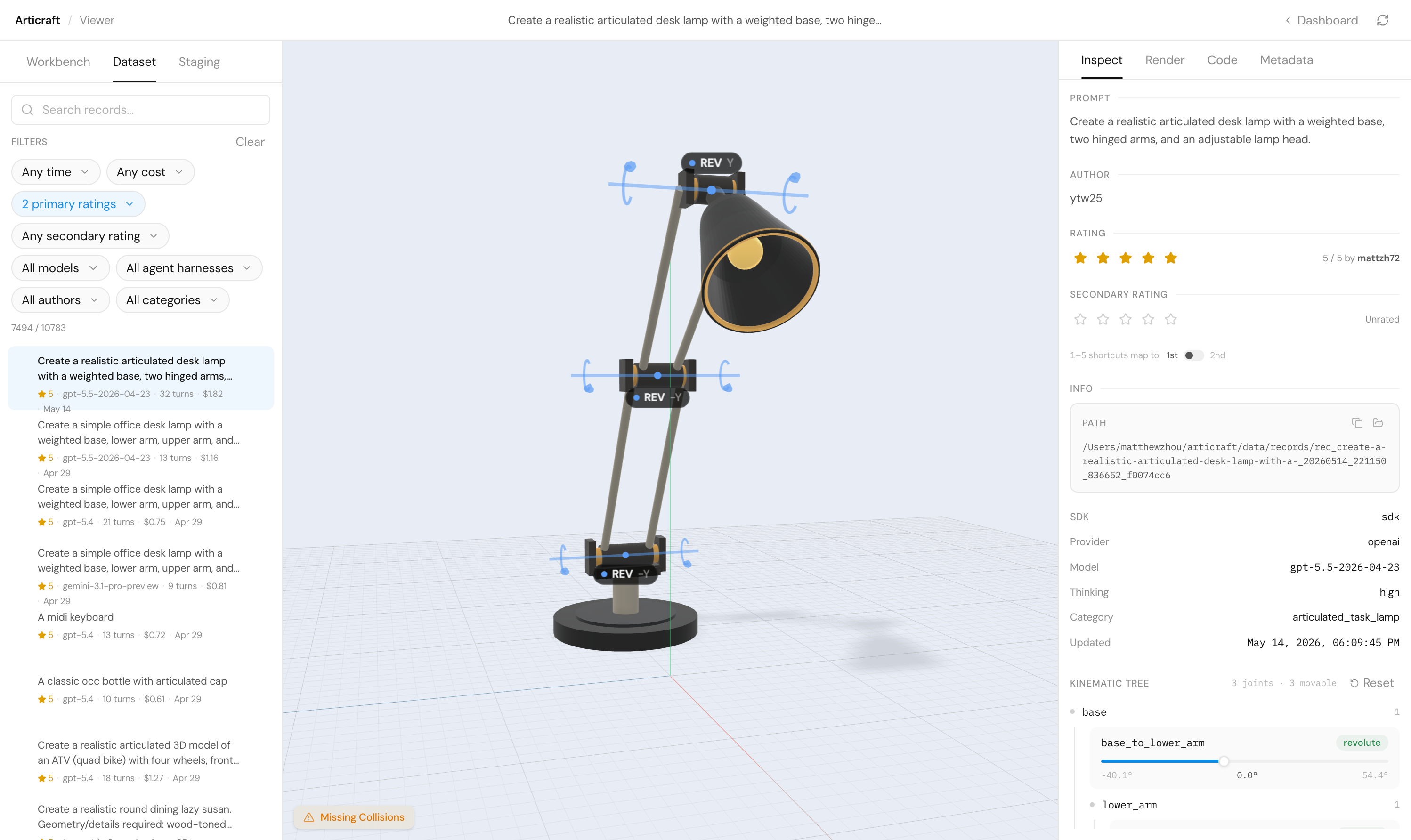
## 快速开始
### 1. 前置条件
- 推荐使用 Python 3.12(或 3.11)。*注意:目前不支持 3.13+。*
- [`uv`](https://docs.astral.sh/uv/) 用于极快的 Python 包管理。
- [`just`](https://github.com/casey/just) 作为命令运行器。
- [`Git LFS`](https://git-lfs.com/) 用于按需拉取数据集记录。
- [`npm`](https://docs.npmjs.com/downloading-and-installing-node-js-and-npm)(可选,但本地查看器前端需要)。
### 2. 环境搭建
从仓库根目录运行:
```
just setup
```
若要从其他工作目录进行检出,请传入仓库根目录:
```
just setup ./path/to/checkout
```
新克隆的仓库以代码优先:`data/records/**` 通过 Git LFS 存储,并被 `.lfsconfig` 排除在自动 LFS 拉取之外,因此在开发代码或浏览索引元数据之前无需拉取。仅在需要检查、渲染或编辑其有效载荷时才拉取记录:
```
uv run articraft data hydrate --record
uv run articraft data hydrate --category
uv run articraft data hydrate --time-from 2026-04-01 --time-to 2026-04-07
uv run articraft data hydrate --last 7d
uv run articraft data hydrate --all
```
### 3. 添加 API 密钥
打开 `.env` 并设置一个或多个提供商密钥(例如 `OPENAI_API_KEY`、`GEMINI_API_KEYS`、`ANTHROPIC_API_KEYS`)。
### 4. 创建资产
使用 `articraft generate` 直接从提示词生成你的第一个模型:
```
uv run articraft generate "Create a realistic articulated desk lamp with a weighted base, two hinged arms, and an adjustable lamp head."
```
如果未指定任何覆盖参数,当 `.env` 中存在 `ARTICRAFT_MODEL` 和 `ARTICRAFT_THINKING_LEVEL` 时将使用它们,否则默认使用 `--model gpt-5.5-2026-04-23 --thinking-level high`。你可以更改模型和上限:
```
uv run articraft generate --max-cost-usd 1.5 "Create a compact desk fan with adjustable tilt."
```
要从参考图像生成,请参阅[基于图像条件的生成](docs/image_conditioned_generation.md)。
### 5. 打开查看器
浏览你刚刚生成的物体。本地查看器 API 和 React 前端可通过以下命令启动:
```
just viewer
```
查看器可以在记录有效载荷被拉取之前从 `data/records_index.jsonl` 浏览/搜索数据集。当你选择一条未拉取的记录时,在打开源文件、追踪记录或渲染资产之前,请使用"拉取记录"操作。
### 6. 编辑现有资产
当你想要修改现有记录时,可以派生(fork)该记录:
```
uv run articraft fork data/records/ "make the handle longer"
```
派生会创建一条新的子记录,父记录保持不变。有关模型选项、数据集行为和历史查看,请参阅[编辑现有记录](docs/record_editing.md)。
## 文档与高级用法
- **[架构与项目结构](docs/architecture.md)**
- **[编辑现有记录](docs/record_editing.md)**
- **[基于图像条件的生成](docs/image_conditioned_generation.md)**
- **[数据集生成与批处理](docs/dataset_generation.md)**
- **[贡献标准与工作流](CONTRIBUTING.md)**
- **[安全策略](SECURITY.md)**
## 引用
```
@article{zhou2026articraft,
title = {Articraft: An Agentic System for Scalable Articulated 3D Asset Generation},
author = {Zhou, Matt and Li, Ruining and Lyu, Xiaoyang and Song, Zhaomou and Huang, Zhening and Zheng, Chuanxia and Rupprecht, Christian and Vedaldi, Andrea and Wu, Shangzhe},
journal = {arXiv preprint arXiv:2605.15187},
year = {2026}
}
```
本仓库基于 [Apache-2.0 License](LICENSE) 授权。
标签:3D渲染, 3D资产生成, Apache 2.0, articraft, arXiv论文, DNS解析, Git LFS, LLM代码生成, MITM代理, npm, Python, uv, 三维建模, 可变形物体, 多关节物体, 大规模数据集, 开源项目, 数字孪生, 数据集构建, 无后门, 智能体系统, 机器人仿真, 物理关节, 生成式AI, 程序化生成, 索引, 自动化流水线, 计算机图形学, 语义部件, 铰接式3D模型