   __  __             __  __

  |  \/  | ___  _ __ |  \/  | ___  _ __

  | |\/| |/ _ \| '_ \| |\/| |/ _ \| '_ \

  | |  | | (_) | | | | |  | | (_) | | | |

  |_|  |_|\___/|_| |_|_|  |_|\___/|_| |_|

Monitoring Monster by 0xNayel
Monitoring Monster
面向 Bug Bounty 猎人的变更监控


安装 •
功能 •
任务 •
告警 •
CLI •
API
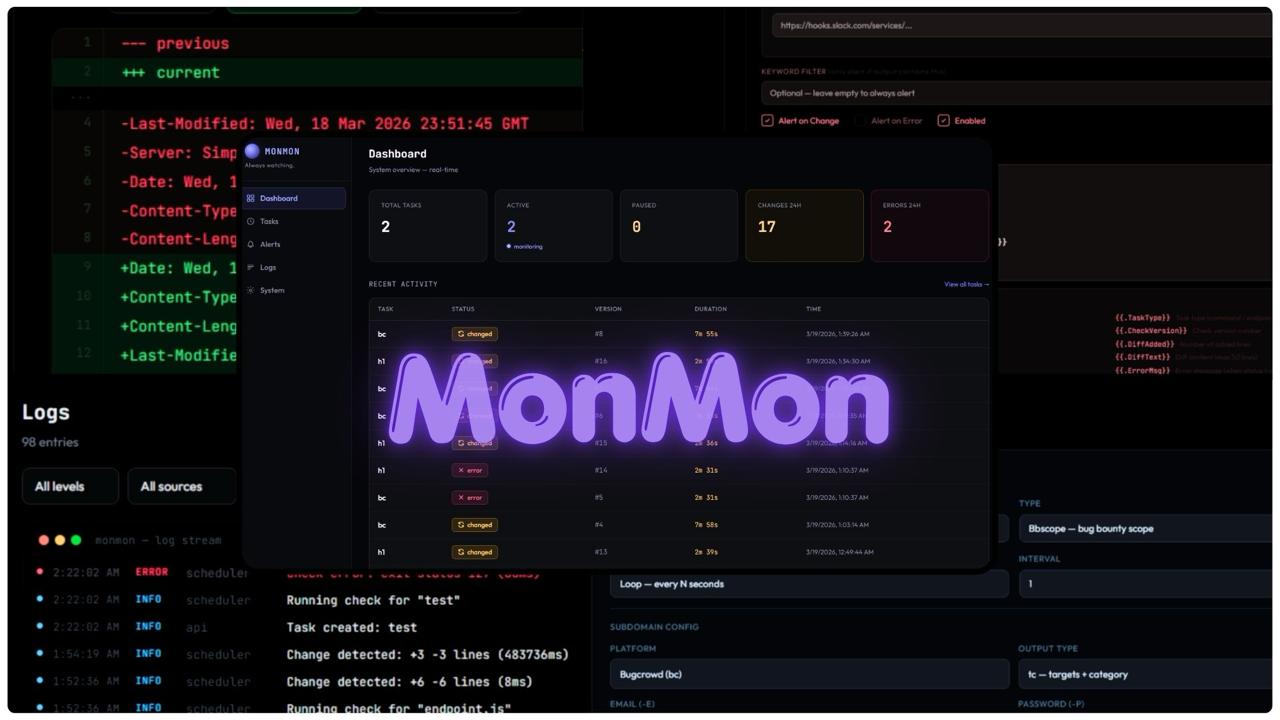
Monitoring Monster (MonMon) 让你的侦察工作(recon)进入自动驾驶模式。只需将其指向目标,设置间隔,一旦有任何变更即可收到告警。新子域名、范围扩展、endpoint 差异、命令输出变动。所有内容都会进行差异比对、版本控制,并在其他人注意到之前发送到 Telegram、Slack 或 Discord。
轻松部署,轻松使用
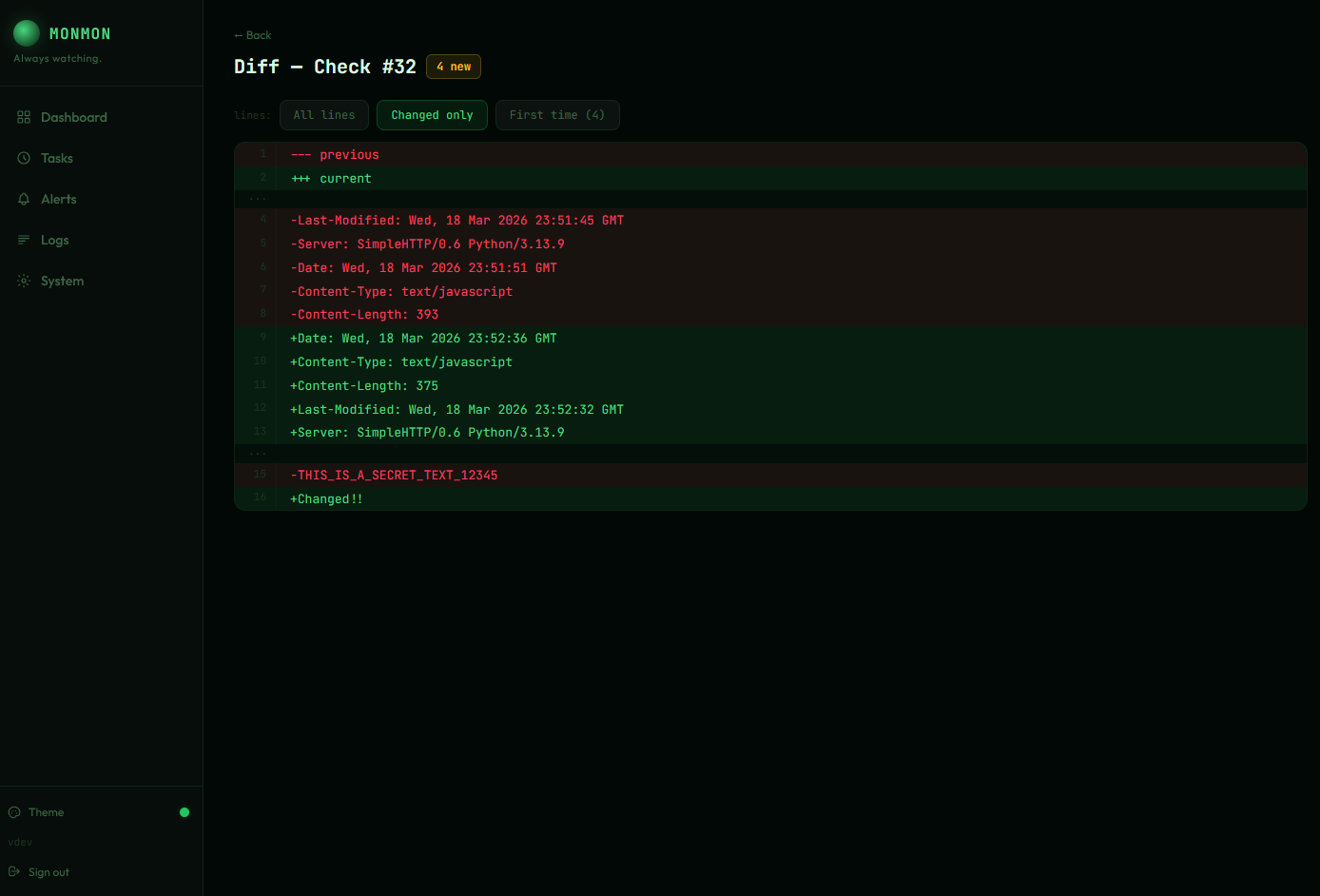
Diff Viewer — unified diffs with line numbers, added/removed highlighting, and change filters
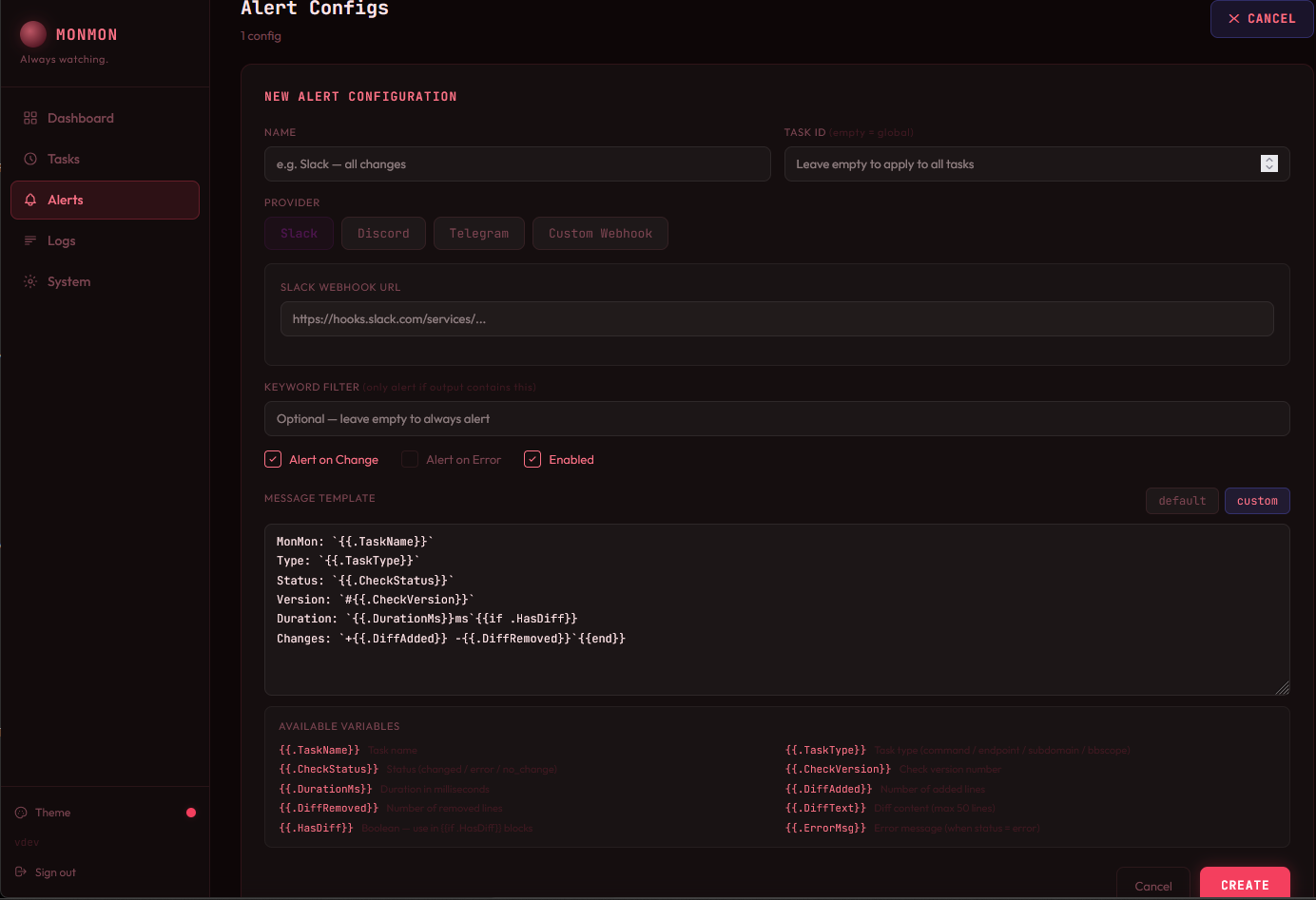
Alerts — multi-provider (Slack, Discord, Telegram, Webhook), custom Go templates, keyword filters
## 功能
| 类别 | 详情 |
|----------|---------|
| **监控模式** | `command` · `endpoint` · `subdomain` · `bbscope` — 四种任务类型,覆盖 Shell 输出、HTTP 响应、子域名发现和 Bug Bounty 范围 |
| **智能差异引擎** | 统一差异比对,支持批量 endpoint 的逐 URL 细分。过滤器:全部 / 已变更 / 首次出现。每一行新增内容都会与完整任务历史比对,而不仅仅是上一次运行 |
| **子域名流水线** | 每个域名执行 `subfinder -all` → `httpx`,多线程执行,稳定的键控输出 — 重新排序绝不会产生误报 |
| **范围监控** | 通过 `bbscope` 支持 HackerOne、Bugcrowd、Intigriti、YesWeHack。即时差异比对范围扩展 |
| **批量 Endpoint** | 在单个任务中监控多个 URL。每个 URL 都有独立的差异部分。模式:`body` · `full` · `metadata` · `regex` |
| **告警** | Slack、Discord、Telegram、自定义 webhook。支持按任务或全局范围。关键词过滤。自定义消息模板。每个配置都有测试按钮 |
| **仪表盘** | 嵌入二进制文件的 React SPA。任务管理器,支持折叠和搜索的差异查看器,实时日志流 (WebSocket),动态统计图表 |
| **多主题 UI** | 6 种主题 (Phantom, Midnight, Terminal, Obsidian, Crimson, Frost),支持实时预览、View Transitions API 和 localStorage 持久化 |
## 安装说明
### Docker Hub (推荐)
预构建镜像,包含所有工具 (`subfinder`, `httpx`, `bbscope`, `oathtool`)。
```
git clone https://github.com/0xNayel/MonMon.git && cd MonMon
# 设置 admin 凭证
echo "MONMON_ADMIN_USER=admin" >> .env
echo "MONMON_ADMIN_PASSWORD=changeme" >> .env
docker pull nayelxx/monmon:latest
docker compose up -d
```
打开 **http://localhost:8888**
#### 更新 (Docker)
```
docker pull nayelxx/monmon:latest && docker compose up -d
```
#### 从源码构建 (Docker)
编辑 `docker-compose.yml`:注释掉 `image:` 行并取消注释 `build: .`,然后:
```
docker compose build --no-cache && docker compose up -d
```
### go install
```
go install github.com/0xNayel/MonMon/cmd/monmon@latest
monmon server
```
打开 **http://localhost:8888** — 需要 Go 1.22+。
#### 更新 (go install)
```
monmon update
```
### 从源码构建
```
git clone https://github.com/0xNayel/MonMon.git && cd MonMon
make build
./monmon server
```
## 前置条件
**仅** `subdomain` 和 `bbscope` 任务类型需要。`command` / `endpoint` 任务或使用 Docker 时不需要。
```
# subfinder
go install -v github.com/projectdiscovery/subfinder/v2/cmd/subfinder@latest
# httpx
go install -v github.com/projectdiscovery/httpx/cmd/httpx@latest
# bbscope
go install github.com/sw33tLie/bbscope@latest
# oathtool (用于 bbscope OTP) — 通过 package manager 安装
# Debian/Ubuntu: apt install oathtool
# macOS: brew install oath-toolkit
# Alpine: apk add oath-toolkit-oathtool
```
## 任务类型
### `command` — 运行任意 Shell 命令,对输出进行差异比对
```
{
"command": "gau target.com | sort -u",
"output_mode": "stdout",
"timeout_sec": 120
}
```
通过管道传输任何内容 — `nuclei`, `ffuf`, `gau`, `waybackurls`, `katana`, 自定义脚本。MonMon 对 stdout 进行差异比对。
### `endpoint` — 轮询 HTTP endpoint,对响应进行差异比对
```
{
"urls": ["https://target.com/api/v1/", "https://target.com/api/v2/"],
"method": "GET",
"monitor_mode": "body"
}
```
监控模式:`body` · `full` (headers + body) · `metadata` (status / length / title) · `regex`
每个任务支持多个 URL — 每个 URL 都有独立的差异部分。
### `subdomain` — 持续子域名发现
```
{
"domains": ["target.com", "sub.target.com"],
"httpx_sc": true,
"httpx_title": true,
"httpx_td": true,
"threads": 5
}
```
每个域名执行 `subfinder -all` → `httpx`。稳定的键控输出意味着重新排序绝不会产生错误差异。
### `bbscope` — Bug Bounty 范围监控
```
{
"platform": "h1",
"token": "your_api_token",
"username": "your_h1_username",
"bounty_only": false,
"output_type": "tc"
}
```
平台:`h1` (HackerOne) · `bc` (Bugcrowd) · `it` (Intigriti) · `ywh` (YesWeHack)。在范围扩展发布的瞬间收到告警。
| 平台 | 认证 | 额外参数 |
|----------|------|-------------|
| `h1` | `-t` token, `-u` username | |
| `bc` | `-E` email, `-P` password | `--otpcommand` 用于 OTP |
| `it` | `-t` API token | `-c` categories (url, cidr, mobile, etc.) |
| `ywh` | `-t` token or `-E`/`-P` email+password | `-O` OTP command, `-c` categories |
## 告警
完全通过仪表盘 UI 进行配置。
1. **Alerts** → **+ NEW ALERT**
2. 命名,选择提供商 (Slack / Discord / Telegram / Webhook)
3. 设置范围:全局或按任务
4. 触发条件:变更时、错误时或两者皆有
5. 可选关键词过滤
6. 可选自定义消息模板及变量:
| 变量 | 描述 |
|----------|-------------|
| `{{.TaskName}}` | 任务名称 |
| `{{.TaskType}}` | 任务类型 |
| `{{.CheckStatus}}` | 检查结果状态 |
| `{{.CheckVersion}}` | 检查版本号 |
| `{{.DurationMs}}` | 执行时间 (毫秒) |
| `{{.DiffAdded}}` | 新增行数 |
| `{{.DiffRemoved}}` | 删除行数 |
| `{{.ErrorMsg}}` | 错误信息 (如有) |
## 配置
通过 YAML 或带有 `MONMON_` 前缀的环境变量进行设置。
```
server:
port: 8888
database:
path: "./data/monmon.db"
auth:
jwt_secret: "" # auto-generated if empty
logging:
level: "info" # debug / info / warn / error
file: "./data/monmon.log"
retention:
default_keep: 0 # 0 = keep all, N = keep last N checks
cleanup_interval: "1h"
tools:
subfinder: "subfinder"
httpx: "httpx"
```
环境变量覆盖示例:`MONMON_SERVER_PORT=9090`
## CLI
```
monmon server # Start server (default :8888)
monmon server -p 9090 -c config.yaml # Custom port + config
monmon version # Print version
monmon update # Self-update from GitHub
monmon task list # List all tasks
monmon task add-cmd "gau target.com" # Add command task
monmon task add-url "https://target.com" # Add endpoint task
monmon task add-domain target.com # Add subdomain task
monmon task add-bbscope h1 -t TOKEN -u USER # Add bbscope task
monmon task run
# Trigger immediate check
monmon task pause # Pause task
monmon task resume # Resume task
monmon task delete # Delete task + checks
monmon check list # List checks for a task
monmon check diff # Show diff output
monmon logs # View recent logs
```
## 后台运行
**Docker** (推荐):
```
docker compose up -d
```
**Screen / tmux**:
```
screen -dmS monmon monmon server
# 或
tmux new -d -s monmon 'monmon server'
```
**nohup**:
```
nohup monmon server > /dev/null 2>&1 &
```
## 文档
完整的 API 参考可在 **[docs/API.md](docs/API.md)** 中找到。架构详情请参阅 **[ARCHITECTURE.md](ARCHITECTURE.md)**。
## 许可证
[MIT](LICENSE)