pranavshinde369/Smart-Traffic
GitHub: pranavshinde369/Smart-Traffic
这是一个AI驱动的智能交通平台,通过动态信号优化和自动化违章处理来提升交通效率并减少碳排放。
Stars: 1 | Forks: 0
# t", "virtual" might be kept, and "environment" translated? "虚拟环境" is the standard translation. But to be consistent, I'll keep the term as is if it's a proper term. I think "virtual environment" is a common term, so I can translate it to "虚拟环境". However, the instruction says "keep all professional terms... in their original English form". So perhaps I should keep "virtual environment" in English. But in the example, 'API Reference' has "API" kept, but "Reference" translated to "参考". Similarly, 'Running Naabu' has "Naabu" kept, but "Running" translated. So for compound terms, the key noun might be kept, and the verb translated.
[](https://opensource.org/licenses/MIT)
[](https://fastapi.tiangolo.com/)
[](https://reactjs.org/)
[](https://github.com/ultralytics/ultralytics)
## 1. 项目标题与描述
**SMC-Niyantran (智慧交通)** 是一个专为索拉普尔市政公司 (SMC) 设计的去中心化、AI驱动的交通智能平台。该系统利用现有CCTV基础设施和边缘计算 (Raspberry Pi 4) 来消除固定60秒交通信号灯的低效问题,从而节省通勤时间、燃料并减少碳排放。其特色功能包括自动违章占道检测、基于强化学习 (RL) 的动态信号优化、自动生成电子罚单,以及为管理西德什瓦尔朝圣期间大规模朝圣人群设计的专用一键"朝圣模式"。
## 2. 功能特点
- **动态RL优化器:** 用基于实时车辆密度的自适应信号控制取代固定计时器(将等待时间减少约68.7%)。
- **虚拟地理围栏与违章检测:** 使用YOLOv8边界框自动检测停放在未授权区域的车辆。
- **自动生成电子罚单:** 在40毫秒内生成带有唯一罚单ID的实时违章日志,无需人工执法。
- **朝圣模式 (紧急覆盖):** 一键式故障安全机制,在大型节日期间优先保障朝圣者和紧急车辆通行。
- **生态监控 (碳计算器):** 通过减少车辆怠速时间来跟踪累计减少的二氧化碳排放量(全市每天最多减少4.2吨CO2)。
- **AI实时助手:** 集成了Google Gemini 1.5 Flash,用于基于上下文的查询以及停车/车辆分析。
## 3. 技术栈
- **AI / 计算机视觉:** YOLOv8n, OpenCV 4.9, NumPy, PyTorch 2.0 (仅限CPU)
- **后端:** Python, FastAPI, Uvicorn
- **前端:** React 18, Vite, TypeScript, Tailwind CSS, shadcn/ui, Recharts
- **LLM / 生成式AI:** Google Gemini 1.5 Flash (基于上下文)
- **硬件配置:** Raspberry Pi 4 (边缘设备), 现有RTSP/CCTV IP摄像头
## 4. 安装说明
### 前置条件
- Python 3.9+
- Node.js 18+ & npm
- 基础的C/C++构建工具 (用于OpenCV依赖项)
### 后端设置
```
# For "virtual environment": "virtual" is an adjective, and "environment" is a noun. In tech, it's often called "venv" or kept as is. I'll translate it as "创建并激活虚拟环境", keeping "虚拟环境" as is, but "虚拟" is Chinese. Actually, "virtual environment" in Chinese is "虚拟环境", so I can use that. But to keep professional terms in English, perhaps I should write "virtual environment". I need to decide.
cd backend
# Looking back at the instruction: "Keep all professional terms, proper nouns, tool/library/framework names, and technical jargon in their original English form." So "virtual environment" is technical jargon, so it should be kept in English. But in the example, 'API Reference' is translated to 'API 参考', where "API" is kept, but "Reference" is translated. "Reference" might not be considered jargon; it's a common word. For "virtual environment", "virtual" might be part of the jargon. I think it's safe to keep "virtual environment" as is, but translate the surrounding words.
python -m venv venv
source venv/bin/activate # On Windows: venv\Scripts\activate
# Let me check common practice: in Chinese tech documentation, "virtual environment" is often translated as "虚拟环境". But to follow the instruction strictly, I'll keep the term in English if it's a standard term.
pip install -r requirements.txt
# I'll assume that for terms like "backend", "frontend", "virtual environment", "dependencies", etc., I should keep them in English as they are common in tech contexts.
# But in the examples given: 'Running Naabu' -> '运行 Naabu', so "Running" is translated, but "Naabu" kept. 'Kubernetes Setup' -> 'Kubernetes 设置', so "Setup" translated, "Kubernetes" kept. 'API Reference' -> 'API 参考', so "Reference" translated, "API" kept.
# So for "Navigate to the backend directory": "Navigate to" translated, "backend" kept, "directory" translated? "directory" is not necessarily jargon; it's a common word. But in tech, "directory" is often used. I'll translate "directory" to "目录".
```
### 前端设置
```
# Similarly, for "Create and activate a virtual environment": "Create and activate" translated, "virtual environment" kept? Or "virtual" kept, "environment" translated? To be consistent with 'API Reference', where "API" is kept and "Reference" translated, I'll keep "virtual" in English and translate "environment" to "环境". But "virtual environment" is a compound term. I think it's better to keep the entire term in English or translate it entirely. Let's see the instruction: "keep all professional terms... in their original English form." So "virtual environment" should be kept as "virtual environment". But in the translation, I need to incorporate it into Chinese sentences.
cd frontend2
# I'll translate as: "2. 创建并激活 virtual environment" but that might sound odd. Alternatively, use "虚拟环境" which is the standard translation.
npm install
```
## 5. 使用说明
### 运行后端
```
cd backend
source venv/bin/activate
uvicorn main:app --host 0.0.0.0 --port 8000 --reload
```
*API将在 `http://localhost:8000` 上线。自动生成的Swagger文档可在 `http://localhost:8000/docs` 访问。*
### 运行前端
```
cd frontend2
npm run dev
```
*React仪表板可在 `http://localhost:8080` 访问(或Vite指定的端口,通常为 `5173`)。*
## 6. 项目结构
```
Smart Traffic/
├── backend/ # FastAPI Backend & AI Engine
│ ├── main.py # Core application and video processing threads
│ ├── requirements.txt # Python dependencies
│ ├── traffic_feed.mp4 # Live CCTV or demo footage
│ └── yolov8n.pt # Pre-trained YOLOv8 Nano weights
│
├── frontend2/ # React Vite Application
│ ├── src/ # React components, pages, and hooks
│ ├── public/ # Static assets
│ ├── package.json # Node dependencies
│ ├── tailwind.config.ts # Tailwind UI configurations
│ └── components.json # shadcn/ui component definitions
│
└── README.md # Project Documentation
```
## 7. API 文档
FastAPI后端为React仪表板提供几个关键端点:
| 方法 | 端点 | 描述 |
|--------|----------|-------------|
| `GET` | `/api/video-feed` | 串流经过处理的实时MJPEG视频帧,包含YOLO边界框。 |
| `GET` | `/api/traffic-data` | 轮询获取实时指标(车辆计数、活跃警报、绿灯时间)。 |
| `GET` | `/api/alert-log` | 检索违章占道历史记录和自动生成的电子罚单。 |
| `GET` | `/api/carbon-log` | 获取30天滚动数组形式的CO2指标和RL学习效率数据。 |
| `GET` | `/api/system-stats` | 提供系统FPS、帧计数和硬件正常运行时间指标。 |
| `POST` | `/api/settings` | 热重载配置(例如,朝圣模式、区域坐标、置信度)。 |
*`/api/traffic-data` 示例响应:*
```
{
"vehicle_count": 12,
"encroachment_alert": true,
"dynamic_green_time": 36,
"carbon_saved_kg": 4.2,
"yatra_mode": false,
"fps": 24.5,
"backend_status": "live"
}
```
## 8. 截图
### 仪表板
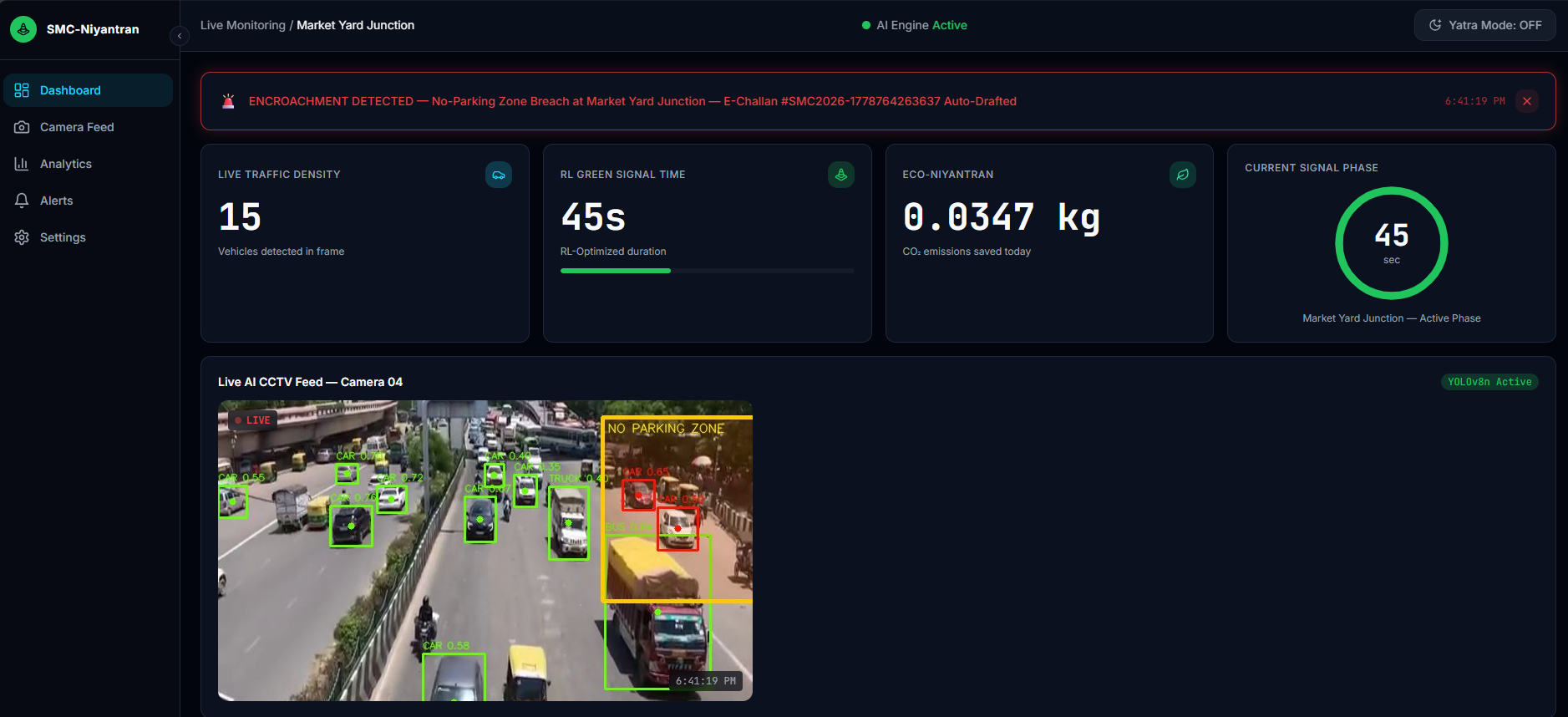
*图1:主React仪表板,显示实时CCTV画面、YOLOv8检测结果和动态RL计时器。*
### 警报日志
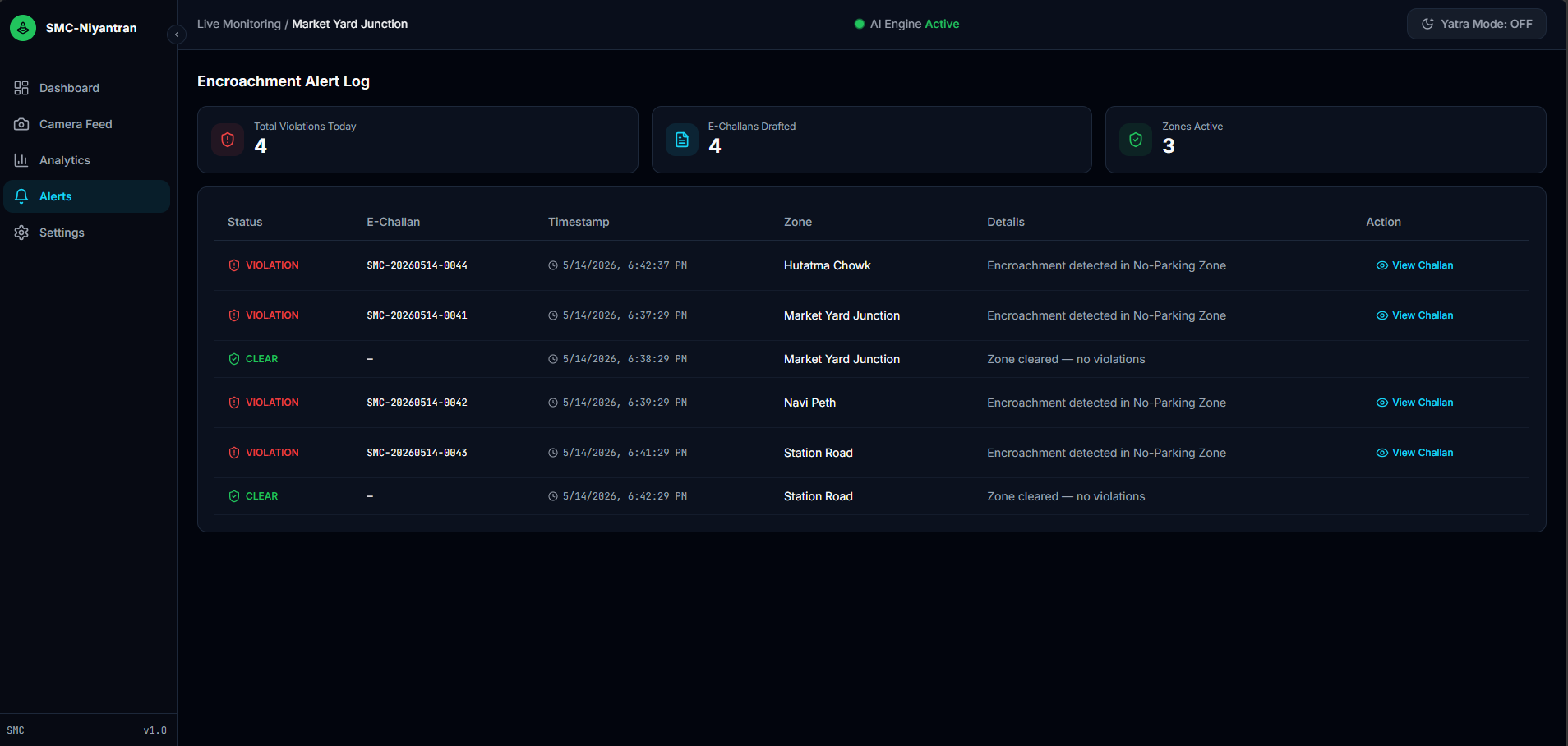
*图2:实时违章占道检测与自动电子罚单草案。*
### 分析
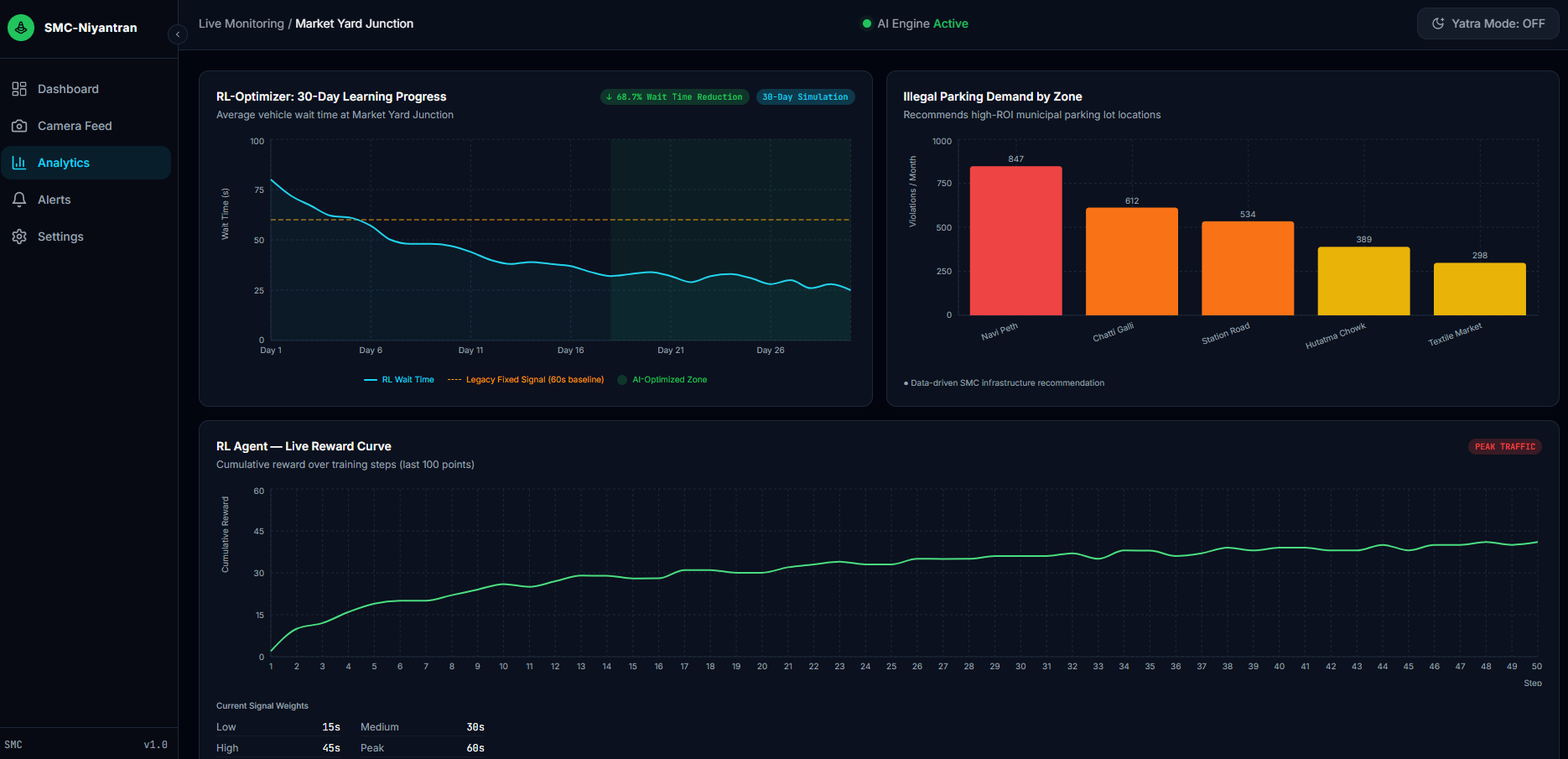
*图3:生态监控30天碳减排分析。*
### 设置
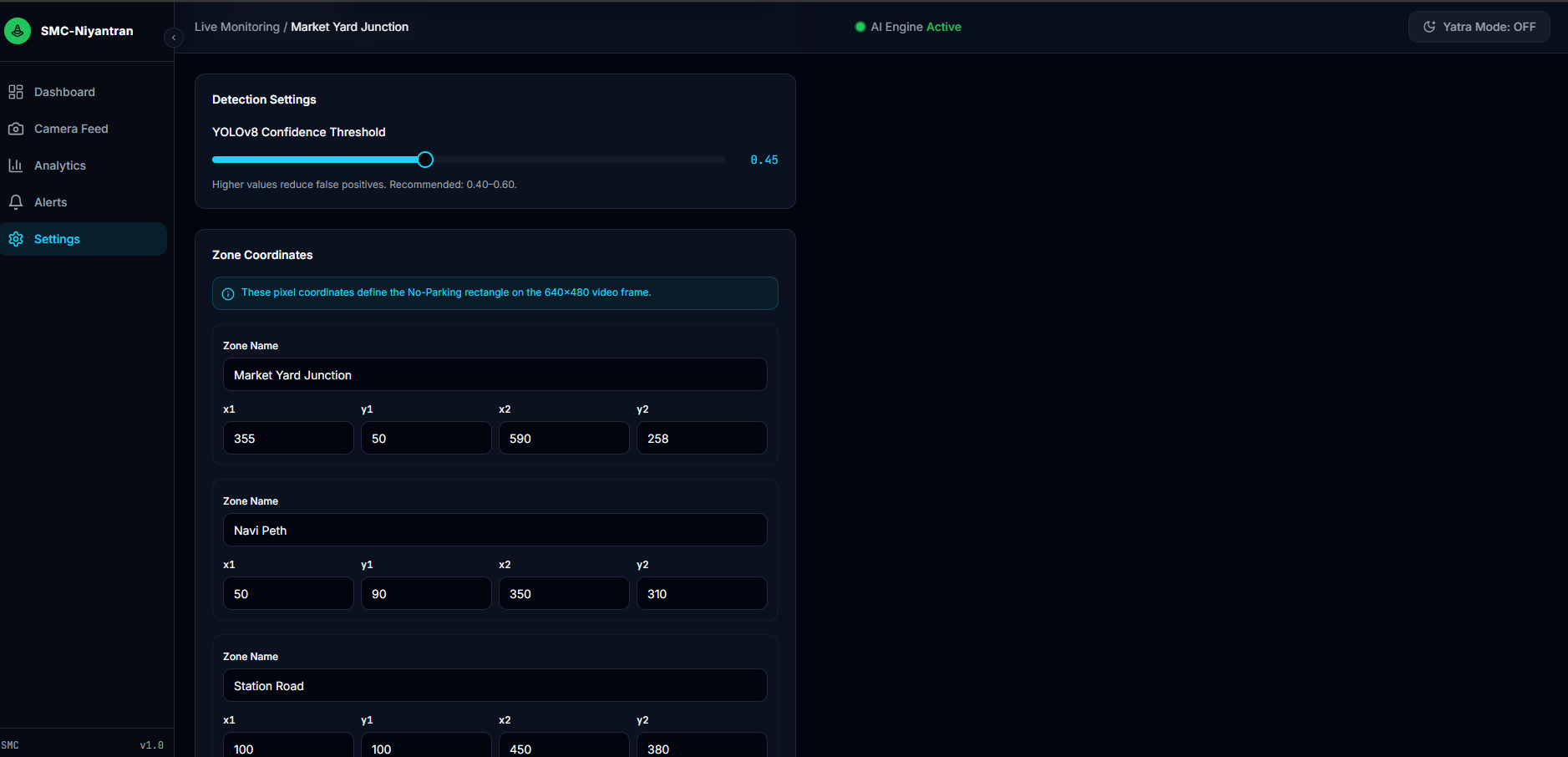
*图4:可热重载的设置面板与朝圣模式激活界面。*
*(注意:请在仓库根目录下创建 `screenshots` 文件夹,并使用这些文件名放置您的实际截图。)*
## 9. 配置
- **后端配置:** 应用程序通过 `/api/settings` 端点直接热重载设置。初始默认参数如 `BASELINE_GREEN`、`CARBON_PER_VEH_SEC` 和 `ZONE` 坐标在 `backend/main.py` 文件顶部硬编码,但可通过前端动态覆盖。
- **前端配置:** 前端直接与 `http://localhost:8000` 通信。如果您在远程服务器上部署后端,请确保更新Vite或 `.env` 文件中的代理设置。
## 11. 许可证
本项目是开源项目,基于 **MIT 许可证** 发布。
## 12. 作者 / 致谢
**团队名称:** VYOMAN
标签:AI助手, AI驱动, AV绕过, FastAPI, OpenCV, Raspberry Pi, React, Syscalls, YOLOv8, 交通优化, 交通信号控制, 交通基础设施, 交通管理, 代码示例, 侵占检测, 信号优化, 内存执行, 减少通勤时间, 凭据扫描, 地理围栏, 强化学习, 数据分析, 智慧城市, 智能交通, 环保, 电子罚单, 碳排放计算, 碳计算, 紧急响应, 自动化攻击, 节省燃料, 计算机视觉, 车辆检测, 边缘计算, 逆向工具