anisdell2010-crypto/AntiForensics-Automation-Tool.
GitHub: anisdell2010-crypto/AntiForensics-Automation-Tool.
专为渗透测试设计的Bash反取证脚本,一键清理系统日志、网络痕迹和敏感文件,帮助红队人员在行动后快速消除取证线索。
Stars: 1 | Forks: 0
# 🛡️ 高级反取证与系统清理 (Bash)
本仓库包含一个专业的 Bash 脚本,旨在用于自动化系统清理和反取证措施。它确保在安全操作后安全擦除敏感数据、网络日志和会话痕迹。
## 👨💻 关于开发者
Sendid Abderaouf
我是网络安全爱好者,也是一名 **ISC2 候选人**,致力于构建安全高效的自动化工具。
### 📜 专业认证
* **ISC2:** 认证 ISC2 候选人。https://www.credly.com/badges/20f257e0-af1c-4ff4-8cb4-f2443229b77d/public_url
* **Cisco:** 网络安全入门。https://www.credly.com/badges/287b2ee6-cff8-4d87-ad7c-c494ad518ccf/public_url
* **IBM:** 网络安全基础。https://www.credly.com/badges/e80a886c-352e-4c89-9374-f1c222fab989/public_url
## 🛠️ 脚本:`clear.sh`
以下是该脚本的优化和文档化版本。[cite_start]它保持了原有的逻辑 [cite: 1, 8],同时增强了可读性和结构。
```
#!/bin/bash
# --- [ 目标配置 ] ---
# 定义要重置的特定无线接口
TARGETS=("wlan0" "wlan1")
# --- [ 颜色定义 ] ---
RED='\033[0;31m'
GREEN='\033[0;32m'
BLUE='\033[0;34m'
NC='\033[0m'
function perform_full_wipe {
echo -e "\n${RED}[!!!] Starting Professional Full Wipe Operation...${NC}"
# 1. Sensitive Data Destruction (10-Pass Shredding)
# Securely deletes capture files and cracked data to prevent recovery
echo -e "${BLUE}[+] Shredding sensitive files...${NC}"
sudo shred -u -n 10 ioom_capture* cracked.json *.cap *.netxml 2>/dev/null
# 2. Network Interface Restoration
# Resets MAC addresses to permanent values and sets mode to managed [cite: 2]
for iface in "${TARGETS[@]}"; do
echo -e "${BLUE}[+] Resetting identity for $iface...${NC}"
sudo ip link set "$iface" down 2>/dev/null
sudo macchanger -p "$iface" 2>/dev/null
sudo iwconfig "$iface" mode managed 2>/dev/null
sudo ip link set "$iface" up 2>/dev/null
done
# 3. Swap Space Wiping
# Disables swap and overwrites it with zeros to clear memory residue [cite: 3, 4]
echo -e "${BLUE}[+] Performing Swap Wiping...${NC}"
sudo swapoff -a 2>/dev/null
sudo dd if=/dev/zero of=/swapfile bs=1M count=512 status=none 2>/dev/null || true
sudo swapon -a 2>/dev/null
# 4. Log Cleansing & Timestamp Forging
# Truncates system logs and matches their timestamps with /bin/ls for stealth [cite: 5, 6]
echo -e "${BLUE}[+] Cleaning system logs...${NC}"
logs=( "/var/log/auth.log" "/var/log/syslog" "/var/log/messages" "/var/log/kern.log" )
for log in "${logs[@]}"; do
if [ -f "$log" ]; then
sudo truncate -s 0 "$log"
sudo touch -r /bin/ls "$log"
fi
done
sudo journalctl --vacuum-time=1s > /dev/null 2>&1
# 5. RAM Cache Cleaning
# Forces the kernel to flush buffer and cache memory [cite: 7]
echo -e "${BLUE}[+] Flushing RAM caches...${NC}"
sudo sync && echo 3 | sudo tee /proc/sys/vm/drop_caches > /dev/null
# 6. Command History Destruction
# Disables history file for current session and shreds existing history [cite: 7]
echo -e "${BLUE}[+] Purging command history...${NC}"
export HISTFILE=/dev/null
history -c
sudo shred -u -n 10 ~/.bash_history 2>/dev/null
echo -e "\n${GREEN}[✔] Wipe Successful: Files, Logs, RAM, and Swap are cleared.${NC}"
}
# --- [ 安全检查与执行 ] ---
# 检查主接口是否为 VPN (tun0)。如果不是,则隔离目标
IFACE=$(ip route | grep default | awk '{print $5}')
if [[ "$IFACE" != "tun0" ]]; then
echo -e "${RED}[!] WARNING: VPN is NOT active! Isolating targets...${NC}"
for iface in "${TARGETS[@]}"; do
sudo nmcli device disconnect "$iface" 2>/dev/null
done
perform_full_wipe
exit 1
else
echo -e "${GREEN}[✔] VPN is active. Starting routine cleanup...${NC}"
perform_full_wipe
fi
TO run this tool on your kali lunix system follow these steps
1. Clone the repository:
git clone https://github.com/anisdell2010-crypto/AntiForensics-Automation-Tool.git
cd AntiForensics-Automation-Tool
2. Give execution permissions:
chmod +x clear.sh
run the script with sudo privileges:
sudo ./clear.sh
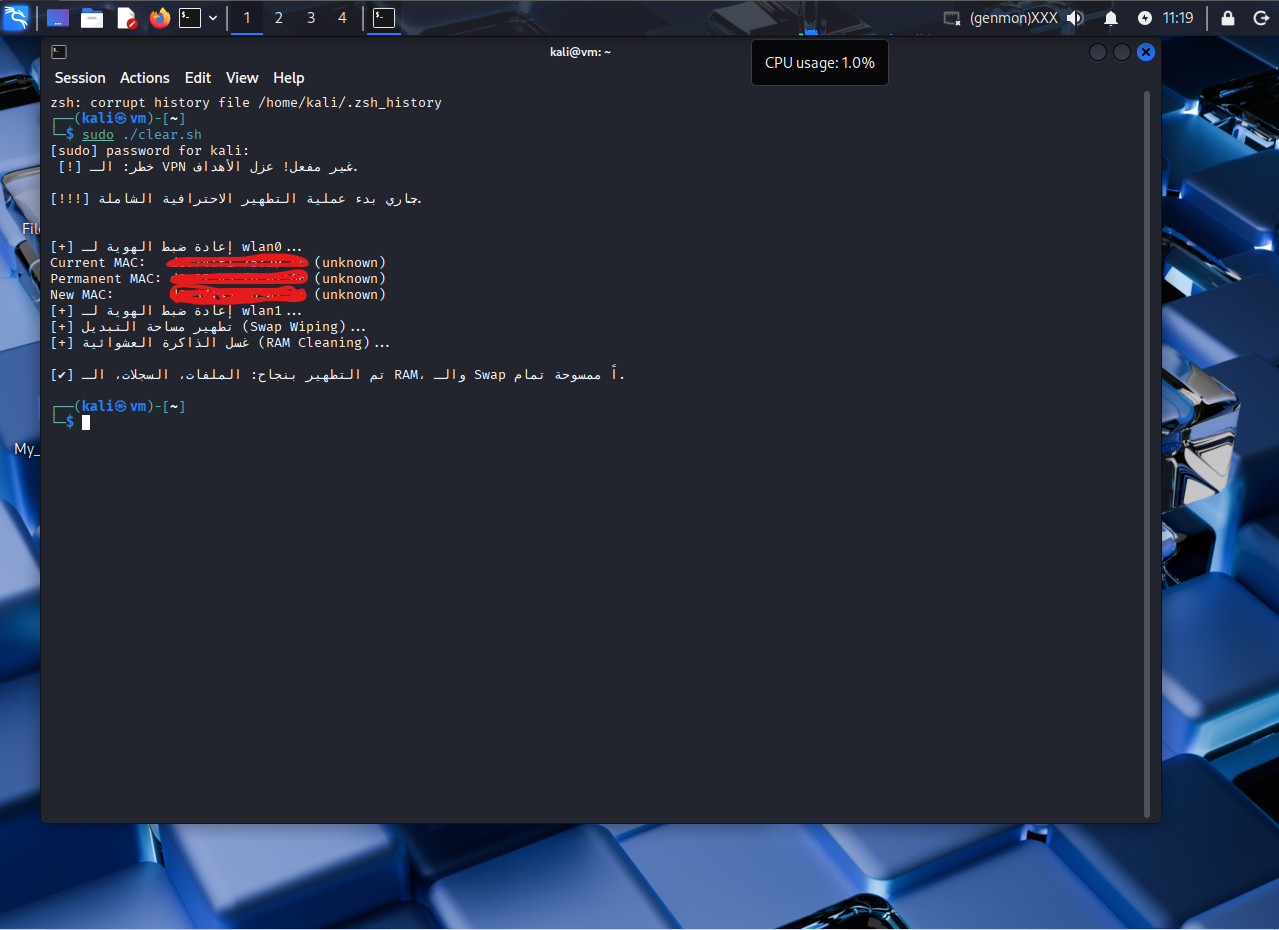
#### ✅ 在 Kali Linux 中成功执行
Once the script is executed, it secures the network interfaces and wipes system traces as shown below:
```
标签:DNS 反向解析, MAC地址重置, Shred命令, 反取证, 子域名变形, 安全擦除, 安全评估, 应用安全, 数字取证对抗, 数据销毁, 日志清除, 系统清理, 网络安全, 网络安全, 网络身份恢复, 隐私保护, 隐私保护