```
██████╗ ██╗████████╗ ██████╗ ███████╗ ██████╗ ██████╗ ███████╗████████╗
██╔════╝ ██║╚══██╔══╝ ██╔══██╗██╔════╝██╔════╝ ██╔══██╗██╔════╝╚══██╔══╝
██║ ███╗██║ ██║ █████╗██████╔╝█████╗ ██║ ███╗██████╔╝█████╗ ██║
██║ ██║██║ ██║ ╚════╝██╔══██╗██╔══╝ ██║ ██║██╔══██╗██╔══╝ ██║
╚██████╔╝██║ ██║ ██║ ██║███████╗╚██████╔╝██║ ██║███████╗ ██║
╚═════╝ ╚═╝ ╚═╝ ╚═╝ ╚═╝╚══════╝ ╚═════╝ ╚═╝ ╚═╝╚══════╝ ╚═╝
```
**Git 仓库密钥扫描器**
在你的 git 历史记录中查找 API 密钥、令牌、密码和敏感数据——在别人发现之前。
[](https://python.org)
[](LICENSE)
[](#what-it-detects)
[]()
[](https://pypi.org/project/git-regret-tool)
[](https://pypi.org/project/git-regret-tool)
[](https://github.com/allemz/git-regret)
[](https://github.com/allemz/git-regret/issues)
## 🤔 为什么选择 git-regret?
你六个月前提交了一个 API 密钥。你在下一次提交中删除了它。你以为你安全了。
**你并没有。**
任何克隆你仓库的人都可以在 git 历史记录中看到那个密钥。`git-regret` 会扫描每一次提交、每一个文件、每一行——并准确地告诉你哪些内容需要处理。
## ✨ 特性
- 🔍 **132 个内置模式** — AWS、OpenAI、Stripe、GitHub、Discord、Telegram、数据库 URL、私钥等
- 🕰️ **完整历史扫描** — 不仅是当前文件,而是所有提交过的内容
- 🔗 **扫描任意 GitHub URL** — 粘贴仓库 URL,它会自动克隆、扫描和清理
- 🧠 **熵分析** — 即使没有已知模式,也能捕捉到看起来像密钥的高熵字符串
- 🧹 **自动清理** — 使用 `git-filter-repo` 从 git 历史记录中移除密钥
- 🔒 **Pre-commit hook** — 永远不会意外提交密钥
- 🖥️ **交互式 TUI** — 美观的菜单驱动界面,无需记忆命令参数
- 📄 **JSON 报告** — 将结果通过管道传输到你的 CI/CD 流水线
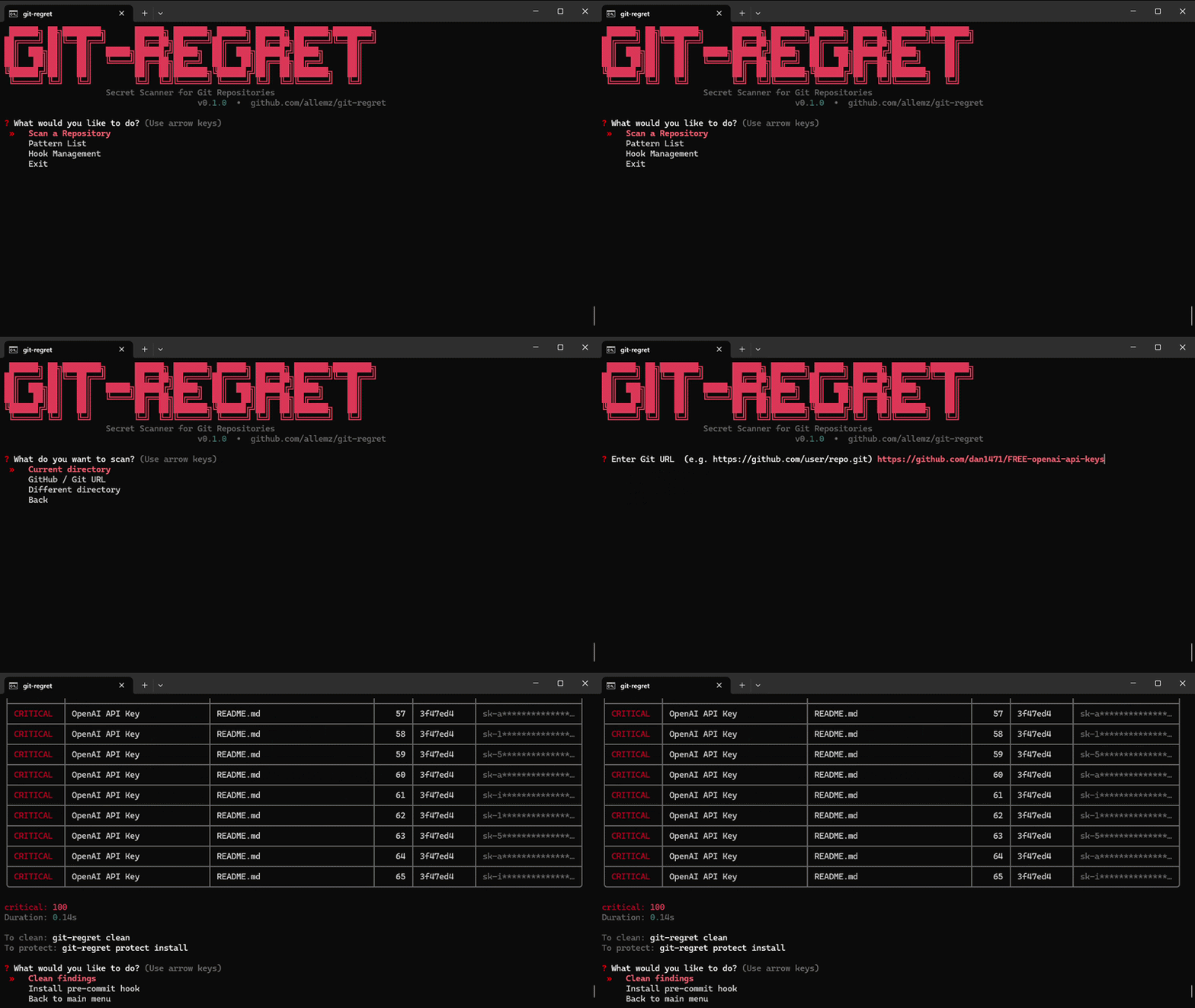
## 🚀 快速开始
### Windows (双击)
1. 下载并解压 zip 文件
2. 双击 `start.bat`
3. 完成 — 它会安装所有内容并打开交互式菜单
### 手动安装
```
git clone https://github.com/allemz/git-regret
cd git-regret
pip install -e .
```
## 🖥️ 用法
### 交互式菜单 (推荐)
```
git-regret-ui
```
使用方向键导航,按 Enter 选择。无需记忆命令参数。
### 命令行
```
# Scan 当前目录
git-regret scan
# Scan 包含完整 git 历史
git-regret scan --history
# Scan 特定路径
git-regret scan --path /path/to/repo
# Export 结果为 JSON
git-regret scan --history --output report.json
# 在 CI 中使用(如果发现结果则 exit code 为 1)
git-regret scan --history --fail-on-findings
# Clean git 历史中的 secrets
git-regret clean
# Install pre-commit hook
git-regret protect install
# List 所有 patterns
git-regret patterns
git-regret patterns --tag aws
```
### 扫描 GitHub 仓库
无需手动克隆 — 只需在 TUI 中粘贴 URL 或使用:
```
# 在 interactive menu 中:
# > Scan 一个 Repository > GitHub / Git URL > https://github.com/user/repo
```
## 🎯 检测内容
| Category | Examples |
|---|---|
| ☁️ **Cloud** | AWS Access Keys, GCP Service Accounts, Azure Connection Strings |
| 🤖 **AI Services** | OpenAI, Anthropic, HuggingFace, Replicate |
| 💳 **Payments** | Stripe, PayPal, Braintree, Square, Iyzico, PayTR |
| 💬 **Social** | Discord, Slack, Telegram, Twitter, Facebook |
| 🗄️ **Databases** | MongoDB, PostgreSQL, MySQL, Redis, Supabase, Neon |
| 🔐 **Crypto** | RSA/EC/SSH private keys, PGP blocks |
| 📧 **Comms** | SendGrid, Mailgun, Mailchimp, Twilio |
| 🕵️ **PII** | Turkish TC No, IBAN, Credit Cards, SSN |
| 🔑 **Generic** | Hardcoded passwords, tokens, API keys |
| 🧠 **Entropy** | Any high-entropy string that looks like a secret |
总共 132 个模式。[查看完整列表 →](git_regret/patterns/definitions.py)
## 📊 示例输出
```
╭───────────────────────────────╮
│ 🔍 git-regret Secret Scanner │
╰───────────────────────────────╯
Repo: /home/user/my-project
Git history: 47 commits scanned
Files: 312 files scanned
⚠️ 3 issue(s) found!!
╭──────────┬──────────────────────┬──────────────┬───────┬─────────╮
│ Severity │ Type │ File │ Line │ Commit │
├──────────┼──────────────────────┼──────────────┼───────┼─────────┤
│ CRITICAL │ AWS Access Key ID │ config.py │ 12 │ a3f9d12 │
│ CRITICAL │ OpenAI API Key │ .env │ 3 │ working │
│ HIGH │ Stripe Webhook Secret│ webhook.py │ 8 │ b7c2e45 │
╰──────────┴──────────────────────┴──────────────┴───────┴─────────╯
critical: 2 high: 1
```
## 🔒 Pre-commit Hook
安装一次,永久受保护:
```
git-regret protect install
```
每次提交都会自动扫描。如果检测到密钥,提交将被阻止:
```
🔍 git-regret: Scanning staged files...
❌ git-regret: A secret has been detected! Commit canceled.
Fix the issue and try again.
```
## 🧹 清理历史记录
```
git-regret clean
```
这将使用 `git-filter-repo` 永久重写历史记录并移除敏感文件。**这会重写 git 历史记录** — 在共享仓库上运行之前请与你的团队协调。
## 🏗️ 项目结构
```
git_regret/
├── cli.py # Click commands
├── tui.py # Interactive menu (questionary + rich)
├── core/
│ ├── scanner.py # Scan engine
│ ├── cleaner.py # git-filter-repo wrapper
│ └── hooks.py # Pre-commit hook manager
├── models/
│ ├── pattern.py # Pattern + Severity enum
│ ├── finding.py # Finding dataclass
│ └── report.py # Report aggregator
├── patterns/
│ ├── definitions.py # All 132 pattern definitions
│ └── registry.py # Pattern registry (singleton)
├── output/
│ ├── formatter.py # Rich terminal output
│ └── reporter.py # JSON reporter
└── utils/
├── entropy.py # Shannon entropy analysis
└── git.py # GitRepo helper
```
## 🤝 贡献
欢迎提出新的模式想法、错误修复和改进。
要添加模式,请打开 `git_regret/patterns/definitions.py` 并在 `RAW_PATTERNS` 中添加新条目:
```
{
"id": "my_service_api_key",
"regex": r"myservice_[0-9a-zA-Z]{32}",
"description": "MyService API Key",
"severity": "critical",
"tags": ["myservice"],
},
```
## 📄 许可证
GNU GPL v3.0 - 使用它,修改它,改进它,但必须始终保持开源。
每个人都至少提交过一次密钥。