aaronb/wireshark-meshcore
GitHub: aaronb/wireshark-meshcore
为 MeshCore LoRa 网状网络协议提供 Wireshark 协议解析器与 JSON 到 pcapng 格式转换,方便开发者在 Wireshark 中可视化分析网状网络数据包。
Stars: 15 | Forks: 1
# MeshCore Wireshark Dissector
一个用于 [MeshCore](https://github.com/meshcore-dev/MeshCore)(一种 LoRa 网状网络协议)的 Wireshark 协议解析器和 pcapng 转换器。
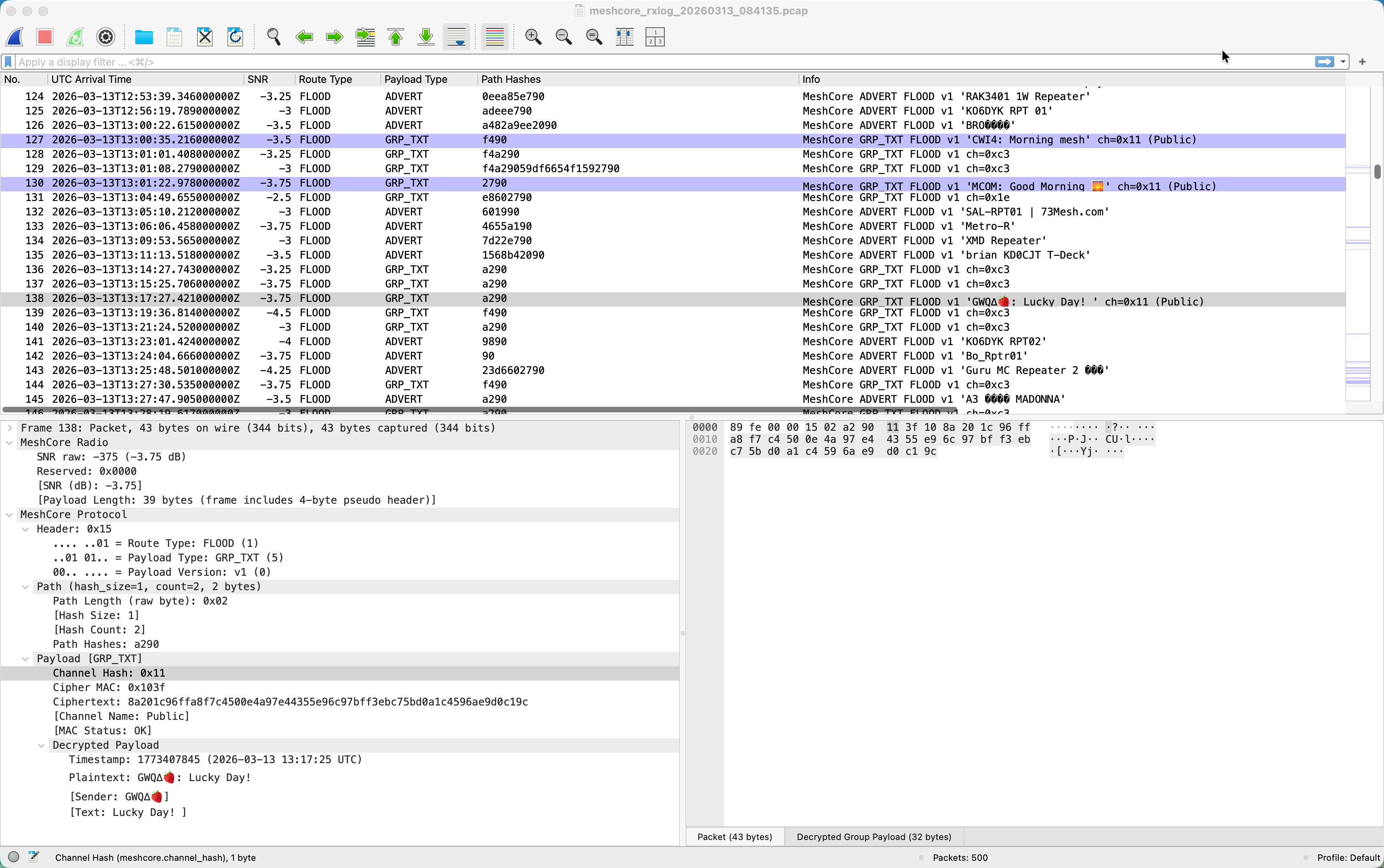
- **`meshcore_dissector.lua`** -- 用于解码 MeshCore 数据包的 Wireshark Lua 解析器,提供完整的协议树、显示过滤器和信息列摘要([下载](https://raw.githubusercontent.com/aaronb/wireshark-meshcore/main/meshcore_dissector.lua))
- **`meshcore_json2pcap.py`** -- 将 JSON 无线电日志转换为 pcapng 文件的 Python 脚本([下载](https://raw.githubusercontent.com/aaronb/wireshark-meshcore/main/meshcore_json2pcap.py))
## 功能
- 解码所有 MeshCore 数据包类型:ADVERT、ACK、GRP_TXT、GRP_DATA、TXT_MSG、REQ、RESPONSE、ANON_REQ、PATH、TRACE、MULTIPART、CONTROL、RAW_CUSTOM
- Header 掩码解析(路由类型、payload 类型、payload 版本)
- ADVERT appdata 解析:节点类型、GPS 坐标、节点名称
- CONTROL 子类型解析:DISCOVER_REQ、DISCOVER_RESP
- 两层解析(类似 802.11 Radiotap):无线电元数据和线路协议是独立的协议条目
- 来源于 JSON 转 pcapng 转换器的无线电元数据 (SNR),可通过 `meshcore_radio.snr_raw` 进行过滤
- 支持显示过滤器(例如使用 `meshcore.payload_type == 4` 过滤 ADVERT)
## 安装说明
解析器是一个单一的 Lua 文件——无需编译。将 `meshcore_dissector.lua` 复制到您的 Wireshark 个人插件文件夹,它会在启动时自动加载。
### Linux
```
mkdir -p ~/.local/lib/wireshark/plugins
cp meshcore_dissector.lua ~/.local/lib/wireshark/plugins/
```
### macOS
```
mkdir -p ~/.local/lib/wireshark/plugins
cp meshcore_dissector.lua ~/.local/lib/wireshark/plugins/
```
或者,如果您将 Wireshark 安装为 app bundle:
```
mkdir -p "$HOME/.config/wireshark/plugins"
cp meshcore_dissector.lua "$HOME/.config/wireshark/plugins/"
```
### Windows
将 `meshcore_dissector.lua` 复制到:
```
%APPDATA%\Wireshark\plugins\
```
通常路径是 `C:\Users\\AppData\Roaming\Wireshark\plugins\`。如果 `plugins` 文件夹不存在,请创建它。
### 验证插件目录
在 Wireshark 中,转到 **帮助 > 关于 Wireshark > 文件夹** 以查看您系统的“个人插件”路径。您也可以通过 **编辑 > 首选项 > 外观 > 文件夹** 找到它。
### 重新加载
复制文件后,重启 Wireshark 或按 **Ctrl+Shift+L**(分析 > 重新加载 Lua 插件)即可在不重启的情况下加载解析器。
## 获取捕获文件
### 从配套应用程序获取
在官方 MeshCore 配套应用程序中,转到 **工具 > Rx Log > 保存日志** 以从您的节点导出 JSON 无线电日志。此 JSON 文件可以转换为 pcapng 格式,以便在 Wireshark 中进行分析。
### 示例捕获
[`docs/samples/sample_1.pcapng`](docs/samples/sample_1.pcapng) 中包含了一个示例 pcapng 捕获文件,因此您无需无线电设备即可尝试该解析器。
## 将 JSON 日志转换为 pcapng
转换器需要 Python 3.6+ 且无外部依赖。
```
python3 meshcore_json2pcap.py capture.json
```
这会在同一目录下生成 `capture.pcapng`。您也可以指定输出路径:
```
python3 meshcore_json2pcap.py capture.json output.pcapng
```
### 输入格式
JSON 输入是一个数据包对象数组:
```
[
{
"timestamp": 1773364730762,
"snr": 8.25,
"packet": "150220ee81fbaf4d..."
}
]
```
| 字段 | 类型 | 描述 |
|-------|------|-------------|
| `timestamp` | integer | 距 Unix 纪元的毫秒数 |
| `snr` | float | 信噪比,单位为 dB |
| `packet` | string | 十六进制编码的原始数据包字节 |
### 无线电元数据标头
默认情况下,pcapng 中的每个数据包都会添加一个无线电元数据标头。
该格式遵循与 802.11 Radiotap 相同的可扩展性模式:一个固定的
版本/长度前缀,后跟各个字段。`length` 字段告诉解析器需要跳过
多少字节,因此即使在未来版本中添加了新字段,
旧的解析器仍然可以找到线路协议的起始位置。
| 字节 | 类型 | 描述 |
|-------|------|-------------|
| 0 | uint8 | 版本(目前为 0) |
| 1 | uint8 | 填充 (0) |
| 2-3 | uint16 LE | 标头长度,以字节为单位(目前为 6) |
| 4-5 | int16 LE | SNR * 100(例如 8.25 dB = 825) |
解析器使用两层架构(类似 802.11 Radiotap + 802.11),
其中无线电元数据和 MeshCore 线路协议在 Wireshark 的数据包树中显示为
独立的协议条目。这使得哪些字节是
捕获元数据、哪些是实际的无线传输数据变得一目了然。
### 链路层类型 (LINKTYPE)
由 `meshcore_json2pcap.py` 生成的 Pcapng 文件使用 **DLT_USER0 (147)**,这是一种
来自保留供私人使用的“用户定义”范围的链路层类型。
**此值是临时的,将会更改。** DLT_USER0-USER15 是一个 16 插槽的
全局命名空间,由每个自定义协议工具共享。如果两个不相关的
解析器插件声明了相同的插槽,最后加载的插件将静默生效——
因为没有冲突检测机制。我们计划向
[tcpdump.org](https://www.tcpdump.org/linktypes.html) 注册一个官方的 LINKTYPE 以消除此风险。
当此事完成时,分配的值将在转换器和解析器中
替换 DLT_USER0。**现有的 pcapng 文件需要
从原始的 JSON 日志重新生成。**
## 在 Wireshark 中使用
打开转换后的 pcapng 文件。数据包将自动被解码为 MeshCore。
解析器提供协议树解析和显示过滤器。
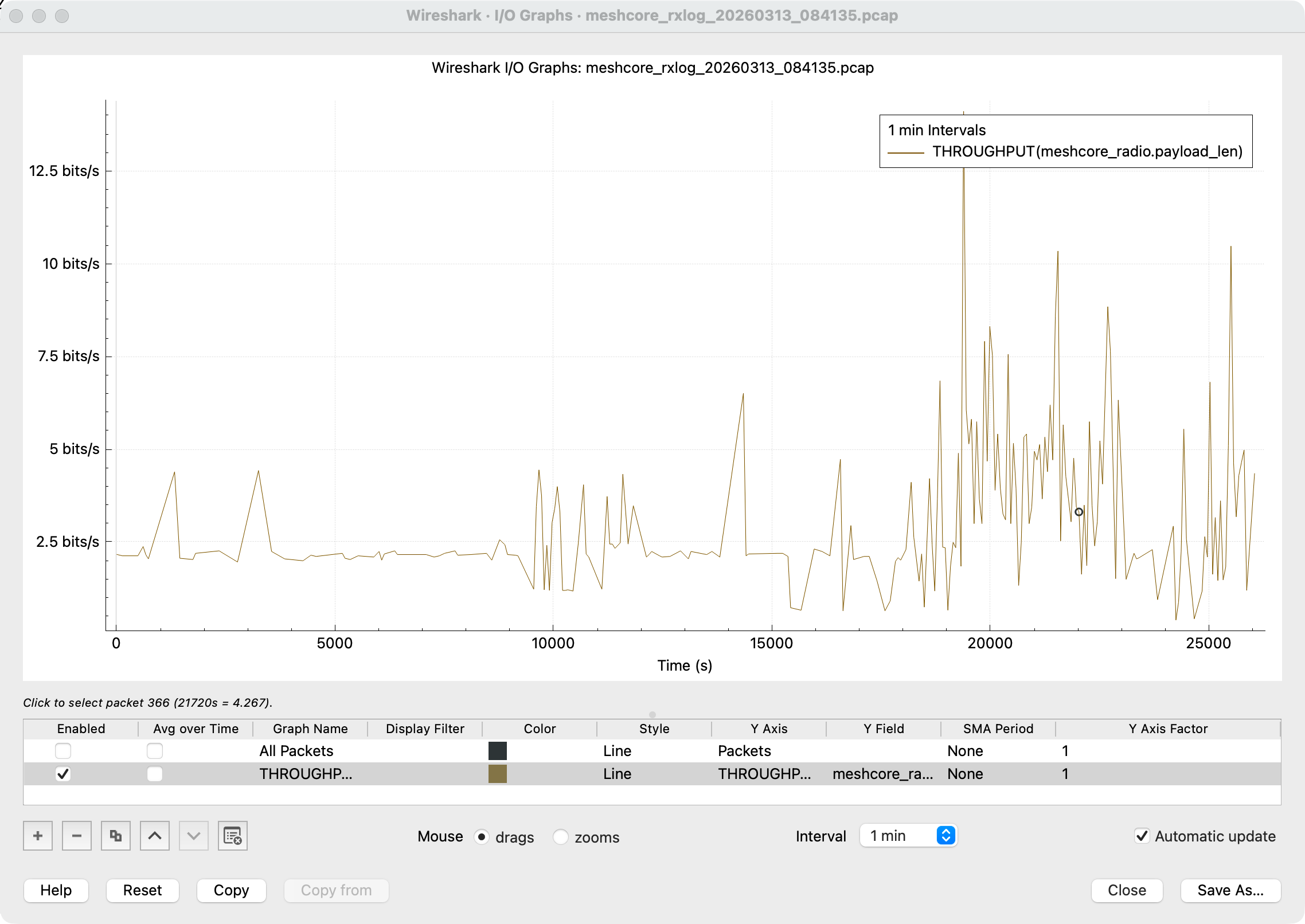
Wireshark 内置的 I/O 图表可以随时间可视化网状网络流量:
### 显示过滤器
| 过滤器 | 描述 |
|--------|-------------|
| `meshcore.payload_type == 4` | ADVERT 数据包 |
| `meshcore.payload_type == 5` | GRP_TXT 数据包 |
| `meshcore.route_type == 1` | FLOOD 路由的数据包 |
| `meshcore.advert.name contains "Repeater"` | 节点名称中包含 "Repeater" 的 ADVERT |
| `meshcore.channel_hash == 0x81` | 特定频道上的组消息 |
| `meshcore_radio.snr_raw > 0` | 具有正 SNR 的数据包 |
### 使用 tshark 的命令行
```
tshark -X lua_script:meshcore_dissector.lua -r capture.pcapng
tshark -X lua_script:meshcore_dissector.lua -r capture.pcapng -Y "meshcore.payload_type == 4" -V
```
## 运行测试
测试需要 Python 3.6+ 和 pytest。解析器集成测试还需要 tshark(如果没有 tshark,它们将被跳过)。
```
pip install pytest
python3 -m pytest tests/ -v
```
## 许可证
GPLv2 —— 完整文本请参见 [LICENSE](LICENSE)。此许可证与主流的
[Wireshark 项目](https://www.wireshark.org/) 兼容。
标签:LoRa, Lua, MeshCore, pcapng, rizin, Wireshark插件, 安全规则引擎, 物联网, 网络协议分析, 逆向工具