Sw4pn33/Easy-Hunt
GitHub: Sw4pn33/Easy-Hunt
一款自动化漏洞赏金侦察工具,集Google Dork搜索、安全联系方式提取和批量邮件外联于一体。
Stars: 1 | Forks: 0
# 🎯 Easy-Hunt
### 智能漏洞赏金侦察与外联工具
[](https://opensource.org/licenses/MIT)
[](https://nodejs.org/)
[](https://expressjs.com/)
[](https://pptr.dev/)
[](#-docker)
**不再浪费时间手动寻找漏洞赏金目标。** Easy-Hunt 自动化整个侦察 → 提取 → 外联流程。 查找项目 → 提取安全联系方式 → 发送报告 → 追踪回复 → 更智能地狩猎。
[🚀 快速开始](#-quick-start) · [🐳 Docker](#-docker) · [☁️ VPS 部署](#%EF%B8%8F-vps-deployment) · [📖 工作原理](#-how-it-works) · [⚙️ 配置](#%EF%B8%8F-configuration)
## ✨ 功能特性
**不再浪费时间手动寻找漏洞赏金目标。** Easy-Hunt 自动化整个侦察 → 提取 → 外联流程。 查找项目 → 提取安全联系方式 → 发送报告 → 追踪回复 → 更智能地狩猎。
[🚀 快速开始](#-quick-start) · [🐳 Docker](#-docker) · [☁️ VPS 部署](#%EF%B8%8F-vps-deployment) · [📖 工作原理](#-how-it-works) · [⚙️ 配置](#%EF%B8%8F-configuration)
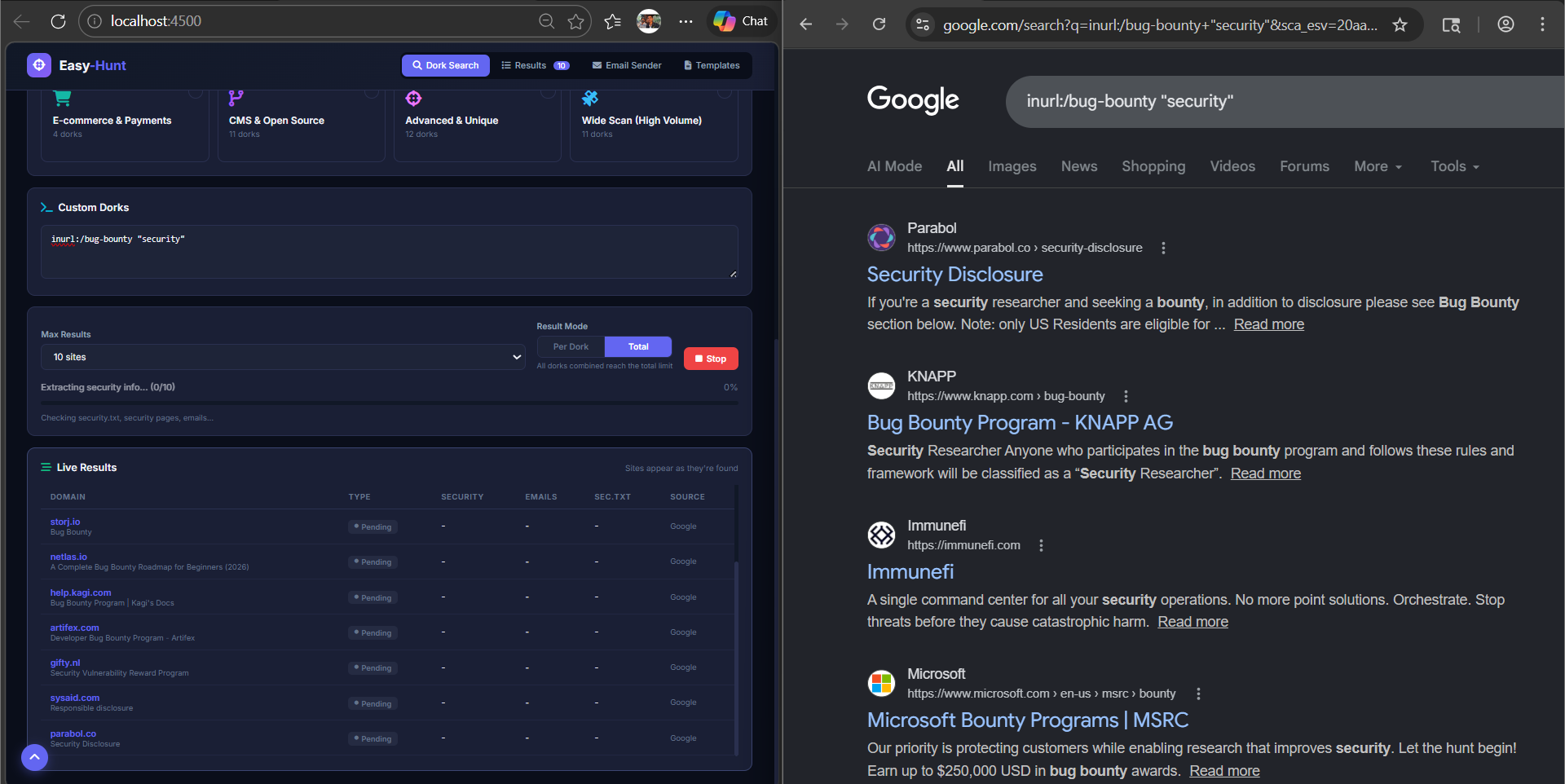
| ### 🔍 智能 Google Dorking - **200+ 个内置 dorks**,涵盖 15 个类别 - 支持单个 dork 或总结果模式 - 支持自定义 dork 输入 - 持久分页(每个 dork 最多 50 页) - CAPTCHA 检测与手动验证支持 | ### 📧 智能提取 - 首先访问**精确的 Google URL**(不仅仅是域名) - `security.txt` 自动检测 - 邮箱提取,并过滤垃圾/虚假信息 - 项目类型检测(Bounty/Swag/HoF/VDP) - 准确性置信度评分 |
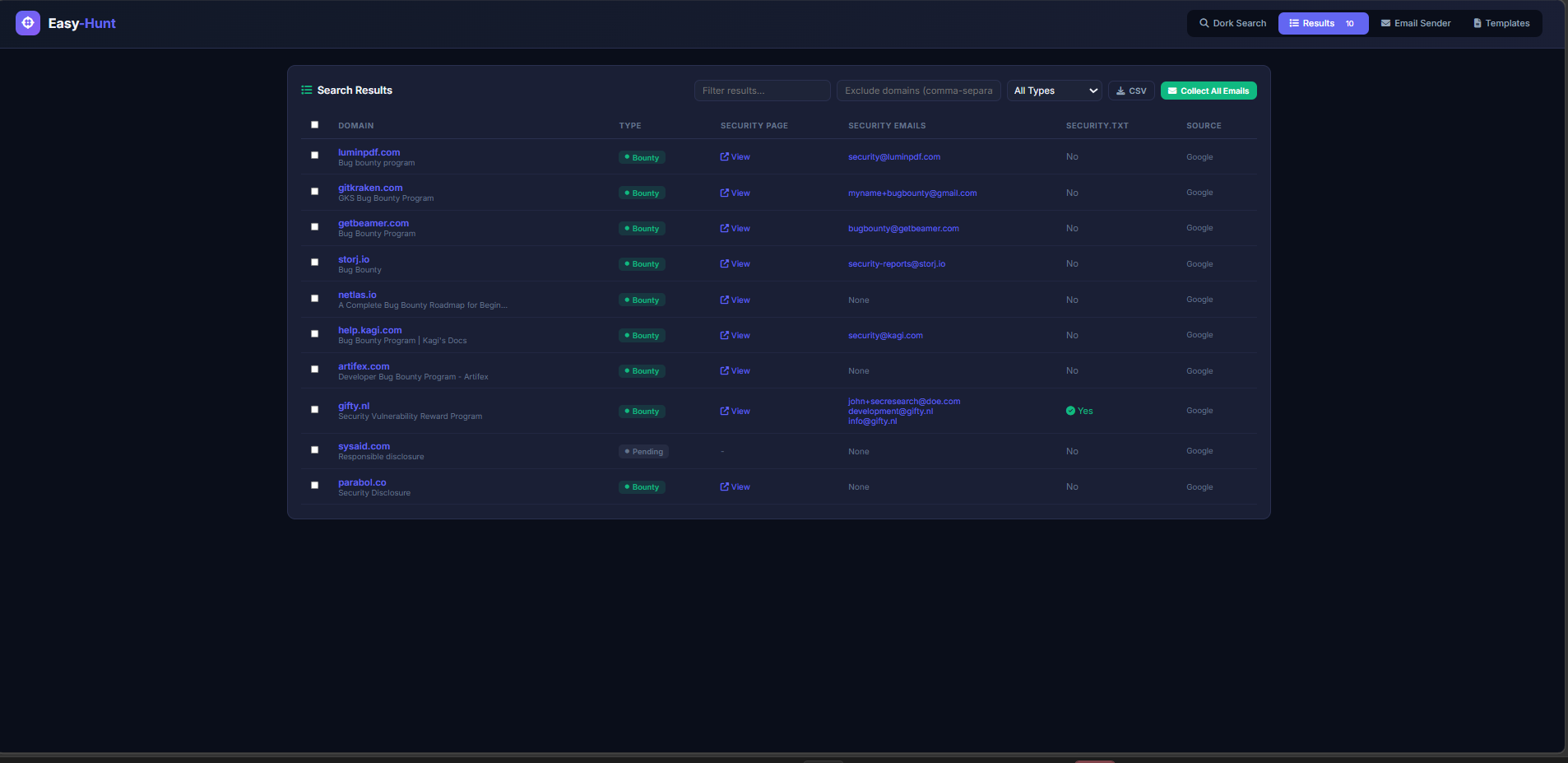
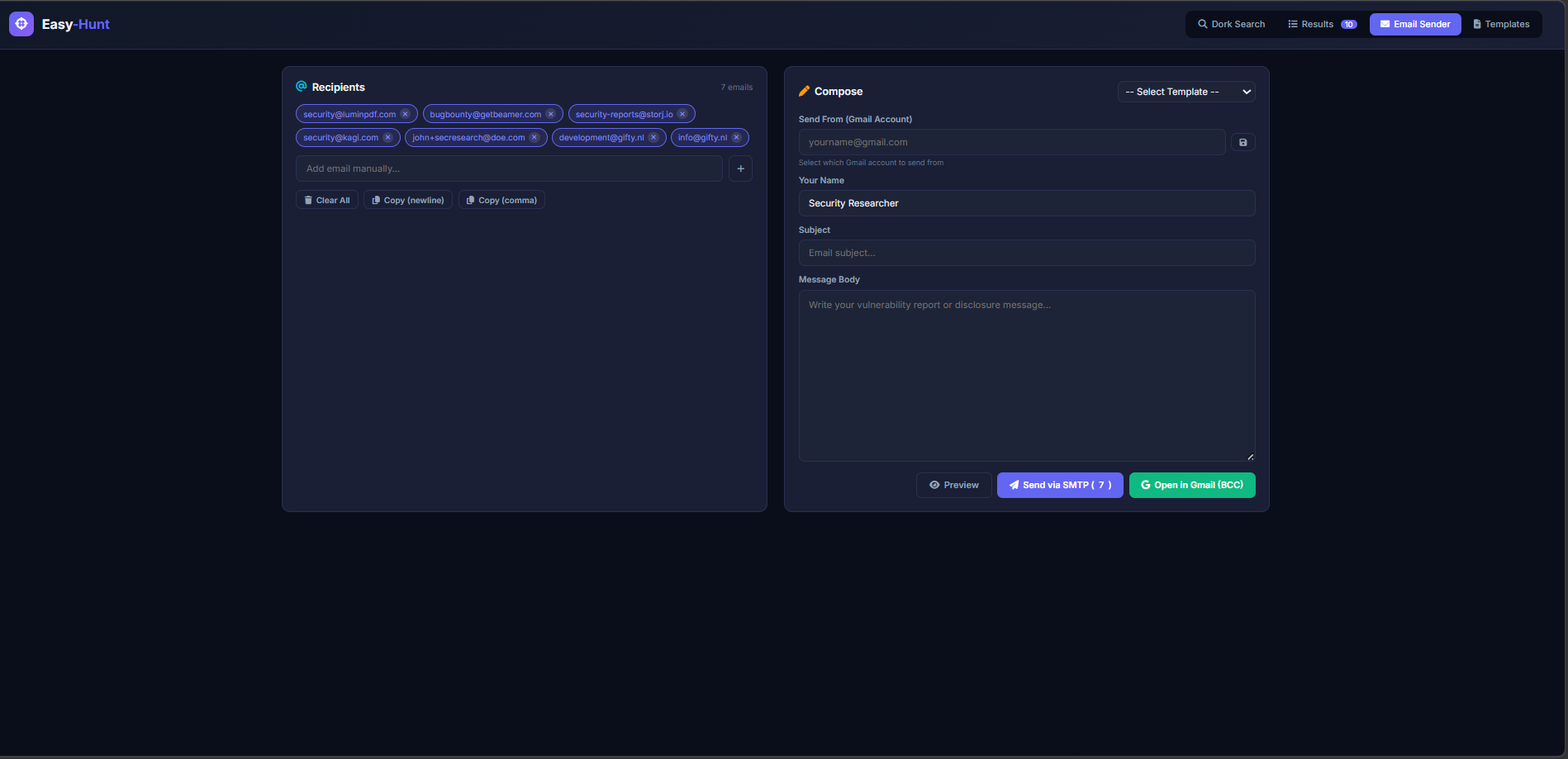
| ### ✉️ 批量邮件外联 - **一键 Gmail BCC** —— 打开撰写窗口并填入所有邮箱 - 支持延迟设置的 SMTP 直接发送 - 3 个内置报告模板 - 自动过滤垃圾邮箱 | ### 📊 结果与导出 - 搜索期间实时显示结果 - 按项目类型过滤 - CSV 导出 - 停止/恢复并保存部分结果 |
### 包含活跃狩猎项目的仪表板
 ### 实时结果
 ### 邮件发送仪表板
## 🚀 快速开始
### 🪟 Windows
```
git clone https://github.com/Sw4pn33/Easy-Hunt.git
cd Easy-Hunt
npm install
copy .env.example .env # optional — edit for SMTP
npm start
```
### 🐧 Linux / macOS
```
curl -fsSL https://deb.nodesource.com/setup_18.x | sudo -E bash -
sudo apt install -y nodejs google-chrome-stable
git clone https://github.com/Sw4pn33/Easy-Hunt.git
cd Easy-Hunt
npm install
cp .env.example .env
npm start
```
### 📱 Termux (Android)
```
pkg update && pkg upgrade
pkg install nodejs git chromium
npm config set puppeteer_skip_chromium_download true
git clone https://github.com/Sw4pn33/Easy-Hunt.git
cd Easy-Hunt
npm install
export PUPPETEER_EXECUTABLE_PATH=$(which chromium-browser)
cp .env.example .env
npm start
```
**打开** → `http://localhost:4500` 🎉
**环境要求:** Node.js 18+ 和 Google Chrome/Chromium
## 🐳 Docker
```
# 构建并运行
docker build -t easy-hunt .
docker run -d -p 4500:4500 --name easy-hunt easy-hunt
# 配置 SMTP
docker run -d -p 4500:4500 \
-e SMTP_HOST=smtp.gmail.com \
-e SMTP_PORT=587 \
-e SMTP_USER=you@gmail.com \
-e SMTP_PASS=your_app_password \
-e SMTP_FROM=you@gmail.com \
easy-hunt
```
打开 `http://localhost:4500`
## ☁️ VPS 部署
适用于任何 Ubuntu/Debian VPS(建议 1GB+ 内存)。
### 选项 1: Docker (推荐)
```
curl -fsSL https://get.docker.com | sh
git clone https://github.com/Sw4pn33/Easy-Hunt.git
cd Easy-Hunt
docker build -t easy-hunt .
docker run -d -p 4500:4500 --restart unless-stopped --name easy-hunt easy-hunt
```
### 选项 2: 使用 PM2 的原生方式
```
curl -fsSL https://deb.nodesource.com/setup_18.x | sudo -E bash -
sudo apt install -y nodejs chromium-browser
git clone https://github.com/Sw4pn33/Easy-Hunt.git
cd Easy-Hunt
npm install
export HEADLESS=true
export PUPPETEER_EXECUTABLE_PATH=$(which chromium-browser)
npm i -g pm2
pm2 start server.js --name easy-hunt
pm2 save && pm2 startup
```
访问地址 `http://YOUR_VPS_IP:4500`
### 实时结果
### 邮件发送仪表板
🔒 Nginx + SSL (可选 —— 用于自定义域名)
``` server { listen 80; server_name hunt.yourdomain.com; location / { proxy_pass http://127.0.0.1:4500; proxy_set_header Host $host; proxy_set_header X-Real-IP $remote_addr; } } ``` 然后运行:`sudo certbot --nginx -d hunt.yourdomain.com` 以获取免费 SSL。
**为漏洞赏金社区用 ❤️ 制作**
如果觉得有用,请给本仓库一个 ⭐ Star!
[报告 Bug](https://github.com/Sw4pn33/Easy-Hunt/issues) · [请求功能](https://github.com/Sw4pn33/Easy-Hunt/issues)
标签:Docker, ESC4, Express, GNU通用公共许可证, Google Dorks, MITM代理, Node.js, OSINT, Puppeteer, security.txt, Web安全, Windows内核, 侦察工具, 安全联系人, 安全防御评估, 密码管理, 批量外联, 搜索引擎优化, 白帽子, 结构化查询, 网络安全, 自动化安全, 自定义脚本, 蓝队分析, 请求拦截, 邮箱提取, 隐私保护